

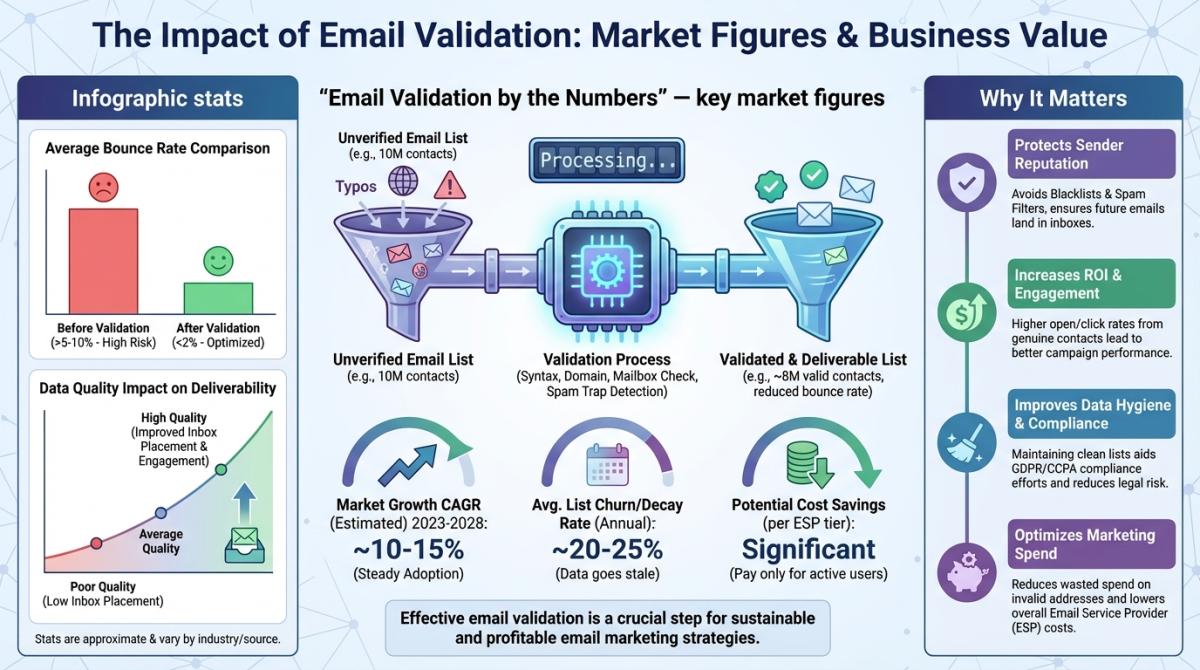
A guy I know — runs a 15-person marketing agency in Austin — sent 8,000 cold emails last month. His bounce rate came back at 34%. Over 2,700 messages slammed into dead inboxes. His sender reputation tanked and it took him weeks to claw it back. The whole mess could've been avoided in ten minutes with a decent email checker.
Ten minutes. That's the part that stings.
Quick context on why this keeps happening. The Clean.email 2026 Industry Report puts global email volume at 376 billion messages per day, with 4.73 billion users worldwide. And industry research consistently shows that roughly 20.6% of email addresses are invalid, disposable, or fraudulent at any given time. One in five. That's not a rounding error.
So yeah. Knowing how to check if an email is valid isn't optional anymore. Not if you're running campaigns, doing outreach, or building any kind of B2B pipeline. This guide covers everything — manual tricks, automated tools, the best validation services in 2026, and the stuff that actually keeps lists clean long-term. It also covers the part nobody else talks about: where your emails come from in the first place.
Video: Scrap.io - How to Start?
- What Is Email Validation (And Why It Matters in 2026)
- Why You Should Validate Emails Before Sending
- 5 Manual Methods to Check If an Email Is Valid
- 4 Automated Ways to Validate Email Addresses at Scale
- What Email Validation Tools Actually Check
- Best Email Validation Tools Compared (2026)
- How to Choose the Right Email Verification Service
- Email List Hygiene: Best Practices for 2026
- Compliance and Legal Considerations
- Common Email Validation Challenges (And How to Handle Them)
- Frequently Asked Questions
What Is Email Validation (And Why It Matters in 2026)
Short answer: an email is valid when it clears three checks in a row: syntax (the address is formatted correctly), DNS/MX (the domain exists and can receive mail), and SMTP (the specific mailbox actually accepts messages). Pass all three and the address is real. Fail any one and it's dead. That's the whole test.
Email validation = checking whether an address exists, is formatted right, and can actually receive mail. That's really all it is.
People mix up "validation" and "verification" constantly, though. Short version: validation catches bad formatting and dead domains. Think checking the envelope before the mailman leaves. Verification digs deeper — it talks to the mail server and confirms the actual mailbox is alive. Most modern tools do both in one shot, so honestly the distinction is fading.
What matters more: the scale of the problem. The email verification software market was worth around $1.28 billion in 2026 and is projected to hit roughly $2.46 billion by 2035, a 7.47% CAGR. Companies aren't spending that kind of money for fun.
And the pressure is real. With 3.4 billion spam emails circulating daily, inbox providers have zero tolerance for sloppy senders. Gmail, Yahoo, Microsoft — they track your bounce rates, your engagement, everything. Google Postmaster Tools will show you exactly how they see your domain. One campaign on a dirty list and your reputation is toast for weeks.
We wrote a separate email validator guide if you need list-level deliverability strategies (fresh data vs. old lists, batch verification, that whole world). This article is more focused on the "how do I verify individual addresses" angle. And if your real question is "how do I check if an email is valid without sending" a message, we've got a dedicated deep dive on verifying an email without sending one — worth bookmarking.
Why You Should Validate Emails Before Sending
Here's a scenario that plays out all the time. A small agency runs Google Ads into a landing page with an email capture. List grows to 5,000 contacts over a few months. Nobody validates anything. When they finally run the list through a checker? 22% comes back invalid. They'd been paying their ESP for every one of those ghost addresses. (If you've ever bought email lists, you know this gets even worse — purchased lists routinely have 30-40% bad addresses.)
Here's what validation actually prevents:
Your sender reputation stays intact. ISPs score you on bounces and engagement. High bounce rate? Gmail and Outlook route you to spam. All of you. Not just the bad emails — your good ones too. The gap is brutal: teams that verify in real time land around a 0.3% bounce rate with roughly 95% inbox placement, while lists that never get cleaned see 6.5%+ bounces and lose nearly a third of their mail to spam (WarmForge, 2026).
You stop burning money. ESPs charge by list size or sends. Every dead address is a charge for nothing. Multiply that by 12 months and it adds up fast.
Your analytics become real. Open rates, CTR, conversions — all of it gets inflated by dead weight in your list. Cleaning it up lets you see actual engagement. The same research shows email validation improves open rates by approximately 26%. That's not a small bump.
You avoid blacklists. Send to enough dead addresses or spam traps and you'll end up on a blacklist. Getting removed from those is slow, painful, and sometimes involves begging. Skip it.
Zoom out and the whole system is leakier than people think. Global inbox placement now averages just 83.1% (WarmForge, 2026). Almost 17% of legitimate email never lands: 10.5% gets filtered to spam, 6.4% vanishes entirely. Validation is how you stay on the right side of that number.
Want to skip the validation step entirely? Instead of collecting random emails and then paying to clean them, Scrap.io pulls real-time business contacts straight from Google Maps — with a filter that keeps only listings that already have an email before you spend a single credit. Fresh data, verified at the moment of export. Free trial, 100 leads included.
5 Manual Methods to Check If an Email Is Valid
Sometimes you just need to check a handful of addresses. A prospect from a trade show, a referral, whatever. You don't need to fire up a paid tool for that. Here are five ways to verify an email address without sending a message. (Want the exhaustive version, with SMTP response codes and catch-all handling? That lives in our guide to verifying without sending. No point duplicating it here.)
1. Syntax and Format Check
Simplest filter there is. Does the address have an @ symbol? A real domain? No spaces or weird characters? You'd be amazed how many "leads" fail this. Someone types [email protected] and now you're emailing a domain that doesn't exist. RFC 5321 defines the technical standard — you don't need to memorize it, just eyeball for typos. Takes two seconds.
2. Google Search Verification
Copy-paste the address into Google. People leave fingerprints everywhere — LinkedIn, conference bios, company pages, random forums from 2019. If the email shows up connected to a real person at a real company, you're probably good.
But — and this is important — no results doesn't mean the email is fake. Plenty of people have basically zero web presence. This method only proves positives, never negatives. Same logic applies to a reverse email lookup: a hit tells you something, a miss tells you nothing.
3. Email Provider Login Check (Gmail, Outlook)
For @gmail.com or @outlook.com addresses, go to the login page, type the email. "Account not found"? Done, it's dead. Password prompt? The account exists.
Only works for big free providers though. Corporate domains? Nope. And don't hammer this at scale — you'll get rate-limited or flagged. (It's also ethically iffy if you're doing it hundreds of times.)
4. DNS and MX Record Lookup
Gets a bit technical but super useful. Every domain that handles email has MX (Mail Exchange) records in its DNS. Check them with MXToolbox or run nslookup -type=mx domain.com in your terminal.
No MX records? That domain literally cannot receive email. Doesn't matter how legit the address looks — anything @that-domain.com is dead on arrival.
5. SMTP Server Test
Most accurate manual method by far. You connect to the recipient's mail server via SMTP and simulate the beginning of an email delivery — without actually sending anything. The server tells you whether the mailbox exists.
Downsides: requires technical knowledge, it's slow, and corporate firewalls often block the attempt entirely. Greylisting gives false negatives too. But when it works, it's about as close to certainty as you'll get without clicking "send."
And here's the honest caveat, straight from someone who builds things for a living. A developer on the r/webdev thread put it bluntly: "There's no way to verify a given email address exists without sending an email and having them perform some action (click on a one-time link)." He's not wrong. The SMTP handshake gets you 95% of the way, but a mailbox that accepts the connection can still be a black hole. Anyone promising you 100% certainty short of a confirmed click is selling something.
| Method | Accuracy | Speed | Scalability | Technical Skill |
|---|---|---|---|---|
| Syntax Check | Low | Instant | High | None |
| Google Search | Medium | Slow | Very Low | None |
| Provider Login | Medium-High | Fast | Very Low | Low |
| DNS/MX Lookup | Medium-High | Fast | Medium | Medium |
| SMTP Test | High | Slow | Low | High |
Bottom line: manual methods are fine for spot-checking. Past 20-30 emails? You need to automate. Trying to hand-check a thousand addresses one by one is masochism. Don't.
4 Automated Ways to Validate Email Addresses at Scale
Hundreds of addresses. Thousands. Manual checks don't cut it. Here's what the pros actually use.
Real-Time Validation APIs
These sit behind your forms and landing pages. Someone types an email, the API checks it in under a second, and rejects or flags it before it ever hits your database. Verifalia, ZeroBounce, and Hunter all offer solid APIs with good documentation. You pay per check — a few cents each — but the ROI is immediate: bad data never gets in.
Bulk Email Verification Services
Got an existing list that's questionable? Upload your CSV, click go. MillionVerifier, Clearout, NeverBounce — they'll chew through thousands of addresses in minutes and spit back a report: valid, invalid, risky, unknown. Pricing drops as volume goes up. NeverBounce processes billions of verifications per year at this point. If you need a free bulk email verifier for a small list, most of these have a free tier — more on that in the comparison table.
Email Validation Browser Extensions
Chrome extensions from most validation providers. Quick checks while you're browsing LinkedIn or a company website. Not for bulk work at all. But for a sales rep who wants to sanity-check an email before adding it to a sequence? Handy little tool.
CRM-Integrated Verification
Probably the smartest setup for B2B teams. ZeroBounce and Clearout plug directly into HubSpot, Salesforce, Pipedrive. New contact enters your pipeline → verified automatically. No human step, no dirty data sneaking through.
If you're running any kind of serious email outreach, always-on verification like this is basically table stakes now.
What Email Validation Tools Actually Check
Professional validators don't just look at formatting. There's a whole chain of checks happening in the background. And before you even get to validation, there's the question of which address to target in the first place, the owner, the sales desk, a generic inbox. This one's worth a watch:
Video: How to Find the Best Email to contact?
Syntax Validation (RFC Compliance)
First gate. Checks the address against RFC 5321 rules — valid characters, correct structure, @ symbol in the right place. Catches typos and garbage instantly.
Domain and DNS Verification
Domain exist? Registered? Active MX records? If any answer is no, the email's dead. Doesn't matter what comes before the @.
SMTP Mailbox Confirmation
Connects to the mail server. Asks "does this specific inbox exist?" Highest accuracy of any check, but slower. This is the difference between "the domain works" and "this actual human's inbox is real."
Disposable Email Detection
10MinuteMail, TempMail, Guerrilla Mail — these throwaway services hand out addresses that expire in hours. Validators maintain databases of known disposable providers. Technically valid for about 15 minutes. Useless for anything real. This is also your first line of a free email scammer check — throwaway domains are a classic tell.
Role-Based Email Identification
info@, sales@, support@, admin@. Departments, not people. Multiple handlers, lower engagement, hard to personalize. Validators flag them and let you decide what to do. For cold outreach? Usually skip them.
Spam Trap Detection
Spam traps are addresses that exist only to catch senders with bad hygiene. They never signed up for anything. Ever. If you're mailing one, you either scraped a junk source or haven't cleaned your list in forever. Getting caught nukes your deliverability.
Catch-All Domain Handling
Some domains accept mail for any address — whether that mailbox exists or not. So [email protected] might be real, might be a void. Validators flag these but can't tell you which. Treat with caution.
| Check Type | What It Does | Risk If Skipped |
|---|---|---|
| Syntax Validation | Confirms RFC-compliant formatting | Typos and fakes slip through |
| Domain/DNS | Confirms domain + MX records exist | 100% bounce on dead domains |
| SMTP Confirmation | Verifies mailbox exists | Hard bounces from non-existent boxes |
| Disposable Detection | Flags throwaway addresses | Zero engagement value |
| Role-Based ID | Flags info@, sales@, etc. | Shared inbox, low personalization |
| Spam Trap | Identifies honeypot addresses | Reputation destroyed overnight |
| Catch-All | Flags domains accepting all mail | Can't confirm = risk |
5 Signs an Email Is Fake (Quick Checklist)
Validation is the machine version of a gut check you can also run by eye. Staring at a suspicious address or a sketchy inbound message? Here's what gives it away:
- A throwaway or lookalike domain (gmial.com, or a random string that expires in an hour).
- A free-provider address for a "company" that claims to be a real registered business.
- A role or gibberish local part like sales92841@ that no actual human would ever pick.
- No MX records behind the domain, so it can't receive mail at all.
- A mismatched reply-to, or a display name that doesn't match the real address underneath.
Spot two or more? Treat it as fake until proven otherwise. Same instinct helps you avoid landing in spam yourself, because the traits that scream "scammer" are exactly the ones inbox filters punish hardest.
Best Email Validation Tools Compared (2026)
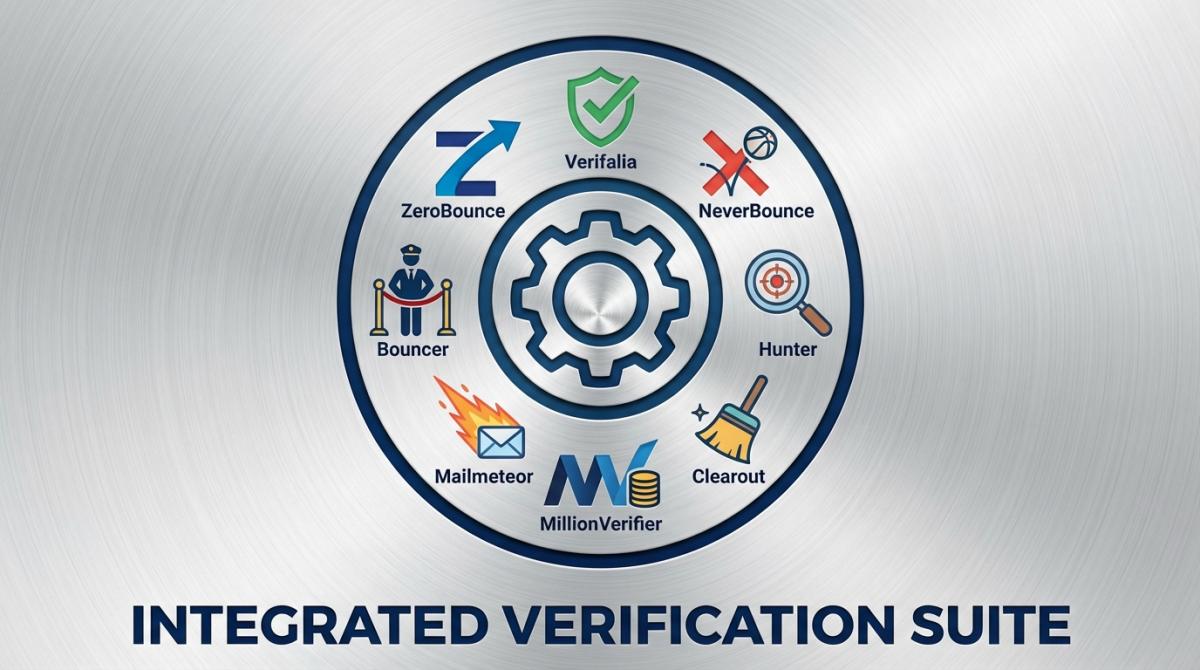
Alright, the comparison everyone's actually here for. All pricing checked July 2026.
| Tool | Free Tier | Paid Pricing | Accuracy | API | Best For |
|---|---|---|---|---|---|
| ZeroBounce | 100/month | From $16/2,000 | 99%+ | Yes | AI detection, data append |
| Verifalia | 25/day | From $9.90/mo | 99%+ | Yes | Multi-step, Zapier |
| NeverBounce | Free test | ~$0.008/email | 99.5%+ | Yes | Bulk at scale |
| Hunter | 25/month | From $49/mo | 98%+ | Yes | Finder + verifier combo |
| Clearout | 100 credits | From $21/3,000 | 98%+ | Yes | CRM integrations |
| MillionVerifier | None | From $37/10K | 99%+ | Yes | Budget bulk |
| Mailmeteor | Free basic | From $9.99/mo | 97%+ | Limited | Gmail users |
| Bouncer | 100 free | From $8/1,000 | 99.5%+ | Yes | Toxicity checks |
ZeroBounce holds about 13% of the global market and covers 190+ countries with AI-based detection. Verifalia ranks near the top on Google for most validation queries — 30+ verification steps per address. NeverBounce is the volume play. Mailmeteor is the pick if you basically live inside Gmail. And "best email checker Reddit" threads mostly circle the same three or four names, for what it's worth.
Chasing rock-bottom price specifically? There's a newer budget option worth a look. Our BillionVerify review digs into the "$20 for 20,000 emails" claim and whether it actually holds up. Cheap, genuinely. Proven track record? Still thin.
But here's the thing that none of these tools solve. They all verify emails after you've already collected them. You still need a source. And if your source is garbage, you're paying to clean garbage.
Video: Why Your Google Maps Emails Don't Get Replies?
That's the whole point of Scrap.io. Instead of collecting random emails and then paying to validate them, you start with real-time business data pulled directly from Google Maps — contacts that are fresh because they come from live listings, updated by the business owners themselves. The eight tools above verify after collection. Scrap.io works upstream: clean contacts from Google Maps, before a single credit is spent. Prevention, not cure. (Want the mechanics? Here's exactly how to find emails on Google Maps, and how the Google Maps email extractor pulls and classifies them.)

Scrap.io search — pick a category and a zone, from one city to a whole country.
And the filter is the clever bit. You toggle "email present" before extraction, so you only ever export listings that actually have an address on file. Zero credits wasted on blanks.

Filter for contacts that already have an email — before spending a single credit.
It even classifies what you're getting: the main email, contact@, sales@, or a named individual with first and last name attached. And if you're building a USA business email database, having verified contacts from the start saves a ton of hassle downstream.
Want verified B2B emails without the validation step? None of the tools above solve the source problem. Scrap.io starts you clean — 225,676,406 businesses indexed across 195 countries and 4,000+ categories, data verified in real time at the moment of export, filtered so you only pay for contacts that have an email. Get your first 100 leads free.
How to Choose the Right Email Verification Service
Not all tools fit all situations. Here's what genuinely matters.
Accuracy above 98%. Anything less = too many false positives and false negatives. Get trial credits. Test on YOUR list — B2B corporate domains behave completely differently from consumer Gmail. Don't trust accuracy claims until you've seen them on your own data.
Pricing that matches how you work. Pay-per-check for occasional use. Monthly for ongoing list hygiene. Bulk credits if you've got a big one-time cleaning job. Do the math before committing — it's not always the cheapest per-email price that wins.
Decent API and integrations. Need real-time validation on forms? API response time under 500ms is the baseline. Pre-built integrations with your ESP, CRM, marketing stack matter too. A tool that doesn't plug into your workflow is a tool you'll stop using by week three.
Security. For real. You're handing over customer email addresses. The provider needs encryption, a clear data retention policy, and ideally SOC 2 compliance. Ask how long they keep your data. If they can't answer that question clearly, move on.
82% of marketers call deliverability critical for campaign success. Choosing the right checker is part of making that happen.
Email List Hygiene: Best Practices for 2026
Validation isn't a one-time event. Lists rot. People switch jobs, abandon inboxes, change providers. A list you validated six months ago? A chunk of it is already dead.
Regular Cleaning Schedules
Quarterly minimum. Monthly if you're doing high-volume outreach. B2B contact data decays at roughly 22-25% per year (Cleanlist, 2026), so every quarter around 6% of your list goes bad. On a 10,000-contact list that's 600 dead addresses silently wrecking your metrics — and your sender score.
Real-Time Validation at Collection Points
Bolt validation onto every form, every landing page, every signup flow. Catch junk at the door. This is the single highest-ROI validation investment you can make. Pennies per check. Keeps your database clean from day one.
But configure it smart. Block obviously invalid stuff. Flag risky ones for later review. Don't reject everything aggressively or you'll frustrate real users who just fat-fingered their email. (Oh, and if you're weighing double opt-in vs single opt-in, that's another powerful way to catch bad addresses at the collection stage.)
Segmentation Based on Validation Results
Not every "risky" email deserves the trash. Build three segments: high-confidence valid (primary campaigns), unknown/risky (lower-volume re-engagement), confirmed invalid (delete immediately). Smart segmentation protects your primary metrics while giving borderline contacts a fair shot.
Running an Email List Verify Without Wrecking It
Here's the mistake people make with an email list verify: they push the whole database through a checker, delete everything tagged "risky," and torch thousands of real contacts in the process. Don't. A proper email list verify sorts addresses into keep, watch, and drop, then only deletes the confirmed-dead ones. The "unknown" and catch-all rows get a low-volume test send, not the trash. Verify hard, delete carefully. It's the difference between a cleaner list and a smaller one.
Re-engagement Before Removal
Before nuking an address that's gone quiet, try one last re-engagement email. Simple subject, clear value, easy unsubscribe. Some of those people are real — they just stopped paying attention. Others will hard bounce, and now you know for sure.
Two things pair naturally with clean-list hygiene. First, if you're starting from scratch, learn how to build a cold email list that's fresh from day one — it's cheaper than cleaning a bad one. Second, before you scale volume from a new domain, look at email warmup tools so you don't torch a clean list on a cold domain. Once your list is clean and warmed, the next move is writing cold emails that actually get replies — and if you need a tool to send those at scale, our cold email software comparison breaks down what works and what doesn't.
Compliance and Legal Considerations
Validated addresses ≠ permission to send whatever you want. The rules in 2026 are tight, and inbox providers are enforcing them harder than ever.
GDPR and Email Validation
Under GDPR, email addresses are personal data. Full stop. Emailing anyone in the EU requires a lawful basis — legitimate interest for B2B, explicit consent for B2C. Your validation provider is also a data processor, so check their DPA. This matters.
CAN-SPAM and CCPA Requirements
The CAN-SPAM Act requires an unsubscribe mechanism, accurate headers, and a physical mailing address in every commercial email. CCPA gives California consumers the right to know what data you hold and request deletion. Neither requires opt-in for B2B — but both have serious teeth if you ignore the rules. Want the full legal rundown? Our cold email compliance guide covers the specifics.
Data Security When Using Third-Party Services
When you upload a list to a validator, you're trusting them with your contacts. Encryption in transit + at rest, SOC 2 certification (or equivalent), clear data retention policies — these aren't nice-to-haves, they're requirements. Some services auto-delete your data in 30 days. Others keep it until you ask. Know which you're dealing with.
One more angle on compliance that people forget: the source of your data matters legally, not just operationally. Scrap.io pulls only publicly available business data, is GDPR and CCPA compliant, and every record is traceable to its source — which makes documenting a legitimate-interest basis a lot easier. It doesn't exempt you from honoring opt-outs at send time. But it puts you on solid ground.
Also — make sure your email authentication is in order. SPF, DKIM, and DMARC are non-negotiable in 2026, and the email authentication requirements for Gmail, Yahoo, and Microsoft now bounce unauthenticated senders outright. And if you're doing cold outreach specifically, read up on avoiding spam triggers too.
Common Email Validation Challenges (And How to Handle Them)
Catch-all domains. The single biggest headache. Industry estimates suggest 15-20% of business domains are configured catch-all — they accept mail for any address regardless of whether the mailbox exists. And it's not spread evenly: catch-all-heavy sectors like healthcare (around 5.9% bounce) and real estate (around 6.1%) sit right at the top of the bounce charts (Mailshake, 2026). No validator on earth can give you a definitive answer here. Segment these separately. Monitor engagement. If they respond after 2-3 touches, keep them. If silence? Drop.
International characters and newer TLDs. Addresses with non-Latin characters or weird extensions (.photography, .agency, .コム) trip up some validators. If your audience is global, test your tool against internationally relevant addresses before signing up. This isn't edge-case stuff if you sell outside the US.
Corporate firewalls. Enterprise mail servers love blocking validation attempts. You'll see "unknown" results for companies with aggressive security. Don't auto-delete these — they might be your highest-value prospects hiding behind IT policy. Ironic, right?
False positives. No system is perfect. Fresh accounts and unusual configurations get wrongly flagged. For high-value contacts, build a manual review step. Losing a deal because your validator was wrong is the kind of mistake you only make once.
Volume limits. Validating millions of addresses? Throughput matters. Check concurrent processing limits and SLA guarantees. Some providers offer priority processing for time-sensitive sends — worth it when you're cleaning a list the night before launch.
Frequently Asked Questions
How to check if an email is valid without sending?
Use SMTP verification or a tool like Verifalia or ZeroBounce that pings the mail server without delivering a message. The recipient never knows. For manual checks, a DNS/MX lookup confirms the domain can receive mail, and the SMTP handshake checks whether the specific mailbox exists — all without sending anything. For the full step-by-step, see our guide on verifying an email without sending one.
How can I confirm if an email is valid?
Run three checks in order: syntax (is it formatted right?), DNS/MX (can the domain receive mail?), and SMTP mailbox confirmation (does the specific inbox exist?). A dedicated verifier does all three automatically in under a second. For a single address, the provider login trick or a quick Google search adds a confidence signal. No method is 100% because of catch-all domains — but stacking checks gets you to 98%+.
Is there a free way to verify email addresses in bulk?
Sorta. ZeroBounce gives 100 free/month, Verifalia offers 25/day, Clearout has 100 free credits. That works for small lists. Anything over a few hundred addresses and you're paying. Cheapest bulk option: MillionVerifier at roughly $37 per 10,000.
What's the difference between hard bounce and soft bounce?
Hard bounce = permanent. Address doesn't exist, domain is dead, server rejected you for good. Remove immediately. Soft bounce = temporary. Full inbox, server timeout, message too big. Can resolve on its own, but if the same address soft-bounces three+ times, treat it as hard. We wrote a full hard bounce vs soft bounce breakdown if you want the details.
What's an acceptable email bounce rate in 2026?
Aim to keep your hard bounce rate under 0.5%. Cross 2% and you're in danger territory: that's the threshold where Gmail, Microsoft, and Yahoo start throttling your domain and routing mail to spam (Cleanlist / Mailshake, 2026). Above 5%? Providers may block you outright. Validate before every send and it stays a non-issue.
How often should you clean your email list?
Quarterly at minimum. Monthly if your list grows fast or you send frequently. Always validate imported or purchased lists before your first campaign — absolutely no exceptions on that one.
Can email validation detect all spam traps?
No. Good tools catch known traps from their databases, but ISPs create new ones constantly. No service guarantees 100% detection. Best defense: regular validation + clean acquisition practices + engagement monitoring. If you've never scraped a shady list, you're already ahead of most people.
What's a catch-all email domain and how should I handle it?
A catch-all domain accepts mail to any address@thatdomain — real mailbox or not. Validators flag them but can't confirm the specific address. Segment separately, send at low volume, judge by engagement. Opens and clicks? Keep. Radio silence after three emails? Remove.
Is email validation GDPR compliant?
Can be, depends on your provider. Reputable ones process only the address, don't store unnecessary data, and have proper DPAs. Check their privacy policy, data retention timeline, and security certs. Using publicly available business data (like contacts from Google Maps via Scrap.io) is inherently GDPR-friendly for B2B since it's already public.
How does email validation improve deliverability?
Directly. Remove invalid addresses → bounce rate drops → ISPs see good list hygiene → sender reputation improves → more emails land in the inbox. Validated lists also show better engagement metrics because you're only counting real people.
Do validation services send emails to the addresses being checked?
No. They use SMTP-level communication to check if the mailbox exists. No message delivered. No trace in the recipient's inbox. Nothing.
How accurate are the best email validation tools?
Top tools claim 98-99%+ accuracy. Real-world numbers depend on your email mix — standard business domains verify cleanly; catch-all servers and heavily firewalled corporate environments are trickier. Always test on a sample of your actual list first.
What should I do with "unknown" validation results?
Don't delete, don't panic. "Unknown" usually means the server timed out or has strict firewalls. Segment separately. Re-validate after 48-72 hours. If still unknown, try a low-volume test send and let engagement data decide.
Can I check if an email is valid on Gmail specifically?
For @gmail.com addresses, the login page trick works (enter the address, see if Google recognizes it). But that's only consumer Gmail. Google Workspace accounts (@company.com on Google servers) require SMTP checks or a proper validation tool.
What's the best free email checker for quick one-off checks?
Hunter's 25 free/month or ZeroBounce's free credits work great for individual addresses. Verifalia's 25 daily free checks are generous too. None of these handle bulk — but for verifying a prospect before a call? Perfect.
Stop cleaning garbage — start clean. The fastest way to check if an email is valid is to never collect a bad one. Scrap.io pulls fresh, real-time business emails straight from Google Maps, filtered so you only export contacts that actually have an address, classified so you know exactly who you're reaching. Try Scrap.io free for 7 days — 100 leads included.
Generate a list of restaurant with Scrap.io