

You open Clay. You ask its Google Maps source for restaurants in a city that has thousands of them. A few hundred rows trickle in. Name, phone, address, rating. No emails. And every time you want an email, you bolt on another enrichment column, and every column costs credits, row by row by row.
That's the whole story right there. The clay google maps scraper isn't broken because Clay is bad — Clay is one of the best tools ever built for outbound. It under-delivers on local data because of the source feeding it.
Big difference.
This article shows you exactly where the cap lives, why the emails aren't there, and how to fix both without ditching Clay.
Video: Clay's Google Maps Source is Broken. Here's the Fix
- Clay is great — so why does its Google Maps source under-deliver?
- Problem #2: Google Maps has no emails (and every fix costs credits)
- The same search, run twice: Clay vs Scrap.io on "restaurants in Charlotte"
- Filters before export: where the economics flip
- Where Clay actually shines: orchestration
- How to plug Scrap.io into Clay (two ways)
- Clay vs Scrap.io: which tool for what in 2026
- Is scraping Google Maps data legal?
- FAQ
Clay Is Great — So Why Does Its Google Maps Source Under-Deliver?
Clay might be the best enrichment tool ever built. Its Google Maps source is another story — and it's genuinely not Clay's fault. The problem sits one layer down, in the pipe Clay drinks from.
Here's the thing nobody says loudly enough: Clay's native "local businesses" source is built on Google's official Places API. And that API was never designed to hand you a whole market. It was designed to power a "find me a coffee shop near this pin" experience. Those are not the same job.
The 60-result cap of the official Places API
Straight from the docs: Google's Text Search (New) "returns a maximum of 60 results, which are broken up across 3 pages" — see the Google Places API Text Search documentation. Sixty. That's the ceiling per query, full stop.
Clay engineers around it, of course. Their own Clay University lesson states that "Google Maps will return up to 1,000 results as a default maximum limit" — Clay University, "Finding Businesses with Google Maps". So the practical cap on the clay google maps source limit is 1,000 per location, stitched together from an API that natively tops out at 60 per call. Better than 60. Still nowhere near a full city.
And the fetching isn't even consistent. Clay's own community has a bug thread where a user runs the same local search and gets 46 results, then re-runs it in a fresh table and gets 94 — same parameters, double the count (Clay Community bug thread). 46 versus 94. If you're building a campaign on top of that, which number do you trust? Neither, honestly.
Want the full picture of why a mapping API caps you and a map index doesn't? We break it down in our complete guide to Google Maps scraping, and the money side in our Google Maps API cost vs scraping breakdown. This isn't a Clay quirk. It's a "you're using a navigation API to do market research" quirk.
Video: Google Maps API versus Scraping — What's the best approach?
"One geographic region at once"
There's a second limitation, and Clay admits it in their own blog. In their tutorial on Google Maps lead generation, they write: "Clay currently only allows you to search one geographic region at once for each search" (Clay blog). One region at a time. So even if you accept the 1,000 ceiling, you're stitching your market together city by city, search by search.
Now stack the two limits. Cap of 1,000 per location, one region per search. For a national campaign across the 36.2 million small businesses in the US (99.9% of all US firms, per the SBA), that's a lot of manual searches to approximate a market you'll still only sample. Try counting a mid-size city's restaurants by hand this way. I'll wait.
Problem #2: Google Maps Has No Emails (and Every Fix Costs Credits)
So what's actually in the rows Clay returns? Business name, phone, address, star rating, maybe a website. Notice what's missing? The one thing your cold email sequence literally cannot run without.
Emails.
Google Maps listings don't carry email addresses — never have. So inside Clay, getting to an email means building the enrichment waterfall: find the website, crawl it, extract an email, verify the email. That's three or four billable enrichment columns stacked on top of every single row you already paid to source. You're paying to enrich rows you might throw away five minutes later. That's a little masochistic, if we're being honest.
And the credits add up fast. Clay moved to a dual credit system in March 2026, and the 2026 tiers look like this (via Landbase's Clay pricing breakdown): the Free plan gives you 100 data credits a month, Launch runs $185/month for 2,500 data credits, and Growth is $495/month for 6,000 data credits. Now divide those 6,000 credits by a four-step enrichment waterfall. The math gets ugly quickly.
You don't have to take our word for the cost pain, either. Independent creator Mitchell Keller built an entire YouTube video titled "Scrape Google Maps leads for 100x less than Clay.com," documenting the real per-lead cost of the enrichment chain (Mitchell Keller on YouTube). A 100x claim is spicy. But the direction is right: chaining enrichments on capped rows is expensive.
Even neutral, non-Clay how-to guides run into the same wall. Gold Penguin's independent write-up on how to get leads from Google Maps walks readers through the exact same crawl-then-find-email dance — because that's simply what raw map listings force on you, whatever tool you're holding.
The fix isn't to fight the waterfall harder. It's to feed Clay rows that already have the email attached. (More on our approach to how to find emails on Google Maps if you want the deep dive.)
The Same Search, Run Twice: Clay vs Scrap.io on "Restaurants in Charlotte"
2,261 restaurants in Charlotte, NC. That's the entire market, according to Scrap.io's live Google Maps index in September 2026. Clay's native source returns a slice of that. Let's actually compare, because the gap is the whole point.
Run #1 — Clay's native source
Fire up the local businesses source in Clay, type in Charlotte restaurants, and watch the rows populate. They come in slowly. The columns are thin — name, address, phone, rating. No email. Hit the ceiling and you stop, well short of the real count. Then you start bolting on enrichment columns to chase the data Google Maps never gave you. This is the standard credit-based workflow GTM consultant Michael Saruggia walks through in his LinkedIn post on scraping Google Maps for local business — it works, it's just capped and credit-hungry by design.
Run #2 — Scrap.io classic search
Same query, different engine. Scrap.io returns 2,261 restaurants for Charlotte — the full market, not a sample. And here's the kicker: 899 of them (about 40%) come back with an email already found on the business website, extracted at export time, no waterfall required (Scrap.io data, September 2026). Over a thousand more businesses, plus emails baked in.
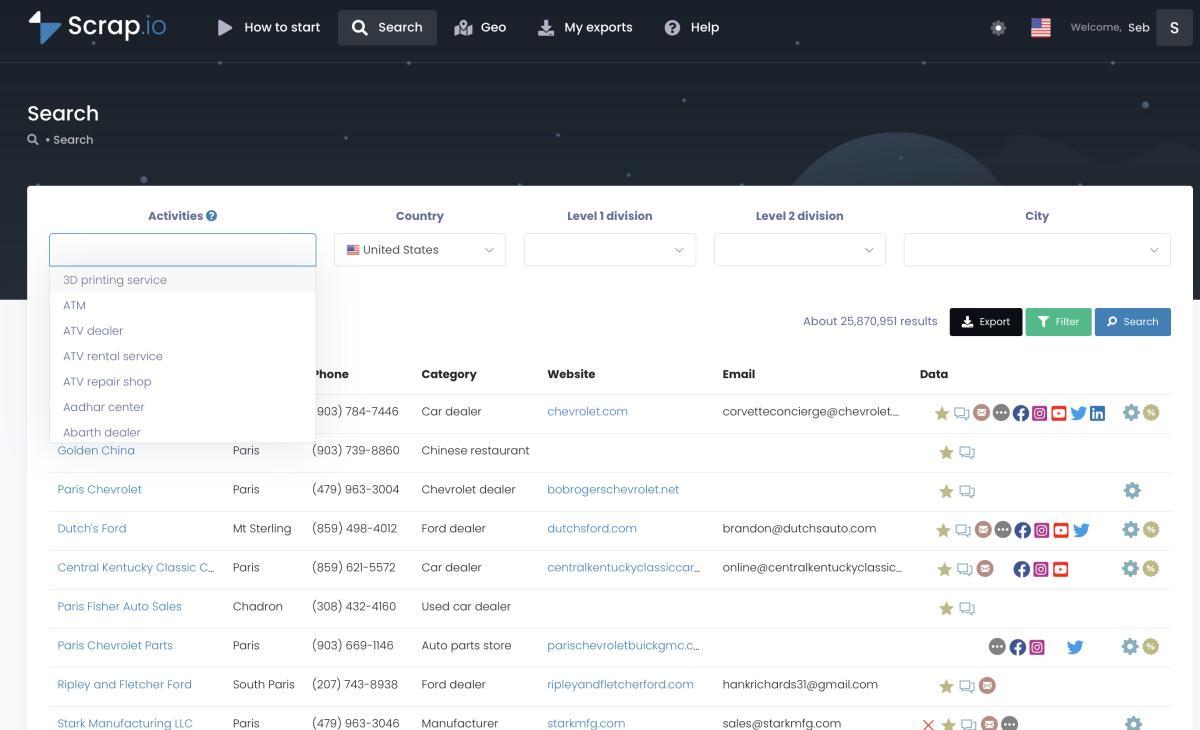
Scrap.io returns the full market for a city, not a capped sample.
That count isn't a Charlotte thing, either. Scrap.io indexes 668,540 restaurants across the entire US (Scrap.io, September 2026) — a number you simply cannot approach with a source capped at 60–1,000 results per search. If you want the method itself, we wrote up how to extract all businesses from Google Maps, and if restaurants are your target vertical specifically, there's a ready-made restaurant email lists resource too.
Why the gap: index vs API
The difference is architectural, not cosmetic. Clay queries the capped Places API. Scrap.io doesn't touch that API at all — it indexes the map itself, in real time, on export. That index holds 225,676,406 business listings across 195 countries and 4,000+ categories (Scrap.io). One quick correction while we're here: you may hear "395 countries" quoted from the source video — that's a slip of the tongue. The real number is 195. Precision matters when you're citing your own coverage.
| Data point | Clay native Maps source | Scrap.io |
|---|---|---|
| Charlotte restaurants returned | Capped sample | 2,261 (full market) |
| Business name / address / phone | ✅ | ✅ |
| Star rating & review count | ✅ | ✅ |
| Email (at export) | ❌ (enrichment chain) | ✅ 899 / 2,261 (40%) |
| Social networks & tech stack | ❌ | ✅ |
| Whole-country extraction | ❌ one region at once | ✅ 2 clicks |
| Result ceiling per search | ~60 (API) / 1,000 (max) | No cap |
For context on how far off a capped source can be, Clay's own tutorial proudly reports an HVAC search in Phoenix returning "178 target opportunities, to be exact" — without ever saying whether that's the whole Phoenix market or a capped sliver of it. Run the same category through a full index and you can find out for yourself.
Don't trust our number — check it. Counts are free on Scrap.io. No credits burned just to see a total. Run "restaurants in Charlotte" (or your own city) and compare the count against what Clay gives you. Run the count yourself →
Filters Before Export: Where the Economics Flip
Here's the counter-intuitive bit. The real difference between the two tools isn't the result count. It's when you pay.
In Clay, you source rows, then enrich them, then discover half of them have no email or the wrong profile — and you've already spent credits enriching the rejects. Scrap.io flips the order. You apply your filters before extraction, so credits only get spent on rows you actually keep. Email present? Filter for it. Minimum rating? Set it. Only businesses running an ad pixel, or with a contact form on their site? Those are filters too, applied up front.
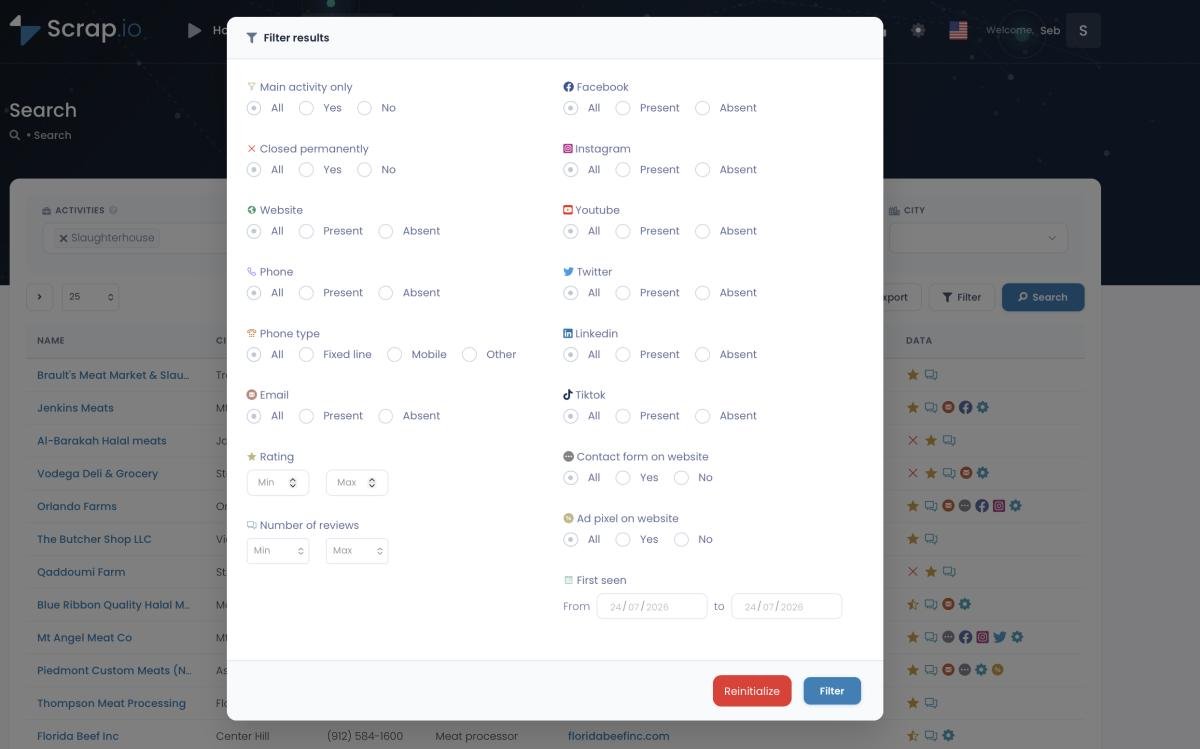
Filters run before extraction, so you never pay to enrich rows you'll discard.
And the credit model is dead simple. One credit equals one exported business — the full record, with email, socials, and tech stack included. No stacked enrichment columns, no four-step waterfall per row. Each business is counted once on a rolling 30-day window, so re-exporting the same listing doesn't burn another credit.
The email data comes pre-classified, which saves you a downstream sorting job. You get the main email, plus an individual email with the person's first and last name pulled out, plus contact, sales, marketing, finance and admin addresses tagged separately. One more precise detail: Scrap.io can also flag phone numbers as fixed or mobile for SMS targeting — everywhere except the US and Canada, where that classification isn't available.
Accuracy over hype.
Where Clay Actually Shines: Orchestration
This isn't where Clay loses. This is where it gets genuinely useful.
Once you have a clean, email-rich list, Clay is world-class at what comes next: waterfall enrichment across dozens of providers, AI research columns with Claygent, hyper-personalized first lines, and native sync into your CRM. That's the "brain" work — reasoning over data, writing to it, pushing it into your stack. Nobody does it better right now.
And for LinkedIn-heavy, tech-decision-maker outbound, Clay on its own is fantastic — that's a genuine clay vs apollo conversation for another day. The point is simple: Clay isn't the weak link. The source was. Fix the source, keep the brain. For the broader landscape of what pairs well here, see our roundup of the best data enrichment tools.
How to Plug Scrap.io Into Clay (Two Ways)
Now the fun part. Scrap.io ships a full REST API in every plan — even the free trial. So you don't have to choose between the two tools. You wire them together. There are two ways to do it, depending on whether you want a one-off list or a live pipeline. It's the same REST layer we document in the Scrap.io's Google Maps Scraper API guide, if you want every endpoint in one place.
Option A — Bulk CSV import (the one-off)
The fastest path, and perfect for a single campaign. Export your filtered list from Scrap.io as CSV or Excel, then import it straight into a Clay table. Done. Emails, socials and tech stack ride along in the columns, so Clay starts from an enriched base instead of a capped, email-less one. For a one-off local campaign, this is all most people ever need.
Option B — HTTP API enrichment column (the live pipeline)
Want Scrap.io data flowing into Clay on demand? Use Clay's HTTP API enrichment column and point it at Scrap.io. Here's the shape of it:
- Grab your API key from the Scrap.io dashboard (it's included in every plan, trial included).
- In Clay, add an HTTP API enrichment column.
- Set the method to
GETagainst the Scrap.io endpointhttps://scrap.io/api/v2/— seedocs.scrap.iofor the exact route and parameters. - Add the auth header:
Authorization: Bearer YOUR_API_KEY. - Map a Clay column (for example, the business website or map URL) into the request so each row calls Scrap.io with its own value.
- Respect the rate limit — 300 requests per minute — and let the JSON responses populate your Clay columns.
The response comes back as JSON, roughly like this:
{ "name": "Sample Bistro", "email": "[email protected]", "first_name": "Marie", "last_name": "Laurent", "phone": "+1...", "facebook": "https://facebook.com/...", "website": "https://samplebistro.com" }
New to the platform? This quick onboarding video walks through the first steps before you touch the API.
Video: Scrap.io — How to Start?
The endgame: Scrap.io as data layer, Clay as brain
Put it together and the architecture is clean. Scrap.io is the data layer — full-market coverage, emails, socials, filtered before you pay. Clay is the brain — AI research, personalization, CRM sync, sequencing. One sources the market honestly; the other reasons over it. That's the whole fix, and it's why this is an integration story, not a versus. If you're wiring the pipeline all the way to your CRM, our guide to CRM automation with Google Maps data takes it the last mile.

GeoSearch radius: draw a catchment area on the map and pull every business inside it, no category required.
Ready to wire it up? Grab your API key from the Scrap.io dashboard — the REST API ships with every plan, free trial included, and counts stay free while you test. Get your API key →
Clay vs Scrap.io: Which Tool for What in 2026
So which one do you actually need? Wrong question. Here's the right one: which job are you doing right now — sourcing a market, or orchestrating outreach over it?
| Job | Clay | Scrap.io |
|---|---|---|
| Sourcing local businesses (full market) | 🟡 capped | ✅ |
| Emails included at export | ❌ | ✅ |
| Whole-country coverage | ❌ | ✅ 195 countries |
| Orchestration & waterfalls | ✅ | ❌ |
| AI personalization (Claygent) | ✅ | ❌ |
| Native CRM sync | ✅ | 🟡 via API / Make |
Read the table and the "clay alternative" framing kind of dissolves. For sourcing local businesses, yes, Scrap.io does what Clay's Maps source can't. For orchestration and AI personalization, Clay wins and it isn't close. They're complementary — the best google maps scraper for Clay users isn't a Clay replacement at all, it's a data layer that sits underneath. The strongest local outbound stack in 2026 runs both, each on its home turf. And if you want to see how it stacks up against the wider field, we ranked the 10 best Google Maps scrapers separately.
Is Scraping Google Maps Data Legal?
Bon. The less fun but absolutely essential part.
Scrap.io works exclusively with publicly available business data — the same listings anyone can see on the map. It's GDPR-compliant in the EU and CCPA-compliant in California, every data point is traceable back to its public source, and using it for B2B prospecting is legal. Business contact data, gathered publicly, used to reach businesses. That's the standard, and it's a solid one.
FAQ
How many results does Clay's Google Maps source return?
Up to 1,000 per location by default, according to Clay University. That ceiling sits on top of Google's Places API, which caps text searches at roughly 60 results per query. So even the 1,000 figure is stitched together from a capped API — and it's one region per search.
Why doesn't Clay return emails from Google Maps?
Because Google Maps listings don't contain email addresses in the first place. To get emails inside Clay, you chain website-crawl, email-finder and verification enrichments — each costing credits per row. Scrap.io instead extracts the email from the business website at export time, so it's already in the row.
Can I use Scrap.io inside Clay?
Yes, two ways. Bulk CSV import for one-off lists, or an HTTP API enrichment column calling https://scrap.io/api/v2/ with a Bearer token (300 requests/minute, included in every plan). Scrap.io feeds the data; Clay does the orchestration.
Is scraping Google Maps data legal?
Yes, when it's public business data used for B2B prospecting. Scrap.io is GDPR- and CCPA-compliant and every data point is traceable to its public source.
Is Scrap.io a Clay alternative?
For sourcing local businesses, yes. For orchestration, AI personalization and CRM sync, no — those are Clay's strengths. Most teams run both: Scrap.io as the data layer, Clay as the brain.
The Fix, in One Line
Clay isn't the problem. The capped, email-less source feeding its Google Maps column is. Swap that source for a real map index — full market, emails included, filtered before you pay — and keep Clay for everything it's brilliant at. Data layer plus brain. That's the 2026 fix, and the best part is you can prove it on your own city before you commit a dollar.
Try it on your next local campaign. Scrap.io is free for 7 days — 100 leads included. Run the same search Clay gave you, count the gap, and feed the winning list straight into Clay. Start your free trial →
Generate a list of restaurant with Scrap.io