

Table of Contents
- What Is Competitive Intelligence (And Why Most Companies Get It Wrong)
- Why Google Maps Is the Most Underused CI Source
- The 5 Types of Competitive Data You Can Extract from Google Maps
- How to Build a CI System with Google Maps (Step-by-Step)
- Best Competitive Intelligence Tools in 2026 (Free & Paid)
- Real-World CI Examples with Google Maps
- Compliance & Ethics
- FAQ
Here's something wild. 82% of executives say they use competitive intelligence tools every single week. And yet — 55% of those same people admit they're drowning in data.
Read that again.
Four out of five C-suite leaders are actively spying on the competition. But more than half still can't make sense of what they're looking at. That's a $557.6 million industry (Coherent Market Insights, 2026) built on a foundation of "we have too much data and not enough insight."
And North America runs the show. The region holds 43.61% of the entire CI market (Fortune Business Insights, 2025). So if you're operating in the US, your competitors are almost certainly already doing this. The question is whether you're doing it better.
And while everyone obsesses over LinkedIn stalking and SEMrush dashboards, there's a CI goldmine hiding in plain sight. Google Maps. Seriously. The thing you use to find the nearest pizza place is sitting on top of the richest local competitive data source on the planet. But almost nobody's using it for competitive intelligence.
That changes today.
What Is Competitive Intelligence (And Why Most Companies Get It Wrong)
Competitive intelligence is the process of collecting, analyzing, and acting on information about your competitors. Simple enough on paper. In practice? Most companies turn it into an overcomplicated mess.
Here's what typically happens. A VP reads a McKinsey report. Gets excited. The company buys an enterprise CI platform for $30K/year. Three months in, nobody's logging in because the dashboards look like a NASA control room and nobody actually knows what decisions to make with all that data.
Sound familiar? (It should — 67% of Fortune 500 companies have dedicated CI teams, and most of them still struggle with this exact problem.)
Good CI is about actionable intel, not data volume. You don't need to know every move your competitor makes. You need to know the moves that matter — where they're expanding, what customers complain about, where they're vulnerable.
And that's exactly what Google Maps gives you. For free. Well, mostly.
Why Google Maps Is the Most Underused CI Source
Everyone watches competitors on LinkedIn. Almost nobody watches them on the street.
Think about it. Google Maps has data on over 200 million businesses worldwide. Every listing includes location, category, hours, reviews, ratings, photos, website, phone number — and it updates in near real-time. That's a competitive intelligence goldmine that most companies completely ignore because they're too busy paying $20K/year for Crayon dashboards.
The thing is, local SEO data and competitive intelligence are deeply intertwined. Your competitor's Google Business Profile tells you more about their actual business health than their quarterly press release ever will. A restaurant chain opening 5 new locations in Phoenix? That shows up on Maps months before the PR announcement. A competitor's average rating dropping from 4.2 to 3.6 in six months? That's a vulnerability you can exploit.
Bottom line: if you're doing competitive intelligence for local businesses and ignoring Google Maps, you're basically doing CI with one eye closed.

The 5 Types of Competitive Data You Can Extract from Google Maps
What if you could see every competitor's complaints, locations, hours — and cross-reference that with their rating trend over the past year? Google Maps lets you do exactly that. Here's what you can pull out.
Location & Expansion Tracking
This one's massive. Google Maps competitor tracking lets you spot expansion patterns before they become public. A competitor opening three new stores in Austin? You'll see the new listings pop up. A franchise going from 12 to 40 locations in 18 months? That's trackable. You can even use geolocation data for B2B to map exactly where they're building density — and where they're leaving gaps you could fill.
Want to catch a competitor the day they open, not the day they announce it? That's the whole game. Here's how the freshest listings surface on Maps first.
Video: Find Businesses That JUST Opened (Before Your Competitors Do)
Review Sentiment & Reputation Monitoring
Reviews are unfiltered customer feedback. Nobody sugarcoats a 1-star review. When you monitor competitor reviews on Google Maps, you get a real-time pulse on what their customers hate. Want to track competitor locations and see who's growing and who's struggling? Reviews tell that story better than any press release. Slow delivery? Rude staff? Product quality dropping? It's all there, written by actual frustrated humans. And here's the kicker: finding companies with negative reviews isn't just competitive intel — it's a lead gen strategy. (More on that later.) If you want the technical route, here's how to scrape Google reviews with Python at scale.
Contact Data & Business Profile Analysis
Every Google Maps listing is basically a mini-CRM record. Name, address, phone, website, email (sometimes), hours, categories. For competitive analysis, this tells you how competitors position themselves — what categories they claim, how they describe their services, whether they're even maintaining their profile at all.
Category & Service Gap Identification
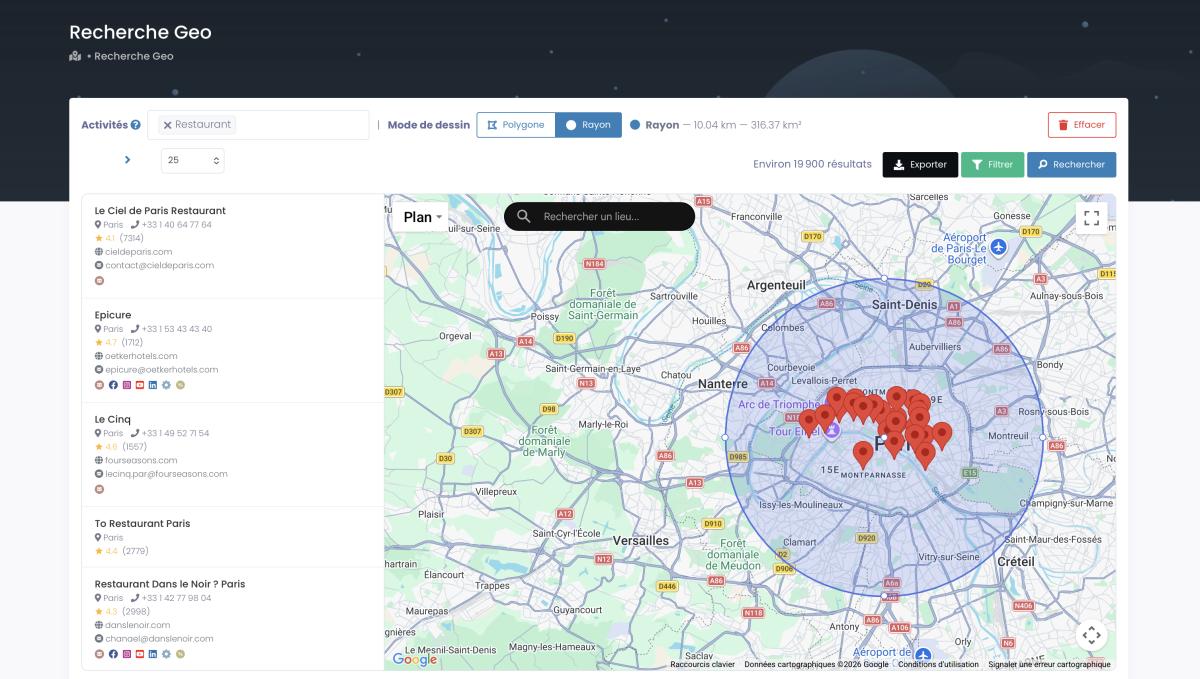
Market gap analysis using Google Maps is underrated. When you extract all businesses in a category within a geographic area, you can spot where the market is oversaturated (200 plumbers in a 10-mile radius — good luck) and where there's opportunity (zero IT services providers in a growing industrial zone). That's competitive analysis for local business that you can actually use. And it's shockingly easy when you do a proper competitor analysis on Google Maps across your target area.
Rating Trends & Customer Satisfaction Benchmarking
A single snapshot of ratings is useless. But competitive benchmarking with Google Maps data over time? That's gold. Track how your rating compares to competitors month over month. If you're at 4.5 and your closest competitor just dropped to 3.8 — that's your cue to go aggressive on marketing in their territory. Timing is everything.
How to Build a CI System with Google Maps (Step-by-Step)
When Jake launched his HVAC company in Phoenix, he had no idea his biggest competitor had just opened 3 new locations across the city. By the time he noticed, they'd already locked in the top search positions. Don't be Jake.
Here's how to build a competitive intelligence system using Google Maps that actually works — no $40K enterprise contract required. It's the same backbone behind serious local business lead generation, just pointed at competitors instead of prospects.
Video: CRM War Machine with Google Maps Data
Step 1 — Define Your Competitive Perimeter
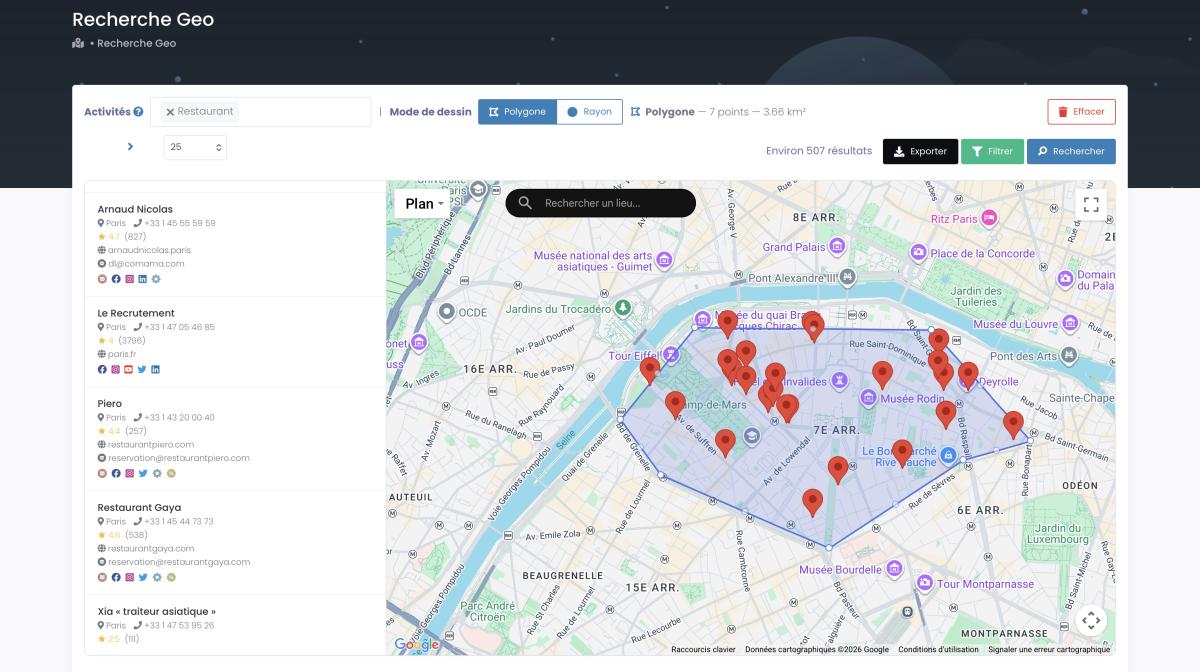
Before you extract anything, get clear on what you're tracking. Which competitors? Which locations? Which categories? If you sell commercial cleaning in Dallas, your perimeter might be "all businesses in the 'commercial cleaning service' category within 25 miles of downtown Dallas." Be specific. Vague perimeters produce vague insights.
Step 2 — Extract Competitor Data at Scale
Here's where it gets fun. Manually clicking through Google Maps listings is fine if you have 5 competitors. But if you need to analyze hundreds of businesses across multiple regions — that's where tools like Google Maps scraping come in. You can also go the how to scrape Google Maps route with Python or APIs, but honestly, most people don't need the complexity. A no-code tool handles this in minutes.
And here's the part that saves you money. You filter before you extract. Quick example, pulled fresh today: right now, Scrap.io indexes 666,649 restaurants in the US. Filter for the ones with a contactable email, and the list drops to 198,825 — roughly 30%. So instead of paying to pull 666K rows and deleting two-thirds of them, you pull only the 198K leads you can actually reach. Same logic works for competitor research: filter for claimed listings, low ratings, missing websites, whatever your angle is, and extract only what matters.

Extract 100 competitor profiles in minutes, not weeks. Try Scrap.io free — pull competitor data from any city, state, or country across 225M+ Google Maps listings. Free trial, 7 days, 100 leads included.
Step 3 — Analyze Patterns & Identify Gaps
Once you have the data, the real work begins. Look for patterns: which areas have high competitor density but low average ratings? Where are competitors expanding? Which ones have stopped updating their profiles (a sign they're scaling back or struggling)? Cross-reference Google Maps business intelligence data extraction with review trends to spot weaknesses before your competitors even realize they have them.
Step 4 — Build Your Competitive Dashboard
You don't need Tableau for this. A simple spreadsheet works. Columns: competitor name, location, category, rating, review count, review trend (up/down), last updated, notes. Update it monthly. The point isn't to build something pretty — it's to have a single place where you can spot how to analyze competitors' local presence over time and make decisions faster than them.
Best Competitive Intelligence Tools in 2026 (Free & Paid)
You could spend $20K/year on Crayon. Or start with Google Maps and a $49/mo scraping tool. Here's the honest breakdown.
Enterprise CI Platforms (Crayon, Klue, Kompyte)
These are the big guns. Crayon tracks competitor websites, pricing changes, and messaging shifts. Klue excels at battlecards — 71% of teams with battlecards report improved win rates. Kompyte automates competitor monitoring. They're powerful. They're also $15K-$40K/year and overkill for most SMBs. If you're a Fortune 500 with a dedicated CI team, go for it. If you're a 20-person agency? That money is better spent elsewhere.
Google Maps-Specific Tools (Scrap.io, Outscraper)
Scrap.io is purpose-built for extracting Google Maps data — competitor locations, reviews, contact info, categories — without writing a line of code. Outscraper is another option with more of an API-first approach (we broke down the differences in our Outscraper alternative comparison). The difference? Scrap.io gives you clean, exportable data in minutes and costs $49/mo. That's about 0.3% of what Crayon charges. (Yeah, we did the math.)
For B2B lead generation platforms that combine Google Maps data with competitive intelligence, Scrap.io sits in a sweet spot — affordable, fast, and local business competitor analysis tools don't get much simpler than this. It's the same reason market intelligence platforms keep losing ground to focused, data-first tools: you don't need a $40K dashboard to know a competitor just tanked to 3.2 stars.
Join 50,000+ pros monitoring local competition with Scrap.io. Start your free trial — extract competitor data from Google Maps in 2 clicks, across 195 countries. Free trial, 7 days, 100 leads included.
| Tool Category | Examples | Price Range | Best For | Local CI? |
|---|---|---|---|---|
| Enterprise CI | Crayon, Klue, Kompyte | $15K–$40K/yr | Fortune 500, large sales teams | Limited |
| Google Maps CI | Scrap.io, Outscraper | $49–$199/mo | Local businesses, agencies, SMBs | Yes |
| Free Tools | Google Alerts, Trends, Social Blade | $0 | Bootstrapped startups, solo operators | Partial |
Free Options (Google Alerts, Social Blade, Google Trends)
Don't sleep on the free stuff. Google Alerts will email you whenever a competitor gets mentioned online. Google Trends shows whether interest in their brand is going up or down. Social Blade tracks their social media growth. None of these are sufficient alone, but stacked together? Decent baseline CI for exactly zero dollars. Perfect for how to spy on competitors using Google Maps when you're just getting started. These are the free competitive intelligence tools worth your time — the rest are mostly noise.
Real-World CI Examples with Google Maps
Companies using competitive intelligence report 67% better win rates and 5.2x ROI. Those aren't abstract numbers. Here's what CI looks like in practice.
Community Brands implemented Klue's CI platform and saw win rates jump 10%. Their sales team finally had real-time competitor battlecards instead of outdated PDF decks. (Source: klue.com case study)
But here's the one that's more relevant to Google Maps CI. Clay.com built an entire lead gen motion around Google Maps data — using it to identify niche businesses in specific geographic areas and then running hyper-targeted cold email outreach campaigns. The result? Response rates that traditional B2B prospecting couldn't touch.
Autobound took a similar approach — combining competitive intelligence software with automated prospecting to identify businesses that matched specific criteria on Google Maps and trigger personalized outreach sequences.
And then there's the agency play. Picture this. A reputation management agency uses Google Maps data to find every restaurant in Chicago with a rating below 3.5 stars and more than 50 reviews. Then they pitch review management services to exactly those businesses. Conversion rate? Way above industry average. Because they weren't guessing — they had the data proving these businesses needed help. That's not a hypothetical stretch. It's the obvious move once you realize the data is just sitting there.
That's the power of Google Maps data for market research. You're not spraying and praying. You're making surgical moves based on real competitive data.
Compliance & Ethics
Is this legal? Short answer — yes, with caveats.
Scraping publicly available data from Google Maps is generally legal. Business names, addresses, phone numbers, ratings, review counts, categories — all public information accessible to anyone with a browser. The Google Maps API itself provides much of this data through official channels.
That said, there are boundaries. You should avoid collecting personal data (individual reviewer names, private phone numbers), respect Google's Terms of Service regarding automated access rates, and comply with GDPR if you're handling EU data. BrightLocal's research confirms that B2B data collection from public listings falls within legal norms in most jurisdictions. It's the same compliant footing Scrap.io stands on: GDPR and CCPA compliant, business data only, every field traceable to its source.
Competitive intelligence Google Maps scraping sits comfortably in the legal zone as long as you stick to publicly available business data and use it for legitimate business analysis. But don't take my word for it — consult your legal team if you're scaling this up. (That's not a cop-out. It's just good practice.)
Oh, and also — 68% of B2B deals involve a direct competitor (Crayon). So the question isn't "is CI ethical?" — it's "can you afford NOT to do it?"
FAQ
What is competitive intelligence and why does it matter in 2026?
Competitive intelligence is the systematic collection and analysis of information about your competitors. It matters in 2026 because the CI tools market has hit $557.6 million, with North America alone accounting for 43.61% of it. Translation: your competitors are investing in CI whether you are or not. With tools becoming cheaper and data more accessible — especially through sources like Google Maps — there's no excuse not to have a competitor review monitoring strategy in place.
How can I use Google Maps for competitive intelligence?
Extract competitor data (locations, reviews, ratings, categories, contact info) from Google Maps using a tool like Scrap.io. Track changes over time: new locations appearing, rating shifts, review volume trends. Use this data to spot expansion patterns, identify market gaps, and find vulnerabilities in competitor service areas. It's the most direct way to analyze competitors' local presence without spending enterprise money.
What's the ROI of competitive intelligence?
According to Gitnux research, the average ROI on competitive intelligence is 5.2x. Companies with CI programs also report 67% better win rates. The ROI depends on how you use the data, obviously — but even a basic competitor tracking system using Google Maps data pays for itself quickly if it helps you avoid one bad market entry decision or capitalize on one competitor weakness.
Is it legal to scrape Google Maps for CI?
Yes, scraping publicly available business data from Google Maps is legal in most jurisdictions. This includes business names, addresses, phone numbers, websites, ratings, review counts, hours, and categories. The key is to stick to public business information, avoid personal data, and respect rate limits. Several court rulings have affirmed that publicly accessible data can be collected for analysis purposes.
What are the best free CI tools?
Google Alerts (monitors competitor mentions), Google Trends (tracks brand interest over time), and Social Blade (monitors social growth) are solid free options. For Google Maps-specific CI, Scrap.io offers a free trial with 100 leads to get started. Combine these with a simple spreadsheet-based tracking system and you've got a legitimate competitive intelligence setup for next to nothing.
Google Maps vs LinkedIn for CI: which is better?
They answer different questions. LinkedIn tells you who works where, hiring trends, and corporate messaging — great for B2B org-level intel. Google Maps tells you what's happening on the ground: new locations, real customer reviews, rating trends, service gaps by area. For local and multi-location businesses, Maps wins because it surfaces physical moves before any press release does. Best case? Use both, but don't ignore Maps just because everyone else does.
Ready to outsmart your competition? Start your free trial with Scrap.io — 7 days, 100 leads on us. Extract competitor data from Google Maps in minutes, build your CI dashboard, and make data-driven decisions that actually move the needle.
Generate a list of restaurant with Scrap.io