

Updated August 2026.
Contact form lead generation is the practice of sending targeted business messages through website "Contact Us" forms instead of emailing cold. Because those forms feed inboxes people actually monitor and skip spam filters entirely, your message gets read almost every time — read rates near 100%, reply rates of 20-30% with good targeting. Whether they reply is on your copy.
I ran a cold email campaign last month. Sent 600 messages. Got 9 replies. Three of those were people telling me to stop emailing them.
That tracks with what the data says. According to Backlinko's outreach study, 91.5% of cold outreach messages go completely unanswered. And "opened" doesn't mean "read" — it means someone's email client loaded a tracking pixel while they scrolled past your subject line on their way to something that actually mattered to them. Reply rates keep sliding too: Sopro's 2026 State of Prospecting report puts the average cold email reply rate at 5.1%. Five point one.
Meanwhile, the average B2B decision-maker gets 120+ emails a day. A hundred and twenty. Your carefully written pitch lands between a Salesforce renewal notice and a DoorDash promo code. Good luck.
So here's the thing. There's a channel that requires zero infrastructure. No Google Workspace. No SMTP. No domain warm-up. No SPF records. No waiting three weeks to send your first batch. And it gets something cold email physically cannot deliver: nearly 100% read rates.
Contact form outreach.
You submit a personalized message through a company's website contact form. That form routes straight to an inbox someone checks — because why else would they put it on their site? No spam filter in the middle. No deliverability gamble. The website sends the email for you.
Table of Contents
- Why Contact Form Messages Achieve Nearly 100% Read Rates
- Contact Form Outreach vs Cold Email vs LinkedIn: 2026 Comparison
- The Golden Rule: Test Manually Before You Automate
- Best Contact Form Automation Tools in 2026
- How to Build Your Contact Form Prospect List With Scrap.io
- How to Write Contact Form Messages That Get Responses
- Real-World Results: Contact Form Outreach Case Studies
- Costs and Limitations: What to Expect
- Legal and Compliance: Is Contact Form Outreach Allowed?
- Integrating Contact Forms Into a Multi-Channel Outreach Strategy
- FAQ
Why Contact Form Messages Achieve Nearly 100% Read Rates
A plumber in Oklahoma City installs a contact form on his website. Why? Because he wants people to reach out about leaky pipes and bathroom remodels. That form pings his main email — the one he checks between jobs, the one his wife sends grocery lists to, the one where invoices land. Not some forgotten info@ address drowning in newsletter subscriptions. His actual inbox.
That's the entire trick. There's no magic here.
Cold email fights a different war. Spam still makes up nearly half of all email traffic worldwide — China and the US alone push out around 7.8 billion junk messages on a single day (Statista). About 17% of cold emails don't even make it to the inbox — blocked, filtered, or bounced before anybody sees them. Your prospect's email server doesn't care that you spent 45 minutes writing the perfect icebreaker. If the algorithm says spam, it's spam.
Contact forms bypass all of that. The website itself sends the notification. There's no sender reputation to worry about. No DKIM signature to misconfigure. No warming up some fresh domain for three weeks before you're "allowed" to reach out. You fill in a form. You click submit. Done. Their inbox, within seconds.
What response rate can you expect from contact form outreach?
Here's the honest number. Well-personalized contact form messages typically pull replies in the 20-30% range, sometimes higher. Compare that with cold email's 1-5% (5.1% average, per Sopro's 2026 data). Five to ten times better, entirely depending on how good your targeting is. Generic blasts? Back down to 2-5%. Targeting is everything.
But — and I should've said this earlier — "nearly 100% read rate" doesn't mean nearly 100% response rate. People will read your message. Doesn't mean they'll care. That part's on you.
Contact Form Outreach vs Cold Email vs LinkedIn: 2026 Comparison
I get asked all the time which channel to pick. Honestly, it depends on what you're selling and who you're selling to. But here's how the numbers actually shake out across the three main B2B outreach channels right now:
| Metric | Cold Email | Contact Form Outreach | LinkedIn Outreach |
|---|---|---|---|
| Open / Read Rate | Low and sliding | ~100% (monitored inbox) | ~100% (if InMail) |
| Reply Rate | 1-5% average (Backlinko) | 20-30%+ (personalized) | 10-30% (SalesBread) |
| Setup Cost | $50-200/mo | $0-50/mo | $80-100/mo |
| Infrastructure | Heavy (domains, SMTP, SPF/DKIM/DMARC) | None | LinkedIn account |
| Spam Filter Risk | High | None | N/A |
| US Addressable Volume | Businesses with a public email | 6.7M with a working form (2.1M form-only) | Skews enterprise, not local |
| GDPR Friendly | Moderate | High | Moderate |
| Scalability | High with tools | Moderate (captchas slow you down) | Low (connection limits) |
The infrastructure column alone should make you stop and think. Setting up cold email the right way — multiple domains, warm-up, authentication — eats weeks before you send a single pitch. I've walked clients through that process. It's a pain. Contact form outreach? You open a browser, go to a website, type a message. Today. Right now.
LinkedIn works, sure. But the platform throttles you hard on connection requests, and 73% of B2B decision-makers say personalization matters for outreach (Snov.io). Everyone on LinkedIn is running the same Sales Navigator playbook. Your "noticed we share a connection" message reads exactly like the other fifteen they got this week.
Contact forms sit in this weird, underused sweet spot. Cheaper than cold email. Higher contact form outreach response rates than either alternative. And almost zero competition because most sales teams have literally never thought about it. That's your edge — while they fight over crowded inboxes, you're walking through an unlocked door.
Want to test contact form outreach yourself? Scrap.io lets you find the 6.7 million US businesses that have a working contact form — filtered before you spend a single credit, pulled in real time from Google Maps across 195 countries. Free 7-day trial, 100 leads included.
The Golden Rule: Test Manually Before You Automate
I know you want to skip this section. Don't.
Every person who's given up on contact form automation started the same way: they blasted 500 forms with some generic "Hi, I do web design, want a free audit?" message, got two angry replies and a bunch of nothing, then told everyone the channel doesn't work.
It works. Their message didn't.
Here's what to do instead. Five steps. No shortcuts.
1) Handpick 50 businesses. Go to their sites. Spend two minutes per site. Read the About page. Check their Google reviews. Look at what they're selling and what's obviously broken or missing on their web presence. This is your ammunition.
2) Write three different message angles. One leads with a specific compliment. One opens with a problem you spotted on their site. A third offers something free — a resource, a tip, an observation about their Google listing. Each message: under 150 words. Nobody reads a 400-word contact form submission. Nobody.
3) Submit all 50 manually. By hand. I know. Track everything in a spreadsheet. Company name, URL, which message you used, date submitted, response.
4) Wait 10 days. Don't touch anything. Then count. Which angle got replies? From what types of businesses? Any patterns?
5) NOW you automate. You've got a message that converts. Scaling something proven is smart. Scaling a guess is how you waste a month and $200 in proxy fees. This is the difference between contact form marketing that generates revenue and contact form automation that generates complaints.
Best Contact Form Automation Tools in 2026
OK so you tested manually, found a message that gets replies, and now you want to scale. Fair. Here's what's actually available for automated form filling — from free and basic to paid and powerful.
Video: How to Automate Sending Messages through Contact Forms
Free Chrome Extensions (Beginner)
Autofill Form and eMacros. Install, save a profile, they auto-populate form fields. That's it. No personalization — every form gets the same message. Captchas stop them dead. These are fine if you're submitting 20-30 forms a day and just want to skip the repetitive typing. Don't expect more.
Advanced Browser Extensions
Automa and BrowserFlow — now we're actually talking. Both let you build real workflows. Link a CSV. Map columns to form fields. Run it across multiple tabs with personalized variables per row.
BrowserFlow is the one I'd pick if you're serious. Paid plans include captcha solving through integrated services, which is the single biggest bottleneck in contact form automation. Runs $20-50/month depending on volume. Automa's free tier is decent for getting started but falls apart the moment you hit a CAPTCHA.
Desktop Automation Software
Browser Automation Studio and Zenno Poster. Heavy-duty desktop apps for people who mean business. Visual workflow builders, proxy rotation, anti-captcha API integration, multi-threaded execution. Hundreds of form submissions running in the background while you do other things.
Downsides: Windows only. Learning curve measured in days, not hours. You can pay someone on Fiverr $50-$150 to build your first workflow, which honestly might be worth it. But once you're set up, nothing else comes close on volume.
Custom Scripts (Python + Selenium)
Can you build your own Python Selenium bot? Sure. Should you? Almost certainly not. Every website's form is structured differently — different field names, different layouts, random JavaScript validation that breaks your script Tuesday morning for no apparent reason. I've been down this road. It's a maintenance nightmare. Stick with the tools above.
Tool Comparison Table
| Tool | Price | Personalization | Captcha | OS | Skill Level |
|---|---|---|---|---|---|
| Autofill Form | Free | ❌ None | ❌ No | Chrome | Beginner |
| eMacros | Free | ❌ None | ❌ No | Chrome | Beginner |
| Automa | Free / $10/mo | ✅ CSV | ❌ No | Chrome | Intermediate |
| BrowserFlow | $20-50/mo | ✅ CSV + formulas | ✅ Yes (paid) | Chrome | Intermediate |
| Browser Automation Studio | $0-199 (license) | ✅ Full | ✅ Yes (API) | Windows only | Advanced |
| Zenno Poster | $57-347 (license) | ✅ Full | ✅ Yes (API) | Windows only | Advanced |
Oh, and if you want to see how a major platform approaches this — Make.com's official tutorial on AI-powered contact form lead generation is solid. They wouldn't have published it if their users weren't actively running these campaigns.
How to Build Your Contact Form Prospect List With Scrap.io
Tools without targets are just expensive browser tabs. You need a list of businesses that actually have contact forms — filtered by industry, location, whatever criteria your campaign requires.
So here's a number that should reframe how you think about this channel. We pulled fresh Scrap.io data in August 2026: there are 14,821,140 US businesses on Google Maps with a website. Of those, 6,743,596 — about 45.5% — have a detectable contact form. And here's the one that matters most: 2,118,662 of them have a contact form but no public email at all. Read that last figure again. Two million US businesses you literally cannot reach by cold email — the form is the only door in. Nobody else is knocking.

The contact form funnel: 14.8M US businesses with a website → 6.7M with a form → 2.1M reachable only through that form. Source: Scrap.io, August 2026.
That's the whole reason we built the contact form filter into Scrap.io. If you're brand new to it, the two-minute walkthrough below shows exactly how to pull your first list:
Video: Scrap.io - How to Start?
Here's how it works in practice:
Search by category and location. Open the dashboard, type your target market — "restaurants," "agencies," "dentists" — and pick a city, state, or country. Pulls from Google Maps, so coverage is massive: 225M+ listings across 195 countries and 4,000+ categories. And the count is free — you see exactly how many businesses match before spending a credit.

Turn on the contact form filter. This is what makes it a contact form lead generation tool specifically. Scrap.io crawls every listed business's website and flags which ones have a working form. Layer other filters on top: businesses with no email (so the form is your only way in — that's your 2.1 million), businesses with ad pixels (they spend on marketing, they'll get what you're doing), specific rating ranges, review counts. Every filter applies before extraction, so you never burn a credit on a business you can't use. No classic scraper does that.

And the data is live. A form that existed six months ago might be gone today — Scrap.io re-crawls the site at extraction time, so you're not buying dead URLs from some frozen database. That freshness is the difference between a list that works and a list that bounces. If you want the broader method, our guide on local business leads with contact info walks through the same filter-first approach across email and phone too.
Want to see the filter side in action on a real campaign?
Video: Finding Clients Through Google Maps Filters
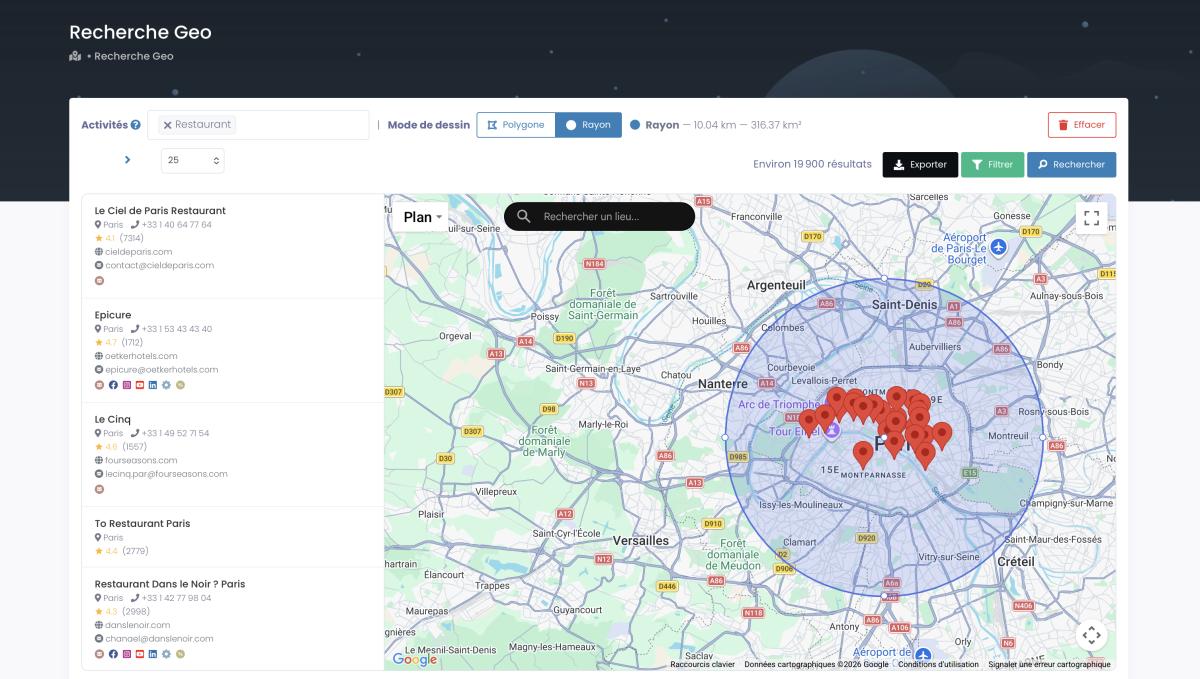
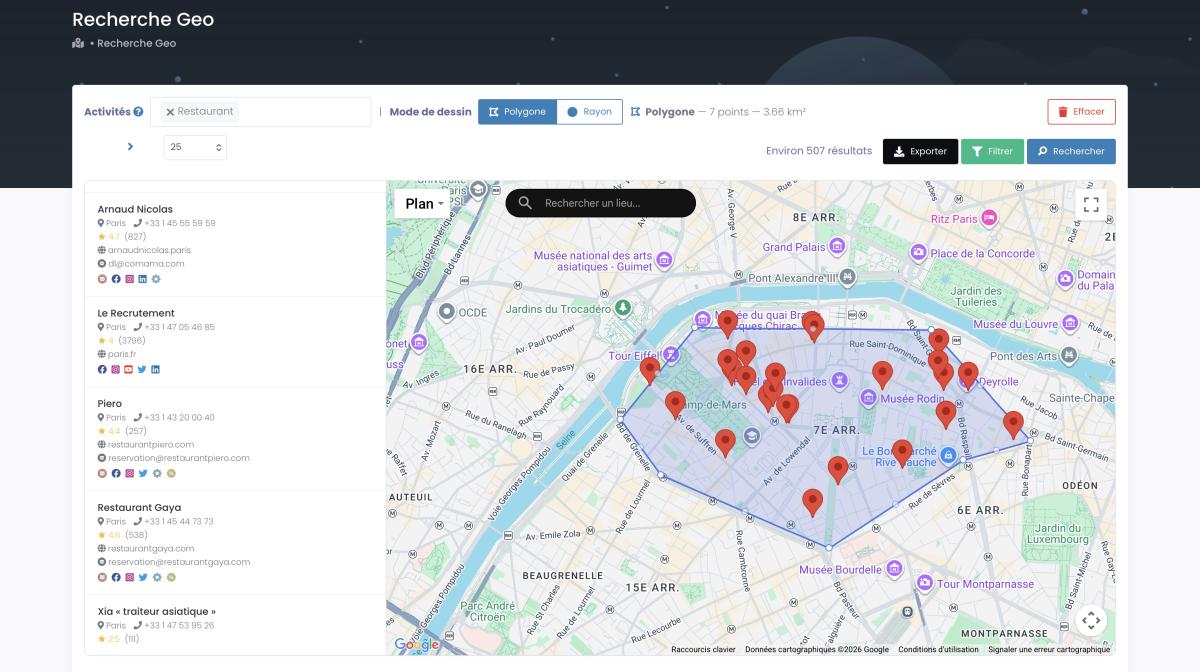
Geo-targeting if you need it. Local campaign? Draw a radius around a city center. Or trace a custom polygon on the map. (The polygon tool gets used way more than you'd think — real territories aren't perfect circles.)
Export and go. Name your file, hit export, grab the CSV. Each row: business name, website, contact form URL, phone (tagged landline or mobile), address, ratings, social profiles, and up to five classified email types where they exist. Load that into BrowserFlow, map the columns to your message template, run it.
Search to export: under 10 minutes. I tried doing this manually once — Googling businesses, clicking through each site, checking for a contact form. I stopped after fifteen tabs. Life's too short. And here's the part that closes the loop: those 6.7 million US listings with a form? Addressable in one search, not 400 city-by-city queries.
If you're also running email campaigns alongside this, our Google Maps email extraction guide shows how to build lists with both email addresses and contact form URLs. And for the warm outreach principles that make first-touch messages actually feel human — we've built a full course around that.
How to Write Contact Form Messages That Get Responses
Alright, your message gets read. That's the easy part. Getting a reply is where most people faceplant.
What's tricky about contact forms: most cap you at 500-1,000 characters. No subject line. No formatting. No bold text, no fancy templates. Just you and a text box. Which — paradoxically — is an advantage. You can't hide behind design. It has to be genuine.
I've tested dozens of contact form message templates over two years. The ones that consistently pull 20%+ replies follow this pattern:
| Step | What to Write | Example |
|---|---|---|
| 1. Hook | Something about THEIR business. Not "I visited your website." Lazy. | "Noticed you've got 340+ five-star Google reviews but no booking system on your site." |
| 2. Problem | Connect that to a pain they probably feel. One sentence. | "Without online booking, you're losing walk-ins to the competitor who makes it easier." |
| 3. Proof | What you bring. Specific. "We help businesses grow" = garbage. | "Helped 8 dental clinics in Austin add $12K/mo via automated appointment reminders." |
| 4. Soft CTA | Ask a question. NOT "can we schedule a call." Too aggressive first touch. | "Are you currently doing anything to capture those after-hours leads?" |
Full message I've actually sent (names swapped):
"Hi — was looking at your Google Maps listing and noticed 87 reviews with a 4.8 average. That's seriously good for a roofing company in Memphis. Quick question: is most of your business referrals right now, or are you getting inbound leads from your website too? We work with 6 roofing companies in Tennessee and helped them add 3-5 qualified quote requests per week. Happy to share what's working if you're interested."
127 words. Four minutes to write because I'd already spent two minutes on their listing. That two-minute research investment is the difference between a 3% response rate and a 25% one.
On timing. Tuesday through Thursday, 10AM-2PM in the recipient's zone. Mondays are catch-up chaos. Fridays people are mentally gone. And if they don't reply in a week, submit another form with a different angle. That's follow-up, not spam. 80% of sales require at least 5 touchpoints (IRC Sales Solutions). One form submission isn't a campaign.
For more on crafting outreach copy, we've got deep dives on writing messages that convert and subject lines that actually get opened — those messaging principles translate directly to contact forms.
Real-World Results: Contact Form Outreach Case Studies
The old version of this article had three case studies. Vague, unsourced, and — let's be honest — they looked made up. I pulled all three. Here's what's actually verifiable.
There's a whole subreddit for this. r/ContactFormMarketing — an active community of people doing exactly this. Sharing results, swapping templates, troubleshooting automation. The fact that a niche subreddit exists and stays active tells you this isn't theoretical. These are practitioners comparing notes in real time.
And the debate is very much alive. Over on r/automation, in a thread literally titled "Thoughts on mass contact form submissions?" the community splits down the middle — exactly the way you'd hope. One camp argues it's the last high-read-rate channel left and swears by it for niche, high-intent B2B offers. The other camp pushes back hard: do it lazily and you're just spamming small-business owners, captchas eat a chunk of your volume, and reputation risk is real. Both are right. That tension is the channel. Read the thread before you scale anything.
Make.com built an official tutorial around it. When Make.com publishes a video on AI-powered contact form lead generation — that's validation from a major automation platform. They track what their users build. Contact form workflows showed up enough to justify the production spend.
Austin M., CX Director — 11,734 leads in 45 minutes. Verified review on Capterra. Real name. Austin manages outreach for a marketing firm with 51-200 employees. He was about to pay a VA $0.30/lead to manually compile contact info for ~400 companies. Found Scrap.io. Pulled 11,734 businesses in under 45 minutes. That's about $3,500 in VA costs that vanished. His words are right there on Capterra for anyone to check.
Yussef C., Managing Director — web design agency. Also Capterra. Also verified. Yussef filters for businesses without websites, then reaches out through their contact forms to sell web design. His entire pipeline — target identification, filtering, list export, outreach — runs through the contact form channel. Publicly documented under his real name.
Ready to build your own prospect list? Scrap.io users like Yussef built targeted lists of businesses with contact forms in under an hour. Try it free — 7 days, 100 leads included.
Costs and Limitations: What to Expect
I could sugarcoat this. I won't.
| Expense | Cost Range |
|---|---|
| Automation tool | $0-50/mo |
| Proxy service | $5-30/mo |
| Anti-captcha | $2-10/mo |
| Prospect list (Scrap.io) | From $35/mo (annual) / $49 no commitment |
| Total | $42-139/mo |
Cheaper than cold email when you add up domains ($10-15 each, you need several), warm-up services, sending tool at $50-100/month, and the hours you'll spend babysitting deliverability. Contact forms skip all that. For the record, that Scrap.io floor of $35/mo on the annual plan gets you 10,000 export credits — Austin M. saved roughly $3,500 in VA costs on a single extraction, so the math isn't subtle.
Now the ugly parts.
Expect 10-20% submission errors. Forms time out. Fields don't map right. Some sites use JavaScript that breaks automated filling. Others have captchas your solver chokes on. And some forms are just broken — click submit, nothing happens. No error. No confirmation. Your message vanished into the void.
Scaling is the other wall. 5,000 cold emails in a day? Easy with the right tool. 5,000 contact forms? Days. Proxy burn. Bot detection everywhere. This is a high-quality, moderate-volume channel. If you need 10,000 prospects hit in a week, cold email wins on volume. If you need 200 prospects to actually read your message and reply — contact forms win by a mile.
Legal and Compliance: Is Contact Form Outreach Allowed?
Short answer: yes. Longer answer: yes, with conditions. Full answer: I'm not a lawyer and this article isn't legal advice, so get one if you're scaling this.
GDPR (Europe). A business puts a form on a public website. That's an invitation for inquiries. Under GDPR Article 6, a relevant business proposition falls under "legitimate interest" — as long as you identify yourself, explain why you're reaching out, and make it easy to opt out. Don't pretend to be a customer when you're selling services. That's dishonest and probably illegal.
CAN-SPAM (US). Per the FTC's CAN-SPAM guidelines, commercial messages need to identify themselves, include a real business address, and honor opt-out requests. Good news: no prior consent required for B2B.
What keeps you safe regardless: be transparent. Don't submit to the same business twice in a week. Personalize — generic blasts trigger complaints. If someone tells you to stop, stop. Right then. Not after one more follow-up. Keep records of who you contacted, when, and what you said.
For the full compliance regulations breakdown covering GDPR, CAN-SPAM, and CASL — we've covered it. Most of it applies to GDPR compliant contact form outreach too.
One thing contact forms have going for them: you're using a channel the business chose to make public. They built the form. They put it on the internet. That's fundamentally different from buying a scraped email list. Is contact form marketing legal? For B2B, in most jurisdictions, yes. But "legal" and "ethical" aren't identical, so keep the quality bar high.
Integrating Contact Forms Into a Multi-Channel Outreach Strategy
Contact forms work best as one channel in a bigger system. Not the whole system. One piece of it.
Here's a multi-channel sequence that actually works:
Day 1 — Contact form. Personalized message, relevant offer. Your first touch. They don't know you. But they read your message (that's the beauty of the channel). Your name is now in their head.
Day 3 — LinkedIn connection request. Short note about your expertise. Don't reference the form. You're just building familiarity. Second touch.
Day 5 — Cold email, if you've got their address. Reference your value prop from the form but add something new. A case study. An industry insight. Different channel, new information. Third touch. (Need help with this step? Our guide on cold email follow-up sequences covers timing and templates.)
Day 8 — Follow up via contact form again. Different angle. "Reached out last week about [topic] — wanted to share one more thing I noticed about your Google listing." Fourth touch.
Four touchpoints, three channels, eight days. Your competitors sent one email and quit. You're running a real B2B outreach strategy. And the data backs it up: 80% of sales need at least 5 follow-up touches (IRC Sales Solutions). If you want the full playbook for coordinating channels without stepping on your own feet, our omnichannel outreach strategy guide breaks down which channel does which job.
More resources for building out the full system: prospecting local businesses the Hormozi way (including how to generate leads from website contact forms as part of a multi-touch approach), AI-powered personalization for local outreach, the best cold email tools for 2026, and our full cold email outreach strategies guide.
FAQ
What is contact form outreach and how does it work?
You find a company's "Contact Us" form, fill it out with a personalized business message, and submit it. Their system sends your message to an email address they actually check. No spam filter, no technical setup on your end. You can do it manually or use automation tools to work through a CSV list. Whether they reply depends entirely on whether your message is relevant to them.
Why do contact form messages achieve nearly 100% read rates?
The form exists because the business wants to hear from people. It routes to an inbox they check regularly — usually the same one they use for customer communication and invoices. Not a marketing address buried under newsletters. That's the whole mechanism. There's nothing sophisticated about it.
Is sending messages through website contact forms legal?
For B2B, generally yes. GDPR treats it as legitimate interest when you contact a business through a public channel with a relevant offer. CAN-SPAM doesn't require prior consent for B2B but demands transparency and opt-out compliance. Be honest, keep it relevant, stop if they ask you to. And talk to a lawyer if you want proper legal advice instead of a blog post.
What tools can automate contact form filling in 2026?
Free: Autofill Form, eMacros (basic, no captcha). Mid-range: BrowserFlow, Automa (CSV personalization, BrowserFlow cracks captchas). Advanced: Browser Automation Studio, Zenno Poster (desktop apps, proxy support, anti-captcha APIs, Windows only). BrowserFlow is the sweet spot for most teams serious about scaling this.
How does contact form outreach compare to cold email?
Cold email gets 1-5% reply rates and needs weeks of infrastructure setup. Contact forms get 20-30%+ with good targeting and need zero infrastructure. The trade-off is volume — you can't blast 5,000 forms in a day like you can emails. High-quality versus high-volume. Most teams should be doing both.
How much does contact form automation cost?
$42-139/month total: automation tool ($0-50), proxies ($5-30), anti-captcha ($2-10), and a lead source like Scrap.io (from $35/mo on the annual plan, $49 with no commitment, for 10,000 export credits). Less than cold email infrastructure once you factor in domains, warm-up services, and all that deliverability overhead.
How do I find businesses with contact forms?
Scrap.io crawls Google Maps business websites and flags which have contact forms. As of August 2026, that's 6,743,596 US businesses with a working form — and 2,118,662 of them have no public email, meaning the form is your only way in. Search by industry and location, enable the "website with contact form" filter, export as CSV. Data is re-crawled at extraction, not pulled from some months-old database.
What response rate can I expect from contact form outreach?
Generic messages: 2-5%. Well-personalized messages to well-targeted businesses: 20-30%, sometimes higher. The biggest factor is specificity. Did you reference something about their actual business, or did you send the same template to 200 companies? That's literally the whole difference.
Can contact form automation bypass captchas?
Yes. BrowserFlow (paid plans), Browser Automation Studio, and Zenno Poster all integrate with anti-captcha services — 2Captcha, CapMonster, etc. They use human solvers or AI to handle captchas in real time. Costs $2-10/month. Free browser extensions can't bypass captchas at all, which is the main reason people end up paying for better tools.
How do I write effective contact form messages?
Four parts: (1) a hook that references something specific about their business, (2) one sentence connecting it to a problem they probably have, (3) proof you can help — with actual numbers, not vague claims, (4) a soft question instead of a meeting request. Under 150 words total. Specificity beats polish. Every single time.
Start generating leads through contact forms today. Try Scrap.io free for 7 days — get 100 verified leads with contact form URLs instantly, pulled in real time from 6.7M+ US businesses that have a working form. Try for free now.
Generate a list of restaurant with Scrap.io