

By Sébastien · Last updated July 2026 · 15 min read · About the team
Video: Scrap.io - How to Start?
I'm going to tell you about a plumber in Tampa named Mike. (Not his real name — he asked me not to use it.) Mike has 247 reviews. 4.8 stars. Eighteen years unclogging pipes in Hillsborough County. He told me — and I'm quoting from memory here — "I've never had a slow month because of word-of-mouth."
Then I pulled up "plumber Tampa" on Google Maps in front of him. His business? Nowhere. Not in the first five results. Not the top ten. Roto-Rooter sat there. Mr. Rooter sat there. Some franchise he'd never heard of sat there. Mike, with his 247 reviews and his 18 years, was buried so deep you'd have to scroll three times just to find him.
Why? He'd never run a single Google Maps ad. Didn't even know they existed.
Two billion people use Maps every month. And 83% of American consumers check Google before they walk into a local business (BrightLocal, 2024). These aren't abstract marketing numbers — that's real foot traffic going somewhere else when your listing doesn't show up.
I wrote this because I couldn't find a guide that actually had everything. Most articles on Google Maps advertising are from 2023 and still don't mention Performance Max (which replaced the entire old system). Or they're 400 words of fluff that say "it depends" twelve times and link to Google's support page. I wanted real costs. A real setup walkthrough. Case studies where somebody counted the humans who walked through a door.
Here it all is. Skip around if you want — not every section matters to everyone.
Table of Contents
- How Google Maps Advertising Targets Users
- Types of Google Maps Ads in 2026
- How to Set Up Google Maps Ads: Step-by-Step
- How Much Do Google Maps Ads Cost in 2026?
- When Google Maps Ads Go Wrong
- Google Maps Ads: Real Results & Case Studies
- Google Maps Ads vs Other Local Advertising
- How to Find Businesses to Target with Google Maps Data
- Frequently Asked Questions
How Google Maps Advertising Targets Users
Forget the ad platform for a minute. Think about the person holding the phone.
They type "Thai restaurant." Seems simple. Except Google's doing four things simultaneously behind that search. It knows the query (obviously). It knows where this person is physically standing and what they searched for yesterday — Google remembers they got sushi on Tuesday and live two miles east. It's read their browsing habits. Been checking food blogs? Watching cooking videos? Google noticed. And it factors in time of day, because someone searching "Thai food" at 11:45 AM is making a lunch call. Same query at 9 PM on Saturday? Date night. Completely different results for the same two words.
That's four signals layered on each other. This is why Google Maps advertising hits differently than slapping $500 on a Facebook ad targeting "people who like food in a 25-mile radius." On social, you're interrupting someone mid-scroll, hoping they care. On Maps, you're catching them mid-decision. Not the same thing. Not even close.
A stat worth memorizing: 91% of in-store buyers used Search or Maps before showing up (Google, 2023). They weren't browsing. They were choosing. If your business wasn't in front of them during that 20-second decision window? Opportunity evaporated. You never knew it was there.
I know a bakery owner in Portland. Four locations. Two years on Facebook ads. Good engagement — lots of little heart emojis and comments like "yum!" She could not trace a single paying customer back to Facebook. Not one. She switched $800/month into a Google Maps PMax campaign with a 5-mile radius around each store. Three weeks later: 85-100 store visit conversions per week in the dashboard. Same money. The difference was reaching people who were already hungry and looking for bakeries versus people scrolling past puppy videos.
Scrap.io's geomarketing strategies guide goes deeper on the targeting mechanics if the technical side interests you.
Types of Google Maps Ads in 2026
Four formats. Most people think there's one. There are four, and they work completely differently from each other.
Also — this confuses nearly everyone who's new to this — there is no "Google Maps Ads" portal. You can't go somewhere and buy a Maps ad directly. Everything runs through regular Google Ads. Performance Max campaigns, mostly. Sometimes Search. Google decides which surfaces show your ads based on campaign settings and an algorithm's best guess about where conversions will happen.
New in 2026 — video is creeping into the Map Pack. Google started testing immersive map-view video ads inside the local pack around April 2026 (Search Engine Land). Short clips, pulled straight from your Google Business Profile, playing right there in the map results. Still a limited beta as of this writing. But if it rolls out wide, businesses with zero video on their profile are going to look flat next to the ones who shot a 15-second clip on their phone. Worth watching.
Promoted Pins (Sponsored Locations)
The visual ones. Right on the map. Organic businesses get round pins. Paid placements get square pins with the brand logo inside them.
Tap the square pin and you see everything — business name, hours, reviews, directions, a CTA button. Here's what makes promoted pins sneakily good: they don't require a search. Someone's just panning around the neighborhood going "hmm, what's around here?" and boom, there's your pin. Restaurants, retail, salons — any business where someone might wander in — these are gold. You're reaching the explorer crowd, not just the searching crowd.
PMax campaigns charge CPM for pin views. Full specs: Google's Maps advertising documentation.
Local Search Ads (Map Search Ads)
Different animal entirely. These aren't on the map surface.
When someone types a query into the Maps search bar, the "Sponsored" results appear at the top of that list. Address, star rating, hours, directions button. Basically the Maps version of a Google Search ad but tuned for local intent.
You need location assets linked in Google Ads or these won't run on Maps. At all. I've debugged this for clients easily a dozen times. The answer is always the same. Missing location asset. Every. Single. Time. Check it first and save yourself two weeks of confusion.
Google Business Profile (Level 0 — Free)
Not an ad. It's the free thing you do before spending a cent on anything else.
Claim your Google Business Profile. Real photos — taken recently, at your actual business, with decent lighting. (Not stock images of a smiling woman in a headset. Nobody believes that's your receptionist.) Accurate hours. And I mean actually accurate — if you close at 6, don't list 7 because you "sometimes stay late." Customers show up at 6:30 to a locked door. Ask me how I know. Correct primary category. At least a dozen reviews.
Why this matters for paid ads specifically: Google Maps ads pull creative directly from your GBP. Your photos become your ad photos. Your review count and rating show up inside the ad. If your profile is junk, your ads look like junk. No amount of budget fixes that.
The GBP optimization guide on Scrap.io is thorough. And the scary motivating number: 30% of businesses on Maps haven't even claimed their listing. If that's you, stop reading, go fix that, come back.
Performance Max for Store Visits
This is the one that changed everything and that most Google Maps advertising articles either skip entirely or get wrong. Drives me crazy.
What happened: Google killed standalone Local Campaigns. Everything got folded into Performance Max. Now when you want to advertise on Google Maps, you create a PMax campaign, set the objective to "Store Visits and Promotions," and Google's algorithm distributes your ads across Maps, Search, YouTube, Display, Gmail, Discover. All automatically.
You don't pick channels. Can't force Maps-only. That's the PMax tradeoff. (Advertisers hate this so much there's a recurring r/PPC thread — "How do I run Google My Business ads only on Maps?" — with the same disappointing answer every time. You can't fully isolate Maps. See the thread.)
But here's the thing — for local businesses, Maps placements eat most of the budget anyway. The algorithm figures out quickly that someone browsing Maps for "dentist near me" is way more likely to visit than someone watching a workout video on YouTube. It shifts spending accordingly. Give it 2-3 weeks and don't touch anything. I know you'll want to. On day four you'll have nine clicks and want to change the whole campaign. Don't. Let it learn.
Fair warning for experienced Google Ads people: PMax reporting is a black box compared to Search campaigns. You cannot see how much went to Maps vs. YouTube vs. Display. Google gives you totals. This drives detail-oriented advertisers insane. But if "store visits" is climbing and cost-per-visit makes sense? The box is working. You don't have to like the lack of transparency. I certainly don't.
Already running Google Maps marketing automation? PMax is the paid layer that sits on top.
Curious which businesses near you aren't running Google Maps ads? Scrap.io filters over 225 million businesses across 195 countries by digital presence — claimed listing, ad pixel, website status — before you spend a single credit. Try it free, 100 leads included.

How to Set Up Google Maps Ads: Step-by-Step
Wild that the previous version of this article had zero setup instructions. Literally zero. Meanwhile "how to advertise on Google Maps" is the most-asked question in Google's People Also Ask box for this topic. Every competitor ranking above us had a tutorial. We had cost formulas and a McDonald's anecdote.
Fixed.
Prerequisites
Three things. Non-negotiable. Skip any of these and you're wasting time on everything that follows.
Verified Google Business Profile. Not created — verified. Google sends you a postcard, calls you, or emails a verification code. Until you've punched that in, you cannot link your business to ads. No workaround, no shortcut, no hack. Google's GBP setup guide has the steps.
Google Ads account. Five minutes at ads.google.com. Credit card on file. Moving on.
Photos and information that don't embarrass your business. This is the part nobody warns you about. Your Google Maps ads pull all creative from your GBP. There's no "upload ad images" step. The blurry phone pic your nephew took in 2021? That IS your ad now. Your hours that still say 9–5 even though you shifted to 10–6 last spring? Showing in every sponsored listing. Category set to "Restaurant" when you're actually a "Vegan Restaurant"? You're competing in a bigger, pricier auction than you need to, against businesses that have nothing to do with your actual niche.
Fix this stuff before launching. Otherwise you're paying for clicks that lead people to wrong information about your own business. Which is somehow worse than not advertising at all.
Campaign Setup (Performance Max)
OK. The actual walkthrough. PMax → store visits. Going fast because the interface changes every few months and screenshots go stale.
Step 1. Google Ads → "New Campaign" → objective: "Local Store Visits and Promotions."
Step 2. Campaign type: Performance Max. If it's grayed out, your GBP link is broken or missing. Go back to prerequisites.
Step 3. Pick your GBP location(s). Single store, multiple locations, whatever applies.
Step 4. Budget. Set a daily number that won't make you panic at 2 AM when you can't sleep and check the dashboard for the third time. Bid strategy: "Maximize Conversion Value." You'll adjust in two weeks when you have actual data. Right now you're guessing and that's fine.
Step 5. Ad assets. This is where 80% of people sabotage their own campaigns. Minimum: 5 headlines, 5 descriptions, several images, your logo. PMax tests combinations automatically — the more raw material you feed it, the faster it figures out what works. One lazy headline and a stock photo of two people shaking hands? You've hobbled the system before it even started. Write ten headlines. Upload fifteen images. Let the algorithm cook.
Step 6. Location targeting. Most single-location businesses: 10-15 mile radius. Here's the trap that catches everyone, and I mean everyone I've worked with: set this to "Presence" — people physically in that area. NOT "Presence or Interest." The second option includes anyone who has ever Googled your city. Tourists planning trips. People who moved away in 2019. College students writing term papers about your region. None of those people are booking a teeth cleaning on Tuesday.
Step 7. Launch. Walk away. PMax has a 2-3 week learning period and every change you make resets the clock. You'll want to fiddle on day two. You'll see four clicks and think it's broken. It isn't. Go do something else. Read a book. Touch grass. The system is calibrating.
Optimization Tips After Launch
Two weeks have passed. Data's accumulating. Now things get interesting.
First thing: Assets → Location in Google Ads. Verify the GBP link is actually working. These break silently — no error message, no notification. Your ads just stop appearing on Maps and nobody tells you. Audited a campaign last year where the location link had been dead for eleven weeks. Eleven weeks of budget going exclusively to YouTube and Display because the Maps connection was severed. The business owner thought Google Maps ads "just didn't work for his industry." They weren't running.
If Search campaigns run alongside PMax, add negative keywords so your own campaigns don't bid against each other. Seems obvious. I've seen it happen on accounts spending $8,000 a month.
Pull the ad schedule report. A brunch spot that's packed on Saturdays and dead on Tuesdays shouldn't pay the same for Tuesday clicks. True story: found a campaign that had been running Sunday ads for six months. Business was closed Sundays. Had been closed Sundays since they opened. Four hundred dollars a month to people who'd click, drive over, find a locked door, and leave a 1-star review. Nobody checked for half a year.
Track "store visits" in conversion reporting. Uses anonymized phone location data — Google estimates whether people who saw your ad later physically entered your business. Imperfect? Sure. But it's the best tool available unless you want to hire someone with a clipboard to stand at your door counting heads.
For organic ranking alongside paid, the Maps ranking guide covers post-Vicinity-update signals in detail.
How Much Do Google Maps Ads Cost in 2026?
I don't love this question. Not because it's bad — it's the most important question there is — but because the honest answer sounds like a dodge.
What does a wedding cost? Courthouse quickie: two grand. Positano with imported orchids and a live jazz quartet: a hundred fifty grand. Both are weddings. Same question, useless answer.
But you're here for numbers. So. Numbers.
Average CPC by Industry (2026 Data)
Let's kill a zombie stat first. You'll see "$5.26 average CPC" copy-pasted across half the blogs on this topic. Shopify's 2026 benchmarks tell a cleaner story: average Google Search CPC sits around $2.69, while Display runs far cheaper at about $0.63. Two very different numbers because they're two very different animals — Search is intent-heavy and pricier, Display is cheap volume. Lumping them into one "average" is how people end up budgeting wrong.
Local Maps campaigns usually land on the cheaper end — $2 to $6 — because you're only competing with nearby businesses, not national advertisers. Google also rewards high relevance in local contexts, which pushes costs down for well-optimized local ads.
But the industry spread? Absurd.
| Industry | Avg. CPC Range | Typical Monthly Budget |
|---|---|---|
| Restaurants & Food | $0.50 – $2 | $300 – $1,500 |
| Home Services (HVAC, Plumbing) | $3 – $8 | $1,000 – $5,000 |
| Retail & Shopping | $1 – $4 | $500 – $3,000 |
| Healthcare (Dentists, Clinics) | $3 – $12 | $1,500 – $8,000 |
| Legal Services | $15 – $80+ | $5,000 – $50,000+ |
| Real Estate | $2 – $10 | $1,000 – $10,000 |
| Automotive | $2 – $6 | $1,000 – $5,000 |
A personal injury lawyer in Miami pays $80 per click. A food truck in Nashville pays seventy-five cents. Same platform. The word "average" is doing a LOT of heavy lifting in any Google Maps advertising cost discussion.
Quality Score & Ad Rank Explained
Math incoming. Quick, I promise.
Google rates your ad 1 to 10. That's your Quality Score. Based on how relevant your ad is, landing page quality, and expected click-through rate.
Ad Rank determines where your ad shows up:
Ad Rank = Max Bid × Quality Score
Here's where it gets good. Business A bids $3 with a Quality Score of 9. Ad Rank: 27. Business B bids $8 with a Quality Score of 3. Ad Rank: 24. Business A pays less AND shows up higher. That's the whole game. Quality Score is the most powerful cost lever in Google Maps advertising and it's the one most people completely ignore because it isn't a button you can click.
Reviews feed into this loop. Better reviews → more people click your ad → higher CTR → Google raises your Quality Score → lower CPC. Starts with asking customers to write reviews. The getting more Google reviews article on Scrap.io covers the tactics.
Complete Cost Formula
What you actually pay per click isn't your bid. It's this:
CPC = (Ad Rank of the ad below yours ÷ Your Quality Score) + $0.01
Example. Competitor below you has an Ad Rank of 12. Your Quality Score is 8. You pay: (12 ÷ 8) + $0.01 = $1.51. Even if your max bid was $5. You only pay a penny more than what's needed to beat the next person. This is why improving Quality Score saves more money than lowering your bid.
Full campaign cost:
Campaign Cost = (CPC × Clicks) + (CPM × Impressions / 1,000)
CPM matters for promoted pins on PMax (charged per thousand views). And don't forget: agency management ($51–$3,000/month if you hire help) and tools ($15–$800/month). That's your real total.
Monthly Budget Guide by Business Size
Rough framework. Based on RSM Connect data, Shopify figures, and what I've personally seen work.
| Business Size | Monthly Ad Spend | Expected CPC | What to Expect |
|---|---|---|---|
| Small (1-5 people) | $100 – $1,000 | $1 – $5 | 20-200 clicks/mo, gets your name visible |
| Medium (6-50 people) | $1,000 – $5,000 | $2 – $8 | 200-1,000 clicks/mo, measurable walk-ins |
| Large (50+ / multi-location) | $5,000 – $50,000+ | $3 – $15 | Scale play, store visit tracking works well |
Don't be scared by the "large" row. A coffee shop spending $300/month with a 3-mile radius will see results. You're not competing with Starbucks. You're competing with the other coffee shops within walking distance, and half of them probably don't run ads.
For API and data costs at larger scale: Google Maps API cost calculator.
When Google Maps Ads Go Wrong
Not all Maps ads are welcome. Users have strong feelings about this.
The McDonald's thing. You're driving. Google Maps is navigating you somewhere. You pass a McDonald's and — ping — promotional popup. "Big Mac, $5.99, 0.2 miles away." While you're driving. Hands on the wheel. Or... they should be.
People hated it. Called it dangerous and tone-deaf. Waze had been doing the same thing for years (Google bought Waze in 2014, so, not a coincidence). Google tightened the policies after enough backlash, but the underlying tension — "helpful local suggestion" vs. "unwanted distraction while I'm operating a vehicle" — that tension hasn't gone anywhere.
Don't take my word that people have feelings about this. Go read the forums. On r/GoogleMaps, someone summed up the shift sharper than any analyst: Google Maps is "transitioning from a GIS-utility to a 'contained' advertising/engagement platform" (r/GoogleMaps, July 2026). That's the quiet change users are noticing. The map used to be a tool. Now it's also a storefront.
Over on r/AndroidAuto it's less philosophical and more raw: "I just got an ADVERTISEMENT while navigating... and I'm MAD" (r/AndroidAuto, May 2026). Read the replies. Hundreds of them. Same frustration, over and over.
Why should you, the advertiser, care about angry Redditors? Because that anger is the exact emotion your ad triggers when it shows up at the wrong moment. If you're running Google Maps advertising: a gas station pin during someone's road trip? Helpful. A mattress store popup during rush hour? Irritating, and people remember the irritation longer than the brand name. The ads that work best are the ones where intent already existed. Trying to manufacture intent through surprise — that's where it breaks. Respect the context or become the thing people screenshot to complain about.
One more thing worth knowing. Google has real compliance requirements for Maps ads. Your GBP must be verified and accurate. Misleading info — fake hours, made-up addresses, services you aren't licensed to provide — gets your ads pulled and can nuke your whole Google Ads account. Saw a chiropractor get his entire account suspended because his listing claimed services he wasn't licensed for in his state. Not a warning. Full suspension. The enforcement team at Google takes local business accuracy seriously. Keep your profile honest and you'll never have a problem.
Google Maps Ads: Real Results & Case Studies
Theory's done. Does any of this actually work?
Four Square — New Zealand
Grocery chain. Sells bread and milk and laundry detergent. Not a tech company. Not VC-backed. Four Square ran Performance Max with store visit objectives, and Google published the case study in 2023.
Result: 419,000 incremental store visits.
I want to make sure that registers. Four hundred nineteen thousand additional people walked into Four Square stores specifically because of this campaign. Not clicks. Not impressions. People pushing shopping carts through aisles.
What was their secret? Nothing fancy. Clean GBP profiles at every location. Consistent creative in PMax. And they left the campaign alone during the learning period. The algorithm moved most of the spending to Maps because that's where the store visit conversions were actually happening. No clever hack. Patience and clean data.
Loveweld — Jewelry
Smaller scale. Loveweld appeared in Shopify's Google Maps ads coverage. Promoted pins with personalized messaging — people searching for engagement rings and custom jewelry in their area. The Maps presence became their main source of walk-in traffic. Not Instagram. Not Etsy. Not their website organic traffic. A square pin on Google Maps.
The aggregate picture
Google claims $8 return for every $1 spent on Ads (2024). All ad types lumped together, so grain of salt for Maps specifically. But local campaigns with real purchase intent tend to beat that benchmark.
Restaurants convert fastest. Person's hungry → "sushi near me" → promoted pin → walks in → orders. Eight minutes start to finish. No email nurture. No retargeting campaign. Hunger plus proximity equals revenue.
Legal? Glacial. 60-90 days minimum before meaningful data. But one case worth $75,000 makes three months of $80 clicks look like pocket change.
Here's a pattern that keeps showing up across every industry I've looked at: businesses running Maps ads alongside a strong review profile get dramatically better results than businesses doing one without the other. A restaurant at 4.6 stars with 350 reviews running promoted pins destroys a competitor at 4.2 stars with 40 reviews spending the same budget. The ads look better (reviews are visible in the ad). More people click (they trust the rating). Higher CTR means better Quality Score, which means lower CPC. Everything compounds. Treating "get more reviews" and "run ads" as separate projects is a common mistake, and it's an expensive one.
Agencies use Scrap.io to find businesses without Maps ads — then pitch them services. 225M+ businesses indexed, 195 countries, real-time data, filterable by category, location, and digital footprint. Start with 100 free leads.
Google Maps Ads vs Other Local Advertising
Maps isn't your only option. But the intent gap between platforms is massive and most people don't think about it enough.
| Platform | Avg. CPC | User Intent | Best For | The Catch |
|---|---|---|---|---|
| Google Maps Ads | $2 – $50 | Very high | Foot traffic, local services | Can't go Maps-only |
| Apple Maps Ads | New (TBD) | High | Retail, restaurants, iOS-heavy areas | Home services banned at launch |
| Facebook/Meta Local | $0.50 – $3 | Low-medium | Brand awareness, events | People are scrolling, not buying |
| Waze Ads | $2 – $5 CPM | Medium | Gas stations, drive-through | Drivers only, limited targeting |
| Yelp Ads | $3 – $15 | High | Restaurants, home services | Expensive, aggressive sales tactics |
Here's the plot twist nobody saw coming: Apple's finally getting into the maps ads game. Ads start rolling out on Apple Maps in summer 2026 (TechCrunch, July 2026). Sounds like fresh competition for Google. Except — and this is the part that matters for a big chunk of you reading — Apple banned home services outright. Plumbers, electricians, locksmiths, HVAC, roofers, pest control, general contractors. All blocked at launch. Apple didn't want the licensing-and-certification headache.
So if you run a plumbing company? Apple Maps ads aren't an option for you. Google Maps still is. That's not a small footnote. The single biggest local-advertising category on Google — the trades — is exactly the door Apple slammed shut. For those businesses, Google Maps advertising isn't just the better choice in 2026. It's the only game in town.
Back to the rest of the field. Maps catches people deciding. Facebook catches people scrolling. Waze catches people driving. Yelp catches people researching. Different moments, different willingness to act on an ad.
A combo that actually works: Maps for conversions + Facebook for retargeting. Someone sees your promoted pin but doesn't visit today. Next morning your Facebook ad pops up with a 10%-off coupon. They show up for lunch. That two-touch sequence converts way above either channel alone.
Opinion time, might be unpopular: don't run Yelp ads and Maps ads simultaneously on a tight budget. Both go after high-intent local searchers. They eat into each other's results. Got $1,000/month? Put it all into Maps. Bigger audience (two billion monthly users vs Yelp's ~178 million), sharper targeting, and you don't have to deal with Yelp's... let's call it "enthusiastic" sales department. If you've gotten a Yelp sales call, you know what I mean. If you haven't, you're lucky.
For B2B specifically, the Maps vs LinkedIn comparison on Scrap.io goes into detail.
How to Find Businesses to Target with Google Maps Data
This section is for agencies and freelancers who sell to local businesses. Own a shop and just want to run your own Maps ads? Jump to the FAQ — nothing here applies to you.
Still reading? Here's the opportunity.
Millions of businesses on Google Maps haven't claimed their profiles. No ads running. Some don't even have a website. Reviews sitting there unresponded to for months. They've never heard of Performance Max. They have no idea 83% of consumers check Google before visiting a store.
That ignorance is your entire sales pipeline.
Video: Finding Clients Through Google Maps Filters
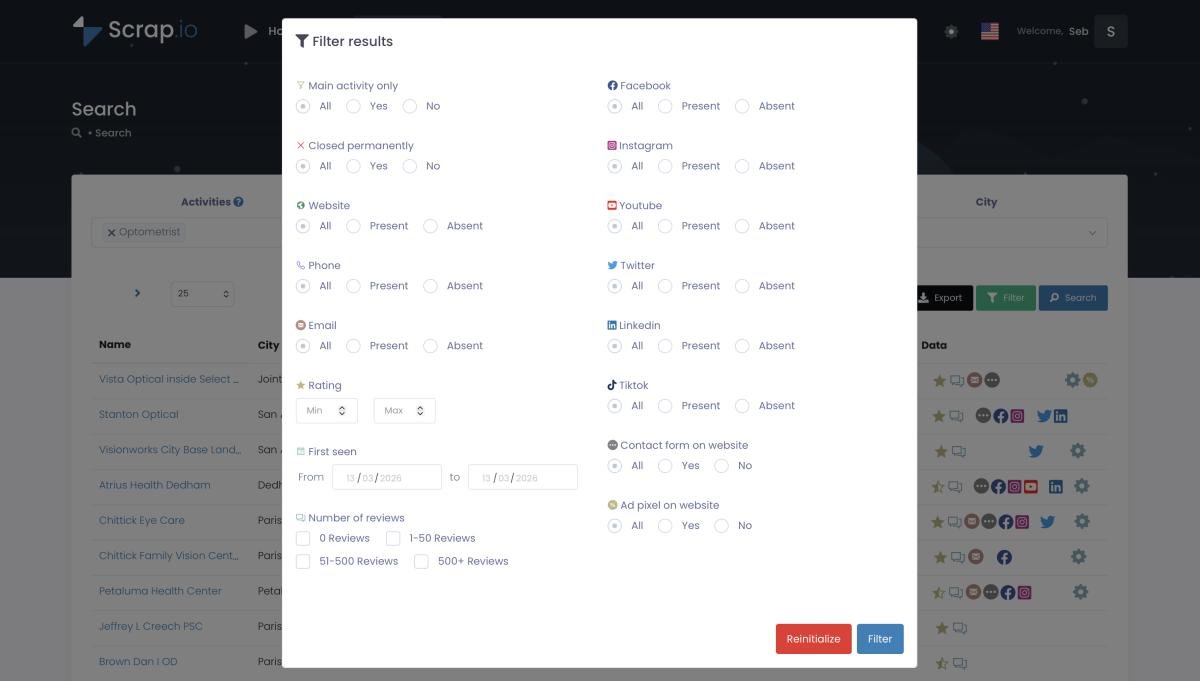
Scrap.io indexes over 225 million businesses in 195 countries. Search by category and location. Filter: no website, fewer than 10 reviews, unclaimed listing, no ad pixel — whatever matters for your pitch. And because the filters run before extraction, you only spend credits on contacts you can actually use. Export to CSV or Excel with emails, phones, social profiles, even the tech stack running on their website.
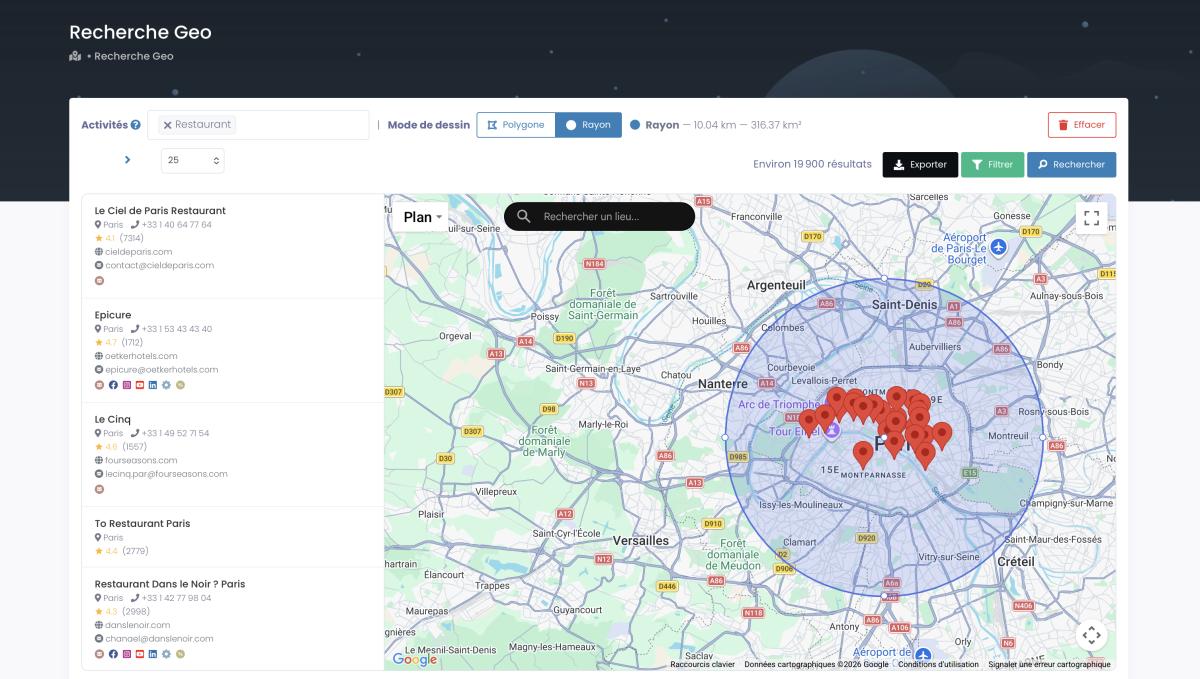
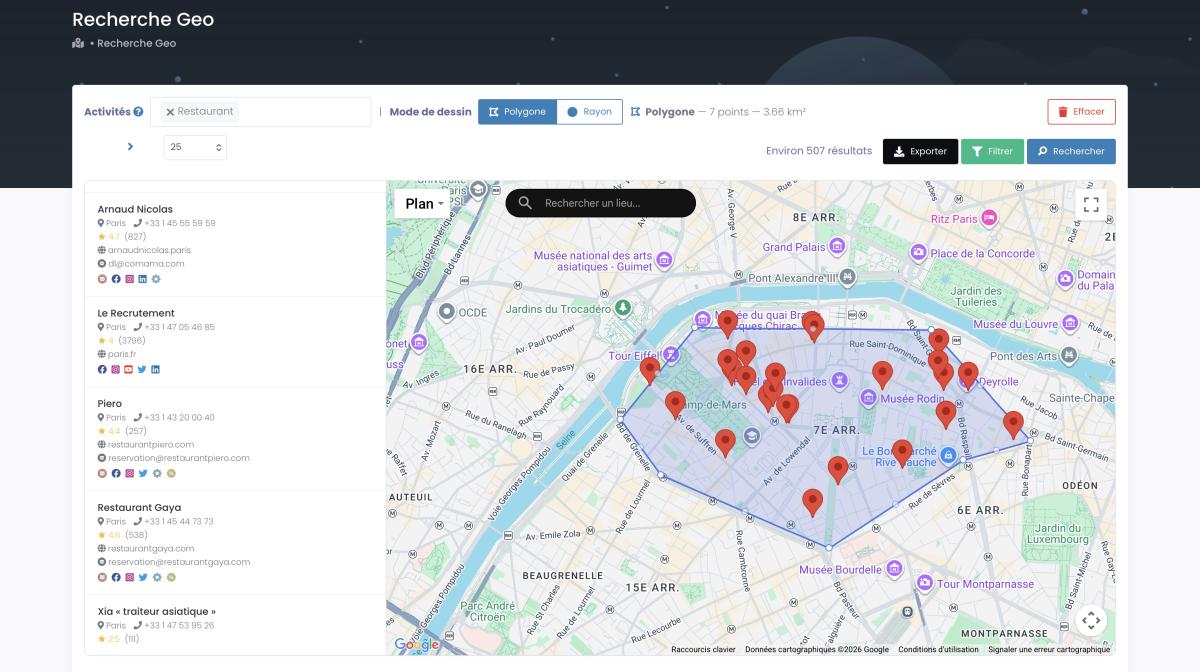
GeoSearch is the interesting piece — draw a radius or freehand polygon directly on the map. Every dentist within 5 miles of downtown Portland who has fewer than 20 reviews and no website. Thirty seconds. Export 200 leads. And here's a filter that's pure gold for this exact play: first-detection date. Find the businesses that just opened — brand new, no marketing yet, hungriest for help.
Video: Find Businesses That JUST Opened
The agency pitch practically writes itself. "Your competitor on 7th Street has a promoted pin on Google Maps. You don't. Here's roughly what that's costing you in walk-in traffic." Back it with data showing competitor ad presence. That's not a cold email anymore. That's a meeting. Response rates on this kind of hyper-specific outreach run 8-15% — miles above typical cold email benchmarks. Because it's not generic. It's "here's a specific thing about YOUR business that's costing you money." Hard to ignore that.
The business extraction guide on Scrap.io covers methods from no-code tools to Python scripts if you want more options.
Frequently Asked Questions
How much does Google Maps advertising cost?
Depends on industry. Restaurants: $0.50–$2 per click. Lawyers: $15–$80+. Most small local businesses spend $300 to $3,000/month. You can technically start at $100/month, but you won't learn much at that level unless your market's tiny. Numbers from Shopify, WordStream, RSM Connect — 2025-2026 data.
Can I advertise on Google Maps?
Yes — through Google Ads, not through Maps directly. Verified GBP, Google Ads account, PMax campaign with Store Visits objective (or a Search campaign with location assets). There's no dedicated "Google Maps Ads" product anywhere.
What types of ads show up on Google Maps?
Four kinds: promoted pins (square pins on the map surface), local search ads (text results in the search list labeled "Sponsored"), map suggest ads (autocomplete as you type), and ads on business detail pages. New in 2026: Google is testing video ads inside the local pack too. All run through Google Ads campaigns.
Is $20 a day good for Google Maps ads?
For a small local business in a low-competition niche, yes — $20/day (about $600/month) is a solid starting budget that buys real data and visibility. In expensive verticals like legal or healthcare, $20/day barely covers a handful of clicks. It's less about the number and more about your cost-per-click: $20 goes far for a bakery, nowhere for a personal injury lawyer.
How do I set up Google Maps ads step by step?
Claim GBP → verify → link GBP to Google Ads → new PMax campaign → "Store Visits and Promotions" → upload 5+ headlines, descriptions, images → radius targeting on "Presence" mode → set budget → launch → don't touch for 2-3 weeks. The full walkthrough's above.
Is Google Maps advertising worth it for small businesses?
Almost always — with a catch. Your GBP has to be solid first. I've seen a 6-person HVAC company in Austin go from zero to 15 inbound calls a week within two months on $800/month. I've also seen a restaurant blow $3,000/month because their profile had three blurry photos and listed the wrong closing time. Same tool. Different inputs, wildly different outcomes.
What is Performance Max and why does it matter?
Replaced Local Campaigns. Automated campaign type that distributes across Maps, Search, YouTube, Display, Gmail, Discover. Can't restrict to Maps-only. But local businesses usually see Maps grab most of the budget because the algorithm figures out that's where store visit conversions are.
How is the cost per click calculated?
CPC = (Ad Rank of the person below you ÷ your Quality Score) + $0.01. Higher Quality Score means lower cost. Most important lever you've got and the one almost everyone ignores.
Can I run ads only on Google Maps?
No. Not as of 2026. PMax distributes automatically. Search campaigns with location assets hit both Search and Maps. You can influence allocation but can't isolate Maps.
What's the difference between promoted pins and local search ads?
Pins are square, on the map surface, triggered by browsing (not just searching). Local search ads are text listings at the top of Maps search results, tagged "Sponsored." Pins catch wanderers. Search ads catch active searchers. Different behaviors entirely.
How long until I see results?
PMax learning: 2-3 weeks. Real evaluable data: around 30 days. Restaurants convert fastest — high volume, quick decisions. Legal and healthcare: 60-90 days minimum. Decision cycles are just longer in those industries and nothing speeds that up.
Do reviews affect ad performance?
Yes, and more than you'd think. Reviews appear inside your ads. Higher rating → more clicks → better CTR → higher Quality Score → lower CPC. Businesses above 4 stars with 50+ reviews consistently outperform at the same budget. Spending money on ads while ignoring your review profile is leaving money on the table.
Is Google Maps advertising free?
Running ads costs money. Having a Google Business Profile costs nothing. And honestly, a well-optimized free GBP outperforms a badly-managed paid campaign every time. Start with the free stuff. Nail it. Then layer on paid.
Conclusion
Two billion users. 83% checking Google before they visit. Most local businesses not running Maps ads.
That gap between awareness and action is where the money sits right now. Setup isn't hard — GBP, Google Ads, PMax, launch. The hard part is everything around the campaign. Honest photos. Right categories. Real reviews. And the patience to let PMax learn instead of panic-editing at 11 PM on a Tuesday because you got three clicks today and you expected thirty.
My suggestion if you're a business owner: $300/month. Tight radius. 60 days. If it's not working after that? Probably your GBP, not your ads. Check photos, check hours, check your category. Nine times out of ten, the answer is in the profile.
One thing nobody tells you: Google Maps advertising results compound over time. The longer PMax runs with steady data, the better it gets at finding your exact customer. Month one is always the worst month. Month three is where you start seeing patterns. Month six is where you wonder why you didn't start sooner. I've watched too many businesses quit at week three because they expected instant results from an algorithm that was still calibrating. Don't be that business. Give it time.
And if you're an agency or freelancer selling Google Maps advertising services — the market's absurdly open. Millions of unclaimed profiles. Businesses hemorrhaging foot traffic to competitors who figured out promoted pins six months ago. Most business owners have never heard of Performance Max. That's your opening. It got wider in 2026, too: Apple locked the trades out of its new Maps ads, so every plumber and electrician in the country still has exactly one serious option — and most of them don't know it yet.
Running Maps ads yourself? Hunting for clients who need them? Either way, Scrap.io gives you real-time Google Maps data across 195 countries and 225M+ businesses — filter by digital presence before you spend a credit. Free 7-day trial, 100 leads included.
Generate a list of restaurant with Scrap.io