

📋 What's in This Guide
- What Is Email Automation? (And Why It Matters in 2026)
- How to Automate Emails in Gmail (Free Method)
- How to Automate Emails in Outlook (Step-by-Step)
- Best Email Automation Tools for B2B Outreach (2026 Comparison)
- How to Automate Emails from Google Maps Leads
- Real Results: B2B Email Automation Case Studies
- Email Automation Best Practices for 2026
- Is Email Automation Legal? CAN-SPAM & GDPR Compliance
- FAQ
Okay so listen. Every single day, 4.73 billion people check their email. Billion. That's more than half the planet. And here's the kicker: automated emails generate 52% higher open rates and a wild 332% higher click-through rate compared to those manual batch-and-blast campaigns everyone's still doing. Those numbers come from Instapage and Omnisend. Not made up. Not guesswork.
But here's what nobody warns you about. Most people hear "email automation" and immediately picture some complicated tech thing that needs a developer and three months of setup. My friend Mike runs a small HVAC company in Texas. Good guy. Works hard. He was spending four hours every single morning copying and pasting the same follow-up emails to leads he found on Google Maps. Four hours. Every day. (That's basically a part-time job just to hit send.)
So how do you actually automate emails without losing your mind? And more importantly, without your emails sounding like a robot wrote them?
That's what we're covering today. The whole thing. From free Gmail tricks to full-blown B2B outreach systems that bring in six figures. Let's get into it.
What Is Email Automation? (And Why It Matters in 2026)
Email automation is the use of software to send targeted emails automatically based on predefined triggers, schedules, or user actions. Instead of manually sending each message, businesses set up workflows that deliver the right email to the right person at the right time, saving hours while improving open rates and conversions.
That's the textbook definition. Here's the real one: you stop doing the same repetitive email tasks over and over, and let software handle it while you focus on stuff that actually requires a brain.
And the timing couldn't be better. The email automation market is projected to hit $13.97 billion by 2030. That's not some niche thing anymore. It's mainstream. 93% of B2B marketers already use email for content distribution according to the Content Marketing Institute. And here's the one that should really get your attention: automated email campaigns deliver $36 to $45 in ROI for every single dollar spent, per Litmus' State of Email 2026 data. Show me another marketing channel that does that. I'll wait.
The email marketing software market itself is growing from $1.7 billion to $4.27 billion by 2034 according to Verified Market Research. People aren't abandoning email. They're doubling down on it. They're just getting smarter about how they do it.
How to Automate Emails in Gmail (Free Method)
If you're just starting out and want to automate emails without spending a dime, Gmail's actually got you covered. Sort of. Here are three ways to do it.
Method 1: Gmail Filters + Canned Responses. Set up filters to automatically label, archive, or forward incoming emails based on sender or subject line. Combine with Gmail's template feature to fire off pre-written replies fast. Super simple. Ten minutes to set up.
Method 2: Google Sheets + Apps Script. Write a basic Apps Script that pulls email addresses from a spreadsheet and sends personalized emails automatically. Want to automate emails from a spreadsheet without coding? Google has templates that make this approachable (you'll copy-paste more than you'd like, but it works).
Method 3: Gmail + Zapier. Connect Gmail to hundreds of other apps. New row in Google Sheets? Automatic email. New form submission? Automatic email.
Now here's the honest truth. These methods work great for personal use and simple tasks. But if you're trying to run B2B outreach campaigns with personalized sequences to hundreds of leads? Gmail's free tools won't cut it. You'll hit sending limits, can't track opens properly, and there's zero sequence logic.
How to Automate Emails in Outlook (Step-by-Step)
To automate emails in Outlook, you have three native routes: set up Rules and Quick Steps to sort, flag, forward, or auto-respond based on conditions; build flows in Power Automate (free with Microsoft 365) that trigger emails from events across your apps; or connect Outlook to a dedicated outreach platform for cold email at scale. Pick based on volume.
Let's break those three down, because they're not interchangeable.
Method 1: Outlook Rules + Quick Steps. Rules automatically sort, flag, forward, or respond to emails based on conditions. Quick Steps let you perform multiple actions with one click. If you want to automate follow-up emails in Outlook for internal workflows, this combo works well.
Method 2: Power Automate. Comes free with Microsoft 365 and it's genuinely powerful. Build automated flows that trigger emails based on events across the entire Microsoft ecosystem. New SharePoint file? Send an email. Calendar event tomorrow? Automatic reminder.
Method 3: Outlook + Third-Party Tools. Connect Outlook to dedicated email automation platforms for serious outreach. Most major tools support Outlook integration natively.
Same caveat as Gmail. Great for internal automation. For B2B cold email outreach at scale? You'll want something built specifically for that.
Best Email Automation Tools for B2B Outreach (2026 Comparison)
Alright, let's talk tools. There are approximately nine thousand options out there and most people waste weeks choosing. Here's the honest breakdown.
| Tool | Best For | Price | Key Feature |
|---|---|---|---|
| HubSpot | All-in-one marketing | Free to $800/mo | CRM + email + workflows |
| Mailchimp | Small business | Free to $350/mo | Drag-and-drop automation |
| Instantly.ai | Cold email at scale | $30/mo | Unlimited email accounts |
| Lemlist | Personalized outreach | $39/mo | Dynamic personalization |
| ActiveCampaign | Advanced sequences | $15/mo | 900+ automation recipes |
| n8n | Technical users | Free (self-hosted) | Open-source workflows |
Which one's right? Depends entirely on what you're doing.
Running a small business and need basic email automation for small business? Mailchimp or ActiveCampaign. Setting up automated email campaigns for marketing? HubSpot if you want everything in one place. Cold outreach to leads you've scraped from business directories? Instantly.ai or Lemlist. Hunting specifically for something cheaper or leaner? Our roundup of Snov.io alternatives compares ten of these tools by price, data quality, and deliverability. Want full control and you know your way around code? n8n is open-source and ridiculously flexible.
Here's an important trend to note: 64% of marketers now use AI in their email campaigns according to Ascend2 and Oracle. Email automation AI isn't some future thing. It's happening right now. Tools are using it for subject line optimization, send-time prediction, content personalization, all of it. And the companies that figure this out early are going to have a massive advantage.
Reddit communities like r/Emailmarketing and r/sales consistently recommend Mailchimp for beginners and Instantly.ai for cold email at scale. One recurring line from r/Emailmarketing sums up the whole tool debate: "The tool matters way less than the list. Fix the list first." (They're right, by the way. It's exactly why the best mailing list companies comparison matters more than the tool comparison. More on that in a second.)
How to Automate Emails from Google Maps Leads
Okay. This is the part nobody else talks about. Every other guide on how to automate emails assumes you already have a contact list. But where does that list come from?
Here's the real problem. You can have the fanciest email automation setup in the world. Best tools. Perfect sequences. Beautiful templates. But if you're sending those emails to a garbage list full of dead addresses and wrong contacts? Doesn't matter. You're still wasting time and money.
Video: Scrap.io - How to Start?
Reddit's r/sales is full of people asking the same question: "How do I get verified emails for [industry] without buying a garbage list?" It's the number one pain point. Every. Single. Week.
This is where automating emails from Google Maps leads changes everything. And here's the workflow in six steps.
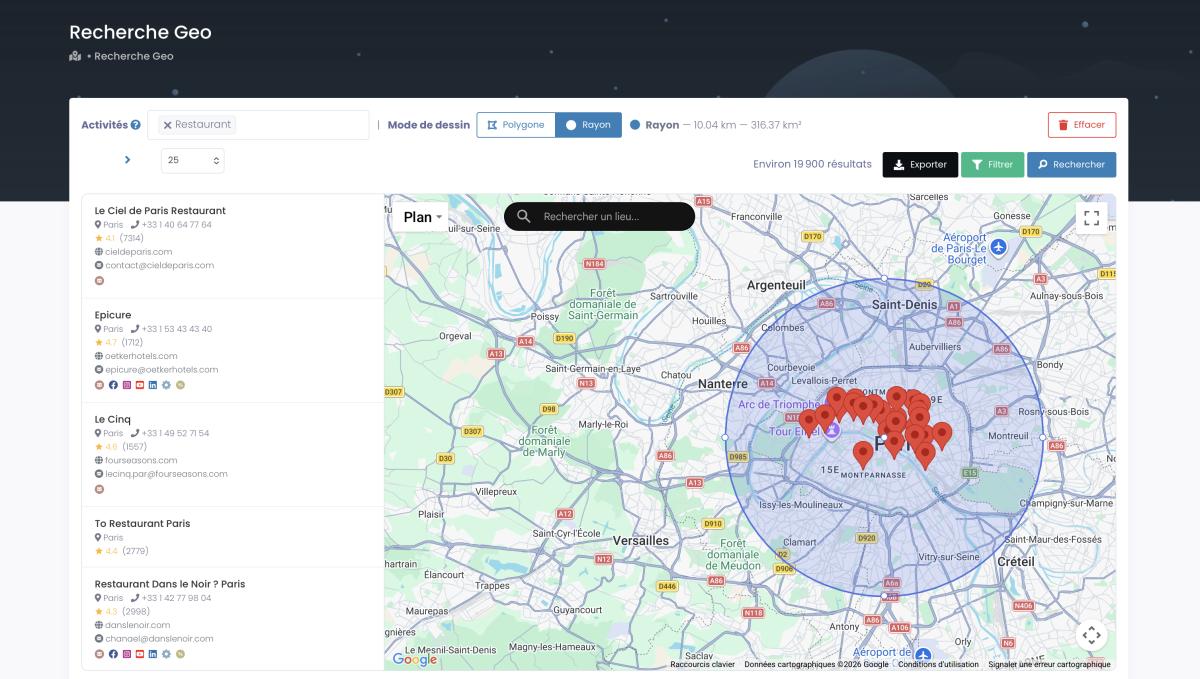
Step 1: Extract business data from Google Maps. Platforms like Scrap.io let you pull business contact data directly from Google Maps, emails, phone numbers, websites, social profiles, from businesses that publicly listed this information. You can scrape entire cities, states, or even countries. Two clicks. No code. (Scrap.io indexes 225M+ businesses across 195 countries, and the data is refreshed in real time on every single export, so no frozen files.) If you're weighing extraction tools, this Google Maps scraper comparison breaks down pay-per-row versus filtered-credit pricing.

Step 2: Filter by criteria. Don't just grab everything. Filter for businesses that actually have an email address, have a website, are in your target location, or match a specific rating range. Want agencies with bad reviews who might need your services? You can filter for that. Businesses without social media who might need a digital marketing agency? Done. And because Scrap.io applies filters before extraction, you only spend credits on contacts you can actually use. Zero waste.

Step 3: Validate emails. Before sending anything, run your list through an email validator. This kills bounce rates and protects your sender reputation. Non-negotiable step. (Not sure the email even exists on Maps? A LinkedIn email finder works for corporate contacts, but for local businesses that aren't on LinkedIn, Google Maps is the better source.)
Step 4: Import into your email automation tool. Export to CSV or Excel and import directly into Instantly, Lemlist, HubSpot, or whatever tool you picked. Scrap.io exports are compatible with any CRM or email platform.
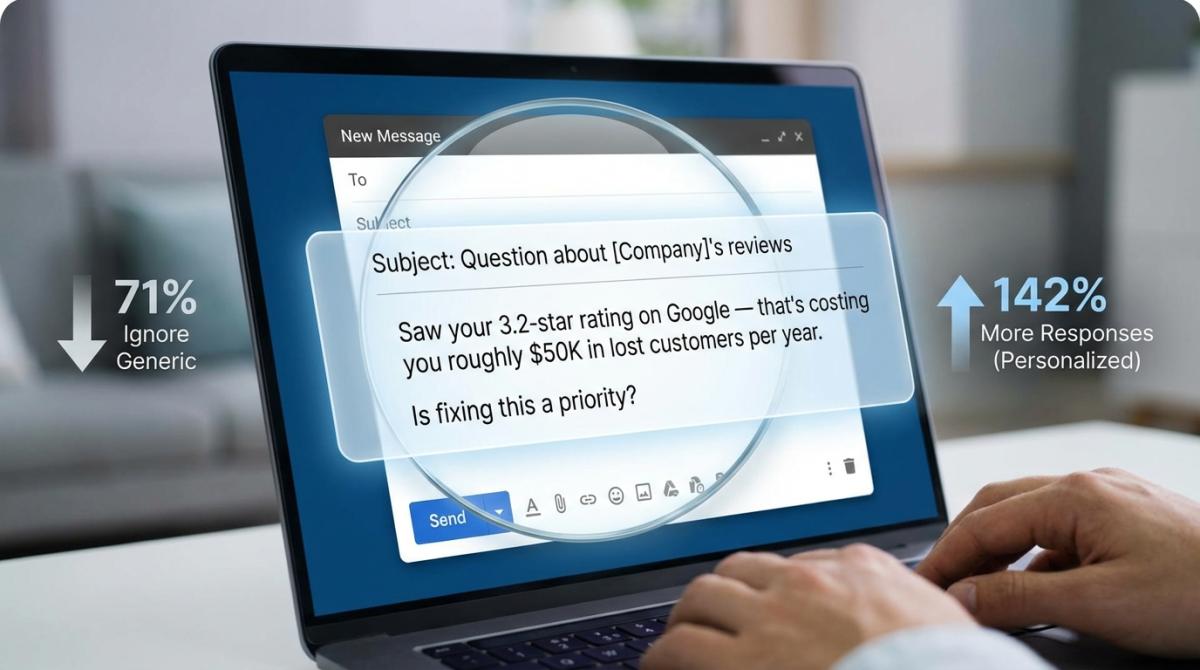
Step 5: Set up your automated sequence. Build a 4–7 email sequence. (More on why that specific number in the best practices section below.) Personalize using the business data you extracted, mention their city, their industry, even their Google rating if it makes sense.
Step 6: Track, iterate, scale. Monitor open rates, reply rates, and conversions. Double down on what works. Kill what doesn't. Then scale to new geographies or industries.
Want to see this running end-to-end on autopilot? Here's the exact no-code build with Make.com.
Video: Scrap.io + Make.com: Turn Google Maps into Business Leads on Autopilot
Captain Data documented this exact workflow on their blog: Google Maps extraction to Hunter.io enrichment to automated personalized email sequences. It works. It's proven. And most of your competitors aren't doing it yet. For a deeper build, here's how automated lead generation from Google Maps runs with Make.com.
Bad data kills good sequences. The best email automation in the world can't save a list of dead addresses. Extract verified business emails from Google Maps with Scrap.io: filtered before extraction, updated in real time, 225M+ businesses across 195 countries. Free 7-day trial, 100 leads included. That's enough to prove the concept before you commit a cent.
Real Results: B2B Email Automation Case Studies
Theory's great. Results are better. Here are real companies (real numbers) that used email automation to drive serious revenue.
Nimbflow × Leo Light Lighting. A Cambodian lighting manufacturer that had run on walk-ins and referrals for 20 years switched to a fully automated cold outreach system. The result, documented by Nimbflow: $310,000+ in new deals in Q1 2025, 350+ qualified leads, and reply rates of 10.9% and 14.1% across two campaigns, from 6,800 emails sent. That's a 162% jump in quarterly sales without hiring a single rep. Cold email automation generating six figures in a single quarter.
LeadFuze / Justin McGill. Justin built LeadFuze from zero to $30K per month in recurring revenue in 12 months using automated cold email. His formula? The "QVC Formula": Question, Value, CTA. Simple. Repeatable. Scalable.
Brenthaven × Seventh Sense. AI-powered send-time optimization to figure out exactly when each contact was most likely to open. Result: 122% increase in open rates and 211% improvement in click-through rates, per Seventh Sense. That's what happens when you let AI handle timing instead of guessing.
Draper James × Retention Science. AI-driven email personalization led to a 10x increase in first-time purchases and 30% increase in repeat purchases. Not just slapping someone's first name into a subject line. Real personalization.
Agricen × Seventh Sense × HubSpot. Automated send-time optimization to re-engage dormant email contacts. Results: 93% increase in email performance, 20% revenue increase, and 225% re-engagement of dormant contacts. People who hadn't opened an email in months suddenly started responding.
Want to run a similar campaign? Every one of these results started with a clean, targeted list. Start with 100 free leads from Google Maps on Scrap.io and build your first automated sequence. The data is the foundation. Everything else builds from there.
Email Automation Best Practices for 2026
Having the right tools and data matters. But execution is what separates the campaigns that print money from the ones that end up in spam folders. Here's what actually works right now.
And honestly, one stat reframes this whole section. Automated emails account for roughly 41% of all email-driven orders while making up only about 2% of total sends (Omnisend / Litmus State of Email 2026). Read that again. Two percent of your volume can drive four out of ten sales. That's the entire argument for automation in one line.
Personalize beyond first names. Merge tags and dynamic content are table stakes. Use business-specific data, their industry, location, company size, even their Google rating, to make emails feel like they were written specifically for that person. When you write a cold email that references something specific about their business, reply rates go through the roof.
Optimize send times with AI. Seventh Sense's case studies prove this works. Their AI analyzes each contact's engagement history and sends at the exact moment they're most likely to open. Brenthaven saw 122% better open rates from this one change. Worth knowing: Litmus found that advanced AI adopters are 75% more likely to see an ROI above 45:1. If your tool supports AI send-time optimization, turn it on. Today.
Use 4–7 email sequences. According to Woodpecker's data, sequences with 4 to 7 emails generate 3x more responses than single emails. Most people give up after one or two attempts. Don't be most people. Space them out. Change your angle each time. The fourth email might be the one that lands.
A/B test everything. Subject lines. Opening lines. CTAs. Send times. Days of the week. The companies seeing the best results aren't guessing. They're testing systematically and scaling what works.
Maintain list hygiene. Clean your lists regularly. Use an email validator before every campaign. Remove bounces immediately. High bounce rates destroy your sender reputation and push future emails straight to spam. This isn't optional. It's survival.
Match your cold email outreach strategies to your audience. A roofing company needs a completely different approach than a SaaS startup. Your messaging, sequence length, and follow-up cadence should all reflect who you're actually talking to.
Still getting ignored despite doing everything "right"? The problem is usually earlier in the funnel than you think. This one's worth 12 minutes.
Video: Why Your Google Maps Emails Don't Get Replies?
For tool recommendations beyond this guide, here's a breakdown of cold email tools that actually work in 2026. And if you want to understand the machinery underneath modern extraction, our AI data scraper guide covers where the data actually comes from.
Is Email Automation Legal? CAN-SPAM & GDPR Compliance
Short answer: yes, email automation is legal. But you need to follow the rules. And honestly? The rules aren't that complicated.
CAN-SPAM Act (US). Include a working unsubscribe link in every email and honor requests quickly. Use honest subject lines. Identify yourself clearly as the sender. Include your real physical business address. The FTC's compliance guide spells it all out, and note that each violation can cost up to $53,088, so this isn't the corner to cut.
GDPR (European contacts). If you're targeting anyone in the EU, you need a legitimate basis for contact, either consent or legitimate interest for B2B. Include right-to-erasure options. Be transparent about data usage. B2B cold outreach is allowed under the legitimate interest provision when done properly. The European Commission's data protection hub is the primary source if you want the actual text, not someone's blog summary.
The Scrap.io angle here. Since Scrap.io only collects information that businesses publicly posted on Google Maps and their own websites, the data is public business data: GDPR and CCPA compliant, and traceable back to its source. No sketchy data brokers. If a business listed their email on Google Maps, they made it public themselves. Using it for B2B outreach with proper opt-out compliance is perfectly legal.
Taking compliance seriously protects your business and builds trust. Being sloppy about it can cost you real money in fines, and your domain's reputation. Bref: don't be lazy about the legal stuff.
FAQ
Is there a way to automate emails?
Yes. Email automation uses software to send targeted messages automatically based on triggers, schedules, or user actions. You can start for free using Gmail filters and Google Sheets, or scale up with dedicated tools like HubSpot, Instantly.ai, or ActiveCampaign. The method you choose depends on your volume, budget, and whether you're doing marketing automation or cold outreach.
How do I set up automatic emails?
Pick a tool (Gmail + Apps Script for free, or a platform like Instantly or HubSpot for scale), connect your contact list, then build a trigger-based workflow: a new lead, a form submission, or a scheduled date kicks off a pre-written sequence. Add personalization tokens, set the spacing between emails, and turn it on. The software sends automatically from there.
Can I automate emails in Gmail?
Yes. Gmail supports automation three ways for free: filters combined with templates fire off pre-written replies automatically, Google Sheets plus Apps Script sends personalized emails from a spreadsheet, and Zapier connects Gmail to other apps for trigger-based sends. It's fine for light use, but for high-volume B2B sequences you'll hit sending limits fast and want a dedicated tool.
What is the best email automation tool?
Depends on your use case. HubSpot is great for all-in-one marketing. Mailchimp works well for small businesses. Instantly.ai is the go-to for cold email at scale. ActiveCampaign has 900+ automation recipes for advanced sequences. And n8n is perfect for technical users who want full control with open-source. Check the comparison table above for a detailed breakdown.
How much does email automation cost?
Anywhere from free to $800+ per month. Gmail and Google Sheets automation cost nothing. Dedicated tools like ActiveCampaign start at $15/mo. Enterprise solutions like HubSpot can run up to $800/mo. For lead data, platforms like Scrap.io start at around $49/mo for 10,000 verified contacts, way cheaper than traditional list providers charging $0.10 to $0.50 per contact.
How to send 1000 emails per day?
Volume isn't the goal. Landing in the inbox is. To send at that scale without torching your domain:
- Spread the volume across multiple sending accounts and domains (never blast 1,000 from one address).
- Warm up every new inbox for 2–3 weeks before scaling.
- Respect per-account daily sending limits, and ramp up gradually.
- Send to a validated, high-quality list so bounces stay near zero.
Deliverability beats raw volume. Every time.
Can I automate cold emails legally?
Yes, with CAN-SPAM compliance. Include an unsubscribe option in every email and honor those requests. Identify yourself clearly. Use honest subject lines. Include your physical address. For EU contacts, follow GDPR's legitimate interest provisions. Using publicly available business data from platforms like Scrap.io keeps you on solid legal ground.
Can AI automate my emails?
Yes, and it's where most of the gains are hiding now. AI handles subject line optimization, send-time prediction, and content personalization at a level manual work can't match. 64% of marketers already use it, and Litmus found advanced AI adopters are 75% more likely to hit an ROI above 45:1. Turn on whatever AI features your tool offers.
How to automate emails from a spreadsheet?
Two main approaches. Google Sheets + Apps Script lets you write a simple script that reads email addresses from your spreadsheet and sends personalized emails through Gmail. Or connect Google Sheets to an email tool via Zapier, no coding required. New row added, email gets sent automatically. Both work. Zapier's easier. Apps Script gives you more control.
Start Automating Today
Look. The data doesn't lie. $36–$45 ROI per dollar spent. 52% higher open rates. 332% higher click-through rates. Email automation isn't some nice-to-have anymore. In 2026, it's the difference between businesses that scale and businesses that stay stuck doing everything manually.
The companies winning right now aren't doing anything magical. They're combining quality contact data with smart automation and testing what works. Free Gmail tricks or sophisticated B2B sequences built on find email addresses from Google Maps data, doesn't matter, the principles never change. Get good data. Send relevant messages. Follow up consistently. Track everything.
Try Scrap.io free for 7 days, get 100 verified business leads from Google Maps and launch your first automated email campaign today. 225M+ businesses, 195 countries, filtered before extraction so you never waste a credit. Enough leads to test your sequences, measure results, and prove the concept works for your specific business.
Now stop reading and start automating. Your competitors already are.
Generate a list of restaurant with Scrap.io