

Picture a sales rep who just found the perfect target: a mid-size company in Ohio importing exactly the kind of product she sells into. She has the company name. She has the bill of lading. She has the HS code, the port, the shipment weight, the name of the vessel. What she does not have is a single email address to send a pitch to.
That gap, right there, is the dirty secret of almost every importer database on the market. They are brilliant at telling you who shipped what to whom. They are terrible at telling you how to actually reach that business.
So let's fix that. This is the 2026 guide to importer databases: what they are, how many US importers actually exist, the three very different types you can buy (most people confuse them), the honest free-versus-paid breakdown, and the seven tools worth knowing. And then the part nobody else covers, which is what to do when you have the importer but no way to contact them.
Table of Contents
- What Is an Importer Database?
- How Many Importers Are There in the US?
- The 3 Types of Importer Database (and What Each Is For)
- Free vs. Paid Importer Databases
- The 7 Best Importer Databases in 2026 (Compared)
- The Gap Every Importer Database Has: Contact Data
- How to Build a Contact-Ready Importer List with Scrap.io
- Is It Legal to Use an Importer Database for Outreach?
- FAQ
- Conclusion
What Is an Importer Database?
An importer database is a searchable collection of companies that bring goods into a country. Depending on where the data comes from, it can be built from customs records (bills of lading), official government trade statistics, or business directories, and it can include company names, shipment details, HS codes, and, in the best cases, verified contact information.
That last clause is doing a lot of work, and we'll come back to it.
Most people mean one specific thing when they say "importer database": a customs-data tool that reconstructs trade flows from shipping manifests. Think ImportGenius or Panjiva. But a US Census spreadsheet counting importers by state is also an importer database. So is a filtered list of import/export companies pulled from Google Maps with their emails attached. Same label, three completely different products. Pick the wrong one and you'll pay for data you literally cannot use.
How Many Importers Are There in the US?
Here's a number that surprises people. The United States had 239,231 identified importers in 2024, according to preliminary U.S. Census Bureau data. On the export side, there were 270,001 exporters. And roughly 97% of them are small and medium-sized businesses, not the mega-shippers you'd expect.
Sit with that for a second. Of those 239,231 importers, about 232,804 are SMEs, and they account for around 31% of total import value ($914.5 billion out of $2.9 trillion). Translation: the real US importer market is mostly small companies, not container-ship giants. So why do most importer databases surface only the big shippers? Because customs manifests reward volume. The little guys barely register.
Importers vs. exporters vs. the wider trade ecosystem
People search "importer database" and "exporter database" as if they're two separate universes. They're not, really. A huge share of trade companies do both, plus wholesaling and distribution on the side. If you only chase the ones tagged strictly "importer," you'll miss half the ecosystem. That's why a combined import export database (sometimes sold as an importer exporter database) usually beats a single-sided one, and why a narrow "us importers list" scraped from one category will always undercount the real market.
We pulled fresh counts from Google Maps to show what the contactable layer actually looks like in the US (data from Scrap.io, September 2026):
| Google Maps category (US) | Businesses listed | With a public email | Share with email |
|---|---|---|---|
| Importer | 4,841 | 2,191 | ~45% |
| Exporter | 6,006 | 2,629 | ~44% |
| Importer + Exporter + Wholesaler | 72,719 | n/a | n/a |
Roughly one importer in two publishes a working email right there on its website. That's a contact list the bill-of-lading databases simply don't hand you. Hold that thought, because it's the whole point of this article.
The 3 Types of Importer Database (and What Each Is For)
Not all importer databases answer the same question. This is the part that saves you money, so read it twice.
There are three families. Customs data, government data, and business-contact data. Each one is built for a different job, and mixing them up is how companies end up paying $500 a month for a tool that can't do the thing they actually needed.
| Type | Question it answers | Typical sources | Ready-to-use contacts? |
|---|---|---|---|
| 🚢 Customs / bill-of-lading | Who shipped what, to whom, on which vessel? | Customs manifests, bills of lading | 🔴 Rarely |
| 🏛️ Government & free | How big is trade, by product and country? | Census, USITC, national agencies | 🔴 No (aggregated) |
| ✉️ Business & contact | How do I actually reach this company? | Business directories, Google Maps + websites | 🟢 Yes |
Customs databases are the famous ones. They pull from shipping manifests, so you can see that Company X received 14 containers of ceramic tile from Vietnam last quarter. Incredible for competitor intelligence and sourcing. But the contact info? Usually a company name and maybe a mailing address. That's borderline useless for a cold email campaign.
Government sources like the Census Foreign Trade program and the USITC DataWeb are free and authoritative. But they're aggregated. You get "$914.5 billion in imports by SMEs," not "here are 5,000 companies and their emails." Great for a market-sizing slide. Useless for prospecting.
Then there's the business-contact layer, which is where the actual outreach lives. This is the same idea behind choosing Google Maps over LinkedIn for B2B lead gen: you go where the reachable data is. More on that below.
Free vs. Paid Importer Databases
Can you build an importer list for free? Short answer: partly.
The free lane is real, but it has a ceiling. Official government data won't cost you a cent, and some commercial tools offer a free search tier. Searches for "importer database free" and even "importer database free download" are everywhere, and the honest answer is that free gets you aggregated stats and import records by company, not a polished contact file. Here's the honest layout.
| Source | Cost | What you get | Contacts? |
|---|---|---|---|
| US Census / USITC DataWeb | Free | Aggregated trade stats by product/country | ❌ |
| ImportYeti (free tier) | Free search | Customs shipment records by company | ⚠️ Limited |
| Paid customs databases | $$$/mo | Deep shipment history, HS codes, ports | ⚠️ Patchy |
| Contact tools (e.g. Scrap.io) | Free trial, then paid | Companies + verified emails/phones | ✅ |
If you just need to know how big a market is, the free government tools win. Every time. Don't pay for that. But if the goal is to talk to those importers, free data leaves you stranded at the company-name stage. That's exactly the moment a tool like Scrap.io earns its keep, and its free 7-day trial (100 export credits included) means you can test the contact layer before spending anything. If you want the mechanics of pulling those addresses, we wrote a full guide on how to find emails on Google Maps.
The 7 Best Importer Databases in 2026 (Compared)
The most famous importer database isn't automatically the right one for cold outreach. It depends entirely on the job.
Here are seven worth knowing, ranked by what they're actually good at, not by ad budget.
| Tool | Type | Best for | Verified contacts? |
|---|---|---|---|
| TradeAtlas | Customs + AI | Global buyer discovery (230 countries) | ⚠️ |
| Descartes Datamyne | Customs | Deep US importer shipment history | ⚠️ |
| ImportGenius | Customs | Supplier & competitor tracking | 🔴 |
| ImportYeti | Customs (freemium) | Free shipment lookups | 🔴 |
| USITC DataWeb | Government | Free official trade statistics | 🔴 |
| Canadian Importers Database | Government | Free Canadian importer lookups | 🔴 |
| Scrap.io | Business & contact | Contact-ready import/export lists | 🟢 |
TradeAtlas is the volume king: it claims 29,567,739 importers, 21,027,625 exporters, and about 3.48 billion trade records across 230 countries, with an AI layer for finding "potential importers." Big, impressive, and priced accordingly. Their accuracy claims lean optimistic, so verify before you trust.
Descartes Datamyne markets itself as the world's largest daily-refreshed US importer database, with 15+ years of history and 190+ countries. It's genuinely strong on shipment-level detail. ImportGenius plays the same game with 3.3 billion+ shipment records and a Fortune 500 client roster. And ImportYeti is the freemium darling, letting you search 711 million+ customs shipment records for free, which is why so many e-commerce folks start there.
All four are customs tools. They tell you who imported what. None of them hand you a tidy column of decision-maker emails. That's not a knock, it's just what they're built for. Which brings us to the thing they all leave on the table.
Geography and niche change the picture too. A US importer database is a different animal from one built for Canada, and a food importer database or a vietnam importer database narrows things further still. Most of these customs tools let you slice import data by company name or pull US import data by HS code, which is exactly what makes them shine for sourcing, and exactly why they still leave the contact question unanswered.
The Gap Every Importer Database Has: Contact Data
You found the importer. Now what?
A company name. A shipment record. Maybe a mailing address from 2019. And no email to send anything to. This is the wall every customs-based importer database hits, and almost nobody talks about it out loud.
Customs data answers "who imports." It does not answer "how do I reach a human there." Those are two different problems, and buying a bill-of-lading subscription to solve the second one is like buying a phone book to send text messages. Wrong tool, honestly.
This is the layer Scrap.io fills. It pulls the import/export ecosystem straight from Google Maps, then crawls each linked website in real time to extract and classify the emails: the generic contact@ address, the sales@ inbox, and, when it exists, an individual email with a first and last name attached. Filtering happens before extraction, so you can ask for "only importers that have a public email" and pay for exactly those. Remember the table from earlier? That's 2,191 contactable importers instead of 4,841 rows of which half are dead ends.
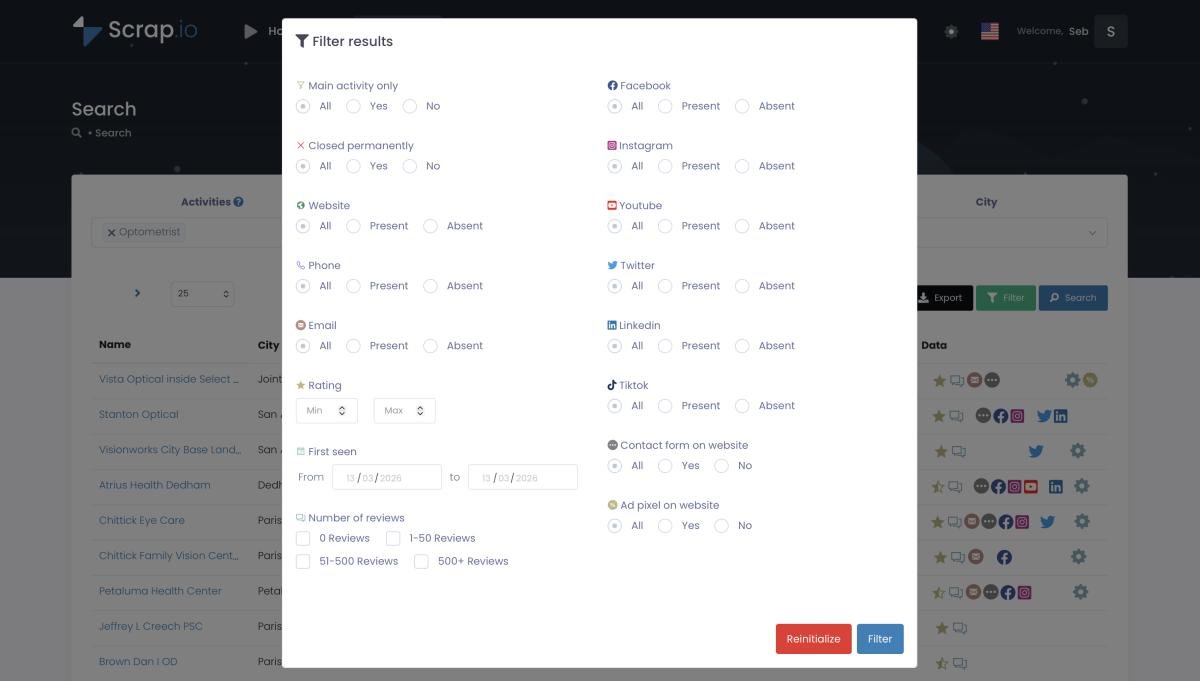
The video below shows the filtering play in action, using the "has email" filter to turn a raw category into a reachable list.
Video: Finding Clients Through Google Maps Filters
None of this replaces your customs data. It completes it. Use ImportGenius to see who's importing, then use the contact layer to actually email them. Plenty of teams run both. For the deeper how-to on the email side, here's the guide on extracting emails from Google Maps.
Curious how many US importers you could actually email? See exactly how many have a reachable address before you spend a thing, run a free count on Scrap.io. Counting is always free, in the app and the API.
How to Build a Contact-Ready Importer List with Scrap.io
Say you need 500 US importers with verified emails by Friday. Here's the actual workflow, and it takes minutes, not days.
Step 1: Pick your category and geography. Choose "importer," "exporter," or "import export company" from the 4,000+ Google Maps categories, then set your zone: a city, a state, or the entire United States in one go. No going market by market.
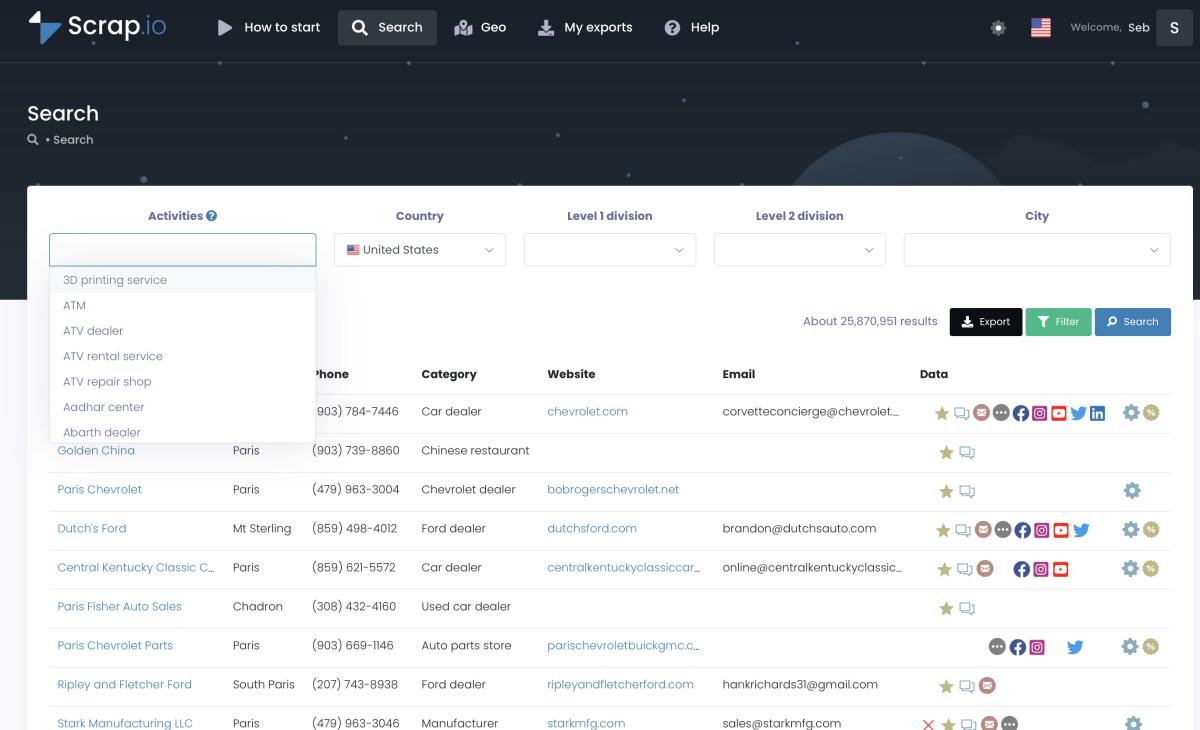
Step 2: Filter before you pay. Toggle "has email." Add "has phone," a review threshold, "has a website," whatever qualifies a lead for you. Every filter runs before a single credit is spent, so you never bankroll rows you'll delete later. This is the single biggest difference from a pay-per-record customs tool.
Step 3: Export. Download a CSV or Excel file with the company name, address, classified emails (up to five per business), phone numbers with type, and social profiles. Drop it straight into your cold email tool or CRM.
Country-level extraction is where this gets fun. The video below walks through pulling leads at national scale, which is exactly how you'd cover every "importer" and "exporter" listing in the US in a couple of clicks.
Video: How to Scrape Google Maps at the Country Level
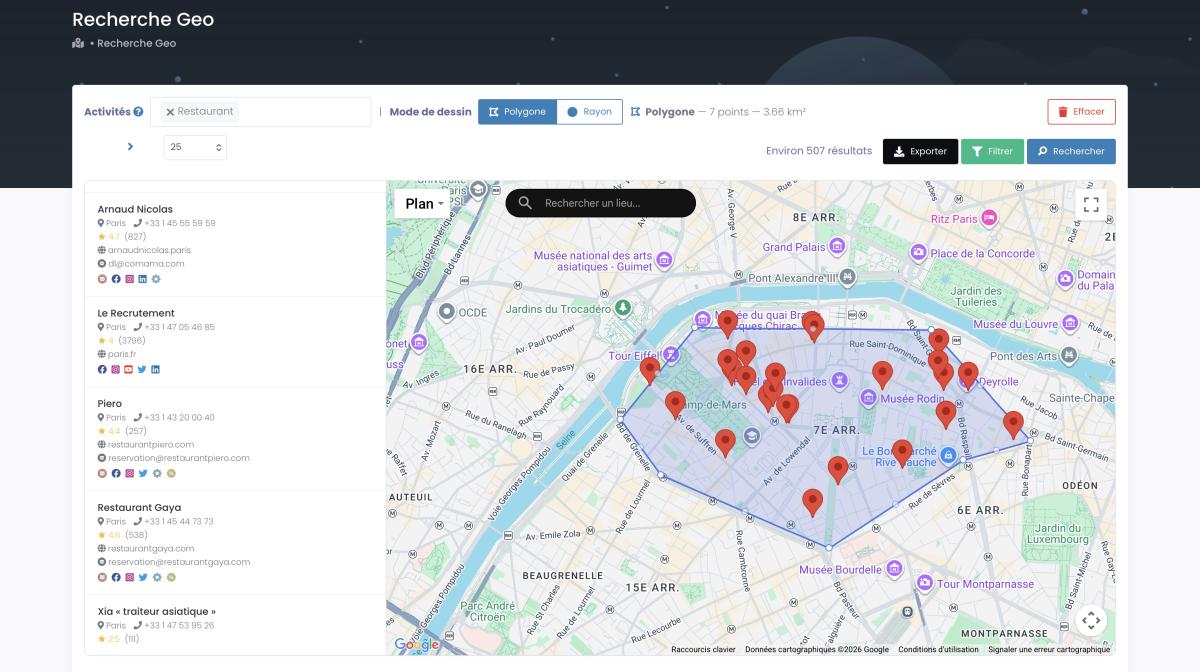
Need a tighter zone than a whole state? GeoSearch lets you draw a radius around a port or an industrial district, or sketch a custom polygon on the map by hand.

And because the extraction is real-time, the emails are pulled the moment you export, not dredged from a database that went stale in 2023. If you want to wire this into a repeatable pipeline, the walkthroughs on generating leads from Google Maps at scale and automating the whole thing with Make.com pick up where this leaves off, and the complete Google Maps scraping guide covers the extraction methods in depth.
Build your first importer list in minutes. Start your free 7-day trial, 50 searches and 100 export credits included, filter before you spend a credit, and export a contact-ready list across 195 countries and 225M+ businesses.
Is It Legal to Use an Importer Database for Outreach?
Let's address the elephant in the room: is collecting business contact data even allowed?
For publicly available business information used in B2B prospecting, yes, in the vast majority of cases. But there are rules, and they matter.
Under GDPR in Europe, a company's generic address or an info@ email generally isn't treated as personal data, and B2B outreach usually leans on the "legitimate interest" basis. A named individual's personal email is a stricter case, so be thoughtful there. Under CCPA in California, publicly available business information sits largely outside the law's scope. In both frameworks, every outreach email needs a working opt-out, and you honor removal requests. No exceptions.
Scrap.io only collects publicly available business data, is GDPR and CCPA compliant, and keeps every data point traceable to its source. That's the floor, not the ceiling. Respect people's inboxes and your reply rates will thank you.
FAQ
What is an importer database?
An importer database is a searchable collection of companies that import goods into a country, compiled from customs records (bills of lading), government trade statistics, or business directories. Depending on the source, it can include company names, shipment details, HS codes, and, in the best cases, verified contact information.
Is there a free importer database?
Yes, partly. Official sources like the U.S. Census Bureau's foreign-trade data and the USITC DataWeb are free but aggregated, with no company contacts. Tools like ImportYeti offer free searches on customs data. For contact-ready lists you'll usually need a paid tool, though Scrap.io offers a free 7-day trial with 100 export credits.
How many importers are there in the United States?
The US had 239,231 identified importers in 2024 (preliminary U.S. Census data), and about 97% are small and medium-sized businesses. On Google Maps, roughly 4,800 businesses are categorized specifically as "Importer," and close to half of them publish a public email.
What's the difference between customs data and a contact database?
Customs (bill-of-lading) data tells you who shipped what to whom. A contact database tells you how to reach a company: emails, phone numbers, decision-makers. Customs data is for sourcing and competitor intelligence; contact data is for outreach and sales. Most serious teams use both.
Is it legal to use an importer database for cold outreach?
Using publicly available business data for B2B prospecting is generally legal, but you must respect GDPR (EU) and CCPA (California). Scrap.io only collects publicly available business data, is GDPR and CCPA compliant, and every data point is traceable to its source. Always include a clear opt-out.
Conclusion
The customs databases will always win at one thing: showing you who imports what. That's their job, and TradeAtlas, Datamyne, ImportGenius and the rest do it well. But knowing a company imported ceramic tile is not the same as being able to email the person who buys it.
So think in layers. Government data to size the market for free. A customs database when you need shipment history. And a contact layer when you actually want to start a conversation. The importer database that closes deals is the one that hands you an email, not just a company name.
Stop buying data you can't contact. Try Scrap.io free for 7 days, 50 searches and 100 leads included, no commitment. Real-time emails and phones for import/export businesses across 195 countries, filtered before you spend a credit.
Generate a list of importer with Scrap.io