

Here's a scenario I see over and over. A local SEO agency migrates 1,200 client listings to a new platform. Halfway through, the whole thing blows up. Why? They'd stored everything using Place IDs — and a chunk of them had quietly gone stale. Nobody noticed for months. Weeks of billable hours, gone, because someone picked the wrong Google Maps identifier at the start.
Google Maps lists over 200 million businesses, and every single one carries three separate identifiers. Three! A Place ID, a CID, and a Google ID. They look different, they behave differently, and confusing them will cost you time. Guaranteed.
With 2.2 billion monthly active users on Google Maps and the platform holding roughly 67–70% of global map-app market share, these identifiers aren't some nerdy footnote. They're the backbone of review links, API integrations, and local SEO workflows. So let's sort this out.
Video: Using the Google Maps API and Google Reviews
- What Are Google Maps Identifiers?
- How to Find Your Google Place ID in 2026 (5 Methods)
- How to Find Your Google CID (Ludocid)
- Place ID vs CID vs Google ID: What's the Difference?
- Real-World Use Cases for Google Maps Identifiers
- Do Google Place IDs Change?
- How Scrap.io Simplifies Working with Google Maps Data
- FAQ
What Are Google Maps Identifiers? (Place ID, CID, Google ID)
OK so Google basically gave every location three different name tags. Overkill? Probably. But each one does a specific job, and once you get the logic, it clicks fast.
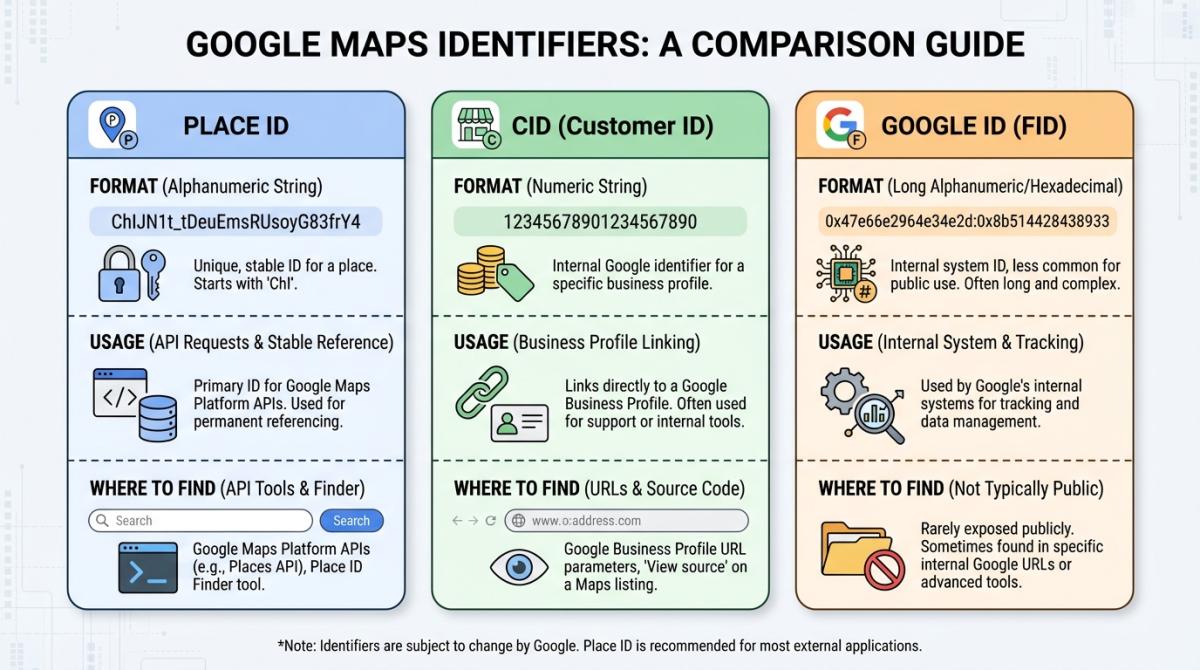
Google Place ID — a text string that always kicks off with "ChIJ" followed by what looks like keyboard smashing. Something like ChIJgUbEo8cfqokR5lP9_Wh_DaM. This is what the Places API, the Geocoding API, and the Routes API all speak. The problem? Google considers them disposable. After 12 months, a Place ID can just... stop working. No warning email. No deprecation notice. Just a NOT_FOUND response and you scrambling to figure out what happened. That's a proper google place id example, by the way — memorize the "ChIJ" prefix and you'll spot one anywhere.
CID (Ludocid) — a giant numeric string. We're talking numbers like 15402384604550917548. Ugly, sure. But this thing is permanent. Tied to a Google Business Profile and baked into Knowledge Panels and Maps URLs. Businesses can rebrand, relocate, change owners — the CID sticks. It's the cockroach of Google identifiers. (I mean that as a compliment.) If you've ever wondered what is a ludocid, that's it: same thing as the CID, just Google's internal pet name for it.
Google ID (Feature ID) — hexadecimal format with a colon jammed in the middle: 0x89aa1fc7a3c44681:0xa30d7f68fdfd53e6. This is Google's internal plumbing, sometimes surfaced as a KGMID or google feature id. Connects a location across Search, Maps, YouTube, everywhere. You'll find it buried in page source code. Unless you're doing something very specific with Google's Knowledge Graph, you can safely ignore this one.
| Place ID | CID (Ludocid) | Google ID (Feature ID) | |
|---|---|---|---|
| Format | Text (ChIJ...) | Numeric (e.g., 15402384604550917548) | Hexadecimal (0x...:0x...) |
| Permanence | 🟡 Can expire after 12 months | 🟢 Permanent | 🟢 Stable |
| Primary use | Places API, Geocoding, Routes | Knowledge Panel, Reviews URL | Internal Google cross-service |
| Where to find it | Place ID Finder, API response | Google Maps URL, page source | Page source code |
How to Find Your Google Place ID in 2026 (5 Methods)
I've ranked these from "my grandma could do it" to "you probably need to know what an API is." Whatever you call it — a place id finder, a place id lookup, or just "how to find a google place id" — one of these five will get you there.
Method 1: Google's Official Place ID Finder Tool
Google built a Place ID Finder demo page. Type a business name, click the map pin, copy the ID. Takes about 8 seconds.
The catch is brutal though — it only does one business at a time. Picture a freelancer manually looking up 200 Place IDs this way for a client project. That's an entire afternoon gone.
There are better ways. Keep reading.
Method 2: Inspect the Google Maps URL
Pull up any business on Google Maps. Check the URL bar. You're looking for the bit after !1s — that's usually the Place ID sitting right there in the google place id url. Or just Ctrl+F for "ChIJ" in the URL. If it's there, that's your google maps place id.
Works about 80% of the time. Google reshuffles their URL structure every now and then, so this isn't bulletproof. But for a quick grab? Perfectly fine.
Method 3: Use the Places API (New)
Heads up if you're a developer: the Places API (New) is the only game in town now. Google killed the ability to activate the Legacy API for new projects — that happened late 2025. If your code still references the old endpoints, you've got a ticking time bomb.
A Text Search or Place Details call returns the Place ID in the JSON response. Pricing runs $17 per 1,000 Place Details calls, $5 per 1,000 Geocoding lookups, per the official Google Maps Platform pricing. For a deeper cost analysis, I wrote up the full Google Maps API pricing breakdown — it adds up quicker than you'd expect.
Method 4: Chrome Extensions (GMB Everywhere, PlePer)
GMB Everywhere is the one I see local SEOs actually using day-to-day. Install it, open a Google Business Profile, and it throws up the Place ID, CID, Business Profile ID, and KG ID in a little overlay. One click.
PlePer gives you similar data with extra SEO metrics on top. Both free for basic use. Both occasionally break after Chrome updates. (Par for the course with extensions, honestly.)
Method 5: Find Place ID for Service Area Businesses (SABs)
SABs are annoying. They don't always show a clickable pin on the map, which means Methods 1 and 2 can fail. Whitespark wrote a great guide for this — the gist is you find the business in Google Search, right-click the "Write a review" button, inspect the HTML, and hunt for the "ChIJ" string in the code. It's always in there somewhere.
Tedious? Yes. But it works even when nothing else does.
And look — if you're only ever pulling one ID at a time, these five methods are all you need. Want the same five walked through with screenshots and edge cases? Here's our dedicated 5-method Google Place ID Finder guide. But if you're doing this for more than a handful of businesses, you're wasting time.
Doing this for more than a handful? Scrap.io pulls Place IDs for thousands of listings at once — SABs included — alongside 70+ other data points, straight from Google Maps. No API, no code. Start with 100 free leads.

How to Find Your Google CID (Ludocid)
CIDs hide in plain sight. You just need to know where to look.
Method A — the URL shortcut. Open a business on Google Maps. Sometimes (not always) the CID sits right in the URL as ?cid=15402384604550917548. If it's there, grab it. If not, move to Method B.
Method B — the developer tools trick. Google the business so the Knowledge Panel pops up on the right. Right-click on the panel, hit "Inspect," then Ctrl+F for "ludocid" in the Elements tab. The number next to it is your CID. Takes about 15 seconds once you've done it a couple times.
Converting between CID and Place ID. This comes up a lot. You've got a CID but need the Place ID for an API call, or vice versa. The hack is feeding the CID into Google's Places API Details endpoint using a ?cid= parameter — undocumented but functional. Or save yourself the trouble and use BrightLocal's free generator. Paste a business name, get the Place ID, CID, and a ready-made review link back. 60,000+ marketers use this tool — there's a reason. And if what you actually need is the address behind an ID rather than the reverse, our guide on how to reverse-lookup a Place ID into an address covers the place id to address route end to end.
Place ID vs CID vs Google ID: What's the Difference?
I keep hearing "they're basically the same thing" from people who should know better. They're not. Not even close. The whole place id vs cid vs google id debate boils down to one question: who needs what?
Developers — you need Place IDs. Full stop. The Google Maps API expects them for Place Details, Geocoding, and autocomplete queries. Store the CID alongside as your permanent backup key. When (not if) the Place ID expires, you can re-derive a fresh one from the CID.
Local SEO professionals — CIDs should be your primary identifier in any tracking spreadsheet or database. They don't expire. Ever. Place IDs are great for generating review links (https://search.google.com/local/writereview?placeid=YOUR_PLACE_ID), but don't build your entire client management system around them. I've seen agencies learn this the hard way. Twice.
Marketers and business owners — honestly? You probably don't need to memorize any of this. You need the output: review links, business data exports, competitor intel. Tools handle the identifier juggling for you. BrightLocal and Whitespark both generate review links from either identifier. And if you want bulk data, that's a different conversation (see the Scrap.io section below).
Don't just take my word for it, though. On Reddit's r/webdev, a developer summed up the CID-to-Place-ID headache better than any doc: "So far it feels like there's no official way to convert CID → Place ID, even though Google clearly links them internally." (Source: r/webdev.) That's the terrain reality. Google connects these identifiers on its side, then leaves you to figure out the bridge yourself.
Real-World Use Cases for Google Maps Identifiers
Generating Google Review Links
This is the #1 reason non-developers care about Place IDs. The format for a google review link from place id: https://search.google.com/local/writereview?placeid=YOUR_PLACE_ID. Send that URL to a customer, they land directly on the review form. No friction.
Here's a scenario I see constantly. A small HVAC company starts texting this link to customers right after every service call. Reviews go from a trickle to a steady stream — same team, same service quality. They just made it stupidly easy to leave a review. That's the whole trick.
WordPress Integration (Crocoblock / JetEngine)
Crocoblock's JetEngine plugin uses Place IDs to pull live Google Reviews into WordPress. You drop a Place ID into a custom field, and the plugin handles the rest — star ratings, review text, the whole thing. If you're building a business directory or a multi-location franchise site, this saves a ridiculous amount of development time.
API Integration for Apps & SaaS
Over 5 million apps and websites plug into Google Maps APIs. The Geocoding API translates addresses into Place IDs and coordinates — and runs the same trip in reverse, which is exactly the google place id to address workflow developers lean on. Place Details returns structured business data: name, hours, photos, reviews. If you're building anything location-aware, these identifiers are your entry point into Google's data.
The digital mapping market hit $34 billion in 2026 and is projected to reach $96 billion by 2035. So yeah — this isn't a niche concern.
Local SEO Auditing & Monitoring
Here's where CIDs earn their keep. Agencies tracking hundreds of client locations need an identifier that won't evaporate during a quarterly Google Maps update. On the Local Search Forum, SEO pros have shared cases where Google merged duplicate profiles and silently killed the associated Place IDs. The CIDs? Untouched.
Over 21,800 companies use Google Maps Platform for mapping and GIS. A lot of them learned the CID lesson the expensive way.
Bulk Business Data Extraction with Scrap.io
Everything above works fine at small scale. One business, five, maybe twenty. But a lead gen agency pulling data for 5,000 plumbers in California? A franchise group auditing 800 locations? Manual lookup is absurd at that volume.
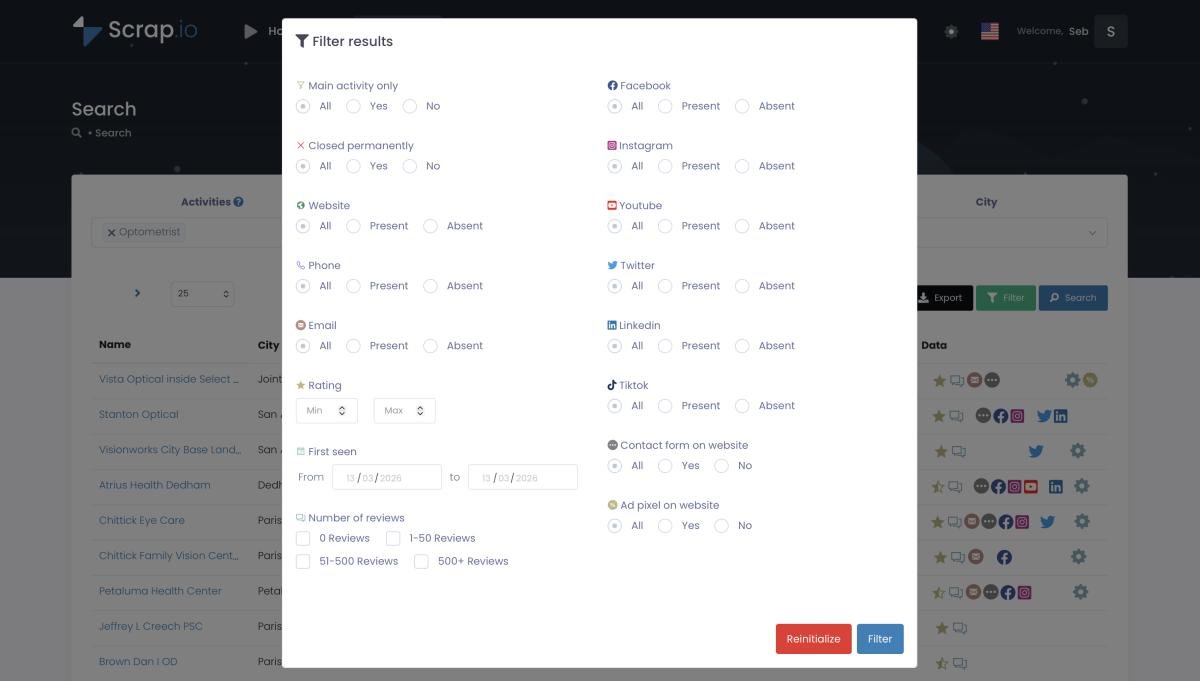
Scrap.io lets you extract Place IDs, CIDs, and 70+ data points for any business on Google Maps — with a free trial including 100 free leads. Type a keyword, set your filters, hit export.
Done in seconds, not days.
Type a keyword, filter, export — Place IDs, CIDs, emails and 70+ fields in seconds, across 195 countries and 4,000+ business categories. No API key, no scraping code. Start with 100 free leads.
For the full technical walkthrough on extraction methods, here's our Google Maps scraping complete guide.
Do Google Place IDs Change? (What You Need to Know in 2026)
Yes. Google Place IDs can become obsolete and return NOT_FOUND. This happens when a business closes, moves to a different address, or when Google merges duplicate listings. Google officially recommends refreshing any Place ID stored for longer than 12 months. So if you've been asking whether do place ids expire — there's your blunt answer.
And I want to be blunt about it, because I see people get burned constantly. A Place ID isn't a permanent key. It's a lease. You're borrowing it from Google's database, and Google reserves the right to invalidate it whenever they feel like reorganizing their data. Build infrastructure on Place IDs without a refresh mechanism, and you're building on sand.
Two more things worth flagging for 2026. First, the Places API (New) is now the only version — Legacy can't be activated anymore. Update your integrations if you haven't. Second, Google pushed updated EEA Terms of Service in July 2025, which changed caching rules for EU-based developers. Storing Place IDs server-side in Europe? Read the fine print.
So how do you actually refresh expired place id records? You re-query the API with what you've got, check the response, update your database. There's no magic button — it's just another call. The practical takeaway: store the CID as your permanent anchor. Treat the Place ID as a renewable token you re-fetch whenever you actually need it. That way, when Google pulls the rug (and they will), your database doesn't fall apart.
Fresh data on every export — no stale IDs sitting in a frozen file. Scrap.io re-extracts live from Google Maps each time you run a search, so the Place IDs you pull are valid the moment you export them. Try it with 100 free leads.
How Scrap.io Simplifies Working with Google Maps Data
I've spent half this article explaining manual ways to find identifiers. They all work.
They're also all painfully slow if you need data at any kind of scale.
Scrap.io does the whole thing differently. You search for businesses the same way you'd search Google Maps — keyword plus location. "Dentists in Chicago." "Coworking spaces in Lisbon." "Bakeries near me." Then you apply filters: minimum rating, has a website, has an email address, number of reviews, whatever matters for your use case. Hit export, and you get a CSV with Place IDs, CIDs, emails, phone numbers, social media links, websites, and 70+ other fields.
Video: Scrap.io - How to Start?
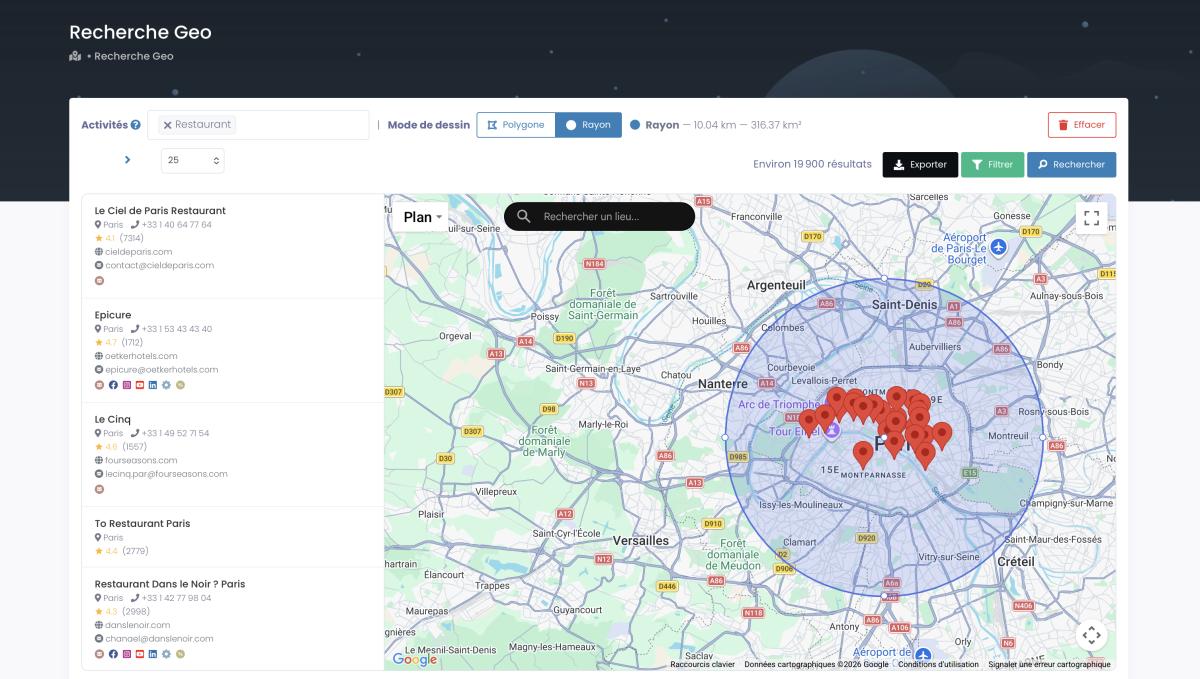
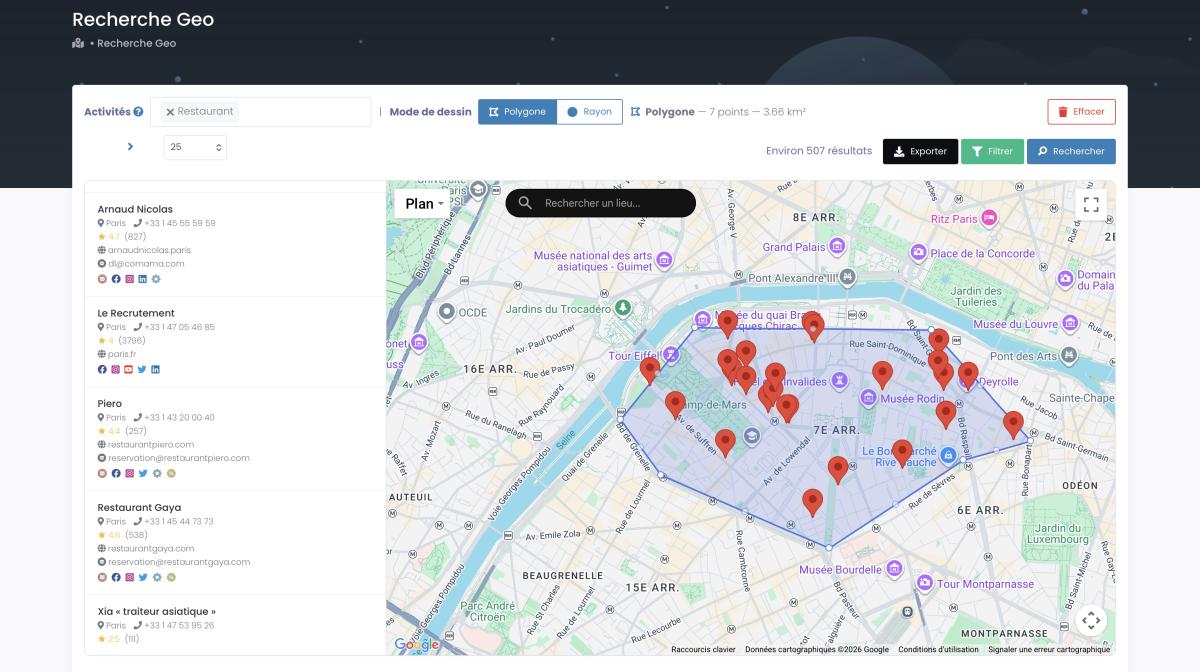
The geo-search is the part I actually find most useful. You draw a radius around a point — or an irregular polygon if your target area isn't a neat circle — and Scrap.io pulls every business inside it. Beats the hell out of searching neighborhood by neighborhood. It's also the one thing a plain Place ID Finder can't do: cover a zone that doesn't match any administrative boundary.
No API key needed. No Python. No browser extensions that randomly stop working after a Chrome update. Just a search bar and an export button.
Oh, and if your actual goal is building a contact list rather than geeking out over identifiers — we've got guides for that too: find emails on Google Maps and extract all businesses from Google Maps.
FAQ: Google Place ID, CID & Google ID
What is a Google Place ID?
It's a unique text identifier — starts with "ChIJ" — that pinpoints a specific location in Google's database. Works across the Places, Geocoding, and Routes APIs. Think of it like a library card number for a location. Except the library occasionally reassigns the number without telling you. (Google recommends refreshing them every 12 months.)
How do I find my Google Place ID?
Five options. The quick one: Google's official Place ID Finder tool. The manual ones: inspect the Maps URL or dig through page source code. The dev option: query the Places API (New). The lazy-but-smart option: install GMB Everywhere or use Scrap.io to grab it automatically. For service area businesses, Whitespark's HTML inspection method works when nothing else does.
What is the difference between Place ID and CID?
Format and lifespan. Place IDs are text strings used by Google's APIs — they can go stale after 12 months. CIDs are permanent numeric identifiers tied to a Google Business Profile. If you're storing data long-term, use the CID. If you're making an API call right now, you need the Place ID.
Do Google Place IDs expire?
Yep. A Place ID can return NOT_FOUND if the business closes, moves, or gets merged with a duplicate listing. Google's official stance: refresh any Place ID older than 12 months. Pair it with the CID and you've always got a fallback.
Can I convert a CID to a Place ID?
Sort of. There's no official, documented endpoint for it — a recurring gripe among developers. The working hack is to feed the CID into Google's Place Details request via a ?cid= parameter and read the Place ID off the response. BrightLocal's free generator does the same thing without code. For the full round-trip, including turning that Place ID back into an address, see our Place ID reverse lookup guide.
How do I create a Google review link with Place ID?
Plug your Place ID into this URL: https://search.google.com/local/writereview?placeid=YOUR_PLACE_ID. That's it. Customer clicks it, review form opens. If you don't want to do it manually, BrightLocal and Whitespark both have free generators that spit out the link for you.
Is a Google CID the same as a credit-card CID?
No — pure homonyms. A Google Maps CID (Ludocid) is a permanent numeric identifier for a business listing. The CID on the back of your credit card is a security code. Same three letters, completely unrelated worlds.
Wrapping Up
Three identifiers. Use Place IDs when you're talking to Google's APIs. Use CIDs when you need something permanent. Forget Google IDs exist unless you're knee-deep in Knowledge Graph work.
The mistake I see over and over — from solo freelancers to 50-person agencies — is building everything on Place IDs and then acting surprised when they break eight months later. Don't be that person. Store CIDs. Refresh Place IDs. Or just let a tool handle the whole mess.
Try Scrap.io free for 7 days — get 100 verified business leads with Place IDs, CIDs, emails, and contact data, extracted live from Google Maps in seconds. Start now.
Generate a list of restaurant with Scrap.io