


$3,200. That's what a medical equipment rep paid for a nursing home email list last year. From a "reputable" provider, no less. Out of 8,000 contacts, 2,400 bounced immediately. Another 1,500 went to people who hadn't worked at those facilities in months. His sender reputation? Torched. Took him three weeks just to claw back deliverability.
I bring this up because it happens constantly — and it's almost always preventable.
Scrap.io's platform indexes 22,204 retirement homes across the US right now. Not an estimate. Not a projection from 2019. Actual live listings. The oldest baby boomers turn 80 this year, and senior housing occupancy just posted its 20th consecutive quarter of growth — 89.9% nationwide in Q2 2026 (NIC MAP via Seniors Housing Business, July 2026). The money is there. The demand is there.
The problem? Most companies trying to sell into this market are using contact data that's already half-dead by the time they hit "send." They're emailing administrators who retired, sending to facilities that changed ownership, targeting nursing homes with generic info@ addresses that nobody checks. I've talked to B2B teams who spent $5,000 on a list and couldn't book a single meeting. The data wasn't wrong — it was just six months old, which in senior care might as well be six years.
This guide covers how to find retirement home email lists that actually work — where to get them, what they should cost, how to avoid the garbage, and what the compliance landscape looks like in 2026. I'll be blunt about what's worth your money and what isn't.
Table of Contents
- What is a Retirement Home Email List?
- Why Target Senior Care Facilities?
- Types of Senior Care Email Lists
- Market Size and Opportunity
- Who Sells to Senior Care Facilities? (B2B Use Cases)
- Building vs. Buying Contact Lists
- How to Choose the Best Provider
- What to Look for in Quality Lists
- Email Marketing That Actually Works
- Legal Stuff You Need to Know
- How to Maximize Your ROI
- Top States for Retirement Home Leads in 2026
- FAQ
What is a Retirement Home Email List?
A retirement home email list is a collection of contact details — emails, phone numbers, names, job titles, facility addresses — for people who work at and manage senior care facilities. The kind of database you'd use to reach nursing home administrators, directors of nursing, purchasing managers, and other decision-makers.
Simple enough concept. But the execution is where everyone trips up.
The Facilities You'll Be Targeting
Nursing homes are the medical heavy-hitters. 24/7 skilled nursing care, strict regulatory oversight, big equipment budgets. About 15,600 of them operate in the US right now (The Senior List, Nursing Home Statistics 2026).
Assisted living communities — roughly 30,600 nationwide — cater to residents who want to stay semi-independent but need daily support (The Senior List, Senior Living Industry Statistics 2026). This segment is growing faster than nursing homes. Families prefer it. So do most residents, honestly.
Then you've got memory care centers (Alzheimer's, dementia — highly specialized, less vendor competition) and retirement communities (campus-style, multiple care levels, sometimes hundreds of units). Memory care is a smaller market, but if your product fits, a targeted nursing home mailing list filtered for those facilities can be incredibly productive.
How many nursing homes are there in the US?
There are roughly 15,600 skilled nursing facilities and 30,600+ assisted living communities operating in the United States. Scrap.io's live Google Maps index currently returns 22,204 retirement homes nationwide — the subset with an active, publicly listed business profile you can actually contact today.
Why These Lists Matter
Retirement home administrators don't browse vendor websites. Ever. They're drowning in state inspections, family complaints, HR fires, and regulatory paperwork. You have to reach them where they are — and email is still the most reliable channel for B2B contact in senior care. A good retirement home email list puts you in front of them right when they need a solution. A bad one wastes your time, your budget, and your domain reputation.
And there's a timing angle that most salespeople underestimate. Senior care facilities make purchasing decisions on cycles — often triggered by regulatory changes, expansion announcements, or budget renewals in Q4. If you have fresh data and reach the right person right after a failed state inspection or a new CMS mandate, you're solving a problem they have today. That's fundamentally different from cold outreach to someone who has no immediate pain.
Why Target Senior Care Facilities?
There are 61.2 million Americans aged 65 and over, and that group grew 3.1% in a single year while the under-18 population actually shrank (US Census Bureau, June 2025). The Administration for Community Living projects about 80 million seniors by 2040 (ACL, Projected Future Growth of the Older Population).
And here's the part that makes this market especially attractive for B2B right now: occupancy hit 89.9% in Q2 2026 — the 20th consecutive quarter of increases. Fifteen of the 31 primary markets NIC MAP tracks are now at or above 90%, led by Boston (93.3%), San Francisco (92.7%) and Baltimore (91.8%). Meanwhile fewer than 16,000 senior living units were under construction nationwide (NIC MAP, Q2 2026). Facilities are full. New supply isn't coming. They're spending.
Think about what that means for vendors. When a 150-bed facility is running at 90% capacity with a two-year waiting list, the administrator isn't cutting budgets — they're looking for ways to handle more residents with the staff they have. Technology that saves nursing hours. Equipment that improves throughput. Software that automates compliance reporting. The buying environment right now is as favorable as it's been in a decade.
The DIY List-Building Trap
Every sales team thinks they can build a retirement home contact list in-house. I've watched it play out a dozen times. SDR spends three months Googling nursing home addresses, copying email addresses off About pages, plugging everything into a spreadsheet. They end up with 1,200 contacts — half of them generic info@ addresses — and by the time they "finish," a third of the administrators have already changed jobs.
(The real cost? $8,000-$10,000 in labor. For data that's rotting while they collect it.)
If you want the methodical version of this — the one that doesn't end in a dead spreadsheet — we broke it down step by step in our guide on how to build a cold email list.
Decision Makers in Senior Care
Administrators and CEOs sign off on capital expenditures. Directors of Nursing drive clinical purchasing — equipment, care tech, software. Facility managers handle building operations — maintenance, food service, supplies. Purchasing managers run the day-to-day vendor relationships.
One stat that should scare anyone using old data: 40% of nursing home administrators leave their position every year (The Senior List, 2026). A list from January? By July, nearly a fifth of the contacts are gone. By December, you're emailing into a void.
Deal Sizes Worth Chasing
These aren't $29/month SaaS deals. Senior living software contracts run into six figures. Medical equipment orders are massive. Compliance consulting engagements span years. One chain operator with 15 facilities? That's potentially a deal that carries your entire annual quota.
Which is exactly why signal-based selling pays off here more than in almost any other vertical. A facility that just updated its Google Maps profile, added a category, or announced an expansion is telling you something. Most vendors aren't listening.
Types of Senior Care Email Lists
The type of senior care email list you need depends entirely on what you sell and who you sell it to. Not complicated, but a lot of people get it wrong by going too broad.
By Geography
Local lists — if you're a regional staffing agency in Phoenix, spending money on contacts in Maine is just lighting cash on fire. State-level lists work well for companies navigating state-specific healthcare regulations (and in senior care, regulations vary dramatically between states — what flies in Texas might violate a rule in California). National lists are for SaaS companies, large distributors, anybody who ships or deploys remotely.
Video: How to Scrape Local Leads at the Country Level
Some providers, like Scrap.io's Google Maps extraction, let you get specific down to ZIP code, metro area, or radius around a specific address. That granularity matters more than people think. A home health equipment supplier that delivers within a 100-mile radius of Charlotte doesn't need a list of every nursing home in North Carolina — they need the ones within their delivery zone. Draw the circle, extract what's inside it, done.

The tighter your geographic targeting, the higher your conversion rate. Boring advice. Still true.
By Facility Type
Nursing home lists are the highest-value per contact — big equipment budgets, lots of compliance spend. Assisted living lists have the fastest growth — new communities popping up quarterly. Memory care lists are small but incredibly targeted; fewer vendors are competing for those accounts.
By Decision Maker
You can slice lists by C-suite, department directors, purchasing, or IT. A real-world tip from people who do this well: 500 verified nursing home decision maker contacts outperform 5,000 untargeted records every single time. Every. Single. Time.
The mistake I see most often? Targeting too broadly. Someone selling clinical software emails every single person at a facility — the administrator, the maintenance guy, the bookkeeper. Half those people couldn't approve a software purchase even if they wanted to. The other half just get annoyed. Better to have fewer contacts that are precisely the right people than a massive list of everyone-who-ever-worked-at-a-nursing-home.
Market Size and Opportunity
Numbers. Sourced. Here's what the senior care market looks like right now:
| Metric | 2026 Data | Source |
|---|---|---|
| US Senior Living Market Value | $943.9B (2025) → $1.33T by 2033 | Grand View Research |
| Total Retirement Homes (US) | 22,204 | Scrap.io platform data, July 2026 |
| …with a website | 16,226 (73%) | Scrap.io platform data, July 2026 |
| …with a detectable email | 8,541 (38%) | Scrap.io platform data, July 2026 |
| Assisted Living Communities | 30,600+ | The Senior List |
| Nursing Homes | 15,600 | The Senior List |
| Americans 65+ | 61.2 million | Census Bureau, Vintage 2024 |
| Projected Seniors by 2040 | ~80 million | Administration for Community Living |
| Occupancy Rate (Q2 2026) | 89.9% — 20th straight quarterly rise | NIC MAP |
| Markets at or above 90% | 15 of 31 primary markets | NIC MAP |
| Units Under Construction | Fewer than 16,000 | NIC MAP |
| Administrator Turnover | 40% annually | The Senior List |
Look at that construction number. Fewer than 16,000 units under construction nationwide, while occupancy climbs for the twentieth quarter in a row (NIC MAP). Supply is crawling. So existing facilities are under pressure to do more — more technology adoption, better equipment, upgraded software. That's where B2B vendors come in.
The broader market keeps climbing too: $943.9 billion in 2025, projected to reach $1.33 trillion by 2033 (Grand View Research, U.S. Senior Living Market Report).
Oh, and Welltower acquired Amica Senior Lifestyles for $3.2 billion (Mordor Intelligence, United States Senior Living Market). Institutional money is flooding into this sector.
Expect Long Sales Cycles
Seventy days to close an assisted living deal. A hundred and twenty for independent living. About 25 touchpoints before someone commits, and nearly half of buyers research for 2+ years before they even sign a contract. If your contact data expires before your sales cycle ends, you're dead in the water.
I've seen companies get discouraged around week 6 and stop following up. Meanwhile, the prospect was finally getting budget approval. The winners in senior care B2B are the ones who understand that month 3 is when the real conversations start — not when you give up. Your email list, your CRM hygiene, your follow-up sequences... all of it needs to be built for that reality.
Who Sells to Senior Care Facilities? (B2B Use Cases)
If you're reading this article, you're probably in one of these buckets. Maybe adjacent. Either way, this is who needs senior care leads:
| B2B Category | Example Companies | Why They Need These Lists |
|---|---|---|
| Senior Living Software | PointClickCare, ECP, MatrixCare | EHR, care management, compliance platforms |
| Medical Equipment | Hill-Rom, Stryker, regional distributors | Beds, mobility aids, diagnostics, safety |
| Staffing Agencies | Regional healthcare staffing firms | Chronic understaffing = perpetual demand |
| Food Service | Sysco, regional providers, dietary software | 3 meals/day × hundreds of residents = big contracts |
| Compliance Consulting | State survey prep, HIPAA consultants | Regulatory pressure never stops |
| Telehealth / Remote Monitoring | Digital health startups | Post-COVID adoption wave still building |
ECP — to pick just one example — connects to 6,500+ assisted living communities. Cedarhurst Senior Living rolled ECP out across 58 communities in 9 states (ECP case study). That's how chain decisions work — one contract, dozens of locations activated simultaneously.
Or take the staffing angle. Nursing homes have been hemorrhaging staff since 2020. Every single one of those 15,600 facilities is either actively using a staffing agency or thinking about it. If you're in healthcare staffing, a filtered nursing home email list segmented by state, facility size, and online review rating (low reviews often correlate with staffing problems) is basically a pipeline on a spreadsheet.
Same logic applies to food service providers, medical supply distributors, telehealth platforms, facility management companies, and compliance consultants. Each of these categories sells to the same buildings — they just enter through different doors. The data you need is the same. The messaging is what changes.
Scrap.io indexes 22,204 retirement homes across the US — pulled live from Google Maps, not from a file that's been sitting in a warehouse since 2024. Filter by state, review rating, email presence or website presence before you spend a single credit. Free 7-day trial, 100 leads included.
Building vs. Buying Contact Lists
Three options for retirement home contacts. I'll be honest about the tradeoffs for each.
Building Your Own — The Slow Bleed
A 4-person sales team I know spent an entire quarter on this. Manual Google searches, copying data off facility websites, plugging it into HubSpot line by line. End result: 3,000 contacts. Not bad, right?
Six months later, a third of those contacts had moved on to different facilities. The remaining data was about as reliable as a weather forecast from last month. Time invested: 300+ hours. Money spent: north of $8,000. For a nursing home email list with a shelf life measured in weeks.
Traditional Providers — The Middleman Tax
Traditional list brokers charge $0.10 to $0.50 per contact. They'll promise "regular updates." What that actually means varies wildly — could be monthly, could be twice a year. You won't know until the bounce rates tell you.
Meanwhile, your competitors buy the exact same database. That's the dirty secret of traditional list providers — exclusivity is almost never part of the deal. The administrator at a senior living community in Tampa might receive your email, your competitor's email, and three other vendors' emails, all sourced from the same broker, all landing in the same week. Not exactly a differentiated approach.
And it's not just me saying this. Marketing operations people have been warning each other about purchased lists for years. In one Marketo community thread about a 150,000-contact purchased file, one practitioner's reply was blunt: "DO NOT send to this list… even 3000 emails can burn a hole in your rep because I bet it has a bunch of spam traps in there. I suppose you could use another email tool, but your sending domain name is also blacklisted, not just your IP." Another added: "Always be very cautious about purchased list data… Not only can you negatively [affect] your reputation, but others as well."
That thread is a decade old. The advice hasn't aged a day.
And with 40% annual turnover among administrators, even a few months of data decay makes a real dent in deliverability. The contacts that bounce hurt you twice — once because you paid for data that didn't work, and again because your sender reputation took a hit.
Live Data Scraping with Scrap.io — The Price-Performance Winner
This is the approach that changed the math. Instead of buying a static snapshot of data, you pull contacts directly from Google Maps and business websites — sources that facilities themselves keep current.
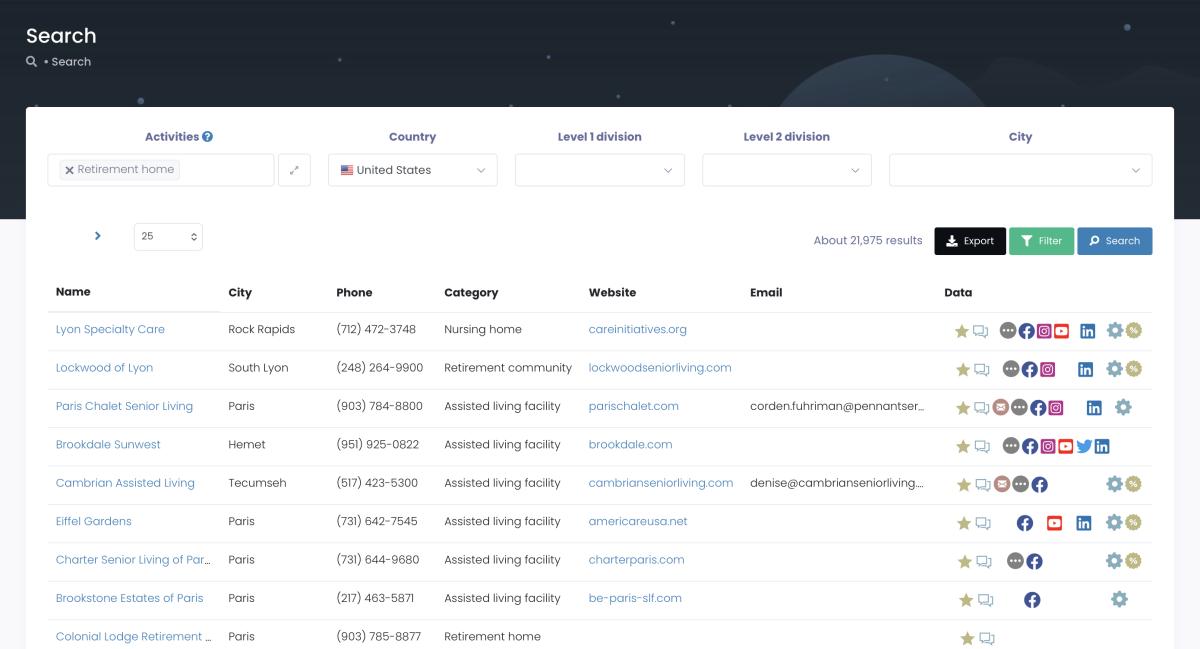
When a retirement home updates their Google listing (new admin, new phone number, new email), that data is available immediately. Not in six months. Now.
Here's the number nobody else in this search result can publish. Of those 22,204 US retirement homes in Scrap.io's index right now: 16,226 have a website (73%), and 8,541 have at least one detectable email address on that site (38%).
Read that second number again. Roughly 8,500 senior care facilities are reachable by email today — no broker, no waiting, no $3,200 invoice. And the ~13,600 that aren't? If you're a web agency or a digital services provider, that's your prospect list. Same extraction, opposite filter.
Want assisted living facilities in Texas with bad Google reviews? (Could be reputation management clients — here's our full playbook on finding companies with negative reviews.) Nursing homes with emails but no website? (Web design prospects.) Scrap.io's filters make that possible.
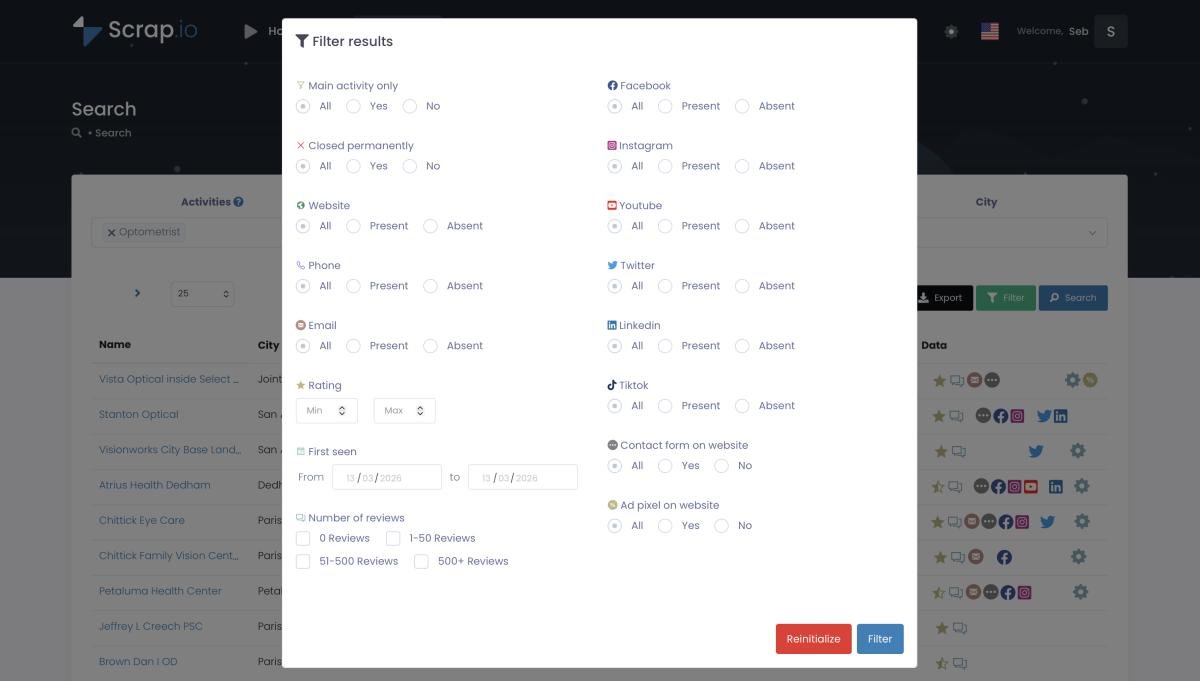
Video: Finding Clients Through Google Maps Filters
And this is the part that actually separates Scrap.io from a broker, so I'll say it plainly: the filters run before extraction, which means before any credit is consumed. You don't buy 10,000 rows and then discover 6,000 have no email. You tell the platform "email present, Texas, rating under 4 stars," and you only pay for what matches.
Cost: about $0.005 per contact. So 10,000 leads run roughly $50 on the Basic plan ($35/month for 10,000 credits). Compare that to $1,000-$5,000 from traditional brokers for the same volume. Same type of data — hospital email lists, nursing home contacts, senior care databases — at a fraction of the price.
One detail that makes the math even better: a credit is counted once per establishment per rolling 30-day period. Re-export the same facility next week to refresh its data? Doesn't cost you again.
And here's what really matters: GDPR and CCPA compliant by default. You're only accessing data that businesses chose to make public. No grey areas about consent or data origin.
A realistic use case based on typical Scrap.io patterns: a medical equipment company pulls 2,500 Florida nursing homes filtered by email presence and review ratings under 4 stars. They pitch compliance upgrade services. Twelve deals in month one. Data cost: $50 plus time. (Your results will vary depending on your product, your messaging, your follow-up. But the data cost is real.)
The hybrid approach works too, by the way. Start with live-scraped data for your primary target list — the high-value, tightly-filtered contacts. Then supplement with a traditional provider if you need broader coverage for less targeted campaigns. Most serious B2B teams end up doing some version of this.
How to Choose the Best Provider
Bad data doesn't just fail quietly. It actively wrecks your sender reputation, tanks your deliverability, and trains email providers to treat your domain like spam. Picking the wrong retirement home email list provider has downstream consequences most people don't think about.
Red Flags
"100% accuracy guaranteed." Run. Nobody in any industry has that. The senior care market changes too fast — facilities close, merge, rename, swap administrators. The ones promising perfection are the ones most likely to disappear when you ask for a refund.
No sample data. They won't show you what you're buying before you pay. Why? Think about it. If the data were good, showing a sample would help them close the sale. The fact that they won't show it tells you everything.
Suspiciously cheap with no explanation of sourcing. There's a cost floor for quality data. Below it, you're getting recycled junk from years ago — data that's been resold so many times it's essentially public at this point. And if it's that cheap and that available, what competitive advantage does it give you? None.
Vague about methodology. "Our proprietary data collection process ensures the highest quality." What does that mean, exactly? Good providers tell you where the data comes from. Evasion on sourcing is a red flag that should end the conversation.
Questions to Ask
How often do you update? (Monthly = good. Quarterly = bare minimum. "Regularly" = red flag.)
What's the accuracy rate, and what happens when data bounces? (Target 85-95% with a replacement policy.)
Can I filter by location, facility type, size, and job title? (If not, you're doing the provider's job for them.)
How much do nursing home email lists cost?
Honest numbers, side by side:
| Method | Cost/Contact | Freshness | Accuracy | Customization |
|---|---|---|---|---|
| Traditional Providers | $0.10-$0.50 | Weeks to months old | 70-85% | Limited |
| Scrap.io Live Scraping | ~$0.005 | Extracted at request time | 90%+ (public data) | Advanced filters |
| DIY Research | $1-$2 (labor) | Current but slow | Inconsistent | Full control |
See the Skrapp.io vs Scrap.io comparison for a more detailed breakdown of how different tools handle email extraction.
What to Look for in Quality Lists
Some retirement home email lists print money. Others print frustration. The difference comes down to three things.
Freshness
Traditional lists start decaying the second they're compiled. Administrators leave — 40% per year, remember? Facilities change hands. Email servers get migrated. Phone numbers get reassigned to different departments or disconnected entirely.
The gold standard is real-time extraction from sources that facilities maintain themselves — Google Maps profiles, their own websites. When an administrator updates their facility's Google listing (which they do constantly for marketing purposes), that change is reflected immediately in a live scrape. Traditional databases might not catch that update for months.
If you want a deeper dive on keeping contacts clean after you've got them, Scrap.io's email validation guide is worth reading. Validation after extraction is a separate step most people skip — and it's the step that saves your sender reputation.
Completeness
Email addresses by themselves don't cut it. A proper senior care email list needs names and titles (personalization), phone numbers (follow-up), facility details (segmentation), and social profiles (multi-channel). More data points per contact = more levers to pull. Email opens the door. Phone closes the deal. LinkedIn keeps you warm in between.
Filtering Granularity
The best assisted living facility databases let you get specific: geography, facility type, ownership (chain vs. independent vs. nonprofit), and decision-maker role. Specificity beats breadth. Always has, always will. 500 perfect prospects > 5,000 random ones.
Email Marketing That Actually Works
Selling to retirement home administrators is nothing like selling SaaS to startup founders. These are people managing life-and-death operations with skeleton staffing, impossible regulations, and families calling every five minutes. They don't have time for your pitch. They have time for your help.
Subject Lines
What works: "[State] regulation update — impact on memory care facilities." Or: "Cut pharmacy costs 18% — how a 150-bed facility did it." Specific. Relevant. No exclamation marks. No "revolutionary."
What bombs: literally anything with the word "transform" or more than one exclamation mark. Administrators can smell vendor hype from three time zones away.
Real Personalization
"Hi Sarah" is a mail merge, not personalization. This is personalization:
"Sarah — running a 150-bed facility in south Florida probably means the new CMS staffing mandates are keeping you up at night. Three facilities in your area found a way around the overtime crunch. Here's what they did."
That email gets read. "Hi Sarah, I'd love to schedule a quick call about your facility's needs" gets deleted in under a second.
When to Hit Send
Early morning — 6 to 8 AM — before the daily chaos kicks in. Or evenings — 7 to 9 PM — when paperwork happens. Tuesday through Thursday beats Monday and Friday.
Content Strategy
80% educational, 20% commercial. That ratio matters. Regulatory updates, industry benchmarks, staff retention tips, technology case studies — the stuff that helps administrators do their jobs. Every email should be useful even if the reader never buys from you. Trust compounds. Sales follow.
What kind of educational content actually gets engagement? The stuff that's specific to their world. Not "5 tips for better healthcare management" — that's generic fluff. More like: "New CMS staffing requirements for memory care: what changed, what it means for your facility, and how three 120-bed communities in the Midwest are handling it." Reference real regulations. Real numbers. Real geography. Administrators can tell in about two sentences whether you actually understand senior care or you're just slinging templates.
One more thing on content: don't underestimate the power of vendor-neutral resources. Compliance checklists, state-by-state regulation guides, ROI calculators for common purchases — these tools earn trust without asking for anything in return. The administrator who downloads your CMS audit checklist in March might not buy from you until October. But when they're ready to buy, guess who they call first?
Follow-Up Cadence
Week 2 — different angle, same problem. Week 4 — educational content or data. Week 8 — case study. Week 12 — specific offer. Scrap.io's warm outreach course goes deep on sequence design if you want more detail.
Software, medical equipment, staffing — whatever you sell into senior care, Scrap.io gives you contacts filtered by location, review rating and online presence, extracted live at the moment you export. 225,676,406 businesses indexed across 195 countries and 4,000+ categories. Free 7-day trial, 100 leads included.
Legal Stuff You Need to Know
Not a lawyer. But I've watched enough companies get slapped with compliance issues to know this section deserves your attention.
CAN-SPAM (The Big One)
Real business identity on every email. Honest subject lines. Working unsubscribe link. Your physical mailing address. Opt-outs processed within 10 business days.
Penalty for violations: up to $53,088 per email (FTC, CAN-SPAM Act Compliance Guide for Business). Per. Email. Not per campaign. A thousand non-compliant sends and you're looking at potential eight-figure exposure. (You'll still see the old $51,744 figure floating around blog posts and even some vendor pages. It's outdated — the FTC adjusts these amounts for inflation.)
For the full jurisdiction-by-jurisdiction breakdown — GDPR, CASL, PECR, the lot — we wrote a dedicated guide on cold email compliance.
HIPAA vs CAN-SPAM — Not the Same Thing
This trips people up constantly. HIPAA protects patient health information. CAN-SPAM governs commercial email. Completely different laws.
Emailing a nursing home administrator about your compliance software? That's CAN-SPAM territory. You're contacting a business professional at a business email about a business product. Patient data doesn't enter the picture unless your product itself touches patient records (EHR, telehealth, etc.) — and even then, HIPAA applies to your product, not your marketing email.
B2B contact lists with administrator business emails are not HIPAA-protected. Period.
Where companies get nervous — and often unnecessarily limit their outreach — is when they conflate "healthcare industry" with "HIPAA-regulated activity." Sending an email to a nursing home administrator about your janitorial supply service has exactly zero HIPAA implications. Sending an email about your EHR platform also has no HIPAA implication for the email itself — though your product will need to be HIPAA-compliant once it's handling patient data. The distinction matters because I've seen sales teams avoid entire market segments out of misplaced compliance anxiety.
State Rules
California (CCPA), Virginia (VDPA), Colorado — all have their own privacy layers on top of CAN-SPAM. If you're targeting facilities in these states, know the requirements or get legal counsel.
Staying Clean
Document data sources. Clean lists quarterly. Train your team. With live scraping via Scrap.io, compliance is simpler — you're only pulling information businesses chose to publish publicly, and every record is traceable back to its source. For adjacent healthcare verticals, nurse email lists and doctor email lists operate under the same compliance framework.
How to Maximize Your ROI
Good data is step one. Not wasting it is step two.
Score Your Leads
Facility size matters — bigger bed count usually means bigger budget. Engagement signals matter — who's opening emails, clicking links, visiting your site. Chain vs. independent matters — chains mean multi-location contracts. Recent expansion activity matters — facilities adding beds need vendors.
A quick framework that works: assign points for bed count (100+ beds = high), online review volume (lots of reviews = more established, more budget), chain affiliation (multi-location operators are gold), and recency of Google Maps profile updates (recently updated = actively managed = someone's paying attention). Weight engagement data on top of that. The leads at the top of your scored list should look nothing like the ones at the bottom. Our full framework for lead scoring for local leads walks through the point values.
80/20 rule. Spend 80% of your time on the top 20% of prospects. The number of sales teams that still blast identical messages to 10,000 contacts and then complain about conversion rates is... depressing.
Segment or Die
By facility type: nursing homes want clinical compliance tools. Assisted living wants resident experience tech. Memory care wants safety systems. Same industry, totally different buying triggers.
By size: a 200-bed chain evaluates vendors nothing like a 25-bed independent home. Don't pitch enterprise pricing to a family-run facility in rural Tennessee.
By geography: a Florida facility dealing with hurricane season compliance has zero overlap with a Minnesota facility dealing with winter staffing shortages. Reference local conditions. They'll notice if you don't. I once saw a sales email referencing "the challenges of managing snow removal at your facility" sent to a nursing home in Tucson. The administrator forwarded it to three colleagues as a joke. Don't be that vendor.
Metrics That Matter
Open rates of 15-25% are normal for senior care B2B. Click-through 2-5%. Unsubscribe under 2%. If you're below these ranges, your data quality or messaging (or both) needs work. But the real numbers are further down the funnel: meetings booked, proposals sent, deals closed, revenue attributed. Track all of it.
Nurture Automation
New prospects get education — regulation updates, benchmarks, healthcare marketing insights. Warm leads get comparisons, ROI tools. Hot prospects get case studies and demos. Customers get expansion plays and referral asks.
The key insight most teams miss: automation doesn't mean generic. Each sequence should reference the prospect's facility type, geography, and likely pain points. An automated email to a 200-bed Florida nursing home should read differently than one to a 40-bed memory care center in Ohio — even if they're at the same buyer stage. Having complete data per contact (not just email) makes a measurable difference in reply rates.
Provide value at every stage. Stop pitching. Start helping.
Top States for Retirement Home Leads in 2026
Where you target matters as much as how you target.
| State | Market Share | Growth | Why It Matters for B2B |
|---|---|---|---|
| California | 12.05% | Steady | Biggest facility concentration. Most competitive, but largest addressable market. |
| Texas | 2nd largest | 6.88% (fastest) | Population explosion driving new builds and expansions. |
| Florida | Top 3 | Strong | Retirement destination + hurricane compliance = constant vendor demand. |
| New York | Top 5 | Moderate | Dense metro concentration. Higher per-facility spending. |
(Mordor Intelligence, United States Senior Living Market)
Retirement home leads in California: what the numbers say
California is the single biggest slice of the US senior living market at 12.05% market share — more facilities than any other state, and a regulatory environment (CCPA, Title 22 RCFE rules, state survey cycles) that generates constant vendor demand for compliance tooling.
The catch: it's also the most crowded. Every national vendor targets California first, which means administrators there get more cold outreach than anywhere else in the country. My advice? Don't extract "California." Extract Fresno County, or a 40-mile radius around Sacramento, or every RCFE in San Diego with a rating under 4 stars. Narrow beats broad in a saturated market — a retirement home email list california segment of 300 tightly-filtered facilities will outperform a 3,000-row statewide dump every time.
Something most people miss: 11 states now have more residents over 65 than under 18 — Delaware, Florida, Hawaii, Maine, Montana, New Hampshire, Oregon, Pennsylvania, Rhode Island, Vermont and West Virginia (Census Bureau, June 2025). In 2020 only three states were in that category. That's creating senior care demand in markets where most B2B companies aren't even looking.
Life Care Services started a 109-unit expansion at Ashby Ponds in Virginia. Welltower's $3.2 billion Amica acquisition shows institutional capital pouring in. Secondary markets — West Virginia, Maine, Vermont — often have less vendor competition and operators who are genuinely hungry for solutions. Don't overlook them.
There's a contrarian play here that smart B2B teams are already running: instead of fighting for attention in saturated markets like south Florida (where every nursing home administrator gets 20 vendor emails a week), target underserved states with rapidly aging populations. A medical supply company that focuses on rural Pennsylvania nursing homes faces a fraction of the competition they'd face in Miami-Dade County — and the facilities still need the same products.
Scrap.io lets you filter retirement home email lists by state, city, or radius. Need every nursing home within 50 miles of Dallas? Every senior care facility in Florida? Thirty seconds.
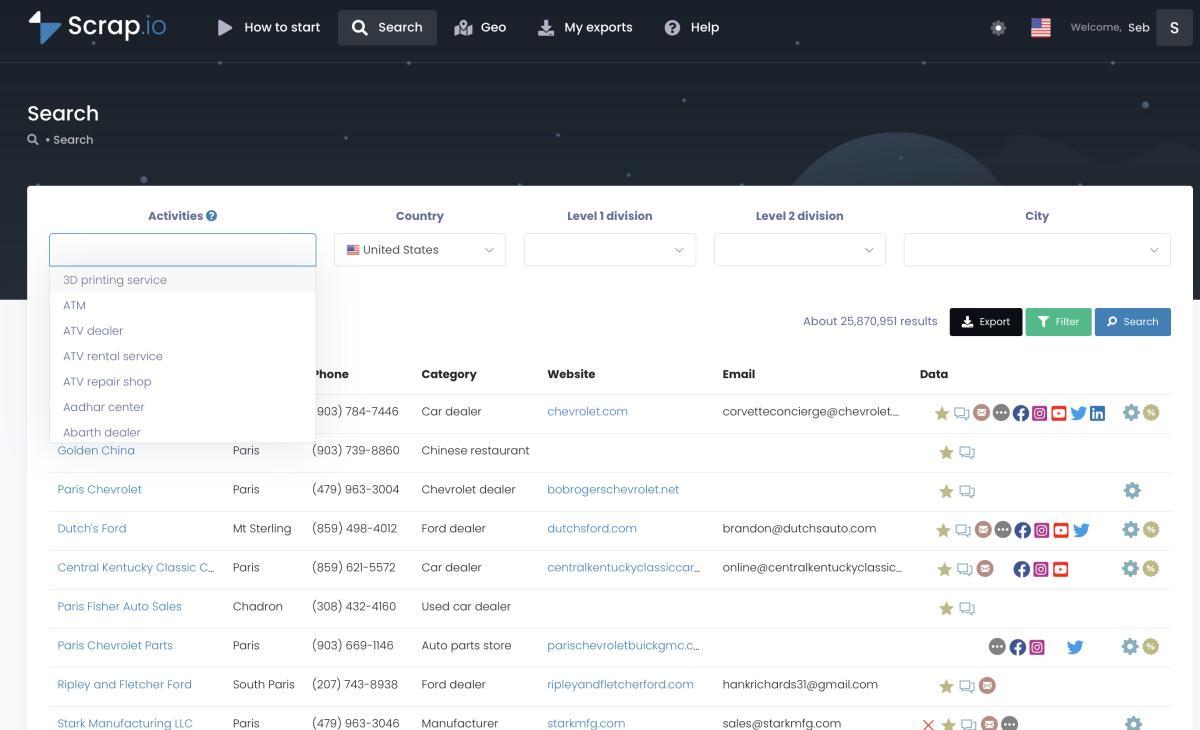
The platform also covers mental health services, home health care, and dozens of other healthcare verticals.
FAQ
How much do retirement home email lists cost?
Traditional brokers charge $0.10-$0.50 per contact. A 10,000-contact list runs $1,000-$5,000, and 15-30% of that data is typically stale on delivery. With Scrap.io, those same 10,000 contacts cost roughly $50 — extracted live from public sources. Big cost gap, better data quality. The math gets even more lopsided when you factor in bounce-related costs: every bounced email chips away at your sender reputation, which affects deliverability on every future campaign. Bad data has compounding costs.
Are retirement home email lists legal to buy and use?
Yes. Include a working unsubscribe link, honor opt-outs within 10 days, identify yourself honestly, follow CAN-SPAM, and respect state-level privacy laws like CCPA. Don't use the data for anything beyond legitimate B2B outreach and you're fine.
How often should I update my senior care email lists?
At minimum, quarterly. Monthly is better. With live scraping, this question basically disappears — you pull current data on demand instead of babysitting a decaying spreadsheet.
Can I target specific facility types?
Yes — nursing homes, assisted living, memory care, CCRCs, independent living. Layer on geography, size, ownership type, and online presence for tighter targeting.
What information comes with a quality retirement home contact database?
Beyond emails: names and titles, direct phone numbers, facility addresses, website URLs, social media profiles, facility size, services offered, ratings, review data, and ownership info. The more fields, the better your personalization and multi-channel outreach.
How do I know if a list provider is legitimate?
Ask for samples before buying. Look for 85-95% accuracy guarantees with replacement policies. Verify they explain data sourcing clearly. Monthly or quarterly refresh cycles. Reviews from actual B2B marketers — not cherry-picked testimonials on their own site.
What response rates should I expect from senior care email campaigns?
Open rates: 15-25%. Click rates: 2-5%. Lead conversion: 1-3%. Meeting request rate: 0.5-2% of total sends. These assume clean data and relevant messaging. Bad data or generic pitches will put you well below.
Can I use email lists for phone outreach too?
Most quality lists include phone numbers. Combining email + phone follow-up significantly boosts conversion. But telemarketing has its own rules — check the DNC Registry, comply with TCPA. Senior care admins generally prefer email first, then a call once they've seen your name.
Should I buy one large list or several smaller targeted lists?
Start small. 500-1,000 contacts matched tightly to your ICP. Test messaging. Measure. Then scale what works. A 1,000-contact list at 3% conversion beats a 10,000-contact list at 0.2% every day of the week.
What's the best way to market to retirement homes?
Targeted email + educational content + consistent follow-up over 90+ days. Lead with value, not pitches. Reference specific regulations, facility types, and geographic challenges. The B2B senior care sales cycle rewards patience and relevance. Not volume. The companies that do this well treat their email list like a relationship channel, not a broadcast tool — they're having conversations, not blasting announcements. Over time, that approach builds a pipeline that traditional cold outreach can't match.
Can I get a free retirement home email list?
Free lists exist. They're almost always outdated, incomplete, or unverified. I've seen free lists where 40% of the facility names didn't match the addresses, and half the emails were dead. You'll spend more time cleaning the data than you'd spend paying for good data. Scrap.io has a free 7-day trial with 100 leads included — enough to test quality and validate the approach before committing budget.
Can I get a free retirement home email list PDF?
You'll find plenty of "free retirement home email list PDF" downloads floating around. Skip them. A PDF is a frozen snapshot — the moment it's exported it stops updating, and in a market with 40% annual administrator turnover, a PDF from six months ago is a list of people who don't work there anymore. It's also unusable operationally: you can't filter it, segment it, or push it into a sequencer without retyping everything.
If you want the data in a format you can actually work with, export to CSV or Excel instead — extracted at the moment you request it, filterable by state, facility type and email presence before you spend a credit.
How do I find nursing home administrator contact information?
Four steps that work:
- Start with current Google Maps listings. Facilities update these themselves for marketing reasons, so they're the freshest public source available.
- Filter before you extract — by state or radius, facility category, and "email present" — so you're not paying for records you can't use.
- Enrich from the facility website. Scrap.io pulls nursing home administrator emails, phone numbers, named individual emails (with first and last name), and role-based addresses directly from the site attached to each listing.
- Cross-check against state licensing databases and professional associations for named administrators. These work, but they update far less frequently — use them to confirm, not to source.
What's the difference between a retirement home email list and a nursing home mailing list?
"Retirement home" is the broader umbrella — assisted living, independent living, CCRCs. "Nursing home" specifically means skilled nursing facilities with medical care. A nursing home mailing list is a subset of the senior care category. Make sure you're targeting the right facility type for what you actually sell.
Twenty consecutive quarters of rising occupancy. Fewer than 16,000 units under construction. 61 million Americans over 65 and 80 million on the way by 2040. The demand side of this market isn't in question.
The companies winning in it right now aren't the ones with the biggest sales teams or the fanciest CRMs. They're the ones with the freshest data. Right administrator, right facility, right message, right time. That's the whole game.
Every day you spend emailing outdated contacts is a day your competitor — the one with live data — is having conversations you're not even part of. In an industry with 40% annual turnover among the very people you're trying to reach, data freshness isn't a nice-to-have. It's the difference between pipeline and noise.
22,204 retirement homes. 8,541 with a live email address. Extracted the moment you hit export. Filter by state, radius, review rating or email presence before a single credit is spent — then push straight to CSV. Try Scrap.io free for 7 days — 100 verified retirement home leads included.
Video: Scrap.io - How to Start?
Generate a list of retirement home with Scrap.io