

A friend of mine runs a reputation management agency out of Austin. Last month, he needed sentiment data on 2,000 restaurants across three states. The plan was simple: scrape google reviews python, run some NLP, deliver client reports by Friday. Forty minutes in, his script hit a CAPTCHA wall, his IP got torched, and he spent the rest of the week debugging proxy rotation instead of analyzing anything.
Sound familiar?
Here's the thing. 71% of all online reviews now live on Google (WiserReview, 2026). That's billions of data points, ratings, review text, timestamps, response patterns, sitting behind a platform that really, really doesn't want you automating access to it. And yet, scraping Google reviews with Python remains one of the most searched developer tasks in the data extraction space.
This guide gives you three working approaches to scrape google business reviews python 2026 style: Playwright (the fast one), Selenium (the legacy one), and a no-code alternative that sidesteps the entire headache. Whether you want to extract google reviews python script yourself or skip the code entirely, you get full benchmarks, honest trade-offs, no fluff.
- What Is Google Reviews Scraping?
- Google Reviews API vs. Web Scraping: Which One in 2026?
- Method 1 — Scrape Google Reviews With Playwright (Python)
- Method 2 — Scrape Google Reviews With Selenium (Python)
- The No-Code Alternative — Extract Google Reviews at Scale With Scrap.io
- Advanced Anti-Detection Techniques for 2026
- Legal Considerations for Scraping Google Reviews
- FAQ
What Is Google Reviews Scraping?
Google reviews scraping is the use of automated tools (scripts, APIs, or platforms) to extract review data at scale from Google Maps listings: star ratings, full review text, reviewer names, timestamps, owner responses, and rating breakdowns. Everything, structured and ready to export into a spreadsheet or a database.
What happens when you need to analyze 10,000 reviews across 500 locations by Friday? You don't open Google Maps and start copying text with Ctrl+C. That's insanity.
Why bother? Because 41% of consumers now say they "always" read reviews when browsing businesses, up from 29% in 2025 (WiserReview, 2026). Reviews aren't optional social proof anymore. They're the primary buying signal for local services. And businesses that respond to those reviews? They earn up to 18% more revenue (ReviewScout AI, 2026).
The data you extract depends on your use case. Lead gen teams care about rating distributions: a 2.8-star business with six reviews is a warm lead for reputation services. Competitive intel teams want the actual text, because recurring complaints about "slow delivery" or "rude staff" reveal weaknesses you can exploit. Sentiment analysis projects need timestamps and volume to track trends, and if that's your angle, the right best sentiment analysis tools turn a raw CSV into an actual diagnosis.
Bref, if you're doing anything data-driven with local businesses, Google reviews are the raw material. The question is how you get them out, and how much pain you're willing to tolerate in the process. For a broader perspective on extracting all kinds of data, check the complete Google Maps scraping guide. And if you're curious about what makes reviews such powerful currency for businesses, here's how to get more Google reviews in the first place, plus a rundown of review monitoring tools if you'd rather watch reviews land in real time than mine them after the fact.
Google Reviews API vs. Web Scraping: Which One in 2026?
Video: Using the Google Maps API and Google Reviews
The Google Places API sounds like the obvious choice. Until you see the bill, and the restrictions.
Let's start with the elephant in the room: the API gives you a maximum of 5 reviews per listing. Five. Not fifty, not five hundred. Five hand-picked reviews, with no option to paginate or fetch more. I remember the first time I hit that wall. Genuinely thought my code was broken. Nope. That's just how it works.
Then there's pricing. ~$17 per 1,000 Place Details requests (Google Cloud Pricing, 2026). Pull details on 50,000 businesses and you're staring at $850 for names and ratings alone. Want the review text? More fields, more money. Run the numbers yourself with the Google Maps API cost calculator before committing to anything.
| Criteria | Google Places API | Python Web Scraping | No-Code (Scrap.io) |
|---|---|---|---|
| Reviews per listing | 5 max | All (with scrolling) | Rating breakdowns + keywords |
| Cost at 10K listings | $170+ | $0 (+ proxy costs) | From $35/mo flat |
| Setup time | ~1 hour | 2-5 hours + ongoing | 5 minutes |
| Skill level | Intermediate | Advanced | None |
| Anti-bot risk | None | High | None (pre-indexed) |
| Email extraction | No | Requires extra crawling | Yes, included |
The API is fine for prototyping. But if you actually need ALL the reviews on a listing, or you want to scrape google reviews without api limitations, you need a different approach. Web scraping reviews python is the developer answer; a managed platform is the business answer. Either way, the google reviews api python alternative conversation starts here.
On a community thread, a WebScraper forum user put it bluntly: "I'm trying to scrape all the Google Maps reviews for my restaurant and the API just doesn't cut it" (WebScraper Forum). Yeah. Welcome to the club.
Want to skip the API limitations? Scrap.io extracts review data at scale from 225M+ indexed businesses across 195 countries. No per-request billing, no 5-review cap. Filter by rating, review count, and category before you export a single row. See how it works →
Method 1 — Scrape Google Reviews With Playwright (Python)
Video: Google Maps API versus Scraping: What's the best approach?
Playwright has made Selenium look like a dial-up modem for Google scraping. Here's a production-ready script.
Playwright is 2-3x faster than Selenium for browser automation tasks (Playwright docs / community benchmarks). It handles modern JavaScript-heavy SPAs natively, auto-waits for elements, and manages browser contexts without the flaky driver issues that plague Selenium setups. If you're starting fresh to scrape google maps reviews python playwright, this is the move.
Here's a working script that navigates to a Google Maps listing, opens the reviews tab, scrolls to load them, and extracts the data:
import asyncio
from playwright.async_api import async_playwright
import json, random

async def scrape_reviews(place_url, max_reviews=50):
    async with async_playwright() as p:
        browser = await p.chromium.launch(headless=True)
        context = await browser.new_context(
            user_agent="Mozilla/5.0 (Windows NT 10.0; Win64; x64) "
                       "AppleWebKit/537.36 (KHTML, like Gecko) "
                       "Chrome/125.0.0.0 Safari/537.36"
        )
        page = await context.new_page()
        await page.goto(place_url, wait_until="networkidle")

        # Click the Reviews tab
        reviews_tab = page.locator('button[role="tab"]:has-text("Reviews")')
        await reviews_tab.click()
        await page.wait_for_timeout(2000)

        # Scroll the reviews panel to load more
        reviews_panel = page.locator('div[role="main"]')
        loaded = 0
        while loaded < max_reviews:
            await reviews_panel.evaluate("el => el.scrollTo(0, el.scrollHeight)")
            await page.wait_for_timeout(random.uniform(1500, 3000))
            items = await page.locator('[data-review-id]').count()
            if items == loaded:
                break
            loaded = items

        # Extract review data
        reviews = []
        cards = page.locator('[data-review-id]')
        for i in range(await cards.count()):
            card = cards.nth(i)
            try:
                author = await card.locator('[class*="d4r55"]').inner_text()
                stars_el = await card.locator(
                    '[role="img"][aria-label*="star"]'
                ).get_attribute("aria-label")
                rating = stars_el.split(" ")[0] if stars_el else "N/A"
                text_el = card.locator('[class*="wiI7pd"]')
                text = await text_el.inner_text() if await text_el.count() else ""
                reviews.append({"author": author, "rating": rating, "text": text})
            except Exception:
                continue

        await browser.close()
        return reviews

data = asyncio.run(scrape_reviews(
    "https://www.google.com/maps/place/YOUR_PLACE_URL", 100
))
with open("reviews.json", "w") as f:
    json.dump(data, f, indent=2, ensure_ascii=False)
print(f"Scraped {len(data)} reviews")
Looks clean on paper. Reality is messier.
Google Maps loads everything through JavaScript. Class names like d4r55 and wiI7pd? Those change without warning. I've seen selectors go stale within two weeks. And those random.uniform delays? They help, but Google's behavioral fingerprinting in 2026 goes way beyond timing analysis. A typical business with 500 reviews takes 3-5 minutes to scrape with a headless browser (Apify blog, 2026). Multiply that by a thousand listings and you're looking at days of runtime.
Oh, and also, a Reddit user on r/webscraping recently shared: "I recently developed a tool to scrape Google Reviews" and the thread devolved into a masterclass on everything that breaks at scale (Reddit r/webscraping). Worth reading before you commit.
For reference, the google-reviews-scraper-pro repo on GitHub is a solid Node.js alternative with incremental scraping support. And for a broader roundup of what's available in the open-source ecosystem, check the best Google Maps scrapers on GitHub.
Method 2 — Scrape Google Reviews With Selenium (Python)
Your company's legacy codebase runs Selenium. Your boss won't approve a rewrite. Good news: Selenium still works in 2026. Barely.
(OK, that was harsh. It works. But Playwright spoiled me.)
Selenium dominated browser automation for over a decade, and millions of lines of production code still depend on it. If scrape google maps reviews python selenium is your only approved path, here's what you need:
from selenium import webdriver
from selenium.webdriver.common.by import By
from selenium.webdriver.support.ui import WebDriverWait
from selenium.webdriver.support import expected_conditions as EC
import time, json, random

def scrape_reviews_selenium(place_url, max_reviews=50):
    options = webdriver.ChromeOptions()
    options.add_argument("--headless=new")
    options.add_argument("--disable-blink-features=AutomationControlled")
    options.add_argument(
        "--user-agent=Mozilla/5.0 (Macintosh; Intel Mac OS X 10_15_7) "
        "AppleWebKit/537.36 (KHTML, like Gecko) "
        "Chrome/125.0.0.0 Safari/537.36"
    )

    driver = webdriver.Chrome(options=options)
    driver.get(place_url)

    # Wait for and click Reviews tab
    wait = WebDriverWait(driver, 15)
    reviews_tab = wait.until(
        EC.element_to_be_clickable(
            (By.XPATH, '//button[@role="tab" and contains(., "Reviews")]')
        )
    )
    reviews_tab.click()
    time.sleep(2)

    # Scroll the reviews panel
    scrollable = driver.find_element(By.CSS_SELECTOR, 'div[role="main"]')
    prev_count = 0
    for _ in range(max_reviews // 10 + 5):
        driver.execute_script(
            "arguments[0].scrollTo(0, arguments[0].scrollHeight)", scrollable
        )
        time.sleep(random.uniform(1.5, 3.5))
        current = len(driver.find_elements(By.CSS_SELECTOR, '[data-review-id]'))
        if current >= max_reviews or current == prev_count:
            break
        prev_count = current

    # Expand truncated reviews
    try:
        more_btns = driver.find_elements(
            By.CSS_SELECTOR, 'button[aria-label="See more"]'
        )
        for btn in more_btns:
            btn.click()
            time.sleep(0.3)
    except Exception:
        pass

    # Extract data
    reviews = []
    cards = driver.find_elements(By.CSS_SELECTOR, '[data-review-id]')
    for card in cards[:max_reviews]:
        try:
            author = card.find_element(By.CSS_SELECTOR, '[class*="d4r55"]').text
            stars = card.find_element(
                By.CSS_SELECTOR, '[role="img"]'
            ).get_attribute("aria-label")
            rating = stars.split(" ")[0] if stars else "N/A"
            try:
                text = card.find_element(By.CSS_SELECTOR, '[class*="wiI7pd"]').text
            except Exception:
                text = ""
            reviews.append({"author": author, "rating": rating, "text": text})
        except Exception:
            continue

    driver.quit()
    return reviews

data = scrape_reviews_selenium(
    "https://www.google.com/maps/place/YOUR_PLACE_URL", 100
)
print(f"Extracted {len(data)} reviews")
Same caveats apply, but amplified. Selenium is slower. Noticeably so. The chromedriver version has to match your Chrome version exactly, or nothing runs. And the --disable-blink-features=AutomationControlled flag? Google's detection moved past that ages ago.
A user on r/dataanalysis summed it up. They wanted to python scrape google reviews free and the consensus was clear: the DIY approach eats more time than it saves unless your volume is tiny (Reddit r/dataanalysis). Try doing it manually for a week. I'll wait.
But here's a genuine use case where Selenium still makes sense: you already have a Selenium grid deployed, your team knows the API inside out, and you need reviews from a few dozen specific locations. Not thousands. Dozens. For that, it's survivable.
My advice? New project, Playwright. Legacy codebase, Selenium is fine. Scale? Keep reading.
The No-Code Alternative — Extract Google Reviews at Scale With Scrap.io
You just spent 3 days debugging proxy rotation. Meanwhile, agencies using no-code tools extracted 50,000 reviews before lunch.
Not an exaggeration. Between proxy costs ($5-15/GB for residential IPs), CAPTCHA-solving subscriptions, broken CSS selectors, and the sheer time sink of maintenance, DIY review scraping costs way more than people realize. The google maps review scraper no code approach exists precisely because most businesses shouldn't be fighting Google's anti-bot systems. That's not your core competency. (Unless you work at Google, in which case, hi, please stop breaking our selectors.)
Scrap.io takes a fundamentally different approach. Instead of scraping Google in real-time and dealing with all the blocks, the platform maintains a pre-indexed database of 225+ million businesses across 195 countries, updated in real-time at extraction. You search, filter, export. That's it.

For reviews specifically, you get rating breakdowns, review counts, and aggregate data at scale, without owning the business listing, without the API's 5-review cap, and without writing a single line of code. Combine that with 30+ data fields per export (emails, phones, social profiles, website tech stack, ad pixels) and you've got a bulk google reviews extraction tool that does what custom scripts simply can't match.
Here's the part that saves the real money: every filter is applied before extraction, so you only spend credits on contacts that match your criteria. Rating range, minimum review count, email present, category, price band. Set it, check the count (counting is always free), then export. Zero credits burned on junk.

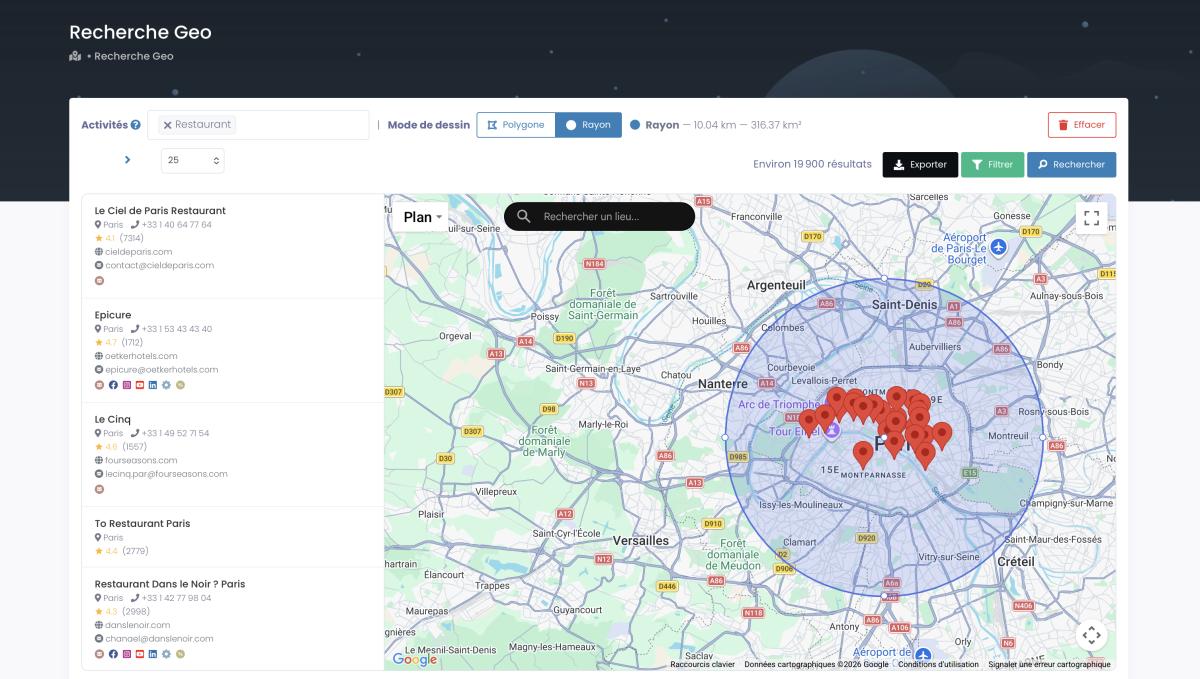
Need a catchment area that doesn't match a city boundary? GeoSearch lets you draw a radius (up to 500 km) or a custom polygon straight on the map, and every filter still applies inside it.
Video: Scrap.io - How to Start?
The market has other options too. Outscraper charges from $3/1,000 records after their free tier, solid for developers who want a managed API. Apify runs about $0.25/1,000 reviews on their cloud platform. Both work. But neither gives you the filter-before-you-pay approach: on Scrap.io, you only burn credits on contacts that actually match your criteria. Zero waste. If you're weighing them up, we broke it all down in our Outscraper alternative deep-dive and a dedicated Outscraper vs Apify comparison.
Want to skip Python entirely? Here's how to scrape Google Maps without writing code. And for a marketing angle on review data, check how to leverage Google Maps reviews as social proof. Running an AI stack? You can even pipe the whole thing through the Scrap.io MCP for Google Maps and pull filtered leads in plain English from Claude, ChatGPT or Gemini.
Try Scrap.io free for 7 days and extract up to 100 leads with review data, emails, and social profiles included. No code, no proxy headaches, no broken selectors. Filter before you spend a credit across 225M+ businesses in 195 countries. Start your free trial →
Advanced Anti-Detection Techniques for 2026
Google blocks 85%+ of naive scraping attempts within the first 50 requests. Here's how the rest get through.
If you're committed to the DIY path, anti-detection isn't optional. It IS the game. Google's bot detection in 2026 uses behavioral fingerprinting, TLS fingerprinting, and ML models that analyze mouse movements, scroll patterns, and timing between actions. The old tricks are table stakes now. Necessary but nowhere near sufficient.
Proxy rotation. Residential proxies are the absolute minimum. Datacenter IPs get flagged on sight. Rotate per request or per session, and never reuse the same IP for more than 10-15 requests on Google Maps. Budget $50-200/month depending on your volume. And no, free proxy lists from 2023 won't cut it. They're already burned.
Browser fingerprint randomization. Tools like playwright-stealth or undetected-chromedriver patch the obvious automation tells: navigator.webdriver, missing plugins, viewport inconsistencies. But Google's detection evolves faster than these patches. It's an arms race, and Google has a bigger army.
Behavioral mimicking. Don't just wait between requests. Simulate real browsing patterns: scroll irregularly, hover over random elements, vary session duration. Some developers inject "human" noise, clicking on the map, zooming in and out, before touching the reviews tab. Does it help? Sometimes. Is it annoying to maintain? You bet.
Session isolation. Separate browser contexts per scraping target. Don't share cookies. And this is critical: never scrape while logged into your personal Google account. Lose that account and you lose Gmail, Drive, Photos, everything tied to it. The Meta v. Bright Data ruling literally established that logged-out scraping doesn't even constitute a ToS agreement.
Honestly? For most teams, the anti-detection overhead alone justifies switching to a pre-indexed platform. You're paying engineers to fight Google's security team instead of analyzing the data you actually need.
Legal Considerations for Scraping Google Reviews
Can Google sue you for scraping reviews? The short answer: it depends. The long answer matters more.
The landmark case is hiQ Labs v. LinkedIn (2022, Ninth Circuit): the court ruled that scraping publicly available data does not violate the Computer Fraud and Abuse Act (EFF case summary). The Supreme Court's Van Buren decision in 2021 reinforced this: the CFAA targets insiders exceeding authorized access, not outsiders viewing public pages.
Google Maps reviews are publicly visible. No login. No paywall. Under current US case law, programmatic extraction is legal.
But Google's Terms of Service do prohibit scraping. Here's the nuance most people miss: a ToS violation is a contract breach, not a crime. The consequences are civil (account suspension, IP blocking), not criminal. Meta v. Bright Data (2024) cemented this further: if you're not logged in, you haven't accepted the ToS.
For GDPR (EU data): business names, addresses, and phone numbers fall under legitimate interest for B2B prospecting. Individual reviewer names are personal data, so tread carefully there. Scrap.io is GDPR and CCPA compliant, working exclusively with publicly available business data.
Full legal deep-dive with 2026 case law updates: is it legal to scrape Google Maps?
Bottom line: scrape competitor google reviews for business intelligence? Go for it. Stick to aggregate insights (average ratings, complaint trends, volume patterns) rather than targeting individual reviewers. Use a compliant platform and sleep well.
FAQ
How many Google reviews can I scrape per day without getting blocked?
With proper infrastructure (residential proxy rotation, randomized delays between 2-5 seconds, user agent switching, and session isolation) expect 1,000 to 2,000 reviews per day before hitting serious resistance. Push beyond that without commercial-grade proxies and you'll spend more time unblocking IPs than scraping data. For larger volumes, Scrap.io sidesteps the problem entirely since the data is pre-indexed, with no live scraping against Google's servers at all.
Is it legal to scrape Google reviews in 2026?
Yes, under current US law. The hiQ v. LinkedIn ruling (Ninth Circuit, 2022) established that scraping publicly accessible data doesn't violate the CFAA. Google's ToS prohibit it, but violating ToS is a contract issue, not a criminal one. For EU data, GDPR's legitimate interest basis (Article 6(1)(f)) covers B2B extraction. Respect reviewer privacy, handle personal data carefully, and you're on solid legal ground. Full analysis: legal considerations for Google Maps scraping.
What's the best Python library for scraping Google reviews?
Playwright for new projects: faster execution, better JavaScript handling, superior auto-wait mechanics. Selenium for legacy codebases where migration isn't happening. For non-developers or anyone who values their weekends, Scrap.io handles everything without code. The google review scraper python github ecosystem has decent options too. HasData's scraper covers both Python and Node.js, though maintenance is entirely on you.
Can I scrape competitor Google reviews for business intelligence?
Absolutely. Focus on aggregate insights (average ratings, review volume trends, recurring complaint keywords, sentiment shifts over time) rather than individual reviewer data. Reputation agencies regularly target businesses under 3 stars with fewer than 10 reviews for outreach. There's a whole playbook for finding companies with negative reviews and turning them into warm leads, using google reviews sentiment analysis python pipelines to prioritize. Completely legitimate use case, growing fast.
Google Reviews API vs. scraping — which is better?
Depends what you optimize for. API: structured, official, reliable, but 5 reviews max per place and ~$17 per 1,000 requests. Scraping: access to ALL reviews with full text, but requires proxy infrastructure and constant maintenance. For data completeness and cost, scraping wins. For zero-maintenance reliability, the API wins, if you can stomach the limitations. Most people land on a platform like Scrap.io as the google reviews api python alternative that gives you scraping-level depth without scraping-level headaches. For cost modeling, the API cost calculator shows the exact breakpoints by volume.
Can I scrape Google Play Store reviews with Python too?
Yes, and it's often easier than Maps. The Play Store has a more stable DOM, and libraries like google-play-scraper pull app reviews, ratings, and version history without a headless browser. Different target, same principle: public data, respect rate limits, handle personal data carefully. For local business reviews though, Google Maps is still where the volume lives, so most scrape google play store reviews python projects end up being a separate pipeline entirely.
Start your free 7-day trial today. 100 leads included: review data, emails, social profiles, 30+ data fields per business. Filter before you spend a credit, count for free, and export across 195 countries. Try Scrap.io free →
Generate a list of restaurant with Scrap.io