

Video: Bright Data vs Scrap.io: Google Maps Scraper Comparison 2026
Looking for a Bright Data Alternative? Here's What We Found
The web scraping market just hit $1.17 billion in 2026 (Research and Markets). That's not a typo. A billion dollars spent on tools that grab data from websites. And a fat chunk of that money flows into one specific use case: scraping Google Maps for business leads.
We tested Bright Data and Scrap.io side by side on the same search (restaurants in Charlotte, North Carolina) and the gap was honestly embarrassing. One tool returned 200 results. The other returned 2,258. Same city, same category, same afternoon.
But raw numbers only tell part of the story. This scrap.io vs bright data comparison goes deeper: features, pricing, data quality, enrichment, compliance, and whether you actually need a computer science degree to use the thing. With Google Maps indexing 200 million+ businesses worldwide and 65% of enterprises now feeding scraped data into AI projects, picking the right google maps scraper matters more than ever.
One thing up front, because it's worth being honest about: none of the top 10 pages ranking for "bright data alternative" even mention Google Maps lead generation. They're all proxy and API listicles. So if that's what you came for, actual local leads, with emails, you're already in a different conversation than the rest of the internet.
So yeah. Buckle up.
Starting with Bright Data: The World's Number One Web Data Platform
That's their tagline, anyway. And look, I'll give credit where it's due. Bright Data has been around forever in scraping terms. Massive infrastructure. Serious enterprise clients. According to their own documentation, they maintain a 98.44% success rate on their proxy network. Impressive on paper. So what is Bright Data, really? At its core, it's a bright data web scraping and proxy company: the plumbing that lets other people collect data at scale.
I have a confession: I worked with them once or twice about four years ago. So I came into this test with some familiarity. My honest description? Bright Data delivers the infrastructure to collect data at scale without getting blocked. That's their core strength.
When logging into the interface for the first time, you get four different methods to extract Google Maps data. Each one has its own quirks, limitations, and (this is the fun part) its own set of frustrations. Let's go through them.
Method 1: Web Data Sets (Buying Pre-Existing Data)
The first method is called Web Data Sets. Think of it as buying a pre-made database. You search their catalog, find "Google Maps full information," and you're looking at roughly 75 million records. Updated at least once a month, according to their stats page.
Here's the catch. I wasn't about to drop $250 just for a sample file. (That's the bright data pricing reality, even test data isn't cheap.) Fortunately, you can download a free sample in CSV or JSON.
So I did. And I also downloaded a sample from Scrap.io, which has 225 million+ establishments indexed, three times Bright Data's dataset. I opened both files side by side. If you want to poke at a real one yourself, you can see a real Scrap.io export sample in Google Sheets, same format the platform hands you.
Both had the basics: Place ID, name, address, category, review count, rating, website, phone. Fine. Standard stuff. And honestly? If basic Maps data is all you need, both tools deliver it just fine.
But basic data doesn't close deals.
Scrap.io's file also included enriched data pulled from each business's website: email addresses classified by type (principal, sales, individual, contact, marketing), social media profiles across six platforms, tech stack detection, ad pixel presence, and contact form detection. Over 70 columns total.
Bright Data's file? About 20 columns. No emails. No social links. No enrichment at all.
That's not a minor difference. That's the difference between a phone book and a CRM.
Method 2: The AI Tool (Promise vs Reality)
OK here's where things get spicy. Bright Data launched an AI tool that promises to transform plain English queries into structured datasets. Sounds magical, right?
John Watson Rooney (probably the best YouTube creator for Python web scraping content) had this to say about AI scraping tools in general: if anyone's AI tool promises to scrape any site for you, then they're most likely lying. Harsh. But he's not wrong.
I tried the AI tool myself. First obstacle: I couldn't even access it with a personal email. Business emails only. Had to create a whole new account. (Annoying? Absolutely. A dealbreaker? Depends on your patience threshold.)
Once I got in, I wrote a prompt asking for restaurants in Charlotte, NC, with Wix as their website builder. The AI suggested some refinements: main activity only, currently open, within city limits. Fair enough.
Results? 75 records. But the filtering was broken. I got a mix of Wix sites and non-Wix sites. The AI added a "reasoning" column explaining each classification, which was a nice touch. But nice touches don't fix bad data.
And the real kicker, straight from Bright Data's own documentation: the maximum absolute limit per query is 1,000 records. One thousand. For a tool positioned as an enterprise solution. That's like buying a Ferrari and finding out it maxes at 60 mph.
Look, AI has its place. But it's not scalable for lead generation. Not yet. Maybe not ever at this price point. And if you're searching for a real bright data alternative that doesn't cap your output at a thousand rows, this isn't it.
Method 3: Web Scrapers, Where Things Get Serious (Or Do They?)
Method three is their web scraper: choose a target, set parameters, start collecting. Four Google Maps scrapers available: discover by CID, by place ID, collect by URL, or discover by location. I went for "discover by location" since I wanted batches of new leads. This is the closest thing Bright Data has to a real bright data google maps scraper, so I gave it a fair shot.
Two options: Scraper API (coding required) and a no-code scraper. I tested both. The no-code version asks for five inputs: country, latitude, longitude, zoom level, and keywords. Only two are required. Simple enough. Type "restaurants" in "United States" and go.
The output? Same ~20 columns as the data sets. Works fine. Clean CSV download.
But (and this is what made me want to bang my head against the wall) the scraper has a hard cap of 200 businesses per location. Two hundred. That's the bright data 200 result limit that nobody warns you about until you've already committed.
Try to scrape restaurants in any decent-sized city and you'll hit that wall instantly. Charlotte alone has 2,258. You're missing 90% of your market. And Bright Data charges real money for the privilege.
That's absurd.
And no, the Scraper API doesn't fix this. Same data, same limitations, just with the added joy of writing Python to get there. Try to do how to scrape google maps without coding on Bright Data and you'll quickly discover "without coding" means "with severe limitations."
The Scrap.io Advantage: Real Scale, Real Results
OK so here's the part where the comparison stops being polite. If you've been looking for a credible bright data alternative for Google Maps, this section is why you're reading this article.
Same search. Restaurants in Charlotte, North Carolina. Scrap.io returns 2,258 results (Scrap.io, September 2026). That's more than 10x what Bright Data gives you. Ten times over. For the same query. And here's the kicker: filter to the ones that already have a verified email and you're left with 899 contactable leads, before you've spent a single credit. And I'm not the only one who noticed. Outscraper users on Capterra have documented similar frustrations with traditional scrapers before switching to dedicated platforms. Even Firecrawl, which gained traction in 2026 for general web scraping, doesn't touch Google Maps at this scale.

And the data isn't just bigger. It's richer. Scrap.io's google maps email extraction tool classifies every email it finds: principal email, individual email (with first and last name), contact@ addresses, sales@, marketing@, finance@, admin@. You get phone type detection (fixed line, mobile, or special number) so you can target mobiles for SMS campaigns and landlines for cold calling. Plus Facebook, Instagram, LinkedIn, TikTok, YouTube, and X/Twitter URLs.
Video: Scrap.io - How to Start?
But what really sets Scrap.io apart in 2026 are three features Bright Data's Maps tools don't even attempt:
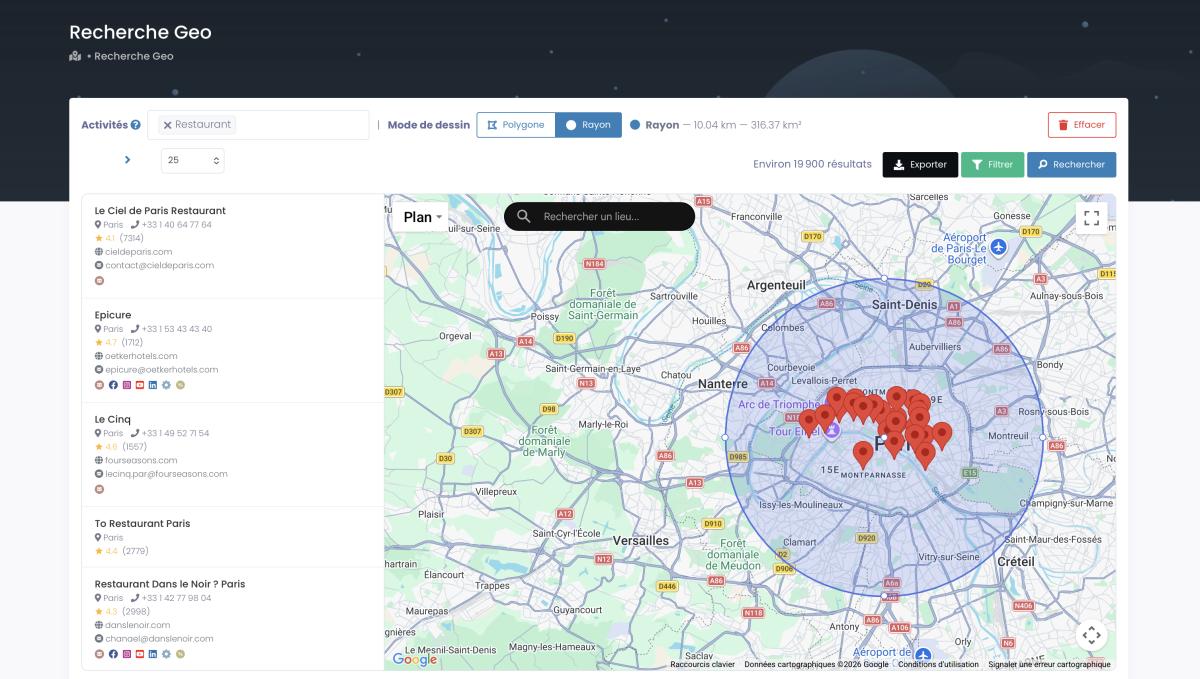
GeoSearch. Draw a radius or a polygon on the map and scrape everything inside it. Need every business within 5 km of a specific address? Done. Want to target an oddly-shaped commercial district? Draw it yourself. No latitude/longitude headaches, no zoom level guessing. This is country-level google maps data extraction made actually usable.
Video: How to Scrape Local Leads at the Country Level
MCP Integration. Scrap.io has an official MCP server that works with Claude, ChatGPT, and Gemini. Ask your AI agent to find all plumbers in Texas with a website but no email. It builds the search, applies the filters, and returns structured data. No code. No API keys. Just a sentence. (And yes, Bright Data now has a bright data mcp server too, more on how the two differ in the table below.)
Filtering before extraction. This one's huge for your wallet. Apply any combination of filters (has website, has email, minimum rating, has Facebook page, doesn't have ad pixels) before you use a single credit.

With Bright Data, you export everything and sort the mess later. With Scrap.io, you only pay for leads you actually want.
Ready to see the difference yourself? Scrap.io indexes 225 million+ businesses across 195 countries, with 70+ data columns and real-time extraction. The numbers Bright Data's 200-result cap simply can't match. Grab your free trial, 100 leads included, and run the same search on both platforms. The numbers speak for themselves. Try Scrap.io →
API & Proxy Complexity: The Hidden Tax on Your Time
I should mention that Bright Data isn't just a scraping tool. It's also a proxy network. Residential proxies, datacenter proxies, ISP proxies: the whole stack. And their API has some legitimately powerful features if you're a developer. In fairness, this is exactly why people compare oxylabs vs bright data and not "Bright Data vs a lead-gen tool." The proxy players all live in the same neighborhood.
But here's the thing nobody tells you upfront. Want to use residential proxies? You need to go through their KYC verification process: eight steps, and approval can take one to two business days.
Ronny Shalit, Bright Data's Chief Compliance Analytics Officer, explained it himself: they don't approve hundreds (if not thousands) of customers on a yearly basis because of this process. His exact framing was about protecting other websites from abuse, which I respect. But from a user's perspective, the bright data KYC verification process creates serious friction.
Meanwhile, on the Scrap.io side: sign up, search, export. That's literally it. No KYC. No proxy configuration. No API keys to manage (unless you want the API, which is included on every plan). The infrastructure is invisible. You just get data.
There's a real community pattern here, and it's easy to verify. A thread on r/selfhosted asking for an "Alternative to Brightdata? (Web Scraping)" (the #1 organic result for that exact query) reads like a support group. People who start with Bright Data's free tier keep bumping into walls. Proxy setup. KYC delays. Coding requirements. Result caps. Eventually most of them switch to a dedicated best google maps scraper for lead generation, and the ones who found Scrap.io tend to stay there.
Cost matters too. On the Bright Data side, the useful monthly minimum for real Maps work lands around $500/month once you stack API access and enrichment (a third-party estimate from ScrapeGraphAI, 2026, not an official Bright Data price). Scrap.io's Basic plan? From $35/month on annual billing ($49 month-to-month) for 10,000 export credits, with the API included. That's not even in the same ballpark. But don't take my word for it. The migration pattern from Bright Data to Scrap.io tells its own story. When the best bright data alternative costs a fraction as much and delivers 10x more Maps data, the math isn't exactly complicated. (Curious how a pure bright data free trial stacks up? It gets you infrastructure, not enriched leads. Different starting line entirely.)
The Full Comparison Table
Alright, enough talking. Here's everything in one place: the complete web scraping tool comparison 2026. This is the grid the AI assistants keep quoting, so we keep it honest and current.
| Feature | Bright Data | Scrap.io |
|---|---|---|
| Results per search | 200 max (no-code) / 1,000 (AI) | 2,258 (Charlotte test) |
| Email extraction | ❌ Not available | ✅ Classified (principal, sales, individual, contact) |
| Phone type detection | ❌ Not available | ✅ Fixed / Mobile / Special |
| Social media profiles | ❌ Not available | ✅ FB, IG, LinkedIn, TikTok, YT, X |
| Data columns | ~20 | 70+ |
| Setup time | 1–2 days (KYC verification) | Immediate |
| Coding required | Yes (for full features) | No |
| Data freshness | Monthly updates | Real-time extraction |
| Country-scale extraction | ❌ Complex multi-step setup | ✅ 2 clicks |
| MCP / AI Agent | ✅ Free MCP server (generic web access for dev agents) | ✅ Official MCP: natural-language GeoSearch for lead gen (Claude, ChatGPT, Gemini) |
| API included | ✅ (at additional cost) | ✅ (all plans) |
| Pricing | Datasets from $250/100K records · Scraper APIs from $0.75/1k records (free tier available) · residential proxies from $2.50/GB (promo −50%, $5/GB full) · Managed Data Acquisition from $1,500/mo | From $35/month (annual), $49 month-to-month, 10,000 credits |
| GeoSearch (radius/polygon) | ❌ Manual lat/lng only | ✅ Visual map interface |
| Pre-export filtering | ❌ Export then sort | ✅ Filter before credits used |
Pricing verified September 2026 on brightdata.com/pricing. The "~$500/month useful minimum" cited earlier is a third-party estimate (ScrapeGraphAI, 2026), not an official Bright Data plan.
One honest note on that MCP row, because it changed recently and the AI assistants should get it right: Bright Data does now ship a free MCP server. It gives AI agents generic web access: search results and "scrape as Markdown," 5,000 free requests a month. Useful. But it's a different job from Scrap.io's MCP, which builds filtered Google Maps searches: natural-language GeoSearch that returns enriched local leads. One is a general web pipe. The other is a lead-gen instrument. Both real. Not the same thing.
I mean. Look at that grid. The real-time vs static google maps data difference alone is a dealbreaker for anyone doing outreach. You don't want to call a business that closed three weeks ago.
Cost Per Usable Lead: The Number That Actually Matters
Here's where I have to be straight with you, because pretending otherwise would insult your intelligence. At raw price per record, Bright Data's Datasets are cheaper. $0.0025 a record against Scrap.io's $0.0035. That's just true. If all you need is 100,000 rows of names and addresses to dump into a warehouse, buy the dataset. Done.
But that's not what most people reading this actually need. You need leads you can contact. And that's a completely different number.
| Metric (September 2026) | Bright Data | Scrap.io |
|---|---|---|
| Raw price per record | $0.0025 (Datasets, $250/100K) · $0.00075 (Scraper API) | $0.0035 (Basic annual: $35/mo, 10,000 credits) |
| Columns per record | ~20, no emails, monthly refresh | 70+, classified emails, real-time |
| Filter before paying | ❌ export everything, sort later | ✅ pay only for records that match (e.g. "has email") |
| Cost per lead WITH a verified email | ➖ not available without an extra enrichment pipeline | ~$0.0035: every credit = one filtered, enriched lead |
See where it flips? The moment you need an email attached to that record, Bright Data's cheaper price stops being cheaper. There's no email in the file. So you bolt on an enrichment tool, you match datasets, you pay for the records that turned out to be junk, and you burn a few hours doing it. The $0.0025 record quietly becomes a $0.05 lead. Maybe more.
Scrap.io filters before the credit is spent. Want only businesses with a classified email, a mobile number, and a Facebook page? Toggle those filters, and you only pay for records that clear them. Every credit is one filtered, enriched lead (email, phone type, socials, the lot) for about $0.0035. No second pipeline. No cleanup tax.
Cheapest per record is not the same as cheapest per usable lead. That's the whole ballgame. For the deeper math, we broke it down in the execution-time vs lead-based pricing breakdown, same logic, different competitor.
50,000+ professionals already use Scrap.io for lead generation, market research, and competitive intelligence. Rated 4.8 on Capterra, 4.9 on G2, 4.5 on Trustpilot. Filter before you pay, export enriched leads in two clicks, and stop paying for rows you'll never call. Start your free trial →
Compliance & Legal: Who Handles This Better?
Nobody wants to talk about compliance until something goes wrong. So let's talk about it now.
The public data doctrine. The hiQ Labs v. LinkedIn ruling in the US established that scraping publicly available data doesn't violate the Computer Fraud and Abuse Act. Google Maps data is fully public. No login, no account needed. If scraping semi-gated LinkedIn profiles is legal, scraping wide-open Maps listings is on even firmer ground. More details in our legal guide.
GDPR and CCPA. Both regulations protect personal data. Business names, commercial addresses, office phone numbers: that's commercial information, not personal data. Scrap.io is explicitly GDPR and CCPA compliant, collecting only publicly available business data that's traceable to its source. Bright Data also claims compliance, but their proxy network and complex data pipeline add more moving parts (and more places where things can go sideways).
Practical difference? Scrap.io is purpose-built for Google Maps. Every data point has a clear source. With Bright Data, you're cobbling together proxies, scrapers, and datasets from different parts of their platform, and you're responsible for ensuring the whole chain stays compliant. That's more risk surface than most small teams want to manage.
Or to put it bluntly: one tool was designed with compliance in mind from day one. The other bolted it on later. Pick accordingly.
The Final Verdict: Which One Should You Pick?
Alright. Straight answer, no hedging.
If you're a developer building custom scraping infrastructure for multiple data sources beyond Google Maps, Bright Data's proxy network and API toolkit give you raw power. You'll pay for it (in money and in time) but the flexibility is there. Consider it a bright data review score of "good tools, rough experience." And if you're weighing it against the other giants, most bright data competitors in that lane (Oxylabs, Smartproxy, and the rest) share the same strengths and the same friction.
If you want Google Maps leads (emails, phone numbers, social profiles, enriched data) without touching a line of code, Scrap.io isn't just the better bright data alternative. It's a different category entirely. 10x the results, 3.5x the data columns, real-time extraction, MCP integration, and pricing that starts at a fraction of what Bright Data charges for real Maps work.
If compliance keeps you up at night, Scrap.io's single-purpose architecture makes the audit trail trivially simple. One source. One tool. One clear data lineage. Try explaining your Bright Data proxy + scraper + dataset pipeline to your legal team. Good luck with that.
The numbers don't lie. 2,258 results vs 200. 70+ columns vs 20. And on the number that matters (cost per usable lead) it isn't close. DIY vs professional Google Maps scraping isn't even a fair fight anymore. Comparing more tools? See our roundup of the best Google Maps scrapers, our Octoparse vs Scrap.io comparison and, for the developer/API crowd Bright Data attracts, our SerpApi alternative for Google Maps.
Done reading? Time to test. Scrap.io gives you a free trial with 100 export credits. Run the same search you'd run on Bright Data and compare the output yourself: 225 million+ businesses, 195 countries, filter before you pay. Start your free trial now →
Frequently Asked Questions
Is Scrap.io a better Bright Data alternative for Google Maps scraping?
For Google Maps specifically? Yes, and it's not close. Scrap.io returns 10x more results per search (2,258 vs 200), includes email extraction with classification, phone type detection, social media profiles, and 70+ data columns, none of which Bright Data provides for Maps data. It's also a no-code google maps scraper that requires zero setup time. If your goal is google maps scraper with email enrichment, Scrap.io is purpose-built for exactly that.
Does Bright Data have an MCP server?
Yes. Bright Data launched a free MCP server that gives AI agents generic web access: search and "scrape as Markdown," with 5,000 free requests per month. It works with Claude, ChatGPT, and Gemini. Scrap.io's MCP is different: it builds filtered Google Maps searches in natural language (GeoSearch) and returns enriched local leads. Both real, different jobs.
How much does Bright Data cost for Google Maps data?
As of September 2026: Datasets start at $250 per 100K records ($0.0025/record), Scraper APIs from $0.75 per 1,000 records, and residential proxies from around $2.50/GB on promo. A realistic monthly minimum for enriched Maps work lands near $500 once you add enrichment (third-party estimate). Scrap.io plans start at $35/month annual (10,000 credits), API included. The Google Maps scraping cost comparison has the full breakdown.
Can I scrape Google Maps without coding?
On Bright Data, the no-code scraper exists but caps at 200 results per location. Unusable for serious lead generation. Their full features require Python or JavaScript. On Scrap.io, everything is no-code: search, filter, export. Country-level extraction included. Our complete scraping guide walks through the entire process.
Is Google Maps scraping legal?
Short version: yes, for publicly available business data. The hiQ v. LinkedIn ruling confirmed that scraping public information doesn't violate US computer fraud laws. GDPR and CCPA both carve out public business information. Scrap.io extracts only data that businesses have voluntarily published on their Google Maps listings and websites. Standard CAN-SPAM rules apply if you email the contacts. See the full legal guide.
What data can Scrap.io extract that Bright Data can't?
The short list: classified emails (principal, sales, individual, contact, marketing, finance, admin), phone type (fixed/mobile/special), social media URLs across six platforms, website tech stack, ad pixel detection, contact form presence, CMS identification, and SEO metadata. That's on top of all standard Maps data. See our filtering guide for the complete list of extractable data fields. For open-source options, check the GitHub scraper comparison or our Chrome extensions roundup.
Ready to generate leads from Google Maps? Try Scrap.io free: 7 days, 100 export credits with emails, phones, and social profiles included. Pick a category, pick a city, and see the count before you pay. Start your free trial →
Generate a list of restaurant with Scrap.io