

Video: How Pizzerias Spy on Competitors Using Google Maps
- What is Google Maps competitor analysis?
- Why Google Maps is an underrated competitive intelligence source
- The 5 things to analyze on every competitor
- How to do a local competitor analysis on Google Maps for free
- Scaling up: extracting competitor data across a whole market
- Best tools for Google Maps competitor analysis in 2026
- Turning analysis into action: the template + checklist
- Is this legal? Data, privacy & compliance
- FAQ
Here's a confession. The first time I "analyzed" a competitor on Google Maps, I just… stared at their listing. Scrolled the reviews. Nodded like I'd discovered something. Closed the tab.
Learned nothing.
That wasn't analysis. That was window shopping. And it's exactly what most local business owners do, because nobody ever told them what to actually look at. Meanwhile, 46% of all Google searches now carry local intent, up from roughly 30% in 2019 (BrightLocal). Your real competitors aren't fighting you on page one of some blog. They're three pins away on the map, quietly eating your walk-ins.
What is Google Maps competitor analysis?
Google Maps competitor analysis is the practice of studying the Maps and Google Business Profile listings of your local rivals: their categories, reviews, ratings, photos, and rankings, to spot gaps you can exploit and mistakes you can avoid. It turns public local data into a concrete advantage. No login walls. No guesswork.
So what can you actually learn from a single listing? More than you'd think. Their primary category. How fast reviews come in. Which services customers rave about, and which ones they roast. Whether they've even bothered to claim the listing. It's a confession booth, and your competitors don't realize the door's wide open.
And the people doing the searching? They're ready to act. Around 76% of local searches lead to a visit or a call within 24 hours (BrightLocal/Synup). That's not idle browsing. That's foot traffic deciding, in real time, between you and the place down the street.
Why Google Maps is an underrated competitive intelligence source
Two billion people open Google Maps every month, and somewhere north of 250 million businesses are listed across 249 countries (Loopex / On The Map). Read that again. It's the largest, freshest, most honest competitor database on earth, and it's free to look at.
Most tools you'd pay thousands for can't touch that. LinkedIn? Great for white-collar firms, useless for the plumber two towns over. ZoomInfo? Expensive, and stale by the time you log in. Google Maps has the 8-person HVAC outfit, the family restaurant from 1994, the solo accountant who just opened a second office. The businesses you actually compete with.
Here's the kicker. Google Business Profile actions (calls, direction requests, website clicks) jumped about 41% in a single year (BrightLocal Local SEO Stats 2026). The map isn't a directory anymore. It's the storefront. If you're not watching what your competitors do with theirs, you're scouting blindfolded.
One more thing worth saying out loud, because the difference matters for local competitor research: there are two kinds of Maps data. Segmentation data (ratings, review counts, category) sorts competitors into buckets. Analytical data (actual review text, recurring complaints, sentiment over time) tells you why they win or lose. You'll want both. We'll get to how.
The 5 things to analyze on every competitor
Staring at a listing isn't analysis. You need a checklist: five signals that actually tell you something, instead of the vague vibe-check most people run. Here's what to look at, in order, on every single competitor.
1. Categories (primary + secondary)
This is the most underrated move in the whole playbook. A business's primary category is the single biggest ranking factor on Maps, and your competitors broadcast theirs for free. Want to know what categories your competitors use? They're right there, hiding in plain sight. As one community write-up on the topic put it, "you can observe how competitors describe their services and incorporate keywords… select up to three popular categories." Steal the strategy, not the words.
2. Reviews (volume, velocity, rating, themes)
Reviews are basically the second-most powerful ranking factor on Maps. A study of 3,269 businesses found that, for the Maps top 10, proximity accounts for about 36% of the weight, review count for 26%, and review keyword relevance for 22% (Search Atlas, via Website Builder Expert). Translation: the words inside reviews are nearly as powerful as the star count. And with 87% of consumers reading local reviews in 2026 (BrightLocal), the review tab is where deals are won and lost.
Don't just count stars. Read the 1- and 2-star ones. "Rude staff." "Always late." "Couldn't get anyone on the phone." That's not noise. That's your sales pitch, pre-written by their angry customers. (This is also the cleanest way to find competitors with negative reviews and the gaps they create.)
3. Photos & completeness
Count the photos. Check the hours. Is the website linked? Is there a description? Roughly a third of businesses don't fill out the basics, and an incomplete profile is a competitor who's already losing. If their listing looks abandoned and yours is polished, you've won before the customer even clicks.
4. Local ranking and map position (a.k.a. Google Maps rank tracking)
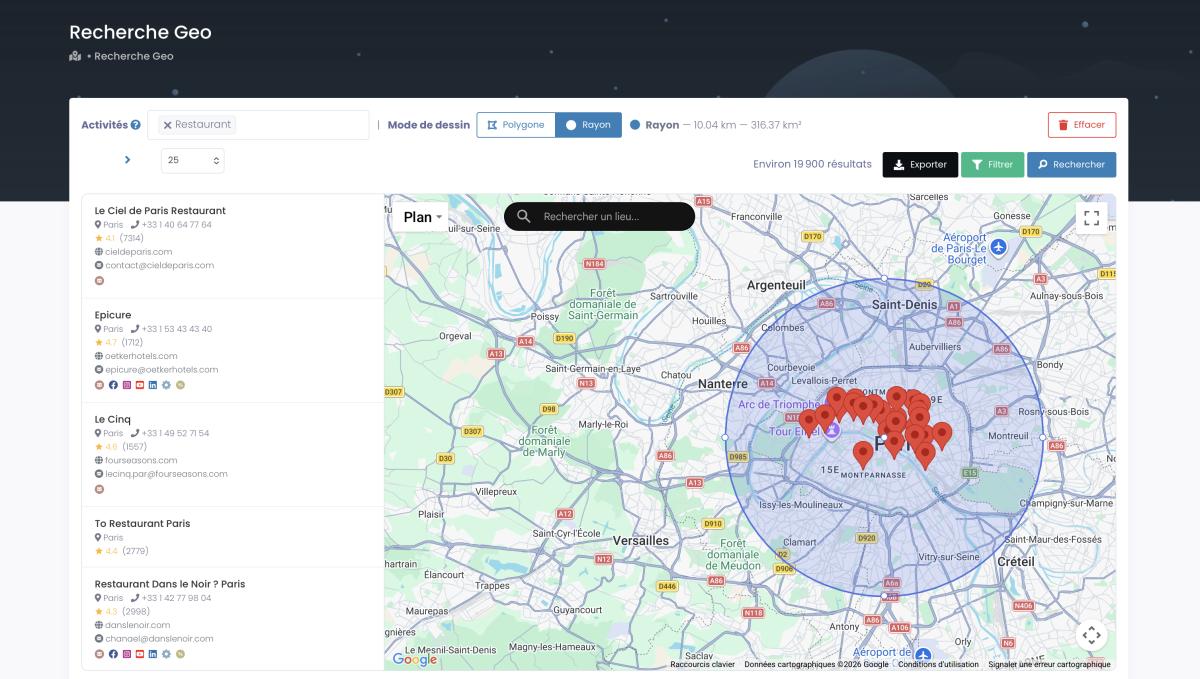
Where you appear on the map depends on where the searcher is standing. So a single "I rank #3" is meaningless. Real Google Maps rank tracking uses a geo-grid: dozens of points across your service area, each showing your position from that spot. Below is a radius-based search, the same logic that powers grid tracking and territory mapping.
5. Website & contact data
The listing links to a website. The website holds the rest of the story: their email, their tech stack, whether they run ad pixels, what their meta titles target. This is also where you'd leverage Google Maps reviews as social proof on your own site once you've seen how the competition does (or doesn't) use theirs.
How to do a local competitor analysis on Google Maps for free, step-by-step
No budget? Good. A free Chrome extension and 30 minutes is enough to run a real local competitor analysis for free. Here's the manual route: the one you should master before you ever pay for anything.
- Map the local pack. Search your main keyword plus your city ("emergency plumber Austin"). The top businesses on the map are your true competitors, not the ones you assume. This is how you find competitors on Google Maps that actually matter.
- Spy the categories. Install a free extension like GMB Everywhere or GMBspy. It overlays each listing's primary (⭐) and secondary categories. This is the heart of any Google Business Profile competitor analysis, and it's how you learn what categories your competitors use without asking.
- Read the reviews. Sort by most recent. Skim the 5-stars for what they nail, then mine the 1- and 2-stars for what they don't. When you analyze competitor reviews on Google Maps this way, you're finding competitor weaknesses with Google reviews, one complaint at a time.
- Note the gaps. Missing categories. Thin photo galleries. A two-week-old "we'll respond soon." Write each one down. Those gaps are your opening.
That's it. Five pins, done in an afternoon. Honestly, for a handful of rivals, this beats any expensive dashboard.
But (and you knew there was a but) try doing that for fifty competitors. Or two hundred, across three cities. Guess how many you'll actually remember tomorrow? The manual method is wonderful right up until it quietly collapses under its own weight.
Want to go beyond one competitor at a time? See how a full-market export works, and pull your first 100 leads free. Try Scrap.io free for 7 days (100 export credits included).
Scaling up: extracting competitor data across a whole market
One by one works for five competitors. It falls apart at fifty. And it's a joke at five thousand. So when you need the whole board, not just the pieces in front of you, you switch from auditing to extracting.
Video: How to Scrape Google Maps - Ultimate Guide
This is the angle every other guide skips. With Scrap.io you can map every business in a city (or a county, a state, or an entire country) in two clicks, no code. Pick a category (or skip it entirely and grab a whole trade area), pick the geography, and you get a clean CSV or Excel file. With 225,676,406 establishments indexed across 195 countries and 4,000+ categories, the index doesn't run out before your market does. One real client extraction: 11,734 businesses in 45 minutes. Try that with a spreadsheet and a free extension. I'll wait.

The part that actually saves money: you filter before you extract. Only competitors with an email on file. Only those rated between 2.5 and 3.5 stars. Only listings claimed in the last 90 days. The filters apply before a single credit is spent, so you never pay for rows you can't use. If a tool makes you export everything first and sort through the mess afterward, it's wasting your money. Full stop.
Video: Find Businesses That JUST Opened (Before Your Competitors Do)

And the data's fresh. Every export pulls in real time from the listing and the linked website: no frozen database that went stale six months ago. If you want the deep mechanics, there's a complete Google Maps scraping guide and a walkthrough on how to extract every business in a city. This is also exactly how local SEO and data scraping work together to turn a market map into actual moves.
A note on Google's own limits, since people always ask: a normal Maps search caps out around 120 results, which is why manual research never shows you the full picture. Pulling from a dedicated index is what gets you past that wall.
Map every competitor in your city (or your whole country) in two clicks. Filter by rating, review count, category, and contact data before you spend a credit. Start your free 7-day Scrap.io trial (100 leads included).
Best tools for Google Maps competitor analysis in 2026
Manual audit, rank tracker, or data extractor? They're three different jobs, and the "best tool" depends entirely on which one you're doing. Here's an honest comparison of the real options for 2026.
| Tool | Best for | Scale | Free option |
|---|---|---|---|
| GMB Everywhere | Free category & gap audits, one listing at a time | A few competitors | Yes (Chrome ext.) |
| Local Falcon | Geo-grid rank tracking (21×21 = 441 points), Share of AI Voice | One business, deep | Trial |
| BrightLocal | Local Search Grid (225 pts) + citations + GBP + reviews | Single-location SEO (~$1.95/location) | Trial |
| Outscraper | Review scraping for analysis & market research | High (pay per record) | Limited |
| Scrap.io | Data extraction at scale: city, region, or whole country | Country-level | 7-day trial, 100 leads |
A quick reality check on this niche, because it's almost funny. The current #1 organic result for "Google Maps competitor analysis" points to an Apify actor literally labeled "Competitor Analyzer," which has been deprecated. Ranking first with a dead product. That tells you how little real, current guidance exists here. (And it's why this article had to get written.)
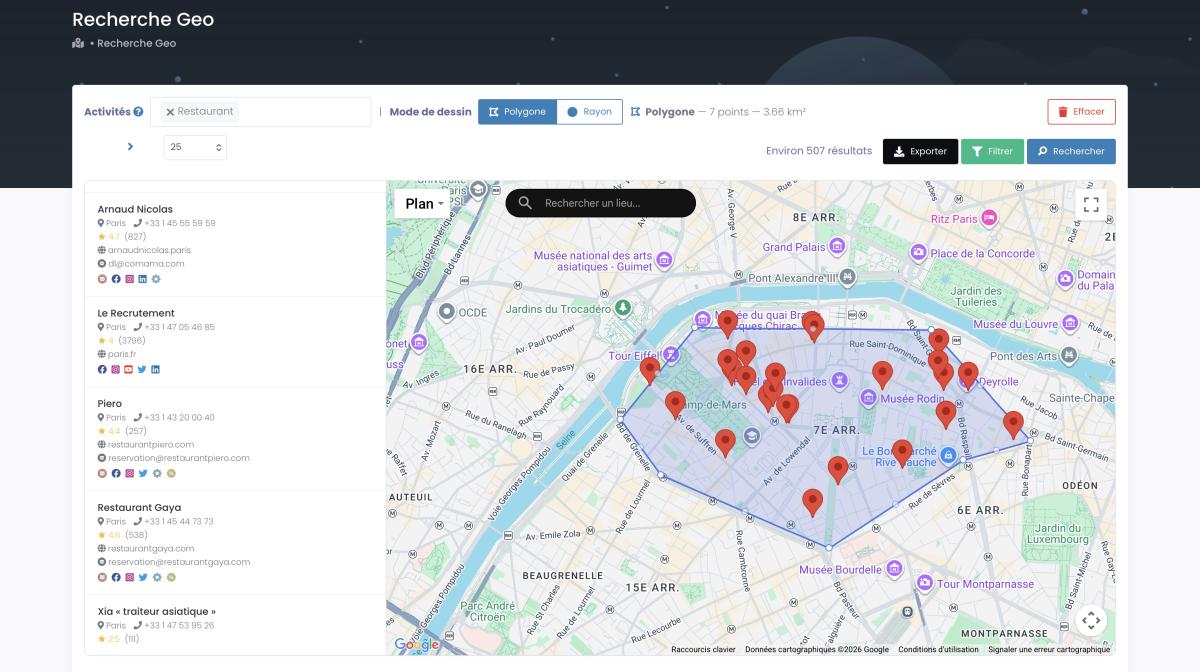
Need to draw a weird-shaped trade area: a single neighborhood, a corridor, a district that ignores city lines? A polygon search (above) handles exactly that. For the broader landscape of extraction methods, here's a rundown of 5 methods to scrape Google Maps. Bottom line: Scrap.io is trusted by 50,000+ professionals pulling from 225M+ businesses across 195 countries. That's the scale advantage no manual tool can match.
Turning analysis into action: the template + checklist
Sarah runs a salon. She kind of knew her competitors: names, rough vibes, the place with the good Instagram. One afternoon with the template below changed that. She found three categories her rivals used that she didn't, plus a glaring review gap (everyone nearby got roasted for wait times; she could own "fast, on-time"). That's a positioning strategy, found in an afternoon, for free.
So here's the Google Maps competitor analysis template you can copy. Run it on each competitor and the patterns jump out fast:
- Identity: name, primary category, secondary categories.
- Reviews: total count, average rating, reviews in the last 30 days, top 3 praise themes, top 3 complaint themes.
- Completeness: photos count, website yes/no, claimed yes/no, hours filled yes/no.
- Ranking: map position from 3–5 points across your service area.
- Gap & move: the single biggest weakness, and the one thing you'll do about it.
Then act on it. The fastest wins usually come straight from your own profile: copy the missing categories, fill the gaps your rivals left, and respond to every review like you mean it. Our full guide to optimizing your Google Business Profile covers the ranking mechanics in depth. And once you've got the whole market in a spreadsheet, you can push it further into market segmentation with Google Maps criteria, slicing rivals by rating, density, or trade area to benchmark your business against local competitors properly.
Done well, this whole routine is competitor analysis for local SEO in its purest form: public data turned into ranking moves. And benchmarking isn't a one-and-done, by the way. Markets move. Refresh the template monthly and you'll catch a competitor's new categories or a sudden review surge while it's still useful, not after they've lapped you.
Is this legal? Data, privacy & compliance
Everything we just did uses publicly available business data. That's legal. But there are rules, and pretending otherwise helps nobody.
In the US, courts have repeatedly held that scraping publicly accessible data doesn't violate the Computer Fraud and Abuse Act. In the EU, GDPR draws a clean line: a business name, address, phone, and category are business information, not personal data. Pulling a reviewer's individual name out of a review? Different story. Tread carefully there. CCPA in California carves out publicly available business info too. The throughline: stick to public B2B listing data for prospecting and competitive research, and you're on firm ground pretty much everywhere.
This is also where tool choice matters. Scrap.io works only with publicly available business data, keeps each record traceable to its source, and is GDPR- and CCPA-compliant. Public, traceable, business-only. That's the standard to hold any tool to.
A community thread on r/b2bmarketing summed up why this data is worth the care, describing two markets side by side: "One region had updated listings, working websites, and recent reviews. Another looked abandoned, full of missing phone numbers, duplicate listings…" (r/b2bmarketing). That contrast is the opportunity. The abandoned market is wide open, if you can see it clearly.
FAQ
What is Google Maps competitor analysis?
It's the practice of studying your local competitors' Google Maps and Google Business Profile listings (categories, reviews, ratings, photos, and rankings) to find gaps and opportunities. In short, it turns public local data into a competitive advantage you can act on the same day.
How do I analyze competitors on Google Maps for free?
Search your keyword plus your city to surface the local pack, install a free extension like GMB Everywhere or GMBspy to reveal each competitor's categories, read their recent reviews for strengths and weaknesses, then note the gaps. Thirty minutes, zero budget, real insight.
How can I see what categories my competitors use?
Use a free Chrome extension such as GMB Everywhere or GMBspy. It overlays a competitor's primary (⭐) and secondary categories directly on their Google Maps listing. No guessing, and no asking.
What's the best tool for Google Maps competitor analysis in 2026?
It depends on the job. GMB Everywhere for quick free audits, Local Falcon or BrightLocal for geo-grid rank tracking, and Scrap.io for data extraction at scale across a city, region, or entire country. Most serious analyses end up using more than one.
Is it legal to extract competitor data from Google Maps?
Yes. Google Maps listings are public business data, and using it for commercial research and prospecting is legal when you respect GDPR and CCPA. Scrap.io is compliant on both, working only with public, source-traceable business information.
Wrapping up
Your competitors' data is public, sitting on the map, and updated in real time. The only question is whether you look at it like a tourist or like an analyst. That's the whole point of Google Maps competitor analysis: categories, reviews, completeness, ranking, contact data. Five signals, one template, and a market full of gaps waiting to be noticed.
Do the free version this week on five rivals. Then, when five isn't enough, scale it.
Your competitors' data is public and updated in real time. Start your free 7-day Scrap.io trial (100 export credits included) and pull your first competitor map today, every business in your market, filtered exactly the way you need it.
Generate a list of restaurant with Scrap.io