

- What Is Geographic Market Segmentation? (Definition + Why It Matters in 2026)
- Why Google Maps Is the Best Market Segmentation Tool Nobody Talks About
- 5 Google Maps Criteria for Market Segmentation (With Real Data)
- Geographic Segmentation Examples: 3 Real-World Case Studies
- How to Extract Google Maps Data for Market Segmentation (Step-by-Step)
- Advanced Segmentation: Combining Google Maps Data with Your CRM
- The Limits of Geographic Segmentation (Let's Be Honest)
- Legal & Compliance: What You Need to Know
- FAQ
A buddy of mine runs a digital agency. Last month he spent $4,000 on a "market intelligence report" from some consultancy. Fifty pages of charts. Looked gorgeous. Problem? The data was from late 2024. Half the businesses listed had either moved, closed, or completely changed their offering. Four grand. Gone.
Meanwhile, 46% of all Google searches have local intent (BrightLocal, 2026). Nearly half the internet is looking for something nearby, right now, in real time. And Google Maps sits on top of all of it with over 2 billion monthly active users (OnTheMap, 2026) generating behavioral data every second of every day.
And almost nobody uses it for market segmentation.
Wild.
This isn't some obscure hack. Google Maps holds 88.71% of the web mapping market share (Enlyft, 2026), with 3,867,624 companies actively using it for marketing according to 6sense. The digital map market itself? Going from $26.67 billion to $68.14 billion by 2032 at a 12.44% CAGR (Data Bridge Market Research). That's not growth. That's an explosion of location data waiting for someone smart to use it.
So let's talk about how to actually do market segmentation with Google Maps criteria in 2026. Not the theoretical MBA version. The practical, "OK but what do I actually do on Monday morning" version.
What Is Geographic Market Segmentation? (Definition + Why It Matters in 2026)
Here's a 40-word answer for the impatient: geographic market segmentation is dividing your target market based on where people and businesses physically are, what they do there, and how location shapes their buying behavior. Not demographics. Not psychographics. Geography.
That's it. Dead simple concept, massively underused.
The old way of segmenting markets (age brackets, income levels, survey responses) worked when data was scarce. But we're in 2026. 76% of people who run a local search on their phone visit a business within 24 hours (Shopify, Local SEO Statistics 2026). These aren't window shoppers. These are people with credit cards out, looking for exactly what you sell, right now, near them.
Location intelligence has become the backbone of modern segmentation. And the companies still relying on 2023 survey data to understand their market? They're basically navigating with a paper map while everyone else has GPS. Sure, you'll get somewhere eventually. But you'll miss every shortcut, every opportunity, and probably your exit.
Quick reframe before we go further: some of the best market research tools for local businesses aren't fancy platforms at all. They're already sitting inside Google Maps, free to look at. The real question isn't what is geographic market segmentation. It's why you aren't using the richest geographic dataset on Earth to do it.
Why Google Maps Is the Best Market Segmentation Tool Nobody Talks About
Let me throw a number at you. 2 billion monthly active users. Two. Billion. And yet 90% of companies still segment their markets with survey data and gut feelings. That's not just inefficient. It's leaving money everywhere.
Google Maps isn't a directions app anymore. It's a living, breathing database of 225,676,406 businesses across 195 countries (Scrap.io, 2026). Every one of those businesses has a category, reviews, ratings, photos, opening hours, contact info. Some have hundreds of reviews telling you exactly what their customers love and hate. That's market research with Google Maps data served on a silver platter.
But here's what makes it genuinely different from, say, buying a Statista report. Google Maps data is updated by the businesses themselves. In real time. A restaurant changes its hours? Updated. A new competitor opens across the street? Shows up within days. A business gets hammered with one-star reviews? You see it immediately. No other market segmentation criteria source gives you that freshness.
Someone on Reddit's r/b2bmarketing put it perfectly: "When your source data is uneven, no amount of enrichment or segmentation logic can fix the noise underneath." Exactly. And Google Maps is one of the few data sources where the noise is low because businesses maintain their own listings. That's a massive deal for anyone doing location intelligence marketing with Google Maps.
Think about geomarketing strategies for a second. If you're a web agency looking for businesses without websites in a specific city, Google Maps shows you exactly that. If you're a food distributor trying to find restaurants in a particular zip code with bad reviews (meaning they might need better ingredients), Google Maps has that too. The data is there. The question is whether you're extracting it or ignoring it.
And honestly, location based marketing through Google Maps is so underused right now that doing it properly feels like cheating. Give it two years. Everyone will be doing this. But right now? You've got a real edge.
Video: How to Scrape Local Leads at the Country Level
5 Google Maps Criteria for Market Segmentation (With Real Data)
What if you could filter an entire country's businesses by rating, review count, phone type, and web presence, before spending a single dollar on outreach? That's not hypothetical. That's Tuesday afternoon with the right tools.
Here are the five market segmentation criteria that Google Maps hands you on a plate:
| Criterion | What It Tells You | Segmentation Use |
|---|---|---|
| Geographic Location | Exact GPS coordinates, city, region, country | Territory mapping, local market analysis |
| Business Category | 4,000+ types (main + subtypes) | Industry targeting, niche discovery |
| Reviews & Ratings | Star average, review count, sentiment | Quality scoring, pain point identification |
| Operating Hours | Open/closed times, seasonal patterns | Timing campaigns, seasonal segmentation |
| Competitor Density | How many similar businesses nearby | Opportunity gaps, saturation analysis |
Video: Finding Clients Through Google Maps Filters
1. Geographic Location Parameters
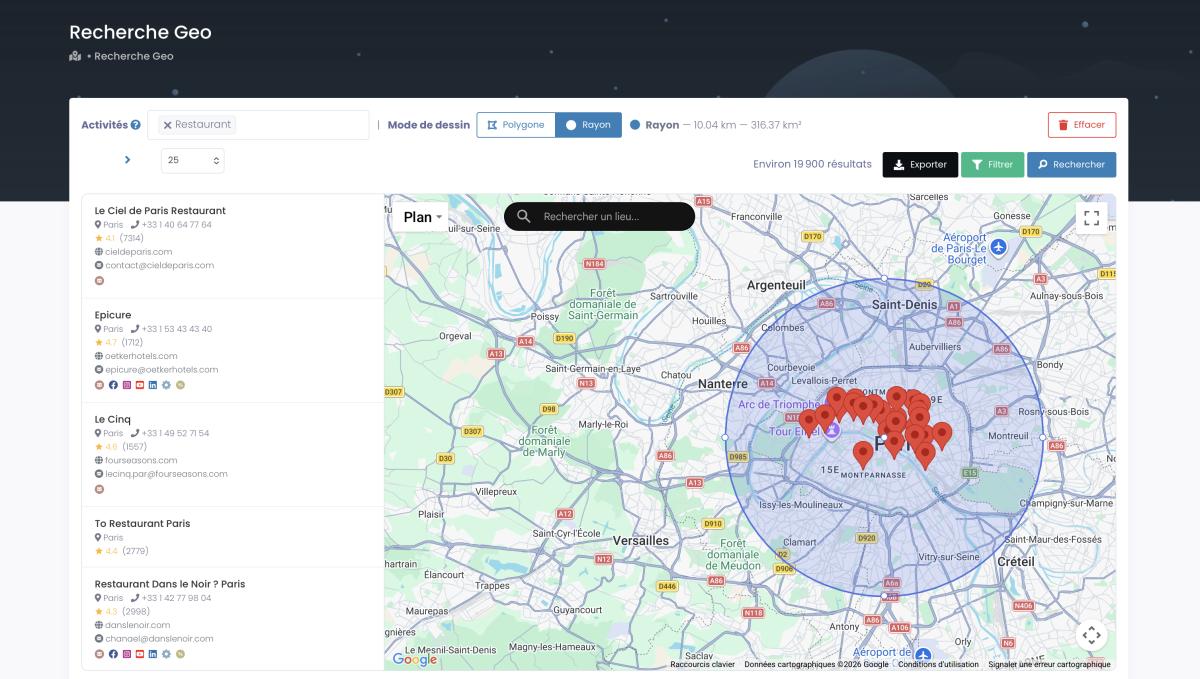
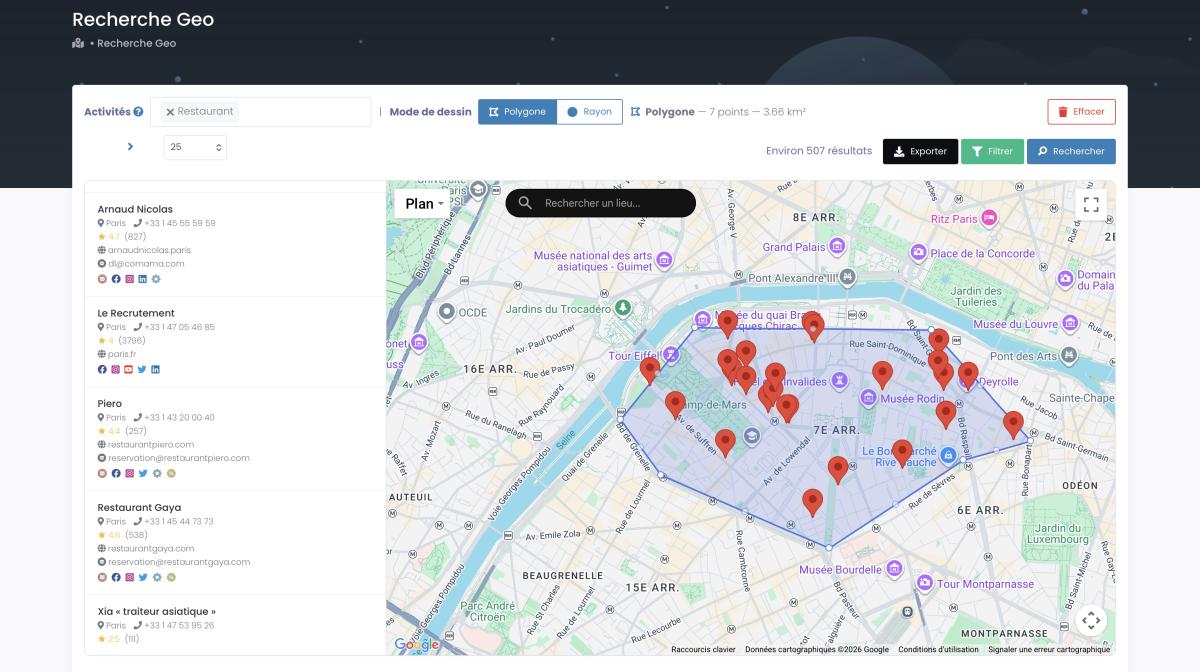
This is the obvious one, but most people do it wrong. They think "geographic segmentation" means picking a city. Nah. It means drawing a polygon around a specific neighborhood, setting a radius around a competitor's flagship store, or comparing business density between two zip codes.
Modern tools let you do geographic segmentation using Google Maps criteria at absurd levels of precision. Radius searches. Custom polygon zones drawn by hand on a map. Country-level sweeps. The granularity is yours to decide. A franchise evaluating expansion can compare every neighborhood in a metro area by business type density before committing a dime. Try doing that with Census data. I'll wait.
2. Business Category and Industry Type
Google Maps business categories for segmentation are absurdly detailed. We're talking 4,000+ types. Not just "restaurant": Italian restaurant, seafood restaurant, vegan restaurant, fast food restaurant. Each with their own competitive dynamics.
And with smart filtering, you don't waste time on irrelevant listings. Want coffee shops near office buildings that open before 7 AM? Done. Auto repair shops in suburbs with no website? Three clicks. This is business data extraction for market research at a level that would have required a team of interns and three months of work just five years ago.
Here's a trick nobody mentions: on Reddit, one marketer pointed out that Google Maps categories are goldmines for niche identification. Restaurants with bad reviews? That's not just a "bad restaurant." That's an opportunity for food consultants, kitchen equipment suppliers, even POS vendors. The category IS the niche. You just have to learn how to segment customers by location and category simultaneously.

3. Customer Review Patterns and Ratings
OK, this one's a goldmine that most people completely sleep on.
Google Maps reviews for market segmentation aren't just "4.5 stars, seems good." They're behavioral data. A business with 200 reviews averaging 3.2 stars is telling you something very different than one with 15 reviews at 4.9. The first one has traffic but problems. The second is probably new and hasn't been tested yet.
You think a business with 47 one-star reviews about "rude staff" needs the same pitch as one with 300 five-star reviews praising their "amazing customer service"? Come on. That's two completely different segments, two completely different sales approaches. And Google Maps gives you this for free. It's also the cleanest way to start finding companies with negative reviews you can actually help, one complaint at a time.
4. Operating Hours and Seasonal Patterns
Underrated. Completely underrated.
Businesses open 24/7 have different needs than 9-to-5 shops. Places closed on weekends are a different segment than those doing their biggest volume on Saturday. And seasonal businesses (ski resorts, beach bars, tax accountants) create predictable windows where specific products and services are in high demand.
You can see all of this on Google Maps. Opening hours. Busy times (the little bar chart showing peak traffic). Seasonal closures. It's right there. Nobody looks at it for segmentation purposes. Why not? Honestly no idea. It's free data sitting in plain sight.
5. Competitor Density Analysis
Here's where Google Maps competitor density analysis gets interesting. Lots of competitors in one area might mean proven demand. Or it might mean you're walking into a bloodbath. No competitors? Could be an untapped opportunity. Or a graveyard where three businesses already tried and failed.
The point is: you can see it. Map every competitor in a 10-mile radius. Count them. Read their reviews. Check their ratings. Understand why the market looks the way it does before you spend a cent. If you want the full playbook, we broke down Google Maps competitor analysis step by step. And defining your ideal customer profile without knowing your competitive landscape is like playing poker blindfolded.
Geographic Segmentation Examples: 3 Real-World Case Studies
A web agency needed HVAC companies without websites in Texas. Not "companies in the South." Not "service businesses." Specifically: HVAC, Texas, no website. In 45 minutes, they had 11,734 verified leads exported from Scrap.io. That's not a case study from a textbook. That's a real extraction that happened on a Wednesday afternoon.
Want a concrete geographic segmentation example or three? Here's the range:
Example 1: Outscraper, Review-Based Market Research. Some companies use Google Maps review data to identify entire market segments based on sentiment patterns. Restaurants with consistently bad reviews about wait times? That's a segment for restaurant tech companies selling table management software. Gyms with complaints about cleanliness? Perfect targets for commercial cleaning services. The reviews ARE the segmentation layer.
Example 2: Actowiz Solutions, Global Business Dataset. Large-scale data providers are building entire market analysis platforms on top of Google Maps data. They aggregate business listings across countries to create competitive intelligence dashboards that show market density, growth patterns, and geographic targeting strategies by industry vertical. It's competitive intelligence with Google Maps at industrial scale.
Example 3: Boutique Fitness Brand, Location Expansion. A fitness studio chain used location-based customer insights from Google Maps to decide where to open new locations. Instead of expensive market research firms, they mapped competitor density (other studios), supporting businesses (health food stores, athleisure shops), and review sentiment in target neighborhoods. Found three underserved areas. Opened there. All three profitable within 6 months.
Oh, and Google themselves offer the Places Insights API for geospatial analytics. Proof that even Google knows their Maps data is a segmentation powerhouse. And real examples matter more than theory here, especially in B2B, where buyers want proof before they commit. So yeah, case studies pull their weight.
How to Extract Google Maps Data for Market Segmentation (Step-by-Step)
Manually scrolling through Google Maps, copying business names into a spreadsheet, checking websites one by one... I've seen people do this. Grown adults. With jobs. Spending 8 hours a day on copy-paste. That's not market research. That's digital archaeology.
Here's how to use Google Maps for market segmentation without losing your mind:
Step 1: Define your segment. What are you looking for? Business category, location, minimum rating, has-email, has-website. Decide your criteria first. Be specific. "Restaurants in New York" returns 60,000 results. "Italian restaurants in Brooklyn with 4+ stars and a website but no Instagram" returns 340. That second list is a goldmine. The first one is noise.
Step 2: Pick your extraction method. Three options: Google Maps API (expensive at scale, $17 per 1,000 requests just for basic fields), custom Python scripts (free but maintenance-heavy and capped at ~120 results per search), or a no-code platform like Scrap.io. The complete scraping guide breaks down each method if you want the technical details.
Step 3: Apply filters BEFORE extracting. This is crucial. Most tools extract everything and let you filter after, which means you pay for thousands of useless records. Scrap.io's approach: filters apply before credits are consumed. You only pay for leads that match your segment. Zero waste.

Step 4: Export and analyze. CSV or Excel. Load it into your CRM, your spreadsheet, your BI tool, whatever. You've got google maps data for business analysis: names, addresses, phones, emails, ratings, review counts, social profiles, website metadata. From there, segment however you want. By rating tier. By review volume. By web presence. By geography. Mix and match.
An extraction that would take a human 3 weeks takes about 45 minutes with the right setup. Not even close. On Trustpilot, Scrap.io users consistently mention one thing: the ability to extract data at the country level in two clicks. No code, no API setup, no proxy juggling. Just pick a country, pick a category, and go. (Honestly, once you've done it once, going back to manual research feels like punishment.)
Video: Scrap.io - How to Start?
Advanced Segmentation: Combining Google Maps Data with Your CRM
Here's where things get seriously powerful. Pull your Google Maps segments into your CRM, and suddenly your sales team has context they never had before. Not just "here's a company name and email." More like "here's a 4.2-star plumbing company in Austin with 89 reviews, no website, a mobile phone number, and they've been on Google Maps for 3 years."
Your CRM is only as smart as the data you feed it. And look, B2B contact data degrades by at least 22.5% a year, roughly 2.1% every single month (Landbase, Data Decay Statistics 2026). So that fancy contact list you bought? A big chunk of it is already garbage.
CRM automation with Google Maps data solves this by pulling fresh data directly from listings that businesses themselves update. No stale databases. No dead emails from 2023. Real data from real businesses operating right now.
The really smart play? Combine Google Maps segmentation with account-based marketing. Segment by location + category + rating. Then enrich each lead with geolocation data: address, coordinates, nearby competitors, review trends. Feed it all into your CRM. Now your reps aren't cold-calling blind. They're reaching out to businesses they actually understand, in areas they've actually researched.
Point is: Google Maps data + CRM automation = google maps data for lead generation on autopilot. And that's not futuristic. That's a Make.com scenario you can build in an afternoon.
The Limits of Geographic Segmentation (Let's Be Honest)
Time for some honesty, because most guides skip this part entirely. Geography tells you where a business is. It doesn't tell you why customers pick it, or whether they even like it. That's the big one among the disadvantages of geographic segmentation: on its own, location is a blunt instrument.
The fix isn't to ditch it. It's to stack it. Cross location with review sentiment and business category, and that blind spot mostly disappears. Geography gives you the map. Reviews give you the reason. Use one without the other and you're only seeing half the board.
Legal & Compliance: What You Need to Know
Is scraping Google Maps legal? Short answer: yes, when you do it right.
Longer answer: you're extracting publicly available business data. Names, addresses, phone numbers, ratings, review counts: stuff businesses voluntarily publish on Google Maps. The hiQ Labs v. LinkedIn ruling (9th Circuit, 2022) confirmed that scraping public data doesn't violate federal law. GDPR in Europe treats B2B data under legitimate interest (Article 6). And CCPA in California has similar carve-outs for public business information.
That said, don't be dumb about it. Stick to business data. Don't harvest individual reviewer names for marketing purposes. Don't pretend you're someone you're not when reaching out. Follow CAN-SPAM rules for email. The basics, really.
Scrap.io only collects publicly available business data. GDPR and CCPA compliant. Every data point traceable to its source. Payments secured by Stripe (PCI-DSS standard). There's even a bug bounty program for security testing. Compliance isn't sexy, but it keeps you out of trouble, and that matters way more than saving ten minutes on data collection.
Frequently Asked Questions
What is geographic market segmentation with Google Maps?
It's dividing your target market based on physical location data from Google Maps, using criteria like business coordinates, category, ratings, review volume, and competitor proximity to create segments. Instead of guessing where your customers are with surveys, you're using real-time data from over 225 million indexed businesses across 195 countries. Way more accurate than demographic guesswork, and it updates itself because businesses maintain their own Google Maps listings.
What are the 5 key criteria for Google Maps market segmentation?
Geographic location (coordinates, radius, polygons), business category (4,000+ types), customer reviews and ratings (volume and sentiment), operating hours and seasonal patterns, and competitor density. Each criterion can be used alone or combined. The real power comes from stacking them. "Italian restaurants in downtown Chicago with 4+ stars and fewer than 50 reviews" is a segment you can extract in minutes. Geographic is just one of the main types of market segmentation, but for local B2B it's the one that pays.
Is using Google Maps data for market segmentation legal?
Yes. You're accessing publicly available business information that companies themselves publish. The hiQ v. LinkedIn ruling (2022) supports scraping public data. GDPR covers B2B data under legitimate interest. Platforms like Scrap.io only extract public business data, are GDPR and CCPA compliant, and provide full data traceability. Just stick to business data. Don't scrape individual reviewer identities for marketing.
How do I extract Google Maps business data for segmentation?
Three ways. The Google Maps API (structured but expensive and limited). Custom Python scripts (free but high-maintenance, capped at ~120 results per search). Or no-code tools like Scrap.io, which lets you filter by category, location, ratings, web presence, and more, then export to CSV/Excel. Scrap.io can extract an entire country's businesses in two clicks, with filters applied before you spend any credits.
Can Google Maps segmentation work for B2B companies?
Absolutely. B2B segmentation through Google Maps is one of its strongest use cases. Segment by business category (target only SaaS-relevant industries), identify industry clusters in specific areas, check competitor proximity, understand regional business ecosystems. A web agency can find every business without a website in a city. A SaaS company can map all potential clients within 50 miles of their sales team. It's how to find target market on Google maps with surgical precision, and it works better than LinkedIn for local B2B prospecting in most cases.
Which companies use geographic segmentation?
Plenty, and probably more than you'd guess. Retail chains and franchises use it to pick store locations. Restaurant groups map delivery zones. Local web agencies target businesses without websites, one city at a time. Field sales teams carve up territories. Even Google leans on geographic data across its own products. Bottom line: if a business cares about where its customers are, it's already using geographic segmentation.
Generate a list of restaurant with Scrap.io