

Sales reps spend 60% of their time not selling. Not calling, not pitching, not closing. Sixty percent gone to admin, data entry, and hunting for the right contact (Salesforce State of Sales, 2026). A lead scraper exists to claw back a chunk of that time.
Most of them don't.
You install a free extension, run it on a Google Maps search, and get 90 rows with no emails. Or you build your own scraper and spend three weekends debugging proxies. Been there. So this guide does something the auto-promo pages won't: it shows you exactly how a lead scraper works, walks through a real extraction, compares the actual tools on price, and tells you when the one we make isn't the right pick. Plus the 2026 legal rules, because "can I go to jail for this?" is a real question people ask.
- What does a lead scraper do?
- The 4 types of lead scrapers (and what nobody tells you)
- Live demo: 1,000 fresh leads in 2 clicks
- Scaling up: whole-country and radius scraping
- Honest comparison: Scrap.io vs Outscraper vs Apify vs PhantomBuster vs Clay
- What does a lead scraper cost in 2026?
- Is lead scraping legal?
- What real teams do with scraped leads
- FAQ
What does a lead scraper do?
A lead scraper automatically pulls business contact details (name, email, phone, website, address) from public sources like Google Maps and compiles them into a list you can use for prospecting at scale. Instead of copy-pasting one business at a time, you point it at a category and a location, and it hands you a spreadsheet.
That's the whole idea. That's the lead scraper meaning in one sentence.
Quick disambiguation, because the search results are a mess here. "Lead scraper" (two words, lowercase) is the generic category, any tool that extracts leads. "Lead Scrape" (leadscrape.com) is one specific desktop product that happens to own the Google knowledge panel for the term. When you search lead scraper, Google shows you the brand. Annoying, but now you know the difference. We're talking about the category, not the brand.
Picture the manual version. Fifty tabs open. Copy the business name, paste it in a spreadsheet. Open the website, hunt for an email, paste that too. Note the phone. Next tab. It's 11pm. Sound familiar? A lead scraper software does that same loop, just a few thousand times faster, and without the carpal tunnel. It's the difference between prospecting as a full-time job and prospecting as a two-minute task before lunch.
The 4 types of lead scrapers (and what nobody tells you)
- Chrome extensions. Free, browser-based, fine for about 50 leads. No emails.
- Desktop software. Installed apps like Lead Scrape. One device, snapshot data.
- Cloud platforms. Scrap.io, Outscraper, Apify. Built for volume, emails included.
- AI lead scrapers. Clay and MCP agents that orchestrate enrichment. The priciest layer.
The free Chrome extension you just installed will give you 90 rows and zero emails. That's not a bug. That's the business model. Free tools get you in the door; the useful data lives behind a paywall or a website crawl the extension can't do. Here's the honest map of the four categories, from "fine for 50 leads" to "runs a whole agency."
1. Chrome extensions (the free lead scraper reality-check)
These live in your browser and read whatever's on the Google Maps page you're looking at. Zero setup. Search "lead scraper chrome extension free" and you'll find a dozen, most of them a one-click install rather than a real lead scraper free download. Great for grabbing a handful of prospects. But they're capped by what's visible on screen: no bulk export, no filtering, and usually no emails, because emails live on the business website, not the Maps listing. A lead scraper chrome extension is a magnifying glass, not a mining rig. We actually tested the top Google Maps scraper Chrome extensions side by side, and the email gap shows up every single time.
And people feel that ceiling fast. Over on r/webscraping, someone hit exactly this wall: "I use the Instant Data Scraping extension; however, it doesn't include a contact number. please helpp" (r/webscraping, April 2025). No phone. No email. Just names. The free lead scraper promise runs out right when the data gets useful.
2. Desktop software (Lead Scrape and friends)
You install an app on your machine, it runs searches, it spits out a file. Lead Scrape is the well-known one here. It works. But it runs on your computer's resources, it's tied to one device, and desktop tools tend to lag on data freshness. You're often looking at a snapshot, not what's live right now. Fine for occasional pulls. Clunky for daily volume.
3. Cloud platforms (Scrap.io, Outscraper, Apify)
This is where serious lead generation happens. The tool runs on someone else's servers, handles the proxies and the scale, and lets you export thousands of records without your laptop fan sounding like a jet. This is the tier people mean when they say lead scraper tool: a real map scraper and lead extractor rolled into one, not a browser add-on. Scrap.io sits here as a Google Maps specialist. Outscraper is a multi-source generalist. Apify is a developer framework you configure. Different flavors, same tier: built for volume.
4. AI lead scrapers (Clay, MCP agents)
The newest lane. An ai lead scraper like Clay orchestrates enrichment across a dozen data providers (search "lead scraper ai" today and this is mostly what turns up). And MCP connectors now let you drive a scraper straight from Claude or ChatGPT in plain English ("find every Italian restaurant in Brooklyn with 4+ stars and an email"), with the agent building the query itself. It's genuinely cool. It's also usually the priciest layer, and it assumes you already have a data source underneath. AI doesn't invent leads. It arranges them.
| Type | Emails included | Bulk export | Filtering | Best for |
|---|---|---|---|---|
| Chrome extension | ❌ | ❌ | ❌ | ~50 leads, one-off |
| Desktop software | 🟡 Partial | ✅ | 🟡 Basic | Occasional pulls |
| Cloud platform | ✅ | ✅ | ✅ | Daily / at scale |
| AI scraper | ✅ (via source) | ✅ | ✅ | Multi-provider enrichment |
Notice the pattern? The best lead scraper for you depends entirely on volume. Fifty leads, once? Extension. Ten thousand a month with emails? Cloud platform. Don't let anyone sell you a mining rig to grab a handful of prospects.
Live demo: 1,000 fresh leads in 2 clicks
Let's scrape every plumber in Texas. For real. I'll use Scrap.io because it's a clean example of the cloud-platform workflow, and because it's the one I know inside out. Timer starts now.
Here's how to use a lead scraper, start to finish:
- Search. Pick a category (plumber) from 4,000+ options, then a location: a city, a state, or a whole country. Scrap.io shows you how many results match before you spend anything. Counting is free.
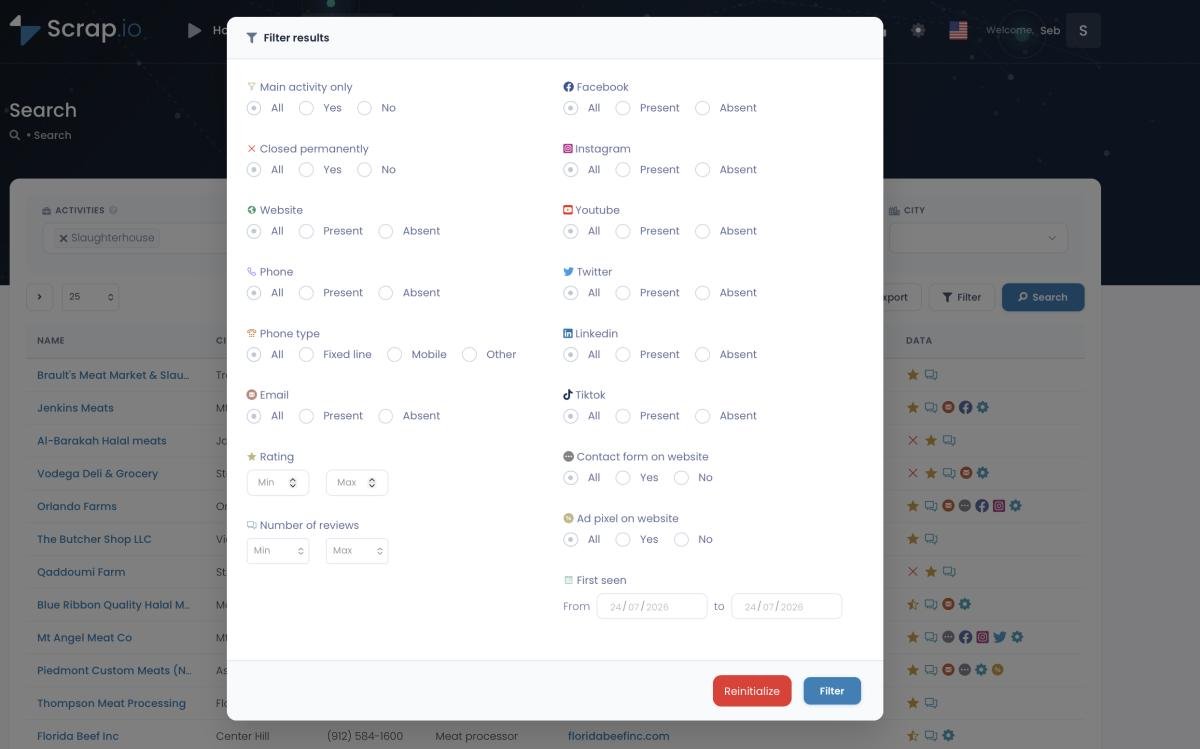
- Filter before you extract. This is the part that matters. Toggle "email present." Toggle "has a website." Set a minimum rating. The filters apply before credits are consumed, so you never pay for a listing you can't actually contact.
- Preview. Check the data (names, phone types, email classifications) before you commit a single credit.
- Export. CSV or Excel. Done. The file includes phone (with landline/mobile type), up to several classified emails per business, social links, and website tech.
- Reuse. Re-export the same business within 30 days? No extra credit. Set filters once, refine forever.
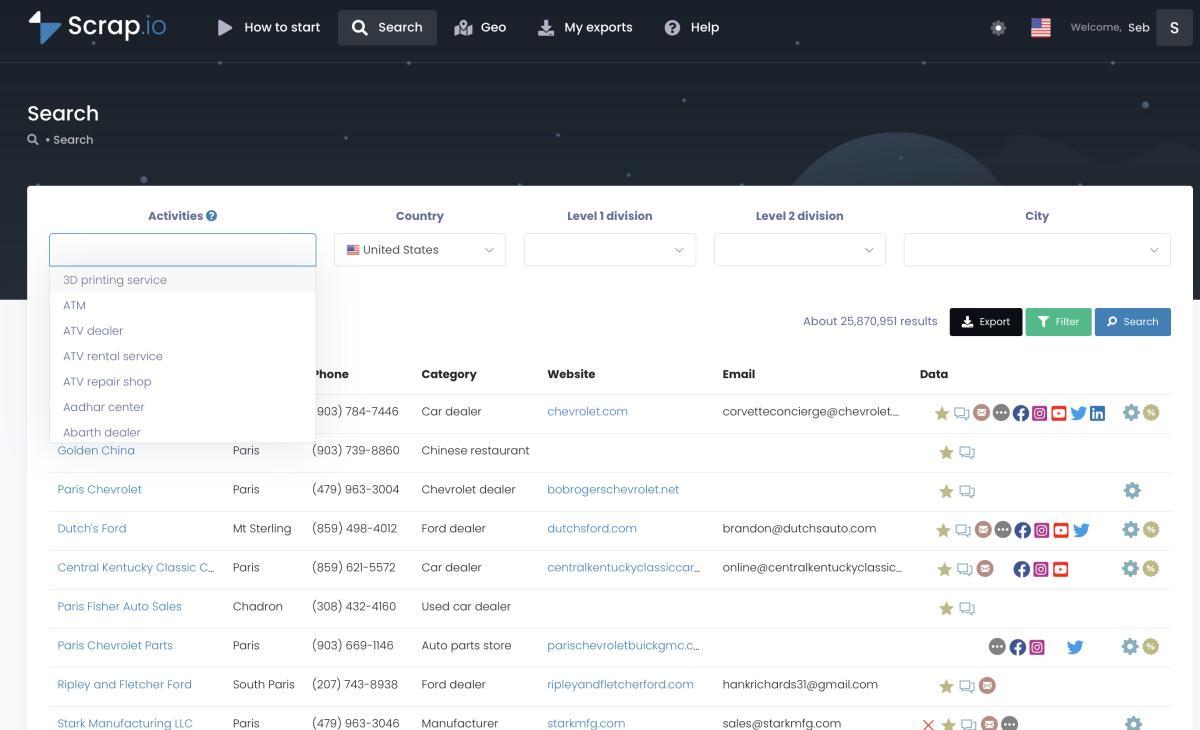
That "filter before you pay" step is the whole game. Most tools scrape everything, charge you for everything, and let you delete the junk afterward in Excel. You already paid for the junk. Filtering first means you only spend on google maps lead scraper results you'll actually use: the ones with an email, a mobile number, whatever you need.
Here's what that looks like with real numbers, pulled fresh. Search plumbers across Texas and Scrap.io counts 5,932 businesses. Now flip on "email present." The list drops to 2,285, the ones you can actually email. That's the whole demo in a single toggle: your credits land on 2,285 contactable leads and not a cent gets burned on the other 3,647. Counting stayed free the entire time. If you want the mechanics of stacking filters for clean data, we broke it down in the filtering guide for accurate business data.
The data comes out live, by the way, extracted at the moment you export, from both the map listing and the business website. Not a database someone froze six months ago. If you want the deep dive on pulling contact addresses specifically, we wrote a full walkthrough on how to find emails on Google Maps. Want to watch it happen instead of reading? Here's the two-minute version.
Video: Scrap.io, How to Start
Run this exact search yourself. Scrap.io covers 225 million+ businesses across 195 countries, and the counts are free, so you can size your market before spending a cent. Free for 7 days, 100 leads included. Cancel in two clicks if it's not for you. Start your free trial →
Scaling up: whole-country and radius scraping
Most scrapers think in cities. The interesting money thinks in countries.
Here's the thing nobody mentions in the tutorials: Google Maps caps visible results at roughly 120 per search. So a DIY scraper or a generalist tool that reads the map directly is structurally stuck. To cover a state, you loop through every city, one query at a time, and you still miss listings in dense areas. It's a grind. And it gets expensive fast. One builder on r/Entrepreneur summed it up: "I have built my own google maps scraper to get business details from Google maps API but it is really expensive to run." (r/Entrepreneur, 2024). That's also why our own DIY vs professional country-level scraping test pulled 52,000 French restaurants the hard way versus 139,000 with a purpose-built index.
Scrap.io built its own index (225,676,406 establishments across 195 countries and 4,000+ categories, as of mid-2026), so the cap doesn't apply. Pick a category, pick a country, hit export. That's it. You can also skip the category entirely and grab every business in a zone: a full economic map of a territory, which is impossible with category-by-category tools. We broke that feature down in extract every business in an area without a category.
And when a country or a city doesn't match your actual service area, GeoSearch handles the odd shapes: draw a radius around a point (up to 500 km), or trace a custom polygon around a neighborhood or a highway corridor. All the same filters apply inside it.

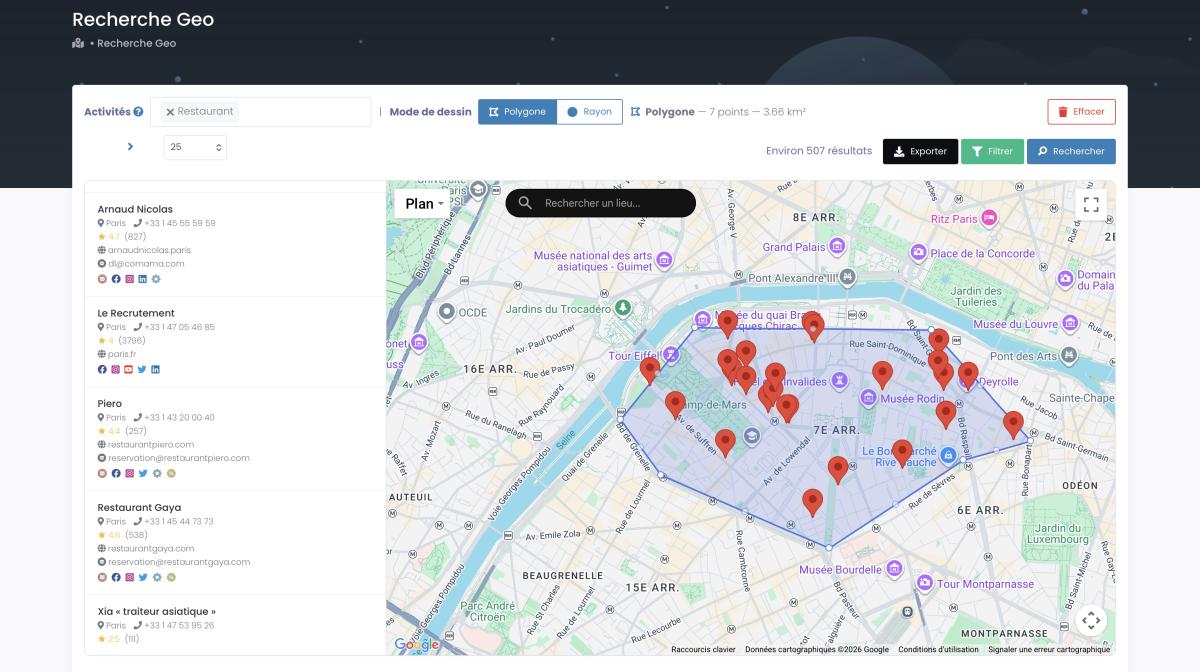
Does this actually work at volume? One documented client extraction: 11,734 businesses in 45 minutes. Complete profiles (emails, phones, social links), not just names and addresses. Try that manually. I'll wait.
Video: How to Scrape Local Leads at the Country Level
Honest comparison: Scrap.io vs Outscraper vs Apify vs PhantomBuster vs Clay
I'm going to be honest with you: Scrap.io isn't the right tool for everyone. Here's when it isn't.
If you need to scrape LinkedIn, Scrap.io doesn't touch LinkedIn. Go to PhantomBuster, it's built for that. If you want a custom scraper pulling from a dozen weird sources, Apify's framework is unbeatable and I'm not going to pretend otherwise. If your whole workflow is enrichment orchestration across many providers, Clay does that better than anyone. And for a pure one-shot, pay-as-you-go developer job, Outscraper can come in cheaper per raw result.
So where does a Google Maps specialist win? Four places: filtering before extraction (nobody else in this list does it), whole-country scraping with no code, real-time data freshness, and email/phone classification (individual vs contact vs sales; landline vs mobile, the mechanics of which we cover in how to scrape phone numbers from Google Maps). One honest limitation, stated plainly: phone-type detection isn't available for US and Canada numbers. If your SMS campaign targets the US, that specific filter won't help you. Good to know before you sign up.
| Tool | Billing model | Filter before paying | Whole-country, no code | Wins at |
|---|---|---|---|---|
| Scrap.io | Per lead, from $35/mo | ✅ | ✅ | Google Maps at scale |
| Outscraper | Pay-as-you-go per result | ❌ | 🟡 | Multi-source one-shots |
| Apify | Compute units | ❌ | ❌ (dev setup) | Custom scrapers |
| PhantomBuster | Execution time, from $69/mo | ❌ | ❌ | LinkedIn automation |
| Clay | Credits, from $149+/mo | 🟡 | ❌ | Enrichment orchestration |
Want the deeper head-to-heads? We wrote a full Outscraper alternative breakdown and a PhantomBuster alternative comparison. Both admit where the competitor wins. That's kind of the point.
The video below is the one where a user drops ZoomInfo (a $20K/year data platform) for a $49/month scraper and walks through why. Worth a watch if you're comparing "static database" against "live extraction."
Video: Stop Paying $20,000 a Year for ZoomInfo. This Does More for $49/Month
50,000+ professionals use Scrap.io (Capterra 4.8, G2 4.9). Don't take the comparison on faith. See how it stacks up on your own market. The counts are free, so you can check the numbers before you pay for a single lead. Compare on your market →
What does a lead scraper cost in 2026?
The average B2B lead costs around $200 (Sopro benchmarks, 2025). Up to $408 through LinkedIn Ads, ~$840 at trade shows. A scraped lead costs less than a cent. So where does all that money go? Mostly into middlemen and stale databases. Here's what the tools themselves actually charge.
| Tool | Price | Model | Note |
|---|---|---|---|
| Chrome extensions | $0 | Free | Incomplete data, no emails |
| Lead Scrape | ~$97/yr | Desktop license | One device |
| Outscraper | ~$3 / 1,000 | Pay-as-you-go | Add-ons stack up with emails |
| Apify | ~$4 / 1,000 | Compute units | Dev setup required |
| PhantomBuster | $69+/mo | Execution time | You pay for minutes, not leads |
| Clay | $149+/mo | Credits | Enrichment-first |
| Scrap.io | $35–49/mo | Per lead (10,000 credits) | All filters + columns included |
The models matter more than the sticker prices. Execution-time pricing bills you for how long a scraper runs (including page loads, failures, and retries), so a crash still costs you. Per-lead pricing bills you for results. We ran the full math on that in execution-time vs lead-based pricing, and the gap gets absurd at volume.
Run the per-lead number on Scrap.io's Basic plan: $35 for 10,000 credits is $0.0035 a lead. Against a $200 average cost-per-lead, that's not a discount. That's a different universe. Which raises the obvious question the rest of this article answers: if it's that cheap, is it even allowed?
Is lead scraping legal?
Can you go to jail for scraping Google Maps? No. Scraping publicly available business data (names, addresses, phones, websites anyone can see without logging in) is generally legal in the US. The hiQ v. LinkedIn saga established that scraping public data doesn't violate the Computer Fraud and Abuse Act.
A platform's Terms of Service can prohibit it, sure. But violating a ToS is a contract matter, not a crime. Those are very different consequences, and it's worth reading the fine print before your first campaign anyway.
On the privacy side: GDPR permits B2B prospecting under "legitimate interest" (Article 6, Recital 47), as long as you offer an opt-out. And the CCPA in California explicitly carves out publicly available information: company data isn't the consumer profile the law is built to protect. Scrap.io only extracts public business data, is GDPR and CCPA compliant, and keeps every data point traceable to its source. We went deeper on the case law in is it legal to scrape Google Maps.
None of this is legal advice, obviously. But the panic around scraping is mostly recycled fear from people who never read a court ruling. Stick to public business data, honor opt-outs, and you're on solid ground.
What real teams do with scraped leads
Groupon didn't build its merchant pipeline by buying lists. It scraped. Using web data collection, Groupon identified and enriched thousands of local merchants and synced them into its CRM. COO Filip Popovic described the output as "fresh, unique leads that drive targeted campaigns" (Apify case study). When a company that size chooses extraction over purchased databases, that tells you something.
It's not just the giants. A few real examples, sourced:
- TheLinksGuy: a link-building agency scraped Google Maps by niche, then ran outreach through Pitchbox. Result: five hyper-local links in weeks, and dozens more in the moving sector (Outscraper case study, May 2025).
- Let's Fearlessly Grow: an outbound agency scaled to "2,500+ emails per day, per client" off scraped data (Apify).
- Itrinity: built an email base and reported "40 hours saved, 400 emails in one week" versus a previous pace of 10 a day (Apify).
And an illustrative one (vendor-reported, so take it with the appropriate grain of salt): an HVAC outreach campaign built on scraped Google Maps data reportedly signed a $3,000 website project, hitting a 60% open rate and booking four meetings in a single week (NotiQ, Dec 2025). Anonymized companies, so I'm calling it illustrative rather than proof. But the shape of it is exactly what agencies do.
Here's the pattern I love, straight from a practitioner. On r/SMMA, an agency owner described scraping "U.S. dentists with 4.5+ star ratings, no website" (roughly 70–80 leads) for agency outreach (r/SMMA, June 2025). Think about how precise that is. Highly rated businesses (they're doing well, they have money) with no website (they need what you sell). That's a local lead scraper used the smart way: filters doing the qualification before a single email goes out.
One more reason this beats buying a list. Purchased B2B databases rot at 22–30%+ per year. Work emails decay fastest, tied to job changes and closures (Cleanlist, 2026). A list you bought in January is meaningfully wrong by summer. A b2b lead scraper that pulls live data sidesteps the whole problem: you extract at the moment you export, so the data is as fresh as the source. That's also why 73% of B2B buyers now actively avoid sellers who send irrelevant outreach (Salesforce, 2026). Stale lists produce exactly the kind of mistargeted spam buyers have learned to tune out. And with cold email reply rates drifting down toward ~5%, where a "good" rate now sits between 1 and 5% (Instantly Benchmark Report, 2026), fresh and precise beats big and stale every time.
The broader market agrees, for what it's worth: lead generation software is projected to grow from $8.76B in 2025 to $9.87B in 2026, a 14.8% CAGR (360iResearch, 2026). The tools are getting better because the demand is real.
The bottom line
So. A lead scraper turns hours of copy-paste into a two-click export. The free ones are fine for 50 leads and useless past that. Cloud platforms win at volume, filtering before you pay is the feature that actually saves money, and the whole thing is legal for public business data as long as you're not reckless about it. Buy a static list and it's already decaying; scrape live and it's fresh at export.
You don't need coding for any of this: a lead scraper without coding is the default now, not the exception. The only real question is whether you'll run your first extraction before or after your competitor does.
Try Scrap.io free for 7 days, 100 leads included. Your first country-wide extraction takes two clicks, across 225 million+ businesses in 195 countries. Check the count on your market for free, then decide. Start your free trial →
FAQ
What does a lead scraper do?
A lead scraper automatically extracts business contact details (name, email, phone, website) from public sources like Google Maps, and compiles them into a list for large-scale prospecting. Instead of visiting listings one by one, you choose a category and location and export thousands of contacts at once.
Is lead scraping legal?
Yes, for publicly available business data. The hiQ v. LinkedIn ruling established that scraping public data doesn't violate the CFAA. Under GDPR, B2B prospecting is permitted on a legitimate-interest basis (Article 6); under CCPA, publicly available information is excluded from scope. Always honor opt-outs and keep your outreach transparent.
How much does a lead scraper cost?
Anywhere from $0 (limited free extensions) to $69–499/month for cloud platforms. Scrap.io starts at $35/month for 10,000 credits, with every filter and column included. There's a 7-day free trial with 100 leads so you can test before committing.
Can I scrape leads for free?
Partly. Scrap.io's 7-day trial gives you 50 searches and 100 export credits with full features. Free Chrome extensions work for roughly 50 leads with no emails. Past that, the time you lose to manual work and incomplete data costs more than the tool. A credit card is required to activate the trial.
How is a lead scraper different from a lead database like ZoomInfo?
A database like ZoomInfo is a static snapshot: it decays 22–30% a year and runs $15–20K annually. A lead scraper extracts data live, on demand, at the moment you export, starting around $35/month. One ages the day you buy it; the other is fresh every time you run it.
Generate a list of restaurant with Scrap.io