

Here's a number that stops most people mid-scroll: one of these tools costs $9.90 a month. The other starts at $35. Same category — Google Maps scraping — and a 3.5x price gap staring you in the face.
Cheaper wins, right?
Not so fast. I spent a day with both, and the answer flipped somewhere around the second search. Because "cheaper per month" and "cheaper per usable lead" are two very different sentences — and one of them decides whether your prospecting actually works. This is a maps scraper ai comparison written the way I'd explain it to a friend over coffee: what each tool is, where the ceiling hides, what a lead really costs, and the install detail nobody puts on their homepage.
Maps Scraper AI vs Scrap.io: The 30-Second Verdict
No time? Fine. Here's the whole article compressed into one table.
| Maps Scraper AI | Scrap.io | |
|---|---|---|
| Entry price | $9.90/mo (Pro, billed yearly) | $35/mo (Basic, billed yearly) |
| Tool type | Chrome/Edge extension | Cloud platform (no install) |
| Max scale per search | ~120 results (Maps ceiling) | Whole country, 2 clicks |
| Emails | One field, Pro plan only | Classified (individual, sales, contact…) |
| Filter before you pay | ❌ No | ✅ Yes |
| Data freshness | What the browser shows now | Re-scraped live at export |
| Compliance | "First Amendment" note only | GDPR + CCPA compliant |
| Distribution | ZIP download, sideloaded | Web app + Chrome Web Store add-on |
The verdict in two sentences: if you need a quick list for one city and you're comfortable sideloading an extension, Maps Scraper AI does the job for pocket change. If you're building real prospecting at scale — filtered emails, whole regions, compliance you can defend — Scrap.io is a different category of tool.
Now the part where I show my work.
What is Maps Scraper AI?
Maps Scraper AI keeps the pitch simple: a browser extension that scrolls Google Maps for you and copies down what it sees. Search "dentists in Miami," open the extension, hit go, watch it collect. It's a google maps scraper extension in the most literal sense — it rides on top of your browser, reading the page you're already looking at. (You'll also see it branded as "Google Maps Scraper AI" in places — same tool.) If you want to see how it stacks up against the free store-based options, we ran a separate test of the best Chrome extensions for Google Maps scraping.
Features and data fields
On paper, the field list is respectable. Around 25 columns: name, phone, the email it finds floating around the web, social profiles, website, domain, full address, category, claimed status, price range, review count, rating, coordinates, opening hours — plus the nerdy identifiers (CID, Place ID, Kgmid). As a google map extractor — or a google maps lead extractor, depending on which label you prefer — it grabs the standard Maps surface data and dumps it to CSV or XLS. And honestly? For a browser add-on, that's a decent haul. Most maps scraper ai review chatter agrees on that much.
Pricing: free plan vs Pro
Two tiers, and the maps scraper ai pricing gap between them matters. The Free plan gives you 1,000 leads a month but caps exports at 15 records at a time — and it extracts no emails. Fifteen. That's a demo, not a workflow. The Pro plan at $9.90/month (billed annually) unlocks 100,000 leads a month, unlimited export size, emails, social networks, and bulk extraction (pricing checked September 2026). So if you actually want maps scraper ai free — or any google maps scraper free tier — to do anything useful, you'll be on Pro within an hour. The free version is a taster.
The install detail nobody mentions
Here's the part I wasn't expecting. The extension does not install from the Chrome Web Store.
You download a ZIP file (version 2.5.6, updated May 22, 2026), unzip it, flip Chrome into developer mode, and use "Load unpacked" to sideload it manually — the exact process Google documents for loading an unpacked extension during development. There's an Edge Add-ons listing too, but the primary path on the official install page is the ZIP.
What does that mean in practice? No Chrome Web Store review. No automatic updates. And the publisher keeps a low profile: no About page, support runs through [email protected], payments go through Paddle, and the footer links to sibling tools (fbgroupextractor.com, igleadscraper.com). None of that makes the tool malicious — plenty of legit software ships this way. It just means the usual guardrails aren't there, and that's worth knowing before you load it next to your logged-in Google account.
What is Scrap.io?
Different beast entirely. 225 million+ businesses indexed, 195 countries, an entire country extractable in two clicks. Where Maps Scraper AI is a plugin bolted onto your browser, Scrap.io is a cloud platform with its own index — you don't install anything to extract. (There is a free Scrap.io Chrome extension, and unlike the competitor it lives properly on the Chrome Web Store — but that's a bonus, not the product.)
The numbers, for the record: 225,676,406 establishments indexed, 4,000+ categories, 50,000+ users. Reviews sit at 4.8 on Capterra, 4.9 on G2, 4.5 on Trustpilot. Data is pulled in real time at each export — no frozen database quietly rotting since last spring. And the filters apply before credits are spent, which turns out to be the whole ballgame (more on that below).
Video: Scrap.io - How to Start
Head-to-Head: Scale and the Invisible Ceiling
Try this right now. Open Google Maps, search "restaurants in Texas," and scroll. Keep scrolling. You'll hit the bottom of the list long before you hit 200 results. Frustrating? Sure. But it's not a bug in Maps Scraper AI — it's the wall every browser extension lives behind.
Google Maps only shows roughly 120 results per search. An extension can only copy what the browser renders, so 120 is its hard ceiling. And Maps Scraper AI's own FAQ admits it, recommending you "search for smaller areas like cities or ZIP codes instead" of a whole state. Read that again — the tool is telling you to slice your market into hundreds of tiny searches because it can't see past the wall.
Now do the math on covering the US city by city. Thousands of manual searches, browser open, babysitting each scroll. That's not a strategy. That's a punishment.
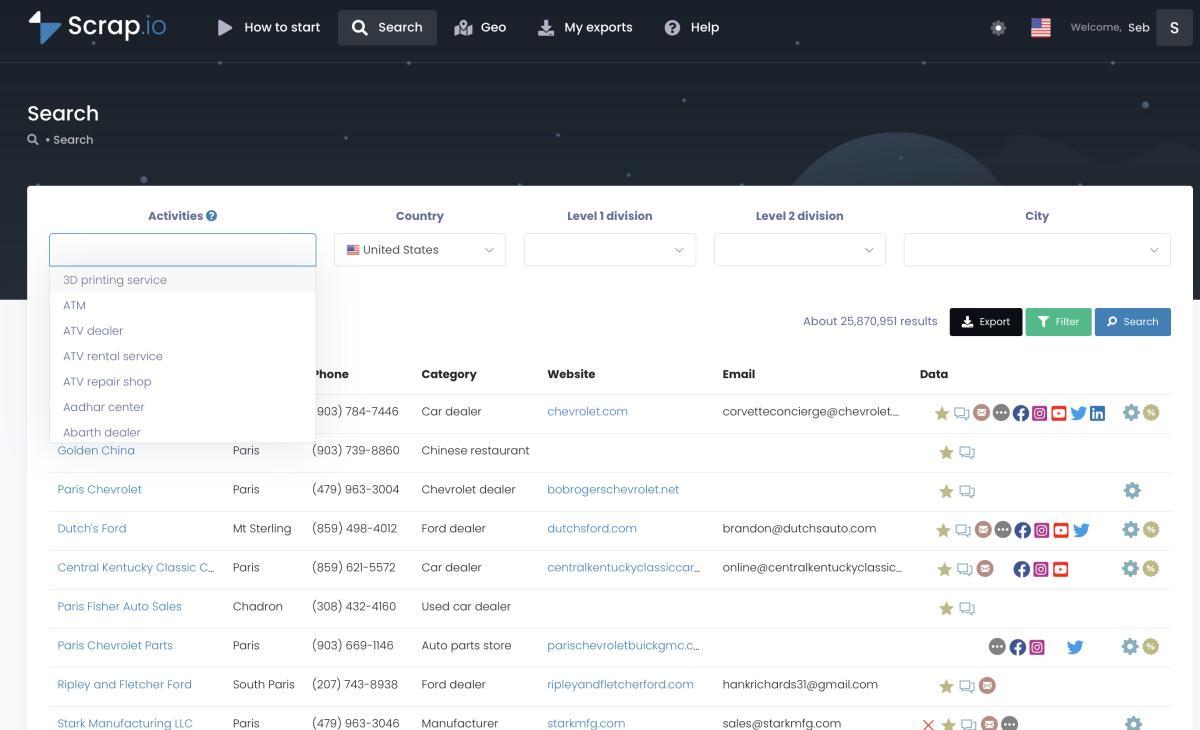
Here's the number that reframes the whole thing. In September 2026, a fresh Scrap.io count returned 668,306 restaurants across the United States — extractable at country level in two clicks on the Company plan. Not 120 at a time. All of them. (And counts on Scrap.io are free, so you can check the size of your market before spending a cent.) One documented client pulled 11,734 businesses in 45 minutes — the platform runs at a capacity of 10,000 requests per minute, so scale isn't the bottleneck. Try that with a scroll-and-copy extension. I'll wait.
Video: How to Scrape Local Leads at the Country Level
The pain is real and people talk about it. On a LinkedIn post from April 2026, Sander Aavik described burning roughly €1,500 a month scraping Google Maps — a reminder that cost and scale are the actual bottleneck, not whether a tool "works." Over on r/CRM, the recurring question is literally "best Google Maps scraping tools for local business leads?" — and the answers keep circling back to the same problem: extensions cap out fast. Even the DIY crowd feels it; a r/DigitalMarketing thread titled "I built a Google Maps scraper in 2 days with AI" is a small monument to the maintenance headache that follows.

Data Quality, Emails and Freshness
An email column is not a deliverability strategy. Who the address belongs to matters far more than whether you scraped one at all. And this is where the two tools stop looking similar.
Maps Scraper AI gives you "the email found on the internet" — a single field, no classification. Is it the owner? An abandoned info@ inbox? A generic form address? No idea. You're sending blind. The publisher advertises a database of 16M+ places, 1.3M+ emails, 16M+ phone numbers and 650K+ reviews (their own figures, checked September 2026) — which, if you divide it out, means roughly 8% of listings carry an email. Present that as what it is: numbers announced by the vendor, not audited coverage.
Scrap.io classifies. Every email gets tagged — Individual (with first and last name pulled out), Contact, Sales, Marketing, Finance, Admin. On top of that: phone type (fixed vs mobile — gold for SMS campaigns), contact-form detection, ad pixels, and the site's tech stack. So instead of a mystery address, you know you're emailing sales@ vs the founder. If you care about actually finding usable emails on Google Maps — the whole point when you extract emails from Google Maps in the first place — that distinction is the difference between a reply and a bounce.
Then there's freshness. An extension reads what the browser shows at that instant — fine — but the vendor's marketing database behind it is a snapshot. Scrap.io re-scrapes live at every export. Nobody's calling a business that closed three weeks ago.
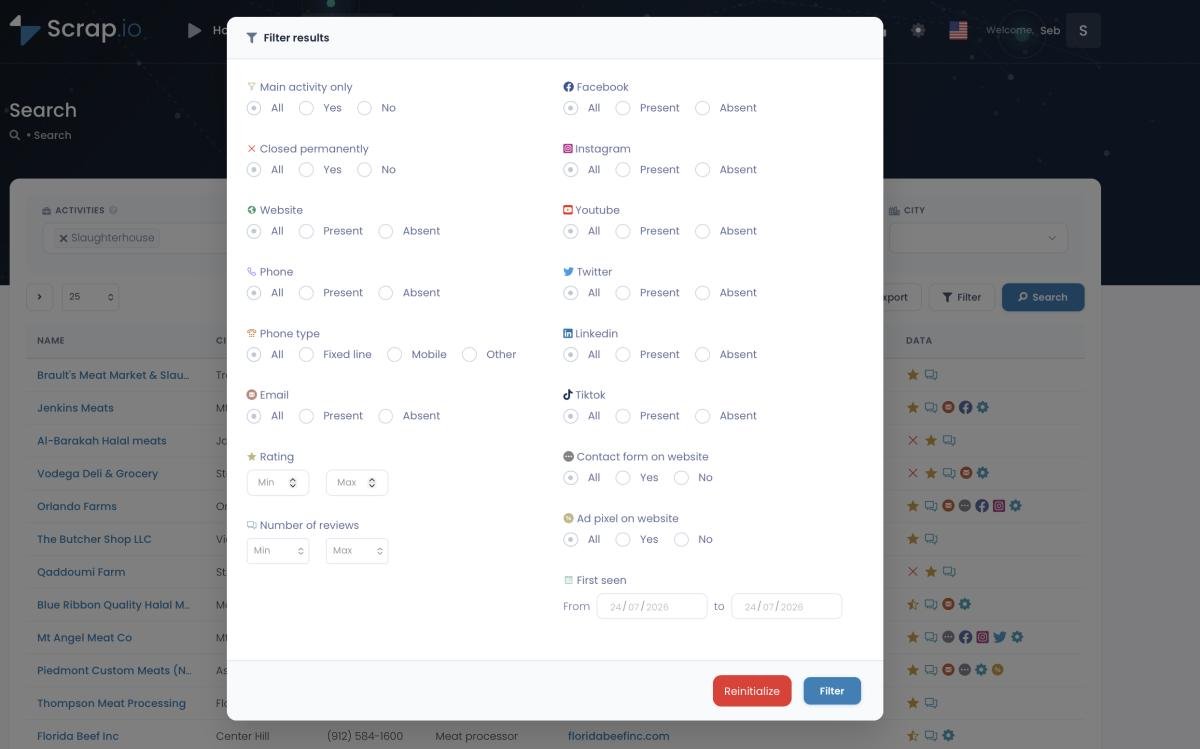
And the filtering. This is the quiet killer. Scrap.io lets you say "only listings that have an email" or "only 4+ stars with a website" before a single credit is consumed. An extension can't do that — it exports everything, and you sort the garbage out afterward in Excel, on your own time. Want to see the filter panel in action?
Curious what a real export looks like? There's a public Google Sheets demo file you can open and poke at, column by column.
Real Pricing: Cost per Usable Lead
$9.90 versus $35. Case closed?
Divide by usable leads and the ranking flips. Here's the honest breakdown.
| Maps Scraper AI Pro | Scrap.io Basic | |
|---|---|---|
| Sticker price | $9.90/mo (annual) | $35/mo annual · $49 monthly |
| Headline volume | 100,000 "raw" leads/mo | 10,000 credits/mo |
| Realistically reachable | Bounded by ~120/search scroll | Zone/country level, no scroll cap |
| Filter before paying | ❌ No — export everything | ✅ Yes — pay only for useful rows |
| Cost per usable lead | Low on paper, high after cleanup | 1 credit = 1 filtered business |
The trap is the word "raw." 100,000 leads sounds enormous until you remember you can only reach them 120 at a time, unfiltered, and then you throw half away because they have no email. On Scrap.io, one credit equals one exported business — filtered upfront — and the same business isn't recounted if you re-export within a rolling 30-day window. You know exactly what you're paying for because the count is free and it happens before checkout.
If pricing models are your thing, there's a deeper piece on execution-time vs lead-based pricing that runs the cost-per-lead math across tools. Spoiler: paying for outcomes beats paying for runtime, basically every time.
Trust and Compliance: the Part Nobody Puts on the Pricing Page
Would you sideload an unsigned ZIP into your browser, stay logged into your Google account, and let it run on autopilot? Because that's the actual onboarding for the extension. I'm not being dramatic — it's the documented install flow.
Let's keep it factual. Maps Scraper AI ships outside the Chrome Web Store (ZIP + developer mode), its legal justification is essentially a "First Amendment" line, and I couldn't find a GDPR mention. So when someone asks "is maps scraper ai safe?", the honest answer is: probably fine, but nobody's vetting it for you. That doesn't make it a villain. It means you carry the risk — the review process, the update hygiene, the compliance argument all fall on you.
Scrap.io sits on the other side of that ledger: GDPR (EU) and CCPA compliant, only publicly available business data, every field traceable to its source, a named company behind it, Stripe/PCI-DSS payments, a bug bounty, and public review scores you can actually check (Capterra 4.8, G2 4.9). For the full legal picture — court rulings, the ToS-vs-law distinction, the works — there's a dedicated guide on whether scraping Google Maps is legal.
Bottom line: scraping public business data is legal in most places for B2B. The question isn't legality — it's who's accountable when a client's DPO starts asking questions. With a sideloaded, anonymously-published extension, that's you. Alone.
Which One Should You Choose in 2026?
Time to be honest: there are cases where you should not pay for Scrap.io. A fair comparison says so out loud.
Choose Maps Scraper AI if: you have a one-off, single-city need, under ~150 leads per search, a near-zero budget, and you're genuinely comfortable sideloading a ZIP in developer mode. For a freelancer grabbing a quick list of local cafés? It'll do the job, and $9.90 is $9.90.
Choose Scrap.io if: you need volume, whole regions or countries, filtered and classified emails, GDPR/CCPA compliance you can defend, and integrations (REST API, an official MCP server for Claude/ChatGPT/Gemini, Make, n8n). If you're doing Google Maps scraping for lead generation as a repeatable part of your business — not a weekend errand — the extension's ceiling will strangle you fast. Look, for anyone hunting the best Google Maps scraper in 2026 who also wants it without coding, that's the honest split.
Still torn? This isn't the only face-off worth reading — Scrap.io also lines up against Octoparse and Bright Data if you're shopping the whole market. And the video below puts a similar extractor next to Scrap.io head-to-head.
Video: G Maps Extractor vs Scrap.io — Which Google Maps Scraper is Best?
FAQ
Is Maps Scraper AI free?
Partly. The Free plan caps at 1,000 leads a month and just 15 results per export, with no email extraction. Emails and unlimited export size require the Pro plan at $9.90/month (billed annually). So it's free to try, but not free to actually prospect at any scale (checked September 2026).
Is Maps Scraper AI on the Chrome Web Store?
No. The extension downloads as a ZIP from the official site and installs manually via developer mode ("Load unpacked"). A variant exists on the Edge Add-ons store. The consequence: no Chrome Web Store review and no automatic updates — you manage that yourself.
Is scraping Google Maps legal?
Extracting publicly available business data is legal for B2B prospecting in most jurisdictions, provided you respect GDPR/CCPA when processing it. Scrap.io is GDPR and CCPA compliant and only collects public business data. For the full breakdown, see the legal guide linked above. (This is a sensitive area — if compliance is critical for you, confirm your specific case with a professional.)
How many results can a Chrome extension really get?
Google Maps only displays about 120 results per search — that's the ceiling for any browser extension. To go bigger you either multiply searches city by city, or use a platform that queries data at the zone or country level instead of scrolling the page.
What is a map scraper?
A map scraper is software that reads public business listings from a mapping service like Google Maps and turns them into a structured file, usually a CSV or Excel sheet. Instead of copying a business name, address, phone and website by hand, the tool collects those fields for every listing that matches your search. The better ones go one step further and visit each listing's website to pull emails, social profiles and the tech behind the site, which is what turns a plain directory into a real prospecting list. There are two broad flavours. A browser extension rides on top of the Google Maps page you're already looking at, so it's cheap and quick but stuck behind the ~120-results-per-search wall. A cloud platform like Scrap.io keeps its own index of 225 million+ businesses across 195 countries, so it queries data at zone or country level, filters before you spend a credit, and hands back classified emails. Same label, very different ceiling. Which one you want comes down to whether you need a quick one-city list or a repeatable pipeline.
What's the best Maps Scraper AI alternative in 2026?
For scale, filtering before extraction, and compliance: Scrap.io (7-day trial, 100 leads). For technical DIY: Apify's cloud Google Maps Scraper or open-source GitHub repos — with the maintenance that comes attached. Pick based on whether you'd rather manage code or just export a filtered file.
Generate a list of restaurant with Scrap.io