

Here's a number that should ruin your afternoon. In 2025, average inbox placement sat around 83–84% (Validity's 2025 Deliverability Benchmark). Translation? Roughly one in six legitimate emails never reaches a human being. Gone. Filtered, junked, vanished.
And it's lopsided depending on where you're sending. In 2026, Google inboxes mail at around 87.2% placement, while Outlook drags at the bottom near 75.6%. So the same campaign can sail into Gmail and quietly drown in Outlook.
And for a brand-new domain, that ratio gets way uglier.
Think about it. You registered a domain last Tuesday. It has zero reputation. Gmail has literally never seen it before. So the moment you fire off 200 cold emails, you look exactly like a spammer spinning up a fresh burner account. That's the problem email warmup tools were built to solve — software that slowly, patiently builds your sender reputation until your domain stops looking suspicious.
But do they still work in 2026? That's the part nobody selling one wants to talk about. We'll get there. Promise. First, let's make sure we actually understand what these things do.
Video: New 2024 Email Guidelines for Gmail & Yahoo
- What are email warmup tools (and how do they actually work)?
- Do email warmup tools actually work in 2026?
- The 9 best email warmup tools in 2026 (compared)
- How long does email warmup take? (the schedule)
- Free vs. paid email warmup tools
- Why warmup fails without a clean list
- Warmup vs. real deliverability: SPF, DKIM & DMARC
- Is email warmup safe? Google's 2024 crackdown
- FAQ
What are email warmup tools (and how do they actually work)?
An email warmup tool gradually builds your sender reputation by automatically sending and replying to emails across a network of real inboxes, rescuing messages from the spam folder, and ramping your volume over two to four weeks — so a new domain doesn't look like a spam operation the second you hit send.
That's the textbook answer to "what is email warmup." Now the human version.
Picture a bunch of mailboxes that all agree to email each other. Tool A sends a message from your new domain to twenty inboxes in the network. Those inboxes open it. They reply. If your email somehow lands in spam, they fish it out and mark it "not spam." Day after day, the volume creeps up. Gmail watches all this engagement and slowly concludes: okay, this domain seems legit, people actually want its mail.
That's the whole trick. It's a confidence game played on inbox providers — a polite, automated one. Automated email warmup just means you set the ramp schedule once and the software handles the daily back-and-forth without you babysitting it.
Sounds clever. And for years, it genuinely was. The question is whether the inbox providers have caught on.
Do email warmup tools actually work in 2026?
Here's the uncomfortable part nobody selling a warmup tool will put on their homepage.
In 2024, Apollo quietly removed its warmup feature and replaced it with something called "Inbox Ramp Up." A platform with hundreds of thousands of users looked at warmup and basically said: this isn't worth defending anymore. And a year earlier, on January 31, 2023, GMass shut its warmup down entirely — not by choice, but because Google threatened its Gmail API access. More on that horror story later.
So when two major players abandon a feature, you should probably ask why. The honest answer: warmup still helps a brand-new domain build a baseline reputation, but its impact is shrinking. Fast.
Why? Because the engagement is fake, and the machines have gotten smart. Google's spam filters now lean heavily on machine learning, and ML is frighteningly good at spotting patterns. A cluster of inboxes that only ever email each other, open in suspiciously uniform ways, and reply with nothing of substance? That looks like a warmup network. Because it is one. The same artificial engagement that boosted you in 2021 can flag you in 2026.
That doesn't mean warmup is useless. It means warmup is one ingredient, not the meal. The senders who actually land in inboxes pair a gentle ramp with three boring, unglamorous things: proper authentication, a genuinely clean list, and consistent sending volume. Skip those and the fanciest email warmup service on earth won't save you.
And the stakes are real, because cold email is already a brutally low-yield game. The platform-wide average reply rate sits at just 3.43% (Instantly's 2026 benchmark, drawn from billions of emails). The top 10% of senders pull above 10.7%, the top quartile around 5.5%. And here's a detail that reframes the whole channel: 58% of all replies come from the very first email, with the other 42% trickling in from follow-ups. Land in spam on email one and you've already forfeited most of your potential responses. That's the gap warmup is trying to close.
Over on r/Emailmarketing, the "best email warmup and sender?" threads circle back to the same conclusion every time — the tool matters less than your fundamentals. Annoying advice. Also correct.
The 9 best email warmup tools in 2026 (compared)
Not all warmup tools are built the same. Some warm a real network of inboxes and run spam-placement tests so you know where you actually land. Others just inflate vanity opens and call it a day. Big difference.
Here are the nine pieces of email warmup software that keep coming up among cold senders, agencies, and the people who do this for a living. A few double as an email warmup checker — they run a placement test so you can see exactly where you land — and a couple even expose an email warmup API if you want to wire the whole thing into your own stack. I've kept the descriptions to publicly documented features — and I'm deliberately not quoting prices, because they change constantly and half the "pricing" floating around online is already stale.
| Tool | Type | Free option | Best for |
|---|---|---|---|
| Instantly | Built into a cold email platform | Trial | High-volume cold senders |
| MailReach | Standalone (any SMTP) | No | Warmup + spam testing |
| Warmup Inbox | Standalone | Limited | Multiple mailboxes |
| Lemwarm | Built into lemlist | No | lemlist users |
| TrulyInbox | Standalone | Free tier | Budget / testing |
| Warmy | Standalone (AI auto-warmup) | Trial | Hands-off automation |
| Mailwarm | Standalone | No | Simple set-and-forget |
| Folderly | Deliverability platform | No | Agencies / enterprise |
| Warmforge | Standalone | Free tier | Free warmup seekers |
Instantly
The warmup is baked right into Instantly's cold email platform, with a one-click toggle and one of the larger inbox networks out there. Over 700,000 businesses run on Instantly, so the warmup pool is enormous — which, for warmup, is the whole point. If you're already sending through it, turning warmup on is genuinely a single click. Instantly's own benchmark data is also worth a skim, even if it's a vendor publishing numbers about its own category.
MailReach
A standalone tool that plugs into Gmail, Outlook, or any SMTP. Its party trick is pairing warmup with an actual spam-placement test, so you're not guessing whether you're in the inbox — you can see it. No free tier, but the reporting is the reason people pick it.
Warmup Inbox
One of the older dedicated warmup names. Network-based, multi-mailbox friendly, and straightforward. If you're juggling several sending addresses, this is the category it was built for.
Lemwarm
One of the very first warmup tools on the market, now living inside lemlist. If lemlist is already your outreach stack, Lemwarm is the natural default. If it isn't, this won't be the thing that makes you switch.
TrulyInbox
Has a free tier, which immediately puts it on the shortlist for anyone testing the waters. Solid for a single mailbox or a small operation that doesn't want a credit card conversation on day one.
Warmy
Leans hard on the "AI auto-warmup" angle — set it and forget it. The pitch is hands-off automation that adjusts your ramp for you. Whether the AI label is meaningful or just marketing paint, the automation itself is real and the setup is painless.
Mailwarm
About as no-frills as it gets. It sends and replies on your behalf across a network, automatically, and that's the entire product. Some people want exactly that and nothing more.
Folderly
More of a full deliverability platform than a pure warmup tool — warmup plus spam analysis plus ongoing monitoring. Priced and positioned for agencies and bigger teams. Overkill if you're warming one domain. Sensible if you're managing twenty.
Warmforge
A newer entrant with a free tier, which is why it keeps showing up in "best free email warmup tool" lists. Worth a look if budget is the deciding factor and you want something modern.
One honest caveat on all of them, straight from the source. Threads like the "best email warmup service (unbiased)" discussion on r/Emailmarketing are full of people recommending whatever they happen to sell — one top reply just says "Try to use Snov.io email warmup tool. It's free and easy to use." Useful, sure. Unbiased? Read everything with one eyebrow raised. The same caution applies to comparison roundups from competitors like Skrapp.io and EmailToolTester — informative, but everyone's got an angle. Once you've picked your warmup tool, it pairs with whatever sender you use; if you're still choosing one, here's our hands-on take on the best cold email tools.
How long does email warmup take? (the schedule)
How long until your new domain is safe to send real campaigns? Short answer: longer than you'd like.
A brand-new domain needs three to four weeks minimum. Automated tools can compress the active warmup to roughly 14 days, but you don't want to rush the ramp — that's how you trip the filters you're trying to avoid. The shape of a healthy email warmup schedule looks like this:
| Week | Emails / day | Goal |
|---|---|---|
| Week 1 | 5–10 | Establish a baseline, zero spam flags |
| Week 2 | 15–20 | Build consistent engagement |
| Week 3 | 25–35 | Push volume, watch placement |
| Week 4 | 30–50 | Hit target volume, confirm stability |
So how do you know your email domain warmup is actually done? Don't trust the calendar. Trust the numbers. Your domain is ready when it holds these for seven to ten straight days:
- Inbox placement above 95%
- Spam placement below 2%
- Stable engagement at your target sending volume
Hit those and keep them? You're cleared to send. See a placement number wobble in week three? Slow down, don't speed up. The whole game is patience, and patience is boring, and boring is what works here.
Free vs. paid email warmup tools
You can warm up one mailbox for free. The problem starts when you're running ten.
Free email warmup tools — the free tiers on TrulyInbox, Warmforge, the trials bundled into bigger platforms — are perfectly fine for a single domain or for kicking the tires before you commit. If you're a freelancer or a founder testing a first cold campaign, start there. Genuinely. No reason to pay before you've proven the channel works for you.
Look, paid tools earn their keep at scale. Multiple domains, multiple mailboxes, sender rotation, spam-placement reporting, agency dashboards — that's where free tiers fall apart and a subscription pays for itself. The r/coldemail crowd has tested this to death; their "top free (or freemium) warmup tools, tested" thread is a decent reality check on which free tiers are actually usable versus which are just bait for the upgrade.
But here's the thing both camps tend to miss. Free or paid, your warmup tool is the second-most-important decision you'll make. The most important one is your list — which we'll get to in about thirty seconds. If you're choosing the sender that'll run alongside warmup, our breakdown of the best cold email software covers the seven that actually get replies.
Why warmup fails without a clean list
Let me tell you about Mark. (Composite of about forty real senders, but you'll recognize him.)
Mark warmed his domain perfectly for a month. Textbook ramp. Inbox placement looked beautiful. Then he loaded a bought list, hit send, and watched a 22% bounce rate detonate his sender reputation in 48 hours. A month of careful warmup. Torched in two days. By dead email addresses.
This is the part nobody in the warmup industry wants to underline, so I'll do it for them: warmup manages your reputation; it does nothing for your list quality. They're two different problems. A warm domain firing into a graveyard of invalid emails is still a domain firing into a graveyard. The filters notice. The bounces pile up. The reputation you spent weeks building evaporates.
And the proof that the reverse works is just as concrete. In the Mailivery automailer case study, a sender went from 91.7% spam placement to 15.2% in 14 days, then down to 4.1% after three weeks — and the payoff landed as roughly +40 leads per month. Warmup did its job there because the list underneath it wasn't garbage. That's the combination that actually moves numbers.
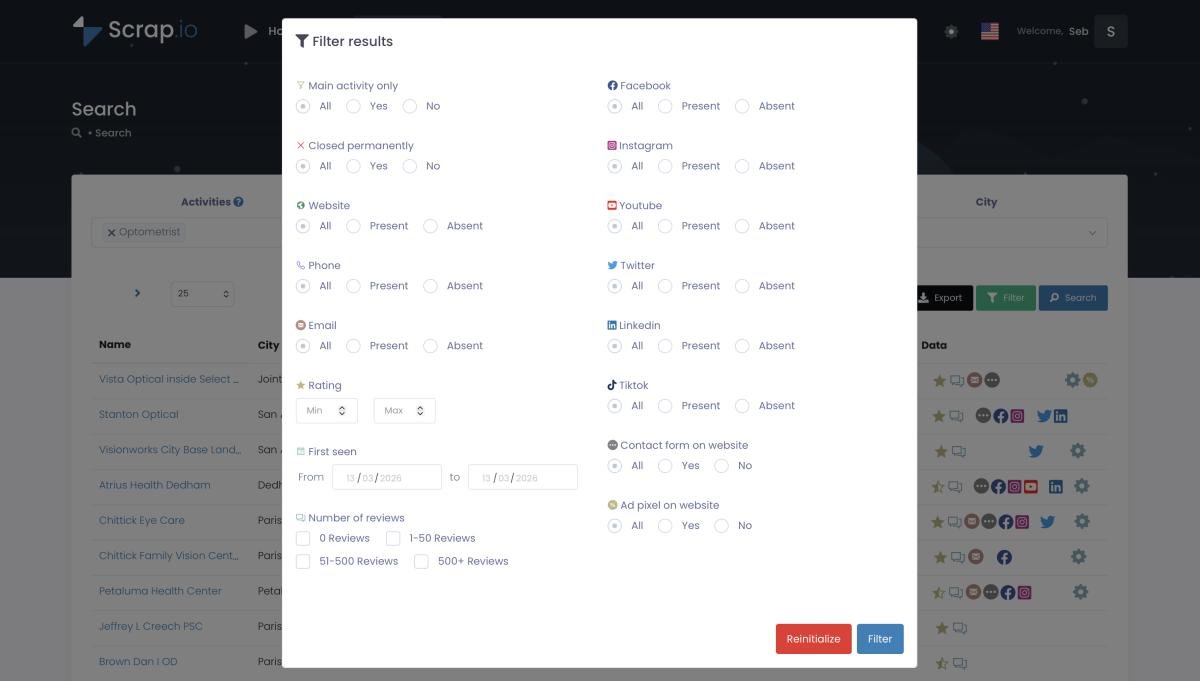
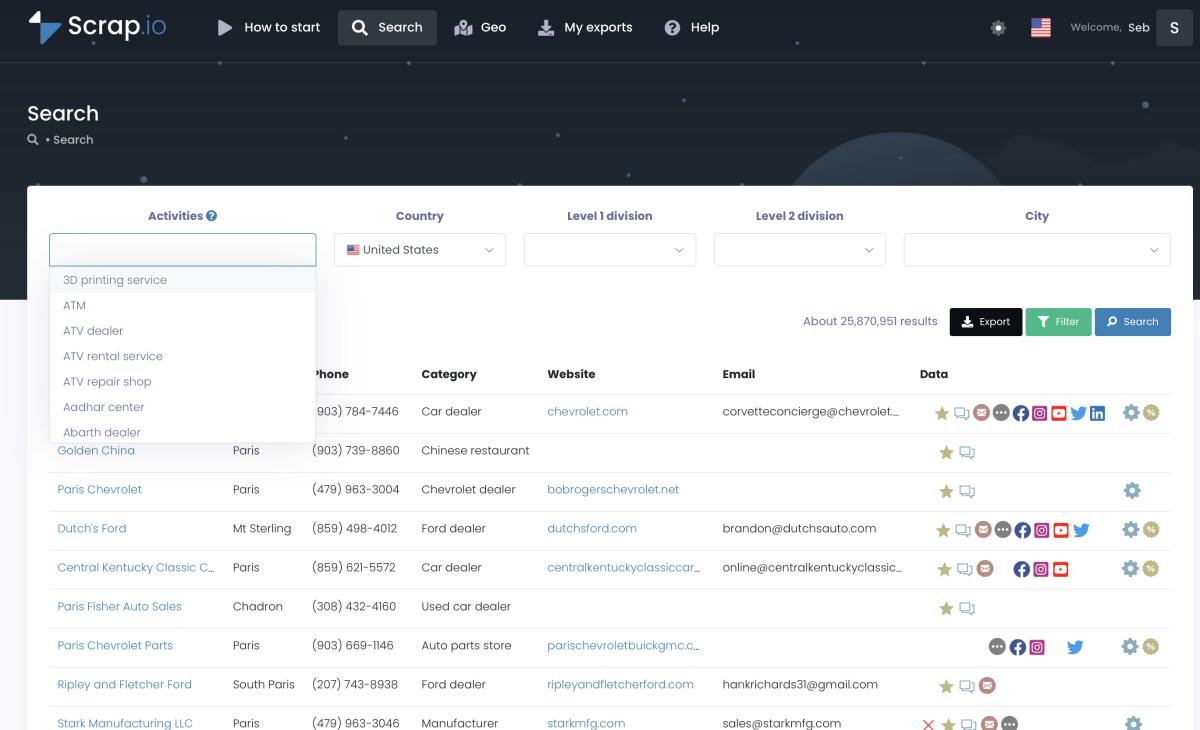
Which is exactly where data freshness becomes the whole ballgame. A bought list is dead the day it's sold. A Google Maps listing, on the other hand, changes constantly — businesses update their own contact details because they want to be reached. That's the gap Scrap.io fills: it pulls real business emails straight from Google Maps, verified in real time at the moment of export, with a filter that only keeps listings that actually have an email before a single credit is spent. No paying for blanks. Minimal bounces. It even classifies what kind of address you're getting — the main one, contact@, sales@, or a named individual with first and last name attached.
Warmup vs. real deliverability: SPF, DKIM & DMARC
Warmup is the cherry. Authentication is the cake. Skip the cake and the cherry means nothing.
I'll explain the metaphor, because it actually matters. SPF, DKIM, and DMARC are the DNS records that prove your domain is allowed to send the emails it sends. They're the foundation — the cake. Warmup sits on top, a nice finishing touch. But a beautifully warmed domain with broken authentication is a cherry balanced on thin air. It falls.
This stopped being optional in February 2024. Google and Yahoo jointly ruled in their bulk sender guidelines that anyone sending more than 5,000 emails a day must have SPF, DKIM, and DMARC properly configured, plus a one-click unsubscribe, plus a spam complaint rate under 0.3%. Honestly? That rule alone reshaped cold email overnight. Microsoft piled on in 2025 with outright rejections for unauthenticated bulk mail. These aren't suggestions you can warm your way around.
So the order of operations is non-negotiable: authenticate first, warm up second, and never assume warmup compensates for a missing DNS record. It doesn't. If your records aren't sorted yet, our SPF, DKIM and DMARC setup guide walks through all five steps without the usual jargon headache. Do that before you touch a single warmup tool. Seriously.
Is email warmup safe? Google's 2024 crackdown
Here's the stat that should give every warmup user pause. GMass sent 1,295,152,830 warmup emails across 236,084 accounts over two years — and then Google told them to shut it down or lose Gmail API access. They shut it down. January 31, 2023. Just like that, a feature used by hundreds of thousands of accounts was dead.
Dead.
So is warmup safe? The honest answer is: it carries risk. Automated warmup is, by definition, bot activity — inboxes performing engagement that no human asked for. Inbox providers can detect it, and when they decide they don't like it, they don't send you a polite warning. They cut access. GMass is the textbook example, and Apollo walking away from its own warmup is the quieter sequel.
That doesn't mean you'll get banned tomorrow. Most senders warm up for years without incident. But you reduce the risk dramatically by doing the unsexy things: authenticate your domain, ramp gradually instead of flooring it, and — this is the big one — send to verified, real contacts who might actually engage, rather than a network of bots faking it. Real engagement from real people is the one signal no algorithm penalizes.
The flip side of safety is not getting flagged as spam in the first place, which is its own discipline. Our guide on how to avoid the spam folder covers the content side, and if you're worried about the legal exposure of cold outreach, here's the straight answer on whether cold emailing is legal in 2026.
Video: How to Identify Spam Emails — A Guide to Avoid Sending Them in Your Prospecting Campaigns
FAQ
What is an email warmup tool?
An email warmup tool gradually builds your sender reputation by automatically sending and replying to emails across a network of real inboxes, rescuing messages from spam, and ramping volume over two to four weeks — so a new domain doesn't look like a spam operation.
Do email warmup tools actually work in 2026?
They help a brand-new domain build baseline reputation, but their impact is shrinking. Google's machine learning now detects automated fake engagement, and both Apollo and GMass dropped warmup entirely. They work best combined with authentication, clean lists, and consistent sending volume — not as a standalone fix.
How long does email warmup take?
A new domain needs three to four weeks minimum (about 14 days with an automated tool). Start at 5–10 emails per day and ramp to 30–50. It's ready when inbox placement stays above 95% and spam below 2% for seven to ten consecutive days.
Are free email warmup tools good enough?
Free tiers work well for one mailbox or for testing. Paid tools scale for agencies running multiple domains with sender rotation and spam reporting. Either way, the bigger lever on your deliverability is a clean, fresh sending list — not which warmup tool you pick.
Can email warmup get my account banned?
It can. Automated warmup is detectable bot activity, and Google forced GMass to shut its warmup down in 2023 under threat of losing Gmail API access. The safer path: authenticate your domain, send to verified contacts, and ramp gradually instead of all at once.
The bottom line
Warmup tools aren't a scam, and they aren't a miracle. They're a fading-but-still-useful way to give a new domain a fighting chance — provided you treat them as one piece of a bigger picture. Authenticate first. Ramp slowly. Watch your placement numbers. And whatever you do, don't aim a perfectly warmed domain at a list full of dead addresses, because that's the fastest way to undo every bit of progress you made.
Your warmed-up domain is only as good as the list you point it at. Fresh, verified, real contacts beat a clever warmup network every single time — and they're the one thing no algorithm will ever penalize you for. When you're ready to write to those people, here's how to write cold emails that actually get replies.
Ready to generate leads from Google Maps?
Try Scrap.io for free for 7 days.