

- What Is a Google Place ID (and Why Should You Care)?
- 5 Free Ways to Find a Google Place ID in 2026
- What to Do When the Place ID Finder Doesn't Work
- 6 Real-World Use Cases for Google Place IDs
- Place ID vs CID vs Google ID: A Quick Comparison
- How Scrap.io Makes Google Place ID Lookups Effortless
- FAQ: Google Place ID Finder
What Is a Google Place ID (and Why Should You Care)?
Google Maps lists over 250 million places worldwide (Google, 2026). Every single one of them, from a Michelin-star restaurant in Manhattan to a dry cleaner in rural Ohio, has a unique Place ID. And if you work with location data in any capacity, this tiny string of characters is quietly running your entire workflow.
So what is a Google Place ID, exactly? It's a unique textual identifier that Google assigns to every location in its database. It always starts with ChIJ. Here's a Google Place ID example: ChIJgUbEo8cfqokR5lP9WhDaM. Ugly? Sure. But incredibly useful.
Think of it as a fingerprint for a location. No two businesses share the same one. You need it for API calls, generating direct review links, feeding rank tracking software, syncing data between platforms. Basically anything where you need to tell Google "I'm talking about THIS specific place, not some other one with a similar name."
Now, a Place ID is not the only identifier Google uses. There's also the CID (an 18-digit number you'll see in Maps URLs) and the Google ID (a hexadecimal reference used internally). They're related but not interchangeable. If you want the full breakdown, check out our complete guide to Google Maps identifiers.
But here's the thing: for 90% of practical use cases, whether that's review links, API integration, or SEO tracking, the Place ID is what you need. If you're wondering where to find your Google Place ID or how to find your Google Place ID for a specific business, you're in the right place.
5 Free Ways to Find a Google Place ID in 2026
You'd think Google would make this easy. Spoiler: it depends on what you're looking for. A single Place ID for your own business? Dead simple. Hundreds of Place IDs for a lead list? That's a different story.
Here are five methods I've actually tested to find a Google Place ID for a business, ranked from simplest to most powerful.
How Can I Find a Google Place ID?
If you just need the short version before diving into each method, here's the quick 4-step answer:
- Open Google's official Place ID Finder tool.
- Type the business name or full address into the search bar.
- Click the correct result on the map.
- Copy the Place ID string that pops up (it starts with
ChIJ).
That covers a single lookup. For a Google place ID search across dozens or hundreds of businesses, you'll want Method 4 or Method 5 below. Keep reading.
Method 1: Google's Official Place ID Finder Tool (Best for Beginners)
Google has a free Place ID Finder tool buried in their developer docs. It's a simple map with a search bar. Type a business name or address, click the result, and boom, you get the Place ID. It works as a Google Place ID finder by address too. Just enter a street address instead of a business name.
That's it. A free, online Google Place ID finder with zero setup.
The catch? It doesn't always work for Service Area Businesses (plumbers, mobile dog groomers, that kind of thing) because they don't have a public address. And sometimes it just... doesn't return a result. More on that in the troubleshooting section below.
Method 2: How to Find a Place ID in Google Maps (URL Inspection)
Want to find a Place ID directly from Google Maps? This method is more manual, but it works when the official tool fails. Here's the process:
- Search for a business on Google Maps and click on its listing.
- Right-click the "Write a review" button and hit "Inspect".
- Look for the
data-pidattribute in the HTML. That's your Place ID.
Not glamorous. But effective. And free.
You can also find Place IDs embedded in the Google Maps URL itself after clicking on a business listing. Look for the long string after !1s in the URL parameters. It takes some practice to spot it, but once you know where to look, it's a 10-second process. This is the classic google maps place id finder trick that local SEO folks have used for years.
Method 3: Chrome Extensions
If you're looking up Place IDs regularly, a Google Place ID finder extension like "Place ID Finder for Google Maps" (available on the Chrome Web Store) saves you from the inspect-element dance. Install it, search a business on Maps, and the extension displays the Place ID right there.
One click. Done.
The downside? You're tied to Chrome, and extensions can break after browser updates. (Ask me how I know.) But for quick, frequent lookups, it's the most convenient option.
Method 4: Google Places API (For Developers and Bulk Lookups)
OK, now we're getting into the serious stuff. The Google Places API lets you programmatically look up Place IDs using a "Find Place" request. Send a text input, get a Place ID back. Simple in theory.
In practice? You need a Google Cloud account and an API key, and the pricing changed in a way that trips people up. Since 2025, Google moved to tiered, per-SKU pricing. A Place Details request runs roughly $5 per 1,000 calls on the Essentials tier, about $17 per 1,000 on Pro, and around $20 per 1,000 on Enterprise (Google Maps Platform Pricing, 2026). Treat the $17 figure as a rough middle-of-the-road reference, because what you actually pay depends on which fields you request.
One more thing that catches everyone off guard: the old universal $200 monthly credit was scrapped in March 2025, replaced by free monthly quotas assigned per SKU. So the "it's basically free under $200" assumption? Dead. Plan around the new per-product quotas instead.
Over 5 million apps and websites use the Google Maps Platform, and roughly 1.2 million companies worldwide rely on the Maps API (Data Landbase, 2025). So yes, the API route works. But it's built for developers with budgets. If you need help setting it up, here's how to get your Google Maps API key, or dive into our complete Google Maps API guide.
For fewer than 50 lookups a month, use Methods 1 through 3. Over that? Keep reading.
Method 5: Use Scrap.io for Bulk Place ID Extraction
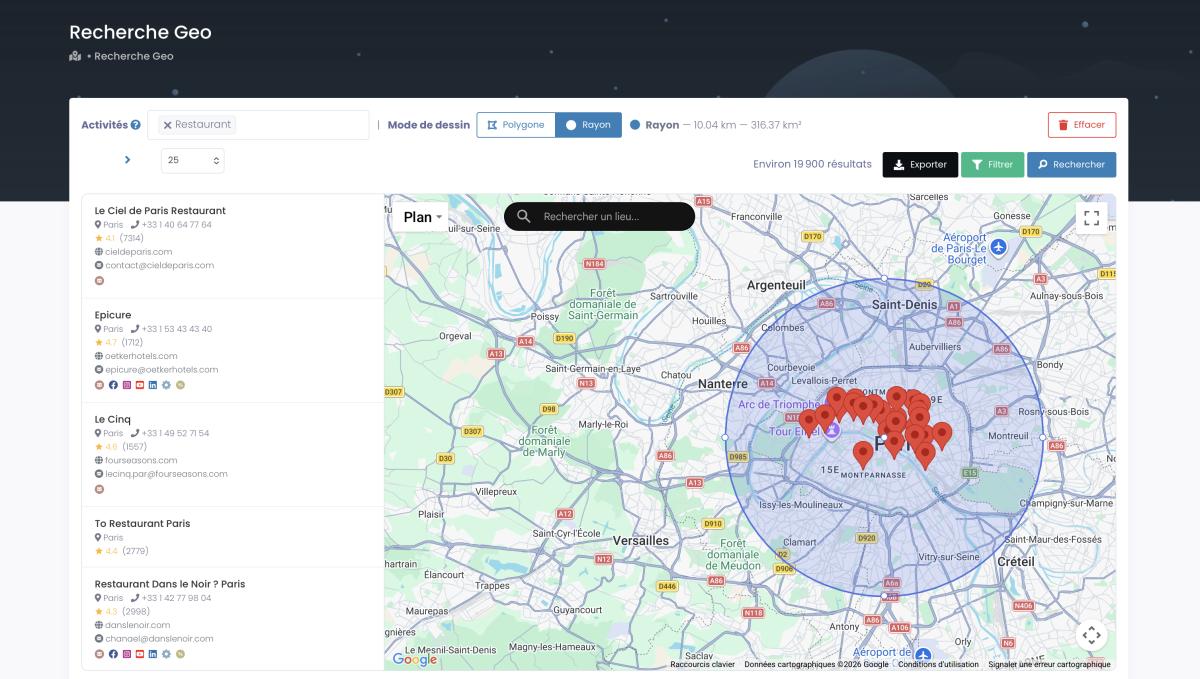
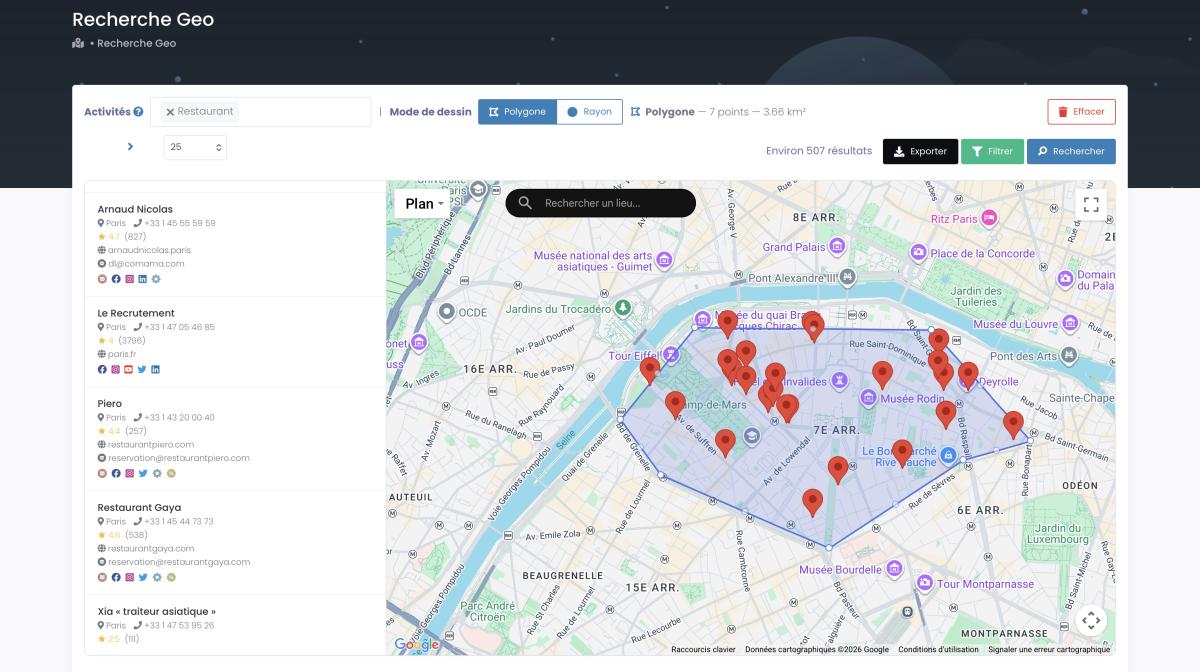
Here's where it gets interesting for anyone who needs Place IDs at scale. With Scrap.io, you don't "look up" Place IDs one by one. They come bundled with every Google Maps data export. Search for a business category in a city, apply filters (rating, number of reviews, status), and export. The Place ID is one of 40+ data fields you get automatically.
No API key. No code. No per-query pricing.


The real trick is the filtering. Because filters run before a single credit is spent, you only pay for businesses you can actually use. Want only listings that have an email? Toggle it on. Only 4-star-plus places? Set it. Zero wasted credits on junk leads.
Video: How to Scrape Local Leads at the Country Level
If you want to scrape Google Maps at scale, this is the path of least resistance. Period. And if you also need contact data, the same export doubles as a Google Maps email extractor, pulling verified emails right alongside those Place IDs.
Quick Comparison: Which Method Should You Use?
| Method | Best For | Cost | Speed | Bulk? |
|---|---|---|---|---|
| Google's Finder Tool | Single lookups | Free | ⚡ Fast | ❌ |
| URL Inspection | Quick manual check | Free | ⚡ Fast | ❌ |
| Chrome Extension | Frequent lookups | Free | ⚡ Fast | ❌ |
| Places API | Developers, automation | ~$5-$20/1K calls (tiered) | 🔄 Medium | ✅ |
| Scrap.io | Bulk extraction, lead gen | Free trial | ⚡ Fast | ✅ |
What to Do When the Place ID Finder Doesn't Work
If you've searched for your business and Google's tool returns absolutely nothing, welcome to the club. You're not alone, and it's not your fault.
This happens most often with Service Area Businesses. Plumbers, electricians, mobile pet groomers, anyone who serves a region rather than operating from a storefront. Since they don't have a public address, the Place ID Finder tool sometimes can't find them.
Here's what a frustrated business owner posted on the Google Maps Community: "I need help finding the Place ID for my business that does not have a physical address." That thread has over 100 replies. So yeah. Common problem.
Another frequent issue: brand-new listings. If your Google Business Profile was created recently, Google may not have indexed it fully. The Google Business Help forums are full of threads like: "I need Google My Business review shortlink, PlaceID not finding business." Give it a few days, then try again. (Yes, your Google My Business place id and your Place ID are the same string here.)
And then there's the merger problem. Google occasionally merges duplicate listings, which can invalidate an existing Place ID overnight. According to ReviewSense (2025), 5-10% of Place IDs become obsolete annually in high-churn sectors like restaurants and retail. My advice? Refresh any stored Place IDs every 12 months. Minimum.
If the official finder still fails, try these workarounds: use the Nearby Search API with coordinates, inspect the HTML source on the Maps listing, or, honestly, just use Scrap.io to pull the data directly. If your problem is actually the reverse (you have the ID but need the address behind it), we've got a dedicated walkthrough on Google Place ID reverse lookup that covers exactly that. Over on Local Search Forum, one thread sums it up nicely: "There are at least four different methods to get a Google review link from a Place ID, and none of them are obvious." Even seasoned local SEO pros need a cheat sheet for this stuff.
6 Real-World Use Cases for Google Place IDs
Picture a local HVAC company in Ohio that switches to Place ID-powered review links. Suddenly leaving a review takes one tap instead of a scavenger hunt, and the monthly review count climbs from a trickle to a steady stream. That's the whole point of the https://search.google.com/local/writereview?placeid=XXXX URL format: it removes friction, and friction is what kills review volume.
That's just one use case. Here are six ways businesses actually put Google Place IDs to work right now.
1. Generate direct Google review links. The review URL format above is the most popular use of Place IDs by far. Drop your Place ID in, shorten the link, stick it in a follow-up email. Done.
2. Feed rank tracking software. Tools like BrightLocal and Whitespark rely on Place IDs to track local rankings accurately. Without the right ID, your rank data is noise.
3. Power WordPress review widgets. Elementor, JetReviews, and Flavor all need a Place ID to display your Google reviews on your site. No ID, no widget.
4. Build API integrations. If you're enriching B2B data or building a SaaS product, the Place ID is how you connect business records to Google's database. Retailers with multiple stores use Place ID mapping to link in-store inventory to foot traffic data.
5. Run multi-location SEO audits. Agencies managing 100+ locations need Place IDs to audit listings at scale. Trying to do this manually is masochism. (Bref, don't.)
6. Extract business data in bulk. Clean, accurate Place IDs matter here. Bad ones cost real money: mismatched IDs have been blamed for hundreds of meters of location drift on major platforms, which quietly leaks bookings and sales. The lesson? Get the identifier right at the source.
Place ID vs CID vs Google ID: A Quick Comparison
Most people think Google uses one ID per business. Nope. There are three, and they don't always point to the same thing. I know. Fun.
| Place ID | CID (Ludocid) | Google ID | |
|---|---|---|---|
| Format | Alphanumeric (ChIJ…) | Numeric (18 digits) | Hexadecimal (0x…) |
| Stability | May expire after 12 months | Permanent | Permanent |
| Primary Use | API calls, data sync | Review links, Maps URL | Internal Google reference |
| Example | ChIJgUbEo8cfqokR5lP9WhDaM | 1234567890123456789 | 0x89c259… |
The short version: Place ID is what you need for API work and data syncing. CID is what you'll see in Google Maps URLs and review links. Google ID is mostly for Google's internal plumbing. You'll rarely need it.
And here's the kicker: Place IDs can expire. CIDs don't. So if you're storing identifiers long-term, keep both. For the deep dive, read our deep dive into Place ID vs CID vs Google ID.
How Scrap.io Makes Google Place ID Lookups Effortless
Looking up Place IDs one by one? That's fine for a single business. But if you need a few hundred, or a few thousand, you need a fundamentally different approach.
Scrap.io exports Place IDs natively with every Google Maps data extraction. You don't search for the ID separately. It's just there, alongside the business name, email, phone number, website, rating, review count, CID, and dozens of other fields. Every export. Automatically.
Here's the exclusive part: Scrap.io indexes more than 225 million establishments across 195 countries and 4,000+ categories, and every export includes the Place ID AND the CID among 40+ fields, in real time (Scrap.io, 2026). No cached database from six months ago. The data is validated at the moment you export it, which directly answers the "5-10% of Place IDs go stale every year" problem: fresh extraction, fresh IDs.
The filters are what make it practical. Search by business category, city, state, rating threshold, number of reviews, whatever you need to narrow the list. Export to CSV or Excel. Your Place IDs are in column C (or wherever you want them).
Video: Scrap.io - How to Start?
SEO agencies use this for multi-location audits. Data analysts use it for market research. Lead gen teams use it to build verified prospect lists. And if you also want email addresses alongside those Place IDs, here's how to extract email addresses alongside Place IDs.
The Google Maps ecosystem is massive. It crossed 2 billion monthly active users in early 2026, sits inside a $34 billion digital mapping market expected to reach $96 billion by 2035, and Google commands 67% of the global map app market share. If you're working with this data professionally, doing it manually just doesn't scale.
FAQ: Google Place ID Finder
What is a Google Place ID?
A Place ID is a unique textual identifier (starting with "ChIJ") that Google assigns to every location in its database, including businesses, landmarks, and addresses. It's used to retrieve place details through the Google Maps API and to generate direct links to specific locations.
How do I find my Google Place ID for free?
The easiest free method is Google's official Place ID Finder tool. Enter your business name or address, and it displays the Place ID. You can also inspect the Google Maps URL, use a place ID finder by address, or install a free Chrome extension to find your Google Business Place ID in seconds. That last route is how most people get their Google Place ID to address mapping started.
Is there a free Google Place ID finder tool?
Yes. Google's official Place ID Finder is completely free and handles single lookups instantly, no coding needed. Free Chrome extensions and BrightLocal's Place ID generator also work well for one-off searches. The catch is scale: none of these free tools do bulk. If you need a Google Place ID finder tool that returns hundreds or thousands of IDs at once, you'll need the Places API (paid, tiered pricing) or a bulk extractor like Scrap.io, which includes the Place ID in every export and starts with a free trial plus 100 free leads.
Do Google Place IDs change or expire?
Yes. Google recommends refreshing any stored Place ID after 12 months. IDs can become invalid when a business closes, moves, or when Google merges duplicate listings. In high-churn sectors, 5-10% of Place IDs go stale annually. Always validate before relying on a stored ID.
Can I find Place IDs in bulk?
Absolutely. The Google Places API supports bulk lookups on tiered pricing (roughly $5 to $20 per 1,000 calls depending on the SKU), but that requires developer setup and an API key. Alternatively, tools like Scrap.io include Place IDs in every Google Maps data export, no coding needed. For most non-technical users, that's the faster path.
What's the difference between a Place ID and a CID?
A Place ID is a text-based identifier (ChIJ…) used primarily with Google's APIs and for data synchronization. A CID (Customer ID / Ludocid) is an 18-digit number used in Google Maps URLs. The key difference: CIDs are permanent, while Place IDs can expire after about 12 months. For optimizing your Google Business Profile, you'll want both handy.
Is it legal to pull this data from Google Maps?
Collecting publicly available business data (names, addresses, Place IDs) is generally fine under US law, and tools like Scrap.io only handle public, GDPR and CCPA compliant data. For the full breakdown of court rulings and best practices, see our guide on whether it's legal to scrape Google Maps.
Generate a list of restaurant with Scrap.io