

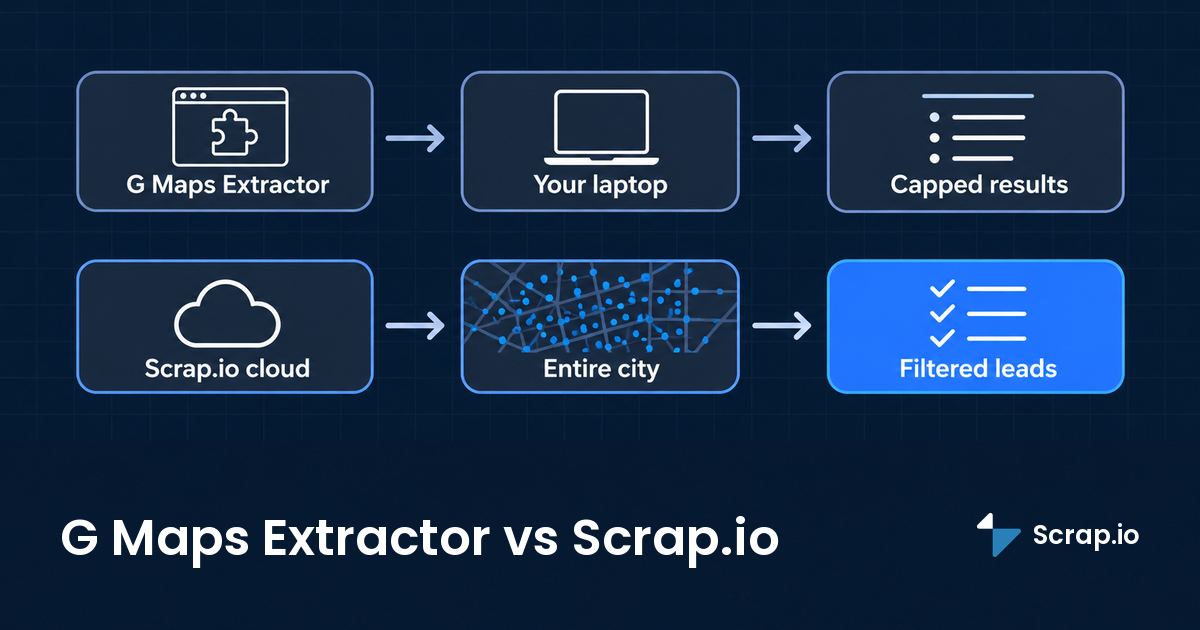
Five cities. Five auto-repair searches. In our September 2025 test, G Maps Extractor's bulk tool handed us 600 leads. Scrap.io returned 11,346 for the exact same queries. That was more than a year ago, and G Maps Extractor has shipped a lot since: a real cloud scraper, decision-maker emails, new plans. So we re-checked everything for 2026.
Here's the thing nobody writing about this tool will admit out loud: we build a competing product, and G Maps Extractor is genuinely good at some things. Cheaper per row. Free plan with no card. Reviews in bulk. We'll say so, plainly, because if we pretended otherwise you'd close this tab and you'd be right to.
What follows is the comparison we wish existed when people type "g maps extractor" into Google: real 2026 pricing, the 120-result cap explained, cloud versus extension, and the one metric that actually decides which google maps extractor fits your lead gen. Tested, dated, and honest about where each one wins.
Video: G Maps Extractor vs Scrap.io, Which Google Maps Scraper is Best? (tested September 2025)
TL;DR verdict
- Cheapest per row? G Maps Extractor. Not close, actually. $0.30 to $0.95 per 1,000 records beats anything Scrap.io charges.
- Whole city, state or country, filtered before you pay? Scrap.io. Coverage, filters and country-wide search are what you're buying.
- One small, one-off list? G Maps Extractor's free plan (1,000 records, no card) might be all you need. Really.
Table of Contents
- What Is G Maps Extractor? (Extension, Online Scraper & API)
- G Maps Extractor vs Scrap.io: The Core Difference
- Pricing in 2026: Cost per Record vs Cost per Useful Lead
- Head-to-Head Test: Same Searches, Different Results
- Feature-by-Feature Comparison (2026)
- Cloud vs Your Laptop: Reliability at Scale
- Is Using a Google Maps Extractor Legal in 2026?
- Verdict: Which Google Maps Extractor Should You Choose?
- FAQ
What Is G Maps Extractor? (Extension, Online Scraper & API)
A g maps extractor is a tool that pulls public business data off Google Maps listings, business name, phone, website, rating, address, and (when it crawls the linked site) emails and socials, into a spreadsheet. In 2026, the product called G Maps Extractor isn't one tool. It's three.
Is it a Chrome extension, a cloud app or an API? The honest answer: all three. And they're billed separately.
The three products (Online Scraper, extension, API)
There's the Online Scraper, a cloud tool that runs server-side with a free tier of 1,000 records a month. There's the Chrome and Edge extension (the original product, the one in our test video) that scrapes Google Maps as you browse. And there's a Scraper API for developers. Their own FAQ puts it bluntly: "They are three separate products, and each requires its own subscription" (gmapsextractor.com, November 2026). So the $19 you pay for the cloud plan doesn't unlock the extension, and neither unlocks the API. Worth knowing before you sign up for the wrong one.
What data it extracts
The vendor advertises 31 exportable fields: name, phone, email, social profiles, website, address, categories, claimed status, reviews, photos, rating, latitude and longitude, opening hours, Place ID, CID, KGMID, and more. The homepage claims 12,500+ customers. That's a serious tool, not a toy. The gmaps extractor name shows up constantly in "best scraper" threads for a reason.
Quick note, because the name causes real confusion: "G Maps Extractor" (gmapsextractor.com) is not the same thing as Apify's "Google Maps Extractor" actor, and it's not Ahmad Software's Windows "Google Map Extractor" either. Three different products, three almost-identical names. We're talking about gmapsextractor.com here.
G Maps Extractor vs Scrap.io: The Core Difference
G Maps Extractor scrapes what Google shows you. Scrap.io queries what's actually on the map. That one sentence explains every number in this article.
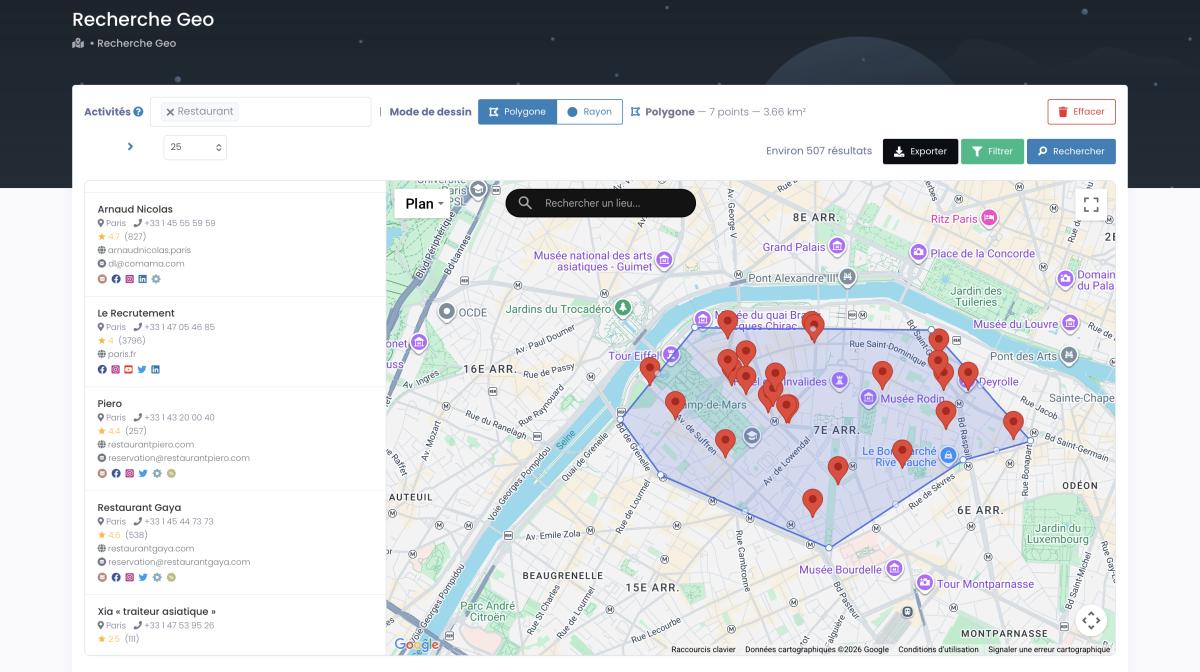
Here's what that means in practice. A google maps extractor built around keyword scraping runs a search ("restaurants in Charlotte"), reads the results Google paints on the page, and stops when Google stops. Scrap.io doesn't go through the search box at all. It queries its own index of businesses by administrative zone (city, county, state, whole country) or by a radius or polygon you draw on the map, with or without a category.
And that distinction matters because of a wall most people never see: Google Maps only surfaces about 120 results per search. It's a consumer product, not a database you can browse, so it ranks what it thinks you want and quits at roughly 120 pins. Any browser-based scraper that scrolls the results inherits that ceiling. To get past it you slice your target into dozens of micro-searches and stitch them together by hand. Painful. Error-prone. A guaranteed way to hate your afternoon.
Scrap.io built its index specifically to walk around that wall, which is why pulling every business from Google Maps in a city or country is two clicks instead of two thousand searches. Different mechanism, different ceiling. Keep that in mind, because it's about to show up in the pricing math.
And this isn't one tool's quirk. It's the whole category. Rival extensions like Maps Scraper & Leads Extractor run into the same ceiling, and their users keep asking the same question: why does Google show more total results than I could download? Same wall, different logo.
The scale underneath makes the point. The US alone has more than 36 million small businesses (SBA Office of Advocacy, 2025), and Scrap.io indexes 225,676,406 establishments across 195 countries and 4,000+ categories. Google hands you 120 of them per search. You see the problem.
Pricing in 2026: Cost per Record vs Cost per Useful Lead
Let's get this out of the way: per row, G Maps Extractor is cheaper than Scrap.io. Much cheaper. Now let's talk about what a "row" actually buys you.
G Maps Extractor pricing (Online, extension, API)
Here's the g maps extractor pricing straight off their site this month, three separate products, three separate bills. (A 7-day money-back guarantee applies.)
| Product | Plan | Price/mo | Volume | Cost / 1,000 records |
|---|---|---|---|---|
| Online Scraper (cloud) | Free | $0 | 1,000 records | free |
| Online Scraper | Lite | $19 | 20,000 | ~$0.95 |
| Online Scraper | Basic | $49 | 80,000 | ~$0.61 |
| Online Scraper | Growth | $99 | 250,000 | ~$0.40 |
| Online Scraper | Professional | $149 | 500,000 | ~$0.30 |
| Chrome extension | Free / Pro / Business | $0 / $39 / $99 | 1,000 / 100,000 / 500,000 | up to 2,500 reviews/listing |
| Scraper API | Basic to Scale | $15 to $365 | 1,000 to 50,000 requests | 20 places max / request |
Scrap.io pricing
Scrap.io runs one subscription (API and MCP included), billed per credit, where one credit equals one business exported and re-exporting the same listing within 30 days is free.
| Plan | No commitment | Annual | Credits/mo | Max zone |
|---|---|---|---|---|
| Basic | $49 | $35 | 10,000 | City |
| Professional | $99 | $69 | 20,000 | County + 50 km radius |
| Agency | $199 | $139 | 40,000 | State + 100 km radius |
| Company | $499 | $350 | 100,000 | Whole country + polygon |
Every filter and every export column is available on all plans. The plans differ on search zone, number of simultaneous categories, and advanced geo modes, nothing else. The 7-day trial includes 50 searches and 100 export credits (a card is required to activate it). And unlike a "google maps scraper free" plan, the counts are free for good: you see the real size of a market before you spend a thing.
The real metric: cost per usable lead
OK, so G Maps Extractor wins the sticker price. By a lot. But a row isn't a lead. A row is only a lead if you can actually contact the business, and for cold email that means an email address.
Run the math. GME Basic is $49 for 80,000 records. But how many of those rows carry an email? Across the US, Scrap.io counts 674,766 restaurants and only 204,271 with an email on file, that's 30.3% (Scrap.io, 4 November 2026). In Charlotte it climbs to 40.6%. So call it 30 to 40%. On 80,000 records that's maybe 24,000 to 32,000 contactable rows, around $1.50 to $2.00 per 1,000 emailable leads, assuming you can even feed 80,000 records in without hitting the per-keyword ceiling.
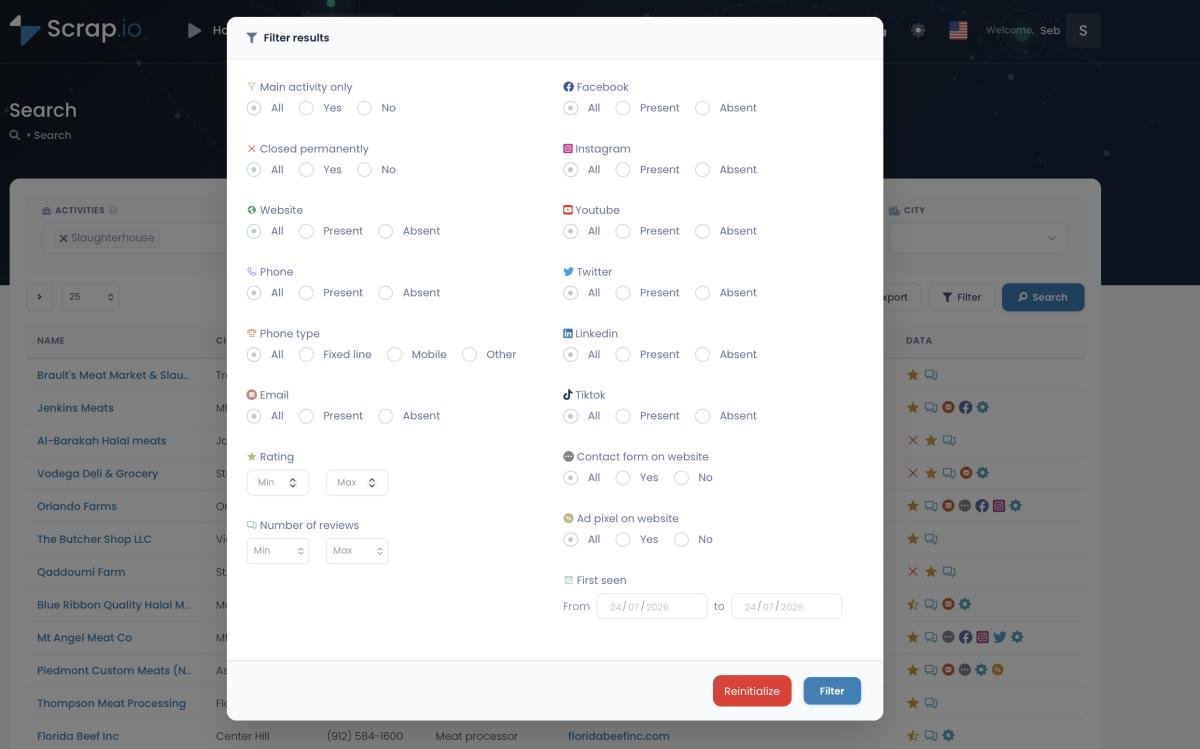
Scrap.io Basic is $49 for 10,000 credits, but those credits only burn on listings that pass your filters. Toggle "has email," and your 10,000 credits become 10,000 rows that all have an email. That's about $4.90 per 1,000 emailable leads, zero empty rows, zero duplicates. You can read the full logic in our guide on how to filter Google Maps data before extraction.
So here's the honest conclusion, no spin: at equal volume, G Maps Extractor stays cheaper per row. Scrap.io earns its price on coverage (a whole city, state or country without manual slicing), filter precision (email, website, ad pixel, rating, first-seen date, mobile versus landline where available), email classification, and automation (API and MCP included). If all you count is records, GME wins. If you count leads you'd actually send to, the gap narrows fast.
💡 Curious how many businesses with an email actually exist in your city? Counting is free on Scrap.io, no credits burned. Run the number before you spend a cent across 225M+ listings in 195 countries.
Head-to-Head Test: Same Searches, Different Results
Restaurants in Charlotte, North Carolina. One search, two tools. One gave us a handful of rows. The other found a couple thousand. That's not a bug in either product. It's the 120-result wall doing exactly what it does.
Test 1: Restaurants in Charlotte, NC
In our September 2025 test, the extension's free tier returned 10 rows, 100 on a paid run. One search against Google's ceiling. Scrap.io, querying its index for the same category and city, counted about 2,000.
Fast-forward to today. On 4 November 2026, Scrap.io counts 2,349 restaurants in Charlotte, of which 954 carry an email (40.6%). That's the whole city, not the first 120 pins Google felt like showing. And the count itself cost nothing.
Test 2: Bulk keywords across 5 cities
The bigger test used the extension's bulk keyword tool: auto repair across New York, Los Angeles, Chicago, Houston and Phoenix. The result in September 2025? 600 leads from G Maps Extractor. 11,346 from Scrap.io. Same queries. Roughly nineteen times the volume.
Why such a gap? Because keyword scraping is capped per search, and five cities hit that cap five times. For context on scale today: Houston alone shows 5,394 auto repair shops on Scrap.io (4 November 2026), against the 120-per-keyword ceiling the extension's bulk tool ran into back then. One city now beats what the old bulk run pulled across five.
The 2025 cloud update
Credit where it's due. G Maps Extractor's cloud scraper is a real step up from the browser-only days. In our September 2025 beta test, the Google Maps Cloud Extractor returned 174 rows against Scrap.io's ~1,000 on one query, and 169 against ~3,000 on another. Better than the extension. Still keyword-based, so still bounded by how many keyword-times-city combinations you're willing to type out. (Those are 2025 figures, dated on purpose, the cloud product keeps moving.)
💡 Run the Charlotte test yourself. Scrap.io's 7-day trial includes 100 export credits, enough to see the difference on your own niche, in your own city. Start free for 7 days (100 leads included).
Feature-by-Feature Comparison (2026)
Filters, emails, phone types, country-wide searches, API, AI agents. Which tool actually checks the boxes you need? Here's the side-by-side, 2026 edition.
| Criterion | G Maps Extractor | Scrap.io |
|---|---|---|
| Type | Cloud scraper + Chrome/Edge extension + API (3 subscriptions) | Single cloud SaaS (API + MCP included) |
| Search logic | Keyword (2 to 50 keywords/task) | Category or no category, by city / county / state / country / radius / polygon |
| ~120-result Google cap | 🟡 partly worked around (cloud); extension capped per keyword | ✅ not affected (indexed) |
| Whole country in 2 clicks | ❌ | ✅ (Company plan) |
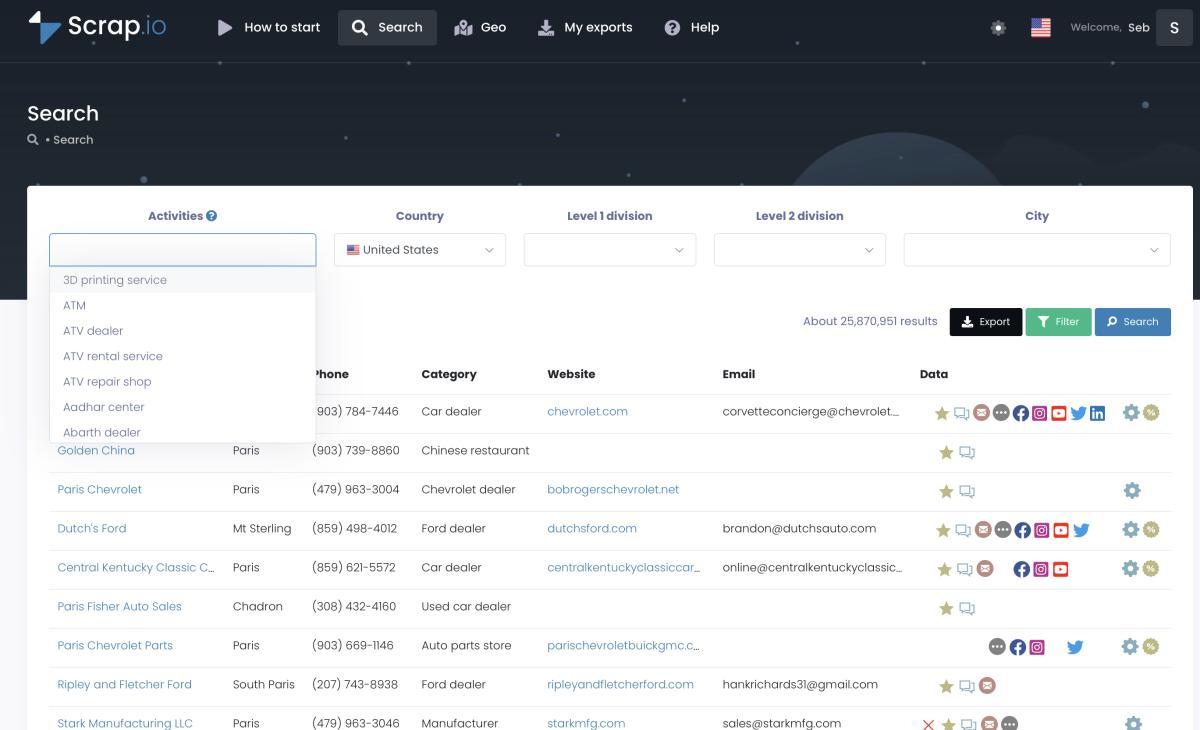
| Filter before you pay | ❌ (you pay per record) | ✅ email, phone, website, socials, rating, reviews, photos, price, claimed, closed, ad pixel, contact form, first-seen date |
| Emails | Business email + "decision-maker emails" (10 to 100/mo) | Primary email + classification: individual (first/last name), contact, sales, marketing, finance, admin |
| Phone type | ❌ | ✅ fixed / mobile / special (not available in US & Canada) |
| Reviews & photos in bulk | ✅ up to 2,500 reviews/listing (Business extension) | 🟡 rating, review count, score breakdown (no review text in export) |
| Saved Google Maps lists | ✅ (extension) | ❌ |
| Website data (tech, pixels, CMS) | ❌ | ✅ |
| Duplicate exclusion | ❌ | ✅ exclusion lists |
| API | ✅ separate product, 20 places/request | ✅ included on all plans (300 req/min) |
| AI agents (MCP) | ❌ | ✅ scrap.io/mcp (Claude, ChatGPT, Gemini) |
| Free plan | ✅ 1,000 records/mo, no card | 🟡 7-day trial, 100 leads, card required |
| Entry price | $19/mo | $49/mo ($35 annual) |
Emails & contact data
This is where the two tools diverge most. G Maps Extractor gives you a business email per listing plus a monthly allowance of "decision-maker emails" (10 to 100 depending on the plan). Useful, capped.
Scrap.io takes a different approach: it crawls each listing's website and classifies every address it finds. Individual (with the person's first and last name pulled out), contact, sales, marketing, finance, admin. So you know if you're writing to sales@ or to the owner before you hit send, which is the whole game in cold outreach. If email is your channel, the dedicated Google Maps email extractor workflow walks through it. And no, before you ask: no free Chrome extension pulls emails at all, because the email lives on the business website, not on the Maps pin.
Cloud vs Your Laptop: Reliability at Scale
Ever left a laptop open overnight so a scraper wouldn't die? We have. It's not a workflow. It's a hostage situation.
That's the trade with a browser extension. It runs on your machine, through your browser, at your browser's speed. Close the tab, let the laptop sleep, lose wifi for a minute, and the job pauses or breaks. Even G Maps Extractor's own documentation warns about it: "During the extraction process, the task may be stuck for some network reason. You can choose how many times to retry" (gmapsextractor.com). Honest of them to say. Still your problem to babysit.
The Online Scraper fixes the babysitting, it runs in the cloud, and that's a genuine improvement. But it's still keyword-based, 2 to 50 keywords per task depending on plan, so covering a whole state means you list out the keyword-times-city combinations yourself. Bon courage with that.
Scrap.io runs server-side too, up to 10,000 requests a minute, and it adds the part the extension can't: a whole country in two clicks, exports past 100,000 rows delivered as a ZIP, and duplicate exclusion across campaigns so your January list never overlaps your February one. One documented client pulled 11,734 businesses in 45 minutes. Try that with a tab open on your laptop. You'd still be scrolling next Tuesday. If you want the extension route done properly, we tested three of them in our Google Maps scraper Chrome extensions guide.
Video: How to Scrape Local Leads at the Country Level
Is Using a Google Maps Extractor Legal in 2026?
Scraping public business data isn't the legal grey zone people think it is. What you do with it afterwards is where it gets real.
On the collection side, US case law is settled enough. In hiQ Labs v. LinkedIn, the Ninth Circuit reaffirmed in April 2022 that scraping publicly available data doesn't violate the Computer Fraud and Abuse Act (Fenwick, 2022). Google Maps business listings need no login at all, which puts them on even firmer ground than the semi-public LinkedIn profiles that case dealt with.
Two caveats, and they matter. Google's Terms of Service do prohibit automated scraping, but a ToS is a private contract, not a criminal statute: break it and the realistic worst case is an IP block, not a court date. Different animals. And the official Google Maps API is a separate path entirely, structured, quota-limited, no emails, which is why most lead-gen work skips it.
The real compliance work starts when you email the list. In the US, CAN-SPAM requires accurate headers, a clear opt-out, and your physical postal address on every message (FTC, CAN-SPAM compliance guide). Targeting the EU adds GDPR on top. Scrap.io only processes publicly available business data and is GDPR and CCPA compliant, with every data point traceable to its source. (This is factual information, not legal advice, if real money's on the line, talk to an actual lawyer.)
Verdict: Which Google Maps Extractor Should You Choose?
There's no universal winner here. There's a right tool for your list size. So let's make it concrete instead of diplomatic.
Choose G Maps Extractor if you've got a small, one-off project, a tight budget, or you specifically need reviews and photos in bulk (up to 2,500 reviews per listing on the Business extension). The free plan, 1,000 records, no card, is genuinely useful for testing whether Maps-based lead gen even fits your business. If you save Google Maps lists and want to pull from those, the extension handles that too. As a cheap maps scraper for a local list, it's hard to argue with the price.
Choose Scrap.io if you want every business in a city, state or country, not the first 120 pins. If you want to filter before you pay (email present, website, ad pixel, rating, first-seen date, mobile versus landline where available) so credits only land on leads you'd actually contact. If you'd rather not slice a map into keyword-times-city searches by hand. And if you want to drive it from an API, an MCP agent, or Make. That's what the whole index was built for. For the wider field, our ranking of the best Google Maps scrapers in 2026 puts ten tools head to head, and if you're comparing cheap extensions specifically, the Map Lead Scraper vs Scrap.io breakdown runs the same per-lead math.
And the hunt for an alternative is clearly on. A third-party roundup, Salesforge's 7 Best GMapsExtractor Alternatives in 2026, lists seven tools people switch to (Leadsforge, Outscraper, CazaLead, and more). Read the whole thing and one name never comes up: Scrap.io. Blind spot, meet article.
Video: Scrap.io - How to Start?
Need the whole map, not the first 120 pins? Try Scrap.io free for 7 days (100 leads included). Real-time data across 225M+ businesses in 195 countries, filtered before you spend a credit. Start your free trial →
FAQ
Is G Maps Extractor free?
Partly. In 2026, G Maps Extractor's Online Scraper includes 1,000 free records per month with no credit card, limited to 2 keywords per task. Paid Online plans start at $19/month for 20,000 records. The Chrome extension and the API are separate products with their own free tiers and subscriptions.
Why does G Maps Extractor stop at 120 results?
The cap comes from Google Maps itself: a single search only surfaces around 120 places. Browser-based tools that scroll the results inherit that limit. Getting more means splitting one search into many smaller ones (by area or keyword), or using a tool like Scrap.io that queries an indexed database instead.
Is G Maps Extractor safe to use?
It extracts publicly visible business data, which US courts (hiQ v. LinkedIn, 2022) have not treated as unauthorized access. Install only the official extension from the vendor's site or store. The real compliance work starts when you contact leads: follow CAN-SPAM in the US and GDPR for EU contacts.
What is the best G Maps Extractor alternative?
It depends on scale. For small, one-off lists, G Maps Extractor's free plan can be enough. For city-, state- or country-wide lists filtered before export (email present, mobile phone, website, ad pixel), Scrap.io is built for that, with free counts and a 7-day trial including 100 leads.
Can G Maps Extractor export emails?
Yes. Paid plans include business emails and social profiles found on each listing's website, plus a monthly allowance of "decision-maker emails" (10 to 100 depending on the plan). Scrap.io classifies emails by type, individual (with first and last name), contact, sales, marketing, finance, on every plan.
Generate a list of restaurant with Scrap.io