

The web scraping market will hit $1.17 billion in 2026, on its way to $2.23 billion by 2031 — a 13.78% CAGR (Mordor Intelligence, 2026). Huge industry. And yet most people scraping Google Maps are still paying for dead data — outdated lists, wrong emails, businesses that closed two years ago.
That's the part nobody says out loud.
So here's what this is: ten tools, tested, with real prices and real limits. Not a "sponsored ranking" where the company writing the list magically comes out on top. (Yes, we make one of these tools. That's exactly why we show you the actual numbers instead of a trophy.) If you're hunting for the best Google Maps scraper and you don't want to burn a budget finding out which ones are junk, start here.
- What Is a Google Maps Scraper (and Why Everyone Wants One in 2026)?
- How We Ranked These Tools (Our 5 Criteria)
- The 10 Best Google Maps Scrapers in 2026
- Free Google Maps Scrapers: What You Actually Get
- Extension, Cloud Tool, API or Open Source: Which Method Fits You?
- Is Scraping Google Maps Legal?
- How to Choose (Decision Checklist) + FAQ
What Is a Google Maps Scraper (and Why Everyone Wants One in 2026)?
225 million business listings sit on Google Maps. How do you get them into a spreadsheet without losing your afternoon?
A Google Maps scraper is software that automatically pulls public business data from Google Maps listings — name, address, phone, website, opening hours, reviews — and hands it back to you as a clean CSV or Excel file. The good ones go one step further: they visit each listing's website and extract emails and social media profiles too. That's the difference between a list and a lead file.
What you can actually scrape from Google Maps: business name, full address, phone number, website URL, star rating, review count, category, opening hours, and — via the linked website — emails, Facebook, Instagram, LinkedIn, and the tech stack behind the site. A serious google maps data scraper gives you 30 to 40 fields per business. A weak one gives you six.
Why Google Maps and not LinkedIn? Because the 8-person HVAC company, the family restaurant, the solo plumber in Ohio — they're not on LinkedIn. They're on Maps. And 46% of all Google searches have local intent (Outscraper, 2026). If your customers have a physical address, Maps is the richest well there is.
Want the full step-by-step? We already wrote it — see our guide on how to scrape Google Maps step by step. This article is about picking a tool, not learning to drive one.
How We Ranked These Tools (Our 5 Criteria)
Let's be honest: most "best scraper" lists are written by the companies selling them. (Yes, we sell one too. That's why we show real numbers instead of asking you to trust our vibe.)
Here's what we actually judged each tool on. Five things. No fluff.
- Data freshness. Is the data pulled live, or served from a database someone scraped six months ago? Stale data is the number one complaint in every forum thread on this topic.
- Real cost per 1,000 usable leads. Not the advertised price. The price after you throw away the 60-70% of records with no email, wrong phone, or a closed business.
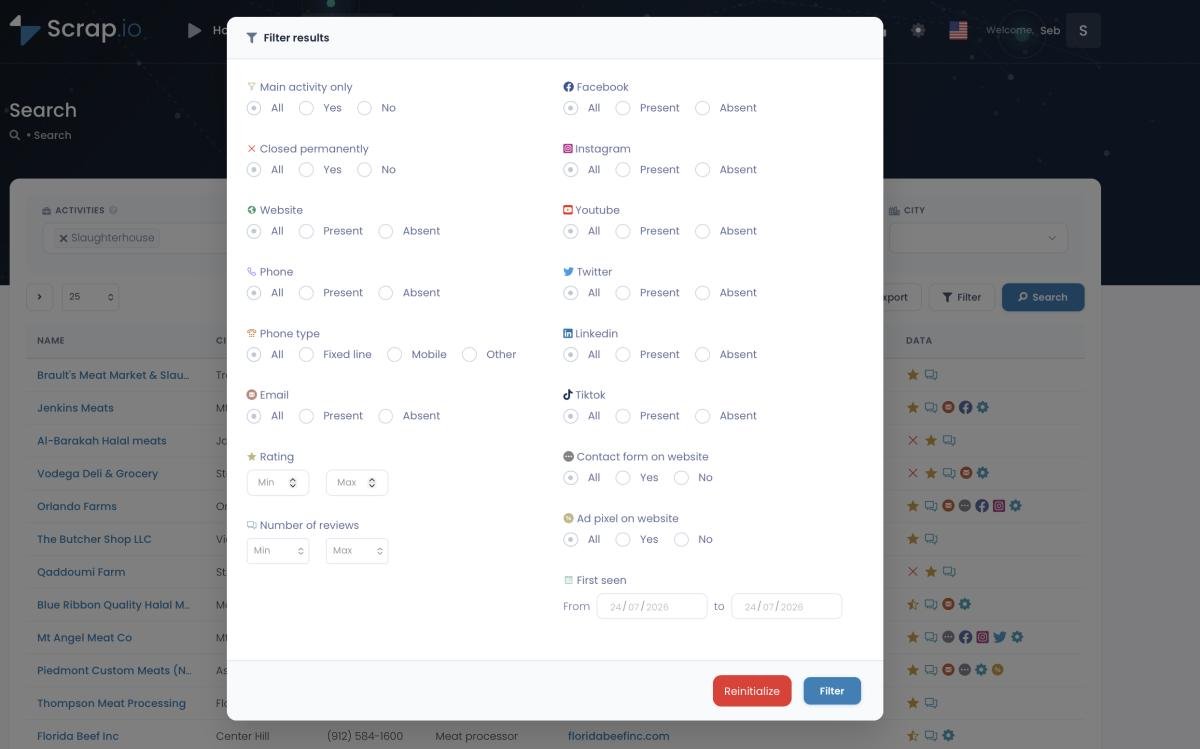
- Filtering before you pay. Can you narrow to "only businesses with an email" before spending credits? Or do you pay for everything and sort the mess out later?
- Max scale. Can it go from a single city to an entire country, or does it choke past a few hundred results?
- Learning curve. Can a non-developer use it by Friday, or do you need to babysit proxies and CSS selectors?
And a fair warning about the competition: the one real "article" ranking against this is Bright Data's own Best Google Maps Scrapers listicle — which conveniently ranks Bright Data near the top. Take any list (including this one) with that in mind.
That's the lens. Now the tools.
Video: Finding Clients Through Google Maps Filters
The 10 Best Google Maps Scrapers in 2026
Ten tools, five categories, one honest verdict per tool. Including where each one falls flat — because pretending a tool is perfect helps nobody.
| Tool | Type | Entry price | Free option | Data freshness | Max scale | Best for |
|---|---|---|---|---|---|---|
| Scrap.io | No-code cloud | $35/mo | Trial (100 leads) | 🟢 Real-time | Whole country | Country-scale + fresh data |
| Apify | Cloud actor | $1.50/1k places | Free credits | 🟢 On-demand | High (dev setup) | Developers & workflows |
| Outscraper | Cloud pay-per-result | $3/1k (then $1/1k) | 500 records | 🟢 On-demand | High | Reviews & one-off exports |
| gosom (GitHub) | Open source | Free | 🟢 Fully free | 🟡 DIY | Medium (proxies) | Open-source control |
| Bright Data | Enterprise infra | $3/1k results | Trial | 🟢 On-demand | Massive | Enterprise pipelines |
| Octoparse | No-code generalist | $119/mo | Free tier | 🟡 On-demand | Medium | Visual workflows |
| PhantomBuster | Automation | $56/mo | Trial | 🟡 On-demand | Medium | Multi-channel automation |
| G Maps Extractor | Extension | $49/mo | 1,000/mo free | 🟢 Live browser | Low | Budget extension |
| Map Lead Scraper | Chrome extension | $9.90/mo | Limited free | 🟢 Live browser | Low | Cheap Chrome extension |
| Maps Scraper AI / Clay | AI enrichment | Varies | Varies | 🟡 Mixed | Medium | Enrichment top-up |
1. Scrap.io — best for country-scale extraction & real-time data
Full disclosure: this is ours. Here's why it earns the top spot anyway, and where it doesn't.
Scrap.io is the only tool on this list that extracts every listing in a whole country in two clicks — no code, no query-by-query grind. Where Apify and Outscraper make you feed in "restaurants + city" combinations one by one, Scrap.io covers 195 countries and 4,000+ categories from a single search. The index sits at 225,676,406 businesses as of September 2026.
Two things set it apart in practice. First, data is pulled in real time at every export — never a frozen database. Second, you filter before you consume credits: only businesses with an email, only mobile numbers, minimum rating, and so on. You don't pay for junk you'll delete. That's a direct answer to the "garbage data" complaint that fills Reddit threads.
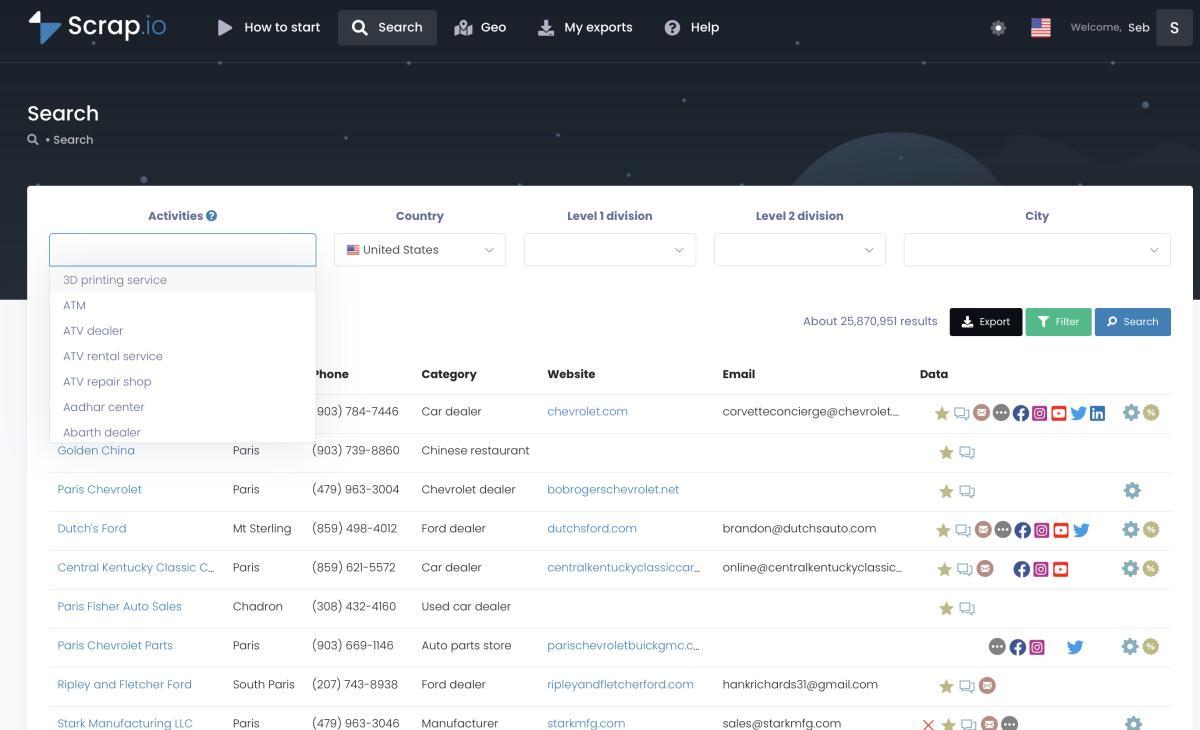
Plans start at $35/month for 10,000 credits (one credit = one business exported; re-exporting the same business within 30 days is free). Real case: a user pulled 11,734 businesses in 45 minutes for a single campaign. Rated 4.8 on Capterra and 4.9 on G2, used by 50,000+ professionals.
Now the honest part. Scrap.io is not built for scraping individual reviews one by one. If you need per-review sentiment analysis, Outscraper does that better. And the free trial requires a card to activate. Different jobs, different tools.
Video: Scrap.io - How to Start?
💡 Curious how big your market actually is? See how many businesses you can extract in your niche on Scrap.io — counting is free, no credits needed.
2. Apify Google Maps Scraper — best for developers & workflows
The apify google maps scraper (the Compass actor) is the most-used community scraper on the platform: 489,000 users and 30 million runs, rated 4.7/5 across 1,808 reviews (Apify, 2026). It's a beast for developers who think in JSON and cron jobs. Pricing starts at $1.50 per 1,000 places, plus compute costs.
That "plus compute" is the catch. You pay for machine time, not results. An actor that runs 40 minutes and returns 300 clean leads costs the same as one that runs 40 minutes and crashes. Hard to budget. And it's data-on-demand — you build the query, it runs. Great if you're technical. Rough if you're not.
3. Outscraper — best for reviews & one-off exports
The outscraper google maps scraper is a cloud platform with a pay-per-result model: a free tier of 500 records, then $3 per 1,000 dropping to $1 per 1,000 at volume. They claim 763,590,259 tasks processed. It shines for pulling reviews and for quick one-off jobs where you don't want a subscription.
Real example: Mihai Vinatoru of GMB Consulting extracted public data on 120,000+ establishments over 12 months for local SEO analysis, documented right on Outscraper's own testimonial page. And Dion Kenney, COO of Mondofora, collected Maps data manually for 15 months before switching — his verdict? "The first search produced more usable data in 20 minutes than my 15 months did altogether."
The weakness: no real filtering before extraction. You're billed on usage, then you sort the useful rows from the dead ones afterward. If it's on your shortlist, we lay out the trade-offs in our Outscraper alternative breakdown.
4. gosom/google-maps-scraper (GitHub) — best open-source option
Free. Written in Go. Ships with a CLI, a Web UI, and a REST API. The google maps scraper github repo everyone links to — gosom/google-maps-scraper — sits around 3,600 stars and gets cited in Google's own AI Overview for the query. If you want a free google maps scraper with real control, this is the one.
And here's the 2026 twist worth knowing. Plenty of people now run gosom through AI coding agents like Claude Code, Cursor, or Codex, letting the agent wire up the proxies, the rate limits, and the email parsing for them. It lowers the barrier a lot. It doesn't remove it: the infrastructure is still yours to own, the agent just rides shotgun.
Because "free" is doing a lot of work in that first sentence. You manage the proxies. You handle rate limits and CAPTCHAs. Emails aren't extracted without extra config. And when Google changes their DOM — usually on a Friday — your selectors break and you fix them. If you're technical and patient, it's genuinely good. Otherwise? Count your hours. We break down the trade-offs in our open-source Google Maps scrapers on GitHub guide.
5. Bright Data — best for enterprise pipelines
Bright Data is the gorilla: a massive proxy network, enterprise SLAs, and a Google Maps dataset at around $3 per 1,000 results, pay-as-you-go. If you're a Fortune 500 feeding a data lake, this is your tool.
For a 5-person agency looking for plumbers in Ohio? Overkill. The pricing and setup complexity are built for a buyer who runs data pipelines for a living — not someone who needs 500 local leads by Friday. Not a criticism. Just the wrong shoe size. We put it head to head with our own tool in the Bright Data vs Scrap.io comparison.
6. Octoparse — best no-code generalist
The octoparse google maps scraper route uses their visual, drag-and-drop builder with GMaps templates. Plans run about $119/month. It's a solid general-purpose scraper if you already use it for other sites.
For Maps specifically? Expensive for what you get. You're paying generalist prices for a job that dedicated tools do cheaper, and email enrichment isn't its strong suit. See the Octoparse vs Scrap.io breakdown if it's on your shortlist.
7. PhantomBuster — best for multi-channel automation
PhantomBuster is a legit automation product, especially for chaining LinkedIn and Maps into one workflow. Starts around $56/month. If you live in multi-channel automation, it fits.
The pricing model, though, bills by execution time — not by leads delivered. And the reviews are mixed: 2.8/5 on Trustpilot across 64 reviews. For pure Maps extraction, you can do better. For orchestrating a whole outreach machine, it has a place. We cover swaps in our PhantomBuster alternative guide.
8. G Maps Extractor — best budget extension
A straightforward google maps scraper extension: 1,000 free leads per month, then $49/month. Cheap, simple, browser-based. Good for small, recurring pulls where you don't need country-scale.
The ceiling is real — it depends on your browser being open, and volume is capped. Fine for a freelancer. Not for an agency running ten markets a week. If extensions are your lane, see our Chrome extensions for Google Maps scraping guide.
9. Map Lead Scraper — best cheap Chrome extension
At $9.90/month and 4.8/5 on the Chrome Web Store, Map Lead Scraper is about the cheapest paid google maps scraper chrome extension worth naming. For grabbing a few hundred listings on a shoestring, it does the job.
Same structural limit as every extension: it runs through your open browser, so volume is small and it stops at Google's ~120-results-per-search wall. A tool, not a platform.
10. Maps Scraper AI / Clay-style tools — the 2026 newcomers
The new wave. maps scraper ai tools and Clay-style enrichment platforms — including the clay google maps and hasdata google maps scraper workflows — layer AI waterfalls on top of scraped data. Useful as a top-up: enrich a list you already have, fill gaps, guess a missing email.
As a primary source? Not yet. The AI marketing runs ahead of the reliability. Use them to polish, not to build the base file. We put one under the microscope in our Maps Scraper AI vs Scrap.io comparison if you want the numbers.
Free Google Maps Scrapers: What You Actually Get
"Free" Google Maps scrapers are rarely free. You pay in time, in proxies, or in dead data.
Here's the reality of the google maps scraper free landscape, laid out plainly. The best free google maps scraper for you depends entirely on how much pain you'll trade for zero dollars.
- Outscraper free tier — 500 records, no card needed to start. Great for a taste test. Runs out fast.
- G Maps Extractor — 1,000 leads/month free. Genuinely useful for small, steady needs.
- Open source (gosom) — a fully free google maps scraper, but DIY. Proxies, maintenance, and email parsing are on you.
- Scrap.io's Chrome extension — free and unlimited, showing emails and social profiles right on the Maps interface. No bulk export, but no cost either.
- Scrap.io trial — 7 days and 100 leads to test real bulk extraction on your own niche.
The pattern across every forum? Everyone starts free. Everyone hits a wall. A June 2026 thread on r/b2bsales was literally titled "Built a free Google Maps lead scraper after getting tired of other scrapers for garbage data." Read that again. The free tools didn't fail on price. They failed on freshness. That's the whole game. And if you want the real math on "free," we ran DIY against a paid platform in our DIY vs professional scraping guide — the hidden hours add up fast.
So the honest test is simple: can you get 100 leads in your market, with real emails, and check the data quality yourself before paying anything?
Video: How to Scrape Local Leads at the Country Level
💡 Scrap.io's free trial gives you 7 days and 100 leads — enough to test data quality on your own niche before paying anything.
Extension, Cloud Tool, API or Open Source: Which Method Fits You?
Take Sarah, who runs a 3-person web agency. She doesn't need a proxy farm. She needs 500 plumbers in Ohio with an email address — by Friday. So which method?
Four paths. They're not equal, and the "right" one depends entirely on volume, budget, and whether you enjoy debugging at 2am.
| Method | Time investment | Cost | Best when |
|---|---|---|---|
| Chrome extension | Minutes | Free–$ | One-off, small volume |
| Cloud SaaS | Minutes | $$ | Volume + filtering + emails |
| API / DIY scraping | Hours–days | $–$$$ | Developers, automations |
| Open source | Days | Free (+ your time) | Full control, maintenance OK |
For Sarah, the answer is cloud SaaS. She filters for "has email," exports 500 rows, done before lunch. If she were a developer wiring this into an automation, the Google Maps scraper API route would make more sense — there's a dedicated article on that.
One more angle: the official Google Places API. It works, but it caps you at 120 results per query, ships no emails, and gets expensive fast — the math is brutal past a few thousand records. We ran the numbers in our Google Maps API cost calculator. Spoiler: scraping public data usually wins on both price and completeness.
Need proof it scales? Eric Nowoslawski of Growth Engine X, a well-known outbound consultant, posted in June 2026 that he scrapes "the entire United States off Google Maps for $19 a category" to reach businesses invisible on LinkedIn — funeral homes, HVAC shops, gyms. That's the country-scale play in one sentence.

And this is where community frustration is loudest. On r/Entrepreneur, one founder put it plainly: "I have built my own google maps scraper to get business details from Google maps API but it is really expensive to run." DIY sounds free. In practice it rarely is.
Meanwhile, on r/CRM: "We've tested a few and honestly the best results came from Apify's Google Maps scraper. It pulls name, phone, website, reviews…" Fair. But notice what comes next in every one of those threads — the follow-up pain is always filtering and freshness. Which is exactly the gap cloud tools with pre-extraction filters were built to close.
Is Scraping Google Maps Legal?
Quick answer: yes, for public business data. Long answer: it depends on what you do with it.
Scraping publicly available business information — names, addresses, phones, websites — is broadly legal in the US. Courts have been consistent: the hiQ v. LinkedIn line of rulings established that scraping public data doesn't violate the Computer Fraud and Abuse Act. Google Maps data needs no login at all, which puts it on even firmer ground. So is it legal to scrape google maps? For public business data, yes.
The nuance is in the usage, not the collection. Business data (a company's phone, address, generic email) generally isn't "personal data" under GDPR. An individual's name and personal email is a different story. Under GDPR and CCPA, B2B prospecting typically leans on the "legitimate interest" basis — but you still need an opt-out on every outreach email, and you should target professional contacts, not people's private inboxes.
Google's Terms of Service prohibit scraping. Worth knowing: that's a contract matter, not a criminal one — breaking a ToS gets your IP blocked, not the police called. Two very different things.
Scrap.io only extracts publicly available business data, is GDPR and CCPA compliant, and every data point is traceable to its source. For the deep dive, see is scraping Google Maps legal and our GDPR-compliant cold email guide. (This is factual info, not legal advice — if real money's at stake, talk to an actual lawyer.)
How to Choose (Decision Checklist) + FAQ
My advice? Don't compare features. Compare what 1,000 usable leads actually cost you.
Run through these five questions before you pick a google maps scraper tool. They cut through the marketing faster than any comparison table.
- Volume? A few hundred leads or a whole country? Extensions die at scale; cloud tools don't.
- Geography? One city, or every county in a state? Country-level extraction is where most tools quit.
- Do you need emails? If yes, a google maps email scraper that crawls linked websites is non-negotiable — Maps listings alone don't show emails.
- Frequency? One-off job, or weekly refresh? Real-time data matters more the more often you pull.
- Budget? And be honest — budget for usable leads, not raw rows. A cheap google maps lead scraper that gives you 70% dead records isn't cheap.
Answer those five and the shortlist writes itself. For most local B2B — volume, emails, filtering, no code — a cloud tool wins. For developers, an API. For a quick peek, an extension. If you want the bigger picture on turning Maps into an actual pipeline, our Google Maps leads guide covers the outreach side too.
💡 Run your first country-level extraction in 2 clicks — try Scrap.io free for 7 days (100 leads included).
What is the best Google Maps scraper in 2026?
It depends on the job. Scrap.io for country-scale extraction with real-time data, Apify for developers, Outscraper for reviews, and gosom (GitHub) for open source. The real test isn't the sticker price — it's the cost per 1,000 usable leads, once you account for dead records and missing emails.
Is there a truly free Google Maps scraper?
Yes, with limits. Outscraper gives 500 records free, G Maps Extractor 1,000 per month, and the open-source gosom project is fully free but technical. Scrap.io's Chrome extension also shows emails and social profiles on Google Maps at no cost. Bulk extraction, though, eventually needs a paid plan somewhere.
Is it legal to scrape Google Maps?
Extracting public business data is legal under US case law (the hiQ v. LinkedIn line of rulings on public data). GDPR and CCPA govern how you use it for outreach, not whether you can collect it. Avoid personal data, keep an opt-out on every email, and prefer a compliant tool that traces data to its source.
Does Google Maps allow scraping?
Not under its Terms of Service, which prohibit automated access. But that's a contract rule, not a criminal law: break it and the realistic worst case is an IP block, not a court date. Scraping the public business data itself stays legal in the US under the hiQ v. LinkedIn rulings, since Maps listings need no login to view.
Can I scrape emails from Google Maps?
Not directly — emails aren't shown on Maps listings. Serious scrapers visit each listing's linked website to find them. That's what Scrap.io does (classifying individual, contact, sales, and marketing addresses) and what Outscraper does via enrichment. See how to find emails on Google Maps for the full method.
Is there a Google Maps scraper on GitHub?
Yes. The most-cited one is gosom/google-maps-scraper, an open-source Go project with around 3,600 stars that ships a CLI, a Web UI, and a REST API. In 2026 many people drive it through AI coding agents like Claude Code, Cursor, or Codex. Setup and trade-offs are in our open-source GitHub guide.
Google Maps scraper vs Google Places API: which one?
The official API limits fields (no emails), imposes quotas, and gets pricey at scale. A scraper reaches all the public data on the listing and its website. For lead gen at volume, a dedicated google maps business scraper is cheaper and richer. For a consumer app doing single lookups, the API is fine.
The Bottom Line
Ten tools. One takeaway: stop shopping on advertised price and start counting usable leads. The google maps scraper that looks cheapest per 1,000 raw records is often the most expensive once you strip out the dead ones. Freshness and filtering are what actually save you money — every Reddit thread on "garbage data" is really a thread about those two things.
Pick the tool that matches your volume, your geography, and your need for emails. Then test it on your own market before you commit a dime.
💡 Try Scrap.io free for 7 days — 100 leads included, real-time data across 225M+ businesses in 195 countries, cancel anytime.
Generate a list of restaurant with Scrap.io