

Nine dollars and ninety cents. That's the monthly price of a Google Maps scraper with a 4.8-star rating and a real free plan. When a colleague first showed me Map Lead Scraper, my reflex was the same as yours probably is right now: what's the catch?
Turns out there isn't one. Not really. Map Lead Scraper is exactly what it says: the cheapest Google Maps lead scraper on the market, and it works. So this isn't a hit piece. We build a competing tool, sure, and we'll be upfront about that. But if we told you a $9.90 extension was useless, you'd close this tab and you'd be right to.
Here's what this comparison actually does: dated October 2026 pricing, the price-per-lead math nobody else publishes, a look at how each tool handles emails, and the exact point where a browser extension stops being enough. Let's get into it.
Table of contents
- Map Lead Scraper in a nutshell: what the $9.90 extension actually does
- Scrap.io in a nutshell: the cloud approach to Google Maps lead generation
- Head-to-head: features, pricing, and the price-per-lead math
- Where Map Lead Scraper wins
- Where the extension hits its ceiling (and Scrap.io takes over)
- Which one should you pick in 2026?
- FAQ
Map Lead Scraper in a Nutshell: What the $9.90 Extension Actually Does
A Google Maps scraper for $9.90 a month, a 4.8-star rating, and a free plan that isn't a bait-and-switch. If that sounds too good to be true, it's not. It's just very good at one specific job.
Map Lead Scraper is a Chrome extension. You install it, open Google Maps, run a search, and it pulls business data off the results as you browse. No cloud dashboard, no onboarding wizard. Two minutes and you're extracting. That's the whole appeal, and it's a real one.
Features and data points
For an extension, the data is surprisingly rich. The map lead scraper chrome extension pulls name, phone, email, social networks, website, address, categories, claimed status, rating, review count, photos, opening hours, lat/long, CID, Place ID, Kgmid, and Plus code. That's more fields than some cloud tools bother with.
The email part deserves a close look, because it's where the model shows its seams. According to their own FAQ, the extension "visits each business website found on Google Maps to look for a contact page or email address listed there" (mapleadscraper.com, October 2026). Read that again. Your browser does the crawling, live, one site at a time. It works. It's also slow, session-dependent, and the emails come back unclassified: no way to tell a sales@ from the owner's personal inbox.
Video: Google Maps Data Scraping, 3 Best Extensions
Pricing in October 2026
Here's the google maps lead scraper price breakdown, straight off their site this month.
| Plan | Price | Quota |
|---|---|---|
| Free | $0 | 1,000 leads/month, 15 records max per extraction |
| Pro (billed yearly) | $9.90/mo | 100,000 leads export/month, unlimited extraction size, auto batch |
| Pro (billed monthly) | $19.90/mo | Same quotas |
The rating is legit too: 4.8/5 across 462 ratings on the Chrome Web Store, as logged by Bright Data's Best 10 Google Maps Scrapers of 2026 roundup, which ranks Map Lead Scraper #2 on the market while noting, in its own words, "Features: Few." Popular and limited at the same time. Both things are true.
Quick tangent worth knowing, because the extension market is genuinely confusing. The #1 organic result for "map lead scraper" isn't even this tool. It's a different extension called Maps Scraper & Leads Extractor (90,000 users, 4.7/5) that scrapes Bing Maps, not Google Maps. So if you've been comparing tools and feeling lost, that's not you. The category is a mess.
Scrap.io in a Nutshell: The Cloud Approach to Google Maps Lead Generation
What if you didn't have to watch your browser scroll?
That's the whole pitch difference. Scrap.io is a cloud SaaS built for one thing: google maps lead generation at scale. Instead of scraping the page in front of you, it queries its own index of 225,676,406 businesses across 195 countries and 4,000+ categories (scrap.io, 2026). You type a category and a location, and it does the rest server-side. Your laptop can be closed. Your browser can be off.
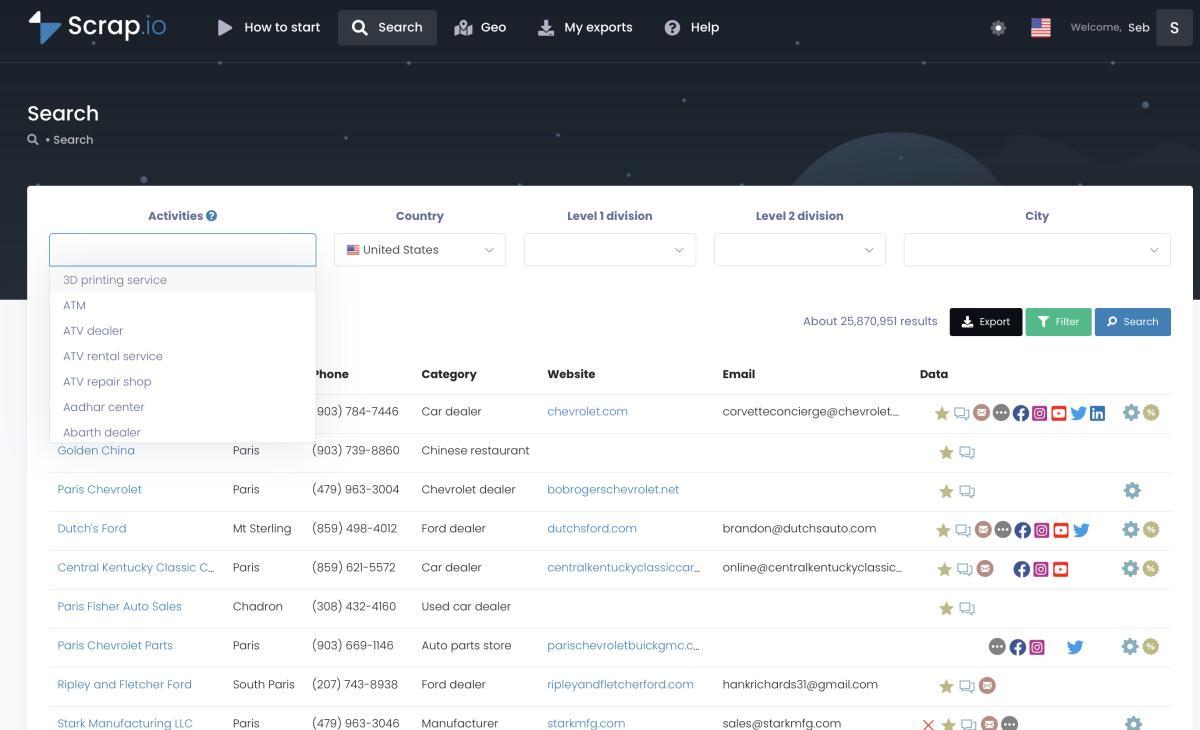
The two things that matter most here: filters run before extraction, and emails come enriched and classified. Want only businesses with an email on file? Toggle it, and you only spend credits on the ones that match. The emails themselves get tagged: Individual (with first and last name pulled out), Contact, Sales, Marketing, Finance, Admin. So you know who you're writing before you hit send. And counting how many results a search returns? Free. Unlimited. Even for an entire country.
There's no stale database behind any of this either. Every record is re-scraped at the moment you export, which is exactly how Scrap.io keeps data fresh at export instead of handing you a file that's been aging on a shelf since last spring.
Video: Scrap.io, How to Start
Want to see what an export actually looks like before committing to anything? Here's a sample export in Google Sheets: real columns, real enrichment.
See how Scrap.io counts your leads for free before you spend a credit. Run a search on any category, any country, and it tells you exactly how many businesses match: no credit burned, counting is always free. Try Scrap.io free for 7 days, 100 leads included.
Head-to-Head: Features, Pricing, and the Price-per-Lead Math
On paper, $9.90 buys you 100,000 leads a month. In practice, Google Maps only shows about 120 results per search. So do the math on how many separate searches your browser needs to survive to hit six figures. I'll wait.
That gap (between the sticker number and the reachable number) is the entire story of this comparison. Every map lead scraper review worth reading eventually lands here. It's the same gap we found testing another $9.90 extension we put to the test, for what it's worth. So let's put both tools side by side first.
The comparison table
| Feature | Map Lead Scraper | Scrap.io |
|---|---|---|
| Type | Chrome extension | Cloud SaaS |
| Entry price (yearly) | $9.90/mo (Pro) | $35/mo (Basic) |
| Emails | ❌ found on the fly, unclassified | ✅ enriched + classified |
| Filters before extraction | ❌ (sort after, in the CSV) | ✅ (credits only on matches) |
| Country-level extraction | ❌ (~120 results/search) | ✅ (2 clicks) |
| Real-time data | ⚠️ tied to browser session | ✅ fresh at export |
| Machine must stay on | Yes | No (cloud) |
| Rating | 4.8/5 (462, Chrome Web Store) | 4.8 Capterra · 4.9 G2 · 4.5 Trustpilot |
Price per lead: the honest math
This is the table nobody else on this search result publishes. So here it is, no spin.
| Map Lead Scraper Pro | Scrap.io Basic | Scrap.io Company | |
|---|---|---|---|
| Price/mo (annual) | $9.90 | $35 | $350 |
| Monthly quota | 100,000 leads (theoretical) | 10,000 credits | 100,000 credits |
| Nominal cost per lead | ~$0.0001 | $0.0035 | $0.0035 |
| Realistic monthly volume | a few thousand (browser speed, ~120 results/search) | 10,000 in minutes | 100,000, country-wide |
| Leads with email guaranteed | ❌ (filter after export) | ✅ (filter before, credits only on matches) | ✅ |
Let's write the honest part in bold, because it's the point of the whole article: on paper, Map Lead Scraper wins the price-per-lead battle by a landslide. Nobody beats $9.90 for 100,000 leads. The catch is that the number assumes your browser can actually scrape 100,000 listings a month, and it can't.
Nominal price is what the pricing page promises. Realistic cost is what you pay once you count the hours your machine spends scrolling, plus the leads you scrape and then delete because they had no email. That's where per-lead pricing quietly flips. Scrap.io is ~35× more expensive per nominal lead, and still cheaper once you count the leads you never wanted. We break the full method down in our guide on execution-time vs lead-based pricing if you want the receipts.
For context, the cloud side of the market isn't cheap either. Most google maps scraper platforms charge roughly $1.50 to $3 per 1,000 results before email enrichment: 10 to 30 times the nominal cost of an extension. So when we say "price per lead google maps," an extension genuinely owns the sticker. Scrap.io's edge isn't the sticker; it's that 50,000+ professionals get filtered, classified, country-scale data for a flat per-lead rate. Is Map Lead Scraper worth it at $9.90? For the right job, absolutely. The question is only whether your job is that job.
Run the same search on Scrap.io: counting is free and unlimited. Type your category and region, see the exact number of matching businesses with an email on file, and only then decide. Start your 7-day free trial, 100 leads included.
Where Map Lead Scraper Wins
Let's be honest: if we told you a $9.90 extension is useless, you'd close this tab, and you'd be right to. So here are the three cases where Map Lead Scraper is genuinely the smart pick, and we mean it.
You're testing Google Maps prospecting for the first time, on a budget of basically zero. If your search term is literally "google maps scraper free," this is your answer (and if you want the paid options lined up too, here's our full ranking of Google Maps scrapers). The free plan gives you 1,000 leads a month, more than enough to scrape Google Maps leads and prove to yourself whether Maps-based lead gen even fits your business before spending a cent. As a google map lead scraper for first-timers, it's hard to beat. Smart way to start.
You need small, local lists. One town. One neighborhood. A hundred plumbers in your county. The google maps lead scraper extension handles that in a few minutes, and the ~120-results ceiling never even becomes a problem because you were never going past it.
You have a one-off need for under 1,000 leads. No ongoing campaign, no country-wide ambition: just a list, once. Paying $9.90 (or nothing) for that is the correct financial decision. A 4.8/5 rating from 462 users isn't an accident; the tool does what it says for these jobs.
If a browser extension is all you want, honestly, take ours. Scrap.io's free Chrome extension for Google Maps shows emails and social profiles right on the map, free and unlimited. And if you want to see how the free browser-based tools stack up against each other, we tested three of them in our Google Maps scraper Chrome extensions guide. Use the right tool for the size of the job. Sometimes that's an extension. Really.
Where the Extension Hits Its Ceiling (and Scrap.io Takes Over)
In theory, you can scrape all of Texas with a Chrome extension. In practice, your laptop has to stay awake longer than you do. This is the section where the two tools stop being comparable, not because one is bad, but because they're built for different mountains.
Browser speed vs cloud speed
An extension scrapes at the speed of your browser, on your hardware, while you watch. Scrap.io runs on infrastructure that handles up to 10,000 requests per minute. One documented client pulled 11,734 businesses in 45 minutes. Try doing bulk google maps extraction like that with a tab open on your laptop. Your machine would still be scrolling next Tuesday.
The ~120-results wall and country-level extraction
Google Maps shows roughly 120 results per search. Full stop. It's not a tool limitation. It's the platform, and even Google's own Places API documentation works around it with paginated, query-by-query calls. An extension scrapes what's visible and stops. To get more, you split your territory into smaller and smaller zones and repeat the search. Manually. Over and over.
Scrap.io built its own index specifically to walk around this wall, which is why country-level lead scraping is two clicks instead of two thousand searches. One client extracted every restaurant in France (139,000+ businesses) in a single export. If you want the broader playbook on generating Google Maps leads at scale, we wrote that one up separately. The GeoSearch radius and polygon tools let you draw any zone you want on the map, well past the 120 the live page would ever show you.
Video: How to Scrape Local Leads at the Country Level
Emails: found on the fly vs enriched and classified
Remember Map Lead Scraper's own description. The browser visits each website looking for a contact page. That's how to extract emails from Google Maps with an extension, and it works, but it's live, slow, and gives you a raw address with no context. Is it sales@? info@ that nobody reads? The owner's Gmail? You can't tell.
Scrap.io crawls the associated website server-side and then classifies every address: Individual (with the person's first and last name), Contact, Sales, Marketing, Finance, Admin. That's the difference between a list you blast and a list you actually segment. This isn't us talking theory. It's the same complaint that keeps surfacing in community threads like r/CRM's "best Google Maps scraping tools for local business leads", where people keep running into cheap scrapers that choke or return messy data once the volume climbs.
Filtering before vs sorting after
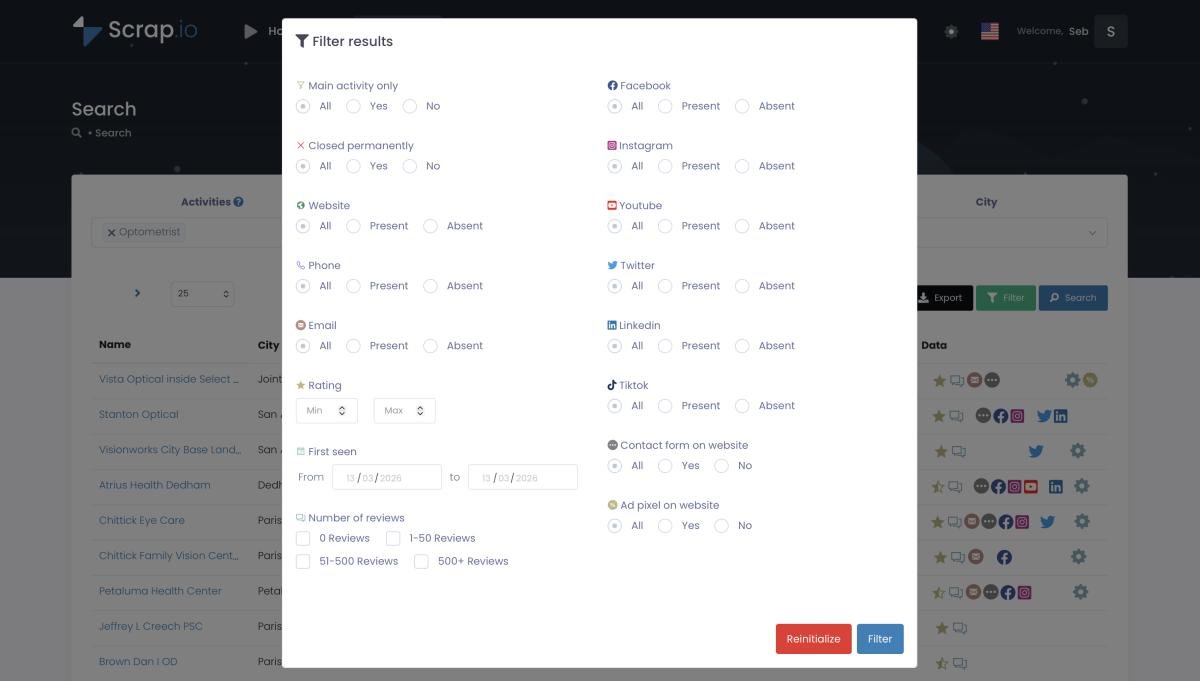
This is the one that quietly costs the most. With an extension, you scrape everything, then open the CSV and delete the rows you didn't want: no website, no email, permanently closed, whatever. You already paid for those in time. With Scrap.io, filters apply before credits are consumed. Only want businesses with a mobile number for an SMS campaign? Only 4-star-plus with a contact form? Set it, and you never pay for a lead you'll throw away. Counts stay free, so you can check the size of any segment for nothing.
One quick note on the boring-but-important stuff: both tools work with publicly available business data, which is legal for B2B prospecting under GDPR and CCPA. The difference is Scrap.io documents its compliance and keeps every data point traceable to its source.
Try the country-level extraction yourself. Pick a category, pick an entire country, and watch Scrap.io return what would take a browser extension weeks of manual searches. 7-day free trial, 100 leads included.
Which One Should You Pick in 2026?
Our advice? It comes down to one number: how many leads you need per month. Everything else is noise.
Here's the decision tree, stripped down:
- Under 1,000 leads, occasional, local? Map Lead Scraper Free. Don't overthink it, don't pay for anything. The extension is the right tool and the price is zero.
- A city or region, and you need reliable, classified emails? Scrap.io Basic at $35/month, 10,000 credits, filters before extraction. This is the sweet spot for most freelancers and small agencies.
- An entire country, or you're an agency running volume for clients? Scrap.io Company at $350/month, 100,000 credits, full country-level reach. The math on human time alone justifies it before you count anything else.
Still fuzzy on what "lead scraper" even means as a category, before you pick a tool at all? We untangle the bare "lead scraper" term, explained, from free extensions all the way up to cloud platforms. Worth two minutes if the labels keep tripping you up.
If you're weighing Scrap.io against other cloud tools rather than an extension, our Octoparse vs Scrap.io comparison covers that fight in detail. Different opponent, same per-lead logic.
Try Scrap.io free for 7 days, 100 leads included. If Map Lead Scraper fits your volume better, keep it: at $9.90, it's a fine tool. But if you've hit the ceiling, you know where the elevator is. Start your free trial →
FAQ
What is Map Lead Scraper?
Map Lead Scraper is a Chrome extension that extracts business data (names, phones, emails, socials) from Google Maps as you browse. It has a free plan (1,000 leads/month, capped at 15 records per run) and a Pro plan at $9.90/month billed yearly, or $19.90 billed monthly (October 2026 pricing).
Is Map Lead Scraper free?
Partially. The free plan allows 1,000 exported leads per month, capped at 15 listings per extraction. Unlimited batch extraction requires the Pro plan ($9.90/mo yearly, $19.90/mo monthly). So it's a real free tier for testing, not a full free tool.
How many leads can Map Lead Scraper really pull per month?
On paper, 100,000 on the Pro plan. In practice, Google Maps shows about 120 results per search and the extension scrapes at browser speed on your own machine, so the realistic ceiling is a few thousand a month. For true high-volume or country-level extraction, a cloud tool like Scrap.io is the practical route.
What is the best Map Lead Scraper alternative for large volumes?
A cloud platform like Scrap.io. It extracts up to an entire country in two clicks, in real time, with filters applied before extraction, so you only pay for leads that match, like businesses with an email on file. For anything past a few thousand leads a month, that's the practical map lead scraper alternative.
Can a Chrome extension scrape an entire country from Google Maps?
Not realistically. Google Maps displays roughly 120 results per search, and an extension scrapes at browser speed on your own machine. Country-level extraction requires cloud infrastructure that splits the territory into thousands of queries and runs them server-side, which is exactly what an extension can't do.
Generate a list of restaurant with Scrap.io