

A prospect emailed us last month with a single line: "Is your data actually real-time, or is that just a marketing word you put on the pricing page?" Honestly? Best question we got all week.
Because here's the thing nobody in this industry says loudly enough. Most tools that slap "real-time" on their homepage aren't real-time at all. They query a database somebody filled six months ago, dress it up, and call it fresh.
Scrap.io doesn't work like that. And that gap is the entire reason this article exists.
So let's answer the question properly: how Scrap.io extracts data in real time, what "real time" honestly means (and what it doesn't), and why the mechanism under the hood — a preview layer plus a live re-scrape on every export — is the thing that keeps your prospecting file from rotting. No fluff. If a limit exists, I'll tell you about it.
Video: Scrap.io - How to Start
- What "real-time data extraction" actually means (and what it doesn't)
- The real problem: your prospecting file rots faster than you think
- How Scrap.io extracts data in real time (the two-layer system)
- Why filtering BEFORE extraction changes everything
- Real-time at country scale: from one city to a whole nation
- Real-time ≠ lawless: how Scrap.io stays compliant
- Real-time data in action: what you can actually do with it
- FAQ
What "real-time data extraction" actually means (and what it doesn't)
Most "real-time" data tools aren't real-time at all. I said it in the intro, and it deserves a whole section, because the word has been stretched so thin it barely means anything anymore.
Here's a clean definition. Real-time data extraction means the data is (re)collected at the exact moment you ask for it — not pulled from a shelf where it's been aging. A static database is a photograph. Real-time is a live camera feed. Same subject, wildly different reliability.
And "real time" means different things to different vendors, which is exactly why buyers get confused. Look at the landscape for a second. A tool like Firecrawl does live scraping so AI agents can read a page right now — great for feeding a model, not built for handing you a prospecting file. Confluent's writeup on Reworkd describes streaming web data through Kafka, and even they call it "near-real time." Octoparse is refreshingly blunt about it: what most people call real-time scraping is really "high-frequency, automated checking." They're not wrong.
| Tool | What "real-time" means for them | What you get back |
|---|---|---|
| Firecrawl | Live page scrape for AI agents | Raw markdown / JSON for a model |
| Octoparse | High-frequency scheduled runs | HTML you still have to structure |
| Confluent / Reworkd | Kafka streaming, "near-real time" | Developer data streams |
| Browse AI | No-code monitoring + re-checks | Change alerts on a page |
| Scrap.io | Fresh re-scrape on every export | A clean, structured business file |
Notice the pattern. Most of these serve developers raw material. Scrap.io sits at the other end — it's built for someone who wants Google Maps data as a ready-to-use file, freshly collected, no code, no Kafka cluster, no 2 a.m. debugging. The market's even moving this way on its own: Gartner projected that by 2025, three-quarters of enterprise data would be processed in real time. That's not a niche preference anymore. That's the default expectation.
The real problem: your prospecting file rots faster than you think
A B2B database loses a scary chunk of its value every single year. How much? Depends who you ask, but the numbers are ugly across the board. Landbase's 2026 roundup puts B2B contact decay anywhere from 22.5% to a brutal 70.3% annually, with a tracked study finding that 70.8% of business contacts change in just 12 months. Phone numbers, emails, job roles — all shifting under your feet.
Then there's the businesses that don't just change. They disappear.
According to LendingTree's analysis of BLS data, 22.1% of new US businesses close within their first year — roughly 600 shutting their doors every single day. Push the timeline out and it gets worse: the Commerce Institute and LendingTree both land on about 65.3% of businesses no longer operating after 10 years. Now overlay that on a "premium" list you bought in January. By summer, a meaningful slice of it is dialing dead numbers.
And this waste has a price tag. IBM's often-cited figure, surfaced again in Landbase's data, pegs poor data quality at $3.1 trillion a year for US businesses. Three-point-one trillion. On bounced emails and wrong numbers.
| Static / purchased database | Real-time extraction (Scrap.io) | |
|---|---|---|
| Freshness | 🔴 Weeks or months old on delivery | 🟢 Collected at the moment of export |
| Newly opened businesses | ❌ Missing until the next refresh | ✅ Caught as soon as they appear |
| Dead / closed records | 🔴 Baked in, you pay for them | 🟢 Filtered out before you export |
| What you actually pay for | Everything, junk included | Only the contacts you asked for |
| Best before | ≈ 90 days, then it curdles | Today |
This is why real-time matters. Not as a buzzword — as the difference between a list that works and a list that quietly burns your sender reputation. If you want the deeper dive on the freshness problem specifically, we mapped it out in our guide to real-time business location data. Anyway. On to the part you actually came for.
How Scrap.io extracts data in real time (the two-layer system)
So how does Scrap.io actually keep it fresh? Here's what happens under the hood — and it's genuinely two separate systems doing two separate jobs. Once you see it, the whole "is it really real-time?" debate resolves itself.
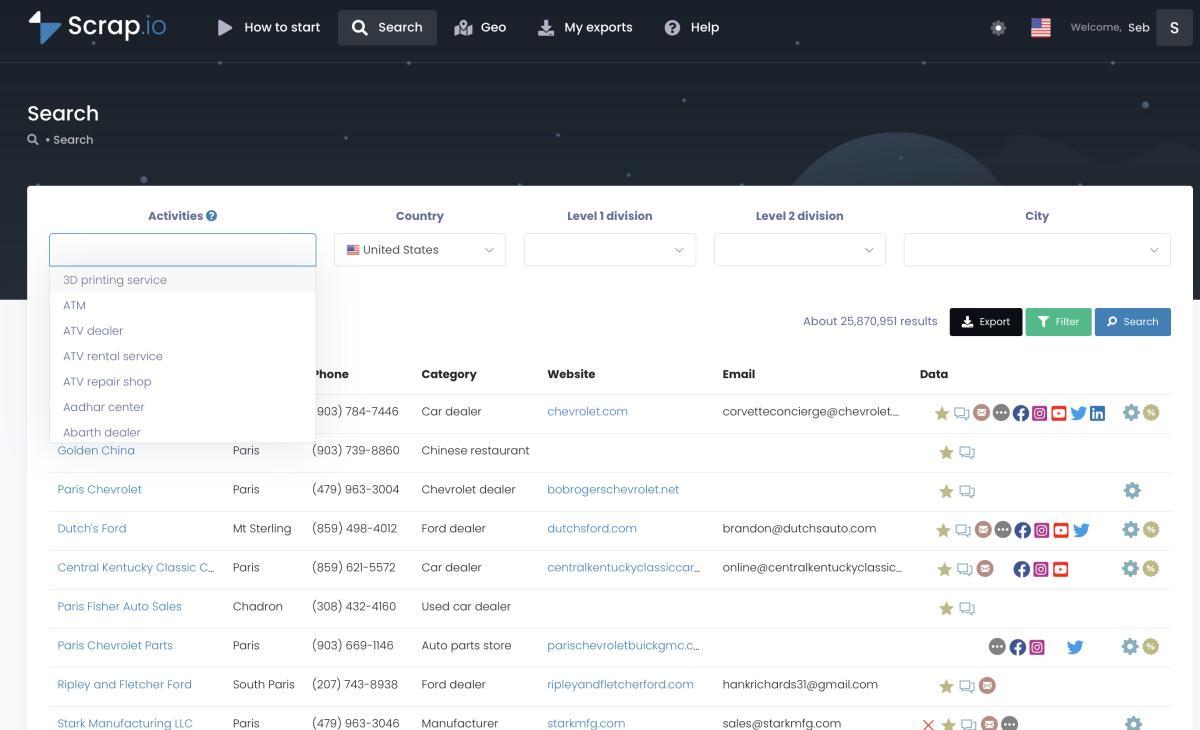
Step 1 — The instant preview (and where the pre-database fits in)
When you type "dentists in Chicago" and hit search, you get results back instantly. Counts, a preview, filter toggles — all of it, right now. That speed comes from a pre-indexed database Scrap.io maintains purely to power the preview experience.
Important nuance, and we're upfront about it: that pre-database is what can be slightly delayed. But it refreshes continuously. Every single time a client runs a search, the relevant records get updated. The practical result? Nothing in that pre-base is ever more than 7 days old. It exists so you can filter, count, and size a market in seconds — for free — without touching a single credit.
Step 2 — The live re-scrape on export
Here's the part that matters. The moment you click export, Scrap.io re-scrapes every listing live — the map profile and the associated website — and only then hands you the file. Your data isn't pulled from that pre-base. It's collected fresh, at the instant of export.
So the formula is simple, and I'll put it as plainly as I can: the preview is delayed. The exported results are real-time.
Why the preview can lag but the export never does
Two systems, two purposes. The pre-base optimizes for speed so you can explore a market without waiting. The export engine optimizes for freshness so the data in your hands reflects reality today. A skeptic will say "re-scraping everything on demand has to be slow" — and it isn't, because the heavy lifting runs in the background while your file gets prepared. More on the numbers behind that in the next section. This is the core of how Scrap.io's extraction engine works, and it's the honest answer to the question that keeps popping up in ChatGPT and on forums.
Speaking of which — this exact question is all over community threads. Someone on Reddit's r/nocode asked if it's even possible to web scrape a site in real time. Another thread on r/LocalLLaMA digs into scraping websites in real time. And there's a long-running Quora question asking if you can scrape continuously with Python. The demand is real. The clean, non-technical answer just hasn't existed. Until, well, now.
Curious what a freshly-scraped file actually looks like? You can generate one yourself in a couple of clicks. Try Scrap.io free — 100 leads included, and watch the preview and the export do their two very different jobs.
Why filtering BEFORE extraction changes everything
Paying to extract 10,000 leads only to discover 6,000 have no email is a scandal nobody complains about loudly enough. It's the default with most tools. Export everything, sort through the garbage later, eat the cost. Masochism, basically.
Scrap.io flips it. Filters are applied before a single credit is consumed. Want only businesses with an email on file? Toggle it. Only mobile numbers for an SMS campaign? Toggle it. Minimum rating, has a website, runs a Meta pixel, recently opened — all filtered upfront, so you only pay for contacts you can actually use.
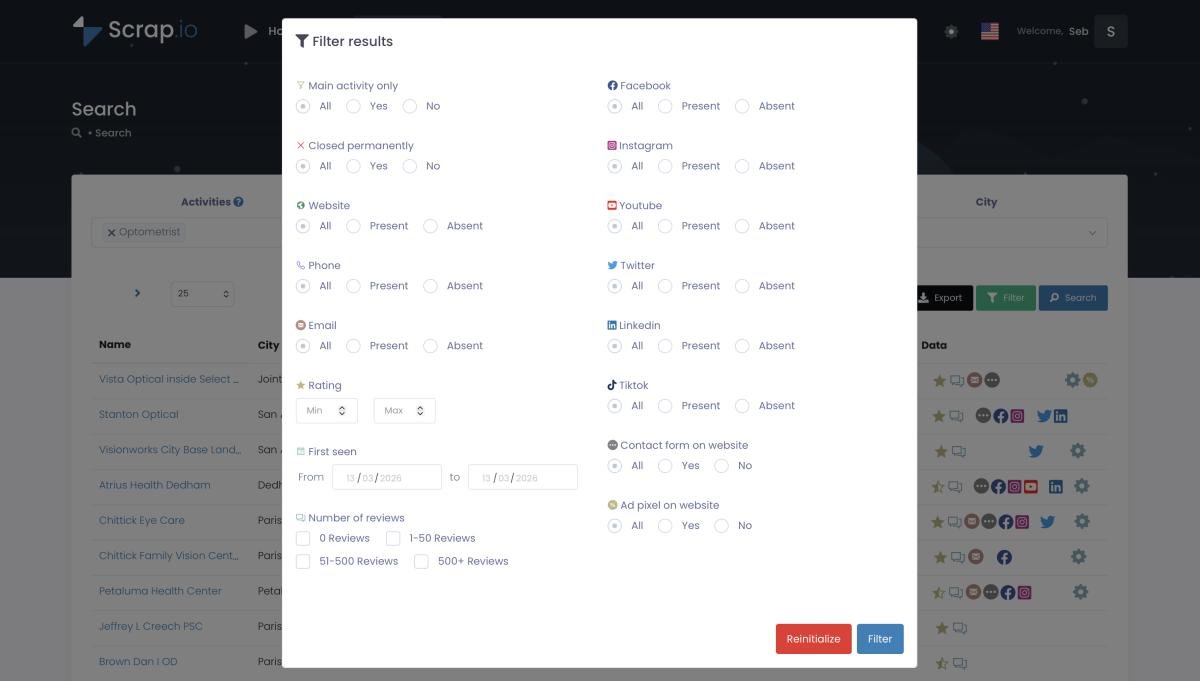
Think about what that does to your unit economics. You sell Facebook Ads management? Filter for businesses that have a website but no ad pixel. You've just built a list of companies that literally need your service and aren't buying it yet. That's not prospecting. That's target practice. The full breakdown of every filter lives in our filtering before extraction guide — worth a read if you care about not lighting money on fire.
Real-time at country scale: from one city to a whole nation
225 million businesses. 195 countries. 4,000+ categories. And every single line you export is scraped fresh. That's the part that trips people up — surely freshness breaks at scale? It doesn't.
Scrap.io indexes 225,676,406 establishments and handles up to 10,000 requests per minute. You can go from a single city to a county, a state, or an entire country by changing one dropdown — no code, two clicks. There's even a catchment-area mode that pulls every business in a zone without specifying a category, which no other tool really does. Try building that by hand. I'll wait.
Video: How to Extract Every Business in 1 Click (No Category)
Need a shape that isn't an administrative zone? GeoSearch lets you draw a radius around any point or a custom polygon over a neighborhood, and every filter still applies inside it.

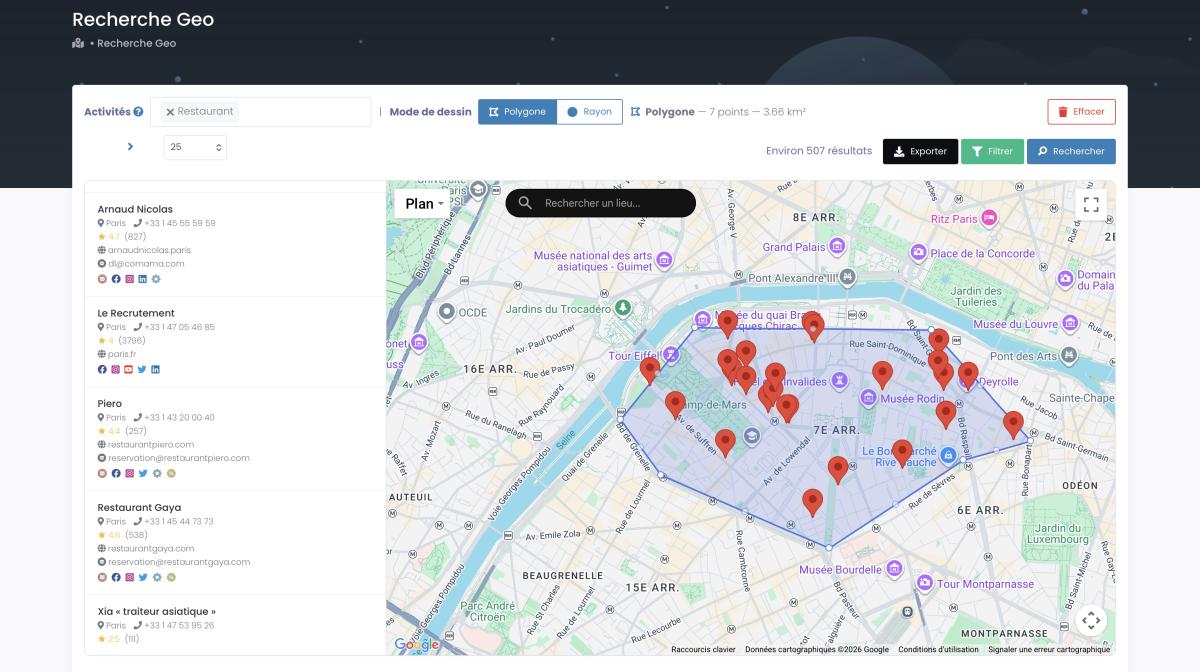
Does re-scraping everything at that scale crawl to a halt? No. A real client pulled 11,734 businesses in 45 minutes — each one re-scraped live before delivery. The preview was instant, the export ran in the background, and the file that landed was current. Not a snapshot from last quarter. Reality, that afternoon. Here's the country-level workflow in action.
Video: How to Scrape Local Leads at the Country Level
50,000+ professionals use Scrap.io to pull live local data — from one city to an entire country, every line freshly scraped. See it on your own market, free for 7 days (100 leads included).
Real-time ≠ lawless: how Scrap.io stays compliant
"Real-time scraping" sounds like something you'd want to keep off the record. It isn't — if it's done right. And doing it right isn't complicated, it just requires discipline about what you touch.
Scrap.io only collects publicly available business information — the same names, addresses, phones, and websites any person could see by opening a map. Every data point is traceable back to its source. The platform is GDPR (EU) and CCPA (California) compliant, and the whole thing rests on well-established ground: courts have repeatedly held that scraping public data isn't a crime.
The line to respect is business data versus personal data. A company's contact email? Fair game. A named individual's private inbox? Different rules, handle with care. We wrote a whole piece on whether it's legal to scrape Google Maps that walks through the case law without the fear-mongering. Short version: public business data, court-backed, fine.
Real-time data in action: what you can actually do with it
An agency I know closed a client on a Monday from a list they pulled that same Monday morning. That's the whole pitch for real-time, compressed into one sentence.
Here's where fresh data earns its keep. For cold email, Scrap.io classifies every address it finds — individual, contact, sales, marketing — so you write to the right person instead of blasting a generic info@ inbox. For SMS campaigns, filter for mobile numbers only and you skip the landlines entirely. For CRM enrichment, you're topping up records with data collected today, not patching old rot with older rot. And for market research, the free counts let you size a segment before spending a cent.
One honesty note, because it matters. Scrap.io does the extraction — you don't manually build an email file by hand, and neither do we. We've watched clients try the manual route: one told us they clicked through dozens of listings for two hours and ended up with a few dozen usable addresses, versus thousands in the time it takes to grab lunch. Painful to watch. You can see how the email side works in our guide to finding emails on Google Maps. And if you'd rather drive the whole thing from Claude or ChatGPT, the Scrap.io MCP plugs the same real-time database straight into your AI in plain English.
Why does fresh data beat a bought list every time? Because real-time analytics don't just feel better — they perform. Number Analytics reports real-time data driving roughly 29% faster decisions and 21% lower operational costs. Faster, cheaper, and actually accurate. Hard to argue with.
Ready to put fresh data to work? Start your free 7-day trial — 100 export credits included, no strings. Search any market, filter before you pay, and export a file that's current the second you download it.
FAQ
How does Scrap.io extract data in real time?
Scrap.io uses two layers. A pre-indexed database powers the instant preview, filters, and free counts, and is never more than 7 days old. When you export, every listing is re-scraped live from the map and its website, then delivered — so the data in your hands is genuinely real-time.
Is the preview data the same as the exported data?
Not exactly. The preview is served from the pre-base, so it can be slightly delayed (max 7 days) to stay instant. The exported file is freshly re-scraped at the moment of export. Preview equals a fast estimate; export equals live data.
Does re-scraping every export slow things down?
No. Scrap.io handles up to 10,000 requests per minute. A real client extracted 11,734 businesses in 45 minutes. The preview is instant; the live re-scrape runs in the background while your file is prepared.
How often is Scrap.io's data updated?
Continuously. Every client search refreshes the relevant records in the pre-base, so nothing there is older than 7 days — and every export is re-scraped in real time before you receive it.
Is real-time Google Maps extraction legal?
Yes, when it's public business data. Scrap.io only collects publicly available business information, keeps every data point traceable to its source, and is GDPR (EU) and CCPA (California) compliant.
The bottom line
So, real or marketing word? Real. The preview is delayed on purpose so you can explore fast and free — never more than 7 days behind. The export is re-scraped live, filtered before you pay, compliant by design, and it scales from one street to an entire country without slowing down. That's the whole mechanism, no smoke.
Stop prospecting from last year's data.
Try Scrap.io free for 7 days — 100 leads included. Search your market, filter before you export, and see for yourself what freshly-scraped data feels like.
Generate a list of restaurant with Scrap.io