

Last week I asked an AI to give me every plumber in Phoenix without a website. It handed me a list. Confident, clean, formatted. Fourteen names.
Four of them didn't exist.
That's the whole problem in one anecdote. AI models are brilliant at writing and reasoning, and hopeless at telling you what's actually out there on Google Maps right now. They guess. And a guess dressed up as a phone number is worse than no answer at all. The Scrap.io MCP is a google maps mcp server built for prospecting, and it exists to kill that guessing entirely. It plugs a live database of 225 million+ businesses straight into Claude, ChatGPT or Gemini, so your AI queries real data instead of inventing it.
Quick number to set the scene. In December 2024, the MCP ecosystem saw about 2 million SDK downloads a month. By March 2026? 97 million a month, across 10,000+ public servers, with every major AI provider on board (Anthropic / MCP ecosystem, 2026). That's not a trend. That's a landgrab.
Table of contents
What is MCP (Model Context Protocol)?
The Model Context Protocol is an open standard, launched by Anthropic in late 2024, that lets an AI like Claude, ChatGPT or Gemini connect to external tools and data through a small piece of software called an "MCP server." Instead of hallucinating, the AI queries a live source. Think of it as the USB-C port for AI.
And the adoption curve is genuinely wild. December 2024: 2 million downloads a month. March 2026: 97 million, 10,000+ public servers, and, this is the part that matters, every major player has signed on. Anthropic shipped it in November 2024. OpenAI adopted it in April 2025. Microsoft Copilot followed in July 2025, AWS in November 2025, Google not long after (Wikipedia, 2026). Rivals almost never agree on a standard. This time they did. Want a raw builder-side number? GitHub had 15,926 repositories tagged mcp-server as of May 24, 2026, up from roughly 7,800 in late 2025 (GitHub Search API, 2026). The ecosystem roughly doubled in half a year.
One more signal, for the people who like their standards boring and durable. In December 2025, Anthropic handed MCP to the Agentic AI Foundation, a Linux Foundation fund co-founded by Anthropic, Block and OpenAI. Translation: this isn't one company's pet project anymore. It's infrastructure. And if you're wondering what an MCP server actually is under the hood, the short version is a permanent connector your AI can call whenever it needs live data.
The USB-C-for-AI analogy
Before USB-C, every device had its own plug. Camera cable, phone cable, that one weird charger you could never find. MCP does for AI what USB-C did for hardware: one standard port, and suddenly everything talks to everything. Before it, every data source needed its own custom integration. Anthropic literally called it the "N×M problem." One protocol replaced the mess.
The official MCP specification is public, open-source, and already shipping in a dozen programming languages. So when a tool exposes an MCP server, any MCP-compatible AI can use it. No bespoke code per client.
Why MCP changes prospecting
Here's why a salesperson should care about a protocol. Until now, feeding business data to an AI meant one of two chores: copy-paste listings into the chat (slow, and the model mangles half of it) or write API code (fun for developers, misery for everyone else). We compared the messier version of this in our breakdown of Google search operators vs ChatGPT for leads. Spoiler: the manual route caps out at 41 unverified contacts and a headache.
MCP removes the chore. You type a sentence, your AI pulls real leads. That's the shift. And it's the reason the Scrap.io MCP exists at all.
The Scrap.io MCP server: Google Maps directly inside your AI
Pasting Google Maps listings into ChatGPT to write cold emails? We've all done it. We've all gotten back a table with three real emails and seven that were confidently invented. The Scrap.io google maps mcp server fixes that at the root: it wires your AI to a real, real-time database, so it queries instead of guessing.
The point isn't subtle. When your AI is grounded in an actual data source, the hallucinations stop. One Hacker News commenter running LLM extraction at scale put it bluntly in a widely-shared thread: "At my job we are scraping using LLMs. For a 10M sector. GPT4 turbo has never hallucinated out of 1.5M API requests." Zero, out of 1.5 million. But only because the model was structuring data that had already been properly sourced, not conjuring it from nothing. Grounding is the whole game.
Another user in the same thread was blunter about doing it AI-only: "Using LLMs for web data extraction does not work unless you generate code." Fair. And that's exactly the gap the Scrap.io MCP closes: the model doesn't extract anything itself. It calls a connector that does the real work, then hands back clean results. If you want the broader picture on this, our guide on how to feed Google Maps data to your AI agents goes deep.
Real-time data on 225M+ businesses across 195 countries
The database behind the MCP is not a dusty snapshot. It's 225,676,406 businesses indexed across 195 countries and 4,000+ categories, extracted in real time on every request (Scrap.io, 2026). No stale files. No "this restaurant closed in 2023" surprises. When your AI asks a question, it gets the answer as it stands today.
That's the difference between a model that "knows" the internet from months ago and one that reads reality right now. For local prospecting, that gap is everything.
Works with Claude, ChatGPT, Gemini & any MCP client
The Scrap.io MCP server lives at one address: scrap.io/mcp. It speaks the open protocol, so it works with Claude, ChatGPT, Gemini, and any MCP-compatible client you throw at it. No favoritism. If your AI supports MCP, and by 2026 they all do, it can drive Scrap.io.
Want to try it? The MCP is included in every Scrap.io plan, nothing extra to buy. Start with the free 7-day trial, 100 leads included, and run your first plain-English search against 225M+ businesses in 195 countries. Start free →
Everything you can drive from your AI
What if you asked your AI "how many restaurants with an email in the US?" and it gave you the exact number, for free, in a few seconds? Not an estimate. The real count. That's the baseline here, not the ceiling.
Everything the Scrap.io interface can do, the MCP can drive in plain English. Searches, counts, filtered exports, geographic targeting, and pulling results straight back into the chat. Let's walk through it. If you want the manual-tool equivalent first, our guide on how to use an AI data scraper covers the ground-level workflow.
Searches & counts (counts are free via MCP)
Ask your AI to count Google Maps businesses with AI and it just… does. To make the restaurant example concrete: pulled live via the Scrap.io MCP in September 2026, the US has 667,827 restaurants, of which 199,372 have an email, roughly 30%. That count cost zero credits. Counts are 100% free through the MCP, exactly like they are in the interface (Scrap.io, 2026).

So you can size a market before spending a cent. Extract Google Maps leads with AI only when you're ready. For the mechanics of pulling a whole territory at once, see how to extract all businesses from Google Maps.
Single & multi-category exports with filters before extraction
This is where credits get respected. The MCP applies filters before extraction (email present, mobile phone only, minimum rating, no website, whatever you specify), so you only ever pay for contacts you can actually use. No exporting 10,000 rows to delete 8,000 of them. Our filtering guide for accurate data shows why "main activity only" alone can halve your junk.
Zero waste. That's the design.

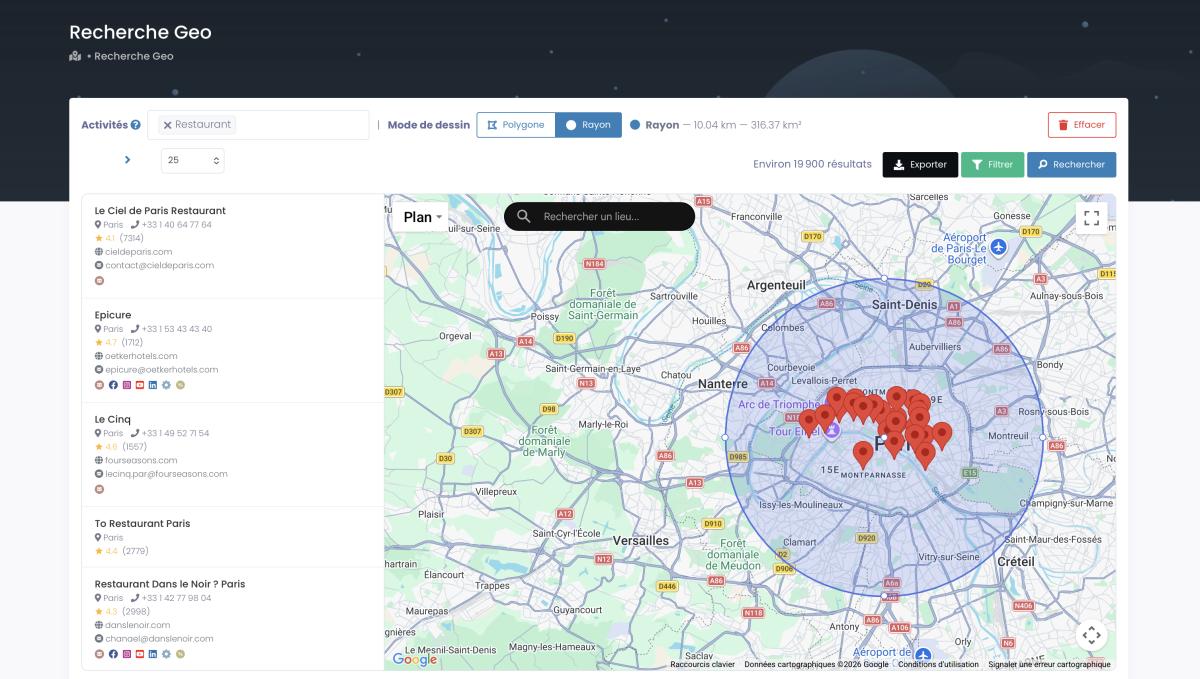
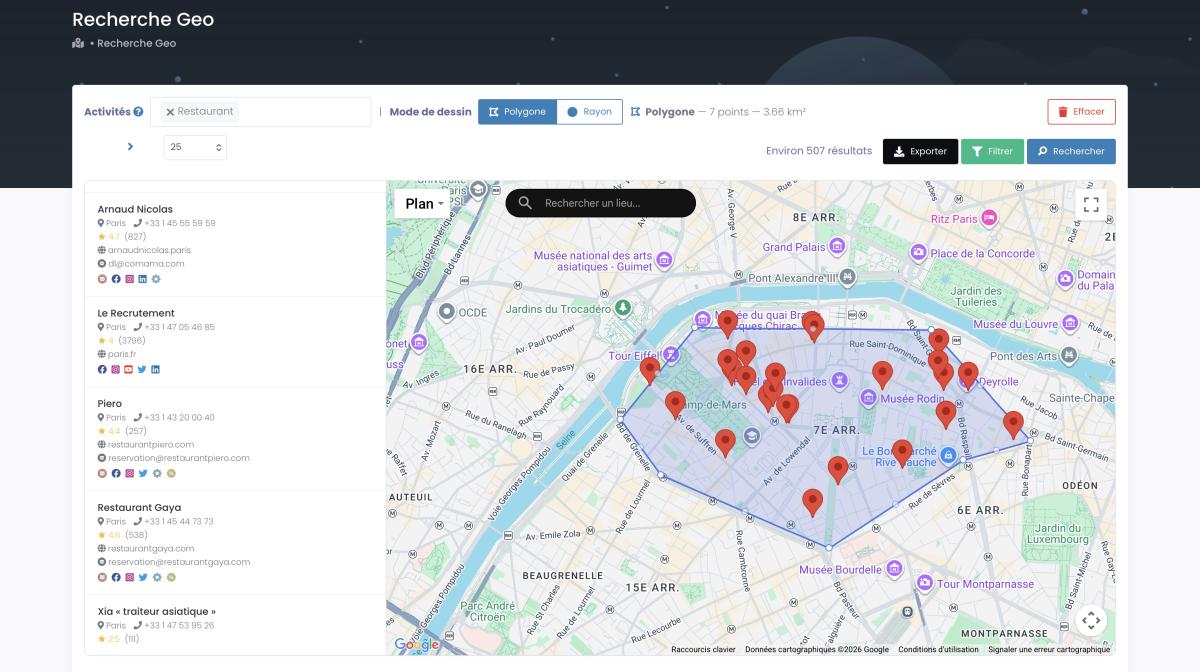
GeoSearch in plain English (radius & polygon)
Here's the party trick. You can run a geosearch polygon natural language query and the AI builds the shape for you. Say "find me every beauty salon within 10 km of downtown Austin" and it constructs the radius. Say "draw a polygon around the 11th arrondissement of Paris and pull the cafés" and it draws it. Radius mode, polygon mode, both driven by a sentence.
Try doing that by hand with a normal scraper. I'll wait.
Pull results directly (map, report, PDF)
And you don't always need a CSV. For smaller queries, the AI can pull results straight into the conversation. Display them on a map, fold them into a report, spit out a PDF. No export step, no download, no tab-switching. The data lands where you're already working.
Set up the Scrap.io MCP in 2 minutes
No code. One URL. Three minutes if you read every tooltip, ninety seconds if you don't. Here's how to install the Scrap.io MCP in each client.
Video: Scrap.io - How to Start
Claude (Claude Desktop Google Maps connector)
If you want to add an MCP connector to Claude, it's four clicks. Settings → Connectors → Add custom connector → paste scrap.io/mcp → Authorize. That's how to connect Scrap.io to Claude, and it's the same flow whether you're on desktop or web.
ChatGPT (use Google Maps in ChatGPT)
To use Google Maps in ChatGPT, turn on Developer Mode first. Settings → Apps → Developer Mode → Create app → scrap.io/mcp → Authorize. Done. Now ChatGPT can run a Google Maps search in plain English against the full database.
Gemini & other MCP clients
Any MCP-compatible client follows the same logic: point it at scrap.io/mcp and authorize through OAuth. Gemini, or whatever niche client you're testing this month, if it speaks MCP, it connects. The MCP server for scraping Google Maps is the same endpoint for everyone.
It really is this trivial. Create your account, connect scrap.io/mcp to your AI, and run your first free count. The trial gives you 7 days and 100 leads to test the whole thing end to end. Create your account →
5 real use cases (with exact prompts)
The real blocker was never the tech. It's knowing what to ask. So here are five prompts that already work. Copy them, tweak the geography, run them. These cover the best MCP for B2B prospecting scenarios most teams actually need.
Case 1: Map a market
Prompt: How many dentists are there in California, and how many have an email address?
Your AI returns the count, free, before you spend anything. This is market sizing in one sentence, the kind of thing that used to take an analyst an afternoon.
Case 2: Build a filtered prospecting file (email present)
Prompt: Export all HVAC contractors in Texas that have an email and a rating above 4.0.
Filters applied before extraction. You get a clean file of reachable, qualified businesses, not a data swamp. That skeptic on Hacker News was right that AI alone can't do this reliably. The MCP works because Scrap.io does the extraction and the AI just orchestrates it.
Case 3: Catchment area in plain English
Prompt: Find every restaurant within 15 km of the center of Nashville that doesn't have a website.
The AI builds the radius, applies the "no website" filter, and hands back your list. Web design agencies, this one's for you.
Case 4: Cross several categories at once
Prompt: Give me restaurants, cafés and hotels in Miami with a mobile phone number, in one export.
Multi-category search, one query. Perfect for anyone whose service (security systems, cleaning, POS terminals) sells to any physical business regardless of type. It's also the backbone of an account-based prospecting motion when you want one clean target list across several business types.
Case 5: Report or map without leaving the AI
Prompt: Pull the top 50 gyms in Chicago by review count and show them on a map with their ratings.
No export, no CSV. Results appear right in the chat. From there it's a short hop to feeding those leads into a pipeline. Our guide to CRM automation & lead enrichment shows how to create a Scrap.io export from Claude and push it straight into Pipedrive or HubSpot.
And a reality check on scale, from another Hacker News voice weighing general-purpose scrapers: "We use Apify and it works most of the time. The long-tail is difficult though" (Hacker News). The long tail is always where generic tools break. A specialized Google Maps source doesn't have that problem.
50,000+ professionals already use Scrap.io. Plug the MCP into your AI and test every prompt above free for 7 days, 100 leads included. Real data, 195 countries, no hallucinations. Try the prompts free →
MCP vs API vs UI: which should you use?
Let's clear something up. The MCP doesn't replace the API or the web interface. It's not better or worse, it's for a different moment. It's for when your AI is doing the driving. The MCP vs API question isn't a fight; it's a "which hand is on the wheel" question.
Comparison table
| Criteria | 🤖 MCP | { } REST API | ▮ Web UI |
|---|---|---|---|
| Who's it for | Anyone driving via an AI | Developers & integrations | Hands-on users |
| Code required | No | Yes | No |
| Best for | Plain-English queries in your AI | Scripts, CRM sync, automation | Point-and-click extraction |
| Database | Same real-time 225M+ | Same real-time 225M+ | Same real-time 225M+ |
| Included in all plans | ✅ | ✅ | ✅ |
Same database behind all three. Pick the one that matches how you're working today. If you're building repeatable pipelines rather than chatting, the API is your friend. Our tutorial on how to automate Google Maps with Make.com shows the no-code version of that route.
Credits, plan & security
The MCP respects your plan's limits exactly. No more, no less. There's no secret backdoor that unlocks a bigger zone or extra categories because you're using an AI instead of the interface. Same rules, same account.
Free counts, exports = 1 credit per business
So does the MCP use Scrap.io credits? Only on export. Counts are free: always, everywhere, including through the MCP. When you export, it's 1 credit per business, and only for the filtered, useful contacts you asked for (Scrap.io, 2026). Ask "is the Scrap.io MCP free" and the honest answer is: the counting is, the extracting costs credits like it does everywhere else.
Respects plan capabilities
Does the MCP bypass your plan? No. Maximum search zone, number of simultaneous categories, radius and polygon limits, all inherited from whatever plan the connected account is on. The AI is a driver, not a cheat code.
OAuth, GDPR/CCPA, public data
Connection is handled through OAuth, so you're authorizing access properly, not pasting secrets into a chat box. And the data itself is only publicly available business information: GDPR and CCPA compliant, every point traceable to its source. If you want the full legal picture, we wrote a whole piece on whether scraping Google Maps is legal. Short version: public business data, court-backed, fine.
FAQ
What is MCP?
MCP (Model Context Protocol) is an open standard released by Anthropic in late 2024 that lets an AI, Claude, ChatGPT or Gemini, connect to external tools and data through an "MCP server." It's the USB-C port for AI. By early 2026 every major provider had adopted it, and it's now governed by the Linux Foundation's Agentic AI Foundation. Full technical reference lives at docs.scrap.io.
What is the Scrap.io MCP server?
It's Scrap.io's official connector, hosted at scrap.io/mcp. It lets you search, count, filter and export from 225M+ Google Maps businesses in plain English, straight from your AI, with no code. Same real-time database as the web app and the API.
Is there a MCP server for Google Maps?
Yes, several. Google ships an official Maps Grounding Lite MCP for geocoding, routing and place lookups. Scrap.io's MCP is different: it's built for prospecting, exposing 225M+ Google Maps business listings with emails, phones and filters, queryable in plain English.
How do I connect it to Claude or ChatGPT?
Claude: Settings → Connectors → Add custom connector → scrap.io/mcp → Authorize. ChatGPT: Settings → Apps → Developer Mode → Create app → scrap.io/mcp → Authorize. About two minutes either way.
Does the MCP use credits?
Counts are free. Exports cost 1 credit per business, applied only to the filtered contacts you actually export. The MCP respects your plan's capabilities, it doesn't unlock anything extra.
MCP vs API vs UI: what's the difference?
The UI is for working by hand. The REST API is for building it into your own scripts and automations. The MCP is for letting your AI drive in plain English. Same real-time database, and all three are included in every plan.
Ready to let your AI talk to Google Maps? Connect the Scrap.io MCP and test it free for 7 days, 100 leads included, 225M+ businesses, real-time data, no hallucinations. Start your free trial →
Generate a list of restaurant with Scrap.io