

By the Scrap.io Team. Last updated: September 2026.
Video: How to Extract Every Business in 1 Click on Google Maps
- What Is a Directory Website? (And the 4 Main Types)
- Why Directory Websites Are Still Smart in 2026
- The 5-Step Build: From Empty Page to Live Directory
- Step 1 & 2: Pick a Niche and Choose Your Platform
- Step 3: Where Your Listings Actually Come From
- Pull Thousands of Listings with Scrap.io
- Keeping Your Directory Fresh
- Is It Legal? Data and Compliance (GDPR/CCPA)
- How Directory Websites Make Money (7 Models)
- Directory Website Examples Worth Studying
- Conclusion
- FAQ
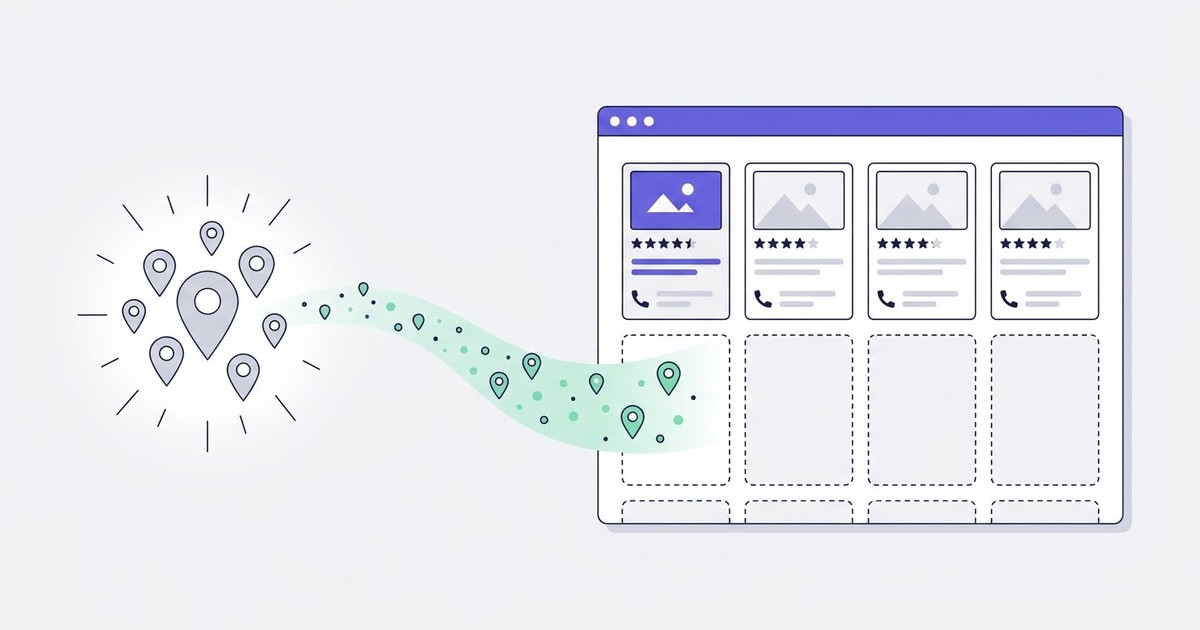
Building a directory website is easy. Filling it is what kills 90% of them.
You pick a slick template. You wire up categories, style the listing cards, drop in a search bar. It looks gorgeous. Then you hit publish and there it is: eleven listings you typed in by hand at midnight, floating in an ocean of white space. Nobody stays on a directory with eleven listings. Nobody comes back to one either.
Here's the thing every other guide dances around. The website was never the hard part. The data is. Where do the thousands of real, current businesses that fill those cards actually come from? Most tutorials shrug and say "reach out to businesses one by one." Cute. We can do a lot better than that, and this guide is mostly about the part they skip.
What Is a Directory Website? (And the 4 Main Types)
A directory website is an organized, searchable collection of listings, whether businesses, services, people, or products, grouped by category and location. Think Yelp, G2, or TripAdvisor. Owners make money through paid placements, subscriptions, ads, or lead generation. You've used dozens without noticing.
So what actually separates a directory site from a regular website? Structure. A blog is a stream of posts. A directory is a database with a face on it: every listing follows the same template, every entry is filterable, and the whole point is helping a visitor find one specific thing fast.
There are four main types of directories:
- Local / business directories, like Yelp or a "best plumbers in Austin" site. Grouped by place.
- Niche / industry directories, like G2 for software or a glamping directory. Grouped by vertical.
- Member / association directories, where an organization lists its own members.
- General web directories, the old-school "index of everything" model. Mostly a relic now, but the DNA is the same.
Whichever type you build, the mechanics are identical. Categories, listings, filters, and a monetization layer on top. The niche just changes who shows up and who pays.
Why Directory Websites Are Still Smart in 2026
A niche directory with a few hundred listings can pull $2,000 to $5,000 a month in subscriptions and placements (Directorist / eDirectory, 2026). That's not a typo (I double-checked). And that's not a huge site either. Just a few hundred well-chosen listings in a vertical people actually care about.
Why does this model keep working while so many "content sites" quietly die? Because a directory solves a search problem that never goes away. People will always need to find dentists, coworking spaces, wedding venues, SaaS tools. A directory that organizes a messy market becomes the shortcut everyone bookmarks. And once it ranks, it compounds.
The demand is loud, too. Over on r/Entrepreneur, someone literally posted "I am addicted to building directory websites. Can I monetize them?" and the thread filled up fast with people running whole portfolios of these sites (Reddit r/Entrepreneur, 2026). That's not a fluke post. Directories are one of the few "build once, earn for years" plays left that a solo operator can actually pull off.
The keyword data backs it up. "Directory website" alone gets 880 searches a month in the US (DataForSEO / Google, September 2026), and that's before you count the dozens of long-tail variants like "niche directory websites," "directory website ideas," and "how to build a directory website for free." Steady, commercial, and nowhere near saturated. My honest read? The bottleneck was never demand. It was always the cold start problem.
The 5-Step Build: From Empty Page to Live Directory
Forget the 40-step tutorials. A directory is really just five decisions:
- Pick a niche. Specific beats broad. "Coworking spaces in the US" not "cool businesses."
- Choose a platform. WordPress, a no-code builder, or an AI builder. More on this below.
- Get your listings. The part that makes or breaks the whole thing. Where the data comes from.
- Design the listing template and filters. Name, rating, phone, website, hours, category, location. The exact fields Google Maps already hands you, by the way.
- Add a monetization layer. Featured listings, subscriptions, ads, leads.
Notice something about step 4? Those fields, name, address, phone, website, hours, rating, are the columns of a business listing. They're also, conveniently, exactly what sits on a Google Maps profile. Keep that in mind, because it's the whole trick.
One small technical note before you build the data model: decide which Google identifier you'll store as the permanent key for each listing. Get this wrong and your database rots when Google reshuffles its data. Our guide on which Google identifier to store (Place ID vs CID) covers exactly that, and it's worth ten minutes before you write a single row.
Steps 1, 2, and 5 are the ones every competitor covers well. Step 3 is where they all go quiet. So that's where we're going to spend most of our time.
Step 1 & 2: Pick a Niche and Choose Your Platform
Niche first. Pick something narrow enough that you can dominate it and broad enough that people pay to be listed. "Micro-wedding venues." "Glamping sites." "Coworking spaces by city." A directory of "all local businesses" competes with Yelp and loses. A directory of one thing, done properly, wins that thing.
Then the platform. You've basically got three lanes.
WordPress (GeoDirectory, Directorist)
The classic route. Plugins like GeoDirectory or Directorist turn WordPress into a full directory engine with listings, filters, and paid submissions. Maximum control, huge ecosystem, and you own everything. The tradeoff? You're the sysadmin now. Updates, hosting, the occasional plugin conflict at the worst possible moment.
No-code directory website builders
Webflow plus Airtable, Softr, or a dedicated no-code directory website builder. You get live fast and the design is usually cleaner out of the box. This is the sweet spot for most first-time builders: no code, quick to launch, easy to iterate. The catch is you're renting the platform, so you play by its rules.
AI directory website builders
The new kid. AI builders scaffold a whole directory from a prompt, layout, categories, sample listings, all generated in minutes. Genuinely impressive for a starting skeleton. But here's the reality check: they generate the shell, complete with fake sample listings. They don't hand you real businesses. Every builder, WordPress, no-code, AI, leaves you staring at the same empty database on day one.
Whatever you pick, the platform is a solved problem. Pick the one you're fastest in and move on (seriously, don't spend a week comparing builders), because none of them answers the only question that matters next. If you want the tooling angle in depth, here are 5 no-code methods to scrape Google Maps that plug straight into any of these platforms.
Step 3: Where Your Listings Actually Come From
Here's the part every other guide skips, or answers with "just email businesses one by one." Let's fix that.
You've got three ways to fill a directory. Only one of them scales.
Option one: do it by hand. Open a browser, search your niche, click each business, copy the name, the phone, the website, paste into a spreadsheet. Repeat. Three thousand times. In theory it works. In practice it's a slow death, and I've watched people abandon a promising directory somewhere around listing number 60. There's a reason. It's soul-crushing.
And it can bite you legally if you improvise. On the Toolset directory guide, a reader named David described adding businesses to his directory by hand, then getting hit with legal threats over data and privacy, and asked, basically, how do I populate this at scale without those problems? Great question. Nobody in the comments really answered it. We will.
Option two: buy or outsource the data. You can pay a freelancer to scrape a list, or buy a database off the shelf. People report paying roughly $400 per directory to have the data scraped for them (Reddit / DEV Community, 2026). It works, sort of. But you get a stale snapshot, you don't control the filters, and you're back at square one the moment the data ages. Which it does. Fast.
Option three: pull it yourself from Google Maps. This is the one nobody else mentions, and it's the obvious answer once you see it. The data you need already exists, publicly, on Google Maps: name, address, phone, website, hours, rating, review count. That's a listing. That's your entire listing template, sitting there, maintained by the business owners themselves.
The only real question is how you extract it without writing a scraper or hiring anyone. And that's a solved problem too. Our guide to extracting business data from Google Maps walks through the mechanics, but the short version is: you filter, you export, you import. No code.
Curious how much of your niche already lives on Google Maps? Counting is free on Scrap.io, no credit spent. Pick a category and an area, and see the exact number of listings you could pull before you commit to anything. Check the count for free.
Pull Thousands of Listings with Scrap.io
Take Sarah. She's launching a US coworking directory and needs 3,000 listings to look credible on day one. By hand? That's weeks of copy-paste and a will to live slowly draining away. Here's how she does it in an afternoon instead.
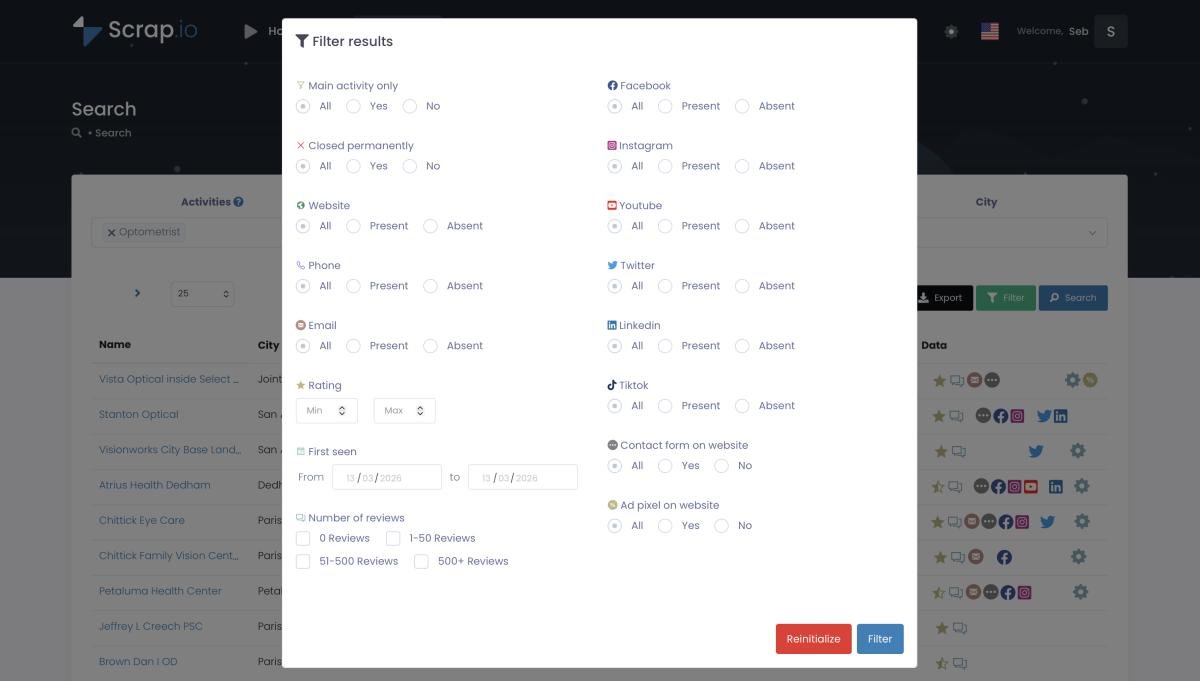
She opens Scrap.io, picks the category ("coworking space"), picks the location (a city, a state, or the entire US), and applies filters before she spends a single credit. Only listings with a website. Only ones with a rating above 4. Then she exports to CSV and imports straight into her directory platform. Done.
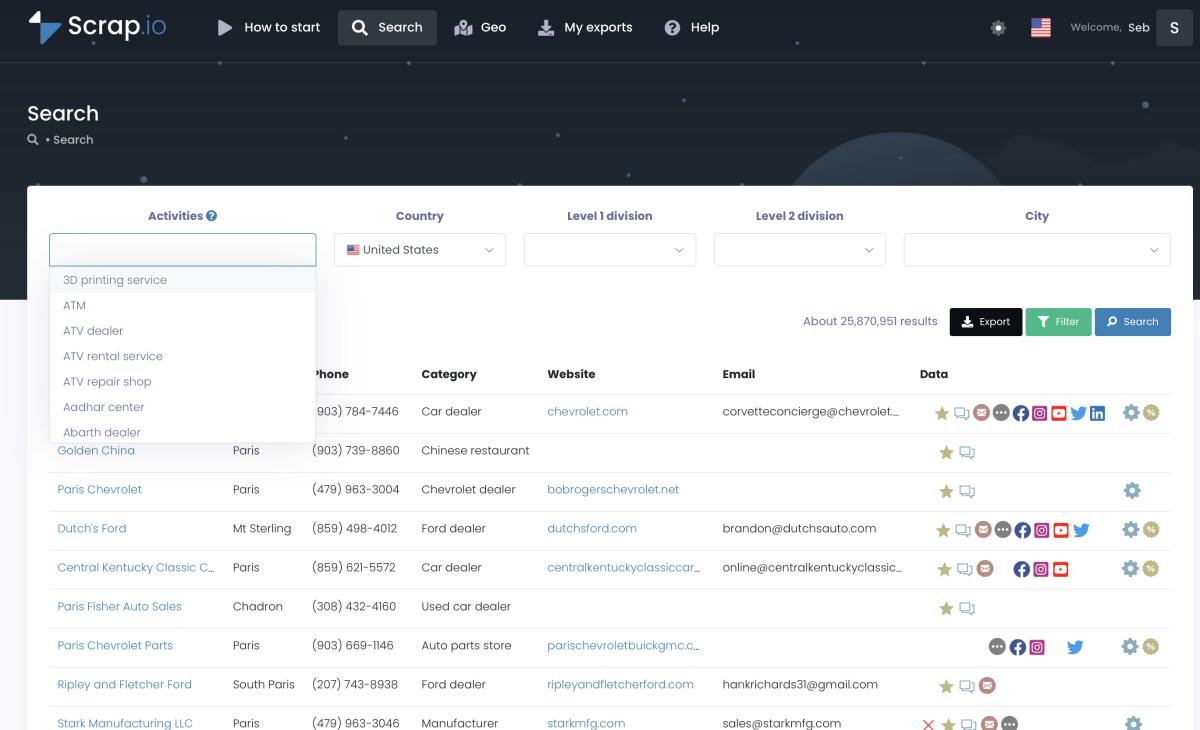
Why does the filter-before-you-pay part matter so much? Because you only populate your directory with listings worth having. No point importing 5,000 businesses when half have no website and no email. You filter for the useful ones first, and credits only get spent on the ones you keep. Zero waste. That's the whole design.
Video: How to Scrape Google Maps - Ultimate Guide
And the scale is genuinely absurd. Scrap.io indexes 225,676,406 establishments across 195 countries and 4,000+ categories (Scrap.io, 2026). One real customer pulled 11,734 businesses in 45 minutes (Scrap.io, 2026). That's not "a head start" for your directory. That's a fully populated launch, in the time it takes to watch a movie.
What if your niche is hyper-local, or spans a weird shape? Scrap.io's GeoSearch handles both. Draw a radius around a point for a "coworking near downtown" directory, or draw a custom polygon for an area that doesn't match any city boundary. Then pull every business inside it.

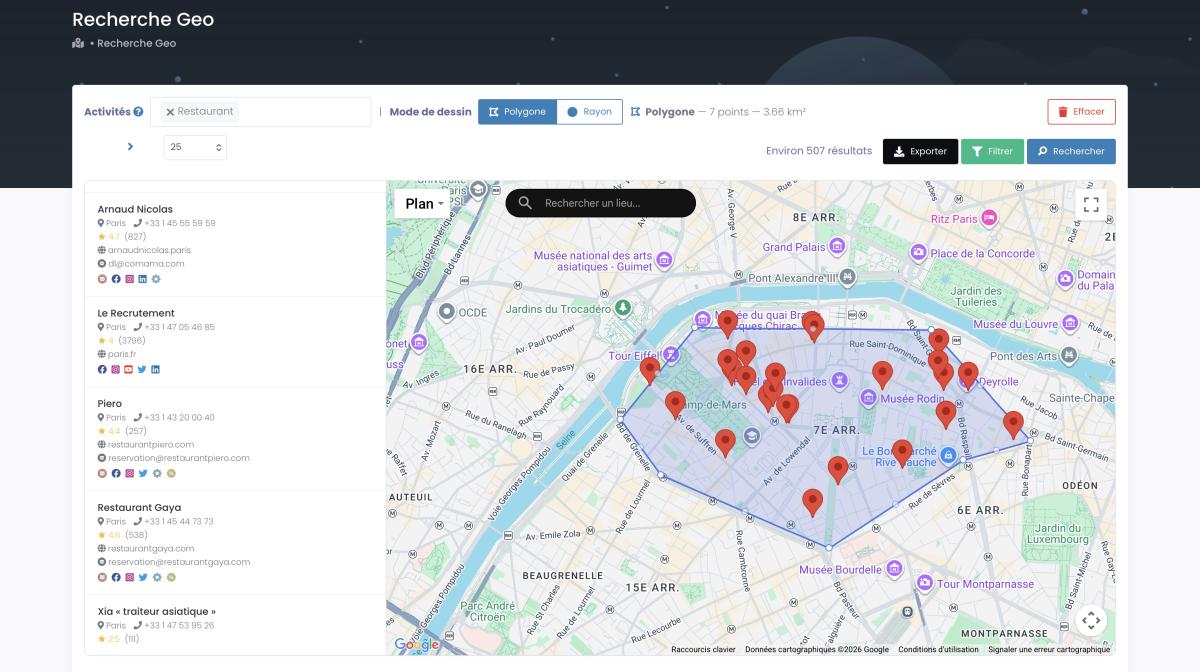
Want to go wider than one area? Here's the full method for how to extract every business in an area, city, county, state, or country, in a couple of clicks.
Try it yourself: your first 100 listings are free for 7 days, no scraper to build and no code to write. Pick your niche, filter for the listings worth having, and export them straight into your directory. Start your free trial.
Keeping Your Directory Fresh
What happens when 20% of those businesses move, close, or change their number next year? Your beautiful directory quietly turns into a graveyard of dead links and disconnected phones. And a directory full of wrong information is worse than no directory at all, because it burns the trust you spent months building.
This is the angle nobody talks about. Populating a directory is a one-time event. Maintaining one is forever. The fix is re-extraction: because Scrap.io pulls data live from Google Maps at the moment of each export, you re-run your search periodically and refresh hours, numbers, and business status against reality. No frozen database rotting in the background.
While you're at it, enrich. A listing with an email is worth more than one without, both to you and to whoever's paying to be featured. Here's how to find emails to enrich your listings during the same extraction. Bref, fresh plus enriched is what separates a directory people rely on from one they abandon.
Is It Legal? Data and Compliance (GDPR/CCPA)
Let's address the scary question head-on: is any of this actually legal?
Short answer, for public business data: yes. Extracting publicly available business information, company names, addresses, phone numbers, websites, has been repeatedly backed by US courts, and it's the exact kind of data that fills a directory. What matters is that you stick to public business info and respect the privacy rules that govern what you do with personal data afterward.
Two frameworks to know. In Europe, GDPR treats a generic business email like [email protected] differently from a named individual's address, and B2B processing usually falls under legitimate interest, as long as you offer an opt-out. In California, the CCPA largely carves out publicly available business information. Scrap.io only extracts public business data, is GDPR and CCPA compliant, and every data point is traceable to its source.
Remember David from the Toolset comment? His problem wasn't scraping. It was doing it carelessly and storing the wrong things. Stick to public business fields, honor opt-outs, and document your basis. That's the difference between a compliant directory and a headache. For the full breakdown, here's whether it's legal to scrape Google Maps. (This is factual info, not legal advice. If real money's on the line, talk to an actual lawyer.)
How Directory Websites Make Money (7 Models)
The best way to learn what works is to reverse-engineer directories that already print money. Most of them stack two or three of these seven models:
- Featured / premium listings. Businesses pay to sit at the top or get a highlighted card. In coworking, a premium listing runs $50 to $150 a month (HivePress, 2026).
- Subscriptions. Recurring fee for businesses to stay listed or unlock a full profile. The backbone of most niche directory revenue.
- Display ads. Banner or sidebar ad slots, sold directly or through an ad network.
- Affiliate commissions. Link out to tools or services and earn on referrals.
- Lead generation. Charge businesses for the contacts or enquiries the directory sends them.
- Sponsored content. Paid "spotlight" articles or category takeovers.
- Booking commissions. Take a cut when a visitor books through the directory.
The membership-directory model scales further than people expect. Brilliant Directories, one platform in this space, reports powering over 10,000 organizations and 100,000+ members (WildApricot, January 2026). These aren't hobby projects. They're real businesses built on a listing database.
And here's the quiet advantage: the same Google Maps data that fills your directory can also feed your sales pipeline. You know exactly which listed businesses have no website, weak reviews, or missing info, which makes them perfect upsell targets. There's a whole set of ways to make money with Google Maps data that pair beautifully with running a directory.
50,000+ professionals already use Scrap.io to source local business data, rated 4.8 on Capterra and 4.9 on G2. The same data that populates your directory becomes the leads you monetize. See why they switched.
Directory Website Examples Worth Studying
Theory's fine. Real examples are better. Here are directory website examples worth pulling apart:
G2 and Capterra. The gold standard of monetized B2B directories. Software vendors pay real money for enriched profiles and placement on g2.com and capterra.com. If you want to see the subscription-plus-lead-gen model at full scale, start here.
Greg Isenberg's "cash-flowing online directory." He built and monetized one on camera in under an hour (YouTube). Worth watching for the speed of the build and the monetization thinking, not necessarily the data method.
The Running Directory by Connor Finlayson. A local running directory built in about 48 hours with Webflow and Airtable (connorfinlayson.com). Beautiful, fast, genuinely impressive. But here's the tell, and it's our whole point: it was populated by hand, listing by listing. Fast to build, slow to fill. Imagine that same build with 3,000 listings pulled from Google Maps in an afternoon instead.
AgenturScout. A directory of Swiss marketing agencies, a tidy example of the niche-plus-region formula that keeps working.
Directorist and eDirectory case studies. Both showcase profitable 2026 niches, glamping, micro-weddings, coworking, and how few listings it actually takes to hit meaningful monthly revenue.
The pattern across all of them? Great shell, and either great data or a painful manual grind to get it. Nail the shell with any platform. Win with the data.
Conclusion
A directory is five decisions, and four of them are easy. Niche, platform, template, monetization: solved problems with a dozen good tutorials each. The one that decides whether your directory lives or dies is the data. Where the listings come from, and whether they stay accurate.
Look, the manual route kills most directories before launch. Buying stale data leaves you rebuilding every few months. Pulling fresh, public business data from Google Maps, filtered, enriched, and re-extractable, is the move nobody else in your niche is making.
So make it.
Stop staring at an empty directory. Pull your first thousand listings today, filter for the ones worth having, and launch a directory that actually looks alive. Free trial: 7 days and 100 leads. Start now.
FAQ
What is a directory website?
A directory website is an organized, searchable collection of listings, businesses, services, people, or products, grouped by category and location. Think Yelp, G2, or TripAdvisor. Owners monetize through paid placements, subscriptions, ads, or leads.
How do directory websites make money?
A mix of models: featured or premium listings, subscriptions, display ads, affiliate commissions, and lead generation. Most successful directories combine two or three rather than relying on a single stream.
How do I fill a new directory website with listings?
The fastest scalable way is to extract public business data from Google Maps, name, address, phone, hours, reviews, with a no-code tool like Scrap.io, filter it for the listings worth keeping, then bulk-import the CSV into your directory platform.
What are the four main types of directories?
Local or business directories, niche or industry directories, member or association directories, and general web directories. The mechanics are the same across all four; only the audience and monetization change.
Is it legal to build a directory from Google Maps data?
Using public business data is generally acceptable, but you must respect GDPR (EU) and CCPA (California). Scrap.io only extracts publicly available business information and is GDPR and CCPA compliant, with every data point traceable to its source. Always offer an opt-out when contacting listed businesses.
Generate a list of restaurant with Scrap.io