

Here's a number that should annoy every web designer reading this. Right now, on Google Maps, there are 31,473 plumbing businesses in the United States with no website. Not a bad website. Not an outdated one. None at all. (We pulled that figure live from our own index this month, so it's current, not recycled from some 2019 blog post.)
And plumbers are just one category.
Most agencies burn their week fighting over the same clients everyone else is chasing on LinkedIn and Upwork. Meanwhile a whole layer of the local economy sits in plain sight, already waving a flag that says "I need what you sell." A business with no website doesn't need convincing. The gap is the pitch. So the real skill isn't persuasion, it's finding these businesses without websites fast, and knowing which ones are actually worth an email.
This is the 2026 playbook. Where they hide, which industries are worst, the exact filters that turn a raw list into qualified leads, and copy-paste outreach scripts you can steal today. Real data. Named tools. Let's go.
Video: Finding Clients Through Google Maps Filters
- Why so many businesses still have no website in 2026
- What types of businesses usually don't have a website?
- How to find businesses without websites: 5 methods
- Step-by-step: build a no-website lead list with Scrap.io
- Don't stop at "no website": the filters that qualify a lead
- Outreach scripts that turn no-website leads into clients
- Is it legal? GDPR, CCPA & cold outreach in 2026
- "Find businesses without websites for free": what it really costs
- FAQ
Why so many businesses still have no website in 2026
In 2026, about one in four US small businesses still has no website. Roughly 27% of them, to be exact, which means 73% are online and a stubborn quarter are not (Zippia, 2026). That's not a rounding error. That's millions of small businesses without websites you can reach.
The trend line matters too. That 27% is down from 36% in 2020 (Wix, 2026). So yes, the pool is shrinking. But slowly, and it's still enormous, and the businesses left in it are often the exact profile an agency wants: established, cash-flowing, and behind on their digital presence.
So why do they skip the website? A few honest reasons, and most of them aren't laziness. Word of mouth still works for a lot of trades, and the phone still rings. Some owners lean entirely on a Facebook page or an Instagram grid and call it done. And a big chunk, around 35% of the ones with no site, simply think they're "too small" to need one (Wix, 2026). They're wrong about that, obviously. That's your opening.
You hear the same logic straight from owners. In one web-design Facebook group, a member put it bluntly: "a lot of businesses either don't need it to drive sales… To them a website is less personal. Sometimes a business is too essential to really need the investment, like a mechanic or a plumber." (Facebook web group). Read that again, because it's the objection you'll have to beat: they don't think they need you. Your job is to show them the walk-ins they're quietly losing.
There's a market angle here that the "just get online" crowd misses. Whole categories of new small businesses launch every year, from home services to wellness studios (Wolters Kluwer, 2026), and a new owner rarely builds a website on day one. They open, they get on Google Maps because Google basically forces the listing into existence, and the website waits. Sometimes for years. That waiting period is the window.
Bref, the "why" is simple: the businesses that need you most are often the ones least aware they need anything. Which is exactly why you go find them instead of waiting.
What types of businesses usually don't have a website?
It's not the ones you'd guess.
People assume the no-website crowd is all corner shops and grandma's craft stall. Nope. The heaviest concentrations sit in home services and skilled trades, the exact businesses pulling in real revenue off referrals alone. Here's the short list of the usual suspects: plumbers, electricians, HVAC techs, general contractors and construction, landscaping, cleaning services, auto repair, hair and beauty salons, barbershops, childcare, pet services, restaurants and food trucks, and small local professional services.
Now the part nobody else in this niche will give you: real numbers, pulled live from our index this month.
| Industry (US) | On Google Maps | With no website | Share with no site |
|---|---|---|---|
| Plumbers | 76,368 | 31,473 | ~41% |
| Restaurants | 670,598 | 223,663 | ~33% |
| Hair salons | 224,775 | 84,700 | ~38% |
Source: Scrap.io index, September 2026. Counting is free, so these are re-runnable any time.
Look at that plumber number again. 41% of US plumbing businesses on the map have no website. Four out of ten. For an agency, that's not a niche, that's a decade of pipeline in a single trade. Restaurants hand you 223,663 no-site targets, hair salons another 84,700. This is why "list of businesses without websites" and "businesses without websites in usa" are searches people run every single day. The list exists. It's just sitting inside Google Maps waiting for someone to pull it.
And no, it isn't only tiny shops. A handful of big companies without website still exist too, usually B2B outfits that live off contracts and never saw the point. But the bulk of any list of companies that don't have a website is hyper-local: the plumber down the road, the salon two blocks over. Search "local businesses near me without websites" or "small businesses near me without websites" and that's exactly who surfaces.
How to find businesses without websites: 5 methods
So where are these businesses hiding? Mostly on Google Maps, honestly. That's the mother lode. Here are the five ways to get them out, worst to best.
1. Manual Google Maps hunting (free, slow, painful)
Open Maps, search "plumber Dallas," click a listing, check for a website link, note the ones with none, repeat. This is how to find businesses without websites on google maps the hard way. It works for ten prospects. It does not work for five hundred. You'll cap out around 40 checks an hour, and Google only shows you roughly 120 results per search anyway. Fine for a first taste. A terrible system. This is also the only real way to hunt "businesses without websites near me" by hand, one pin at a time, which is exactly why nobody does it past their first client.
2. A free Chrome extension
Extensions like Scrap.io's free "Emails and Social Networks for Google Maps" show contact data right on the map as you browse. Handy for grabbing a handful of prospects on the fly. But it's still page-by-page, it hits the same 120-result wall, and there's no bulk filtering. A tool, not a pipeline.
3. Purpose-built lead tools
A cluster of tools do exactly one thing: surface no-website businesses for agencies. Grape Leads scans Google Maps for businesses that need websites and hands you actionable lists. B2B Lead Finder (rated 4.9/5) scores each lead and flags the no-site ones. Webless Leads and Leadodo play in the same lane. They're fine, genuinely. The catch is they're mostly capped to a city per scan and thin on filtering. Great for a quick batch, limiting once you want scale. (Outscraper publishes a decent guide on the topic too, if you want a second read.)
And the demand for this is loud, by the way. On Reddit's r/webdesign, one commenter summed up why a tool beats manual work: "It gives you a clean list of 'No-Website' leads with their phone numbers and ratings." Over on r/LeadGeneration, "how to build a list of businesses without websites" is a recurring thread, and "businesses without websites reddit" is a search in its own right. People want this list. Most just don't know it's a two-click export.
4. A full Google Maps scraper
This is where it gets serious. A proper Google Maps scraper doesn't crawl the search box at all, so the 120-result cap vanishes. You pick a category, pick a location (city, state, or the whole country), toggle "no website," and export a clean CSV with phones, ratings, and emails already attached. One real user pulled 11,734 businesses in 45 minutes. Try that by hand. I'll wait.
5. AI + MCP
The 2026 addition. You tell an AI agent "find every roofer in Texas without a website" in plain English, and it builds the search, the location zones, and the filters for you. Scrap.io ships an official MCP connector for Claude, ChatGPT, and Gemini, so this is genuinely how a lot of people now find companies that need websites without touching a dropdown. Wild that this is normal already.

See the pattern? Methods 1 and 2 top out fast. Method 3 is fine for a city. Methods 4 and 5 are the only ones that take you from "a few leads" to "an entire state" without breaking a sweat. Choose based on how many clients you actually want.
Step-by-step: build a no-website lead list with Scrap.io
Take Mike, a freelance web designer in Ohio who's tired of Fiverr races to the bottom. He wants 300 local businesses without websites, with a phone number, that he can call this week. Here's the exact four-step flow he'd run. It takes about three minutes.
Step 1: Search a category and a location. Type "plumber" (there are 4,000+ categories mirroring Google Maps) and pick your geography. A single city, a county, a whole state, or the entire US if you're on the right plan. The counter tells you how many match before you spend a thing.
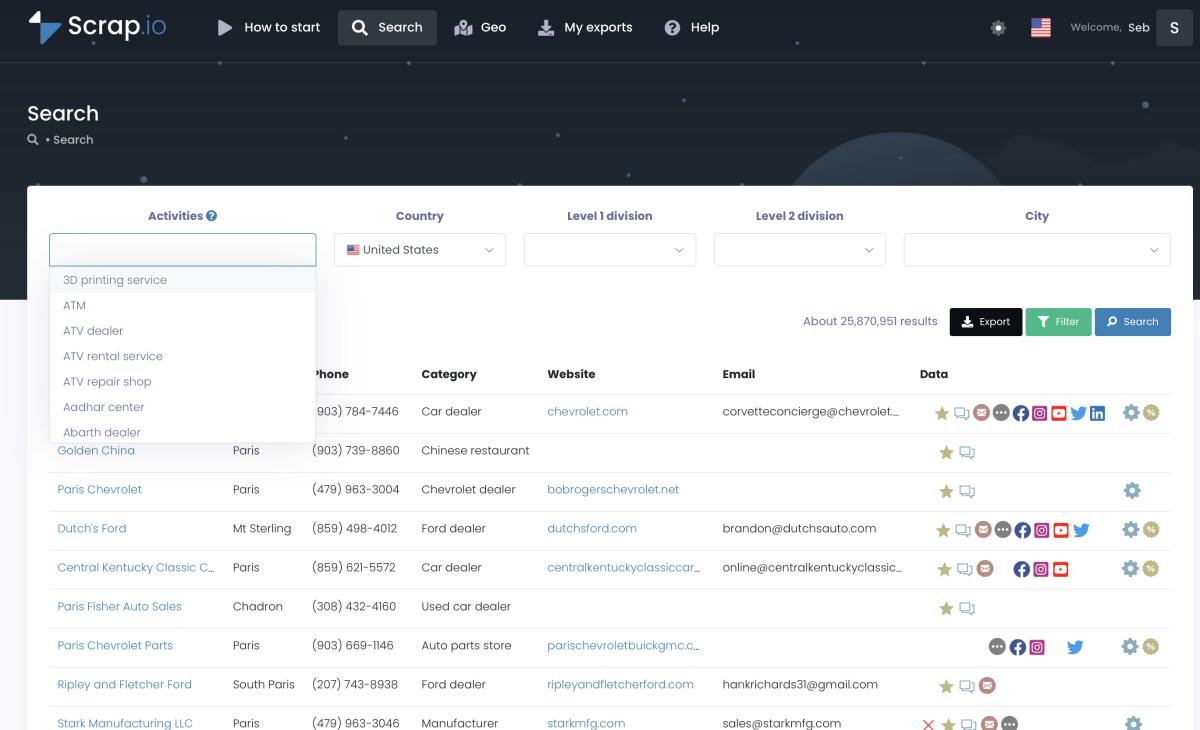
Step 2: Filter Website to "none." This is the whole game. One toggle and your list collapses to businesses without websites only. And here's the money part: the filter runs before a single credit is spent. You're never paying to export a company that already has a site and then deleting it. Zero waste.
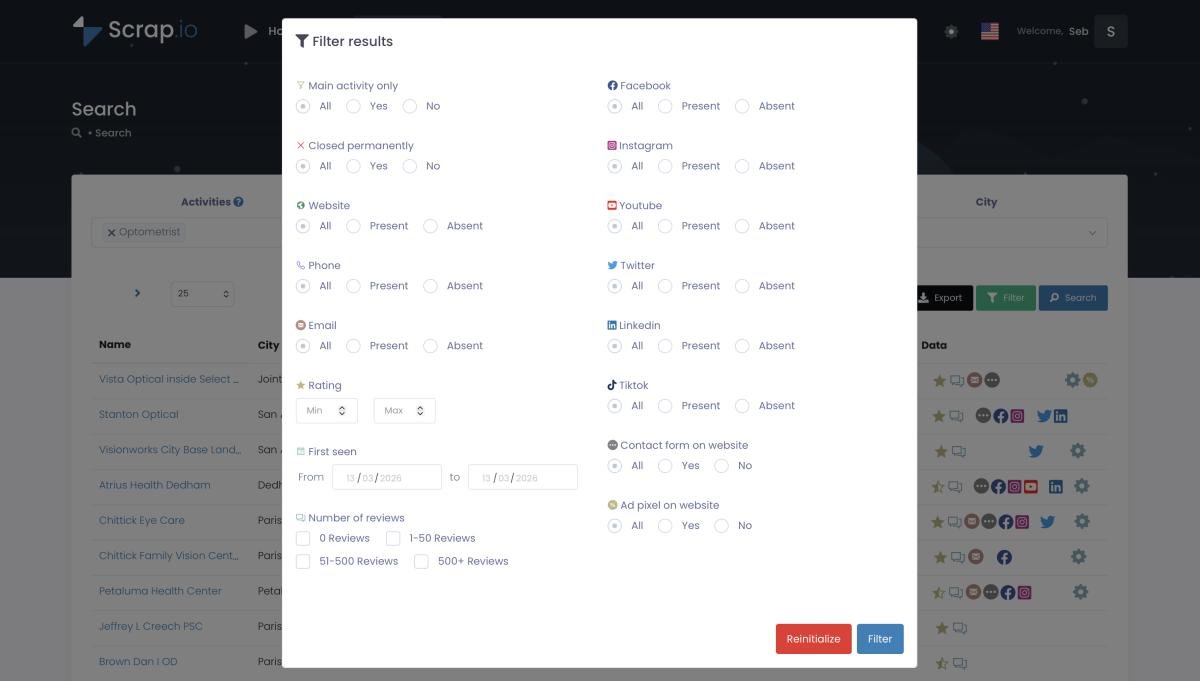
Step 3: Stack a couple more filters. Add "has phone" so every lead is callable. Maybe a minimum rating, or a review floor, so you're not chasing ghosts. (More on qualifying in the next section, it matters more than people think.)
Step 4: Export. CSV or Excel. Name, address, phone, rating, review count, social profiles, and any email found on record. Done. That's a targeted list of Google Maps leads at scale that would've taken Mike a week of manual clicking, built before his coffee cooled.
One credit equals one exported business, and re-exporting the same record inside 30 days is free. So a filtered list of 300 no-site plumbers costs Mike 300 credits, and not a single credit went to a company that already has a website. That's the difference between a scraper and a data dump.
Don't stop at "no website": the filters that qualify a lead
A business with no website isn't automatically a good lead.
This trips up beginners constantly. They pull 500 no-site businesses, blast all of them, and wonder why the reply rate is garbage. The problem? Half those listings are barely alive. One review from 2019, a phone that rings into the void, an owner who checks Google never. "No website" is a starting signal, not a finished lead. You need to layer signals on top, which is the core idea behind signal-based prospecting.
Here's the qualifying stack I'd actually use for a US no-site list:
- No website (obviously): the base gap you're solving.
- Has a phone number: reachable today, not a dead listing.
- Rating around 4+: a business people already like, so it has budget and cares about reputation.
- Recent reviews: proof it's open and active, not a zombie pin. A "business without website and low reviews" can still be worth a look if it just opened, but pair it with a recent first-seen date so you know it's new, not dying.
Run that stack and 500 noisy names become maybe 180 businesses that are open, liked, reachable, and missing the one thing you sell. That's a list that converts. One honest note for US and Canada users: Scrap.io's mobile-vs-landline phone filter isn't available there (carrier data limitation), so lean on "has phone," rating, reviews, and first-seen date instead. Everywhere else, you can filter for mobile numbers too. All of this is standard practice when you filter Google Maps data properly.
And a bonus play worth stealing: filter by first-seen date to catch businesses that just opened. New owners need everything, and they need it now.
Video: Find Businesses That JUST Opened (Before Your Competitors Do)
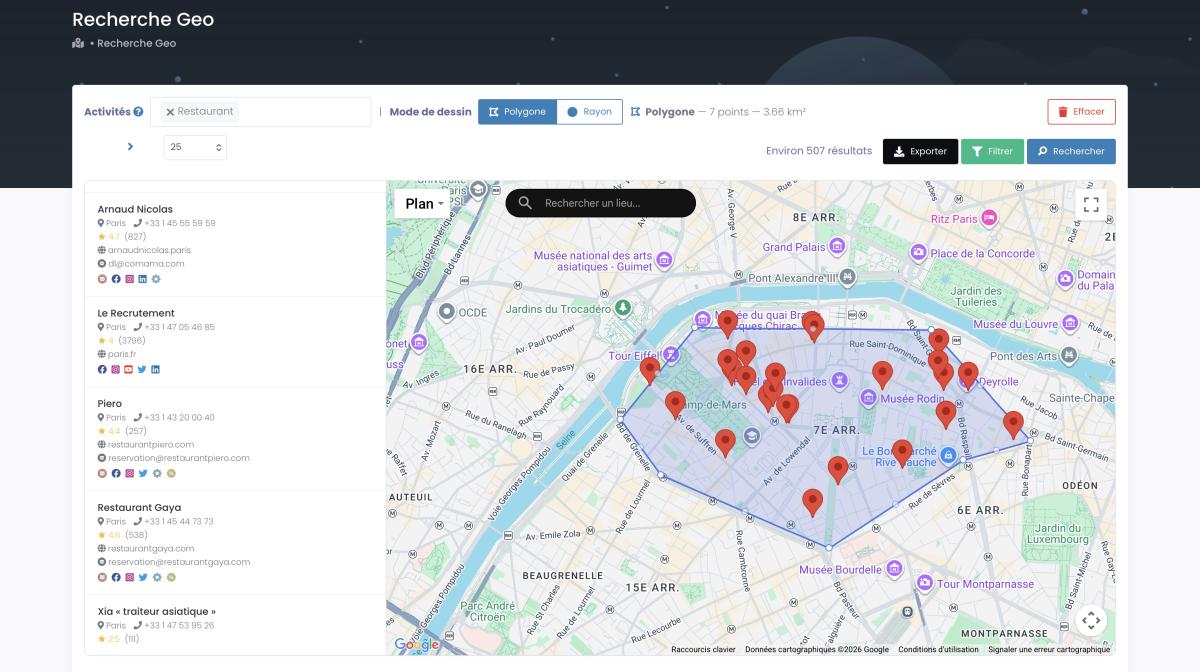
Need to target a specific neighborhood instead of a whole city? Draw a polygon straight on the map with GeoSearch, and every filter still applies inside it. Surgical.
Outreach scripts that turn no-website leads into clients
You found 500 businesses with no website. Now the hard part: getting them to reply.
Cold outreach to offline businesses lives or dies on one thing. Specificity. "Dear business owner" gets deleted. "Hey Mike, saw your shop has 4.7 stars and 80 reviews but no website" gets a reply, because it proves you actually looked. Below are three copy-paste starters, one per channel. Tune them, don't send them raw.
Subject: quick one about [Business Name]
Hi [First Name], I was looking up [category] in [City] and noticed [Business Name] has a strong Google rating but no website yet. Right now anyone who searches you and wants to book ends up on a competitor's site instead. I build simple, fast sites for local [category] businesses, and I could have a first draft of yours live in about a week. Worth a 10-minute call this week? Reply "yes" and I'll send times.
Short. Problem first. One question at the end. That's the whole formula, and there's a lot more where that came from in our guide on how to write a cold email that actually gets answered. To personalize at scale you need the contact, so pull it first: here's how to find their email address straight from the listing.
Phone call
"Hi, is this [First Name]? Great. I'll be quick, I'm not selling you anything today. I found [Business Name] on Google, you've got a really solid reputation, but I noticed you don't have a website. A lot of your customers are probably searching for you and landing on the competition. I help local [category] shops fix that. Can I text you a couple of examples?"
Notice: no pitch, no price, just a permission ask. You're earning the next step, not closing on the first call.
SMS
Hi [First Name], I found [Business Name] on Google Maps, great reviews. Noticed there's no website though. I build them for local [category] businesses and would love to show you a quick example. OK if I send one over?
Keep SMS to two sentences and always give an easy out. And whatever the channel, follow up. Most people send one message, hear nothing, and quit. The reply usually comes on touch three or four.
Is it legal? GDPR, CCPA & cold outreach in 2026
Is any of this actually allowed? Yes, with a few rules.
The data itself is publicly available business information: names, addresses, phones, listings people put on Google Maps on purpose. Scraping that for legitimate B2B prospecting sits on solid legal ground. In the US, court rulings from hiQ v. LinkedIn onward have held that collecting publicly accessible data doesn't violate the Computer Fraud and Abuse Act. No login gets bypassed, no wall gets climbed.
The nuance is in how you reach out. Under GDPR in Europe, a company's generic business contact usually falls under "legitimate interest" for B2B outreach, though a named individual's personal email triggers stricter handling. Under CCPA in California, publicly available business information is carved out of scope entirely. In both cases the rule is the same: every message needs a clear opt-out, and you honor removal requests immediately. In the US, CAN-SPAM also wants a real physical address and an honest subject line on emails. That's the floor.
Two things to keep straight. Google's Terms of Service do say no scraping, but a ToS is a private contract, not a criminal law. Worst realistic case is a temporary IP block, not a courtroom. And there's a canyon between extracting business contacts for outreach and scraping personal data to train a model. You're doing the first. Scrap.io only processes publicly available business data, stays GDPR and CCPA compliant, and keeps every record traceable to its source. (This is factual info, not legal advice. If real money's on the line, ask a lawyer.)
"Find businesses without websites for free": what it really costs
Free tools cost you the one thing you can't buy back: time.
Yes, you can find businesses without websites for free, and "how to find businesses without websites for free" is one of the most-searched versions of this whole topic. Manual Google Maps hunting is free. A Chrome extension is free. And for your first ten leads, honestly, go for it, no reason to pay to test the idea. The math only flips when you scale.
Do the arithmetic. Manual checking runs about 40 listings an hour, and maybe a third of those have no site, so call it 13 qualified no-site leads an hour. Need 500? That's roughly 38 hours of clicking. Almost a full work week, staring at pins, copying phone numbers, fighting the 120-result cap the whole way. Your time isn't free. If an hour of your work is worth $40, that "free" list just cost you $1,500 in labor.
A filtered export of the same 500 leads takes a few minutes and a fraction of the credits. This is the honest version of the "for free" question, and it's the same logic that runs through all of local business lead generation: the cheap option is rarely the low-cost one. Free tools are perfect for tasting. They're a tax on your calendar the moment you get serious. For a genuinely free-forever piece, the Scrap.io Chrome extension shows emails on Maps with no limit, and the 7-day trial hands you 100 export credits to see the full workflow before spending a cent.
FAQ
What percentage of businesses don't have a website?
About 27% of US small businesses have no website in 2026, down from 36% in 2020 (Wix / Zippia, 2026). By industry it runs much higher: pulled live from Scrap.io in September 2026, roughly 41% of US plumbing businesses on Google Maps have no website. So the average is one in four, but in the trades it's closer to four in ten.
What types of businesses usually don't have websites?
Mostly home services and local trades: plumbers, electricians, HVAC, contractors and construction, landscaping, cleaning services, auto repair, hair and beauty salons, barbershops, childcare, pet services, and many restaurants and food trucks. These businesses often run on word of mouth and referrals, so a website never felt urgent, which is exactly what makes them prime web-design prospects.
How can I find businesses without websites?
Four ways. Search Google Maps manually and check each listing (free, slow). Use a Chrome extension for on-the-fly grabs. Use a scraper like Scrap.io to filter Website to "none" and export a whole city or state at once. Or ask an AI agent via an MCP connector to build the list for you. The scraper route is the only one that scales past a few hundred leads.
How do I find businesses without websites for free?
Manual Google Maps searching costs nothing but your time, and a free Chrome extension speeds it up a little. Both cap out around 120 results per search and get slow fast. For real volume without the manual grind, Scrap.io's free 7-day trial includes 100 export credits, and counting matching businesses is always free, so you can size your market before spending anything.
Why would a business not have a website?
Usually because word of mouth and social media already bring in enough work, so it never felt necessary. Around 35% of no-site owners say they think they're "too small" to need one (Wix, 2026), and others point to perceived cost or just never getting around to it. New businesses in particular often open, land on Google Maps automatically, and put the website off, sometimes for years.
Go pull your first list
The opportunity is almost unfair when you look at it plainly. Millions of businesses without websites, real ones, profitable ones, sitting on Google Maps with a phone number and a good rating and no site for a competitor to steal. The agencies winning in 2026 aren't the ones with the biggest ad budget. They're the ones who filter smart, reach out with specifics, and follow up. Learn to find businesses that need websites at scale and you never run out of pipeline again.
You've got the data, the filters, and the scripts. Now go get the list.
Generate a list of restaurant with Scrap.io