


Video: Using the Google Maps API and Google Reviews
- Can You Actually Remove a Google Review?
- How to Delete a Google Review You Wrote
- How to Remove a Bad Review From Your Business: The Owner's Playbook
- What Actually Gets a Google Review Removed: The Policy Violations
- When Flagging Fails: Escalation and Legal Options in the US
- Should You Pay a Review Removal Service?
- Bury Bad Reviews With Good Ones
- For Agencies: Turn Review Problems Into a Prospecting Goldmine
- FAQ
Here's a number that should ruin your morning. One 1-star review costs the average local business around 30 customers. Thirty. Gone before they ever pick up the phone. So you start searching how to remove Google reviews, and you hit a wall fast: that delete button you're frantically hunting for doesn't exist. Not for you, anyway.
Picture a restaurant owner. Friday night, slammed kitchen, one table has a rough time, and by Saturday morning there's a fresh 1-star sitting on top of the Google profile like a coffee stain on a white shirt. First instinct: make it vanish. Completely understandable. Also, mostly impossible.
So let's get honest about how to remove Google reviews in 2026. Two completely different situations hide under that one search, and mixing them up wastes hours. This guide splits them apart, then walks the real process: the flagging, the tool nobody mentions, the appeal, and the legal stuff for when Google just shrugs.
Can You Actually Remove a Google Review?
Let's kill a myth right now. As a business owner, you cannot delete a customer's review. Not one. Ever. But you are not powerless either, and that distinction is the whole point of this article.
Can you remove a Google review? If you wrote it, yes, you can delete it yourself in about 30 seconds. If someone else wrote it, no. You can only flag it and ask Google to take it down, and Google only removes reviews that break its content policies, not ones you happen to dislike. That's the honest answer most guides dance around.
So when people ask "can I remove a Google review that a customer left me," the real reply is uncomfortable. You can't personally delete it. You can report it, and you can outrank it. Both work. Neither is a magic button.
You're not alone in the panic, either. Scroll through the recurring threads on Reddit and you'll see the exact same question on a loop: r/GoogleMyBusiness has a whole discussion titled "How can I delete negative Google reviews safely?", and over on r/smallbusiness, owners keep asking "How to remove negative Google review". Notice the word "safely" in the first one. People sense there's a wrong way to do this. There is. We'll get to it.
Reviews You Can Delete vs. Reviews You Can Only Flag
Here's the thing. There are two publics reading this page, and they need opposite instructions.
If you're a customer who fired off an angry review and now regrets it (or fixed the issue with the business), you own that review. Delete it, edit it, change the stars, swap the photos. Total control.
If you're the business owner staring at that same review, you own nothing about it except the right to reply and the right to report. In theory that feels unfair. In practice, it's what keeps Google reviews worth reading at all. Nobody trusts a platform where owners scrub whatever stings.
And no, before you ask: you can't delete someone else's review, and you can't quietly get a friend's account to nuke it. Google ties every review to a real account, and "how to remove Google reviews posted by others" always routes back to the same two options. Flag it, or bury it.
How to Delete a Google Review You Wrote
Wait. Are you here to remove a review you posted? Different game entirely. This one actually is a 30-second job, so let's knock it out before the hard part.
On Desktop
Sitting at a computer? Do this:
- Sign in to Google Maps with the account you used to post.
- Click the Menu icon at the top left.
- Click Your contributions, then Reviews.
- Find the review, click the three-dot More icon next to it.
- Select Delete review (or Edit review if you'd rather soften it than nuke it) and confirm.
Done. It's gone the moment you confirm, no waiting, no approval queue.
On Your Phone (iPhone, Android, Samsung)
Most people do this from their phone anyway. On iPhone, Android, or a Samsung, the flow is nearly identical. Open the Google Maps app, tap your profile picture at the top right, tap Reviews (or "Your contributions"), find the review, tap the three dots, and choose Delete. That's how to delete Google reviews on your phone in under a minute. Same result as desktop.
No Delete Button? Here's Why
Sometimes the delete option just isn't there. Usually it's one of two things. Either you're logged into the wrong Google account (people juggle three of them and forget), or the review posted from a different profile than the one you're viewing. Check the account first. Nine times out of ten, that's the culprit. If it genuinely won't budge, Google's own help flow can walk you through it, but the account mix-up is almost always the answer.
How to Remove a Bad Review From Your Business: The Owner's Playbook
Now the part you actually came for. And the step 90% of guides skip: flagging is step one, not the whole game. Most articles stop at "click the three dots" and leave you hanging when Google ignores the report. We won't.
Flag It From Your Business Profile
First move, always. To report a Google review that violates policy:
- Go to your Business Profile and select Read reviews.
- Next to the offending review, click the Report icon (the little flag).
- Pick the reason, like "Spam" or "Off topic" or "Profanity."
- Hit Send report.
That's the front door for how to remove a bad review on Google. You can read the full official process on Google's help page for reporting reviews. But flagging one review and hoping is amateur hour. There's a better tool.
The Review Management Tool (The Part Nobody Mentions)
Here's the tool almost no competing article names: the Reviews Management Tool. It's a dedicated dashboard where you can report reviews for removal and, crucially, track their status afterward. This is also the honest answer to "how to remove bad reviews from Google My Business," since Google My Business is now Google Business Profile and this is where review management actually lives.
Why does it matter? Because flagging from the public map gives you zero feedback. The Review Management Tool tells you exactly where your request stands. While you're in there, it's worth making sure the rest of your listing is airtight too, so optimize your Google Business Profile while you have the dashboard open.
Check Status and Appeal
After you report, the tool shows one of three statuses. Decision pending means Google hasn't looked yet. Report reviewed, no policy violation means they looked and said no. Escalated means it's moving up the chain. And here's the move most owners miss: if you get a "no violation" verdict, you can file a one-time appeal directly in the tool. One shot per review, so make it count. Explain precisely which policy it breaks. Don't just say "it's unfair."
Realistic Timelines (Set Your Expectations)
Bottom line on speed: Google usually responds within a few days, but full removal can stretch from 48 hours to several weeks depending on the case and whether you appeal. Anyone promising instant removal is selling something. This is a slow-moving system. Patience is part of the job.
Managing reviews across several locations? Refreshing each profile by hand eats your week. A tool that pulls ratings and review counts across every listing in real time saves hours, and it's how the sharpest agencies keep score. See our rundown of review monitoring and reputation management tools, or extract the raw data yourself and try Scrap.io free for 7 days (100 leads included).
Video: How to List Your Business on Google Maps
What Actually Gets a Google Review Removed: The Policy Violations
Google removed or blocked 292 million policy-violating reviews in a single year (Google Trust and Safety, 2025). So the real question was never "can I remove it." It's "does mine actually break a rule?" Because if it doesn't, no amount of flagging will work.
Here are the categories Google will actually act on. Match your review to one of these before you waste an appeal:
| Violation | What It Looks Like | Removable? |
|---|---|---|
| Spam / fake | A review from someone who was never a customer, or duplicate posts | 🟢 Yes |
| Conflict of interest | A competitor, ex-employee, or you reviewing your own business | 🟢 Yes |
| Off-topic | A rant about politics or a delivery app, not your actual business | 🟢 Yes |
| Restricted or illegal content | Regulated goods, sexually explicit or dangerous content | 🟢 Yes |
| Harassment / hate | Personal attacks, slurs, threats against staff | 🟢 Yes |
| Impersonation | A reviewer pretending to be someone they're not | 🟢 Yes |
| "The service was slow and I'm annoyed" | A genuine, negative, honest opinion | 🔴 No |
See the pattern? Google's line is content, not sentiment. A vicious 1-star that's technically truthful stays up. A glowing 5-star from a fake account comes down. This isn't new, either. Back in 2023, Google removed 170 million fake reviews and blocked 12 million fake business profiles. The machine is big, and it does not care about your feelings. It cares about rules.
When Flagging Fails: Escalation and Legal Options in the US
You flagged it. Google said "no policy violation found." Now what? This is where most owners give up. Don't. There are a few rungs left on the ladder.
Google Business Profile Support and the Forum
If the automated review is wrong (and it sometimes is), escalate to a human. Google Business Profile support can take a second look, and the community forum is full of Product Experts who've seen your exact situation a hundred times. Not glamorous. Occasionally effective. It's worth a shot before anything drastic.
Defamation: Cease-and-Desist, Court Orders, and Lawyers
Here's the legal reality, and it cuts both ways. Can you get sued for a Google review? An honest opinion is protected speech, full stop. But a review containing a knowingly false statement of fact ("they stole my deposit" when they didn't) can cross into defamation. That opens real options: a cease-and-desist letter, a court order compelling removal, or a defamation attorney. Google will remove content when presented with a valid court order. This is the serious end of "how to remove unwanted illegal Google reviews," and it costs real money, so weigh it carefully.
A Serious Warning About the FTC
Before you get creative, read this. The FTC's Consumer Review Rule (finalized October 2024) changed the game in the US. It bans buying or selling fake reviews, and it also bans review suppression through groundless legal threats. Translation: strong-arming a reviewer with a bogus lawsuit is now its own violation. The penalties are brutal, up to roughly $53,088 per violation, and the FTC sent its first wave of warning letters to businesses in December 2025. So the shady shortcuts aren't just risky anymore. They're federally expensive.
Should You Pay a Review Removal Service?
A reputation company once got an entire forum thread wiped from Google using a fake copyright claim. The claim said the thread had stolen content from a news article about an earthquake in Haiti. It hadn't, obviously. Google's system auto-approved it anyway, and the page's traffic dropped to zero overnight. True story, documented by Joy Hawkins.
That story comes straight from Sterling Sky's breakdown of how these companies operate, and it's the best argument against paying one blindly. Some of these "companies that remove bad Google reviews" lean on false DMCA takedowns and mass-reporting. Both violate platform rules. Both can boomerang and tank your reputation worse than the original review ever did. (The thread in that story, by the way, eventually got reindexed. The loophole abuse didn't even stick.)
That said, not every service is a scam. Legitimate outfits like Removify work on a no-win-no-fee basis, build policy-based arguments, and quote timelines of 24 hours to 60 days (most land in one to four weeks). My advice? If you're going to pay anyone, ask one question first: "What method do you use?" If the answer involves DMCA claims or flooding the report button, run. If it's a genuine policy-violation argument, that's defensible. The tactic matters more than the price.
Bury Bad Reviews With Good Ones
Here's the counterintuitive truth nobody wants to hear. The fastest way to "remove" a bad review usually isn't removing it. It's burying it under twenty good ones. A single 1-star review looks like a scandal on a profile of eight reviews. On a profile of two hundred, it looks like Tuesday.
Respond to Everything
Businesses that respond to reviews can see up to 18% more revenue, yet 68% of 1 and 2-star reviews sit with no reply at all. Read that again. Most owners leave their angriest customers on read. A calm, professional response to a bad review does more for the next reader than the removal ever would, because future customers judge you by the reply, not the complaint. Respond fast, own what's yours, offer to fix it offline, and stop there. Don't argue in public. Ever.
Ask for Reviews the Right Way
The single best defense against one bad review is a steady stream of honest good ones. But there's a landmine here: review gating, the practice of only asking customers you expect to be happy, is banned. So is buying reviews. So is offering a discount for five stars. Ask everyone, ask openly, and let the chips fall. Our full playbook on how to get more Google reviews has the compliant scripts and templates. Then put those wins to work: use reviews as social proof across your site, and let the volume rank higher on Google Maps while it protects you. That flywheel is the actual answer to a bad review. Prevention beats removal, every single time.
For Agencies: Turn Review Problems Into a Prospecting Goldmine
What if a wall of 1-star reviews wasn't a problem to solve, but a client list to build? Flip the whole page around. Every struggling business in this article is a prospect for reputation management, web design, or local SEO. The trick is finding them at scale, before your competitors do.
That's exactly what Scrap.io does. It indexes 225,676,406 businesses across 195 countries, pulled in real time from the map, and it lets you filter by average rating (1.0 to 5.0) and review count before you spend a single credit. Want every local business in your city sitting below 3.5 stars? Two clicks. You get a qualified list of reputation-help prospects without paying for the ones you'd never contact.
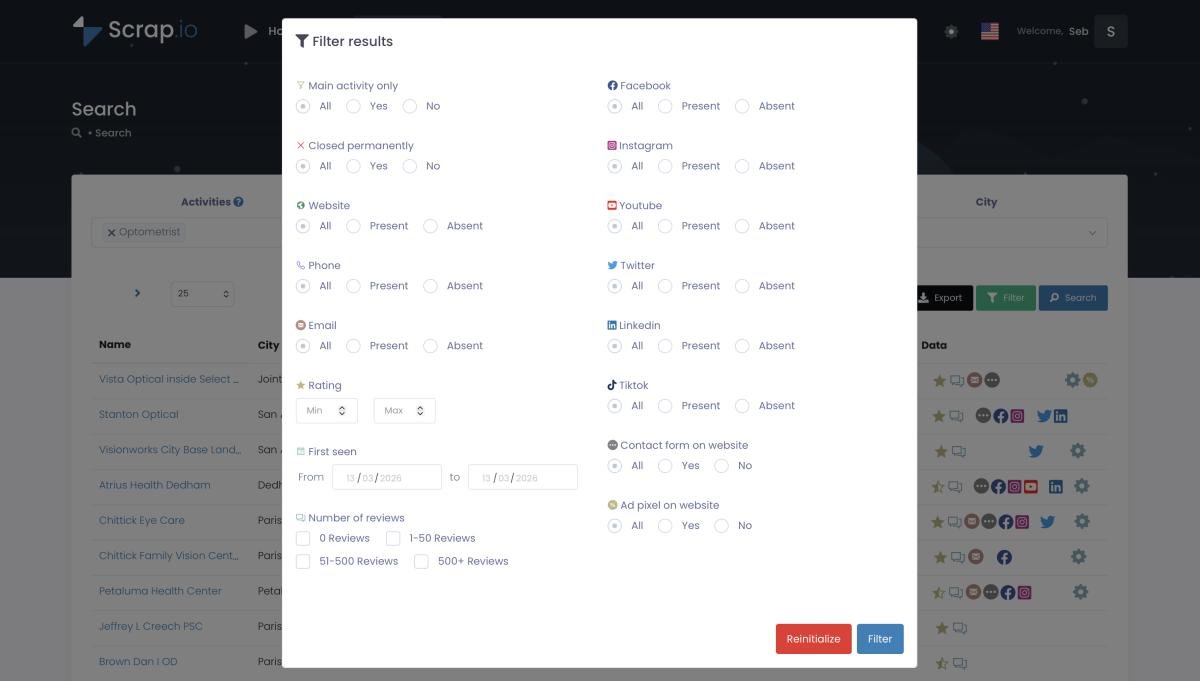
In Scrap.io, filter local businesses by star rating and review count before spending a single credit.
And it doesn't stop at the rating. Each record comes enriched: primary email plus classified emails, phone (fixed or mobile), and social profiles, so you reach the decision-maker directly instead of a generic inbox. Cross the rating filter with the "no website" filter and you've got a triple pain point in one export. This is the mechanism behind finding businesses with negative reviews for lead generation. Want to know which pain point to lead with in your outreach? Pair the export with tools that analyze review sentiment at scale, and you'll know whether it's "slow service" or "rude staff" before you ever write the email.
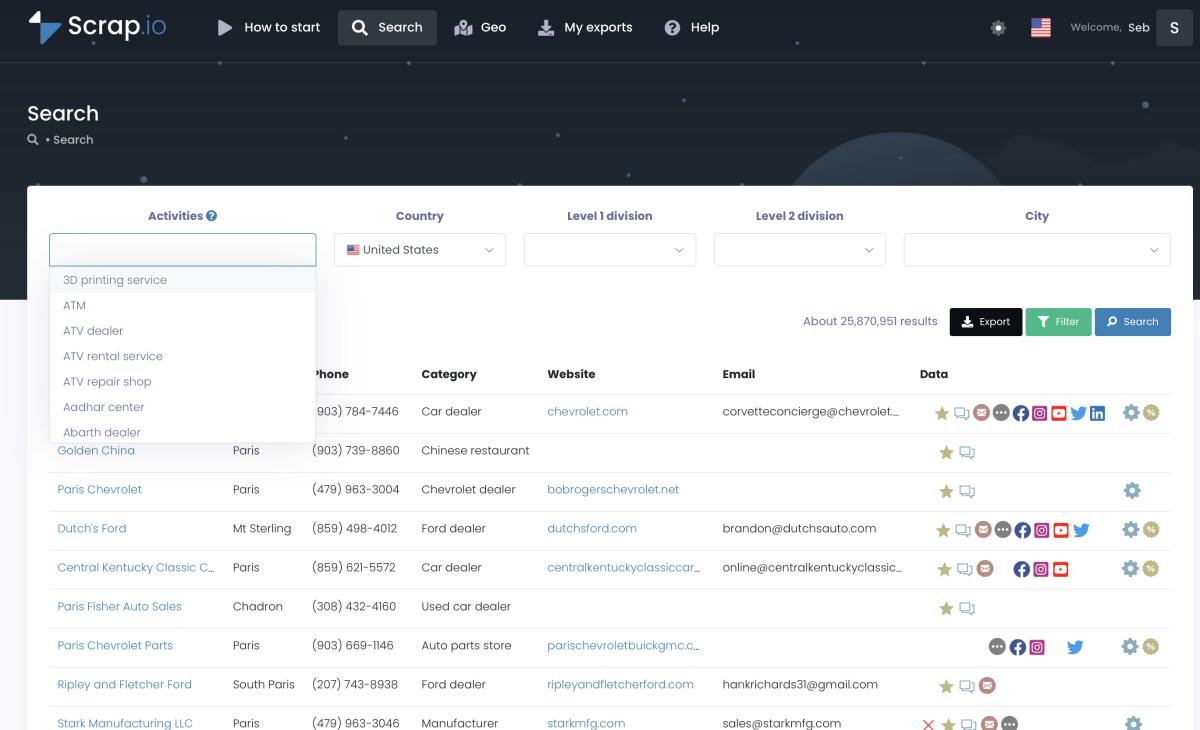
Search any category across a whole city, region, or country.
Want a list of every local business with a sub-3.5 rating in your city? Scrap.io filters by star rating and review count before you spend a single credit, then hands you emails and phone numbers to reach them. 225M+ businesses, 195 countries, real-time data. Try it free for 7 days (100 leads included).
FAQ
Can a business owner delete a Google review?
No. Owners can't delete customer reviews directly. You can only flag a review for a policy violation and let Google decide, or reply to it publicly. You can, however, delete reviews you wrote yourself from your own Google account.
How long does it take Google to remove a review?
It varies. Google usually responds within a few days, but full removal can take anywhere from 48 hours to several weeks, depending on the case and whether an appeal is needed. The Review Management Tool lets you track the status the whole way through.
Can you get sued for leaving a bad Google review?
Honest opinions are protected speech. But reviews containing false statements of fact can expose the author to a defamation claim. Fake or paid reviews are also illegal under the FTC's 2024 Consumer Review Rule, which carries penalties up to roughly $53,088 per violation.
Why are so many Google reviews being removed?
Google's automated systems and its 2026 policy enforcement remove millions of rule-breaking reviews. Spam, fake, off-topic, conflict-of-interest, and incentivized reviews are the most common triggers. In one year alone, Google blocked or removed 292 million policy-violating reviews.
Is it worth paying a company to remove Google reviews?
Sometimes, but be careful. Some services use tactics like false DMCA claims or mass-reporting that violate Google's rules and can backfire badly. Always ask what method they use. A legitimate policy-violation argument is defensible; a fake copyright claim is not.
The Bottom Line
So, how to remove Google reviews in 2026? Delete the ones you wrote in seconds. Flag the ones that break policy, track them in the Review Management Tool, and appeal once if Google says no. Escalate to legal only for genuine defamation. And for everything else, the honest opinions you simply don't like, bury them under real, honest, five-star reviews instead.
You can't control every review. You can control your data. Business owner protecting a hard-won reputation? Agency turning a wall of bad reviews into a client pipeline? Either way, Google Maps data is where it starts.
Start your free 7-day Scrap.io trial: filter 225M+ Google Maps businesses by rating and review count, get 100 leads included, no strings. Try Scrap.io free for 7 days.
Generate a list of restaurant with Scrap.io