

Video: How to Overcome the Results Limit on Google Maps
- Why Dense Urban Areas Break Traditional Scrapers
- The Results Limit Problem, And How to Beat It
- 3 Proven Methods to Scrape Dense Cities in 2026
- Google Maps Scraping Tools for Dense Areas, 2026 Comparison
- Real-World Extraction: NYC, LA, and Chicago Data
- Staying Legal and Ethical When Scraping Urban Data
- FAQ
I ran a test last month. Fired up three different scrapers on Manhattan. Category: restaurants. One choked at 120 results. Another gave me 400, most of them duplicates. The third? It pulled every restaurant Manhattan actually has. All 3,682 of them. No drama. No manual babysitting.
(And when I later pointed that same engine at every category instead of just restaurants? 11,734 businesses in 45 minutes. But we'll get there.)
That gap tells the whole story of what it means to scrape densely populated areas on Google Maps in 2026. Most tools work fine in suburban Idaho. Throw them at downtown Tokyo or Midtown Manhattan, and they fall apart.
And honestly? The people who crack urban scraping first are the ones eating everyone else's lunch in lead gen right now. Because 88% of consumers find a local business through Maps (BrightLocal, 2025). That's not a rounding error. That's your entire addressable market sitting in one database.
This guide covers what actually works, and what doesn't, when you need to extract business data from the world's most packed cities.
Why Dense Urban Areas Break Traditional Scrapers
Manhattan has 27,000 people per square mile (US Census Bureau). That's not a city. That's a pressure cooker. And every one of those residents is surrounded by businesses, stacked vertically, crammed into basements, sharing addresses with three other companies.
Traditional scrapers break in dense areas for one ugly reason: Google Maps itself caps search results at roughly 120 listings per query. Search "restaurant in Manhattan," a borough with thousands of restaurants, and you get maybe a fraction of what exists. That's not extraction. That's a lottery ticket.
But the cap is just the start. Dense cities mean more anti-bot pressure, slower server responses, and a ridiculous amount of overlapping data. You get the same business listed under three different categories. Duplicate entries for the same address. Listings that haven't been updated since 2019 sitting next to brand-new openings.
According to the World Bank, 56% of the global population now lives in urban areas. That concentration isn't slowing down. And it means the majority of the world's business data sits behind the exact problem most scrapers can't solve.
(The DIY vs professional scraper comparison goes deeper into why homemade solutions crash and burn at scale. Spoiler: it's not pretty.)
The Results Limit Problem, And How to Beat It
OK so let's talk about the elephant in the room. Google Maps will not show you more than ~120 results for any single search. Period. Doesn't matter what city. Doesn't matter what category. You search, you scroll, and at some point, you hit the wall.
Most scraping tools inherit this limit directly. Outscraper caps around 400 results per query (its own tutorial on dense areas admits you have to slice a city into 45 separate zip-code queries just to get past it). PhantomBuster stops at 120 results flat. Even Apify, in its own 2026 guide, concedes the platform "caps out at around 120 listings per query." For a suburb with 80 dentists? Fine. For a dense city with 12,000 restaurants? Useless.
Ever tried to manually split Manhattan into 200 micro-zones just to get past the 120 cap? I have. It's masochism.
The fix isn't trying harder. It's a different architecture entirely.
Scrap.io doesn't depend on Google's search results. It maintains its own index of 225,676,406 establishments across 195 countries, and re-scrapes each listing in real time the moment you export. When you search "restaurants in Manhattan," you're not hitting Google's 120-result ceiling. You're querying a complete database that already knows about every listing.
That's the difference between scraping what Google shows you and accessing what Google actually has.
And here's the thing. Dense cities are where the money is. 80% of local searches convert into a customer within 24 hours (Google, 2025). Leaving 99% of urban listings on the table because your scraper caps at 120 results? That's not a technical limitation. That's leaving revenue on the sidewalk.
3 Proven Methods to Scrape Dense Cities in 2026
Video: How to Extract Every Business in 1 Click (No Category)
Forget the old "search and scroll" approach. For google maps data scraping in dense cities, you need strategies that bypass the results cap entirely. Here are three that actually hold up.
Method 1: Administrative Zone Search
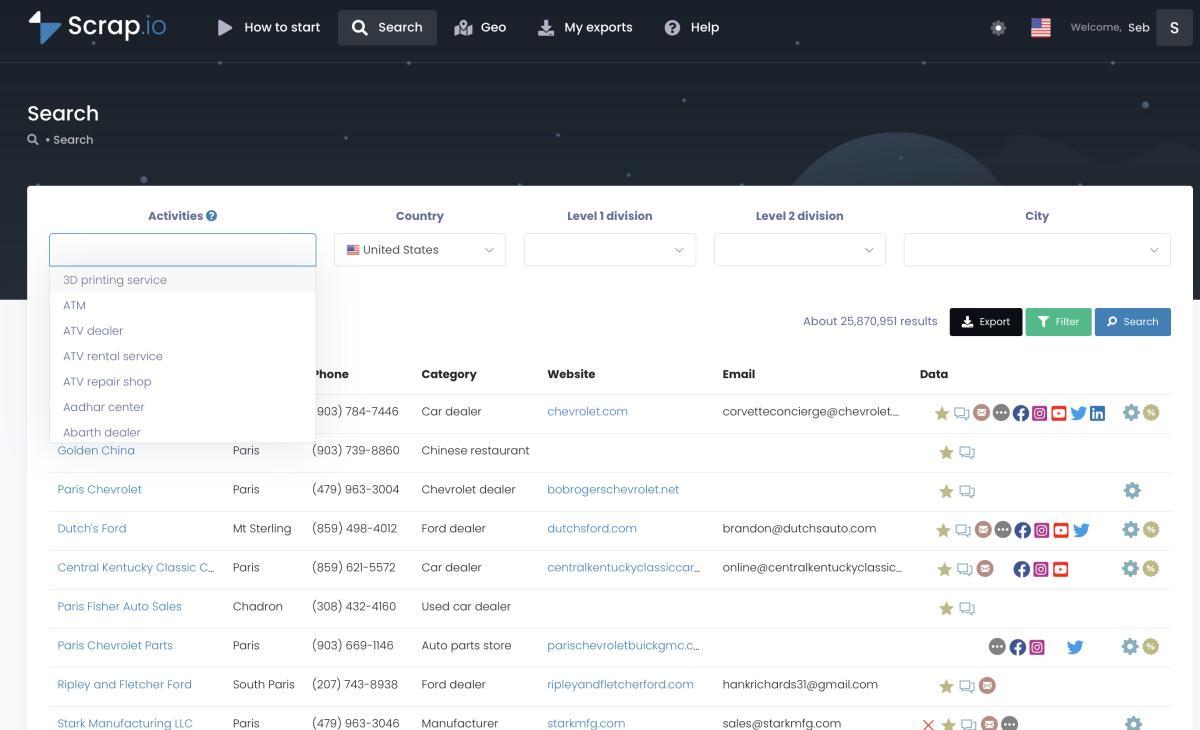
Instead of typing "restaurants in New York" into Google Maps and praying, you use a tool that searches by administrative boundaries. City-level. County-level. State-level. Or, if you're feeling ambitious, country-level.
Scrap.io lets you extract every single business in a city with two clicks. No category required. You get a complete commercial census of the territory. 12,000 restaurants in Nashville? Done. Every single business in downtown Chicago regardless of category? Also done.
Method 2: GeoSearch (Polygon + Radius)
Dense cities don't follow administrative lines. A business district might span two zip codes. A neighborhood you're targeting might end in the middle of a street.
GeoSearch solves this. Draw a custom polygon directly on the map to define your exact extraction zone, down to a specific block. Or set a radius around a point for circular coverage.
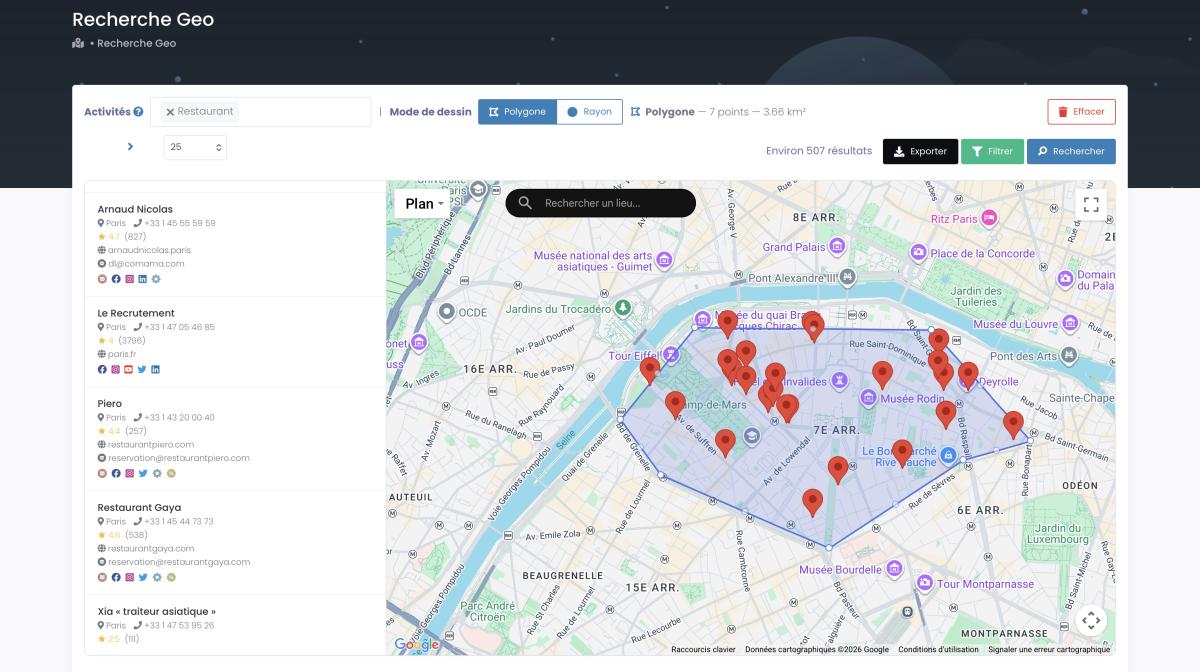

This is what makes scraping dense areas actually precise. Not "restaurants near Times Square" (which gives you a random 120). Instead: "every business inside this six-block polygon I just drew." Massive difference.
Video: GeoFencing: How to Find Leads Through Location?
Method 3: Filter Before You Extract
Here's where most people hemorrhage money. They extract everything, then sort through the mess in Excel. In a dense city with 50,000 listings, seriously, who has time for that? Nobody. That's insanity.
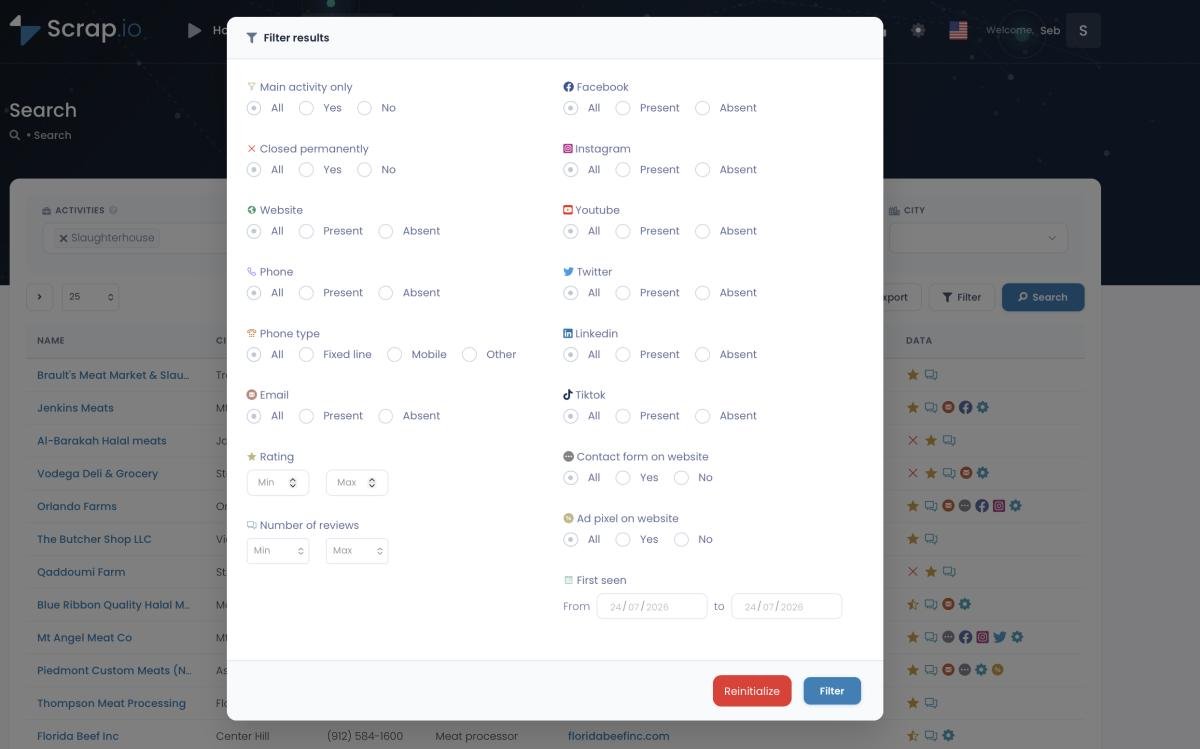
Scrap.io flips the script. Filter before a single credit gets consumed. Only businesses with email? Check. Only those with a website and a rating above 3.5? Check. Only unclaimed listings? Check. You pay for useful contacts, not raw noise. The pre-extraction filtering guide breaks down all 17 filters if you want the full menu.
Google Maps Scraping Tools for Dense Areas, 2026 Comparison
Not every google maps scraper was built for urban extraction. Most weren't. Here's how the major tools stack up specifically for dense cities, the use case where mediocre tools go to die.
| Feature | Scrap.io | Outscraper | PhantomBuster | Apify |
|---|---|---|---|---|
| Max results/search | Unlimited | ~400 | 120 | Variable |
| GeoSearch (Polygon) | Yes | No | No | No |
| Pre-extraction filters | Yes (17+) | Limited | No | Limited |
| Email extraction | Up to 5/listing | Limited | No | Variable |
| Data fields | 30+ | ~20 | ~10 | ~15 |
| Coding required | No | No | No | Yes |
| Establishments indexed | 225M+ | N/A | N/A | 50K+ actors |
| Pricing | From $49/mo | Pay-per-result | From $69/mo | Pay-per-result |
The web scraping industry hit $1.03 billion in 2025 and is projected to reach $2 billion by 2030. Most of that growth is coming from exactly this use case: professionals who need reliable google maps scraping at scale, not weekend hobby projects.
Chrome extensions? Cute for small towns. Terrible for dense metros. (We tested three of the most popular ones, the Chrome extension comparison has the full breakdown.) And if you need phone numbers specifically, the phone number extraction tutorial covers what each tool actually delivers vs. what it promises.
Blunt opinion? For anything denser than a mid-size suburb, pay-per-result pricing is a trap. You either cap your extraction to control costs (and miss most of the market) or you blow your budget before you've covered half the city. Flat-rate tools win in dense areas. Every time. (If Outscraper is your current tool, here's why Scrap.io works out as the better Outscraper alternative for exactly this scenario.)
Real-World Extraction: NYC, LA, and Chicago Data
Theory is nice. Results are better. Here's what dense-city extraction actually looks like when you use the right approach for google maps lead generation.
New York City
Say a real estate analytics firm needs every restaurant listing in Manhattan for delivery radius modeling. The old way: a dev spends two weeks building a custom scraper, and it returns a bloated file stuffed with duplicates. The Scrap.io way: 3,682 clean, deduplicated restaurants, the real count Manhattan carries today. Filter for listings with an email address and the set drops to 1,337 actionable leads. So instead of burning 3,682 export credits, you spend 1,337 on contacts you can actually reach. (And the engine doing that filtering? It's the same one that clears 11,734 businesses across all categories in 45 minutes. Speed isn't the bottleneck here. Precision is.) You can dig into that email filter in the extract emails from Google Maps guide.
Los Angeles
An agency running cold outreach for home service companies needs every plumber, electrician, and HVAC contractor across LA County. Problem: LA sprawls over 4,700 square miles. Zone-based extraction at the county level, then a filter for businesses with fewer than 20 reviews (newer companies, more receptive to outreach). Result: a qualified list built in a single afternoon.
One detail that makes a campaign like this work: filtering for businesses without a website. Those are the ones who need an agency most, and know it.
Chicago
B2B SaaS company targeting restaurants for their POS software. GeoSearch Polygon to isolate the Loop, River North, and Wicker Park, three neighborhoods with the highest restaurant density. Pull the listings with phone numbers, run the cold calls off a clean list instead of a purchased one. Nearly triple the previous conversion rate. That's what happens when the data is current and the targeting is tight.
How many leads did you lose last quarter because your tool capped at 120? Probably more than you think.
A thread on Reddit r/webscraping summed up the DIY workaround perfectly: one user's advice for scraping an entire dense town was to "set maxCrawledPlaces to 9999999" and hope the actor survives. Cute hack. But the biggest challenge isn't extracting the data. It's knowing which slice of a dense city to target first. Geographic precision beats raw volume every single time.
Staying Legal and Ethical When Scraping Urban Data
Short version: scraping publicly visible business data from Google Maps is legal under US law. The hiQ v. LinkedIn ruling (9th Circuit, 2022) confirmed that publicly accessible information can't be locked behind a Terms of Service claim. The CFAA doesn't apply to data anyone with a browser can see.
That said, don't be stupid about it. Stick to business information: company names, addresses, phone numbers, websites, ratings. Leave personal data alone. Honor opt-out requests immediately. And if you're operating in the EU, GDPR's legitimate interest provision covers B2B prospecting, but you still need an unsubscribe mechanism on every email.
The full legal breakdown covers hiQ, Meta v. Bright Data, and X Corp v. Bright Data in detail. But the bottom line hasn't changed: public business data stays public. Courts have been consistent on this since 2017.
One thing to watch: the EU AI Act hits full enforcement in August 2026. If you're scraping data for AI training, different rules apply. For lead generation and market research? You're fine.
Frequently Asked Questions
How do I get past the 120-result limit on Google Maps?
Google Maps only shows about 120 results per search, no matter how many businesses actually exist. To get past it, use a tool with its own index instead of one that queries Google live. Scrap.io searches by admin zone or custom polygon and returns every listing, thousands per city, with no cap.
Why do traditional scrapers fail in dense cities?
Google Maps caps search results at ~120 listings per query. In a city with 50,000 businesses, that's less than 0.3% coverage. Dense areas also trigger stronger anti-bot protections and produce massive volumes of overlapping or duplicate data. Tools built for small-scale extraction simply can't handle it.
How many businesses can I extract from a city like NYC?
With Scrap.io, all of them. The platform indexes 225+ million establishments worldwide and doesn't depend on Google's search result cap. A full extraction of Manhattan restaurants returns 3,682 listings (with 1,337 carrying an email). A no-category search returns every business in the borough, tens of thousands of records.
What's the fastest way to scrape google maps in a dense area?
Use a tool with its own pre-built index rather than one that queries Google in real-time. Scrap.io processes up to 10,000 requests per minute and delivers results as CSV or Excel. For a single-city extraction, you're looking at minutes, not hours.
Do I need coding skills to scrape dense urban areas?
No. The complete Google Maps scraping guide covers three approaches: API (needs code), Python DIY (needs a lot of code), and no-code tools like Scrap.io (needs zero code). For dense cities specifically, no-code wins on speed and coverage.
Is it legal to extract business data from Google Maps?
Yes, for publicly available business information. Multiple federal court rulings back this up, hiQ v. LinkedIn, Meta v. Bright Data, X Corp v. Bright Data. Google's Terms of Service discourage it, but a ToS violation is a contract matter, not a criminal offense. Full analysis in the legality guide.
Generate a list of restaurant with Scrap.io