

Video: Scrap.io + Make.com: Turn Google Maps into Business Leads on Autopilot
I watched a guy spend three hours last Tuesday copy-pasting dentist phone numbers from Google Maps into a spreadsheet. Three hours. His client needed 500 leads by Friday and he was on number 47.
That's not a strategy. That's punishment.
Meanwhile, companies running marketing automation with Google Maps are pulling thousands of verified leads in minutes, enriching them automatically, and feeding them straight into multi-channel campaigns. Same data source. Wildly different results. And the gap between "manual grinder" and "automated operator" gets wider every quarter.
Here's what changed in 2026: the marketing automation market hit $8.14 billion. AI entered the stack. And tools like Scrap.io now let you extract entire countries of business data in two clicks, without writing a single line of code. The game moved. Most people didn't.
What is Complete Marketing Automation with Google Maps?
Evolution from Manual to Automated
Let's kill the confusion early. Complete marketing automation with Google Maps is not "scraping some emails and blasting a campaign." That's step one of maybe twelve.
Real automation means building a system that finds prospects, qualifies them, enriches their data, reaches out across multiple channels, and tracks everything. Automatically. While you sleep. Or while you're copy-pasting dentist names, if that's still your thing. (No judgment. OK, a little judgment.)
The old workflow looked like this: search Google Maps for "plumbers in Dallas," scroll through 20 results, copy names and numbers, manually hunt for emails on websites, paste everything into a CRM, write individual emails, send them one by one. Exhausting doesn't even cover it. You scrape Google Maps by hand for 8 hours and walk away with maybe 40 leads. (Your competitors automated this two years ago, by the way.)
The automated version? You define your criteria. The system scrapes, filters, enriches, scores, routes, and reaches out. You review results and close deals. That's a fundamentally different business. If you've ever wondered how to use Google Maps for marketing beyond copy-paste, this is it: how to automate Google Maps lead generation instead of surviving it.
Why Google Maps is the Ultimate B2B Data Source
225,676,406 establishments indexed. Not an estimate. That's the actual count from Scrap.io's database as of mid-2026, across 195 countries and 4,000+ business categories.
Google Maps updates in real time. When a business changes its phone number, adds a new service, or gets a review, the data refreshes. No stale lists. No six-month-old databases where half the contacts have moved or closed. Every extraction pulls current information.
And we're not talking about just a name and address. A single Google Maps listing gives you the business name, address, phone, website, opening hours, rating, review count, photos, categories, and more. Layer on website scraping and you get emails (classified by type: personal, contact, sales, marketing), social media profiles, tech stack, ad pixels. That's 30+ data points per business.
Try getting that from LinkedIn. I'll wait.
The Marketing Automation Market in 2026
Market Growth: From $8B to $20B by 2034
The numbers are almost absurd. According to Fortune Business Insights, the marketing automation market sits at $8.14 billion in 2026, growing at 12% CAGR toward $20.12 billion by 2034. Mordor Intelligence pegs similar growth trajectories in their latest report.
That $5.44 return for every $1 spent over three years? That's from WiserNotify's analysis of marketing automation ROI. And EmailVendorSelection found companies using automation see 53% higher conversion rates. Read that again. Fifty-three percent.
Look, the market is massive and accelerating. But the really interesting shift happened in the last 18 months.
Why 92% of Marketers Now Use AI in Automation
DemandSage's 2026 report dropped a stat that should make anyone doing manual prospecting uncomfortable: 92% of marketers now use AI in their automation workflows. And 96% have either implemented marketing automation or plan to within the year.
That's not a trend. That's a takeover.
AI didn't just speed things up. It changed what's possible. Lead scoring that used to take a data analyst now runs in seconds. Email personalization at scale went from "merge first name" to "reference their specific Google Maps review count and competitor comparison." And with MCP connectors, you can pipe Google Maps lead generation data directly into AI agents that build campaigns for you.
When you compare Google Maps to LinkedIn for B2B lead generation, the local data advantage is brutal. LinkedIn wins for enterprise and white-collar targeting. But for local businesses, service providers, and SMBs? Google Maps owns that data. Not close.
Scrap.io lets you search, filter, and export Google Maps data across 195 countries. No code. Real-time data. Try it free, 100 leads included.
Complete Automation Framework: 5 Essential Components
1. Real-Time Data Extraction
Everything starts here. And everything falls apart here too, if you're working with bad data.
The foundation of Google Maps scraping at scale is speed plus accuracy. With Scrap.io, you're looking at 10,000 requests per minute capacity. Real-world performance: a client extracted 11,734 businesses in 45 minutes. That's not a lab benchmark. That's someone building a prospection file for a cold email campaign.

But here's what actually matters: Scrap.io extracts data from the live map, not a stored database. Every single extraction hits the source in real time. That means when you export, you're getting today's data. Not last month's snapshot. Not a recycled CSV someone's been selling for six months. Want the deep dive on volume? Here's how to generate Google Maps leads at scale.
The complete Google Maps scraping guide breaks down every method. But the no-code approach is simple: pick a category, pick a location (city, region, or entire country depending on your plan), apply filters, export. Done. No Python script, no google maps scraper github repo to babysit at 3am.
Oh, and those exports include classified emails. Not just "here's an email we found." Scrap.io classifies them: personal emails (with first and last name extracted), contact emails (info@, contact@), sales emails, marketing emails, finance emails. That classification changes your entire outreach strategy.
2. Lead Qualification and Smart Filtering
Extracting 11,000 businesses is useless if 9,000 of them aren't relevant. This is where most Google Maps scraper workflows break down. People dump everything into a spreadsheet and then spend hours manually sorting.

Scrap.io's advantage (and this genuinely matters for your budget) is that filters apply BEFORE extraction. You only consume credits on leads that match your criteria. Want businesses with an email address? Toggle that filter. Only interested in companies with websites running Meta Pixel? Filter for it. Minimum 4-star rating? Set it. Businesses with fewer than 10 reviews? Done.
Selling website redesign services? Filter for businesses without a website. Targeting SMBs ripe for digital marketing? Look for low review counts and no social media presence. Running SMS campaigns? Filter for mobile phone numbers. (Available in most countries except the US and Canada.)
Zero wasted credits on irrelevant contacts. That's not how most tools work, by the way. Most scrape everything first and let you filter the CSV afterward. You've already paid for the garbage data.
3. Contact Enrichment
Raw data is a starting point. Google Maps marketing automation turns that data into actionable profiles.
When Scrap.io pulls a business listing, the export already includes 30+ data fields scraped from both the map listing AND the business's website. That means you get the basic stuff (name, address, phone, category) plus enriched data: all email addresses found on the site (classified by type), every social media profile (Facebook, Instagram, LinkedIn, TikTok, YouTube, X), the website's CMS, detected ad pixels, and even the website's meta-description and keywords.
Building a CRM automation system enriched with Google Maps data means your sales team gets profiles, not rows. They know the business size (from review volume), digital maturity (from website and social presence), and engagement level (from ratings and photo count) before making the first call.
And here's where it gets practical. A web agency filtering for "no website + has email" gets a list of businesses they can reach with a ready-made pitch. A SaaS company filtering for "uses Shopify + has Instagram" finds e-commerce businesses already in their ICP. The enrichment isn't extra work. It's built into the extraction.
4. Multi-Channel Outreach
One channel is a gamble. Multiple channels working together is a system.
Your Google Maps lead generation data feeds into:
- Cold email sequences personalized with business-specific data (star rating, review count, missing features)
- Cold calling with phone numbers already verified by type (mobile vs. landline)
- LinkedIn outreach using the social profiles from the extraction
- Contact form submissions for businesses where email addresses aren't available
- SMS campaigns to mobile numbers (where filtered and legally permitted)
Contact form outreach is severely underrated. Emails get spam-filtered. But contact form messages go straight to the business owner's inbox, or phone. Read rates approach 100%. Not a typo. Almost every single one gets seen.
Anyway, the real power isn't any single channel. It's orchestration. Prospect doesn't open your email? They get a LinkedIn connection request 3 days later. Click a link but don't reply? Follow-up with a phone call. Know what happens when someone sees your name across three different platforms in a week? They remember you. The channels reinforce each other instead of competing. If you want the full playbook, our omnichannel outreach strategy guide breaks down which channel does which job, and the email automation guide shows how to wire the email leg on autopilot.
5. Performance Tracking
You can't optimize what you don't measure. (Overused quote. Still true.)
The metrics that matter for marketing automation Google Maps campaigns: extraction accuracy (are the emails real?), open rates, reply rates, conversion per channel, cost per lead, and ultimately, revenue per campaign. Track which business categories convert best, which locations produce the most replies, and which outreach sequence closes the most deals.
Most teams discover that their assumptions about "ideal leads" are wrong once they have data. Maybe 3-star restaurants respond more than 5-star ones. Maybe businesses without websites in small towns convert 3x better than those in big cities. Weird, right? But you don't know until you measure. And you can't measure what you don't track.
Plans start at $35/month. Extract, filter, enrich, all in one platform. Start your free 7-day trial.
Tools and Platforms
No-Code vs Custom Cost
You've got two paths. Build it yourself or use platforms that already solved the hard parts.
Custom development means full control. Also means $50,000 to $200,000 upfront, 3-6 months of build time, and ongoing maintenance costs. For a Fortune 500 company with specific integration requirements? Maybe worth it. For 95% of businesses? Overkill bordering on self-harm.
No-code solutions let you build the same workflows in hours. Make.com alone connects to 1,000+ apps with visual workflow builders you drag around. No developers. No deployment headaches. And when something breaks, you fix it yourself instead of filing a ticket with your dev team and waiting three sprints. Forget hunting down a google maps scraper free trial or the best free google maps scraper on some forum. That route caps out fast, every time.
Scrap.io + Make.com Stack
This is the stack we recommend. Not because we built half of it. Because it works.
The complete Make.com + Scrap.io tutorial walks through the setup, but here's the architecture:
- Scrap.io handles extraction and enrichment. You define your target (category, location, filters), create an export, and either download the CSV or trigger it via API.
- Make.com orchestrates everything after that. New export triggers a scenario: data flows into your CRM, email sequences launch, Slack notifications fire, lead scores calculate.
- Your cold email tool (Instantly, Lemlist, whatever you use) receives enriched, scored leads ready for personalized sequences.
Total setup time: an afternoon. Cost: Scrap.io plan ($35-$350/month depending on volume) plus Make.com plan. Compare that to the $50K-$200K custom build. It's not even a conversation.
MCP & AI Integration
This is new. And it changes everything about how you interact with Google Maps B2B automation tools.
Scrap.io exposes an official MCP (Model Context Protocol) server at scrap.io/mcp. That means AI agents (Claude, ChatGPT, Gemini) can directly search, filter, and extract Google Maps data through natural language. Our full Scrap.io MCP for Google Maps guide covers the two-minute setup for each client.
Tell Claude: "Find all Italian restaurants in Brooklyn with fewer than 50 reviews and no website." It queries Scrap.io, builds the search, and returns the results. No interface. No manual filtering. Just a conversation that produces a lead list. It's basically maps scraper ai without a single dropdown.
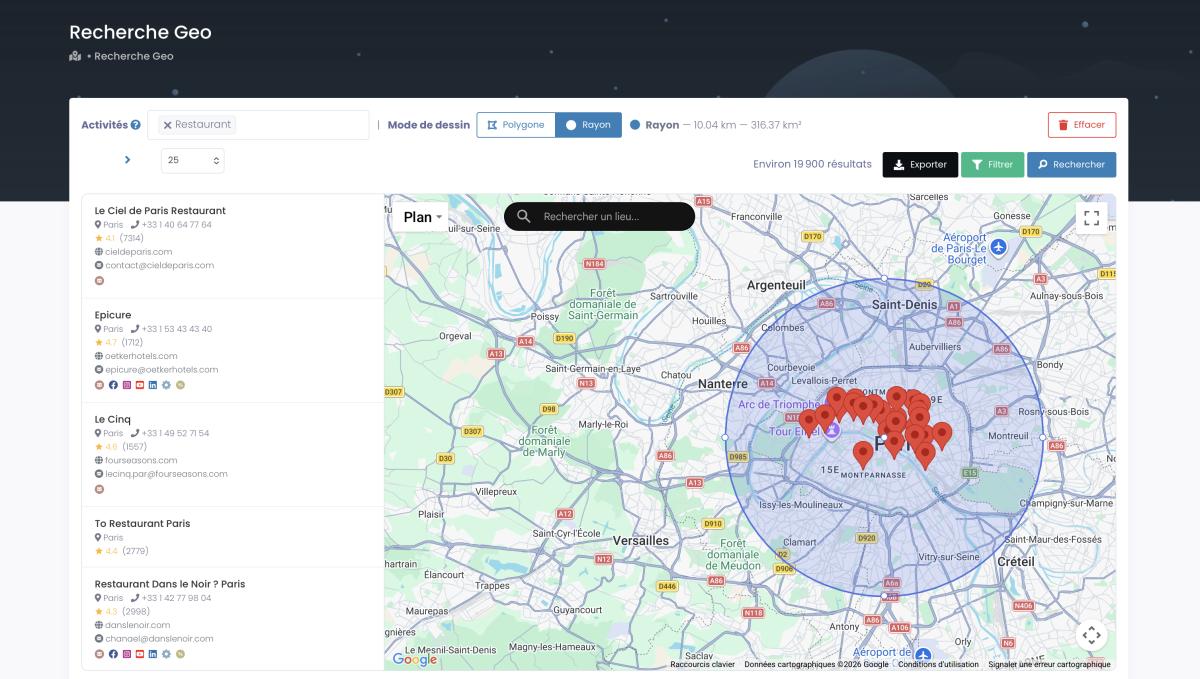
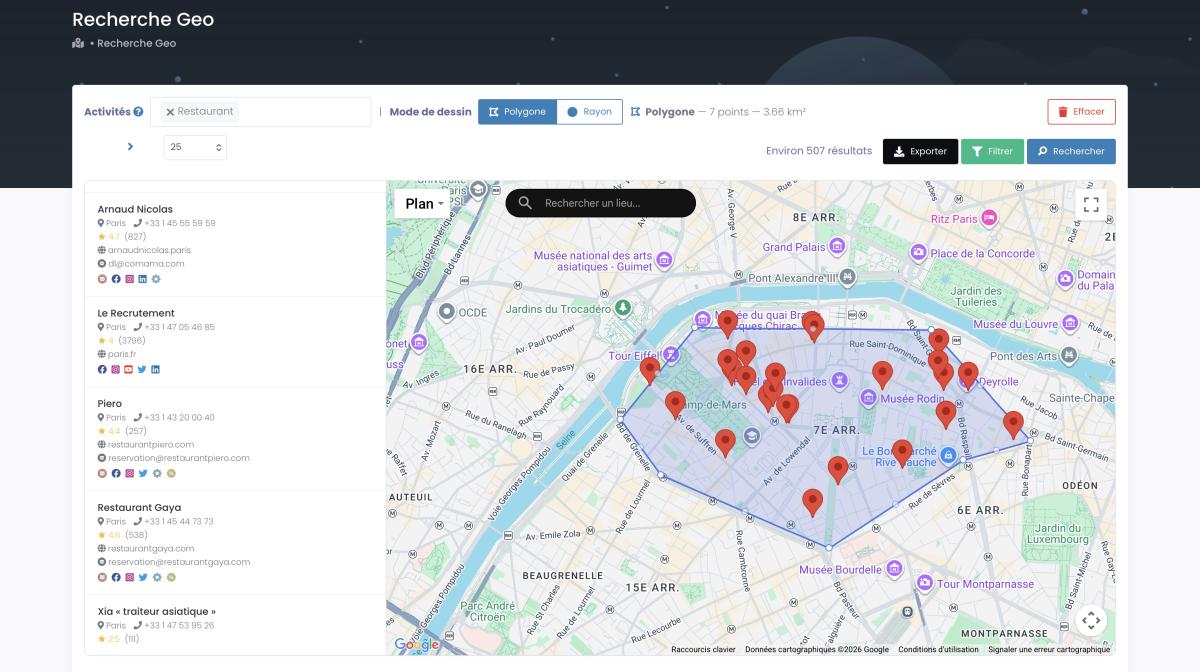
The MCP connector supports search, counting (free, no credits consumed), export creation with filters, and direct result retrieval. GeoSearch works too: the AI constructs radius and polygon queries from plain language instructions. If you want to go further and feed Google Maps data to AI agents that build entire sequences on their own, that guide walks through the RAG-and-MCP plumbing.
This isn't a gimmick. (Honestly, when we first tested it internally, even our team was surprised at how fast it worked.) It's the difference between clicking through a UI for 20 minutes and getting the same results in one sentence. For agencies managing multiple client campaigns, the time savings compound fast. This walkthrough shows the AI-assisted version end to end:
Video: How to Scrape Local Leads with Claude & Vibe Prospecting
Compliance
The question everyone asks: is Google Maps automation legal?
Short answer: yes.
Longer answer: the complete legal analysis covers the court rulings (hiQ v. LinkedIn, Meta v. Bright Data, Van Buren v. United States), but the core principle is simple. Businesses publish their information on Google Maps because they want to be found. Collecting publicly available business data for B2B prospecting is legal and has been upheld repeatedly in US federal courts.
Scrap.io operates under GDPR and CCPA compliance. Only publicly available business data. Every data point traceable to its source. Secure payment via Stripe. And if someone asks to be removed from your outreach, you honor that immediately. Standard stuff.
The businesses freaking out about legality are usually the ones buying shady lists from anonymous brokers. If your data comes from a public directory that businesses voluntarily listed themselves on, you're fine.
Real-World Success Stories
Industry Use Cases with Real Data
Clay.com published a case study on using Google Maps data for niche lead generation, building targeted prospect lists by combining map data with enrichment layers. Their approach: define a hyper-specific ICP, extract matching businesses from Google Maps, enrich with firmographic data, and personalize outreach at scale. Classic framework, executed well.
On our own blog, the Scrap.io + Make.com automation tutorial walks through a complete workflow from extraction to CRM to email sequence, the exact stack agencies use to run Google Maps campaigns on autopilot.
Want proof it's not just theory? A consultant on r/EntrepreneurRideAlong documented (in 2026) how they automated Google Maps lead generation for another marketing consultant, swapping hours of manual copy-paste for a filtered export feeding a cold-email sequence. Small operator, real workflow, no fluff.
The AI angle is where it gets loud. Lead Gen Jay walked through scraping Google Maps leads for free with Claude Code on his channel, letting an AI agent build the search and pull the list in plain English. It's the same MCP shift we covered above, demonstrated live by someone with no reason to shill us.
And on the raw-opportunity side: Joe Apfelbaum reminded his LinkedIn audience that Google Maps holds tens of millions of businesses that never show up in ZoomInfo. That's the whole thesis in one post. The local economy your expensive B2B database ignores is sitting right there on the map.
One thread on r/Entrepreneur summed it up well: "I spent $2,000 on a purchased lead list. Got a 22% bounce rate and zero clients. Then I extracted the same industry from Google Maps with fresh data. 2% bounce rate. 7 meetings. 3 clients. I'll never buy a list again." That's not a sponsored testimonial. That's someone who learned the hard way.
Even the tool-builders can't resist. Over on r/GrowthHacking, someone shipped a Chrome extension that turns Google Maps into a lead list, the fiftieth version of an idea that keeps getting reinvented because the demand never stops. The lesson buried in all these threads is the same: the map is the source, and whoever extracts it cleanest wins.
ROI Comparison
Let's talk real numbers. Because the cost-per-lead difference is not subtle.
| Lead Source | Cost Per Lead | Data Freshness | Email Included |
|---|---|---|---|
| Scrap.io (Google Maps) | ~$0.005 | Real-time | Yes (classified) |
| Purchased email lists | $0.10 - $0.50 | Months old | Yes (unverified) |
| LinkedIn Sales Navigator | $1.50 - $3.00 | Current | InMail only |
| Manual prospecting | $5.00 - $15.00 | Current | If you find it |
| Google Maps API (official) | $7.00 per 1,000 requests | Current | No |
At $0.005 per lead, Scrap.io is roughly 100x cheaper than manual prospecting and delivers richer data than any alternative. The Google Maps API doesn't even include emails. LinkedIn caps your results and charges premium prices. Purchased lists bounce at 15-30%.
The ROI math writes itself. $5.44 return for every $1 invested over 3 years (WiserNotify). That's the marketing automation average. With Google Maps data specifically, the input cost is so low that the ratio gets even more lopsided.
Scrap.io gives you real-time Google Maps data for a fraction of the cost. Free 7-day trial, 100 leads included. Start extracting now.
Implementation Roadmap
Enough theory. Here's how you actually build this.
Week 1: Foundation. Define your ICP. What category? What location? What size? What signals indicate a good prospect for YOUR business? Be specific. "Restaurants" is too broad. "Italian restaurants in Texas with fewer than 30 reviews and no Instagram." That's an ICP. Set up Scrap.io, run a test extraction of 500 businesses in your target segment. Review the data. Adjust filters. Export. New to the interface? This two-minute starter shows the whole flow:
Video: Scrap.io - How to Start?
Week 2: Pipeline Setup. Connect Scrap.io to your stack. CRM (HubSpot, Pipedrive, whatever). Cold email tool (Instantly, Lemlist). Automation layer (Make.com). Build your first workflow: new export, then CRM import, then sequence trigger. Test with a batch of 100 leads. Check: are emails valid? Are sequences triggering? Is data flowing correctly?
Week 3-4: First Campaign. Launch your first real campaign. Start with 500-1,000 prospects. Monitor everything: open rates (target 40%+), reply rates (target 3-5%), bounce rate (must be under 3%), unsubscribe rate. Use proven cold email templates as a starting framework, but personalize with data from your extraction: star ratings, review counts, missing website, specific categories.
Month 2: Optimize. By now you have data. Which categories respond best? Which locations produce the most meetings? Which email angle (review-based, website-based, competitor-based) drives the highest replies? Double down on what works. Kill what doesn't. Add a second outreach channel: phone, LinkedIn, contact forms.
Month 3+: Scale. Expand to new territories. Add business categories. Build segment-specific sequences. Consider the MCP integration for AI-powered campaign building. Layer in the google map extractor for specialized extractions (polygon searches for specific neighborhoods, radius searches around competitor locations).
Most teams see positive ROI by month 2. By month 6, you should be generating 10x more qualified leads than manual methods, at a fraction of the cost. Still think you can match that by scrolling through Google Maps and copy-pasting into a spreadsheet? Go ahead. I'll check back in three months.
Frequently Asked Questions
How do I use Google Maps for marketing?
Extract business listings from Google Maps by category and location using a no-code tool like Scrap.io, filter for the contacts you need (email, phone, rating), then feed the enriched data into cold email, SMS, or CRM campaigns. It turns 225M+ public listings into a real-time B2B marketing database.
What is complete marketing automation with Google Maps?
It's an end-to-end system that extracts business data from Google Maps' 225 million+ listings, enriches contacts with emails, social profiles, and business signals, qualifies leads through smart filtering, and automatically feeds them into multi-channel outreach campaigns. Not just finding emails, building an automated pipeline from raw map data to closed deals.
How much does Google Maps marketing automation cost in 2026?
Scrap.io plans range from $35/month (Basic, 10,000 credits) to $350/month (Company, 100,000 credits) with annual billing. The Professional plan at $69/month with 20,000 credits covers most agency needs. Compare that to custom development ($50,000-$200,000) or manual prospecting (infinite time, limited results). All plans include every filter, every export column, and API access.
Is Google Maps automation legal?
Yes. Multiple US federal court rulings (hiQ v. LinkedIn, Meta v. Bright Data, Van Buren v. United States) have confirmed that collecting publicly available data is legal. Scrap.io is GDPR and CCPA compliant. The data comes from businesses that voluntarily listed themselves on Google Maps. Use it for legitimate B2B prospecting, respect opt-out requests, and you're fully in the clear.
What's the ROI of marketing automation with Google Maps?
Marketing automation delivers $5.44 for every $1 invested over 3 years (WiserNotify). With Google Maps data specifically, the cost per lead is approximately $0.005 via Scrap.io, roughly 100x cheaper than manual prospecting. Companies using automation see 53% higher conversion rates (EmailVendorSelection) and measurable revenue growth within 60-90 days of implementation.
Can I integrate Google Maps automation with AI tools?
Yes. And this is a 2026 game-changer. Scrap.io offers an official MCP (Model Context Protocol) connector compatible with Claude, ChatGPT, and Gemini. You can search, filter, count, and export Google Maps data directly from your AI assistant using natural language. "Find all dentists in Chicago without a website" becomes a direct AI query that returns actionable results. No interface clicking. No learning curve. Counts are always free.
225 million businesses. 195 countries. Real-time data. Classified emails. Smart filtering. MCP for AI agents.
Start your free 7-day trial, 100 leads included.
Generate a list of restaurant with Scrap.io