

Video: How to Turn Your CRM Into a War Machine Using Google Maps Data
- Why Google Maps Leads Need Their Own Sales Pipeline in 2026
- The 7-Step Google Maps Lead Pipeline Framework
- Pipeline Metrics & KPIs You Should Track in 2026
- Tools & Tech Stack for Your Google Maps Pipeline
- Real-World Case Studies: Google Maps Pipelines That Work
- Common Pipeline Mistakes That Kill Your Conversion
- FAQ
- Build Your Google Maps Lead Pipeline Today
79% of leads never convert into sales. That's the industry average. Across all channels, all verticals, all the fancy marketing stacks money can buy. But here's a number most people don't know: Google Maps leads, when funneled through a properly built pipeline, convert at 13-33%. Not a typo.
The global lead generation market is projected to hit roughly $295 billion by 2027, growing at a ~17% CAGR (Business Research Insights, 2025). And Google Maps sits on 200 million businesses across 195 countries. The opportunity is massive. But only if you stop treating Google Maps leads like regular cold leads. Because they're not.
A roofer in Memphis learned this the hard way. Spent four months blasting generic emails to every contractor on his list. One client. Then he rebuilt his pipeline around local signals: distance, review freshness, listing completeness. Same leads, different framework. Fourteen clients in the next quarter. Same data. Wildly different outcome.
That's what this article is about. Not theory. A local business lead pipeline framework built on real numbers, real case studies, and a few hard-won lessons from people who've actually figured out how to convert google maps leads into customers.
Why Google Maps Leads Need Their Own Sales Pipeline in 2026
How Google Maps Leads Differ From Traditional Sources
Traditional leads already know you. They've read your blog, clicked your ad, maybe watched three of your webinars. Google Maps leads? They typed "HVAC repair" and you appeared. That's the entire relationship. They don't know your brand story or your mission statement. They just know you're nearby and you do the thing they need done.
This changes everything about how you sell to them. The intent is different (immediate need vs. browsing), the trust level is different (zero vs. some), and the competition is hyper-local (the guy two blocks over, not some SaaS company in another state).
89% of revenue organizations now use AI somewhere in their sales process (Martal Group, 2026). But most of them apply the same pipeline logic to every lead source. That's like using the same fishing rod for trout and marlin. Technically possible. Practically stupid.
This is really just signal-based selling applied to local data: you prioritize the businesses whose problems you can literally see on the map, instead of blasting everyone the same template.
2026 Conversion Benchmarks: Google Maps vs Other Channels
Here's what the data actually says:
| Lead Source | Avg. Conversion Rate |
|---|---|
| Google Maps leads (structured pipeline) | 13-33% |
| Google Ads | 3-7% |
| Facebook leads | 2-5% |
| Cold email lists | 1-3% |
| Referrals | up to 70% |
| B2B median (cross-industry) | 2.9% |
(Sources: First Page Sage, MarketJoy, Martal Group, 2026 data)
Google Maps leads sit in this sweet spot. Warmer than cold outreach, but not quite referral-level. The pipeline's job is to close that gap.
One more thing. If you call a Google Maps lead within 5 minutes, you're 9x more likely to close. After an hour? Forget it. They already hired your competitor. Speed isn't a nice-to-have here. It's the whole game.
Platforms like Scrap.io let you extract thousands of qualified local leads in minutes, across 225M+ businesses in 195 countries. Take one US vertical: a single search returns 192,682 construction companies, 98,176 of them with a usable email. Filter before you extract, and you only spend credits on the ones you can actually reach. Free 7-day trial, 100 leads included to test your pipeline.
The 7-Step Google Maps Lead Pipeline Framework
Step 1: Prospecting & Data Extraction at Scale
The old approach: sit on Google Maps, copy-paste business names into a spreadsheet, pray the phone numbers still work. I've watched a client do this for three weeks straight for a single city. Half the data was outdated by the time he finished.
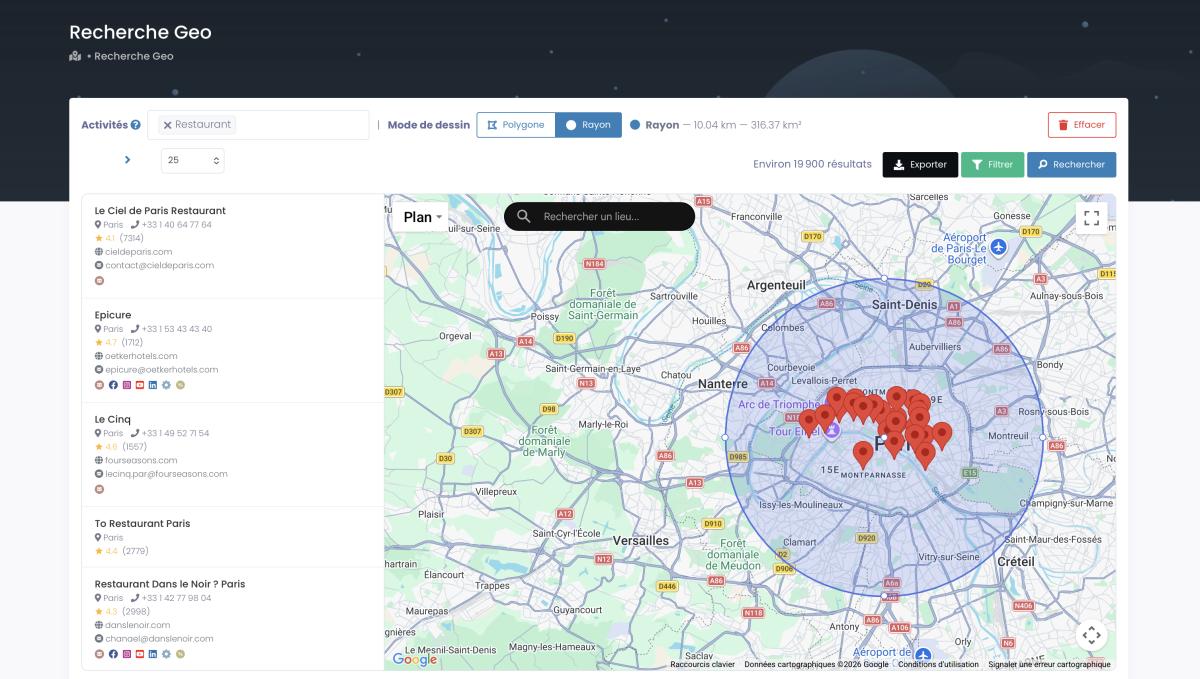
The smart approach: use google maps data extraction for sales at scale. Tools like Scrap.io let you extract comprehensive business data from entire cities in minutes. We're talking thousands of records: emails, phone numbers, websites, review counts, categories, pulled in one shot.
Video: Scrap.io - How to Start?

But extraction without filtering is just noise. Filter before you pull:
- Businesses with emails only (skip the rest)
- Companies with no website (goldmine for web agencies)
- Low-review businesses (they need help and know it)
- Specific categories among 4,000+ on Google Maps
Want proof this isn't hand-waving? Run the numbers on a single vertical. There are 192,682 construction companies on Google Maps in the US right now. Only 98,176 of them, about 51%, have a usable email. And 59,830, roughly 31%, have no website at all, which is a straight-up goldmine if you sell web services. Filtering before extraction means you pay for the 98,176 contactable ones and skip the rest. Zero credits wasted on fiches you can't reach. (Source: Scrap.io live data, August 2026, category "construction company", US.)
When finding email addresses from Google Maps, quality destroys quantity every time. One user pulled 11,734 businesses in 45 minutes. Kept 3,000 that fit his ICP. That's the right ratio.
Step 2: Lead Qualification & BANT-L Scoring
61% of marketers say lead generation is their biggest challenge. Most of them are drowning in unqualified contacts.
Standard BANT doesn't cut it for local leads. You need a proper google maps lead scoring system: BANT-L, meaning Budget, Authority, Need, Timeline, and Location. The L matters more than you think. Proper lead qualification google maps data makes the difference between a 5% and a 25% close rate. If you want the frameworks laid out side by side, this guide on lead qualification frameworks breaks down BANT, CHAMP and MEDDIC for local prospects.
Video: Finding Clients Through Google Maps Filters

Here's a scoring system that works:
High-priority leads (8-10 points): Claimed listing, recent reviews, terrible website, within 10 miles, overlapping business hours.
Mid-priority (5-7 points): Unclaimed listing (opportunity!), sporadic reviews, no website, 10-25 miles away.
Low-priority (1-4 points): "Permanently closed" tag, zero recent activity, great existing website, too far away.
Want the tactical setup, point values and thresholds? Our lead scoring playbook for local leads covers the Fit/Interest/Urgency model in detail. It's built for exactly this: prospects with no website behavior to track.
And validate your emails. Always. Use email validation best practices before you send a single message. Bad emails nuke your sender reputation faster than anything.
You should also define your ICP with Google Maps geographic data before scoring. Knowing exactly who you're after, by category, location density, competitive landscape, makes scoring ten times more accurate.
Step 3: First Contact & Hyper-Local Value Proposition
You've got 5 minutes. After that, response rates drop by 90%. Not exaggerating.
Your first outreach needs three elements:
- Local proof. "We helped 47 shops in downtown Austin increase their Google calls by 35%."
- A specific problem you noticed. "Your Google listing says you close at 5pm but your website says 7pm."
- One clear next step. "Want to see how Johnson's Plumbing went from 12 calls/month to 40?"
Cold email benchmarks for 2026: average reply rate is 3.43%, but top performers with advanced personalization hit 18%, that's 2x the average (Instantly.ai Benchmark Report, 2026). The difference? Hyper-local detail. Mentioning the new Starbucks on their block. Referencing the festival next month. Making it impossible to confuse your email with a mass blast.
Suggested cadence:
Day 1: Call immediately (within 5 minutes if possible). Day 2: Email with a specific insight about their listing. Day 3: Follow up via LinkedIn or a second call. Day 5: Send something useful (a free mini-audit, a competitor comparison). Day 7: Last attempt, different angle entirely.
Step 4: Discovery: Understanding Local Business Needs
You made contact. They're listening. Most people immediately launch into a pitch. Wrong move.
Google Maps leads are comparing you to the business down the street. Not some abstract competitor in another market. The literal shop three doors down.
Ask about what tools they currently use (usually nothing), local pain points (summer slump? new competitor across the road?), what they actually care about (speed, price, or just not looking bad in front of customers), and timeline. If you want a ready-made list, these sales discovery questions are built specifically for local business owners, not enterprise buyers.
Here's a discovery trick that changed one agency's pipeline conversion rates for local businesses completely. They started asking: "When you searched, did you look just in your neighborhood or across the whole city?" Neighborhood searchers got the convenience pitch. City-wide searchers got the value pitch. Conversions jumped from 15% to 28%. Same leads. The sales funnel google maps businesses respond to is built on relevance, not volume.
Step 5: Proposal & Local-Proof Demonstration
Proposals for local business owners can't be 20-page decks full of jargon. These people don't have time. Their phone is ringing, a delivery just arrived, and their afternoon guy called in sick.
Keep it under 3 pages. Summary (one paragraph: their problem, your fix), deliverables (bullets, not essays), timeline (real dates, not "Q3"), cost (clear, no hidden fees), and one proof point from their neighborhood.
For demos: pull up Google Maps live during the call. Show exactly what you'd change for businesses right in their area. One agency doubled its close rate just by switching from generic screenshots to live local demos.
Step 6: Objection Handling for Local Prospects
Local businesses negotiate differently. It's usually the owner spending their own money. Not a procurement department running a process.
"Bob down the street is cheaper."
Don't defend your price. Ask: "Besides price, why'd you reach out to us instead of Bob?" They'll mention something, your reviews, your responsiveness, something. Build on that.
"Let me think about it."
Translation: they're about to check your reviews and compare. Say: "Makes total sense. While you're looking around, want to see what we did for [similar business nearby]?"
"We're too small for this."
They assume you only work with big companies. Say: "Actually, 70% of our clients are your size. Here's one right in your zip code."
"We already bought a database."
This one comes up constantly. A purchased list ages the moment it's sold. Scrap.io re-extracts in real time, filters out the fiches with no email, and excludes contacts you already exported over the last 30 days, so you never re-spend a credit on the same business. A static file can't do that. It just rots on a server.
Local urgency works. "The holiday market is 6 weeks out. If we start now, you'll be ready for the foot traffic." This isn't pressure. It's practical.
For a deeper playbook, check out how to handle objections in Google Maps prospecting.
Step 7: Closing & Post-Sale Referral Pipeline
If you've done steps 1-6 right, closing is just logistics. Try the "which location" close: "Based on everything, this makes sense for you. Should we start with your Main Street shop or the one on Industrial?"
But here's what everyone forgets: the post-sale pipeline. This matters enormously because local business owners all know each other. They're in the same rotary club, the same Facebook group, the same commercial lease corridor. One happy client brings five more without you lifting a finger.
Post-sale cadence: Day 1, quick setup. Day 7, check-in. Day 30, show results. Day 90, ask for a Google review (timing is everything). Month 6, upsell or cross-sell. If you want the full playbook on turning raw contacts into signed deals, this guide on how to convert scraped leads into customers walks through every phase.
Pipeline Metrics & KPIs You Should Track in 2026
Stage-by-Stage Conversion Benchmarks
Real numbers from actual local pipelines:
| Pipeline Stage | Google Maps Leads | Traditional Cold Leads |
|---|---|---|
| Lead → Qualified | 40-50% | 20-30% |
| Qualified → Discovery | 60-70% | 40-50% |
| Discovery → Proposal | 50-60% | 30-40% |
| Proposal → Close | 30-40% | 20-30% |
| Total Pipeline | 13-33% | 3-5% |
SQL-to-Opportunity rates in B2B SaaS typically land at 55-70%, with Opportunity-to-Close at 15-35% (MarketJoy, 2026). These pipeline conversion rates local businesses achieve outperform traditional channels at every stage, but only when pipeline stages are built around local signals.
Track these local prospecting metrics and KPIs relentlessly: response time (must be under 5 minutes), call attempts per lead, discovery-to-proposal gap (keep under 7 days), total days to close, and local market saturation percentage. And don't just track them in a notebook. Wire them into a proper sales dashboard built for local prospecting so a stalled lead turns yellow before it goes cold.
Sales Cycle Optimization for Local Leads
The sales cycle local lead generation teams deal with varies wildly. B2C local leads typically close in 30-60 days. B2B in 60-90. Emergency services (plumbing, IT repair) can close in 1-3 days. Planned purchases (marketing, renovations) take 2-4 weeks.
One client cut their cycle from 67 days to 23 by adding a "quick start" package specifically for Google Maps leads. Smaller commitment, faster yes, foot in the door. Then upsell at month three.
Tools & Tech Stack for Your Google Maps Pipeline
Data Extraction & Enrichment
You can't run a modern local lead generation pipeline with spreadsheets and sticky notes. You need tools that pull real-time Google Maps data across 225 million businesses.
Scrap.io handles the extraction and enrichment side: categories, emails, phone numbers, review data, website status, all in one pull. For automated CRM enrichment strategies, connect your extraction tool directly to your CRM so leads flow in without manual entry.
CRM Integration & Automation
Building a CRM pipeline for google maps prospects requires territory management, distance-based scoring, competitor tracking, review monitoring, and seasonal pattern detection.
Don't want to code anything? No-code automation solutions using Make.com or Zapier connect Scrap.io directly to HubSpot, Pipedrive, GoHighLevel, whatever you use. Set it up once, let it run.
Compliance note: When building your automated pipeline, ensure GDPR and CAN-SPAM compliance at every stage. Use tools like Scrap.io that only extract publicly available business data. Include unsubscribe links in every email, use accurate sender information, and respect opt-out requests immediately. For EU leads, document your legitimate interest basis for outreach.
Real-World Case Studies: Google Maps Pipelines That Work
Case 1: MailShark: Nationwide Lead Generation via Google Maps
MailShark needed to expand their b2b lead generation using google maps beyond their local market. They used a Google Maps scraper to pull business data across the entire US, systematically, city by city. The result: a nationwide prospecting operation built entirely on Google Maps data extraction for sales.
(Source: ProWebScraper Case Study)
What made it work? They didn't just scrape and blast. They built a google maps lead scraping pipeline with proper segmentation by region, category, and business size before any outreach happened.
Case 2: SEO Agency in Los Angeles: 2,000 Businesses → 10 Clients
An SEO consulting agency scraped 2,000 local businesses in LA: HVAC companies, cleaning services, contractors. After qualification, 500 leads were verified and worth pursuing.
First attempt with generic outreach? One client. They rebuilt the pipeline with hyper-local personalization and BANT-L scoring. Result: 10 clients. A 10x improvement from the same dataset.
(Source: MarketingHackers)
The lesson: the leads weren't the problem. The pipeline was.
Case 3: Let's Fearlessly Grow: 2,500+ Prospects Per Day
This agency automated their entire Google Maps prospecting workflow. 2,500+ prospects contacted daily with targeted, category-specific outreach. Not spray-and-pray. Each message referenced the prospect's specific business type and location.
(Source: Apify Use Cases)
Case 4: Reddit User: Full Pipeline for Less Than $0.01/Lead
A Reddit user on r/coldemail documented their complete google maps lead scraping pipeline: extraction, 36 fields of enrichment, qualification scoring, automated outreach. Total cost per lead: under a penny.
Their words: "Built a Google Maps lead scraping pipeline for less than a penny per lead. 36 fields of enrichment. Here's the full stack."
Compare that to $20-200 per lead via paid ads. The math isn't even close.
Case 5: Gym Equipment Reseller: +65% Revenue
A gym equipment reseller found a creative angle: they tracked recently closed gyms on Google Maps, then contacted new gyms opening in the same areas to sell discounted used equipment. Revenue jumped 65% in one year.
(Source: MarketingHackers)
Verticals matter here too. Construction is a textbook example: 192,682 US construction companies sit on Google Maps, 59,830 of them without a website, which is exactly the kind of visible pain a web agency can build a whole pipeline around. If that's your niche, this breakdown of the construction company email list shows how the data splits by email, phone and website coverage.
Want to build a pipeline like these? Start with 100 free Google Maps leads on Scrap.io and see the difference fresh, filtered data makes. Free 7-day trial, 100 leads included.
Common Pipeline Mistakes That Kill Your Conversion
Treating every lead the same. A restaurant in Manhattan has nothing in common with one in suburban Dallas. Your pipeline stages, messaging, and pricing all need to adjust by local context.
Being slow. The 5-minute rule isn't optional. Set up real-time alerts. Google Maps leads are actively shopping. Right now. They'll call your competitor next.
Generic messaging. "We help businesses grow" means nothing. "We got Mario's Pizza 40% more delivery orders during ACL Festival" means everything. The more specific and local, the better your cold email google maps leads conversion.
Ignoring local events and context. Not knowing about the big festival, the new mall going up, the competitor who just opened across the street. This stuff matters to local business owners, a lot.
Over-automating. Google maps prospecting tools for sales teams absolutely help with extraction and enrichment. But local businesses can smell mass emails instantly. Personal touches are non-negotiable.
No post-sale referral loop. The pipeline doesn't end at closing. Local businesses talk to each other. Build the referral ask into your process or you're leaving the easiest leads on the table.
FAQ
How do you build a sales pipeline from Google Maps data?
Build it in seven steps:
- Extract businesses by category, location, and filters like "has email" or "low reviews."
- Score each lead with BANT-L (Budget, Authority, Need, Timeline, Location).
- Reach out within 5 minutes using hyper-local messaging.
- Run a discovery call focused on their specific local challenges.
- Send a 3-page proposal with neighborhood proof.
- Handle objections with local references.
- Close, then build a referral loop post-sale.
Tools like Scrap.io handle the extraction; your CRM handles the pipeline stages.
What is the conversion rate for Google Maps leads?
A structured Google Maps lead pipeline converts at 13-33%, versus 2-5% for traditional cold outreach and a B2B median of 2.9% across industries (First Page Sage, 2026). The biggest factors: response speed (under 5 minutes = 9x more likely to close), local personalization, and proper BANT-L qualification. Top performers using automated lead pipeline google maps workflows report 25%+ consistently.
How to automate lead generation from Google Maps?
Connect a Google Maps extraction tool (like Scrap.io) to your CRM via Make.com or Zapier. Set up automated filters for your ICP, auto-score incoming leads based on review count, website status, and distance, then trigger personalized outreach sequences. The extraction + enrichment + CRM push can run entirely hands-off, that's a true automated lead pipeline google maps workflow. The outreach should still feel personal. Automation handles volume, not voice.
What CRM is best for Google Maps leads?
Any CRM that supports territory management, distance-based lead scoring, and review monitoring. HubSpot, Pipedrive, and GoHighLevel are popular choices. The key feature: direct integration with your data source so leads from Google Maps flow in automatically with all enrichment fields intact. Scrap.io connects to most CRMs through Make.com or Zapier, zero coding required.
How long should the sales cycle be for Google Maps leads?
B2C local leads typically close in 30-60 days, B2B in 60-90 days. Emergency services like plumbing or IT repair can close in 1-3 days. You can cut cycles by up to 50% with quick-start offers, local proof points, and simple pricing packages. The key is matching your timeline expectations to the lead's urgency level. Google Maps leads searching "near me" often have immediate needs.
Is it legal to scrape leads from Google Maps?
Scraping publicly available business data from Google Maps is generally legal. GDPR-compliant tools like Scrap.io extract only publicly listed information: business name, phone, email, address. Always follow CAN-SPAM guidelines when emailing scraped contacts (include unsubscribe links, use accurate sender info) and GDPR rules when handling EU data (legitimate interest basis, right to opt out). Using a compliant tool and responsible outreach practices keeps you on the right side of the law.
How much does it cost to generate leads from Google Maps?
Google Maps lead extraction costs $0.005-$0.05 per lead with tools like Scrap.io. Compare that to $20-200 per lead via paid ads. A $500-1,000 annual tool investment can generate 10,000-20,000 qualified leads. At a 15% conversion rate and $1,000 average deal size, that's a pipeline worth $1.5M+. B2B lead gen services are projected to grow from $2.98B (2025) to $9.18B by 2035 (Business Research Insights), the market is only getting bigger.
Build Your Google Maps Lead Pipeline Today
The B2B lead generation services market is exploding: $2.98 billion in 2025, projected $9.18 billion by 2035 at an 11.91% CAGR. Google Maps covers 200 million businesses in 195 countries. And the tools to build an automated lead pipeline from Google Maps data cost less than your monthly coffee budget.
If you want to build a sales pipeline for local leads that actually converts, the difference isn't the data. It's the pipeline. Build these 7 steps. Track your metrics. Let the local proof compound over time.
Your competitors are still cold-calling from purchased lists. You'll be working fresh, filtered, scored Google Maps leads through a pipeline built for local conversion. That's not an incremental improvement. That's a structural advantage.
Try Scrap.io free for 7 days and get 100 verified local business leads instantly. Real-time data from 225M+ businesses across 195 countries, filtered before you spend a credit. Start building your pipeline today.
Generate a list of restaurant with Scrap.io