

You hired one last month. The plumber who unclogged your sink. The cleaner who handled the move-out. The locksmith who bailed you out at 11 PM. Not one of them runs a shop you can walk into, and yet all three sit somewhere on Google Maps right now. Those are service area businesses, and there are millions of them.
Here's the odd part. Almost every article online teaches these companies how to build their own listing. Practically nobody explains how to find them. That's a miss, because a service area business (SAB) is one of the best B2B targets going: high ticket, badly underserved, and often invisible on paper.
So this guide does both jobs. What an SAB actually is, with real examples you'll recognize. And how to pull every single one on Google Maps across a city, a state, or a whole country. Let's dig in.
Video: How to Extract Every Business From Google Maps in 1 Click
- What is a service area business? (SAB)
- Service area business vs storefront vs hybrid
- Service area business examples (the trades)
- Do service area businesses show up on Google Maps?
- How service areas work on Google Business Profile
- How to set up and verify a SAB on Google
- Why service area businesses are a B2B goldmine
- How to find service area businesses on Google Maps (at scale)
- Local SEO for service area businesses
- Is it legal to extract SAB data?
- FAQ
What is a service area business? (SAB)
A service area business (SAB) is a company that travels to its customers instead of serving them at a fixed storefront: a plumber, an electrician, a house cleaner, a mobile groomer. On Google Business Profile, an SAB can hide its street address and list the zones it covers instead. No shop. No walk-ins. Just a van and a service radius.
The name trips people up. "Service area" sounds like it should mean any business that pulls customers from an area, right? Not quite. A grocery store serves an area too, but it's not an SAB, because customers come to it. So the service area business meaning comes down to one question: does the customer come to you, or do you go to the customer? If you go to them, you're a service-area business. That's the whole definition.
And that single distinction changes everything downstream. How you show up on Maps. How you rank. And the part nobody talks about: how easy or hard you are to find when someone's building a prospect list. Keep that last one in mind, because it's where this article is headed.
Service area business vs storefront vs hybrid
Google sorts every local business into three buckets. Pick the wrong one and you can end up invisible, or worse, suspended.
| Attribute | Storefront | Service Area (SAB) | Hybrid |
|---|---|---|---|
| Visible public address | Yes | No (hidden) | Yes |
| Customers visit you | Yes | No | Yes |
| You travel to the customer | No | Yes | Yes |
| Example | Barber shop, bakery | Mobile mechanic, plumber | Restaurant with delivery |
Storefront: a fixed address, customers walk in. A barber shop. A bakery. Service area: no public address, you drive to the customer. A mobile mechanic, a locksmith, a carpet cleaner. Hybrid: it does both, like a florist with a shop that also delivers, or a dine-in restaurant that runs takeaway.
Why does the bucket matter this much? Because Google shows a storefront as a pin on the map and a service-area business as a shaded zone with no pin at all. Classify yourself wrong and people browsing the map won't see you sitting there. That's a rough way to lose customers you never knew you missed.
Service area business examples (the trades)
Plumbers. Electricians. House cleaners. Locksmiths. Odds are, most pros you've paid this year were SABs.
The common thread is the trades and mobile services. Here are the service area business examples you'll bump into constantly:
- Plumbers, HVAC techs, and heating engineers. If you want the numbers, we broke them down in this plumber email list guide.
- Electricians and solar installers. Same deal, covered in the electrician email list breakdown.
- House cleaners, carpet cleaners, and pressure-washing crews.
- Locksmiths, garage-door contractors, and pest control.
- Mobile services: dog groomers, mechanics, personal trainers, notaries.
- Landscapers, painters, and handymen.
Notice a pattern? None of these need a showroom. The customer's kitchen, driveway, or living room is the workplace. Which is exactly why they hide their address and why, when it's time to prospect them, they're a headache to track down one by one.
It's not only trades, either. As one poster on r/GoogleMyBusiness put it, "most website developers and internet marketers are listed as Service Area Businesses, and are far more SEO savvy than Location Based Businesses." Consultants, agencies, freelancers who visit clients: all SABs too.
Do service area businesses show up on Google Maps?
Yes. But with no visible address, they play Maps on hard mode.
A service area business google maps listing appears in local search and the local pack just like a storefront does. The catch: because the exact address is hidden, users can't tap "Directions," and browsers scrolling the map itself won't see a pin for you. You only surface once someone runs an actual search. So the answer to "do service area businesses show up on Google Maps" is a solid yes, with an asterisk.
And here's a fact most SAB owners get wrong: your rankings still hang on your verified base location, not on the service areas you draw. Adding a zone two states away doesn't make Google rank you there. It just dilutes the areas you actually serve. Drawing a bigger blob is not a strategy.
How service areas work on Google Business Profile
You can list up to 20 service areas. A 21st does nothing but water down the ones that matter.
On Google Business Profile (the platform still called Google My Business by half the internet), a google my business service area is defined by cities, postal codes, or regions, not by a radius you draw on a map. Google's own documentation is blunt about it: the boundaries of your overall area shouldn't stretch more than about a two-hour drive from where your business is based (Google Business Profile Help, 2026). Try to cover a whole state and you'll rank for none of it.
The mechanics are simple once you get them. You remove your street address, then enter the zones you cover. Google replaces your map pin with a shaded service area and stops showing your home address publicly. That's the trade: privacy in exchange for that convenient little "Directions" button. For most trades, worth it. If you also want the listing to actually pull leads, the rest of the playbook lives in our Google Business Profile optimization guide, and Google spells out the setup rules for service and hybrid businesses too.
Can you have a service area business without an address? Yes. That's the entire point of the SAB type. You verify a real location with Google privately, then hide it from the public profile.
How to set up and verify a SAB on Google
Setting one up takes about ten minutes. Verification is where people stall, so here's the short version of how to set up a service area business on Google and get it live:
- Create or claim the profile at business.google.com. Search your business name first to make sure a listing isn't already floating around.
- Pick your primary category. This is the single most important field you'll touch. Get it right the first time.
- Skip or remove the public address. When Google asks whether customers visit you, say no. Your address stays private.
- Define your service areas. Up to 20 cities, zip codes, or regions, all inside that two-hour boundary.
- Verify. This is how to verify a service area business on Google: pick from phone, email, postcard, or video verification. New SABs with a thin web presence often only get the postcard option, which is normal and still works fine.
One warning. Keyword-stuffing your business name ("Best Emergency Plumber Dallas") is the fastest way to get suspended. Use your real name. Google's spam filters are not subtle about this one.
Why service area businesses are a B2B goldmine
6.1 million home-service pros in the US, and roughly 4 in 10 don't even have a website. Sit with that number for a second.
The US home services market topped $600 billion in 2024 (Mordor/Technavio, 2026), riding a workforce of around 6.1 million professionals in 2023, projected to hit 7.2 million by 2028 (ServiceTitan/Valve+Meter, 2026). The online slice of that market is growing about 12.4% a year, and a whole industry of software and marketplaces has grown up to serve these SABs. Field-service platforms like ServiceTitan, Jobber (which alone serves 400,000+ home-service pros, Jobber 2026), and Housecall Pro run the back office. Lead marketplaces like Angi and Thumbtack sell them customers. There's even a projected shortfall of 550,000 plumbers by 2027 (home services reports, 2026), which tells you how much demand is chasing how few hands. Every one of those companies needs to reach SABs to sell to them. So do you, probably.
Now the part you won't find anywhere else on the SERP. We pulled fresh Google Maps counts on 2026-09-22:
| SAB category (US) | On Google Maps | No website | With email |
|---|---|---|---|
| Plumbers | 76,386 | 31,481 (41%) | 28,386 (37%) |
| Electricians | 76,623 | ~40% | n/a |
| House cleaners | 41,924 | 16,950 (40%) | n/a |
Read the "no website" column again. Around four SABs in ten have no site at all (Scrap.io, September 2026). If you sell web design, SEO, or marketing, that's not a market. That's a list of people who literally need what you sell, sitting in public, waiting. Pair that with the emails you can pull from Google Maps and the outreach writes itself. There's a full playbook in our local business lead generation guide.
How to find service area businesses on Google Maps (at scale)
Take Marcus, a web agency owner in Texas. He wants every plumber in the state without a website, so he can pitch them a site. Doing that by hand? He'd search "plumber" city by city, hit Google's 120-result cap every time, copy-paste until his eyes bleed, and still miss half of them because their addresses are hidden. That's the SAB problem in a nutshell: the businesses you most want to reach are the ones Google makes hardest to list.
Here's how Marcus pulls that list in two clicks instead. He starts from a category and a geographic zone, not from an address, because a service area business search by address is a dead end when the address is hidden. That's the whole trick, and it's what a tool like Scrap.io is built for.

GeoSearch radius: target every service area business inside a chosen zone.
Scrap.io indexes 225 million+ establishments across 195 countries and 4,000+ categories, and lets you extract every listing in a territory, up to a whole country, without writing a line of code. Marcus picks "plumber," picks "Texas," and gets the full population instead of Google's 120-at-a-time trickle. To go beyond administrative zones, he can draw a custom polygon or set a radius on the map (GeoSearch), which is handy when a service zone doesn't match a tidy city boundary. If you want the wider method, we cover it in the guide on how to extract every business on Google Maps.
Video: Finding Clients Through Google Maps Filters
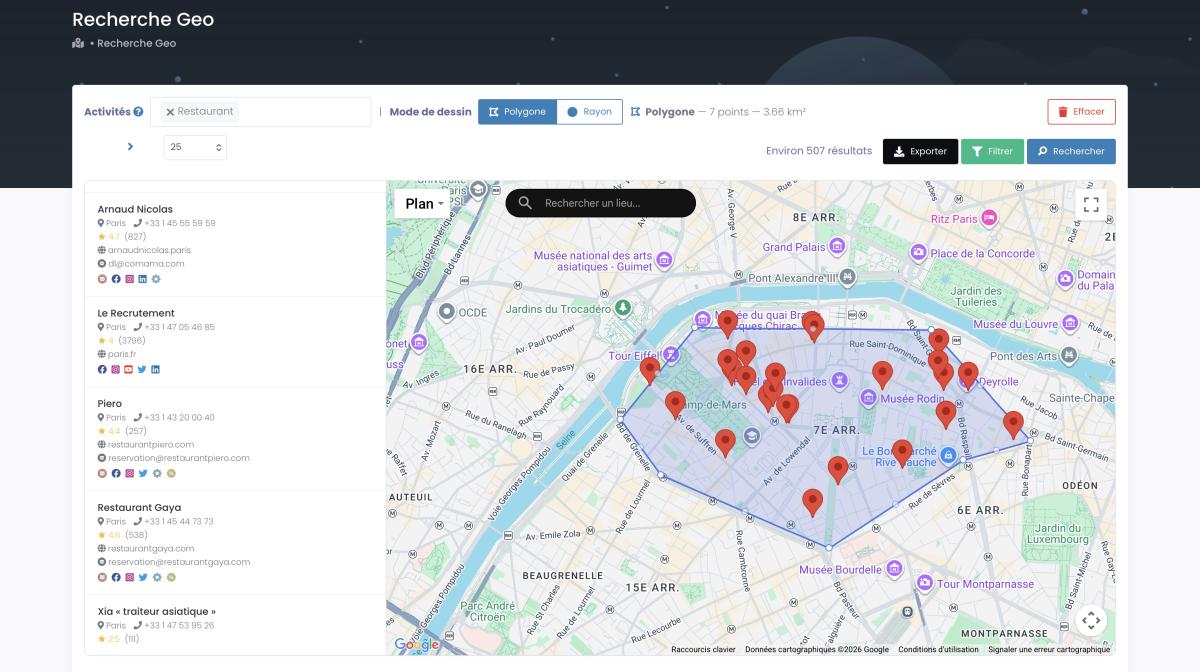
GeoSearch polygon: draw any custom shape when a service zone ignores city lines.
Step-by-step with Scrap.io
The actual workflow is three steps, and the whole thing takes a couple of minutes. Here's how to find service area businesses without burning credits on junk.
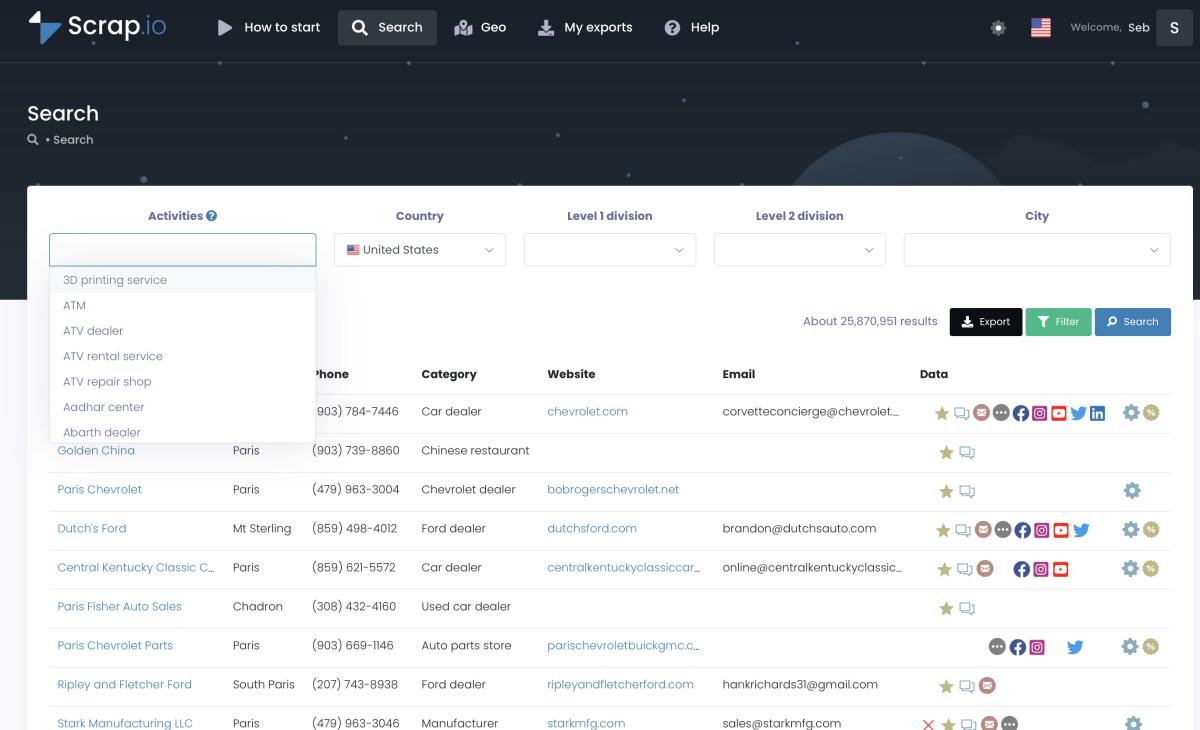
Step 1: search by category and location.
Step 1. Search. Pick a category (plumber, electrician, cleaner) and a location (city, county, state, or whole country). Two dropdowns. Done.
Step 2. Filter before you pay. This is the important one. Toggle "no website" to find the businesses that need a site. Toggle "email present" so every export is reachable. Filter by rating, review count, first-seen date, ad pixel, whatever fits your pitch. Because the filters run before extraction, you never spend a credit on a contact you'll delete anyway. The filtering guide walks through every option.
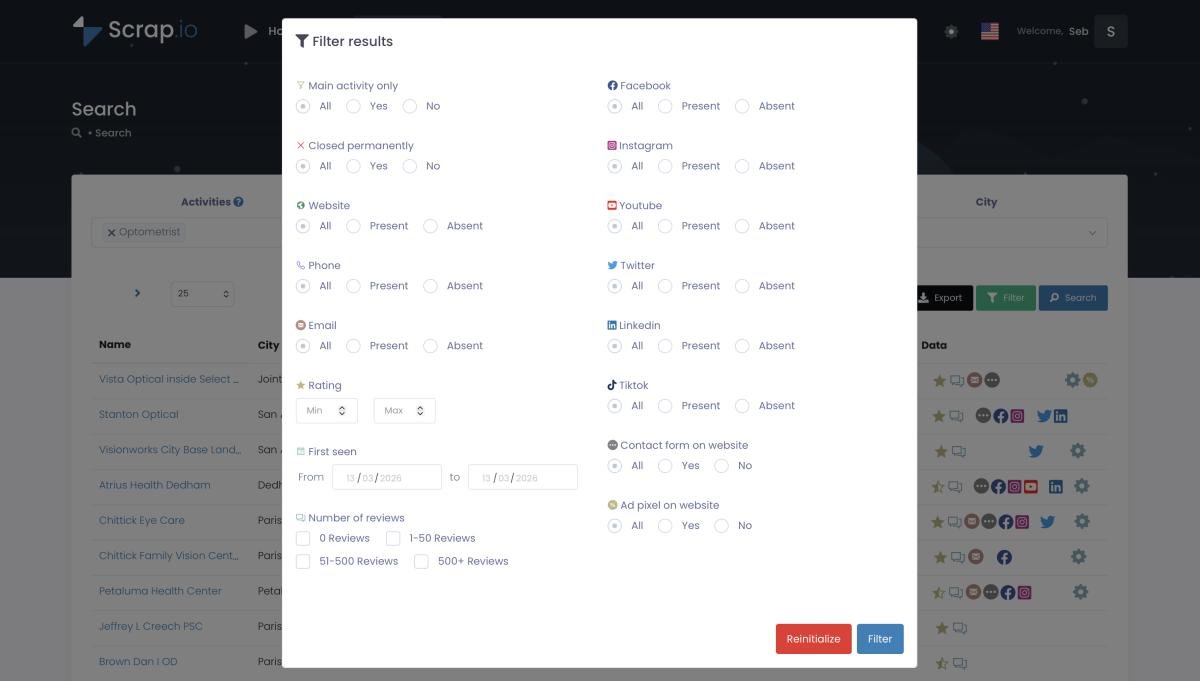
Step 2: filter by website, email, rating and more, before spending a credit.
Step 3. Export. Preview the exact count, then export to CSV or Excel with emails already classified (owner, contact, sales, and so on), ready to drop into a CRM or cold-email tool. One real client pulled 11,734 businesses in 45 minutes this way. The full no-code method is in the complete Google Maps scraping guide.
Local SEO for service area businesses
For an SAB, the map is your storefront. So local seo for service area business owners plays by slightly different rules than it does for a shop with a front door.
Proximity matters less. When customers don't travel to you, Google can't lean as hard on "how close is the searcher." So it leans harder on the other two pillars: prominence and relevance. In plain terms, service area business seo is won with reviews, a dialed-in primary category, and consistent NAP data (name, address, phone) across the web. A pest control company with 300 five-star reviews will outrank a closer competitor with 12. Reputation is the lever.
Two practical moves. First, build service-area pages on your own website, one per major zone, so your on-site signals back up the areas your Google Business Profile claims. Second, keep the profile alive: fresh photos, weekly posts, quick review responses. SAB results attract more spam than other categories, so an active, honest profile also signals to Google that you're the real deal. Boring? Sure. It also works. For a deeper checklist, BrightLocal's guide to local SEO for SABs is worth a read.
The competition is fierce, mind you. One thread on r/localseo summed up the whole game in a title: "Service-area businesses: Fight to become a location." Without a pin on the map, ranking is a grind. Reviews and relevance are how you win it.
Is it legal to extract SAB data?
Can you legally pull public data on thousands of service area businesses? Yes, with a few rules to respect.
The data on a Google Maps listing (business name, phone, category, website, publicly posted email) is public business information, not private personal data. That's the crux. GDPR in the EU and the CCPA in California both treat publicly available business contact details differently from personal data, and CCPA explicitly carves out public business info. Scrap.io only collects publicly posted business data, is GDPR and CCPA compliant, and keeps every data point traceable to its source.
The usual caveat still applies: how you use the data matters more than whether you collect it. If you send cold email, include an unsubscribe link and honor opt-outs. This is factual info, not legal advice, so if serious money's on the line, talk to an actual lawyer. But the collection itself, for public business data used in B2B prospecting? On solid ground.
FAQ
What is a service area business?
A service area business (SAB) is a company that travels or delivers to customers instead of serving them at a physical storefront, like a plumber, electrician, house cleaner, or mobile pet groomer. On Google Business Profile, an SAB can hide its street address and list the areas it serves.
Do service area businesses show up on Google Maps?
Yes. SABs appear on Maps and in local results, but because they hide their exact address, users can't request directions, which can dent engagement. Rankings still depend on the verified base location, not on the service areas you draw.
How many service areas can you add on Google Business Profile?
Up to 20 service areas (cities, postal codes, or regions), ideally within about a two-hour drive of your base. Adding distant areas you don't truly serve won't help you rank there.
What's the difference between a service area business and a storefront?
A storefront serves customers at a fixed location they visit. An SAB goes to the customer and shows no public address. A hybrid does both, like a restaurant with dine-in and delivery.
How can I find or build a list of service area businesses?
Search Google Maps by category (plumber, electrician, cleaner) and area, then export. A tool like Scrap.io extracts every SAB in a city, state, or country, with filters for no-website or verified email, in a couple of clicks and no code.
Stop hunting SABs one pin at a time
So there it is. A service area business is any company that comes to the customer instead of waiting for the customer to come to it, and it's the bucket most trades fall into. They hide their address, they skip a pin on the map, and a huge share of them run without a website at all. Which makes them frustrating to find one by one, and gold once you can pull the whole list.
That's the shift. Don't chase them across Google Maps a hundred results at a time. Start from a category and a zone, filter for exactly the ones you want, and export.
Generate a list of plumber with Scrap.io