

Video: Scrape Google Maps, how to limit results to the main category
A bowling alley showed up in my restaurant list last week. Not next to it. In it. Filed right between two Italian bistros in a fresh export, wearing the "restaurant" label like it belonged there.
It didn't. And that single bowling alley is the whole reason this guide exists, because your google maps scraper almost certainly does the same thing to you, quietly, on every run.
Here's the part nobody warns you about: the mess isn't a bug in the tool. It's baked into how Google Maps classifies businesses. Fix the filtering and you fix accuracy, cost, and your sanity in one move. So let's talk about what's actually happening under the hood, and the one toggle that ends it.
What is a Google Maps scraper? A Google Maps scraper is a tool that pulls public business data from Maps listings, name, address, phone, website, rating, reviews, then crawls the linked site for emails and social profiles. It hands you a clean CSV or Excel file for prospecting, market research, or CRM enrichment. The good ones filter before extraction, so you only pay for businesses that match.
Table of Contents
- Why 66% of Google Maps Scraper Results Are Wrong
- How Google Maps Categories Actually Work (Main Type vs Subtypes)
- The "Main Activity Only" Filter: Your Secret Weapon
- Beyond Category Filters: 8 Advanced Filters That Change Everything
- Google Maps Scraper Comparison: Filtering Features Across 5 Tools
- Real Results: How Businesses Use Filtered Data for Lead Gen
- Best Practices for Accurate Google Maps Data Extraction in 2026
- Is It Legal to Scrape Google Maps? Compliance Guide
- FAQ: Google Maps Scraper Filtering
Why 66% of Google Maps Scraper Results Are Wrong
Back to that bowling alley. You searched "restaurants in New York City" on your google maps scraper, you exported, you opened the file, and there it sits between two bistros. Serving pizza on Fridays, apparently. That qualifies it, as far as Google is concerned.
Not even close.
This isn't a glitch. It's how Google Maps works, and most people scraping business data have no clue it's happening. When you run a search for restaurants, Google doesn't return only businesses whose primary category is "restaurant." (Surprising, right?) It returns every listing that has "restaurant" as any category. Main type, subtype, fifth subtype down the stack, doesn't matter. If the word appears anywhere in the listing's category list, it shows up in your export.
The result? According to internal Scrap.io data across millions of extractions in 2026, 66% or more of unfiltered scrape results are false positives. This is an aggregate average across categories and cities, not a single-search figure. You asked for restaurants. You got cocktail bars, hotels with dining rooms, gas stations with a deli counter, and yes, bowling alleys.
And here's where it hurts. Every one of those irrelevant results costs you a credit on most scraping platforms. Export a few thousand "restaurants," then discover half of them aren't restaurants at all. That's not a data problem. That's a budget problem.
The web scraping B2B market is projected to hit $2.7 billion by 2027 (Grand View Research). More people than ever are pulling data from Google Maps. But if two-thirds of what you pull is noise, you're burning cash while your competitors go surgical.
So filtering isn't a nice-to-have. It's the entire game.
How Google Maps Categories Actually Work (Main Type vs Subtypes)
Let's back up and look at what's really going on. Google Maps tags every business with a main type (the primary activity) and up to 10 subtypes. That cocktail bar from earlier? Its main type is "Cocktail Bar." But one of its subtypes is "Restaurant," because it serves tapas alongside the drinks.
Here's the thing. When you scrape Google Maps for restaurants, most tools don't separate main types from subtypes. They dump everything into one pile. A gun shop with a small cafe corner? Restaurant. A hotel with room service? Restaurant. A shopping mall with a food court? You already know the answer. (We've seen all three in real exports.)
Scrap.io has indexed over 4,000+ categories on Google Maps, and the overlap between them is enormous. A single business can belong to several categories at once, and often does.
| Business Name | Main Type | Subtypes Include | Shows in "Restaurant" Search? |
|---|---|---|---|
| Joe's Italian Kitchen | Italian Restaurant | Restaurant, Pizza | Yes (correct) |
| The Velvet Lounge | Cocktail Bar | Restaurant, Bar | Yes (wrong) |
| Grand Hotel NYC | Hotel | Restaurant, Event Venue | Yes (wrong) |
| Lucky Strike Bowling | Bowling Alley | Restaurant, Entertainment | Yes (wrong) |
| QuikStop Gas | Gas Station | Restaurant, Convenience Store | Yes (wrong) |
See the pattern? Out of five results, one is actually a restaurant as its primary business. The other four are completely different companies that happen to serve food on the side.
And this isn't a niche annoyance. It hits every category, from plumbers to dentists to web agencies. The google maps data scraper you're using doesn't know the difference. Unless it has a very specific filter built for this exact problem.
(Spoiler: only one does.)
The "Main Activity Only" Filter: Your Secret Weapon
OK, so you get the problem. Every google maps scraper tool on the market returns messy data because Google's category system refuses to separate primary from secondary activities. What do you do about it?
Scrap.io built a filter called "Main Activity Only." Toggle it on, and the platform restricts results to businesses where your target category is their primary classification. Not a subtype. Not a secondary tag. The main thing they do.

Concrete example, refreshed with today's data. Search restaurants in New York City with no filter and Scrap.io counts 8,960 results. Turn on "Main Activity Only" and re-run: 3,736 results. (Counts pulled from Scrap.io on 27 August 2026, restaurant, New York, and counting is always free.) That's 5,224 irrelevant listings gone in one click, a 58% noise reduction on this specific search.
Wild.

But the real magic? You didn't pay for those 5,224 garbage results. Because Scrap.io applies filters before extraction, not after. Your credits only get consumed on businesses that actually match your criteria. Most other platforms extract everything first, then let you filter the CSV. By then you've already burned credits on bowling alleys.
Look, the pattern is always the same. Someone exports 10,000 listings, spends hours scrubbing the file, and ends up with maybe 3,500 usable contacts. With the Main Activity filter you export 3,500 clean results from the start. Same data quality, a third of the cost, zero cleanup. The math isn't complicated.
And no, this feature doesn't exist on any other google maps scraper. We checked. Apify doesn't have it. Outscraper doesn't have it. PhantomBuster, Octoparse, nope. This is the one filter unique to Scrap.io, and it solves the single biggest accuracy problem in Google Maps data extraction. If you work high-density metros where volumes explode, our guide on scraping densely populated areas like NYC goes deeper on the mechanics.
Try Scrap.io free for 7 days, 100 leads included. Toggle Main Activity Only, watch 8,960 results collapse to 3,736 real restaurants, and only spend credits on the ones that match. Start your free trial.
Beyond Category Filters: 8 Advanced Filters That Change Everything
The Main Activity filter fixes the biggest problem. But stop there and you're leaving money on the table. Scrap.io gives you 17 filters total, all applied before you spend a single credit. Here are the eight that matter most for accurate business data extraction from Google Maps.
Video: How to Extract Every Business in 1 Click (No Category)
| Filter | What It Does | Best Use Case |
|---|---|---|
| Digital Presence (website/email/phone) | Show only businesses with (or without) a website, email, or phone | Target businesses missing a website for web agency pitches |
| Phone Type (mobile/landline/special) | Classify phone numbers as mobile, fixed, or special | SMS campaigns targeting mobile contacts (note: unavailable in the US and Canada) |
| Review Count (min/max) | Filter by number of Google reviews | Find low-review businesses that need reputation help |
| Rating (1.0 to 5.0 range) | Set minimum or maximum star rating | Target struggling businesses (under 3 stars) for service pitches |
| Claimed Status | Show whether a listing is claimed by the owner | Unclaimed listings = owners not managing their presence |
| First Seen Date | When Scrap.io first detected the listing on maps | Target newly opened businesses, hot prospects |
| Duplicate Exclusion | Automatically exclude contacts from previous exports | Run weekly campaigns without re-exporting the same leads |
| Contact Form / Ad Pixel | Detect if a website has a contact form or runs paid ads | Ads = marketing budget. Contact form = guaranteed reachability. |
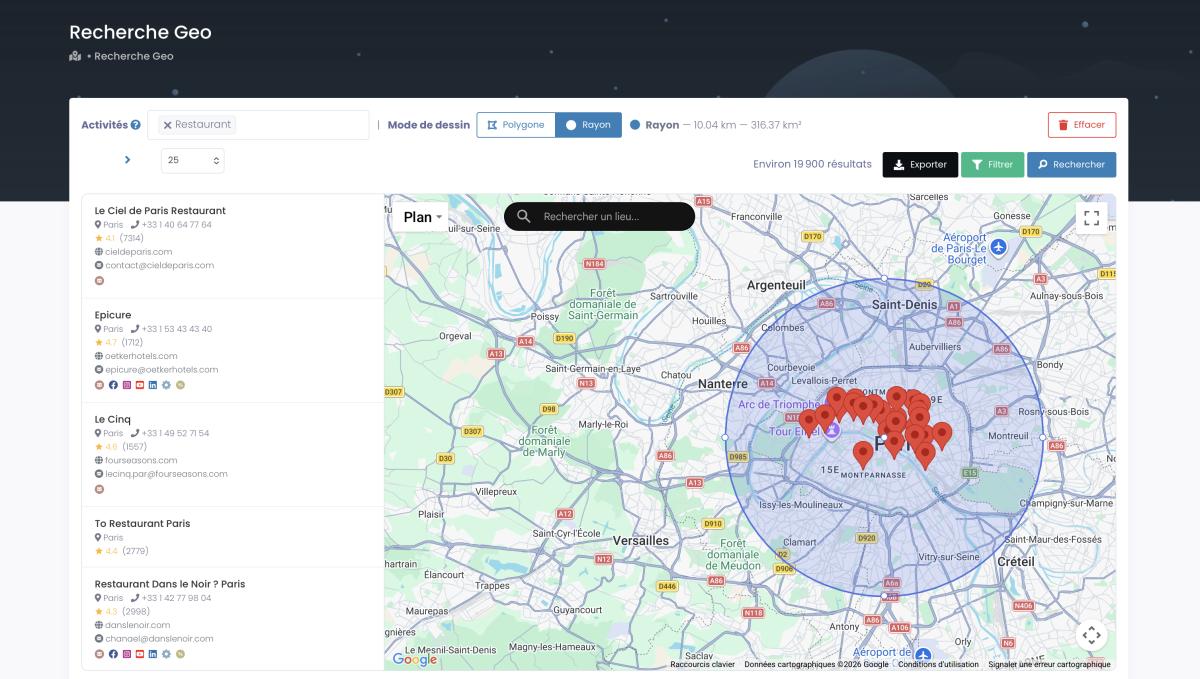
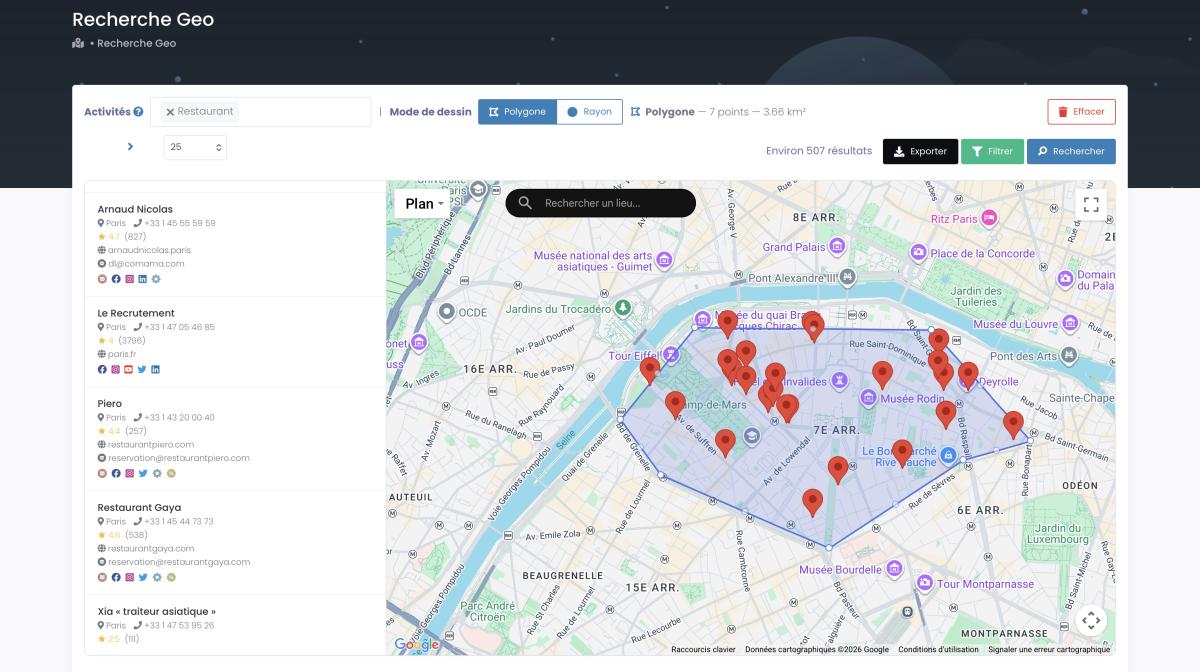
Oh, and one more thing: every filter is available on every plan. No feature gating. The difference between plans is geographic scope (city vs county vs state vs country), not filter access. When administrative borders don't match your service area, GeoSearch lets you draw a radius or a custom polygon straight on the map, and every filter still applies inside it.
Why does this matter so much? Because filtering before extraction means you only burn credits on qualified leads. A traditional google maps scraper charges you to export 10,000 records, then you discover half of them have no email. With Scrap.io you check "email: present" before you export, and your file only contains businesses with verified contact info. You can even extract every business in an area with no category at all, or segment your market with Maps filters like rating, reviews, and web presence before a single credit moves.
That's the difference between a prospecting tool and a data dump.
Google Maps Scraper Comparison: Filtering Features Across 5 Tools
Everyone claims to be the "best google maps scraper." Let's see who actually backs it up on filtering, the single most important feature for accurate business data extraction.
We tested five tools head to head: Scrap.io, Apify, Outscraper, Octoparse, and PhantomBuster. Same search, "restaurants, New York City." Here's what each one can actually do when it comes to filtering.
| Feature | Scrap.io | Apify | Outscraper | Octoparse | PhantomBuster |
|---|---|---|---|---|---|
| Main Activity Filter | Yes | No | No | No | No |
| Pre-Extraction Filtering | Yes | Limited | Limited | No | No |
| Phone Type Detection | Yes (excl. US/Canada) | No | No | No | No |
| Digital Presence Filters | Yes | Partial | Partial | No | No |
| Review/Rating Filters | Yes | Yes | Yes | No | No |
| Country-Level Extraction | Yes | No | Limited | No | No |
| Duplicate Exclusion | Yes | No | No | No | No |
| Real-Time Data | Yes | Yes | Partial | Yes | Yes |
A DEV Community benchmark from 2026 found that dedicated scraping tools hit a 94% success rate on Google Maps extractions, compared to 78 to 82% for general-purpose APIs. The takeaway? Specialized tools crush generalist ones.
And when you scan that table, one thing jumps out. Scrap.io is the only platform with a green light on every row. It's not that the others are bad. Outscraper is a solid platform, Apify is powerful for developers. But none of them solve the Main Activity problem, none of them filter before you pay, and none of them extract an entire country in two clicks. Want the receipts? We put the whole field through its paces in 10 best Google Maps scrapers, tested, ran our Octoparse vs Scrap.io test, and refereed Outscraper vs Apify too.
If all you need is a quick 50-listing scrape for a one-off, any tool works. But if you're building targeted lead lists at scale? The filtering gap between these tools is the difference between profitable campaigns and wasted money.
50,000+ professionals trust Scrap.io for accurate Google Maps data. 225,676,406 establishments indexed across 195 countries, refreshed in real time at every export. See why they switched.
Real Results: How Businesses Use Filtered Data for Lead Gen
Theory is nice. Money is better. So instead of dropping anonymous "case studies" you can't verify, here are three realistic persona scenarios, the kind of thing Scrap.io users run every week, and exactly how the filtering changes the outcome.
1. Picture a New York web agency pitching restaurant redesigns. They want restaurants, actual restaurants, not bars that serve tapas. Unfiltered NYC search: 8,960 results. Flip on Main Activity Only: 3,736 real restaurants. That 58% cut isn't just cleaner data, it means they never pay to export, then delete, 5,224 bowling alleys and hotel lobbies. Fewer credits, zero manual cleanup, a list that's ready to email the same afternoon.
2. Take a booking-software startup chasing auto repair shops. They need garages in Texas, Florida, and California, specifically ones with a website but no online booking system. Filter for "has website," layer on "has contact form," and the export lands pre-qualified instead of raw. Compare that to dumping 130,000 mixed results and sorting by hand. One is a campaign. The other is a weekend you'll never get back.
3. Think about a roofing contractor targeting commercial property managers. Filter for businesses with a website (to confirm legitimacy) and fewer than 20 reviews (to catch smaller properties), and the cold outreach hits the right inboxes instead of landscapers and plumbers who happen to also do roofing. Filtering doesn't build the business. It just clears the noise that was burying the signal.
Meanwhile, real people keep hitting the same unfiltered-data wall. On Reddit r/webscraping, one user put it bluntly: "Every time I scrape for restaurants, I get bars, nightclubs, bowling alleys." A Quora thread echoed it: "90% of my exports needed manual cleanup before I found proper filtering tools." And on AppSumo, someone nailed it: "I wish there was a simple toggle to only get the primary business type."
That toggle exists now. Has for a while, actually.
Google Maps lead generation delivers a cost per lead of $2 to $15 (CazaLead, 2026), compared to $50 to $150 on LinkedIn. And filtered Google Maps campaigns show an average 300% ROI (LeadLu, 2026). But those numbers only hold if your data is clean. Export 10,000 unfiltered leads and hand-sort them for three days? Congratulations, you've built the most expensive spreadsheet in history. Garbage in, garbage out, the oldest rule in sales.
Best Practices for Accurate Google Maps Data Extraction in 2026
Alright, rapid fire. These come from watching thousands of campaigns run through the platform, and seeing which ones actually convert.
Always toggle Main Activity Only. I can't stress this enough. Unless you specifically want subtypes (rare), this is your default. Every single time.
Filter for email presence before export. There's zero point paying for leads you can't contact. Check "email: present" and you only export businesses where Scrap.io found at least one email on their website. Same logic applies to phone numbers for cold calling.
Use "First Seen" to target new businesses. Newly opened businesses respond more often because they're still building a client base. The "First Seen" filter surfaces listings detected in the last 30, 60, or 90 days. Fresh opportunities. (I was going to say "fresh meat," but that felt aggressive.)
Exclude duplicates across campaigns. Running a monthly scraping campaign? Turn on duplicate exclusion so you never export the same contact twice. Zero overlap between your January and February lists.
Combine filters for surgical targeting. Main Activity Only + email present + rating between 2.0 and 3.5 + fewer than 15 reviews = businesses that are struggling, reachable, and desperate for help. That's a qualified list that practically sells itself.
And one more. Validate a sample before scaling. Export 100 filtered results, eyeball 10 to 15 of them. If the data matches expectations, scale to thousands. If something's off, adjust the filters. Ten minutes. Saves hours.
Is It Legal to Scrape Google Maps? Compliance Guide
Short answer: yes, for publicly available business data.
The hiQ Labs v. LinkedIn case (9th Circuit, 2022) established that scraping publicly accessible data doesn't violate the Computer Fraud and Abuse Act. The Supreme Court's Van Buren decision (2021) narrowed the CFAA further: it targets insiders exceeding authorized access, not outsiders viewing public pages. And in Meta v. Bright Data (2024), Meta dropped its claims against scraping of logged-out public data.
Google's Terms of Service do prohibit scraping. But a ToS violation is a contractual dispute, not a crime. Courts have drawn that line repeatedly. Different animals entirely.
For GDPR in Europe, B2B contact data (business phones, company emails) is typically processable under legitimate interest. For CCPA in California, publicly available business information falls outside its scope. Just make sure your cold outreach includes an unsubscribe link and your physical address, per CAN-SPAM.
Want the deep dive with case law and specific examples? Is it legal to scrape Google Maps? Full 2026 guide.
Scrap.io operates fully within legal boundaries, GDPR and CCPA compliant, only processing publicly available business data. Every data point is traceable to its source. (This is factual information, not legal advice, so if serious money is on the line, talk to an actual lawyer.)
Video: Scrap.io, How to Start?
FAQ: Google Maps Scraper Filtering
What is a Google Maps scraper?
A google maps scraper is a tool that automatically extracts public business data from Google Maps listings, name, address, phone, website, rating, reviews, then crawls the linked website for emails and social profiles, and hands it back as a CSV or Excel file. A serious one gives you 30+ fields per business and lets you filter before extraction, so you only pay for records that match your target. Weak ones just dump raw listings.
Can you get caught scraping Google Maps?
For public business data, there's nothing to "get caught" doing, it's legal under US case law (hiQ v. LinkedIn, Van Buren, Meta v. Bright Data). Google's ToS prohibit scraping, so aggressive live scraping can get an IP temporarily blocked, but that's a contract matter, not a criminal one. A compliant tool like Scrap.io only processes publicly available business data and keeps every point traceable to its source, which sidesteps the issue entirely.
Can Google Maps be scraped legally?
Yes. Multiple US court rulings (hiQ v. LinkedIn, Van Buren v. US, Meta v. Bright Data) confirm that scraping publicly available business data is legal. Google's ToS prohibit it, but ToS violations are civil matters, not criminal ones. For B2B lead generation using public business info, you're on solid legal ground. Full breakdown: legal guide.
What is the "Main Activity Only" filter?
It restricts your google maps scraper results to businesses where your target category is their primary classification, not a secondary subtype. Restaurants search in NYC without it: 8,960 results (including bars, hotels, bowling alleys). With it: 3,736 results that are actually restaurants, a 58% cut on that search. Only available on Scrap.io.
What is the best Google Maps scraper for accurate data in 2026?
Scrap.io. It's the only google maps scraper tool with a Main Activity filter, pre-extraction filtering (you don't pay for data you don't need), and country-level extraction. 225 million+ listings indexed across 195 countries, 10,000 queries per minute, and 30+ data fields per business. For a wider field test, see our 10 best Google Maps scrapers, tested. For Chrome extension options, Scrap.io's Maps Connect extension is free and unlimited.
How do I filter Google Maps scraper results by business type?
On Scrap.io: select your target category from 4,000+ options, choose your location (city to country level), toggle "Main Activity Only" to yes, apply additional filters (rating, reviews, email presence), then export. The whole thing takes under 3 minutes. For a step-by-step comparison with other tools, we've published detailed walkthroughs.
Is there a free Google Maps scraper with filtering?
Scrap.io offers a 7-day free trial with 100 export credits, all filters included, no feature restrictions. The Maps Connect Chrome extension is 100% free and unlimited, showing emails and social profiles directly on Google Maps. For basic scraping without filtering, free Chrome extensions exist but cap around ~120 results with no email extraction. Free tools fail on freshness and filtering, not price, that's the whole game.
Stop wasting credits on irrelevant data. Try Scrap.io free, 7 days, 100 leads, all 17 filters included, across 225M+ businesses in 195 countries. Start now.
Generate a list of restaurant with Scrap.io