

A bakery owner told us she'd been filed under "Pastry shop" for three years. Three years. Then she flipped her primary category to "Bakery" and watched her Maps calls climb the very next month. Same shop, same croissants, same street. One word changed, and Google finally started showing her to the people actually searching for bread.
That's the thing nobody warns you about with Google Maps categories. They look like a cosmetic label you pick once and forget about. They're actually the single biggest ranking lever you fully control, and there are more than 4,000 of them.
So here's what this page is: the complete, browsable list of every Google Business Profile category Google currently recognizes, plus the part the directory sites skip. How to choose the right one. And how to pull every business inside a category when you need leads, not just a name. Grab a coffee. This is the reference you keep re-Googling.
- What are Google Maps categories?
- Google Maps, Google My Business, Google Business Profile: same categories?
- How many Google Maps categories are there in 2026?
- Primary vs. secondary categories: how to choose
- How to find and change your category on Google Business Profile
- The complete list of Google Maps categories (4,000+)
- Beyond the list: how to extract every business in a category
- Google Maps categories and local SEO: do they affect ranking?
- A note on data, compliance & sources
- FAQ
What are Google Maps categories?
A category is Google's answer to one blunt question: what is this business? Not what it sells. What it is. Pick the label, and you've told Google's local algorithm which searches you're even allowed to compete in.
Most businesses get it wrong on the first try. They reach for the broad, comfortable option ("Contractor," "Store," "Consultant") and quietly blur themselves into a crowd of thousands. A vague category is a vague signal. And a vague signal loses to a precise one every single time.
Think of it as the door you stand in. "Mexican restaurant" opens onto people craving tacos tonight. "Restaurant" opens onto everyone and no one. Same kitchen, wildly different traffic. This is the whole business category list problem in one sentence: specificity is relevance, and relevance is rank.
Categories vs. services vs. attributes
Three fields get muddled constantly, so let's untangle them once. Your category is what your business is (Plumber). Your services are the specific jobs you do (drain cleaning, water-heater install, leak detection). Your attributes are the extra details (open 24 hours, women-owned, wheelchair accessible).
Categories answer what you are. Everything else describes how you operate. Mix them up and you'll stuff a service into the category field, dilute your signal, and wonder why you're invisible. Don't. If you want business category examples that actually rank, they all share one trait: they name the thing, not the task.
Google Maps, Google My Business, Google Business Profile: same categories?
Short answer: yes.
Google renamed Google My Business to Google Business Profile back in 2022, and half the internet still says "GMB" out of habit. The name changed. The taxonomy didn't. The google my business categories you set are the exact same google maps categories that show on the map, pulled from one shared list.
So if you've been searching "gmb categories" versus "google business categories list" and worrying they're different systems, relax. One taxonomy, three names that people use interchangeably. Same list. Promise.
How many Google Maps categories are there in 2026?
There are over 4,000 Google Maps categories in 2026. Google doesn't publish an official, downloadable list, and it quietly adds, merges, and retires categories every month, so the exact count drifts. But it consistently sits north of 4,000 distinct business types.
Why no official list? Honestly, probably because a public file would get gamed within a week. Local SEO agency Sterling Sky tracks the US dashboard at around 3,956 categories and notes Google reshuffles it constantly, adding new ones on a roughly monthly cadence. The scraping tool Outscraper puts the ceiling even higher, arguing there are "5,000+ but the top 500 account for 99% of the data." Both can be true. The long tail is enormous and mostly empty.
Want to see the whole thing? Tools like PlePer's category browser regenerate the current list, and we've appended the full 4,000+ set further down this page. There's no google maps categories list pdf from Google itself, so a browsable page is the closest you'll get to a canonical reference.
Primary vs. secondary categories: how to choose
Picture a bakery that also sells great coffee. Primary category: Bakery. Secondary: Coffee shop. Get that order right and you win "bakery near me" while still surfacing for the occasional latte hunter.
Flip it, set Coffee shop as primary, and you've just entered a knife fight with every Starbucks in a two-mile radius. Wrong race. Worse odds. The primary is where the ranking weight lives, so it has to describe the one thing you most want to be found for.
Why your primary category drives local ranking
Your primary category is the heaviest single input in the local pack. Heavier than your review count. Heavier than your bio. Heavier than that backlink you paid someone for. BrightLocal ranks the primary Google Business Profile category as the top local-ranking factor, full stop, and their guidance is blunt: get it right or nothing else you do matters much.
And here's the uncomfortable part. You could out-review, out-blog, and out-optimize a competitor and still lose to them because their primary category is a tighter match than yours. That's how much it weighs. Choosing the best google business profile category isn't a nice-to-have. It's the whole foundation.
How many secondary categories can you add? (Up to 9)
One primary. Up to nine secondary categories, per Google Business Profile Help in 2026.
Nine sounds generous, so people cram all nine slots and call it "optimization." Bad move. Every irrelevant secondary you bolt on dilutes your relevance instead of boosting it. Can you have more than one category on Google Maps? Absolutely. Should you max them out just because you can? Only if every single one is genuinely true.
5 rules for picking the right Google Business Profile category
Here's the whole decision, boiled down:
- Be specific, not broad. "Mexican restaurant" beats "Restaurant." Every time. Specificity is relevance.
- Describe what you are, not what you do. Category equals identity. Services go in the services field, where they belong.
- One primary, chosen ruthlessly. If you could only rank for a single search, which would it be? That's your primary. Done.
- Only add secondaries that are genuinely true. Nine slots is a ceiling, not a target. Leave the fake ones empty.
- Match what customers actually type. If nobody searches "artisanal bread atelier," that label helps exactly no one. Not even you.
And if you're staring at "what is my business category" wondering where you fit, apply the "Is vs. Has" test: your category is what your business is, never what it has. A hotel that has a restaurant is still a hotel.
| Primary category | Secondary categories | |
|---|---|---|
| How many | Exactly 1 | Up to 9 |
| Ranking weight | 🟢 Highest single signal | 🟡 Supporting, lighter |
| What it should be | The one thing you are | Other genuine offerings |
| Risk if misused | 🔴 Wrong race entirely | 🔴 Diluted relevance |
Real talk from the field: on r/GoogleMyBusiness, owners swap the same story on repeat, they changed a single primary category and their ranking jumped within weeks. Anecdotal? Sure. Consistent? Also yes.
How to find and change your category on Google Business Profile
Good news: changing it takes about ninety seconds, and you don't need a developer, an agency, or a prayer. Here's the exact path.
- Search your business name on Google, or open Google Maps while signed in to the account that manages the listing.
- Click Edit profile.
- Open the Business category section.
- Edit your Primary category, then add or remove Additional categories (up to nine).
- Save. Changes usually appear within minutes, sometimes after a short review.
That's it. While you're in there, it's worth doing a proper pass on the rest of the profile too, our guide to optimize your Google Business Profile covers the photos, services, and attributes that compound on top of a good category. And if you're brand new to the data side of all this, the two-minute walkthrough below shows how the pieces fit together.
Video: Scrap.io - How to Start?
Curious what a category looks like from the data side, not the dropdown? See how many businesses sit inside any category, on any city, state, or country, before you spend a cent. Explore the data free on Scrap.io, 100 leads included. Counting results costs zero credits.
The complete list of Google Maps categories (4,000+)
Here it is, the part you actually came for. Below is the full, browsable list of google maps categories, sorted by how often each one appears across real listings (most common first). Hit Ctrl+F (or Cmd+F on a Mac) and search your niche, it's faster than scrolling.
This google business categories list is generated from the same 4,000+ categories that power Scrap.io's database of 225,676,406 businesses across 195 countries. It's as close to a canonical google my business category list pdf as you'll find, minus the PDF. Skim it, find your fit, then keep reading, because the list is only half the story.
Beyond the list: how to extract every business in a category
Now flip the whole thing on its head. A category isn't just a label you pick for your own listing. It's a door to every other business behind it.
"Restaurant" isn't a word. It's 667,454 restaurants indexed in the US alone (Scrap.io, real-time, September 2026). "Plumber" is 76,407 of them, sitting there with addresses, phone numbers, ratings, and very often an email hiding on their website. Every category on that list above is a ready-made prospecting universe. The only question is how you pull it.
Video: How to Scrape Local Leads at the Country Level
From category to lead list in 2 clicks
The workflow is almost insultingly simple. Pick your category (or several, crossed together). Pick your zone, a city, a county, a whole state, an entire country. Click. Export a clean CSV or Excel file with names, phones, emails, social profiles, ratings, the works.
No Python. No proxies. No 2 a.m. debugging session because a scraper broke overnight. You do this without writing a single line of code, and one real user pulled 11,734 businesses in 45 minutes doing exactly this. Try that by hand. I'll wait.
Video: How to Extract Every Business in 1 Click (No Category)
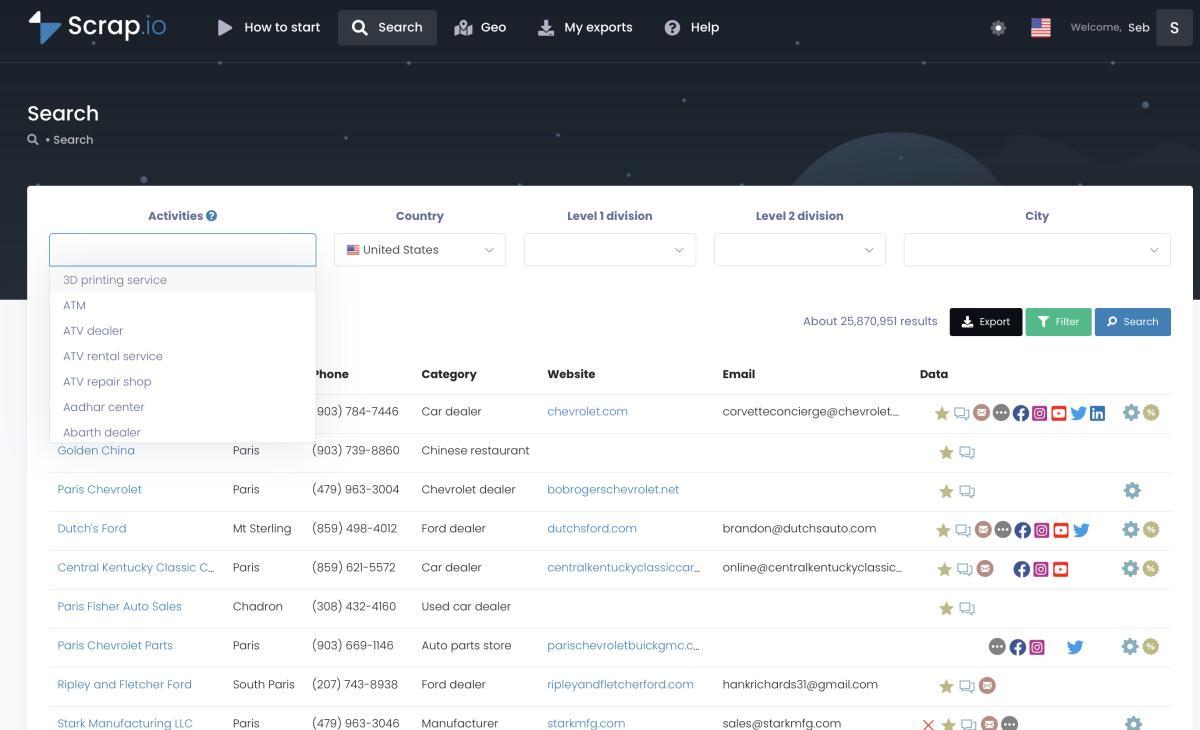
This is where a category quietly turns into a pipeline. Want to build lead lists by industry across a whole region, or generate Google Maps leads at scale for an entire country? Same two clicks, bigger zone. And if you'd rather talk to your data than click through menus, you can use Scrap.io inside your AI (MCP) and just say "find me every roofer in Texas without a website" in plain English. Wild that this is normal now.
Filter before you extract
Here's the trick most tools get backwards. They make you extract everything first, then delete the junk afterward, the closed businesses, the ones with no email, the duplicates you already contacted last month. You pay for all of it. Then you bin most of it.
That's a waste.
Filter first. Before a single credit is spent, narrow to exactly what you can use: email present, mobile number only, no website (gold for web agencies), minimum rating, claimed or unclaimed, runs an ad pixel or doesn't. Out of those 667,454 US restaurants, 199,311 have an email on file, so if email is what you need, why pay for the other 468,000? The filters run at the source, so you only spend on contacts you'll actually use. Our full filter your results before extracting guide goes deep on this, but the principle is dead simple: filter before you extract, or you're just buying garbage to throw it away.
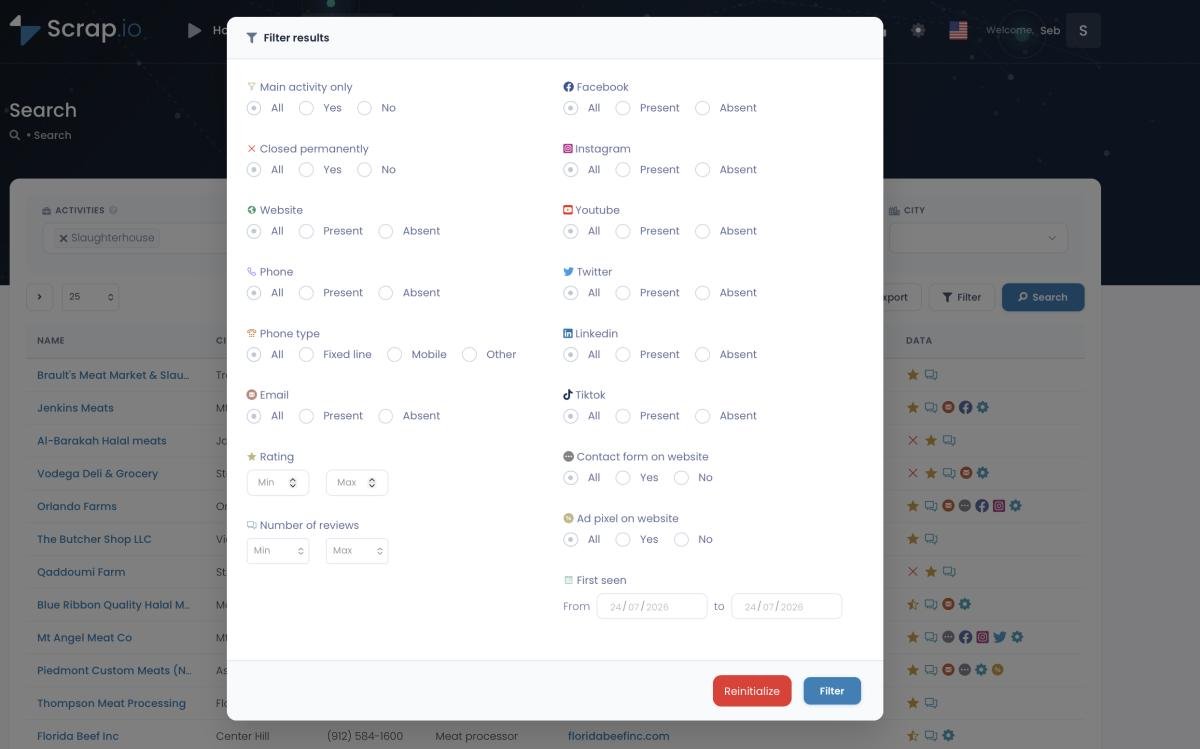

Go from a category name to a filtered lead list in two clicks. Pick "plumber," pick "Texas," filter for "has email, no website," export. Real-time data on 225M+ businesses, filtered before you pay. Start free, 7 days, 100 leads included.
Google Maps categories and local SEO: do they affect ranking?
Strongly. Your primary category can move you more than a hundred backlinks ever will.
Google's local algorithm weighs three things: relevance, distance, and prominence. Your category is the relevance signal, and relevance is the gate you pass through before proximity and reputation even get a vote. Pick a fuzzy category and you fail the relevance test before the race starts. Pick a sharp one and you're suddenly in contention for searches you were invisible for yesterday. If ranking is the goal, start here, then layer on the rest with our guide to how to rank higher on Google Maps.
There's a prospecting angle too, and it's the one competitors miss entirely. Once you can extract a whole category across a precise zone, you can map your own competitive landscape, every business in your niche, their ratings, their review counts, whether they even have a website. Draw a radius around your city or sketch a custom polygon around a neighborhood, and you've got a live economic map of your market. Most people never think to look.
50,000+ professionals already use Scrap.io, rated 4.8 on Capterra and 4.9 on G2, to turn Google Maps categories into real prospecting data across 195 countries. See what it pulls for your niche, free for 7 days.
A note on data, compliance & sources
Quick, honest word on where this data comes from, because it matters. Everything Scrap.io extracts is publicly available business information, the same details you'd see clicking a listing yourself. It's GDPR (EU) and CCPA (California) compliant, every data point is traceable to its source, and the category taxonomy itself mirrors Google's own structure, cross-checked against the official place types in the Places API.
Public data. Lawful use. Clean trail. That's the standard, and it's non-negotiable, no scraping of private data, no logins bypassed, no shady sourcing. If you want the deeper picture on how the extraction actually works, here's how to extract all businesses from Google Maps and how to scrape Google Maps without Python, both cover the mechanics without the hand-waving. For the full method breakdown, see our guide on how to scrape Google Maps in 2026.
FAQ
How many categories are there on Google Maps?
Over 4,000 in 2026. Google doesn't publish an official, downloadable list and updates it regularly, so the exact number shifts month to month, but it consistently sits above 4,000 distinct business categories.
How do I add or change a category in Google Maps / GBP?
It takes about a minute:
- Open your business on Google Search or Google Maps while signed in.
- Click Edit profile.
- Go to the Business category section.
- Set your Primary category and add up to nine Additional categories.
- Save, changes appear within minutes.
What should I put for my business category?
Use the "Is vs. Has" rule. Your category is what your business is, not what it has or does. A hotel with a restaurant is a Hotel (primary), not a Restaurant. Pick the most specific label that completes "This business is a ___," and keep it honest.
Can I have more than one category?
Yes. One primary category plus up to nine secondary categories. The primary carries almost all the ranking weight, so choose it ruthlessly, and only add secondaries that genuinely describe what you offer. Stuffing all nine slots with loose matches dilutes your relevance rather than boosting it.
How do I extract every business in a category?
Pick a category (or several), pick a location from a city up to a whole country, filter for what you need (email present, no website, minimum rating), and export a CSV or Excel file, no code required. A tool like Scrap.io pulls the data in real time and applies filters before you spend a credit. Counting how many businesses sit in a category is free.
Businesses Categories Sorted By Number Of Appearances
The complete, browsable list of 4,000+ Google Maps categories (sorted by number of appearances) is published in full on the live article page. Use Ctrl+F / Cmd+F to search it by niche.
The takeaway
One word in a dropdown decides which searches you win. That's the entire story of these categories, undervalued, overlooked, and quietly running the show. Pick a precise primary. Add only the secondaries that are true. Then revisit it like you'd revisit any asset that drives revenue, because it is one.
And the moment you stop seeing a category as a label and start seeing it as a doorway to thousands of businesses, that list above stops being a reference and becomes a prospecting map.
So stop browsing categories and start extracting them. Pick your category, filter before you pay, and walk away with a fresh, real-time lead list. Try Scrap.io free, 7 days and 100 leads included, no commitment, cancel anytime.
Generate a list of hotel with Scrap.io