

📋 What's in This Guide
- What Is Google Maps Satellite View (and How Does It Work)?
- How to Switch to Satellite View on Google Maps (Desktop & Mobile)
- Google Maps Street View: Explore the World at Street Level
- Satellite View of My House — How to Find It
- How Often Does Google Maps Update Satellite Imagery?
- Historical Satellite Imagery — How to Travel Back in Time
- What's New in 2026 — Immersive Navigation & AI Imagery Search
- Google Maps vs Google Earth — Which One Should You Use?
- Business Uses of Satellite & Street View
- FAQ
One billion monthly users. 170 billion Street View images. 87 countries and counting. Those are real numbers, by the way — straight from Google.
And yet? I'd bet most of those billion people have never toggled past the default map. They type an address, grab their directions, and close the app. Which is a shame, because Google Maps satellite view has quietly become one of the most insanely detailed windows into our planet that's ever existed. And it keeps getting wilder — Google dropped what they're calling the biggest Maps navigation overhaul in a decade back in March 2026.
The thing is, there's a ton of confusion around this stuff. People don't realize you can view historical satellite imagery going back to 1984. They mix up Google Maps and Google Earth constantly. They wonder whether they're watching a "live feed" of their roof (spoiler: they're not). And barely anyone has played with the new Immersive View 3D features.
So I figured I'd put together everything worth knowing about Google Maps satellite view in one place. We'll go from the dead-simple basics — like how to actually switch to satellite mode on your phone — all the way to the new AI imagery search in Google Earth that lets you find algae blooms in rivers using plain English. Wild times.
What Is Google Maps Satellite View (and How Does It Work)?
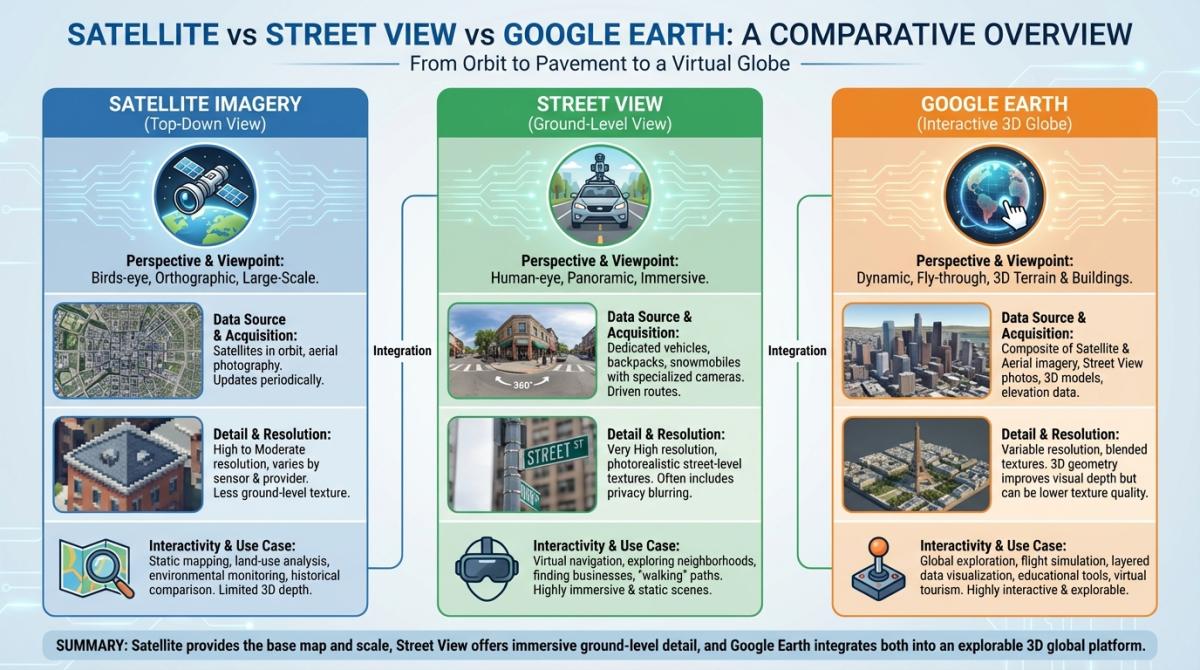
When you switch Google Maps to satellite mode, the colorful cartoon streets disappear. In their place: actual photographs of Earth. Real buildings. Real trees. The parking lot at your local Walmart with tiny cars in it. It's a bird's eye view — or more accurately, a satellite's eye view — stitched together from thousands of overhead images.
Here's something most people don't think about. Google doesn't have its own satellites. Not a single one. The imagery gets pieced together from more than a thousand different sources — commercial satellite operators like Maxar, aerospace companies like Airbus, government programs like NASA and Landsat Copernicus, plus actual airplanes taking aerial photographs. Different providers, different times of day, different weather conditions, all mashed into one seemingly continuous image. Honestly, the fact that it looks seamless at all is kind of a miracle.
Quick rundown of all the view modes, because people always mix these up:
- Map view — the default. Flat, colorful, simplified street map. What 90% of people use 100% of the time.
- Satellite view — real overhead imagery. Actual photographs of what's on the ground.
- Terrain view — topographic stuff. Elevation, mountain ridges, valleys. Hikers love it, everyone else forgets it exists.
- Hybrid view — satellite imagery with street names and labels overlaid on top. Probably the most useful and the most underused.
Google Maps satellite coverage extends across 220+ countries and territories. Basically everywhere. The resolution varies a lot though — downtown Manhattan looks crisp enough to spot fire hydrants, while some patch of farmland in central Mongolia... not so much.
How to Switch to Satellite View on Google Maps (Desktop & Mobile)
I know, I know — this sounds like it should be obvious. But I've watched enough people fumble with this that it's worth spelling out. Plus Google keeps moving the buttons around, which doesn't help.
Desktop — here's all you do:
- Go to maps.google.com
- Bottom-left corner — there's a little square thumbnail labeled "Layers"
- Hover over it (or click)
- Hit "Satellite"
- Done. Whole map flips to aerial imagery instantly.
Getting satellite view on Google Maps mobile is just as straightforward:
- Open the Google Maps app on your phone
- Top-right — tap the layers icon (looks like stacked diamonds)
- Under "Map type," select "Satellite"
- That's literally it
One thing that bugs me — there's no way to make satellite your permanent default view. You'd think after 20+ years they'd let you set that. Best workaround on desktop: bookmark the URL while you're already in satellite mode. On mobile you're stuck toggling every time. Mildly annoying.
Oh, and if your Google Maps satellite view is not working — images not loading, everything grey — it's almost always a browser cache thing. Clear it. Or try a different browser. On the app, just make sure it's updated. Boring fix, but it works 99% of the time.
Google Maps Street View: Explore the World at Street Level
Satellite gives you the overhead perspective. Google Maps Street View does the opposite — it sticks you right at ground level, in a 360-degree panorama, like you're standing on the sidewalk.
The scale of what Google has built here is genuinely absurd. 170+ billion images. Over 10 million miles of roads photographed. 87+ countries with Google Street View coverage. They've driven cars, strapped cameras to backpacks, loaded them onto camels (yes, camels — for the desert stuff), boats, snowmobiles, even a guy in the International Space Station. Almost twenty years of nonstop capturing.
Using it is simple. On desktop, you grab the little orange person — that's Pegman, Google's oddly charming mascot — from the bottom right and drag him onto any road highlighted in blue. Drop him, and you're in. On mobile, tap a spot, then tap the small Street View preview that pops up at the bottom.
Coverage-wise, things keep expanding. In 2025 alone, Google rolled out first-ever Street View in Vietnam and Nepal, and added fresh imagery for Kuwait, Kosovo, and Georgia. So if you tried checking some remote country a few years back and got nothing — might be worth another look.
Street View in 3D — Immersive View
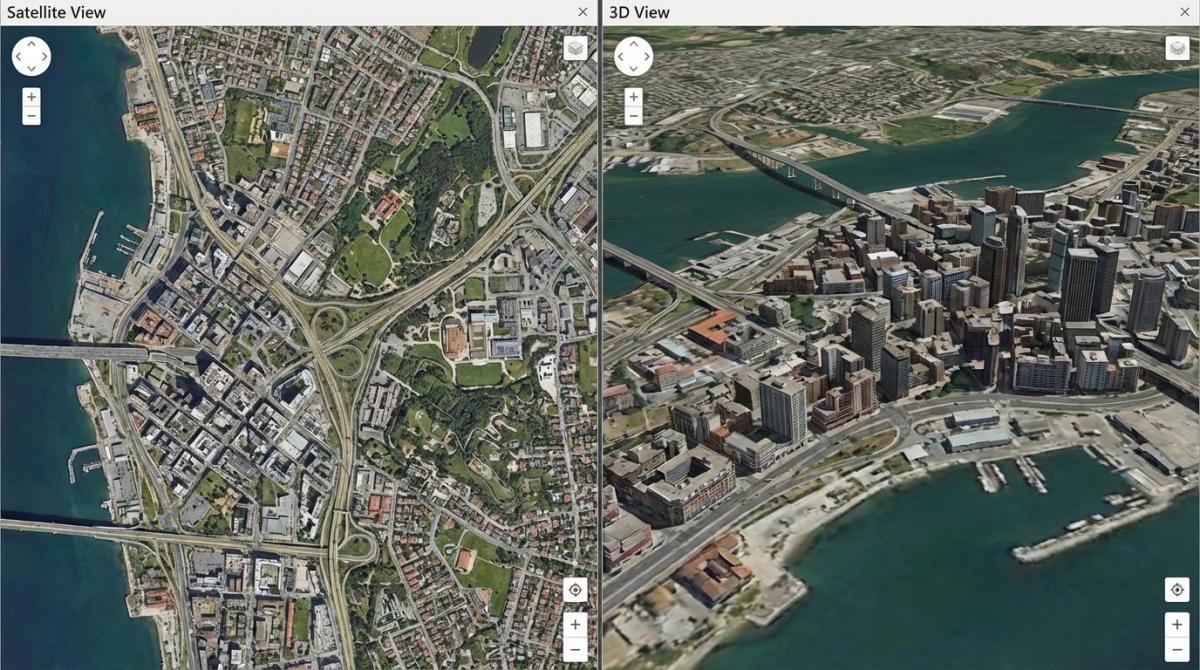
Now, Google Maps Street View 3D is a different beast entirely. Officially they call it "Immersive View," and it's... kind of like being inside a very detailed video game? Instead of clicking through flat panoramic photos, you get this smooth, photorealistic 3D flythrough that blends satellite imagery, Street View captures, and aerial data into one continuous experience.
Available right now in Amsterdam, Barcelona, London, New York, Paris, San Francisco, Tokyo, and a growing list of other cities. If you haven't tried it yet, seriously — go play with it. It's the kind of thing that makes you go "wait, this is free?"
Satellite View of My House — How to Find It
Alright. Let's talk about what everyone actually googles: "satellite view of my house." I get it. There's this oddly satisfying feeling of zooming into your own roof from space. Like some kind of low-budget spy movie.
The process couldn't be simpler:
- Open Google Maps (browser or app)
- Search for your address
- Switch to satellite view
- Zoom in until you run out of detail
What you'll actually see depends heavily on where you live. Major metro areas and their suburbs? Google Maps satellite view resolution can hit roughly 15 centimeters per pixel. That's enough to spot your car in the driveway, your above-ground pool, maybe even your lawn furniture. Rural areas and middle-of-nowhere locations get much blurrier imagery. That's just how it works — satellite companies prioritize where the demand is.
Now — and I cannot stress this enough — Google Maps does not show a live satellite view. The "google maps live satellite view" thing is a myth that refuses to die. What you're seeing is a static snapshot, usually somewhere between a few months and a few years old. There's no livestream of your backyard. Satellites orbit at 17,000+ mph. They take snapshots, not video. And even if they could stream live footage... the privacy implications alone would shut it down in about five minutes.
Need something closer to real-time? You're looking at paid commercial services — SkyFi, OnGeo, EOS Data Analytics. They'll sell you near-current imagery, but it ain't cheap. For checking whether your neighbor finally took down their Christmas lights in March? Regular Google satellite view works fine.
How Often Does Google Maps Update Satellite Imagery?
"How often does google maps update satellite images?" — probably the second most-asked question after the house one. And the frustrating answer is: it depends entirely on where you are.
| Zone Type | Typical Update Cycle | Examples |
|---|---|---|
| Dense urban areas | Every 1–3 years | NYC, London, Tokyo, LA |
| Rural & suburban | Every 3–5 years | Small towns, farmland, outskirts |
| Disaster & crisis zones | Near real-time (days to weeks) | Earthquake zones, wildfire regions |
What determines priority? A bunch of stuff. Population density matters most. User demand — if millions of people are searching for a specific area, Google will refresh it sooner. Cloud cover screws things up too, since satellites can't shoot through thick clouds. And some regions have government restrictions on high-res imagery for national security reasons.
Want to check when the imagery was last captured? Google Earth Pro (the free desktop app) is your best bet. Look at the status bar at the bottom — it shows the capture date. Google Maps itself is annoyingly inconsistent about displaying dates, which has been a complaint from users for years.
And no — you cannot request that Google update the satellite imagery for your area. I've seen people ask this on Reddit constantly. Google doesn't take individual requests. You can hit "Send feedback" in Maps to report severely outdated or incorrect imagery, and maybe that factors into their prioritization queue somehow. But don't hold your breath.
Historical Satellite Imagery — How to Travel Back in Time
This might be my favorite feature that almost nobody uses. Google Earth has access to Google Maps satellite view history — historical satellite imagery stretching all the way back to 1984. Forty-plus years of overhead imagery. You can literally watch your neighborhood evolve from open fields to strip malls.
Two ways to get at it:
- Google Earth Pro (desktop app, free): There's a little clock icon in the toolbar. Click it, and a timeline slider appears across the top. Drag it left to travel backwards through decades of historical satellite images. Watch Dubai go from empty desert to skyscraper city. Watch Amazon rainforest patches shrink. It's mesmerizing and, frankly, a little unsettling sometimes.
- Google Earth web version: They finally added historical imagery to the browser version in June 2025. So now you don't even need to install software.
Use cases are all over the place. Urban planners track sprawl. Environmental scientists monitor glaciers and coastlines. Real estate investors compare how a neighborhood looked five or ten years ago before buying. Insurance companies use it for claims. Even just poking around — seeing what your street looked like in 1995 — it's weirdly addictive. Fair warning.
What's New in 2026 — Immersive Navigation & AI Imagery Search
March 2026 was a big deal. Google didn't just tweak a few things — they announced what they're calling their most significant navigation update in 10+ years. Here's what actually changed.
Immersive Navigation. This is the flagship feature. Imagine replacing the flat blue navigation line with a full photorealistic 3D render of the streets around you. Buildings with actual textures. Pedestrian crossings. Traffic lights. Lane markings. All rendered in real-time as you drive, powered by Google's Gemini AI combined with years of Street View and aerial photography data. It's an entirely different navigation experience. The evolution of AI features in Google Maps has been wild to watch — a year ago half of these tools barely worked, and now they're central to the product.
Ask Maps. Conversational search, finally. No more keyword guessing. You can type something like "cozy restaurants with live music near Union Square" and actually get good results. It's powered by Gemini under the hood. Not perfect yet, but light-years ahead of the old keyword-matching approach.
AI Imagery Search in Google Earth. Okay this one blew my mind a little. There's a new "Ask Google Earth" feature where you type natural language queries — stuff like "find algae blooms in rivers in the US" — and the AI scans through satellite imagery to locate matching areas. For researchers, environmental orgs, anyone working with geospatial data... this is enormous.
Google Earth Plans Pro updates. Solar feasibility evaluations. 3D building models now in 2,500+ cities. Elevation contour data at 20 and 40 meter intervals globally. The professional tools in Earth are getting genuinely powerful.
All of this fits into a bigger picture of Google reimagining how route planning technology works — moving away from flat 2D directions toward something that feels closer to a simulation of the real world.
Google Maps vs Google Earth — Which One Should You Use?
People confuse these two all the time. I see it on Reddit, Quora, everywhere. Understandable — both are made by Google, both show satellite imagery, both are free. But they're really built for different things.
| Feature | Google Maps | Google Earth |
|---|---|---|
| Built for | Navigation, finding places | Exploration, education, research |
| Satellite view | Yes | Yes — with better 3D rendering |
| Historical imagery | Nope | Yes — all the way back to 1984 |
| Turn-by-turn directions | Yes | No |
| Business listings | 200 million+ with reviews, hours, etc. | Bare minimum info |
| 3D mode | Immersive View (select cities only) | Full 3D globe everywhere |
| Price | Free | Free (including Pro since 2015) |
Short version: need directions or local business info? Google Maps. Want to explore the planet, look at old aerial views, or do serious geographic analysis? Google Earth. They share a lot of the same satellite and street view imagery under the hood, but the interfaces and use cases are genuinely different. We actually wrote a deep-dive comparison on the differences between Google Maps and Google Earth if you're curious about the finer details.
Business Uses of Satellite & Street View
Outside of personal curiosity and trip planning, satellite and street-level imagery has become genuinely valuable in a bunch of industries. More than most people realize.
Real estate is probably the biggest one. Zillow, Redfin, and similar platforms have baked Google Maps satellite and Street View deeply into their listings. Buyers evaluate neighborhoods remotely — checking nearby parks, parking situations, how busy a street looks, all without driving out there. Google also offers an Aerial View API that generates those cinematic overhead property flyovers you see on real estate sites. The Immoscout24 case (an Ubilabs project) showed that integrating these visual tools noticeably increased property inquiries. Makes sense — you're way more likely to book a visit if you've already "walked" the block virtually.
Urban planning and environmental work. Google Earth Pro — free, remember — is now a standard tool for city planners. Elevation data, 3D building models, and historical satellite imagery let them study how cities expand over time, assess solar potential on rooftops, plan new transit routes. Environmental researchers use it to track deforestation, coastline erosion, flood risk. The google maps aerial view is critical infrastructure at this point, not just a cool visual trick.
Local business prospecting and lead generation. Here's one that's less obvious but surprisingly practical. By browsing satellite and street-level views, you can visually scan commercial zones, identify emerging business districts, spot construction activity, and get a feel for local market density — all before ever reaching out to anyone. New construction going up in a suburb? That's a leading indicator of business growth. A cluster of small shops without websites visible from their storefronts? That's a gap worth filling.
Spotting these opportunities visually is just the first step, though. The real value comes when you can turn what you see on the map into actionable contact data. Tools like Scrap.io let you find business emails from Google Maps and extract business data from Google Maps at scale — try it free for 7 days with 100 leads included.
If you're more on the developer side and want to integrate satellite imagery or maps data into your own app, the Google Maps API is the way in. And for businesses interested in promoting themselves within Maps results, there's a whole ecosystem around advertising on Google Maps that's worth understanding — it's more nuanced than most people expect.
FAQ
Is Google Maps satellite view free?
Totally free. Always has been for regular users. Google Earth is also free — including the Pro desktop version, which used to cost $399/year until Google made it free in 2015. The only thing that costs money is the API for developers who want to build satellite imagery into their own products.
Can you see a live satellite view on Google Maps?
No. And this is the myth that absolutely won't die. The satellite imagery on Google Maps is static — typically 1 to 3 years old in cities, sometimes older in rural areas. Satellites don't hover and livestream. They orbit at absurd speeds, snapping images as they pass. If you need near-real-time imagery for something like agriculture or disaster monitoring, paid services like SkyFi and EOS exist, but they're aimed at professionals and researchers, not casual browsing.
How do I see historical satellite images?
Google Earth Pro — the free desktop version — has a timeline slider accessible via the clock icon. You can scrub through imagery dating all the way back to 1984. Since June 2025, historical imagery is also available on the Google Earth web version, so you don't need to download anything.
Can I request a satellite imagery update?
Nope. Google doesn't accept those requests. What you can do is submit feedback through Maps ("Send feedback" in the menu) if imagery for your area is clearly outdated or incorrect. Whether that actually speeds up a refresh... nobody really knows. Google hasn't said.
What's the resolution of Google Maps satellite imagery?
Hugely variable. Dense urban areas in the US and Europe can get down to about 15 cm per pixel — detailed enough to identify individual cars and street signs. Remote or rural areas are much blurrier. The variation comes from Google sourcing imagery from many different satellite and aerial photography providers, each with different equipment and orbital patterns.
Is Google Street View available in my country?
It's in 87+ countries as of 2026, covering more than 10 million miles. Recent expansions added Vietnam, Nepal, Kuwait, Kosovo, and Georgia. Some nations restrict or ban Street View for privacy or security reasons. But the general trajectory has been steady expansion for years, and that doesn't seem to be slowing down.
Ready to turn Google Maps data into actionable leads? Start your free 7-day trial on Scrap.io and get 100 verified business contacts instantly.
Google Maps satellite view went from a novelty — "hey, I can see my house!" — to a genuinely powerful tool that spans everything from AI-driven imagery search to 40 years of historical snapshots. With over a billion people using Maps every month and 5 million+ apps plugged into the platform, it's less a mapping tool and more a global infrastructure layer at this point.
Whether you're zooming into your neighborhood, exploring Street View in some city you'll never visit, or trying to figure out why the satellite image of your street still shows your old car... it's all there, it's all free, and most of it is way more powerful than people give it credit for. Go poke around. You'll lose an hour. Worth it.