


Here's a number that should annoy you: 5.
That's how many reviews Google's own Places API will hand you for any business you don't own. Not fifty. Not five hundred. Five. Meanwhile 83% of consumers use Google to read reviews before they trust a local business, and 81% check Google reviews before they'll even walk in the door (BrightLocal, 2025). So the single richest trust signal on the internet sits behind a platform that rations it out five at a time. Wild.
If you've searched google reviews api and come away confused, you're not slow. The landscape is genuinely messy: two official Google APIs that do completely different things, a pile of third-party vendors with wildly different pricing, and almost nobody explaining which one fits which job. This guide fixes that. Official options, third-party options, real pricing, the legal side, and one angle nobody else covers: review data as a prospecting signal, not just a wall of text.
Video: Using the Google Maps API and Google Reviews
- Does Google have an official Reviews API?
- Why the official APIs fall short
- Third-party Google Reviews APIs, compared
- Google Reviews API pricing
- Which option should you choose?
- Beyond review text: review data as a lead-gen signal
- Is it legal to pull Google reviews via API?
- How to get Google review data with Scrap.io
- FAQ
Does Google have an official Reviews API?
Yes. Two of them, actually. And that's exactly where the confusion starts, because they solve completely different problems and most people assume there's just one.
One lets you manage reviews for businesses you own. The other lets you read a tiny sample of reviews from any business, at a price. Neither is what most people picture when they imagine a "Google Reviews API" that just gives you all the reviews for any place. That thing? Google doesn't offer it. On purpose.
Let's take them one at a time.
Google Business Profile API (your own listings only)
The Google Business Profile API (the old Google My Business API, the one people still call the google my business api reviews endpoint) is the official way to pull reviews for locations you own or manage. You call accounts.locations.reviews.list, you get review text, ratings, and a pagination token back. It's free. No per-request bill.
Sounds great until you read the fine print.
First, it only works on profiles you've been verified to manage. Your restaurant, sure. Your competitor's? No chance. Second, you don't just switch it on. You fill out an access request form and wait for Google to approve you, which can take a couple of weeks. Third, there's a rate limit of 300 queries per minute. Fine for one business, useless the second you want data across a market.
So it's the right tool if you're building a review widget for your own site, or syncing your own ratings into a dashboard. That's it. That's the whole use case.
Google Places API (any business, but…)
The Google Places API is the one people reach for when they want google places api reviews from businesses they don't own. You call Place Details, add reviews to the field mask, and back come the reviews. Along with ratings, addresses, the usual metadata. First, you'll need a Google Maps API key and a billing account attached (yes, even to touch the free tier).
Now the catch. The one everyone hits.
Five reviews. Maximum. Per listing. You can't paginate. You can't sort. You can't ask for more. Google picks the five it considers "most relevant" and that's your lot. And it costs $25 per 1,000 Place Details calls (with a $200 free credit each month, good for roughly 8,000 calls). Pay real money, get five reviews. That's the deal.
Why the official APIs fall short
Here's the part that drives developers up the wall. The 5-review cap isn't a bug or an oversight Google forgot to fix. People have been asking for pagination since 2015. There's a public Google Issue Tracker thread (#35825957) that's older than some of the developers complaining in it. Still open. Still unfixed. A decade later.
Read that again. Eleven years of "we hear you" and nothing.
So you're left with a genuinely frustrating fork. The Business Profile API gives you all your reviews, but only for businesses you own and only after an approval queue. The Places API works on any business, but caps you at five and charges you for the privilege. Want every review from a place you don't own? Officially, through Google, you simply cannot. Not at any price.
And that's before you even get to what's not in there. No emails. No bulk export. No way to say "give me every restaurant in this city rated under 4 stars." The official APIs were built to display reviews, not to work with review data at scale. Two very different jobs.
Curious what review data looks like without the 5-review ceiling? Scrap.io indexes ratings, review counts, and score breakdowns for 225M+ businesses across 195 countries, no listing ownership required. See how it works →
Video: Google Maps API versus Scraping, What's the best approach?
Third-party Google Reviews APIs, compared
When the official route hits a wall, this is where most people end up. A handful of vendors have built exactly what Google won't: APIs that pull unlimited reviews from any business, with sorting, pagination, and filters. They're not free. But they actually do the job.
Here's the honest lay of the land.
| Provider | Approx. price /1k reviews | Sync or async | Best for |
|---|---|---|---|
| Outscraper | ~$3 | Both | Query filters, region control |
| SerpApi | ~$1.50 | Synchronous | Real-time lookups, dashboards |
| DataForSEO | Pay-as-you-go | Both | Devs already in the DataForSEO stack |
| Bright Data | Enterprise tiers | Both | Very high volume, infra-heavy teams |
| Lobstr.io | from ~$0.40 (down to $0.10) | Asynchronous | Cheapest at scale, 30+ fields |
Outscraper, SerpApi, DataForSEO, Bright Data, Lobstr
Outscraper is the flexible one. Sorting, pagination, cutoff dates, filter by rating, the works, around $3 per 1,000 reviews. Its search-by-query endpoint can be a little temperamental, so most people feed it Google IDs directly.
SerpApi goes the other way: fully synchronous, results in the same request, 20+ attributes per review, roughly $1.50 per 1,000. Great for a dashboard or a quick lookup. Less great for bulk, since there's no batch listing endpoint and it paginates.
DataForSEO runs a dedicated Google Reviews endpoint on pay-as-you-go pricing. If your team already lives in the DataForSEO ecosystem for SEO data, adding reviews is a no-brainer. If not, the onboarding is heavier than it needs to be.
Bright Data is the enterprise animal. Built for huge volume, priced for buyers who run data pipelines as a full-time job. Overkill for pulling reviews on a few hundred local businesses. Right call if you're moving millions of records.
Lobstr.io is the cheapest at scale, from about $0.40 per 1,000 dropping to $0.10, with 30+ data points per review. The trade-off: it's asynchronous. You fire a job, wait, then fetch the results. Fantastic for bulk collection, annoying if you need an answer this second.
Oh, and one more category worth knowing: widget tools. Featurable and similar services get you past the 5-review limit for display purposes, but they lean on the Business Profile API under the hood, so you're back to owning the listing. Different job again.
Comparing your options? Scrap.io is trusted by 50,000+ professionals for fresh Google Maps data, ratings and review counts included, pulled in real time on every export. Filter before you spend a credit. Start free →
Google Reviews API pricing
Let's put the money side in one place, because google reviews api pricing is where people get blindsided. The official and third-party routes price completely differently, and comparing them line by line is the only way to see it clearly.
| Option | Price | Review limit | Any business? |
|---|---|---|---|
| Business Profile API | Free (approval required) | All, paginated | ❌ Own listings only |
| Places API | $25 / 1k calls ($200 free/mo) | 🔴 5 max | ✅ Yes |
| Third-party APIs | ~$0.10–$3 / 1k reviews | 🟢 Unlimited | ✅ Yes |
Notice the units, because this is the trap. The Places API charges $25 per 1,000 requests, and each request gets you up to five reviews. Third-party APIs charge per review, often a fraction of a cent. So on paper $25 versus $3 looks close. In practice, one gets you 5,000 reviews at the cap and the other gets you a thousand full review histories. Not the same thing at all.
The pattern here rhymes with the wider Google Maps platform, where the API looks cheap until you scale and then bites hard. We ran that exact math in our Google Maps API cost vs scraping breakdown, and the break-even point comes faster than most people expect.
Which option should you choose?
Enough options. Let's make the decision simple. Meet Maria. She runs a small web agency and wants to flag every local business sitting under 4.0 stars so she can pitch them reputation and web work. Which tool does Maria reach for? Depends entirely on what she's actually trying to do, and the same logic applies to you.
Here's the decision, by use case:
- You only need your own reviews. Business Profile API. It's free and it's official. Live with the approval wait.
- You need a handful of reviews from any business, live, in a product. Places API or a synchronous third-party like SerpApi. If five is genuinely enough, the Places API is fine. If not, SerpApi.
- You need full review histories from businesses you don't own, at scale. A third-party API. Lobstr.io for cheap bulk, Outscraper for filtering, Bright Data if you're enterprise. For a code-first walkthrough, our guide on how to scrape Google reviews with Python covers the DIY route too.
- You need review signals across a whole market, not the text. This is Maria's case. And honestly, it's the one nobody talks about. Keep reading.
That last one is where the whole conversation usually goes quiet. Because everyone's arguing about who returns the most review text, and Maria doesn't want review text at all.
Beyond review text: review data as a lead-gen signal
Here's a contrarian take that took me a while to land on. For a lot of businesses, the money isn't in the review text. It's in the metadata.
Think about what a rating and a review count actually tell you. A business at 3.1 stars with 200 reviews has real customers and a real, visible problem. A business with zero reviews just opened, or nobody's found it yet. A 4.9-star place with 12 reviews is a different prospect from a 4.9 with 4,000. You don't need to read a single word of a single review to know all of that. The numbers are the signal.
And that reframes everything. If you're an agency, a reputation service, a web designer, or a B2B sales team, you're not sitting down to read reviews. You're trying to find, across an entire city or region, which businesses are hurting, which are thriving, and who to call first. Review text can't do that at scale. Review metadata can.

This is exactly what Scrap.io was built for. It doesn't hand you the raw text of individual reviews the way Outscraper or Lobstr do. What it gives you is the review metadata, average rating, number of reviews, score distribution, photo counts, cross-referenced with the emails, phone numbers, and websites for every business across a whole territory. 225M+ businesses, 195 countries. Filter by rating range and review count before you export, so you never burn a credit on a business you can't use.
Let me be straight about this, because honesty builds more trust than a sales pitch. Scrap.io is not a review-text extractor. If you want the verbatim words of every one-star rant, use a third-party review API. Scrap.io's strength is the opposite: it turns rating and review data into a prospecting list at the scale of an entire market. Different tool, different job. Anyone who tells you one tool does both is selling you something.
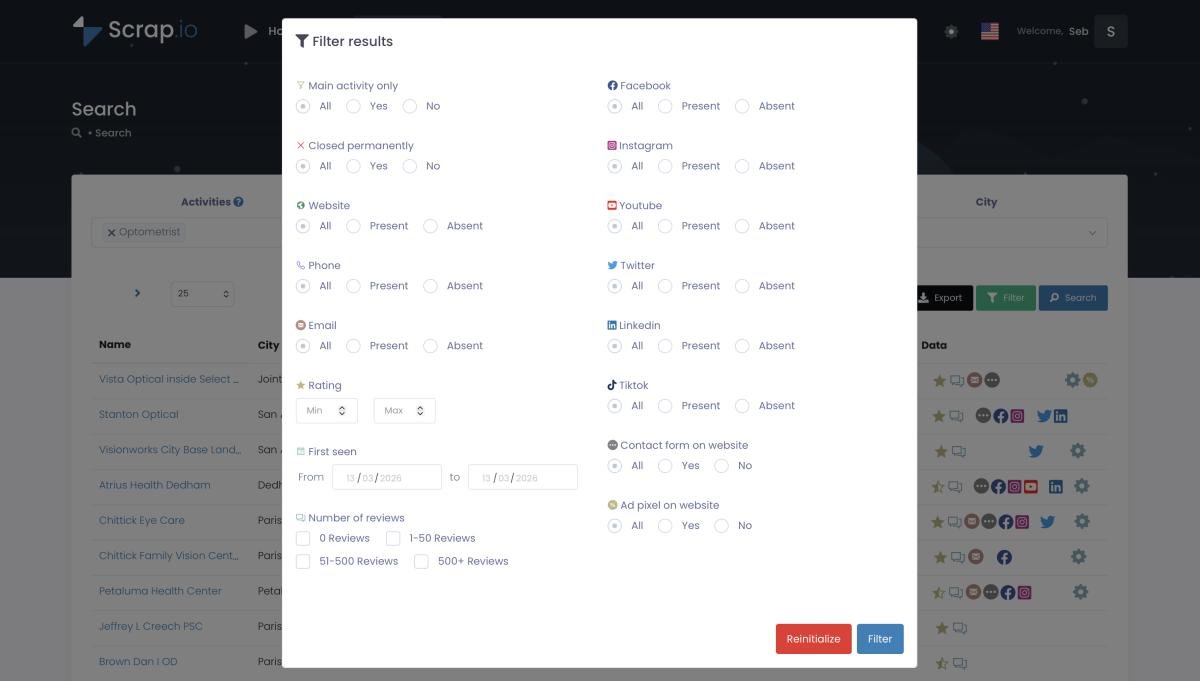
Maria's play, concretely: filter every business in her city rated 2.5 to 4.0 stars that has an email on file, export the list, and start outreach. Two clicks. No OAuth. No 5-review cap. If negative ratings are her angle, our guide on finding companies with negative reviews walks the whole playbook. And once she's landed those clients, she can show them how to leverage Google reviews as social proof, or how to get more Google reviews in the first place, to keep the wins compounding.
Pull every business in your city with its rating and review count. Filter before you spend a credit, then export with emails and phone numbers included. Start free: 7-day trial, 100 leads on us. Try Scrap.io free →
Is it legal to pull Google reviews via API?
Short version: pulling public business data, ratings, review counts, business names, is legal in most places, and US courts have backed that repeatedly. The nuance is in what you collect and what you do with it afterward.
Using the official APIs within their terms is obviously fine, that's Google handing you the data on purpose. Third-party APIs and scrapers that pull publicly visible review data sit on solid legal ground too: rulings like hiQ v. LinkedIn and Meta v. Bright Data have consistently held that scraping publicly available data doesn't violate the CFAA. Google's Terms of Service prohibit scraping, sure, but a ToS breach is a contract issue, not a crime. Two very different things, and confusing them is where most of the fear comes from.
Where's the actual line? Personal data. An aggregate star rating and a review count are business data. An individual reviewer's name is personal data, and that's where GDPR and CCPA kick in. Keep your work on the business-data side of that line and you're fine. For the full breakdown, court cases and all, here's our deep dive on whether it's legal to scrape Google Maps in 2026.
For its part, Scrap.io only processes publicly available business data, is GDPR and CCPA compliant, and keeps every data point traceable to its source. That's the posture that keeps prospecting clean.
How to get Google review data with Scrap.io
No OAuth forms. No approval queue. No 5-review ceiling. Here's the whole thing, start to finish.
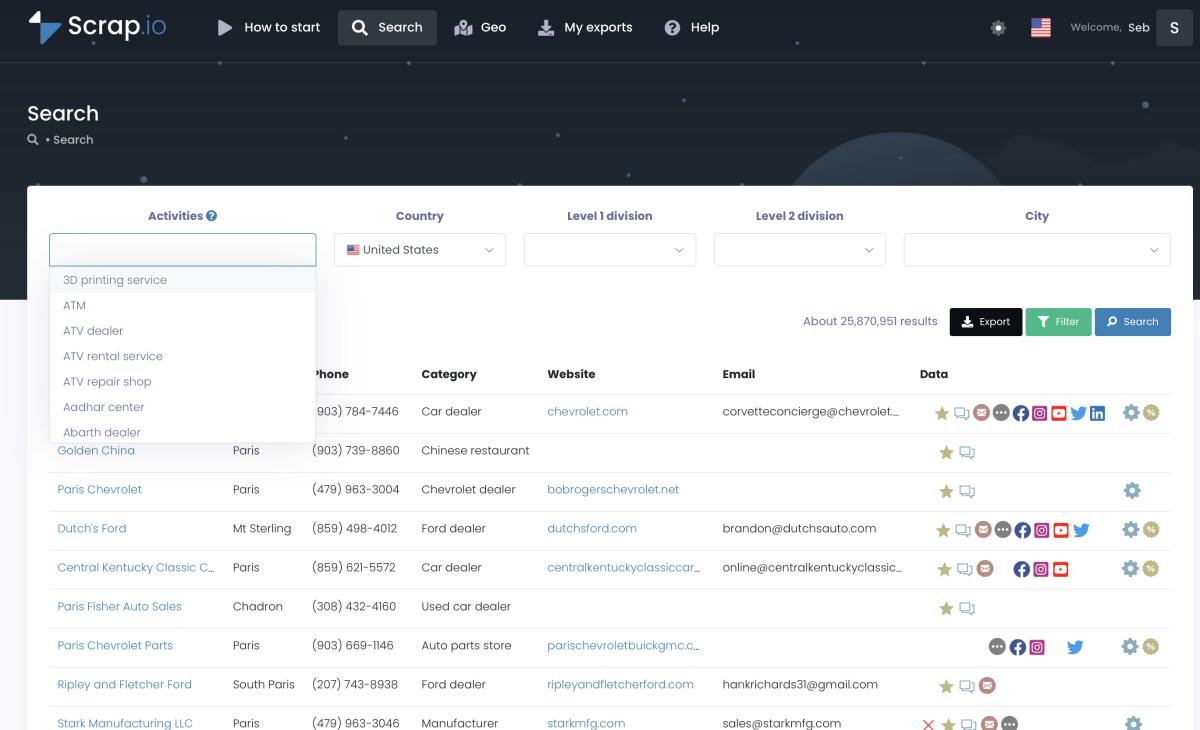
Step 1: pick a category and a location. Type your niche (restaurants, dentists, plumbers, whatever) and choose your geography, from a single city up to an entire country across the 195 covered.
Step 2: set your review filters. This is the part the official APIs can't touch. Set an exact rating range (say, 2.5 to 4.0), a minimum or maximum review count, and require an email or website if you want. Filters run before extraction, so credits only get spent on contacts that match. Counting, by the way, is free, so you can size a market before spending a thing.
Step 3: export. CSV or Excel, with the review metadata (average rating, review count, score breakdown, photo count) sitting alongside emails, phones, and social profiles. Or pull it through the REST API, the MCP connector, or a Make.com workflow if you're wiring it into something bigger.
That's it. Real-time data, refreshed on every export, no proxies, no broken scrapers, no code. And if you need the actual review text on top of this, that's when you pair it with one of the third-party APIs above. Right tool, right job. Always.
FAQ
Is the Google Reviews API free?
Partly. The Google Business Profile API is free but only works on listings you own, and needs Google's approval first. The Google Places API is paid, $25 per 1,000 requests, and caps you at 5 reviews per place (there's a $200 free credit each month). Third-party APIs run roughly $0.10 to $3 per 1,000 reviews depending on the provider and volume. So is google reviews api free has no single answer: free for your own reviews, paid for everyone else's.
How do I get Google reviews through an API?
For your own business: use the Business Profile API with OAuth 2.0 and call accounts.locations.reviews.list. For any business: use the Places API (capped at 5 reviews) or a third-party API/scraper for the full history. You'll need a Google Maps API key and billing set up before the Places API will return anything.
Can I get more than 5 reviews from Google Places API?
No. It's hard-capped at 5, with no pagination and no sorting. Developers have requested this since 2015 and it's still unfixed. To get more, use the Business Profile API (own listings only) or a third-party API. For displaying more than 5 on your own site, a widget tool built on the Business Profile API works too.
Can I automate collecting Google reviews?
Yes. Third-party APIs support scheduling and webhooks for hands-off collection. If you need review metadata across many businesses rather than the text of one, Scrap.io automates it through its interface, a REST API, an MCP connector, and Make.com. Set your filters once and let it run.
Is it legal to collect Google reviews via API?
Collecting public business data, including aggregate ratings and review counts, is generally legal, and multiple US court rulings back that up. Respect Google's Terms of Service and stay compliant with GDPR and CCPA, especially around individual reviewer names, which count as personal data. Scrap.io only processes public business data and is GDPR and CCPA compliant.
The bottom line
Google's official Reviews APIs are built to serve two narrow jobs, managing your own reviews, or grabbing five from anyone else, and they're genuinely good at exactly those. Everything beyond that, full review histories or market-wide review signals, lives outside Google's walls. Third-party APIs cover the text. And when what you actually need is review data as a prospecting signal across a whole territory, that's a different job with a different tool.
Stop wrestling with OAuth forms and approval queues to answer a question a filter could answer in two clicks.
Skip the OAuth forms and the approval queues. Try Scrap.io free for 7 days, 100 leads included, and pull ratings and review counts across 225M+ businesses in 195 countries, filtered before you spend a credit. Try Scrap.io free →
Generate a list of restaurant with Scrap.io