

Marcus needed 2,000 restaurant leads by Friday. He found LiveScraper, loved the $2-per-1,000 price tag, ran a job for Chicago… and then hit the wall nobody warned him about. Half his rows had no email. He'd paid for every single one of them anyway.
That's the moment most people go looking for a LiveScraper alternative. Not because LiveScraper is bad — it's genuinely cheap and dead simple — but because "cheap per row" and "cheap per lead I can actually use" turn out to be two very different sentences.
So here's the honest version. LiveScraper is a solid pay-per-row google maps scraper for one-off pulls. Scrap.io is built for people who prospect on Google Maps every week and don't want to pay for junk. This article puts them side by side — real pricing, real features, no trophy handed to the company writing the page. (Yes, we're Scrap.io. That's exactly why we'll show you where LiveScraper wins.) If you want the wider picture first, our complete Google Maps scraping guide for 2026 covers the whole landscape.
- What Is LiveScraper (and Why People Like It)?
- LiveScraper Pricing in 2026: How Pay-Per-Row Really Adds Up
- Where LiveScraper Falls Short for Serious Lead Gen
- LiveScraper vs Scrap.io: The Head-to-Head Google Maps Scraper Showdown (2026)
- 5 Things Scrap.io Does That LiveScraper Can't
- Pricing Showdown: Which Is Actually Cheaper for YOU?
- Is Google Maps Scraping Legal?
- How to Choose: LiveScraper or Scrap.io, by Use Case
- Conclusion
- FAQ
What Is LiveScraper (and Why People Like It)?
Let me be fair before I'm critical. LiveScraper is a good tool.
It's a no-code google maps scraper tool that pulls public business data — names, addresses, phones, websites, ratings, reviews — and hands it back as CSV, JSON, or Excel. Three scrapers live under one roof: a Maps scraper, a Reviews scraper, and an Email & Contact scraper. The Maps run alone gives you 51 core fields, and chaining the email module adds 16 more. Data is pulled live, in real time, never from a stale cache. There's even a REST API and a Claude connector for the AI crowd. (For context, the official Google Places API caps you at just 5 reviews per business and charges per call — which is half the reason third-party scrapers exist at all.) For a straightforward "give me every coffee shop in Austin" job, it does exactly what it says on the tin.
Why do people like it? Three reasons, and they're all legit. It's fast to start. It's genuinely cheap. And it asks nothing upfront — 500 free rows, no credit card, then pay only for what you scrape. For a freelancer who needs a list once a quarter, that's a great deal. No subscription guilt. No "am I using this enough to justify the cost" math. You pay, you pull, you leave. As a google maps scraper free option to start with, the 500-row tier is genuinely no-strings.
So if you've been Googling is LiveScraper legit or is LiveScraper safe — yes, on both counts. It scrapes public data, it's GDPR-aligned, and it delivers what it promises. The question isn't whether it works. The question is whether it's the right tool for your workflow. And that's where things get interesting.
Video: Scrap.io - How to Start?
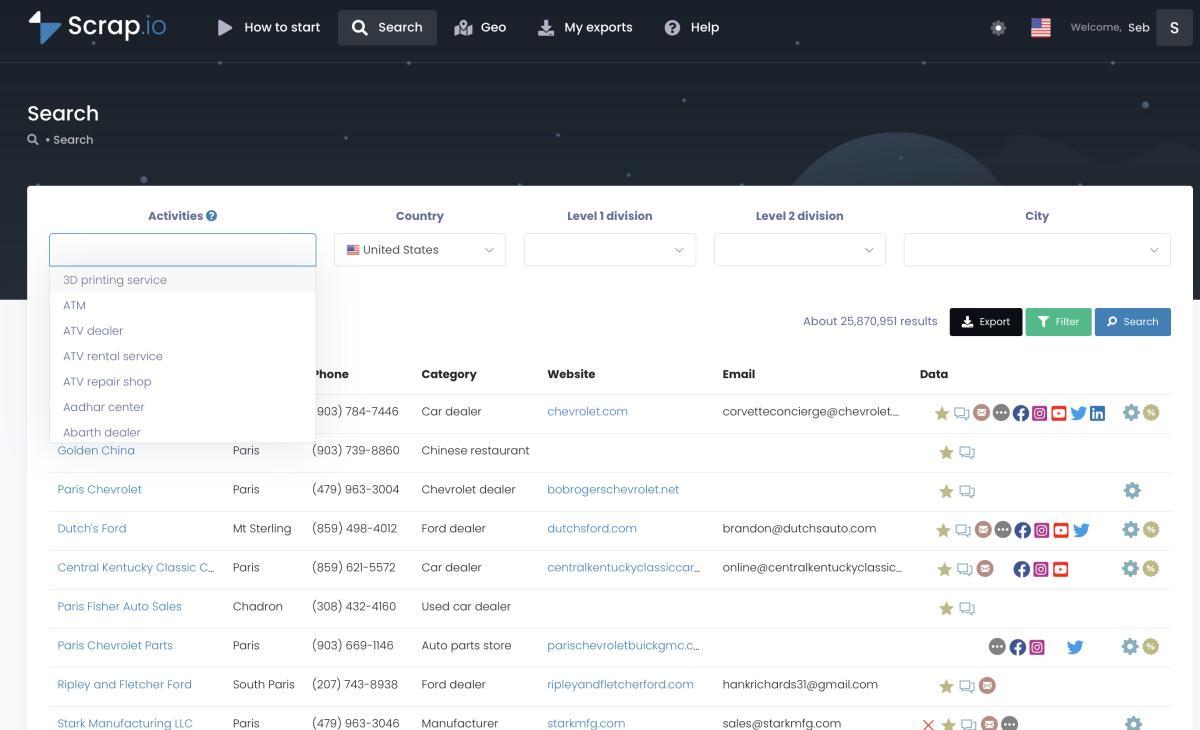
Curious how a filtered, country-scale scraper actually feels? Peek at Scrap.io's live search — counting results is free, no credit needed, no card to just look around.
LiveScraper Pricing in 2026: How Pay-Per-Row Really Adds Up
$0.002 per row sounds like nothing. Then you scrape a whole city.
Here's the model, straight from LiveScraper's own page. Every new account gets 500 free rows — one-time, no card. After that it's $0.002 per row, roughly $2 per 1,000 businesses (LiveScraper, 2026). No subscription. No monthly minimum. Big jobs auto-split into batches above 50,000 rows, up to 500,000 per task, with a custom enterprise tier for 5M+. As a pay per row google maps scraper, it's about as transparent as they come — a pre-flight estimator even shows the price before you hit "Get Data."
| Tier | Price | What you actually get |
|---|---|---|
| Free tier | $0 — 500 rows, one-time, no card | All scrapers unlocked, 51 + 16 fields |
| Pay-as-you-go | $0.002 / row (~$2 per 1,000) | Every returned row billed; email is an add-on pass |
| Enterprise | Custom (5M+ rows) | Volume pricing, SLAs, dedicated workers |
So where's the catch? Read that middle row again. Every returned row is billed — the one with a perfect email and the one with nothing but a name and a pin. You don't get to say "only charge me for businesses that have an email." You pay for the pile, then sort the useful rows from the dead weight in Excel afterward.
And emails aren't in the base Maps run at all. To get them, you chain the separate Email & Contact Scraper — a second pass, more rows, more cost. There are no monthly credits, no duplicate exclusion across campaigns, and no way to say "skip anyone I already exported last month." For a single quick job? Fine. For recurring prospecting? Those little gaps compound. Fast.
Where LiveScraper Falls Short for Serious Lead Gen
The cheapest tool per row can quietly become the most expensive tool per usable lead. This is the part nobody puts on a pricing page.
Picture it. You pull 1,000 plumbers. Pay-per-row says you owe for 1,000. But 300 have no email, 120 are permanently closed, and 90 are duplicates of businesses you scraped for a different client last week. You paid for 1,000 rows and got maybe 500 you can actually do something with. Your real cost per usable lead just doubled — and you didn't notice, because the invoice still said "$2 per 1,000." Sneaky math.
The root problem is the order of operations. LiveScraper extracts first and lets you filter later. There's no "email present" gate before the meter runs. Its filters are thin, email arrives on a second pass, and there's no email classification and no phone-type detection to tell a sales@ inbox from an owner's personal address, or a mobile from a landline. If you want a real google maps scraper with filters that saves money instead of just organizing spend after the fact, this is the gap.
Then there's scale. LiveScraper handles big jobs by auto-splitting into batches — genuinely useful — but you're still assembling coverage job by job. There's no single "give me every business in this country" button. Compare that with a specialist and the difference shows. It's the same reason people end up hunting for an OutScraper alternative too: the generalist pay-per-result model bills you for everything, then leaves the qualifying to you. It's the recurring gripe in community threads on r/automation — folks going the livescraper alternative reddit route, or weighing any other google maps lead scraper, keep circling back to the same thing: paying for rows that turn out to be uncontactable.
None of this makes LiveScraper a bad product. It makes it a one-shot product. Which is a completely reasonable thing to be — just know which one you're buying.
LiveScraper vs Scrap.io: The Head-to-Head Google Maps Scraper Showdown (2026)
Same public data source. Google Maps. So what actually separates them?
Not the raw data — both read the same listings any logged-out visitor can see. The difference is when you pay and how much comes back per business. Here's the honest LiveScraper vs Scrap.io breakdown.
| Dimension | LiveScraper | Scrap.io |
|---|---|---|
| Pricing model | Pay-per-row ($0.002) | Monthly filtered credits (from $35/mo) |
| Free to try | 500 rows, no card | 7-day trial, 100 leads |
| Filter before you pay | No — filter after | Yes — filters applied pre-extraction |
| Emails | Add-on (second scraper) | Included in the same export |
| Email classification | No | Yes — individual, contact, sales, marketing… |
| Phone-type detection | No | Mobile / landline / special (outside US & Canada) |
| Country-scale extraction | Job-by-job, up to 500k/task | Whole country in 2 clicks |
| Dedup across campaigns | No | Yes — exclude previously exported |
| No-code | Yes | Yes |
| Best for | Cheap one-off pulls | Recurring, filtered, country-scale prospecting |
Read the table top to bottom and a pattern jumps out. LiveScraper optimizes for the lowest sticker price on a single job. Scrap.io optimizes for the lowest cost per lead you'll actually email or call. Different philosophies. Both valid — for different people. And if you'd rather see how this plays out across the whole market, we ranked ten tools in our best Google Maps scrapers roundup.
Video: GMapsScraper.com vs Scrap.io (Tutorial & Comparison)
Quick reality check on the market too, because it explains why this comparison even exists. "google maps scraper" gets about 1,600 searches a month in the US at a keyword difficulty of 42 (DataForSEO, 2026) — and that volume is actually down 32% year over year (DataForSEO, 2026). People aren't searching less because they scrape less. They're searching smarter — brand names, comparisons, livescraper vs scrap.io — instead of generic terms. Which is exactly the question you're here to answer.
5 Things Scrap.io Does That LiveScraper Can't
Enough theory. Here are the five concrete differences that actually change your bill and your data quality.
1. Filter BEFORE you pay
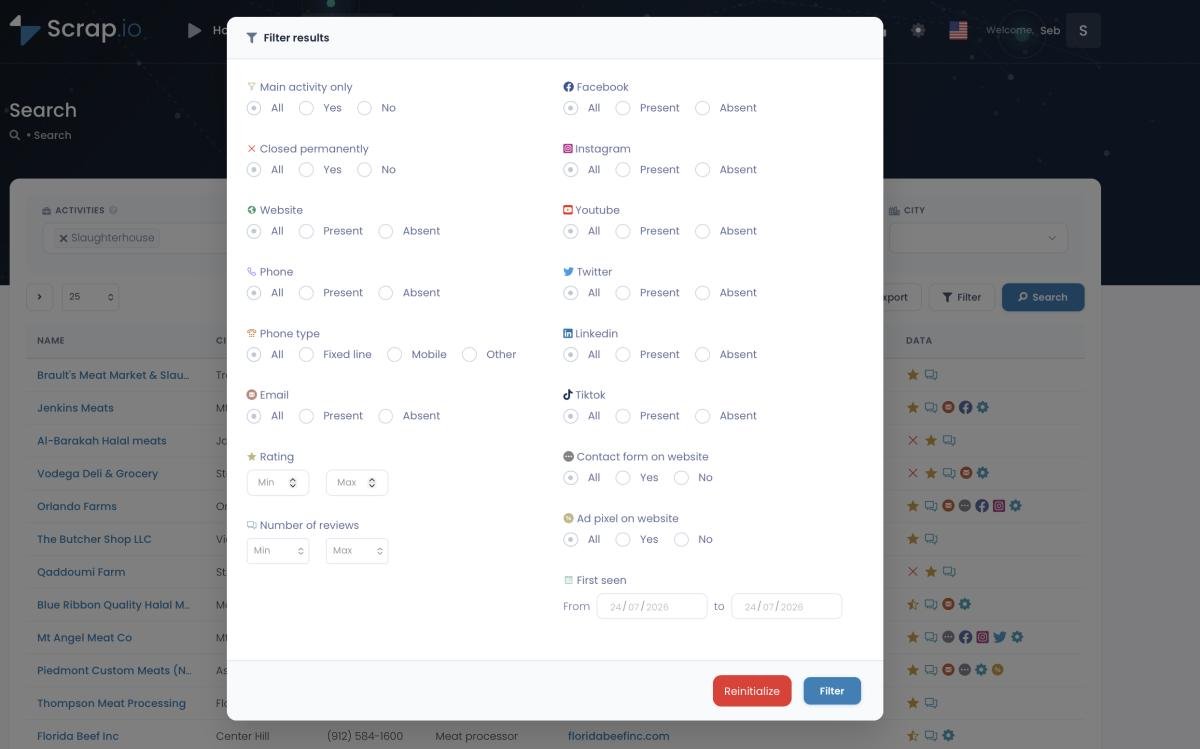
This is the whole ballgame. On Scrap.io, filters run before a single credit is consumed. Only want businesses with an email? Toggle it. Only mobile numbers? Toggle it. Minimum rating, has a website but no Facebook pixel, claimed listing, first seen in the last 90 days — stack them all, check the count (counting is always free), then export. You pay for contacts that match, not for the pile you'll delete. That's the direct answer to pay-per-row: zero wasted spend on rows you can't use.
2. Extract an entire country in 2 clicks
Scrap.io has indexed 225,676,406 establishments across 195 countries and 4,000+ categories (Scrap.io, 2026). Pick a category, pick "United States," export. No looping city by city, no assembling coverage one job at a time. One real client pulled 11,734 businesses in 45 minutes (Scrap.io, 2026), and the platform runs at 10,000 requests per minute (Scrap.io, 2026) so volume doesn't choke it. If your job is google maps scraper whole country, this is the two-click version — here's the method, spelled out: extract every business from Google Maps.
Video: How to Scrape Local Leads at the Country Level
3. Email classification (not just raw scraping)
LiveScraper's add-on gives you email_1, email_2, email_3 — a raw list, no labels. Good luck guessing which one to pitch. Scrap.io doesn't just find emails, it sorts them: an individual email with the person's first and last name extracted, plus contact@, sales@, marketing@, finance@, and admin@ buckets. As a google maps email scraper, that's the difference between blasting info@ and landing directly in the sales inbox. Want the mechanics? Here's how to find emails on Google Maps and how the crawl surfaces them, so you can extract emails from Google Maps that are actually sortable.
4. Trade-area search + GeoSearch (radius and polygon)
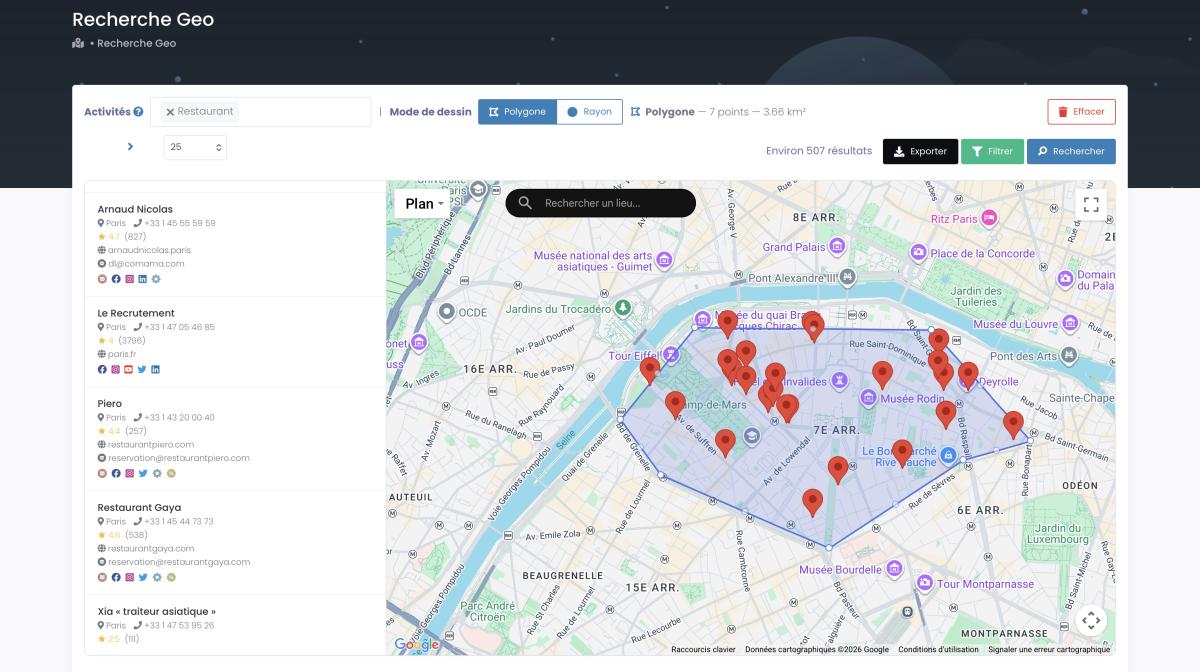
Two things here. First, you can skip the category entirely and pull every business in a zone — a full economic map of a territory, not just "restaurants." Second, GeoSearch lets you draw the shape: a radius around any point, or a polygon traced by hand around a neighborhood, a highway corridor, whatever your service area actually looks like. Every filter still works inside the shape. Try drawing a custom polygon in a pay-per-row tool. I'll wait.

5. Phone-type targeting + cross-campaign dedup
Scrap.io classifies each number as mobile, landline, or special — so you filter mobiles for an SMS campaign or landlines for B2B cold calling. (Fair warning: phone-type detection isn't available for US and Canada numbers — we'd rather tell you than let you find out mid-export.) And the dedup feature excludes anyone you've already exported, so campaigns spread across months don't pile up the same contact twice. Zero duplicates. No manual scrubbing.
See it yourself: filter for has email before you spend a single credit. Start your free Scrap.io trial — 7 days, 100 leads on us, real-time data across 225M+ businesses in 195 countries.
Pricing Showdown: Which Is Actually Cheaper for YOU?
"Cheaper per row" and "cheaper per campaign" are not the same sentence. So let's actually run it.
For a genuine one-off — say 800 rows, once, never again — LiveScraper wins, and it's not close. 800 rows costs about $1.60 after your free 500, no subscription, done. If that's your whole use case, stop reading and go use it. Seriously. Paying $35 for a monthly plan to pull one small list would be silly.
Now flip it. You prospect every week. On Scrap.io's Basic plan, $35/month (annual) gets you 10,000 filtered credits — and a credit is one unique establishment, counted once per rolling 30 days, re-exportable for free. Filter for "has email" first and those 10,000 credits are 10,000 contactable leads, not 10,000 raw rows with 30% dead weight. On pay-per-row, hitting 10,000 usable emailed leads means scraping well past 10,000 rows (you pay for the empties), then paying again for the email add-on pass. The per-usable-lead gap narrows hard, and at recurring volume it flips.
| Tool | Model | Pre-extraction filters |
|---|---|---|
| LiveScraper | Pay-per-row ($0.002) | No — email is an add-on pass |
| Outscraper | Pay-per-result | Limited |
| Apify (Compass actor) | Compute units (opaque) | No |
| Clay | Enrichment credits | Maps pull capped (~60 results) |
| Lobstr.io | Cloud subscription | Limited |
| Scrap.io | Filtered monthly credits | Yes — 17+ filters, before you pay |
The Apify google maps scraper is a beast for developers but bills in compute units — you pay for machine time, not results, which is impossible to budget. Outscraper is the US pay-per-result reference but has no real pre-filter. Clay is enrichment-first with a capped Maps pull. None of them let you gate on "email present" before the meter runs. If you want the deeper math on why the pricing model matters more than the sticker price, we broke it down in what Google Maps scraping really costs. Looking for the cheapest google maps scraper? On a per-usable-lead basis, the filtered model is hard to beat.
Run the numbers on your own market: 10,000 filtered credits from $35/mo. Count your niche for free first — see exactly how many contactable leads are actually there before you commit a cent.
Is Google Maps Scraping Legal?
Short answer: yes — if you stick to public data.
Scraping publicly visible business information — names, addresses, phones, ratings, public emails — is broadly legal in the US, and Google Maps needs no login to view, which puts it on firm ground. Both LiveScraper and Scrap.io collect only public business data. Scrap.io is GDPR and CCPA compliant, and every data point is traceable back to its source. The nuance is in what you do with the data: under GDPR and CCPA, B2B outreach leans on the "legitimate interest" basis, and every email you send still needs a working opt-out. Target businesses, not people's private inboxes, and you're on solid ground. (This is factual info, not legal advice — if real money's on the line, talk to an actual lawyer.)
How to Choose: LiveScraper or Scrap.io, by Use Case
No universal winner here. There's a winner for you. Answer one question honestly: how often will you do this?
Pick LiveScraper if you need a quick, one-time pull, the volume is small, and you refuse to touch a subscription. A livescraper alternative free tier hunt usually ends here anyway — 500 rows, no card, in and out. It's a great google maps scraper no code option for the occasional job, and honestly, for that job, it's the right call.
Pick Scrap.io if you prospect on a recurring basis, you need to go from a city to a whole country, you want qualified emails classified by type, you want to filter before you pay, or you're running a team that can't afford duplicate contacts across campaigns. That's the best LiveScraper alternative for lead generation at any real scale — and if your goal is simply to get local business leads you can actually contact, the filtered model was built for exactly that. For the wider field, the best google maps scraper roundup we linked earlier ranks the alternatives side by side.
Conclusion
Both tools turn Google Maps into a spreadsheet. Only one is built to keep your pipeline full.
If you scrape once and vanish, LiveScraper's pay-per-row model is cheap, clean, and honest — use it and don't overthink it. But if you're building a real prospecting motion — recurring lists, filtered before you pay, emails sorted by role, whole countries in two clicks, zero duplicates — then a livescraper review 2026 comparison keeps landing in the same place. You want the tool that charges you for leads you'll use, not rows you'll delete.
Try Scrap.io free for 7 days — 100 leads on us, no scraping code, cancel anytime. Run it on your own market, filter for the contacts you can actually reach, and see the data quality before you decide.
FAQ
What is the best LiveScraper alternative in 2026?
For recurring, filtered, country-scale prospecting, Scrap.io is the strongest LiveScraper alternative: it filters before extraction (you only pay for rows with an email, phone, or website), classifies emails by type, and extracts a whole country in two clicks across 195 countries. LiveScraper stays the better pick for cheap, one-off pulls. Rated 4.9 on G2, if you want third-party proof.
How much does LiveScraper cost?
LiveScraper is pay-as-you-go: 500 free rows (one-time, no card), then $0.002 per row — about $2 per 1,000 businesses — with no subscription. Emails come from a separate Email & Contact Scraper pass, so a complete lead file with emails costs more than the base row price (LiveScraper, 2026). That's the honest answer to how much does LiveScraper cost and its livescraper pricing per row.
Is LiveScraper legit and legal?
Yes. LiveScraper extracts only publicly available Google Maps business data and is GDPR-aligned. Scraping public business info is legal in the US, and the same principle applies to Scrap.io, which is GDPR- and CCPA-compliant with every record traceable to its source. As always with a sensitive topic like scraping: keep an opt-out on every outreach email and stick to business data.
Does LiveScraper find emails from Google Maps?
Not in the base Maps run. You chain LiveScraper's Email & Contact Scraper, which crawls each business website for email_1/2/3 — a raw, unlabeled list. Scrap.io extracts and classifies emails natively in the same export (individual with first and last name, plus contact, sales, marketing, finance, admin), which is what makes it a genuine google maps scraper that finds emails you can actually target.
Can I scrape a whole country with LiveScraper?
Sort of. LiveScraper auto-splits large jobs into batches, up to 500,000 rows per task, but you're still assembling coverage job by job. Scrap.io is purpose-built for country-scale extraction in two clicks — 225,676,406+ establishments indexed across 195 countries — so "every plumber in the US" is one search, not a spreadsheet of city queries.
Generate a list of restaurant with Scrap.io