

Video: Scrap.io — How to Start
- What counts as a local business lead
- Where local business leads live in 2026
- 4 ways to get local business leads with contact info
- How to generate leads from Google Maps step by step
- Getting leads at scale: city to country
- Only pay for leads you can contact
- Turning leads into replies: cold email & calls in 2026
- Is scraping local business leads legal?
- FAQ
There are 36,207,130 small businesses in the United States. That's 99.9% of all American companies, employing 62.3 million people — about 45.9% of the private workforce (SBA Office of Advocacy, 2026). Finding them was never the hard part. They're on a map. Anyone can see them.
The hard part is contacting them. A name on a listing isn't a lead. A name with an email and a phone number? That's a lead.
And that's exactly what this article is about — not another listicle of "7 growth strategies" (the internet has enough of those), but the actual execution: how to pull local businesses with their emails and phone numbers, fast, without paying $50 a contact to a broker who already sold that same contact to three of your competitors. If you want the full strategy playbook, we've got a separate piece on local business lead generation. This one is about doing it.
What counts as a local business lead
Let's define terms, because most people get this wrong.
A local business lead is a business in a specific area that you can actually reach. Reach being the operative word. A restaurant's name and a pin on Google Maps? Not a lead. That same restaurant with a verified email, a mobile number, and a note that they have no website (meaning they might need one)? Now we're talking.
This distinction matters more than it sounds. Because plenty of "lead lists" out there are just directories — rows of names with a phone number that rings a disconnected line. You can't run a cold email campaign on a name. You can't book a call with a pin. The whole game of local lead generation comes down to one thing: attaching real contact info to the right businesses. Everything else is decoration.
So when someone searches "how to get leads from Google My Business," wants a "free leads list for business," or asks how to find local business leads from Google Maps, what they actually want is contact info. Emails. Phones. The stuff you can DM, dial, or drop into a sequence. Keep that in mind for the rest of this guide.
Where local business leads live in 2026
Local businesses don't hang out on LinkedIn. Let that sink in. The 8-person HVAC company, the family restaurant that's been open since 1994, the solo accountant with a second office — most of them have never touched a LinkedIn company page. So if that's your prospecting tool for local leads for business, you're fishing in an empty pond.
Here's where they actually are:
Google Maps and directories. This is the big one. Every local business that wants to be found is on Google Maps, because that's where their customers look. Name, phone, website, hours, reviews — all public, no login wall. It's the largest, freshest local business database on earth, and it's the backbone of everything that follows.
Referrals and networking. Still works. A warm intro from someone trusted beats any cold email. But it doesn't scale — you'll run out of warm contacts by Thursday if you're doing real volume.
Google Local Services Ads (LSA). Google's own pay-per-lead product for service businesses. Leads come straight to your phone. But you're renting them, and you don't own the data (Google, 2025). More on that trade-off in a second.
Purchased databases. ZoomInfo, Apollo, resold CSVs. Fast, but they rot — up to 30% of a bought list can be wrong within a year. And everyone else bought the same file.
Bottom line? For local B2B, Google Maps wins on speed, volume, and cost. LinkedIn wins for enterprise. We broke that comparison down in detail in Google Maps vs LinkedIn for B2B lead generation. If your customer has a physical location, Google Maps has them.
4 ways to get local business leads with contact info
Four methods. Wildly different trade-offs. Here's the honest comparison, because every one of these works for someone — the question is which one works for you.
| Method | Speed | Cost | Freshness | Do you own the data? |
|---|---|---|---|---|
| Manual copy-paste | 🔴 Slow | 🟢 Free | 🟢 Fresh | ✅ Yes |
| Google Local Services Ads | 🟡 Medium | 🔴 Expensive | 🟢 Fresh | ❌ No |
| Purchased database | 🟢 Fast | 🟡 Variable | 🔴 Stale | ✅ Yes |
| Google Maps extraction (Scrap.io) | 🟢 Fast | 🟢 Filtered credits | 🟢 Real-time | ✅ Yes |
Let's walk through them honestly.
Manual copy-paste. Open Maps, click a listing, visit the website, hunt for an email, paste it into a spreadsheet. Repeat a hundred times. Then again tomorrow. It's free and the data is fresh — but it's also soul-crushing, and you'll cap at maybe 50 businesses an hour if you're fast. Try building a list of every plumber in Texas this way. I'll wait.
Google Local Services Ads. Genuinely good for some service businesses. Motivated leads, straight to your phone, pay only when someone reaches out. But it's Google's pipeline, not yours. The second you stop paying, it evaporates. And you never own the underlying contact data. The same "someone else does it for you" logic applies to done-for-you agencies — Clicks Geek's roundup lists players like Scorpion, ServiceTitan Marketing Pro, and Hibu, with packages that routinely start around $1,500 a month. Great if you've got the budget and no in-house sales muscle. Pricey, and you're renting the pipeline.
Purchased databases and directories. Buy a list, get 50,000 rows before your coffee cools. Directory-style tools like Targetron package local business leads by category and location, while B2B databases like UpLead lean on verified corporate contacts. Both have their place. The catch? Data goes stale, and the "exclusive" file got sold to a dozen other senders. This is the route agencies and pay-per-lead outfits push too — we compared them all in the best lead generation companies of 2026, and the DIY math is brutal in your favor.
Google Maps extraction. Pick a category, pick an area, filter, export. You get emails, phones, and social profiles for thousands of businesses, in real time, and you own every row. This is the method the rest of the article focuses on — because for local B2B, nothing else comes close on cost and freshness.
How to generate leads from Google Maps step by step
OK but concretely, what do I actually do? Fair. Here's the whole thing, start to finish — the fastest way to generate leads for local business, in three real steps.
Step 1 — Pick your category and area. Choose a business type (say, "roofing contractor") and a location — a city, a county, a state, or an entire country. Scrap.io works from 225,676,406 business listings across 195 countries and 4,000+ categories, so your target zone is yours to set. The platform shows you the exact count of matching businesses before you spend anything. Counting is free — always.
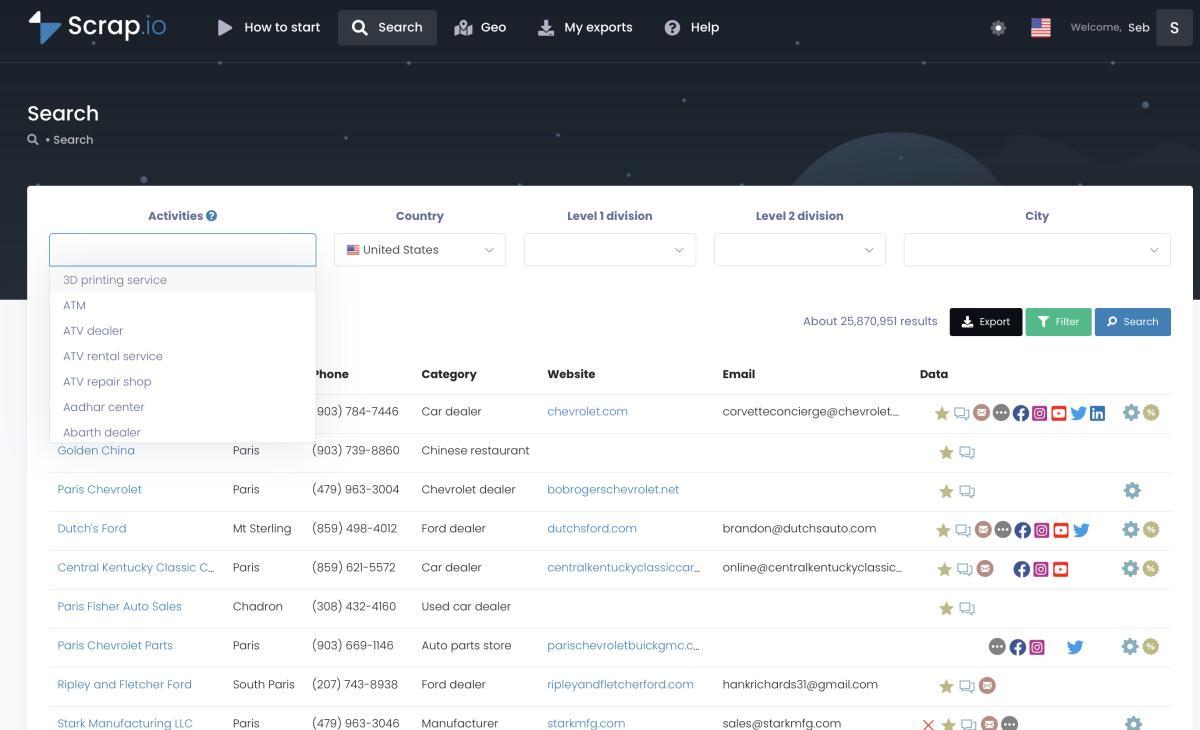
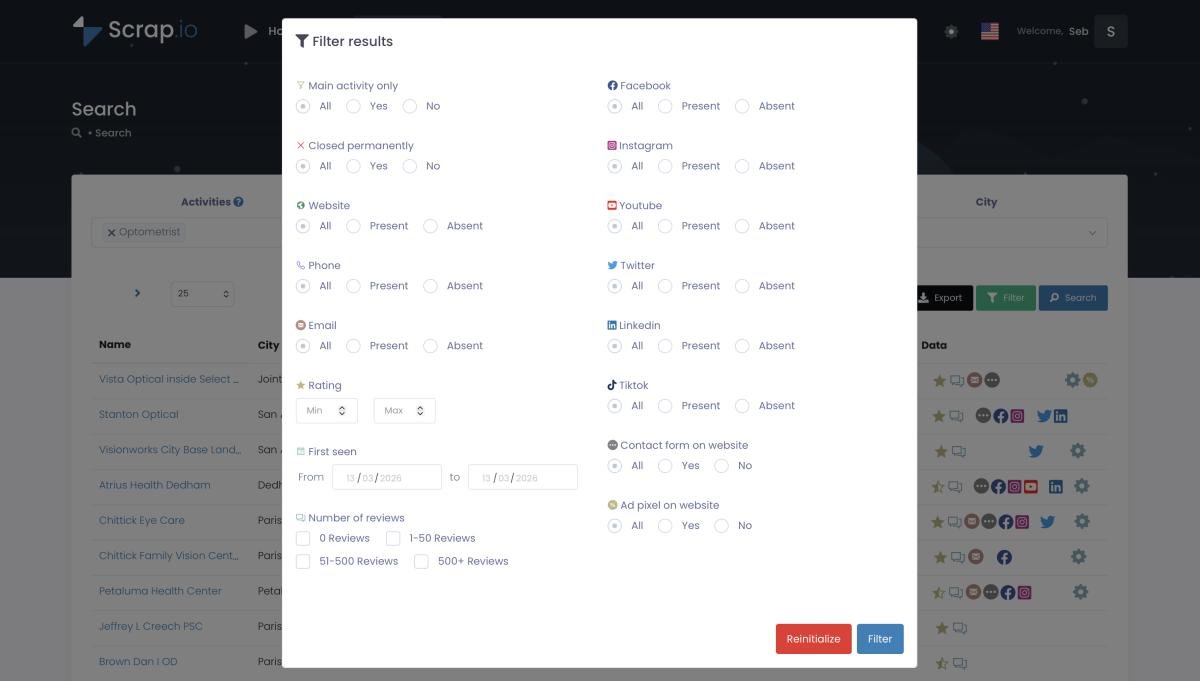
Step 2 — Filter before you extract. This is the part that saves your budget. Only want businesses that actually have an email? Toggle the email filter. Only mobile numbers for an SMS campaign? Done. Minimum rating, a website but no Facebook pixel (a business that needs marketing help), a certain review count — stack the filters. Every one of them applies before a single credit is consumed. You pay only for contacts you can actually use.
Step 3 — Export. CSV or Excel, ready to drop into your CRM or cold email tool. The file carries everything: name, address, phone (with type), up to five classified emails per business, social links, website tech stack. Re-export the same business within 30 days and it costs zero extra credits.
That's it. No code, no proxies, no 3 a.m. debugging sessions. If you want the deep technical version of how to scrape Google Maps, or a full breakdown of how a lead scraper actually works, both go far deeper than I can here. But the core loop is genuinely this short.
Extract your first 100 local leads free. Start a 7-day Scrap.io trial — 100 leads included, 225M+ businesses across 195 countries, filtered before you spend a credit. Run it on your own market and see the data quality for yourself.
Getting leads at scale: city to country
Here's where most tools fall apart. Google Maps caps visible results at roughly 120 per search. So a browser extension or a DIY scraper is structurally stuck — to cover a state, you loop through every city one query at a time, and you still miss listings in dense areas. It's a grind.
Scrap.io built its own index, so the cap doesn't apply. Pick a category, pick a country, hit export. One real client extraction: 11,734 businesses in 45 minutes. Complete profiles — emails, phones, social links — not just names. Try doing that by hand.
And when your service area isn't shaped like a city or a county, GeoSearch handles the odd shapes. Draw a radius around a point (up to 500 km on the top plan), or trace a polygon by hand around a neighborhood, a highway corridor, a trade area. Every filter still works inside the shape.

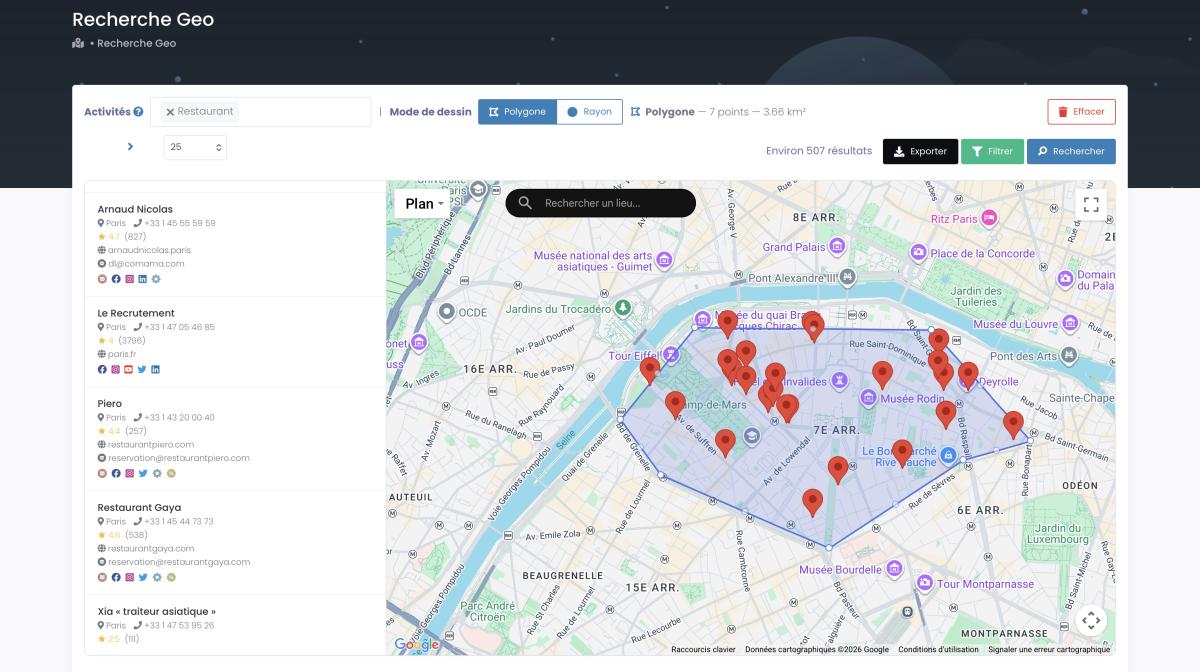
There's also a trick most people miss: you can skip the category entirely and grab every business in a zone. A full economic map of a territory — impossible with a category-by-category scraper. Handy when you want a USA business email database covering a whole city or state at once. Watch the country-level version in action:
Video: How to Scrape Local Leads at the Country Level
Pull an entire city — or country — in a couple of clicks. Start free with Scrap.io: 100 leads, 195 countries, real-time data. Size your market for free (counts never cost a credit), then extract only what you need.
Only pay for leads you can contact
Here's a number that should change how you think about lead lists. We pulled fresh Scrap.io data on July 16, 2026: there are 661,441 restaurants in the U.S. on Google Maps. Of those, only 193,306 — roughly 29% — have a public email address.
Read that again. Seven out of ten restaurants have no email you can find. So if you buy a raw "restaurant list," you're paying for 71% of rows you literally cannot email. That's not a lead list. That's a spreadsheet of dead ends with a few good contacts hidden inside.
This is the entire argument for filtering before extraction. Toggle "email present," and you count — and pay for — only the 193,306 you can actually reach. The 71% never enters your file, never costs you a credit. Compare that to a purchased database where you buy everything, bounce rate and all, and pray.
Want to go deeper on the email side specifically? Our guide on how to find emails on Google Maps covers exactly how the extraction crawls each business website to surface those addresses. The short version: filter first, pay for what you can use, skip the rest. Simple as that.
Turning leads into replies: cold email & calls in 2026
A list is not a campaign. You've got the leads — now what?
Set expectations first, because the numbers have shifted. The average B2B cold email reply rate in 2026 is 3.43%, down from around 5% in 2025 and a golden-age 8.5% back in 2019 (Instantly Benchmark Report, 2026). Conversion follows suit — Breakcold pegs a good cold email conversion rate at 4.2% as of January 2026, while a more typical cold outreach campaign converts somewhere in the 0.2–2% range (Focus Digital, 2026). Sobering. But not dead — far from it.
What separates the 4.2% crowd from the 0.2% crowd? Fresh, targeted data and personalization. It's not the volume. It's the row.
Which is where your Google Maps extraction pays off twice. The email classification tells you who you're writing to — an individual email (with first and last name pulled automatically) reads completely differently from a generic info@. Segment by type. Personalize the individual ones with something specific — their rating, their city, a gap on their listing. Send the generic ones a value-first pitch that doesn't assume who's reading. Our walkthrough on how to write a cold email has the frameworks, and if you're assembling the whole thing from scratch, start with how to build a cold email list.
Then go multi-channel. Email alone is fine. Email plus phone plus a DM is better. Your export includes phone numbers (with landline/mobile type, so you know what to text and what to call) and social profiles. Use all of it. For the calling side, we broke down how to scrape phone numbers from Google Maps, and for picking a sequencer, here's our roundup of the best cold email tools.
And here's the part people love — you can now build these lists in plain English. Scrap.io exposes an MCP connector, so you can drive the whole extraction straight from Claude, ChatGPT, or Gemini. "Find every Italian restaurant in Brooklyn with 4+ stars and an email" — and the agent builds the query. Vibe prospecting, basically:
Video: How to Scrape Local Leads with Claude & Vibe Prospecting
Can ChatGPT find leads on its own? Not really — it writes and qualifies, but it can't pull verified, real-time business data by itself. Pair it with a live data source and now it can. That's the whole point of the MCP.
Is scraping local business leads legal?
Short answer: yes, for public business data, done right. And I know — of course the company that does this says it's legal. So let's be specific instead of hand-wavy.
You're extracting business information — company names, addresses, phone numbers, publicly listed emails — that businesses voluntarily published on their own Google Maps listings and websites. Under GDPR in the EU, business contact data typically qualifies for the "legitimate interest" basis, as long as every outreach email includes an easy opt-out. Under California's CCPA, publicly available business information is carved out of scope almost entirely. And in the US, CAN-SPAM permits unsolicited commercial email to business addresses — you just need accurate sender info, a physical address, and a working unsubscribe link.
Scrap.io extracts only publicly available business data, is GDPR and CCPA compliant, and keeps every data point traceable to its source. No private profiles. No sketchy resold consumer lists. Just business details companies chose to make public.
None of this is legal advice, obviously — if you've got real money at stake or you're operating in a gray area, talk to an actual lawyer, not a blog post. But the panic around scraping is mostly recycled fear from people who never read the actual rules. Stick to public business data, honor opt-outs, and you're on solid ground.
FAQ
How do I find local business leads?
The fastest route is extracting them from Google Maps: pick a category and an area, filter for the businesses that have an email or phone, and export to CSV. You get names, verified contact info, and enrichment data (reviews, website, social profiles) in one shot. Tools like Scrap.io do this without any code. The community keeps asking this exact question — see this thread on finding local business leads from Google Maps (r/DigitalMarketingHack).
How can I get local business leads for free?
Two ways. Manually collect them from Google Maps or Google Business Profiles (slow, but genuinely free), or use Scrap.io's 7-day free trial, which includes 100 export credits — enough to build a real list for one campaign. Free Chrome extensions also exist, but they cap at roughly 120 results and usually skip emails entirely. As one owner put it on r/smallbusiness, generating leads for a local service business is mostly about consistency and reaching people where they actually are.
Can ChatGPT find leads?
On its own, no. ChatGPT writes and qualifies outreach, but it can't pull verified, real-time business data by itself — it has no live source. Connect it to a data platform via MCP (Scrap.io supports Claude, ChatGPT, and Gemini) and it'll build your lists in plain English. Enrichment-first tools like Clay take a similar orchestration approach — but they still need a source underneath. AI arranges leads; it doesn't invent them.
What is the 5-minute rule for leads?
Contacting a lead within five minutes of them showing interest dramatically increases your odds of connecting — wait an hour and the odds crater. It's why having contact info ready before you need it matters so much. A pre-built, filtered list means you can reach out the moment a trigger appears instead of scrambling to find a phone number. Speed only helps if the number is already in your hand.
Is it legal to scrape local business leads?
Yes — extracting publicly available business data is legal for B2B prospecting in both the EU (GDPR legitimate interest) and the US (CAN-SPAM, CCPA). The key word is business: a company's public email is fair game, an individual's private address is a different matter. Scrap.io only collects public business data, stays GDPR and CCPA compliant, and keeps every record traceable. Always include an opt-out in your outreach. Owners discuss the practical side of this constantly, like in this r/growmybusiness thread.
Stop hunting leads one at a time
So. The businesses are right there — 36 million of them in the US alone, on a map, with contact info attached. The winners in 2026 aren't the ones with the biggest ad budget or the priciest ZoomInfo seat. They're the ones with the freshest data and the best follow-up. A solo freelancer with a filtered Google Maps list and a decent cold email sequence will out-prospect an agency burning $6,000 a month on shared leads. Every time.
Buying leads one at a time is a tax on not knowing this exists. Now you know. If you're weighing done-for-you against doing it yourself, we laid out the full case in lead generation companies vs DIY, compared the specialist tools in our Hunter.io alternative for local leads breakdown, and if you want the mindset side of outreach, our Alex Hormozi prospecting guide is worth the read.
Stop hunting leads one by one. Try Scrap.io free — 100 leads, no commitment. Pick any category, any country, filter for the contacts you can actually reach, and export a ready-to-use list in a couple of clicks. Your first list is waiting.
Generate a list of restaurant with Scrap.io