

Three grand. That's what one agency owner posted about on Reddit after buying a usa business email list last quarter. "Half bounced. The other half went to people who quit months ago." He'd been running outreach for years. Not a rookie. Just got sold garbage data, and the comments were full of people saying "same."
The US has 8,298,562 business establishments. Census Bureau number, you can look it up. Eight million companies you could potentially sell to. And 473,679 new business applications drop every month. Every. Single. Month. The opportunity keeps growing and most people are still cold calling or buying spreadsheets that were outdated before the invoice cleared.
A USA business email database done right changes everything. Not some recycled CSV from 2023. Real-time data pulled as businesses update their own listings on Google Maps. We're talking about the 86% of US companies with under 20 employees. Owners who read their own inbox. People who actually reply.
Video: Scrap.io - How to Start?
Table of Contents
- What is a USA Business Email Database?
- Why Businesses Need USA Email Lists in 2026
- Understanding the U.S. Business Landscape
- Key Features of Quality Business Email Lists
- Top Industries Using B2B Email Databases
- USA Email List Provider Comparison (2026)
- How to Choose the Right Email List Provider
- Best Practices for Using Business Email Lists
- Email Compliance & Legal Requirements in 2026
- Geographic and Market Opportunities
- The Bottom Line
- FAQ
What is a USA Business Email Database?
Big searchable list of verified company email addresses USA businesses actually check. Not some random info@ nobody that nobody monitors. The real addresses: owners, managers, purchasing people, the humans who actually make buying decisions.
You know those chamber of commerce breakfast events? Stale coffee, worse conversation, maybe three good contacts if you're lucky? A database replaces all of that. Thousands of contacts, filtered however you want: industry, city, employee count. Done in minutes instead of months.
That's the whole promise of a modern us business email database. But here's the catch that burns people. Not all databases are the same and the difference is brutal.

Real-Time vs Static Databases
Think about it this way. A static database is a photograph of businesses taken... when, exactly? Three months ago? Six? A year? The provider might not even tell you. And during that time, people quit jobs. Companies closed. Email servers got shut down. The marketing director you're trying to reach? She left for a competitor in January. You're emailing a dead inbox.
A B2B email database USA that tested at 97% accurate when it was compiled? After six months of employee turnover and business closures, that number has cratered to maybe 80%. Possibly worse.
Real-time databases don't have this problem. They grab data directly from Google Maps and company websites. Business changes their phone number on Tuesday morning? It's in the database Tuesday afternoon. Not next quarter. Not "during our scheduled refresh."
| Feature | Static Database | Real-Time Database |
|---|---|---|
| Data freshness | Quarterly updates (maybe) | Pulled live from public sources |
| Accuracy after 6 months | ~80-85% | 95%+ |
| Price per contact | $0.10–$0.50 | $0.005–$0.05 |
| Duplicate contacts | Common | Filtered before you export |
| Coverage updates | Whenever they feel like it | Continuous |
| Delivery guarantee | Good luck with that | Bounce replacements typical |
This is a scenario we hear about constantly. A company pays $1,500 for a "premium" B2B email database USA. Sends 10,000 emails. Over 3,200 bounce on the spot. Another 2,000 come back with out-of-office replies from people who left months ago. More than half the list. Dead. Fifteen hundred bucks, wasted. (If you've been through this, you already know the feeling.)
Static data does that.
Why Businesses Need USA Email Lists in 2026
"Is email even worth it anymore?"
I get asked this constantly. Founders, agency owners, sales directors. Everybody seems to wonder if email is dead. It's not. Not even close. Email marketing returns between $36 and $42 for every dollar spent (Litmus, DMA: not just one source, multiple studies land in this range). That's 3,600% to 4,200% ROI.
Name another channel that does that. Google Ads? Nope. Trade shows? Ha. LinkedIn outreach? Please. I'll wait.
The Email Economy
Some numbers to put this in perspective. People sent 376 billion emails per day in 2025 (Statista). Not per year. Per day. The global email marketing industry was worth $12.33 billion in 2024 and climbing (Statista again). There are 4.6 billion email users worldwide right now, headed toward 4.8 billion by 2027.
Your potential customers are checking email all the time. Between meetings. At lunch. On the toilet. (Don't judge, we all do it.) You just have to show up with something that doesn't look like every other sales pitch they got that morning.
Other numbers worth filing away: 87% of marketing leaders call email critical to company success (Litmus State of Email). B2B emails pull a 3.18% click rate, that's 52% higher than B2C's 2.09% (Mailchimp/CMI 2025). Automated email sequences generate 320% more revenue than one-off sends (Campaign Monitor). And email click-to-conversion rates jumped 27.6% in 2024 alone (Omnisend 2025). Oh, and the average business professional? Receives 121 emails daily (DemandSage 2025). Your message is competing against 120 other emails. Personalization and targeting aren't optional. They're survival.
What Email Actually Costs vs Everything Else
Old-school B2B marketing is expensive in a way that makes you want to cry. A trade show booth? $20,000 to $100,000 for one event. One. Google Ads for B2B keywords cost $5 to $50 per click, and most of those clickers aren't buying. LinkedIn Sales Navigator runs $1,600/year to manually message people one... at... a... time.
Meanwhile a good business contact list USA runs $0.01 to $0.50 per contact. You can email 10,000 companies for less than two days at a conference would cost. And you don't have to stand around wearing a name badge making awkward small talk with someone who turned out to be an intern.
Where This Actually Plays Out
Pierre Harington, Head of Growth at Fiveoffices (a shared office space platform), ran a cold email campaign targeting 246 CEOs in Paris. Seven-step sequence, personalized opening lines. Result: 23%+ reply rate. His own words: "Cold outreach brought us leads that other channels such as Ads, SEO, or WOM would have never attracted." Two hundred and forty-six contacts. Not 50,000. Tight targeting crushed volume.
Lemlist's own analysis of 182 million cold emails sent through their platform in a single year found that multi-step sequences consistently outperformed single sends. Emails around 120 words hit a 52% booking rate, compared to just 20% for 300-word emails. Real data from real campaigns, not a hypothetical.
Now picture a SaaS company going after businesses still running outdated CRM software. They pull a targeted list filtered by industry and company size. Reach 50,000 prospects in an afternoon. Even at 2% response rate, that's 1,000 conversations. Try getting that volume from LinkedIn. You'd burn a year. And way more budget.
Recruiting firms are another big one. CTO lists, VP of Engineering lists. Cold email open rates of 15-20% are common when targeting is tight. One placement at $30,000-$50,000 in fees covers the list cost many times over.
And here's a scenario that plays out quarter after quarter: an events company emails healthcare administrators about an upcoming conference. Out of 10,000 sends, they pull 2,000+ registrations. At $200 a ticket, that's $400K+ in revenue from a campaign that cost maybe $700 total. Rinse and repeat.
The math works. But (and this is the part people skip) only if the underlying data is fresh.
Understanding the U.S. Business Landscape
Census Bureau's County Business Patterns (CBP) data puts it at 8,298,562 business establishments in the US. Most people read that number and just keep scrolling. Don't.
8.3 Million Establishments, What That Really Means
So there are about 36.4 million employer and nonemployer businesses total in the US, generating $50.0 trillion in receipts (Census Bureau, November 2025, ABS + NES-D combined). But the vast majority of those 36.4 million are just paperwork. LLCs that exist to hold a rental property. Solo consultants who never actually consult. The 8.3 million are the real ones. They employ people, they have physical or digital operations, they buy stuff.
And it keeps growing. 473,679 new business applications landed in August 2025 alone (Census Bureau's Business Formation Statistics). Half a million new potential customers showing up every month. That's not slowing down anytime soon.
Video: How to Scrape Local Leads at the Country Level
86% Have Fewer Than 20 Employees
I need you to internalize this one. 7,119,920 establishments (86% of the total) have fewer than 19 employees. Average staff per business: 4.4 people (Census Bureau SUSB data).
Why is this such a big deal for your USA business email database strategy? Because a 6-person landscaping company in Tampa doesn't have a procurement department. The owner reads the emails. The owner makes the decisions. Often on their phone, between job sites. They don't need three committee meetings and a PowerPoint to say yes.
About half of all businesses have just one owner making every call. One email, one person, one shot at a deal. That's either terrifying or exciting depending on how good your pitch is. Point is, a small business email database is where most of the reachable, fast-moving buyers actually live.
Where the Businesses Are
Census data on the five biggest business categories:
Retail. 1.1 million stores and shops. Includes e-commerce now, tons of small operations, and they all need B2B services.
Healthcare. 890,000+ establishments. Growing fast because the population is getting older (that trend isn't reversing). These businesses spend serious money.
Professional Services. 850,000+ law firms, accounting practices, consulting shops. Highest revenue per business of any category. They're the ones writing the big checks.
Food & Hospitality. 730,000+ restaurants, bars, hotels. Everywhere you look. Always need supplies, tech, marketing help.
Construction. 710,000+ contractors and firms. 92% are small companies. They need everything from project management software to safety equipment to bookkeeping services.
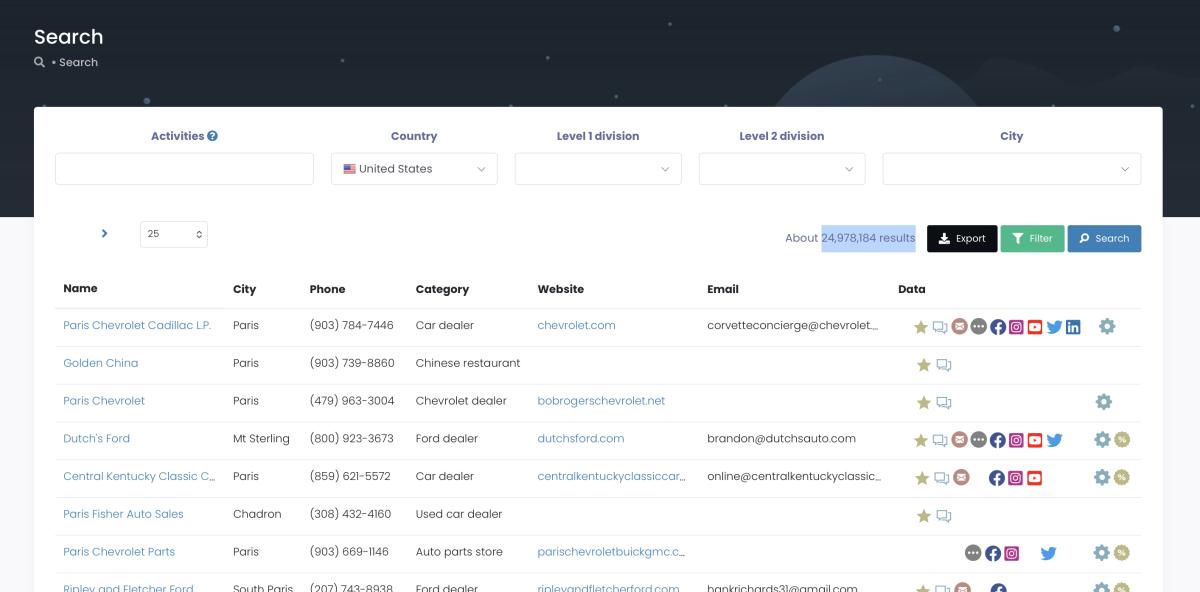
Scrap.io indexes 26,149,296 US business listings pulled live from Google Maps, and 8,966,801 of them already have a public email. See how many contacts are available in your target state and industry before you pay. Free trial, 100 leads to test it. That covers all 4,000+ business categories across every state. Start your free trial →
Key Features of Quality Business Email Lists
Not all business email list USA providers are equal. Some sell legitimately useful data. Others sell recycled garbage with a "verified" sticker slapped on. Here's how to tell them apart (quickly, before you waste money).
Data Accuracy & Verification
Good providers claim 95-97% accuracy. Fine. But accuracy has a shelf life, and it's shorter than you think. People change jobs every 2-3 years. That "97% accurate" list from just six months ago is probably down to 85% by now. Maybe lower if it's a high-turnover industry.
This is exactly why pulling data straight from Google Maps works better. You're grabbing info that businesses themselves updated recently. Not something that's been sitting in a database since before the last election.

And notice what the filters above let you do. You toggle "email present" before extraction, so of those 26 million listings, only the 14,957,738 with a website or the 8.97 million with a public email ever land in your export. You don't burn a credit on a blank. That's the difference between paying for usable contacts and paying for a spreadsheet full of holes.
| Feature | Good Provider | Red Flag |
|---|---|---|
| Data source | Public sources (Google Maps, websites) | "Proprietary" (won't explain) |
| Update frequency | Real-time or weekly | "Regularly" (ask what that means) |
| Email verification | Syntax + domain + inbox ping | Spelling check only |
| Bounce policy | Refunds or replacement credits | "All sales final" |
| Duplicates | Removed before you export | Your problem to sort |
| Compliance | CAN-SPAM + GDPR documented | "You'll be fine" |
Email authentication requirements got strict in 2025-2026. Gmail, Yahoo, Microsoft, all of them will straight-up reject your emails if your domain isn't properly set up with SPF, DKIM, DMARC. Clean data isn't a nice-to-have anymore. Good email validation is the baseline.
Segmentation, Where It Gets Interesting
A quality B2B email database USA should let you slice and dice by: location (every state, county, city, zip code in the US), industry (4,000+ NAICS categories), company size (employee count, revenue range), job role (owners, directors, managers), and digital footprint (has website? social media? Google reviews above a certain rating?).
Want dentists in Phoenix with 10-30 employees and no Instagram presence? You can build that exact list. Need restaurant owners in Chicago who have a Google listing but no website? Filter for that, and suddenly you've got a gold list for a web design agency pitch. The more specific your targeting, the better your response rates. Always.
Integration
Your business contact list USA needs to plug into your existing tools or it's just a pretty spreadsheet. CSV/Excel export for anything. Direct CRM integration for HubSpot, Salesforce. API access if you're technical. Compatibility with email platforms: Mailchimp, ActiveCampaign, whatever you use.
If a provider doesn't work with the tools you already have, you'll spend hours on data entry. And nobody, literally nobody, has time for that.
Top Industries Using B2B Email Databases
Some industries are absolutely printing money with USA business email database campaigns. Others are leaving opportunity on the table because they haven't figured out the targeting yet. If you want the sector-by-sector breakdown, our guide to building an email list by industry goes deep on which verticals convert best.
Technology & SaaS
About 15% of all B2B list purchases come from tech companies. Obvious reasons: long sales cycles, high lifetime values, and email is how tech people communicate.
The typical SaaS playbook: export 5,000 companies in a target vertical, check what tech stack they're running (or at least what size/industry they are), then build a 5-email sequence hitting specific pain points. Agencies and startups doing this with B2B lead generation platforms report 3-5% demo booking rates. On 5,000 contacts, that's 150-250 demos. From one campaign. That's a pipeline most sales teams would kill for.
Marketing Agencies
Agencies buy lists for two reasons: their own new business development and their clients' campaigns. They see results across dozens of accounts so they know what works.
One trick we see constantly: agencies filter for businesses that have a Google Maps listing but no website. These are established companies (they have a physical location, reviews, foot traffic) but they clearly need digital help. In a single metro area, this filter surfaces thousands of prospects for a web design or SEO pitch. Contractor email lists are especially good for this. Construction guys are busy building stuff, not building websites.
Recruiters
They live and die by contact data. Direct emails to hiring managers, department heads, C-suite. Response rates of 15-20% aren't unusual because the proposition is so immediate. One placement at $30K-$50K in fees covers the cost of a list for years.
Healthcare, Construction, Finance
Quick hits. Healthcare: 890K+ establishments, constant spending on equipment, software, staffing. Construction: 710K+ businesses, 92% small, they need everything. Consulting: $129B+ market, high deal sizes, long relationships. Finance: high-value targets who invest in tools that save time.
Want to see how many contacts are available in your target state and industry? Try Scrap.io free for 7 days, your first 100 leads are on us. Start your free trial →
USA Email List Provider Comparison (2026)
Alright, the comparison table everyone asks for. I'll keep it blunt. These are real prices and real tradeoffs, not marketing copy. If you want the full field, we also compared the best mailing list companies head to head.
| Provider | Price Range | Data Freshness | US Coverage | Free Trial | Best For |
|---|---|---|---|---|---|
| Scrap.io | $49/mo (starts) | Real-time (Google Maps) | 26M+ contacts | Yes, 100 free leads | SMBs, agencies, startups |
| ZoomInfo | $15,000-$50,000/yr | Quarterly | 100M+ claimed | Demo only | Big enterprise teams |
| Apollo.io | $49-$99/mo | Monthly refresh | 275M+ claimed | Freemium (limited) | Sales teams, SDRs |
| Cognism | Custom ($$$$) | Regular + phone-verified | Strong US + EU | Demo only | Enterprise, EU-heavy |
| BookYourData | Pay per lead | Varies a lot | US focused | Small sample | One-time buyers |
| DataAxle | $0.10-$0.50/contact | Quarterly-ish | Big legacy dataset | No | Old-school marketers |
$49/month for real-time data vs $25,000/year for quarterly dumps. Unless you've got a 30-person sales team running enterprise deals, the math doesn't favor legacy providers anymore. If ZoomInfo's price is what's driving your search, we broke down the cheaper options in our ZoomInfo alternatives comparison.
Video: Stop Paying $20,000 a Year for ZoomInfo, This Does More for $49 a Month
Apollo's freemium tier is decent for testing: limited credits but enough to check data quality. Cognism does phone-verified mobile numbers (they call it Diamond Data) and claims 93% deliverability. Solid product if you've got budget. ZoomInfo is the gorilla: massive coverage, massive price, mostly makes sense for large organizations with dedicated RevOps teams running the thing daily.
$49/mo real-time vs $25K/yr quarterly. Start free, 100 leads on us. 26M+ US contacts, filtered before export, no annual lock-in. Try Scrap.io free →
For pure usa email database coverage from Google Maps? Scrap.io. Real-time extraction, transparent pricing (it's on the website, no "talk to sales" nonsense), and you only pay for what you actually export. No annual lock-in.
How to Choose the Right Email List Provider
Pick wrong and you don't just lose money. You lose time, burn your sender reputation, and spend months crawling back. Here's what actually matters.
Data freshness. Ask them directly: when was this data last verified? If they dodge the question or say "regularly," that's not an answer. Push harder. "Quarterly" is acceptable. "Real-time from public sources" is ideal.
Verification depth. Checking that an email is formatted correctly (syntax check) is worthless by itself. Confirming the domain exists is better. Actually pinging the inbox to see if it's live? That's what you want. Good providers do all three layers.
Source transparency. Where does the data come from? Google Maps listings, company websites, public business registries: all legit and legal. "Our proprietary data partnerships" without specifics usually means they scraped LinkedIn or bought resold data of questionable origin.
Pricing clarity. Real companies show prices on their website. If you have to "schedule a call" or "request a quote" for basic pricing, they're either expensive enough to need a sales pitch or they charge different people different amounts. Neither is great. For reference, manufacturer email lists on Scrap.io have the price right there. That's how it should work.
Buying Without Getting Burned
When you decide to buy a business email list the smart way, start small. Please. Test with 500-1,000 contacts. Track your bounce rate, open rate, reply rate. If bounces go above 5%, stop. The data has a problem. This applies whether you buy business email database access by the month or pay per record.
Also, and I've watched people make this mistake over and over, don't chase the cheapest option. A $99 "unlimited contacts" deal sounds incredible until you realize the data is ancient and your very first campaign craters your domain reputation. Recovering from that takes months. Sometimes longer. The sender reputation damage from one bad send can haunt you across multiple campaigns.
Smart move: pick a platform with monthly pricing, test for 30 days, track results, scale what works. No annual contracts, no surprise invoices.
Red Flags
- "Unlimited emails for $99." If the data were good, they'd charge more.
- Won't show sample data. Hiding something.
- "100% delivery guaranteed." Literally impossible. Even the best lists have 3-5% bounces.
- No refund policy. They already know the data has problems.
- Won't say where data comes from. "Secret sauce" in this industry means "stolen from LinkedIn."
Best Practices for Using Business Email Lists
Owning a great business email list USA is step one. Actually getting results from it? Different skill.
Campaign Optimization
Subject lines. This is where 80% of campaigns succeed or fail. "Revolutionary Solution For Your Business!!!" goes straight to trash. Every time. What works: "[Specific problem] for [their industry]" or "Quick question about [their company name]." Something that looks like a human wrote it, not a template engine.
Timing. Tuesday through Thursday, 10-11 AM or 2-3 PM in the recipient's time zone. Monday morning? Their inbox is a warzone from the weekend backlog. Friday afternoon? They've mentally clocked out. And weekends, don't bother unless you're targeting people who work weekends (restaurants, maybe).
Sequences beat single sends. A 5-email sequence (introduction, something useful, social proof, an offer, a "hey we'll stop emailing" breakup) pulls roughly 3x the replies of a single email. Not 10% more. Three times. For cold email outreach frameworks with actual sequence templates, that link has the details.
Getting More Out of Your Data
Test constantly. Subject line A vs B. Send at 10 AM vs 2 PM. First name in the opening vs city reference. I've seen agencies double their response rate just by mentioning the prospect's city in line one instead of their name. Tiny change. Huge difference. These things compound: an extra 2% open rate across 10,000 sends is 200 more people reading your pitch.
Clean before you send. Even fresh data deserves a quick pass. Run the list through a tool to check if an email is valid before a big campaign, and keep bounces under that 5% line that protects your sender reputation.
Segment hard. Same email to a 5-person roofing company in Nashville and a 200-person IT consultancy in Chicago? Come on. Different problems, different budgets, completely different buying processes. Build separate sequences per segment. Yeah, it's more work. But a 500-contact campaign with sharp targeting will crush a generic blast to 5,000. Every time.
Track what actually matters. Opens (aim for 20-30%), clicks (3-6%), replies (2-4%), meetings booked (1-2%), and (this is the only one that really counts) revenue generated. Opens feel good but they don't pay rent.
Go multi-channel. Your list probably includes phone numbers too. Call the top 50 prospects. Connect on LinkedIn. Send a handwritten note to the ones worth the most (yes, snail mail, it works because nobody does it anymore). The USA business email database starts the conversation. Cold email tools automate the email part while you focus on the people who reply.
Email Compliance & Legal Requirements in 2026
Skip this section and you might end up paying more in fines than you made in sales. Not joking.
CAN-SPAM, The Basics
The fine for each individual email that violates CAN-SPAM is up to $53,088 (FTC, 2026 inflation-adjusted). Per email. Not per campaign, not per batch. Per email. In 2024, Verkada got hit with a record $2.95 million penalty for sending 30 million commercial emails without proper unsubscribe options over three years. The FTC called it their largest CAN-SPAM fine ever.
Don't be Verkada.
What you need in every single commercial email: your real company name and physical address, a subject line that isn't deceptive, a working unsubscribe link (not buried in 6pt grey text, make it visible), and you have to actually honor opt-out requests within 10 business days. None of this is hard. Cold email compliance isn't just about avoiding fines: compliant senders get better deliverability too, because ISPs trust them more.
Some industries pile on extra rules. Healthcare lists come with HIPAA considerations. Financial services have their own regs. Know your vertical before you hit send.
GDPR & CCPA
Emailing companies with EU connections? Data needs to come from legitimate public sources. Business info that companies published on Google Maps or their own websites qualifies. Random scraped personal addresses do not.
California's CCPA applies if you're hitting that state's 3.9 million businesses. Core principle: be transparent about where the data came from, provide opt-out options, and don't be shady about it.
SPF, DKIM, DMARC, This Is Mandatory Now
Gmail, Yahoo, and Microsoft all require proper email authentication for bulk senders as of 2025. And "require" means what it says. Google's own sender guidelines spell it out: bulk senders need SPF, DKIM, and DMARC, or their mail gets rejected. Google started permanently rejecting (not spam-foldering, rejecting) unauthenticated bulk email in November 2025. Microsoft followed with the same policy in May 2025. Error code 550 5.7.15. No retry. Dead.
If you're running B2B outreach without a proper SPF/DKIM/DMARC setup, your emails aren't going to spam. They aren't arriving at all. Set this up before you send anything.
Geographic and Market Opportunities
Where you aim matters almost as much as who you aim at.
The Big Four
California: ~3.9 million businesses. Texas: 2.8 million. Florida: 2.7 million. New York: 2.1 million. Together they're over 35% of US business activity. The California business directory alone has enough contacts to keep a sales team busy for years. Texas is the same story, and so are the Florida business directory and the New York business directory, each with over a million contactable listings live on Google Maps right now.
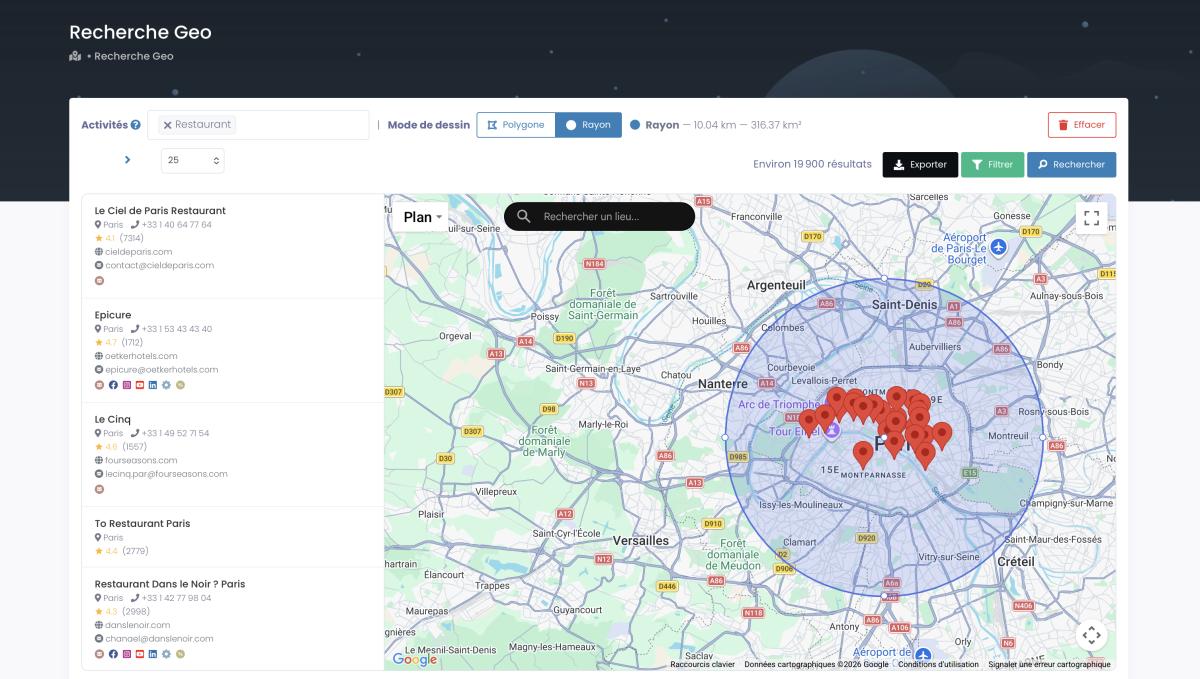
GeoSearch radius: target every business around a US location, filtered before you export.
That radius tool is the part static providers can't touch. Set a circle around a point, or draw a polygon by hand over a neighborhood or catchment area, and pull every matching business inside it with all the same filters applied. Try that with a frozen CSV.
Top 10 States by Business Count
| Rank | State | Approx. Establishments | Key Industries |
|---|---|---|---|
| 1 | California | 3.9M+ | Tech, entertainment, healthcare |
| 2 | Texas | 2.8M+ | Energy, construction, tech |
| 3 | Florida | 2.7M+ | Tourism, real estate, healthcare |
| 4 | New York | 2.1M+ | Finance, media, professional svcs |
| 5 | Illinois | 1.3M+ | Manufacturing, finance, logistics |
| 6 | Pennsylvania | 1.1M+ | Healthcare, manufacturing, ed |
| 7 | Ohio | 1.0M+ | Manufacturing, healthcare, retail |
| 8 | Georgia | 1.0M+ | Film, logistics, EV manufacturing |
| 9 | North Carolina | 900K+ | Finance, tech, biotech |
| 10 | New Jersey | 880K+ | Pharma, finance, logistics |
Smaller Markets, Higher Response Rates
The fastest-growing metros aren't always the biggest. Austin grew 8% in one year. Miami's up 7%. Denver, 6%. And the thing about these mid-tier cities: there's less competition for inbox space. A business owner in Raleigh or Nashville gets maybe half the B2B emails that someone in Manhattan does. They actually read them.
Puerto Rico got added to Census Bureau stats in September 2025. Almost nobody is prospecting there. Pure opportunity sitting unclaimed.
Following the Money
Construction companies in Sun Belt cities (Phoenix, Dallas, Tampa, Charlotte) are spending hard because of building booms. Cranes everywhere, and every contractor needs software, insurance, equipment, bookkeeping services.
Real estate agencies in Florida and Texas keep multiplying as people keep migrating south. Healthcare is expanding anywhere the population is aging. (That's basically everywhere, but the Southeast and Southwest especially.) And don't sleep on Atlanta: the Georgia business directory keeps swelling around the state's film and EV manufacturing boom.
And don't overlook the Midwest. Dense manufacturing clusters where manufacturer email lists perform incredibly well. A 12-person roofing company in Nashville or a 6-person dental practice in Columbus: they buy tools, software, and services constantly. And they're not drowning in cold emails like a SaaS founder in San Francisco.
Target where the demand actually is. Not just where the biggest logos are.
The Bottom Line
Email 10,000 targeted businesses. Get 200-400 replies. Close 20-40 deals. At $1,000 average deal size, that's $20K-$40K from a list that cost you under $500.
The ROI is borderline ridiculous, but only when the data is current and the targeting is right.
And remember: 86% of US businesses have fewer than 20 employees. These aren't enterprise deals with procurement committees and 18-month cycles. These are owners and managers who check email on their phones and decide quickly. They respond to relevant pitches. They buy from people who reach them at the right time with the right offer.
Your competitors are already running this playbook. Every week you spend manually building lists or working with expired data is a week they're filling pipeline.
Your competitors are already running this playbook. Try Scrap.io free: 7 days, 100 leads on us. 26M+ US business contacts, refreshed at every export. Start your free trial →
FAQ
Is it legal to buy email lists in the USA?
Yeah. B2B email lists sourced from public data are totally legal to buy and use in the US. You do need to follow CAN-SPAM: include an unsubscribe link, honor opt-outs within 10 days, clearly identify yourself, include a physical address. Use data from public sources (Google Maps, business websites, registries) and you're fine.
How much does a USA business email list cost?
Depends wildly on the provider. Anywhere from $0.01 to $0.50 per contact. Scrap.io starts at $49/month. Apollo is similar. ZoomInfo and Cognism? $15,000-$50,000/year. Enterprise territory. Most small and mid-sized businesses don't need to spend that kind of money. The newer platforms are better value for the vast majority of use cases.
What's the average accuracy of business email databases?
Fresh data from a good provider: 95-97%. But that number degrades at roughly 2-3% per month. People switch jobs. Companies close. After six months, a static list might be at 80%. Real-time databases pulling from Google Maps avoid this because the data refreshes as businesses update their own listings.
How many businesses are in the USA database?
Scrap.io indexes 26,149,296 results in the US as of September 2026, with 8,966,801 carrying a public email and 14,957,738 with a website. The Census Bureau counts 8,298,562 business establishments with employees. Total employer and nonemployer businesses combined: 36.4 million.
Can I filter by industry or location?
Yes, that's kind of the whole point. 4,000+ NAICS categories, all 50 states, any city or zip code, company size, employee count, Google review rating, whether they have a website, social media presence. The more granular you get, the better the response rates.
What percentage of U.S. businesses are small businesses?
86%. That's 7.1 million establishments with fewer than 20 employees, averaging 4.4 staff each (Census Bureau SUSB data). They're the bulk of the B2B email opportunity and they respond faster than big companies.
Real-time vs static databases: what's the actual difference?
Static: someone compiled a list months ago and sells it as-is. Real-time: data gets pulled directly from public sources as businesses update their own info. After six months, the accuracy gap is massive: 95%+ for real-time vs maybe 80% for static. Worth the few extra bucks.
How do I keep email bounces low?
Choose a real-time data provider. Run email validation before every major send. And always, always test with a small batch first. 500-1,000 contacts. If bounces go above 5%, stop and investigate before scaling.
Does cold email even work in 2026?
It does. Typical response rates: 1-5% for generic campaigns, 5-15% for highly personalized outreach. Cold email is still an effective strategy when you combine fresh data + personalization + proper authentication (SPF/DKIM/DMARC) + multi-touch sequences. One-off generic blasts? Those don't work anymore. Probably never did.
Do I need email authentication?
Not optional. Gmail, Yahoo, Microsoft, all three require SPF, DKIM, and DMARC for bulk senders. Without proper authentication, your emails get permanently rejected. Not spammed. Rejected. Like they never existed. Configure this before you send a single campaign.
Generate a list of restaurant with Scrap.io