

📋 What's in This Guide
- Why Businesses Still Buy Email Lists in 2026
- How Much Do Email Lists Really Cost? (2026 Pricing)
- 10 Best Places to Buy Email Lists in 2026
- The Risks of Buying Email Lists (What Reddit Won't Tell You)
- Buy vs. Scrape vs. Build: Which Approach Wins?
- Real Companies That Used Email Lists Successfully
- Email List Compliance in 2026: CAN-SPAM, GDPR & Beyond
- FAQ: Buying Email Lists in 2026
Okay so listen. You can buy 10,000 email addresses in like five minutes flat. Sounds incredible right? Until 30% of them bounce back, your domain gets blacklisted, and that little "shortcut" just nuked three months of outreach. Yeah. Not so incredible anymore.
I've seen it happen way too many times. Some guy on Reddit last month was bragging about this killer deal he found on a bulk email list. Two weeks later he's posting again asking how to fix his domain reputation. Classic.
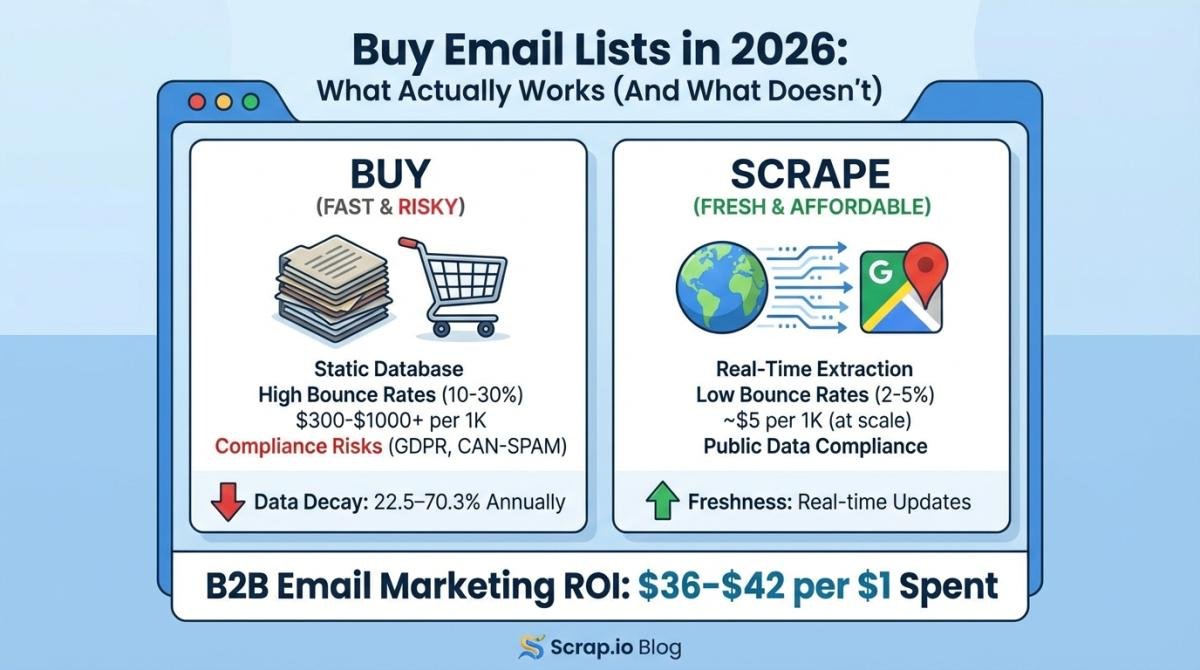
But here's the weird part. Email marketing still absolutely crushes everything else when it comes to ROI. We're talking $36 to $42 back for every dollar spent. That's not a typo. Forty-two dollars back for one dollar in. Try getting that from LinkedIn ads. Or Google Ads. Or... honestly anything else.
The global email marketing market hit $7.14 billion and it's heading toward $16 to $18 billion by 2030 according to Statista and Fortune Business Insights. So the money? Definitely still there.
Problem is, and nobody really warns you about this upfront, B2B contact data decays 22.5% to 70.3% annually. That number is from Gartner and ZoomInfo. Let it sink in. People change jobs. Companies fold. Emails get updated. The "fresh" list you bought in March might be half garbage by September.
So should you still buy email lists? Honestly? It depends. And I know that's annoying to hear. But stick with me through this guide and you'll actually know what makes sense for your situation. The real costs. The real risks. The providers worth considering. And a scraping alternative that a lot of smart teams are quietly switching to in 2026.
Why Businesses Still Buy Email Lists in 2026
The $7.14B Email Marketing Opportunity
Look. Every year someone declares email dead. And every year email keeps printing money for B2B companies. It's kind of funny at this point.
$36 to $42 return per $1 spent according to the DMA and Litmus. I don't care what social media guru told you TikTok is the future. Show me those numbers on TikTok. I'll wait.
The market keeps growing too. It cleared $7.14 billion and it's on track for $16 to $18 billion by 2030. That's a whole lot of businesses betting real money on email. They can't all be wrong.
Who Actually Buys Email Lists? (And Why)
Take this guy I know. Let's call him Dave. Dave sells scheduling software to dental clinics across Texas. He knows there are thousands of dentists who'd love his product. Only problem? He doesn't have their email addresses. Building a prospect list from scratch would take him months. And his sales team needs leads now. Not next quarter. Now.
So Dave looks into buying an email list. Fast access. Wide reach. Could start outreach next week instead of next quarter. Makes total sense on paper.
Or take this marketing agency owner in Chicago. She wants to target restaurants that don't have a proper website yet. Needs a contact database fast. Not in six months when she's done manually Googling every restaurant in Cook County.
People buy email lists because speed matters. Some are chasing a broad B2B play, others just want a targeted email list by industry so they only pay for the vertical they actually sell into. When you've got a product that solves a real problem, every week spent building lists from scratch is a week your competitors are already closing deals. But, and this is a pretty big but, speed without quality is just expensive noise. Expensive and frustrating.
How Much Do Email Lists Really Cost? [2026 Pricing]
Consumer vs. B2B Email Lists: Pricing Breakdown
Let's talk actual numbers because "it depends" never helped anyone.
Consumer email lists run about $100 to $300 per thousand contacts. These are general consumer databases. Quality's all over the place honestly. A "1,000 email addresses list" for cheap almost always means recycled data.
B2B email lists are where your wallet starts hurting. We're talking $300 to $1,000+ per thousand contacts. Want verified C-level contacts at SaaS companies in the Northeast? That's premium territory. And premium means expensive.
Then there's scraping. Tools like Scrap.io completely flip the pricing model. You pay $49 to $199 a month for a subscription. Pull 10,000 contacts and you're looking at roughly half a cent per contact. Compare that to thirty cents to a dollar from traditional brokers. The math is... pretty obvious.
| List Type | Price per 1,000 | Data Freshness | Typical Bounce Rate |
|---|---|---|---|
| Consumer lists | $100 to $300 | 3 to 6 months old | 15% to 25% |
| B2B purchased lists | $300 to $1,000+ | 1 to 6 months old | 10% to 30% |
| Email scraping tools (e.g. Scrap.io) | ~$5 at scale | Real-time | 2% to 5% |
Per-Contact Pricing vs. Subscription Models
Most traditional email list providers charge per contact. You pay once and get a static file. Done. That data starts aging the second you hit download. Like literally the second.
Subscription tools work differently. Pay monthly and extract fresh contacts whenever you need them. Five thousand restaurant contacts in Miami today? Three thousand dental clinics in Dallas tomorrow? Same subscription. Way more flexible.
Hidden Costs Most Providers Don't Mention
Nobody talks about these. But they add up fast and they can absolutely wreck your budget.
Bounce rates. Purchased lists average 10% to 30% stale or invalid contacts according to Mailtrap and industry benchmarks. Buy ten thousand contacts and twenty-five hundred bounce? That's not just wasted money on the list. It's damage to your sender reputation. Rebuilding that takes weeks. Sometimes months.
Compliance fines. CAN-SPAM violations cost up to $51,744 per email according to the FTC. Per. Individual. Email. Not per campaign. I'll let that one marinate for a second.
ESP restrictions. Mailchimp, Constant Contact, Campaign Monitor: they all ban purchased lists in their terms of service. Get caught and they suspend your account. So now you've lost your list AND your sending platform. Great combo right?
Data enrichment. That "complete" list you bought? Half the entries might be missing phone numbers or job titles. Enriching costs extra. Always does.
10 Best Places to Buy Email Lists in 2026
Alright so you're still set on purchasing a list. Fair enough. At least do it right. If you're hunting for the best place to buy email lists, here's where most people go.
B2B Data Platforms
These are the big players. Massive databases with verification systems and enterprise pricing to match.
ZoomInfo is the industry standard for B2B contacts. Huge database. Solid verification. But expensive. Like really expensive. Enterprise pricing starts in the thousands per month. Not exactly small business friendly.
Apollo.io is more affordable. Solid for startups and mid-size companies. Has a free tier but it's pretty limited. Still a good starting point if you're on a budget.
Cognism is strong in European markets. Good if you need GDPR-compliant data. Their Diamond Data verification for phone numbers is actually pretty useful.
Lusha is quick and simple. Decent Chrome extension for grabbing contacts on the fly. Better for individual prospecting than bulk list purchasing though.
Niche List Brokers
These companies specialize in selling pre-compiled contact databases. Old school approach but some are decent. If you specifically want to buy a mailing list for postal or multi-channel campaigns, this is also where you'd start, and our roundup of the best mailing list companies breaks those down separately.
BookYourData claims a 97% accuracy guarantee. Pay-as-you-go pricing which is nice if you don't want a subscription commitment.
LeadsPlease is a budget option for small businesses. Consumer and business lists. Nothing fancy but gets the job done for basic needs.
Data Axle (used to be InfoUSA) is one of the oldest in the game. Massive US business database. Been around forever which means they've got a lot of data. Whether it's all current... that's another question.
All-in-One Outreach Tools
These combine contact data with email sending. Everything in one place basically.
Saleshandy Lead Finder pairs a built-in lead database with cold email sending. Convenient if you don't want to juggle multiple tools.
Hunter.io is great for finding emails from company domains. More of a finder tool than a bulk provider though. I use it for one-off research sometimes.
UpLead claims 95% data accuracy with real-time verification. Good filtering by industry and company size. Worth testing.
| Provider | Database Size | Starting Price | Best For | Verification |
|---|---|---|---|---|
| ZoomInfo | 260M+ profiles | Enterprise ($$$) | Large B2B teams | Phone + email |
| Apollo.io | 270M+ contacts | Free / $49/mo | Startups, SMBs | |
| Cognism | 400M+ profiles | Custom pricing | EU markets | Diamond Data® |
| Lusha | 100M+ contacts | Free / $36/mo | Quick prospecting | Email + phone |
| BookYourData | 250M+ contacts | Pay-as-you-go | Niche targeting | 97% guarantee |
| Data Axle | 300M+ contacts | Custom pricing | US businesses | Multi-source |
| Saleshandy | 700M+ contacts | $25/mo | Outreach combo | |
| Hunter.io | 100M+ addresses | Free / $34/mo | Domain search | |
| UpLead | 160M+ contacts | $99/mo | Verified B2B | Real-time |
| Scrap.io | 225M+ businesses | $35/mo | Real-time scraping | Real-time |
All that to say, most of these providers sell you a static snapshot. The data was accurate at some point. Could've been last month. Could've been six months ago. Which brings us to the part nobody likes talking about.
The Risks of Buying Email Lists (What Reddit Won't Tell You)
Data Decay: The $3.1 Trillion Problem
This number should honestly scare you a little. Poor data quality costs US businesses $3.1 trillion per year. That's from IBM, cited in Harvard Business Review. Not million. Trillion with a T.
And it makes total sense when you actually think about what happens. You purchase an email list. Load it into your CRM. Your sales team spends hours writing personalized cold emails. They click send. And twenty-five percent of those emails bounce straight back into the void.
All those hours writing emails? Wasted. Your sender reputation? Damaged. The deals you could've closed if those emails had actually reached real people? Gone.
B2B contact data decays 22.5% to 70.3% every single year according to Gartner and ZoomInfo. People switch companies. Get promoted. Leave the industry entirely. The contact list you bought in January could be worthless by summer. That's just how it works and no provider is immune to it.
Video: Why Your Google Maps Emails Don't Get Replies?
ESP Restrictions
This one catches so many people completely off guard. Mailchimp? Bans purchased lists. Constant Contact? Same thing. Campaign Monitor? Yep. They all explicitly prohibit purchased email lists in their terms of service.
Upload a bought list and blast through their platform? They'll suspend your account. Sometimes permanently. Why? Because purchased lists generate way higher spam complaint rates. And ESPs protect their own deliverability by cracking down hard on senders with high complaints.
If you're gonna use purchased or scraped contacts for cold outreach, you need tools built for that. Saleshandy, Lemlist, Instantly: these are designed for outbound lists. They won't freak out when you upload contacts who didn't opt in.
Deliverability Damage and Sender Reputation
Your email domain has a reputation score. Think of it like a credit score but for email. Every spam complaint drops it. Every bounce drops it. Drop it low enough and even your legitimate emails, the ones going to people who actually signed up, start landing in spam folders.
Rebuilding takes weeks. Sometimes months. During that time your entire email operation is basically crippled. Not fun. If you want the full playbook on how to keep emails out of spam, we wrote a whole guide on it.
Smart move? Verify your email list before sending. Whether you bought it, scraped it, or built it yourself. Always verify first.
Real Cautionary Tale: SalesCaptain's $2K Failure
This story keeps coming up in SaaS and cold email communities. SalesCaptain, a startup, spent $2,000 on purchased email lists. Seemed like a reasonable bet. Get a bunch of contacts. Launch outreach. Close some deals. Easy right?
What actually happened? Lists bounced over 30%. Domain got blacklisted within weeks. They lost the two grand obviously. But the real damage? Having to rebuild their sender reputation completely from scratch. Months of potential outreach just... gone.
One user on r/Emailmarketing nailed it: "Every time I hear someone bought a list I cringe. Your domain reputation is NOT worth the shortcut."
Hard to argue with that honestly. Meanwhile on r/coldemail someone was asking where to get a bulk email database focused on the US, which just shows how real the "buy email lists reddit" demand still is. And a thread on r/b2bmarketing captured the whole confusion perfectly, with people still trying to pin down the actual state of purchased lead lists heading into this year.
The answer? It's complicated. Which is exactly why you need to understand the alternatives.
Buy vs. Scrape vs. Build: Which Approach Wins?
Okay so this is the part that basically no one in the current top search results covers properly. I checked. They all dance around it. So let me just lay out the buy vs scrape email list debate plainly.
Video: Scrap.io vs Apollo: Which Tool for Which Type of Prospecting
Buying: Fast but Risky
Pros are obvious. Instant access to thousands of contacts. No tech skills needed. Works for broad targeting when you need volume fast.
Cons are also pretty obvious once you dig in. Data starts decaying the moment you download it. Ten to thirty percent bounce rates are standard. ESPs might ban you. GDPR makes it risky for EU contacts. And here's the kicker: your competitors might have bought the exact same list. So much for competitive advantage.
Scraping: Real-Time Data at a Fraction of the Cost
Now here's where email scraping tools have seriously changed things. Instead of buying some static database from a broker, you extract fresh data directly from public sources. Google Maps listings. Company websites. Business directories.
When a business updates their Google Maps profile or throws a new email on their website, you get that updated info. No more emailing people who left six months ago. No more bounces from addresses that don't exist anymore.
Platforms like Scrap.io let you extract business emails from Google Maps in real time, and there's a dedicated walkthrough if you want to extract emails from Google Maps step by step. We're talking 200M+ US business contacts across over 4,000 categories in 195 countries, which is exactly what people mean when they search "buy email list USA" without the stale-database baggage. The filtering is honestly kind of insane. Target by review score. Social media presence. Website quality. Geographic area. Want all plumbers in Denver with bad Google reviews and no Instagram presence? Two clicks. Done.

And here's the part that makes the "static list" model look silly. Right now, as you read this, Scrap.io counts 667,827 restaurants across the United States on Google Maps, and 199,372 of them (about 30%) come with a usable email address. Those numbers were pulled live on September 4, 2026, not frozen in a file that's six months stale (source: Scrap.io, 2026-09-04). That's the whole point of filtering before extraction: you only spend credits on the ~30% that are actually contactable.

Cost difference is wild too. Traditional purchased lists run $300 to $1,000+ per thousand contacts. Scrap.io starts at thirty-five bucks a month and you can pull ten thousand contacts for around fifty dollars. That's roughly half a cent per contact versus thirty cents to a dollar from brokers. I mean... the math basically does itself.
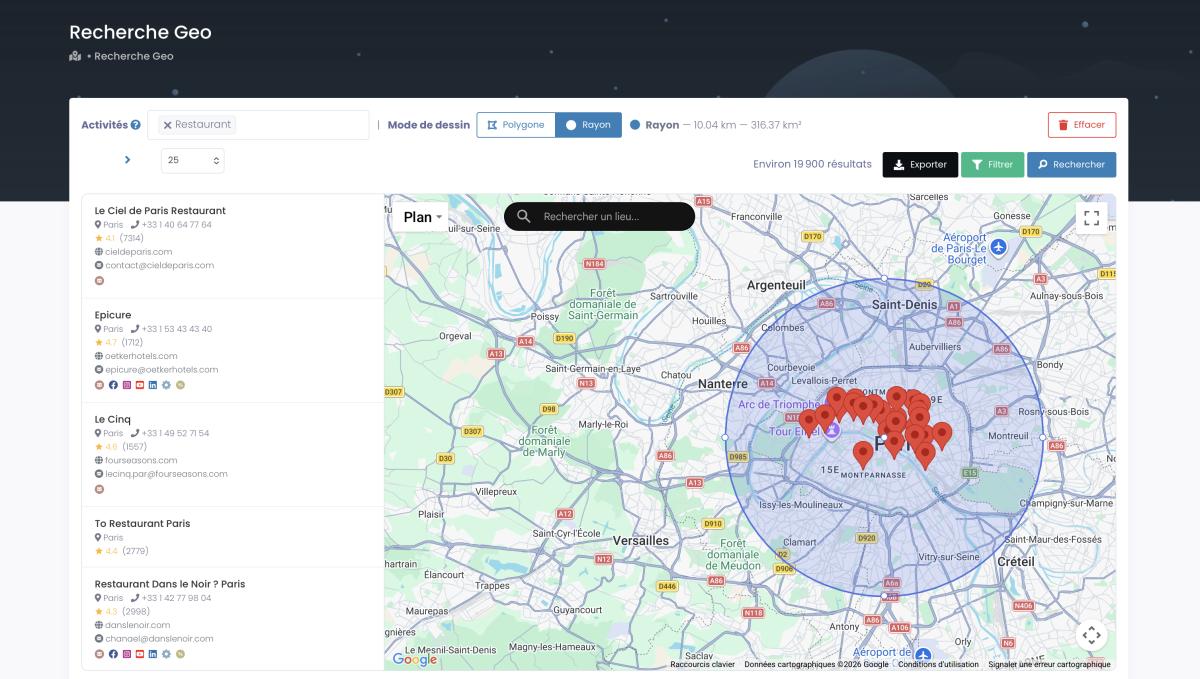
Need to target a precise trade area instead of a whole city? GeoSearch lets you draw a radius around a point, or sketch a polygon by hand over an exact neighborhood, and every filter still applies inside it.
Downsides? You need a tool. Though most are no-code these days so it's not exactly rocket science. And data's limited to what businesses publish publicly. No intent signals like some B2B platforms offer.
Comparing your options? Start with 100 free leads from Scrap.io. Real-time B2B data from Google Maps, filtered before you spend a credit, so you only pay for contacts that actually have an email. 7-day free trial, 100 leads included. Put fresh data head-to-head against whatever list you're eyeing.
Building Organically: Highest Quality, Longest Timeline
Building your own list through opt-ins, content marketing, webinars, lead magnets: that gives you the absolute best quality contacts. These people actually want to hear from you. Open rates are way higher. Conversions are better. Zero compliance headaches.
But man does it take forever. Months to build anything meaningful. If you need pipeline next quarter, email list building alone just isn't gonna cut it. Not even close. This is also where lead generation companies try to sell you a done-for-you pipeline, though for local B2B you can usually beat their pricing yourself.
The Hybrid Approach Most Pros Use in 2026
You know what the smartest teams actually do? They don't pick just one. They mix approaches.
Scraping for quick targeted outreach lists. Organic building for long-term audience growth. And if they buy at all? They buy small. Verify ruthlessly. And treat purchased lists as a starting point. Never the whole strategy.
| Factor | Buy | Scrape | Build |
|---|---|---|---|
| Speed | Instant | Minutes to hours | Months |
| Cost per 1K contacts | $300 to $1,000+ | ~$5 | Free (but time-intensive) |
| Data freshness | 1 to 6 months old | Real-time | Always current |
| Bounce rate | 10% to 30% | 2% to 5% | <2% |
| Compliance risk | Medium to High | Low (public data) | Lowest |
| Targeting precision | Limited filters | Very high | Highest (self-selected) |
| Scalability | High | Very high | Low |
Real Companies That Used Email Lists Successfully
Enough theory. Let me show you what actually worked for real companies with real numbers.
Postaga: 600% Revenue Growth from Targeted Outreach
Postaga is this AI-powered outreach platform for B2B marketers. They used a combination of targeted email lists and scraping for their own sales outreach. Result? 600% revenue growth. Not six percent. Six hundred percent. They didn't just blast purchased lists blindly though. They built hyper-targeted contact databases and paired them with messaging that actually resonated. Big difference.
Clay: $1.5B Valuation with Data Enrichment
Clay basically built a billion-dollar company around making email list building smarter. They combine data from 75+ providers into one enrichment platform. Sequoia Capital backed them. They hit 800% ARR growth. Earned a $1.5 billion valuation. Their whole thesis? The future isn't buying static databases. It's dynamically enriching contacts from tons of different sources. Apparently Sequoia agrees.
Artisan AI: 1M+ Campaigns Automated
Artisan is Y Combinator-backed. It's an AI sales agent that automates outbound prospecting. They process over a million campaigns using enriched email data. Database covers 300M+ contacts. Raised $12M+ in funding. Works because they're constantly refreshing their contact data instead of relying on lists compiled months ago.
Jacob Tuwiner: 83% Open Rates with Hyper-Targeted Lists
This one's my favorite honestly. Because it shows you don't need massive scale to win.
Jacob Tuwiner is a freelancer. He built a hyper-targeted list of just 200 contacts using targeted scraping. Two hundred. Compare that to somebody who might purchase a list of five thousand generic contacts.
His results? 83% open rate. 12% reply rate. Those numbers are honestly kind of absurd. For context, cold email average open rates are 15% to 25% for good lists and 1% to 5% for purchased ones according to Mailchimp and HubSpot data. Jacob's little 200-contact list absolutely destroyed a purchased list ten times its size. A small fresh targeted email list beats a big stale one every single time.
Need fresh, verified emails to run a campaign like Jacob's? Try Scrap.io free for 7 days and pull 100 verified B2B leads straight from Google Maps. Real-time data across 225M+ businesses in 195 countries. No stale databases, no mystery contacts.
Email List Compliance in 2026: CAN-SPAM, GDPR & Beyond
Boring? Maybe. Important? Extremely. Get this wrong and you're staring at fines, lawsuits, and a destroyed sender reputation. So pay attention for like three minutes here.
US (CAN-SPAM): What's Legal and What's Not
Good news if you want to buy email lists in the US. It's legal under CAN-SPAM. As long as you follow the rules. And the rules honestly aren't that complicated.
Honest subject lines. Clear sender identification. Working unsubscribe link, and you actually have to honor opt-outs within ten business days. Your real physical business address in every email. That's... basically it for the basics.
The penalties though? Up to $51,744 per individual email according to the FTC. Per email. Not per campaign. Not per batch. Each one. So yeah. Follow the rules.
For the full breakdown check out this complete cold email compliance guide.
EU (GDPR): When Purchased Lists Become Illegal
Got any European contacts on that list? Things get way stricter. Like way way stricter.
GDPR requires documented consent before you email anyone. Buying a list from some broker and blasting it to EU contacts? That's essentially illegal unless the provider can prove every single person on that list gave explicit consent. Spoiler: most can't.
Scraping publicly available business data works differently here though. When businesses publish their email address on Google Maps or their own public website, they're making that info available. Different legal framework than purchasing pre-compiled databases with questionable consent chains. If you're wondering exactly where the line sits, here's a deeper look at whether it's legal to scrape Google Maps.
Canada (CASL): The Strictest Consent Rules
Canada's anti-spam law requires express consent before commercial emails. There's some implied consent for existing business relationships but it's narrower than most people think. Targeting Canadian businesses with a purchased list? Be extra careful.
Email Authentication Requirements (SPF, DKIM, DMARC)
Technical side. Trips a lot of people up. Gmail, Yahoo, Microsoft: they're all actively rejecting emails in 2026 that don't have proper authentication set up. SPF, DKIM, and DMARC requirements aren't optional anymore. They're table stakes.
Sending cold emails from bought or scraped mailing lists without your domain authentication locked down? Your emails go straight to spam. Doesn't matter how good your list is or how brilliant your copy is. Spam folder. Every time.
FAQ: Buying Email Lists in 2026
Is it legal to buy email lists?
In the US? Yes. Legal under CAN-SPAM as long as you include opt-out options and your physical address in every email. EU is a different story: GDPR makes it generally illegal without documented consent from each contact. Canada's CASL requires express consent too. Always ask your provider exactly how they collected the data. If they can't give you a straight answer? Walk away.
Can you still buy email lists?
Yes, you can still buy email lists in 2026, and it's perfectly legal in the US under CAN-SPAM. The catch is quality and geography. EU and Canadian contacts carry real consent risk, and purchased data decays fast. Most teams now scrape fresh data instead and buy only for very specific niches.
Is buying email lists a good idea?
It depends. For quick, broad US B2B volume it can work if you verify hard and use a dedicated cold email tool. But with 10% to 30% bounce rates, ESP bans, and stale data, it's rarely the best play. For most people, scraping real-time contacts beats buying a static list on cost, freshness, and compliance.
How much does a 1,000-contact email list cost?
Consumer lists run about $100 to $300 per thousand. B2B lists cost $300 to $1,000+ per thousand depending on how targeted and verified the contacts are. Subscription scraping tools offer a completely different model: unlimited extraction starting from $35 a month, which works out to roughly five bucks per thousand contacts at scale. Pretty massive difference.
What's the average bounce rate on purchased email lists?
Industry data shows 10% to 30% invalid contacts on purchased lists. And B2B data decays 22.5% to 70.3% annually according to Gartner and ZoomInfo research. Fresh scraped data from platforms like Scrap.io typically hits 2% to 5% bounce rates because you're getting contacts updated in real time. Not stuff compiled six months ago and sitting in a spreadsheet somewhere.
Can I use purchased email lists with Mailchimp or HubSpot?
Short answer: nope. Mailchimp, Constant Contact, Campaign Monitor, most major ESPs explicitly ban purchased lists in their terms. Use one and you risk getting your account suspended. If you're doing cold outreach with bought or scraped contacts, grab a dedicated cold email tool like Saleshandy, Lemlist, or Instantly. They're built for outbound and won't shut you down for it.
Where can I get free email lists for marketing?
You'll find plenty of sites offering "buy email lists free" downloads, but those lists have been recycled through hundreds of campaigns and are packed with spam traps. They're the fastest way to get blacklisted. If you want a genuinely low-cost option, read our take on free email lists for marketing before you touch one, then compare it against extracting your own fresh data.
What's the difference between buying email lists and scraping?
Buying means paying a broker for a pre-compiled database. Static file. Data was accurate at some point but you don't always know when. Scraping means extracting fresh contacts in real time from public sources: Google Maps, company websites, business directories. Scraping gives you way fresher data at lower cost. Buying is faster to get started but riskier on quality and compliance. Most smart teams in 2026 are using scraping as their primary approach and occasionally buying for very specific niche lists, whether that's an email list by industry or leads for affiliate marketing.
Bottom Line
The email list market in 2026 is more complicated than "just buy a list and start blasting." That might've worked ten years ago. Today? With data decaying at 22.5% to 70.3% annually and ESPs cracking down on purchased lists? You gotta be smarter about it.
Most teams getting real results right now are combining targeted scraping with organic list building. Fresh verified data. Fraction of what traditional brokers charge. Better targeting. Better compliance. Better results across the board.
Whether you go with a provider, scrape your own data, or build organically, match your approach to your budget and your timeline. Just please don't expect a purchased email list to be some magic bullet. It never was. And it definitely isn't now.
Test what works for your outreach. Try fresh data against whatever you're currently using. You might be surprised at how big the difference actually is. If you're still curious how the tool works end to end, this quick walkthrough covers it:
Video: Scrap.io - How to Start?
Try Scrap.io free for 7 days and pull 100 verified B2B leads from Google Maps. See how real-time data stacks up against purchased lists: 225M+ businesses, 195 countries, 4,000+ categories, filtered before you spend a credit. Browse B2B email databases by industry to find contacts in whatever niche you're working.
Now stop reading guides and go get some leads. Your competitors already are.