
Video: How to Turn Your CRM Into a War Machine Using Google Maps Data
📋 What's in This Guide
- What Is a CRM and Why Does Your Small Business Need One in 2026?
- How to Choose the Best CRM Software for Small Business
- The #1 Problem No One Talks About: An Empty CRM
- Real Results: How Small Businesses Use CRM + Lead Generation
- CRM Compliance & Data Quality: What You Need to Know
- FAQ: CRM for Small Business
Okay so here's a number that should make you sit up. The global CRM market hit $126.17 billion in 2026, and the SMB slice alone is worth $11.77 billion. Billion. With a B. The SMB segment is projected to reach $25.54 billion by 2035 according to Business Research Insights, a CAGR of 8.5%, which in boring financial terms means this thing is growing fast and not stopping.
But here's what gets me. 91% of companies with 10+ employees already run a CRM. Below 10 employees? Barely half. And the ones sitting it out are leaving money on the table. Businesses see an average +29% revenue bump after adopting a CRM, per Salesforce (and the broader CRM adoption numbers back this up). That's not my opinion. That's the vendor who invented the category.
And yet. I talk to small business owners every week. Know what I hear? "I tried a CRM once. Spent two weeks setting it up. Then nobody used it." Or: "We have HubSpot but it's basically empty. Just me and three contacts from 2023."
Sound familiar?
Look, choosing a CRM for small business isn't the hard part anymore. There are literally 200+ options out there. The hard part is what happens after you pick one. Because an empty CRM is about as useful as an empty fridge. Nice to look at. Does absolutely nothing for you.
This guide's gonna fix that. We'll cover how to choose the right CRM software for small business, sure. But more importantly, how to actually fill the thing with leads that turn into money. And yeah, we'll talk about the AI stuff everyone's obsessing over in 2026. Spoiler: it doesn't replace your CRM. It just makes an empty one look even sadder.
Let's get into it.
What Is a CRM and Why Does Your Small Business Need One in 2026?
Simple version. A CRM, customer relationship management system, is where you keep track of everyone your business talks to. Prospects, leads, customers, that guy who emailed asking about pricing six months ago. All in one place.
But in 2026? It's way more than a digital Rolodex. A modern CRM platform handles your sales pipeline, automates follow-ups, tracks emails, schedules calls, and, if you're paying attention, uses AI to tell you which deals are most likely to close.
87% of businesses have moved their CRM to the cloud. And here's the momentum stat: 66% of small and mid-sized businesses adopted a CRM for the first time in the last three years (SchedulingKit / SuperOffice, 2026). That's a stampede. If you still don't have one, you're now genuinely late to the party. Even the U.S. Chamber of Commerce's small-business CRM guide now walks owners through picking one. That's how mainstream this got. For the full picture of what a customer relationship management software actually does, Salesforce's primer is a decent starting point.
The Real Cost of Not Using a CRM
Here's what kills me. 40% of salespeople still use spreadsheets or their email inbox as their "CRM." Forty percent. In 2026.
Take Mike. Mike runs a small HVAC company. He's got 200 customers, maybe 50 active leads at any time. He keeps everything in his head, a few sticky notes, and a Google Sheet his wife started in 2021. Works great until Mike goes on vacation. Or forgets to call back that property manager who wanted a quote for three buildings.
No CRM means no system. No system means dropped leads. Dropped leads mean lost revenue. Pretty straightforward math.
Key CRM Benefits by the Numbers
The data here is honestly hard to argue with. Companies using a CRM see +300% improvement in conversion rates according to DemandSage. That's three times more deals closing. And 45% of businesses report a revenue increase after implementing a CRM.
Not to mention: your sales team actually knows what's going on. Who talked to whom. What was promised. When the follow-up is due. Instead of five people emailing the same lead with slightly different offers. We've all been there.
One caveat, though. A CRM only pays off if the data inside it is any good. 47% of CRM users say data quality directly impacts how satisfied they are with the tool (2026 data). Hold that thought. It's the whole point of this article.
How to Choose the Best CRM Software for Small Business
Alright so you're convinced you need one. But which one? There are a ridiculous number of options. Figuring out how to choose a CRM for small business can feel overwhelming. Seriously. Type "best CRM for small business" into Google and good luck sorting through that mess.
Before you even look at specific tools, you need to define your ideal customer profile. Sounds basic but most people skip this step and wonder why their CRM feels pointless six months later.
The 5 Features That Actually Matter
After watching dozens of small businesses pick (and abandon) CRMs, here's what actually moves the needle. Not the feature list. Not the logo wall. These five things:
1. Simplicity. If it takes more than a day to learn, your team won't use it. Period. A simple CRM for small business beats a powerful one that nobody opens. Roughly 35% of teams don't use their CRM because they don't have time to add records. That's a usability problem, not a motivation problem.
2. Email tracking and automation. You need to know when someone opens your email. And you need follow-up sequences that run without you thinking about it. A CRM for small business with email tracking is basically table stakes in 2026.
3. Mobile access. Your team isn't always at a desk. If your lead management system doesn't work from a phone, you're missing deals on the road.
4. Integrations. Gmail, Outlook, Google Maps, your accounting software. Your CRM tool needs to talk to the stuff you already use. As one HubSpot Community user put it: "If you're in B2B, consider tools that integrate directly with Gmail and LinkedIn so following up on leads feels seamless."
5. Pricing that makes sense. An affordable CRM for small business doesn't mean free forever. It means the ROI math works. If you're a solopreneur paying $15/month and closing one extra deal a quarter because of it? That's infinite ROI.
The Rise of the AI-Native CRM
New in 2026: everybody and their cousin is selling an "AI CRM" now. And some of it is genuinely useful. AI now scores your leads, drafts your follow-ups, and flags the deals most likely to close before you'd have spotted them yourself. The best CRM for small business with AI baked in can save a solo founder a real chunk of admin time.
But, and this is the part the demos skip, AI only works with clean, complete data. Feed it a half-empty pipeline of stale contacts and it'll confidently recommend you follow up with a company that closed in 2024. Garbage in, confident garbage out. Here's the number that should scare you: 40% of CRM projects built on agentic AI are expected to stall or fail by 2028 because of poor data quality, not because the AI is bad. The AI's fine. The data's the bottleneck.
So when you're comparing an AI-native CRM against a simpler tool, don't get hypnotized by the feature. Ask yourself where the data's coming from first.
Free vs Paid: What You Really Get
Let's talk about free CRM for small business options because everyone asks.
HubSpot CRM Free. The most popular option. Free forever for up to 2 users with 1,000 contacts. Includes deal tracking, live chat, and basic email marketing. Really solid for getting started. You'll probably outgrow it within 6-12 months though.
Salesforce Free Suite. Also offers a 2-user free plan now. More complex but more powerful if you plan to scale.
Zoho CRM Free. Free tier for 3 users. Great balance of features and price. Zoho CRM for small business is honestly underrated. It does a lot for what you pay.
Worth a look beyond the usual names: Bigin by Zoho, which PCMag tapped as its 2026 Editors' Choice for small business, and Insightly if you want a CRM with light project management bolted on. Neither is free forever, but both start cheap and stay simple.
The catch with free plans? Limited contacts, limited automation, limited reporting. Fine for month one. Not fine for month twelve. And if you're looking for a free CRM for small business with email tracking built in, HubSpot's free tier is honestly your best bet. The others either charge for email tracking or don't offer it at all.
Quick Comparison Table
Here's a quick small business CRM comparison to save you some research time. Finding the best CRM for small business really comes down to matching features to your specific needs. Prices verified for 2026:
| CRM | Starting Price | Best For | Free Plan |
|---|---|---|---|
| HubSpot | $0–$50/mo | Startups, marketing-heavy teams | Yes (2 users) |
| Salesforce Starter | $25/user/mo | Teams planning to scale fast | Yes (2 users) |
| Zoho CRM | $0–$14/user/mo | Best balance of features + price | Yes (3 users) |
| Less Annoying CRM | $15/user/mo | Solopreneurs, simplicity-first | No (30-day trial) |
| Pipedrive | $14/user/mo | Sales-focused small teams | No (14-day trial) |
What is the best CRM for a small company? Honestly depends on your situation. Best CRM for solopreneurs or a one person business? Probably Less Annoying or Breakcold. Best CRM for startups with a team? HubSpot free or Zoho. Best CRM for service based business? Pipedrive or Salesforce Starter. Cheapest CRM for small business that isn't useless? Zoho's free tier, then $14/user when you outgrow it. Best sales CRM for small business overall? Hard to beat Pipedrive for pure pipeline management. (And if you're on the other side of the table, selling services to CRM users rather than using one yourself, here's how to target Salesforce users directly.) Want the full shortlist? We ranked the 15 best lead generation software that feed these tools.
Does Google have a free CRM? Not exactly. Google Contacts plus Sheets plus Gmail can work as a basic contact management software but it's not a real CRM. No pipeline, no automation, no deal tracking. For a proper sales pipeline tool with Google Workspace integration, HubSpot free or Zoho free are your best bets.
And look, discussions on Reddit's r/CRM consistently come back to one thing: people want the best CRM for under $50/month that isn't overly complicated. As one long thread on affordable small business CRMs put it, an affordable tool that scales as your database grows beats a feature monster every time. The ones I just listed all fit that criteria.
The #1 Problem No One Talks About: An Empty CRM
Okay this is the part nobody writes about. And it's the part that actually matters.
You can pick the perfect CRM. Set it up beautifully. Custom fields, automation workflows, pretty dashboard. Know what happens next?
Nothing. Because it's empty.
Why 91% of CRM Data Is Incomplete
Here's a stat that should genuinely concern you. 91% of CRM data is incomplete and 70% degrades every single year. That's from Salesforce themselves. The company that literally invented the modern CRM is telling you most CRM data is garbage.
Think about that. Your fancy CRM system has bad phone numbers, old email addresses, missing fields, duplicate contacts, and leads that went cold two years ago but are still sitting there making your pipeline look bigger than it is.
And it's not a fringe problem. 55% of CRM deployments fail to hit their goals, and data quality is the recurring villain in the post-mortems. Remember that 40% of AI-CRM projects stalling by 2028? Same root cause. You can throw all the AI you want at a dirty database, the AI just gets dirty answers faster.
How to Feed Your CRM With Verified Local Leads
So what do you do about it? You need a system to continuously feed your CRM with fresh, verified contacts. Not once. Continuously.
Traditional methods (buying static email lists, manually researching leads, attending networking events) work, but they're slow and expensive. And static lists? They're outdated before you finish importing them.
Video: Scrap.io, How to Start?
This is where things get interesting. Companies like Clay have documented how sales teams are scraping Google Maps to find, enrich, and personalize outreach to local businesses. Salons, HVAC companies, restaurants, law firms. The entire local business ecosystem lives on Google Maps. Clay shows the workflow. But you need a data source.
Platforms like Scrap.io let you extract verified business contacts from Google Maps in real time. We're talking 225 million+ establishments indexed across 195 countries, in 4,000+ business categories. You can automate CRM lead enrichment with Google Maps data and keep your pipeline fresh instead of stale.

Here's what makes this different from buying some random email list. You filter before extraction, so you only pay for contacts you actually want. Need all the plumbing companies in Austin with bad Google reviews and no website? Done. Two clicks. That's the part that saves your credits: the filter runs before a single credit is spent, so you never pay for a listing you can't use.

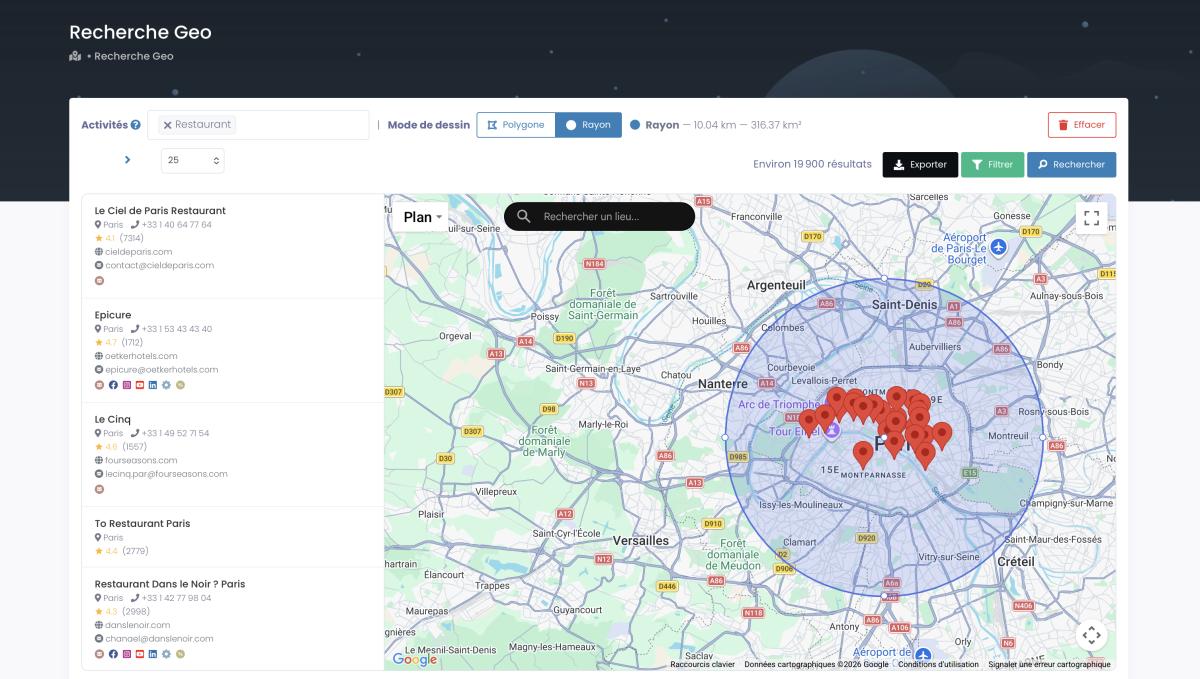
One more trick for local targeting. With GeoSearch, you draw a radius around any point on the map, say a 25-mile ring around your shop, or you sketch a custom polygon by hand to match a neighborhood exactly. Every filter still applies inside the shape, so you pull the right businesses in the exact zone you actually serve.
Video: Finding Clients Through Google Maps Filters
Want to build a sales pipeline from Google Maps leads? That's a real workflow now, not a fantasy. And if you're weighing sources, you can compare Google Maps and LinkedIn for lead generation, but for local business owners? Google Maps wins every time. It's where the businesses actually are.
The best CRM for local business owners isn't just about the software. It's about how you fill your CRM with quality leads. A CRM for small business with Google Maps integration (even if that integration is just a CSV import from an extraction tool) changes the whole game.
Curious what a full pipeline actually looks like? Scrap.io pulls verified local leads from Google Maps in real time: email classified by type, landline vs mobile, website, socials, ratings. 225M+ businesses, 195 countries. Try it free for 7 days, 100 leads offered and watch your empty dashboard fill up.
Real Results: How Small Businesses Use CRM + Lead Generation
Alright enough theory. Let me show you what this looks like when it actually works. These are real businesses, real numbers, real results.
Xavier Caffrey / Breakcold CRM: 23,600% ROI
This one's wild. Xavier Caffrey is a solopreneur. One person. He uses Breakcold CRM at $59 per month. Not exactly enterprise budget.
In two weeks (fourteen days) he closed 6 deals worth $14,000. That's a 23,600% ROI on his CRM investment. Documented on Breakcold's own blog.
What made this work? A simple CRM program paired with quality data. He wasn't juggling 47 features he'd never use. He was tracking real conversations with real prospects. Easiest CRM for small business? Maybe not. But effective? Clearly.
Papeloja / Keap CRM: 800% Revenue Growth
Nuno Silva runs Papeloja, a specialty paper company. His problem was the classic one: contacts everywhere. Some in email. Some in a spreadsheet. Some written on actual paper (ironic for a paper company, I know).
After centralizing everything in Keap CRM, Papeloja saw 800% revenue growth. Eight hundred percent. That's what happens when you stop losing track of people who want to buy from you.
The lesson? It wasn't the CRM itself. It was getting all the contacts into one place and actually following up. Simple concept. Massive results.
Omega Financial / Kylas CRM: 45% Sales Increase
Omega Financial is a financial distribution company with a growing sales team. Their challenge was tracking an expanding pipeline with more reps, more products, and more moving parts.
After implementing Kylas CRM, they saw a 45% increase in sales growth plus significant operational efficiency improvements. For a B2B services company, that's not a tweak. That's a transformation.
Atlantic Energy / Salesforce: 50% Faster Operations
Quick mention here because it illustrates the efficiency angle. Atlantic Energy centralized their field data and customer service in Salesforce. Result? Order completion time cut by 50% and 50% business growth without adding headcount. Per Nucleus Research. That's scale without the usual growing pains.
The Clay + Google Maps Workflow
Here's where the lead generation piece connects. Clay documented a workflow where sales teams scrape Google Maps to find niche local businesses (salons, HVAC companies, anyone with a local storefront) then enrich that data and send personalized outreach.
The concept is sound. The problem was always the data source. Where do you get reliable, current business data at scale?
That's exactly what Scrap.io solves. 225M+ businesses indexed. Real-time extraction. Smart filtering before you even export. One customer pulled 11,734 businesses in 45 minutes. Try doing that by hand. If you can use geographic data to refine your targeting, suddenly you're not just filling your CRM, you're filling it with the right leads.
Getting them into the CRM is only step one, though. Then you nurture those leads into deals, which is where most of the money actually gets made. An import is not a sale.
Want the same for your niche? See what your market looks like before you commit to any CRM. Start with 100 free leads, pulled live from Google Maps, filtered by location, category, and digital presence. Then import them into whatever CRM you chose.
CRM Compliance & Data Quality: What You Need to Know
Not the exciting part. Still important. Actually really important if you don't want fines or deliverability nightmares.
CAN-SPAM, GDPR, and Your CRM
If you're emailing contacts in the US, CAN-SPAM applies. Basics: honest subject lines, clear sender identification, working unsubscribe button, your real business address in every email. Pretty straightforward.
Got international contacts? GDPR might apply. Consent requirements, data processing transparency, right to erasure. Don't wing this. Read up on GDPR for cold email B2B before you hit send on anything crossing the Atlantic. It matters.
Here's why the data source matters for compliance. When you collect data from public sources, like business information that companies themselves post on Google Maps, you're on solid legal ground. It's public data. No shady scraping of private databases. No questionable third-party data brokers.
Scrap.io works exactly this way. Only publicly available business information, GDPR and CCPA compliant, and every record is traceable back to its source. No gray areas.
Keeping Your Data Clean
Remember that stat? 70% of CRM data degrades every year. People change jobs. Businesses move. Phone numbers get disconnected. Email addresses stop working.
You need to verify your email lists before importing anything into your CRM. Every time. Non-negotiable. A bounced email isn't just a missed opportunity. It damages your sender reputation. Stack up enough bounces and your emails start going to spam. For everyone.
Best practice? Refresh your data quarterly at minimum. Monthly if you can. Or better yet, use live data extraction so your contacts are current from day one. That's the whole point of pulling from Google Maps in real time instead of buying six-month-old lists.
Filter before you export, so you only pay for contacts with a valid email, a real phone number, whatever your campaign needs. GDPR & CCPA compliant, traceable to the source. Try Scrap.io free: 7 days, 100 leads offered and stop paying for dead data.
FAQ: CRM for Small Business
Which CRM is best for a small business?
The best CRM depends on your team size and budget. HubSpot offers a robust free plan for startups. Salesforce Starter ($25/user/month) suits teams planning to scale. Less Annoying CRM ($15/user/month) is ideal for solopreneurs who want simplicity. Zoho CRM provides the best balance of features and affordability. The key is choosing a CRM you'll actually use daily, not the one with the most features.
Is there a free CRM program?
Yes. HubSpot CRM is free forever for up to 2 users with 1,000 contacts, including deal tracking, live chat, and email marketing. Salesforce Free Suite also offers a 2-user free plan. Zoho CRM has a free tier for 3 users. Free plans work well for getting started, but most businesses outgrow them within 6–12 months as their contact database grows.
Does Google have a free CRM?
Google doesn't offer a dedicated CRM product. However, Google Contacts combined with Google Sheets and Gmail can serve as a basic contact management system. For a proper CRM with pipeline tracking and automation, third-party tools like HubSpot (free) or Zoho CRM (free tier) integrate seamlessly with Google Workspace.
What is the simplest CRM to use?
Less Annoying CRM is widely considered the simplest CRM available, built specifically for non-technical small business owners. OnePageCRM also ranks highly for its single-page interface. Both prioritize usability over feature count, with most users reporting they're fully operational within the first day.
How much does a CRM cost for a small business?
CRM pricing for small businesses ranges from $0 (HubSpot free, Zoho free tier) to $25–$99/user/month for professional plans. Most small businesses spend $15–$50/user/month. The real cost isn't the subscription: it's the time lost to manual data entry and the revenue lost from an empty or outdated CRM pipeline.
Can I build a CRM in Excel?
You can, and plenty of small businesses start there. A spreadsheet handles a contact list and a few columns just fine. But it breaks fast: no automated follow-ups, no email tracking, no pipeline view, and one careless sort scrambles everything. Excel is a decent month-one stopgap. Past that, a free CRM like HubSpot or Zoho does the same job without the manual upkeep.
Will CRM be replaced by AI in 2026?
No. AI won't replace your CRM in 2026, it's making it smarter. AI now scores leads, drafts follow-ups and flags deals likely to close. But it only works with clean, complete data. That's the real bottleneck: 40% of AI-CRM projects stall on data quality, not the AI.
Final Thought: Your CRM Is Only As Good As What You Put In It
Look. The CRM software for small business market is packed with great options. You're not going to pick a bad one if you stick to the names in this guide. Whether you're searching for the best CRM for small business on Reddit threads or G2 reviews (HubSpot, Zoho, Salesforce, Pipedrive, Less Annoying), they all work.
The difference between businesses that get ROI from their CRM and businesses that don't? Data. It's always data.
An empty pipeline produces nothing. Outdated contacts waste your time. Bad emails destroy your sender reputation. And manually building lead lists when you could be selling? That's the most expensive decision you can make.
Your CRM is only as powerful as the data you put in it. Fill it from a live source, then nurture your Google Maps leads into customers and watch what happens when your pipeline actually has people in it.
Stop staring at an empty dashboard. Fill the thing up.
Try Scrap.io free for 7 days, 100 verified local business leads offered, ready to import into any CRM. Real businesses. Real emails. Pulled live from Google Maps across 195 countries. No stale lists. Fill your CRM →
Last updated: September 2026 · by the Scrap.io Team
Generate a list of restaurant with Scrap.io