


Video: Scrap.io - How to Start? (building a fresh list of managed service providers)
I pulled a live count this morning, just to settle a bet with myself. Right now, as you read this, Google Maps lists 33,882 computer-support-and-services businesses across the United States (Scrap.io, real-time, October 8, 2026). Of those, 19,790 (58.4%) have a public email address sitting there, ready to export.
Nobody sells you that number. They sell you a spreadsheet.
And that spreadsheet, the one some vendor calls a "complete list of managed service providers," was compiled months ago and resold to half your competitors. Here's the honest pitch for this guide: stop renting a stale file. A list of managed service providers worth building is one you build yourself, fresh, filtered, and yours. I'll show you where the public directories actually help, where they quietly fail you, and how to turn a Google Maps category into a clean MSP list in about two clicks. Let's get into it.
- What is a managed service provider (MSP)?
- The US MSP market in 2026: size, growth, and why this list is gold
- Where to find a list of managed service providers (4 sources)
- The problem with buying a static MSP list
- How to build your own list of MSPs (step-by-step)
- Filter your MSP list before you spend a credit
- Managed security service providers (MSSP): the high-value niche
- Staying compliant when you prospect MSPs (GDPR, CCPA, CAN-SPAM)
- Who builds a list of MSPs, and why (real examples)
- Conclusion
- FAQ
What is a managed service provider (MSP)?
A managed service provider is a company that runs another company's IT for them. Monitoring, help desk, backups, security patches, cloud management, the whole unglamorous machine that keeps a business online. You pay a flat monthly fee, they keep the lights on. Think of them as an outsourced IT department that never calls in sick.
Quick clarification, because people mix these up constantly. An MSP is not the same thing as a software company. A software company builds a product and sells it. An MSP delivers a service and manages your stack. (We even wrote a whole separate guide to software company email lists because the two audiences buy completely differently.) Lumping them together is how prospecting campaigns go sideways.
Managed service providers examples
When people ask for managed service providers examples, they usually mean two very different things: the MSPs themselves, and the vendors who sell to MSPs. Both matter, depending on which side of the list you're on.
On the MSP side, you've got everything from a two-person shop handling dentists' offices in one county, up to names like Zayo and TPx that top the national rankings. On the vendor side, selling tools and data to the channel, you've got the heavy hitters: ConnectWise and Kaseya/Datto for PSA and RMM software, NinjaOne and N-able for remote monitoring, and Pax8 as the cloud distributor everyone routes through. Those last five are real companies, genuinely run by the MSP economy. They're also exactly the kind of buyer who'd pay for a clean managed service providers list, which is the whole reason this keyword carries a $37 cost-per-click.
So "example" cuts both ways. Are you looking for MSPs to sell to? Or studying the market you're selling into? Your answer changes everything about how you build the list.
The US MSP market in 2026: size, growth, and why this list is gold
Let me hit you with the market number first, because it reframes everything. The global managed services market sits at USD 460.59 billion in 2026 and is projected to reach USD 705.22 billion by 2031, an 8.9% compound annual growth rate (MarketsandMarkets). That's not a niche. That's a continent of spending.
And it's fragmented in a way that makes list-building worth your time. There are an estimated 150,000+ MSPs worldwide, yet the top 500 firms account for only about 38% of channel revenue (Channel Futures MSP 501, 2026). Read that again. The other 62% is spread across tens of thousands of small, reachable, un-gatekept shops. In the US specifically, managed IT services sustain well over a million tech-sector jobs, per CompTIA's IT Industry Outlook 2026.
Here's the part that makes these leads genuinely good. The median MSP pulls roughly USD 2.8 million in annual recurring revenue (Datto/Kaseya, Global State of the MSP, 2025), and 48% of businesses with 50 to 499 employees lean on an MSP as their primary IT support. Translation: these are real companies with real budgets, buying real tools, on repeat. If your product serves the channel, a targeted list of MSPs is close to the best prospecting asset you can own.
But here's the catch nobody mentions. "MSP" isn't a native Google Maps category. It doesn't exist as a clean label. The closest real-world bucket is "Computer support and services," and that's where our 33,882 US businesses live. (More on why that matters, and how to work around it, in the Google Maps categories breakdown.) Keep that honesty in your back pocket. Anyone selling you a pristine "MSP category" list is rounding the truth.
Where to find a list of managed service providers (4 sources)
You've got four realistic ways to get a list of managed service providers, and they are absolutely not created equal. One of them is clearly the best for prospecting. The other three each have a specific, narrow use, and a specific way of letting you down. Here's the honest rundown.
| Source | Best for | Exportable emails? | Fresh? | The catch |
|---|---|---|---|---|
| Directories (Clutch, mspcompanies.us) | Shortlisting / vendor research | No | Varies | Same names for everyone, capped at a top 100 |
| Email list vendors | Instant volume | Yes | Stale (often 45+ days) | Shared, un-filterable, you pay for dead rows |
| Named decision-makers | No (no bulk emails) | Current | Misses small local shops, no bulk export | |
| Build your own (live map data) | Fresh, filtered outreach lists | Yes | Real-time | Needs a tool (no code, but still a tool) |
Managed service providers directory sites
A managed service providers directory like Clutch, The Manifest, or mspcompanies.us is great for one job: shortlisting. You want to see who's reputable, read some reviews, compare a top 20. Fine. Directories do that well.
If your goal is simply ranking the best managed service providers, or eyeballing the top MSP companies in the USA, a directory's top 10 MSP providers in the USA is a fine place to start. That's the job it's built for.
What they don't do is hand you contactable data. You get the same ranked names your competitor sees, usually capped at a top 100, and no exportable emails. Try running a cold campaign off a directory page. I'll wait. It's a reading experience, not a prospecting one.
Managed service providers email list vendors
Then there's the managed service providers email list crowd. Vendors who'll sell you "96,000+ MSP contacts worldwide, 35,000 in the US" as a downloadable file, often refreshed only every 45 days or so. Instant volume, sure. But you're buying a snapshot that started rotting the moment it was compiled, you can't filter it before you pay, and the same file is in a dozen other inboxes. We dug into why buying email lists rarely works if you want the full teardown.
Which leaves building your own, from live map data, filtered before extraction. That's the one worth your time, and it's where the rest of this guide lives.
The problem with buying a static MSP list
Static lists die quietly. That's what makes them dangerous.
You buy a "verified" MSP list in March. It looks fine. By September, a chunk of those companies have moved, merged, rebranded, or folded, and a slice of the emails now bounce. Nobody warns you, because the file sits there looking exactly as full as the day you bought it. The rot is invisible until your sender reputation tanks.
And bounce rate isn't a vanity metric. Push past roughly 2% and mailbox providers start reading you as a spammer, which quietly sends your whole campaign to the junk folder, including the addresses that were perfectly good. One bad list can poison a clean domain. That's a rough trade for a shortcut.
Then there's the exclusivity problem, which is really a non-exclusivity problem. A purchased MSP list is sold over and over. The ConnectWise competitor you're pitching? They've had the same canned "we help MSPs grow" email from six other vendors this quarter, all working off the same broker file. You're not standing out. You're the seventh identical voice in a crowded inbox. Honestly, that's worse than cold, that's pre-annoyed.
Static vendors also won't let you filter before you pay. You buy the whole block, emails and empties alike, then delete most of it. That's the opposite of how it should work, and it's exactly the gap the next section closes.
Pull your first filtered list of US MSPs, free.
Skip the stale spreadsheet. Start a 7-day Scrap.io trial, 100 export credits included, and extract a fresh, email-present list of computer-support-and-services businesses from any city, state, or the entire US. Real-time data across 225 million+ businesses in 195 countries, and you only spend credits on contacts that match your filters.
How to build your own list of MSPs (step-by-step)
OK, concretely, how do you actually do this? You take a Google Maps category, point it at a geography, filter it, and export. No Python, no proxies, no 2 a.m. scraper that breaks overnight. Here's the exact flow with Scrap.io, and it maps almost one-to-one onto any solid guide on how to build a cold email list.
- Pick the category. Since "MSP" isn't a native Maps label, select "Computer support and services" (the real bucket holding those 33,882 US businesses). You can cross it with related IT categories if you want a wider net.
- Pick the zone. A city, a county, a state, or the whole United States. Yes, the entire country, in one search. Targeting "managed service providers near me," a single metro, or nationwide MSP coverage is just a matter of where you draw the boundary.
- Filter before extracting. Toggle "email present" so you never pay for a blank row. Add a minimum rating, a review-count floor, "has a website," whatever fits your ICP. (More on this in the next section, it's the part that saves your budget.)
- Count, then export. Hit the count button (it's free, always) to see exactly how many MSPs match. Happy with the number? Export to CSV or Excel, ready for your CRM or cold email tool.
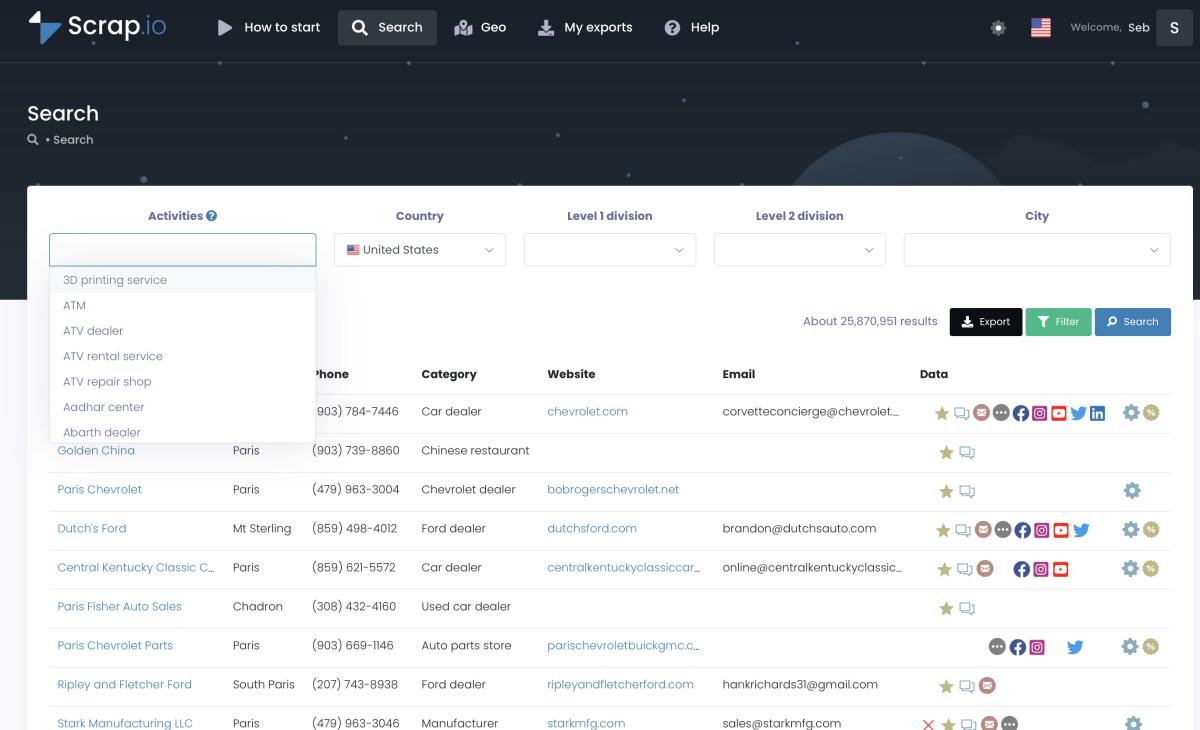
Pick a category and a location. Your list of managed service providers starts here.
That flow answers almost any version of the question people actually type. A list of MSP companies in the USA for a nationwide play. An IT managed service providers list narrowed to one state. Managed service provider companies near California or near Texas. A managed service provider for small business clients inside a single ZIP code. Same four steps, different filters. And since the index spans 195 countries, the identical method builds a list of IT managed service providers in the UK, Australia, or India, not just MSP USA.
Want to go even wider than one category? There's a "no category" mode that pulls every business in a zone, handy when you're mapping a whole local tech economy rather than one slice. This two-minute walkthrough shows it in action:
Video: How to Extract Every Business in 1 Click (No Category)
Need a shape instead of an administrative area? GeoSearch has you covered. Draw a radius around a point, or sketch a custom polygon over an exact neighborhood or corridor, and every filter still applies inside it. Perfect when "Texas" is too big but "within 40 km of Dallas" is just right.

GeoSearch radius: draw your catchment area and pull only the MSPs inside it.
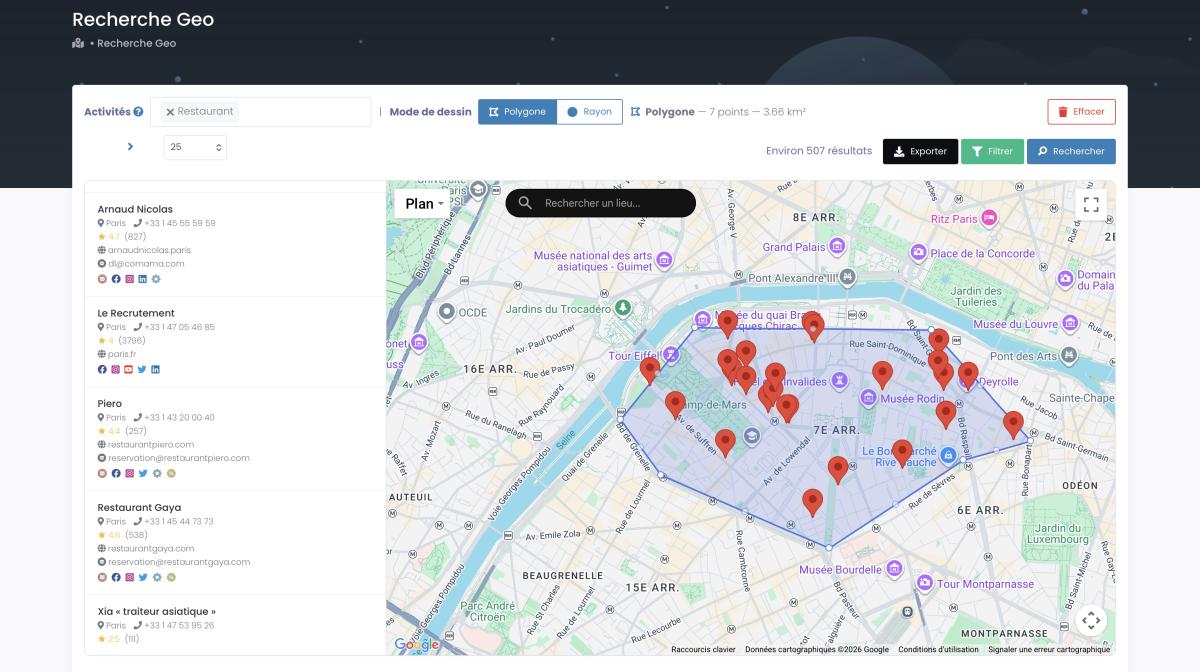
GeoSearch polygon: trace any shape by hand when a city border won't do.
And the export isn't just names. Each record carries the business name, address, phone (classified mobile or landline), website, social profiles, ratings, and classified emails, the generic contact@ separated from the actual sales and individual inboxes. If you want the deeper mechanics of pulling addresses off the map, here's the full guide on how to extract emails from Google Maps. The point stands: this is today's data, not a file from last spring.
Filter your MSP list before you spend a credit
This is the part most tools get backwards, and it's the single biggest reason to build instead of buy. Filter first. Narrow the list to exactly what you can use before a single credit leaves your account.
Watch the math on our own numbers. Of the 33,882 computer-support-and-services businesses in the US, 29,097 (85.9%) have a website, 33,032 (97.5%) have a phone, and 19,790 (58.4%) have an email on file. If email is what your campaign needs, why on earth would you pay for the ~14,000 that don't have one? Filter to "email present," and you extract 19,790 instead of 33,882. You just saved roughly 40% of your budget before sending a thing.
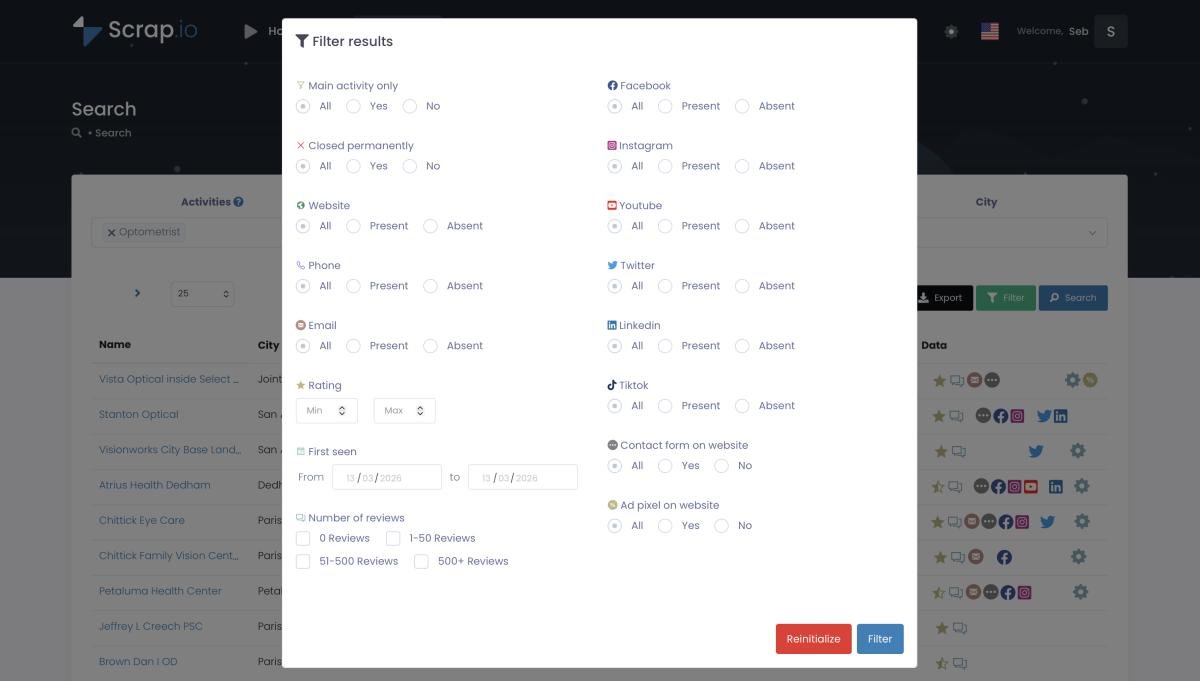
Filters run before extraction, so you only spend credits on MSPs that actually match.
It goes way past "has email," too. Want only MSPs rated 4 stars and up? Filter. Only those with more than 50 reviews (a rough proxy for an established shop)? Filter. Recently detected listings, to catch newly launched providers before your competitors do? Filter. Mobile numbers only, for an SMS campaign? Filter. Every constraint applies at the source. And counting is always free, so you can test a dozen filter combinations without spending a cent, then export only the exact slice you want. That's how a targeted email list by industry is supposed to work.
See how many MSPs match your filters before spending a credit.
Counting is always free on Scrap.io. Set your category, your zone, and your filters, email present, minimum rating, phone type, and see the exact number of contactable managed service providers instantly. Then export only what you need. 7-day free trial, 100 leads included.
Managed security service providers (MSSP): the high-value niche
If MSPs are a good market, managed security service providers are a richer one. An MSSP is an MSP with a security specialization: threat monitoring, SOC services, incident response, compliance. Same DNA, heavier price tag, stickier contracts.
Why does that matter for your list? Because a managed security service providers list tends to convert differently. These firms sell high-margin services, so they buy serious tools, and they're easier to identify than you'd think, they cluster under security-flavored categories and they advertise it loudly on their sites. If you're selling anything security-adjacent to the channel, segmenting MSSPs out of your broader MSP list is worth the extra filter. Build the full list of MSPs first, then slice the security specialists into their own high-value file. Different message, different budget, better reply rate.
Staying compliant when you prospect MSPs (GDPR, CCPA, CAN-SPAM)
Nobody's favorite section. Still, skip it and the fines get expensive fast, so give me three minutes.
The short version for the US: CAN-SPAM lets you cold email businesses without prior consent, as long as you use a real identity, keep subject lines honest, include a physical address, and make unsubscribe work in one click. In Europe, GDPR allows B2B cold outreach under "legitimate interest," provided your targeting is relevant and your opt-out is easy. CCPA in California mostly exempts B2B business contacts but still expects clean opt-out handling. The deeper playbook lives in our GDPR cold email guide for B2B.
Here's the thread that ties it together, and it's genuinely the most important compliance point: where your data came from. Regulators care about traceability. "We bought a list from a broker" is a red flag. "This is public Google Maps business data, traceable to its source" is an audit-proof answer. Scrap.io only surfaces publicly available business data, every record traceable to its origin, and it's GDPR and CCPA compliant by design. That doesn't exempt you from honoring opt-outs, but it puts your list on solid legal ground from day one.
Who builds a list of MSPs, and why (real examples)
So who actually does this? Let me show you the personas, because they explain the $37 CPC better than any chart.
Start with the obvious one: channel vendors. Companies like ConnectWise, Kaseya/Datto, NinjaOne, N-able, and Pax8 exist to sell to MSPs. PSA software, RMM tools, cloud distribution, the lot. For them, a fresh, filtered list of US managed service providers isn't a nice-to-have, it's the top of the funnel. Every new MSP that opens is a new prospect. A real-time list catches those "recently detected" shops the static files miss entirely.
Then the RMM or cybersecurity founder launching a product for the channel. Picture a two-person startup with a slick new monitoring tool and zero pipeline. They don't need 150,000 MSPs. They need the 3,000 in their region with a website and decent reviews, pulled this week. That's a filtered extraction, not a broker invoice.
And the pattern shows up in the communities, too. Scroll through r/msp on Reddit or the MSP tooling threads on Spiceworks, and the same frustrations surface on repeat: where do I find a current list, why is this file half-dead, how do people keep their prospecting data fresh. Over on Quora, the "who are the managed IT service providers" questions never really stop. The demand is real. The clean, fresh supply mostly isn't, unless you build it yourself.
Marketing and web agencies round it out, using the same approach to find MSPs that need better sites, more reviews, or a bigger local footprint. Different pitch, identical list-building move: category, zone, filter, export.
Conclusion
A list of managed service providers isn't hard to get. A list that's fresh, filtered, exclusive, and actually contactable? That you have to build. And in 2026, building it takes minutes, not a purchase order.
Stop renting a stale spreadsheet that's already in your competitor's inbox. Pick "Computer support and services," point it at your market, filter to the MSPs you can actually use, and walk away with data that was accurate today. The market's worth half a trillion dollars and growing. Your list should be at least as fresh as the opportunity.
Build your own fresh MSP list today.
Try Scrap.io free for 7 days, 100 leads included. Real-time data on 225 million+ businesses across 195 countries and 4,000+ categories, filtered before you spend a credit. Pull your first list of US managed service providers in the next five minutes.
FAQ
What is a managed service provider (MSP)?
A managed service provider is a company that remotely manages another business's IT infrastructure and end-user systems for a recurring fee. That typically covers monitoring, help desk, backups, security, and cloud management. In short, it's an outsourced IT department that handles the technical work so the client can focus on running their business.
How many managed service providers are there in the US?
Google Maps lists 33,882 computer-support-and-services businesses in the US (the closest native category to "MSP"), of which 19,790 have a public email, per Scrap.io's real-time data on October 8, 2026. Worldwide, estimates put the figure at 150,000+ MSPs, with the top 500 accounting for roughly 38% of channel revenue.
Where can I get a list of managed service providers?
Four main sources: directories (Clutch, mspcompanies.us) for shortlisting, email-list vendors for instant but stale volume, LinkedIn for named decision-makers without bulk export, and building your own from live Google Maps data. For fresh, filtered, exportable contacts, building your own wins on freshness, cost, and exclusivity.
Is it legal to use an MSP list for cold outreach?
Yes, for publicly available business data handled correctly. In the US, CAN-SPAM permits B2B cold email with accurate sender info and a working unsubscribe. In the EU, GDPR allows it under legitimate interest with easy opt-out. The key is traceable data from a public source, which is exactly what Google Maps business data provides.
What is the difference between an MSP and an MSSP?
An MSP manages general IT: networks, help desk, backups, cloud. An MSSP (managed security service provider) specializes in security: threat monitoring, SOC services, incident response, and compliance. Every MSSP is effectively a security-focused MSP, but not every MSP offers the deep security services an MSSP does. MSSPs typically command higher budgets.
Generate a list of computer service with Scrap.io