

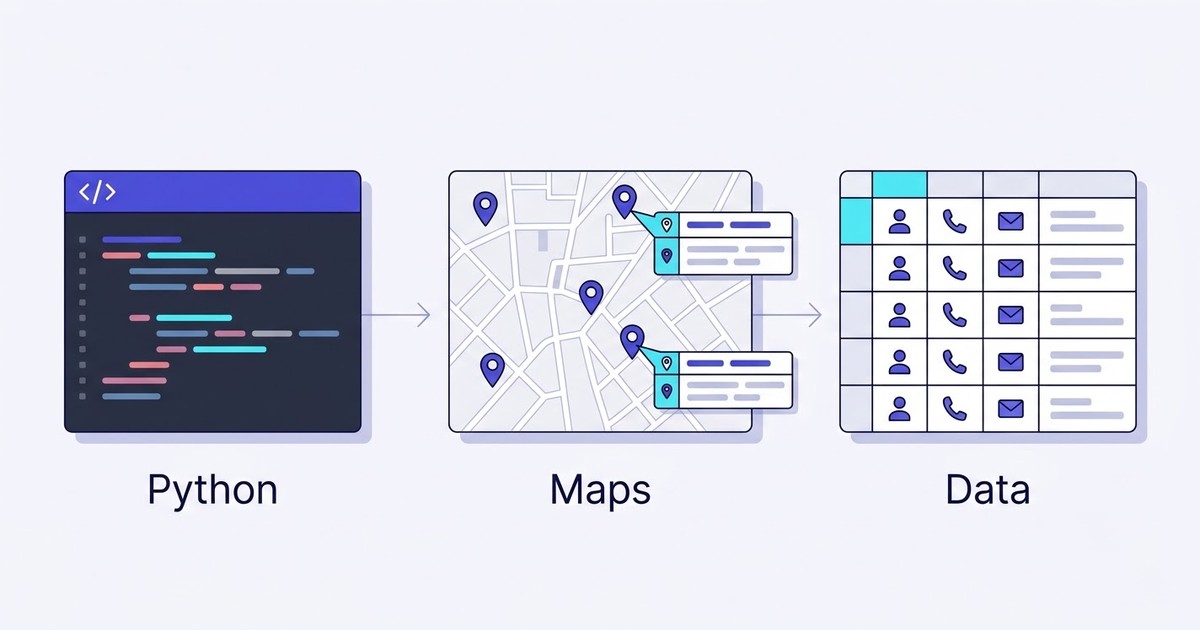
I once watched a developer friend build a Google Maps scraper on a Sunday afternoon. Sixteen lines of Python. It pulled a list of coffee shops in Portland, clean CSV, the whole thing. He was thrilled. By Wednesday it was dead, blocked by a CAPTCHA it couldn't read, and he spent the next two weeks patching selectors instead of shipping his actual product.
That gap is the whole story. You can scrape Google Maps with Python in an afternoon. Keeping it alive for a month is a different sport entirely.
This guide walks through every real method to pull business data off the map with code: Selenium and Playwright, the official Places API, the best free repos on GitHub. Then the honest part nobody writes: when writing the scraper is the wrong call, and a no-code tool gets you cleaner data faster. If you want the wider view first, here's the full breakdown of 5 methods to scrape Google Maps. Otherwise, let's get into the code.
Video: How to Scrape Google Maps without Python?
- What scraping Google Maps with Python actually means
- Method 1: Selenium and Playwright, step by step
- Method 2: the official Google Maps Places API in Python
- Method 3: free Python tools and GitHub repos
- Python vs no-code: the decision table nobody shows you
- The no-code alternative: a whole country in two clicks
- Is it legal to scrape Google Maps in 2026?
- From a Python script to actual leads
- FAQ
What scraping Google Maps with Python actually means
There are around 250 million places on Google Maps, with roughly 225 to 230 million active Google Business Profiles in 2026 and about 1.5 million new listings added every month (Clay / ScrapeBadger, 2026). Almost none of them are on LinkedIn. The plumber, the family restaurant that opened in 1994, the two-person accounting firm above the pharmacy: they don't have a company page, but they're all on the map, each with an address, a phone number, and often an email hiding on a website somewhere.
That's the prize. And it matters because 46% of all Google searches carry local intent (Clay / GTM, 2026), which is exactly the buyer pool most B2B sellers are chasing.
When people say they want to scrape data from Google Maps with Python, they usually mean one of two things. Either they want the listing fields (name, category, rating, phone, hours, coordinates), or they want to go one step further and scrape phone numbers and emails from the business website linked on that listing. The first is easy. The second is where scripts start to sweat.
So what can you realistically pull? Business name, full address, rating and review count, opening hours, price band, GPS coordinates. Want to scrape Google reviews with Python or the emails behind each listing? Possible, but that's a second crawl on top of the first, and it's where most tutorials quietly stop. There are three code routes to get any of this. Let's take them one at a time.
Method 1: Selenium and Playwright, step by step
You can scrape Google Maps in under 20 lines of Python. You just can't keep it running for a week.
Google Maps renders everything through JavaScript, so a plain requests call gets you an empty shell. To actually see the business data, you need a real browser, which means browser automation: Selenium (the old reliable) or Playwright (Microsoft's faster, more modern answer). Both drive a headless Chrome, load the map, scroll the results panel, and read the DOM.
The code skeleton
Here's the shape of a Playwright script that opens a search, scrolls to load listings, and pulls the basics. This is the skeleton, not a production tool:
import asyncio
from playwright.async_api import async_playwright

async def scrape_maps(query, max_results=40):
    async with async_playwright() as p:
        browser = await p.chromium.launch(headless=True)
        page = await browser.new_page()
        await page.goto(f"https://www.google.com/maps/search/{query}",
                        wait_until="networkidle")

        # Scroll the results panel to load more listings
        panel = page.locator('div[role="feed"]')
        seen = 0
        while seen < max_results:
            await panel.evaluate("el => el.scrollBy(0, el.scrollHeight)")
            await page.wait_for_timeout(2000)
            cards = await page.locator('div[role="feed"] > div > div a').count()
            if cards == seen:
                break
            seen = cards

        # Extract the visible fields
        results = []
        names = page.locator('div[role="feed"] a[aria-label]')
        for i in range(await names.count()):
            label = await names.nth(i).get_attribute("aria-label")
            if label:
                results.append({"name": label})

        await browser.close()
        return results

data = asyncio.run(scrape_maps("plumbers in Austin", 40))
print(f"Scraped {len(data)} listings")
Run it once and it works. Genuinely. You'll get your plumbers. This is roughly the "web scrape Google Maps in under 20 lines of Python" approach that floats around Medium, and even the author admits it's "not elaborate." For a fuller, proxy-backed version, Bright Data's Python tutorial is a solid 19-minute read, and scrape.do's guide goes deep into the protobuf endpoints if you enjoy that kind of thing. Both, notably, lean hard on proxies. That's the tell.
Where the scripts break
Here's what the tutorials skip. Try to run that script for a real campaign and three walls appear, fast.
CAPTCHAs and IP bans. After a few hundred requests, Google notices. TLS fingerprinting, behavioral analysis, rotating CAPTCHA challenges. A residential proxy that worked in January gets flagged by March. You'll burn through proxies at $5 to $15 per GB just to stay unblocked.
The DOM changes without warning. Google ships frontend updates constantly, no changelog. One morning your aria-label selector returns null and every field is empty. You debug for an hour, patch it, and it breaks again in three weeks.
The ~120-result cap. Google Maps shows a maximum of about 120 listings per search, full stop. Want every dentist in Texas? You'd split it into hundreds of ZIP-level queries and deduplicate across all of them. A script that runs "fine" for one city becomes an engineering project for one state.
The Python community says the quiet part out loud. On r/learnpython, a developer asking how to scrape Google Maps with Python gets a 200 response but keeps hitting the JavaScript render wall. That's the recurring pain: easy to start, brutal to scale. And it's exactly the seam where the no-code route starts to look less like cheating and more like sense.
Method 2: the official Google Maps Places API in Python
The "official" way sounds safest. So why does almost nobody use the Places API for lead lists?
Video: Google Maps API versus Scraping: What's the best approach?
Google offers a proper Google Maps API for Python: the googlemaps library plus the Places API. It's ToS-safe, structured, and reliable. No CAPTCHAs, no proxy rotation, no 3 AM selector crisis. If you're wiring 50 lookups a week into an app, it's the right tool. You'll need to get a Google Maps API key first (a credit card is required even for the free tier), then a request looks like this:
import googlemaps

gmaps = googlemaps.Client(key="YOUR_API_KEY")
results = gmaps.places(query="plumbers in Austin")
for place in results["results"]:
    print(place["name"], place.get("formatted_address"))
The pricing reality
Two things kill the API for lead generation, and neither shows up in the quickstart.
First, cost. Google rewrote its pricing on March 1, 2025, scrapping the old $200 monthly credit for per-SKU free caps. The Places Nearby Search SKU, the one you actually need for business listings, runs about $32 per 1,000 requests and climbs to $35 and $40 for advanced field tiers (Google Maps Platform pricing, 2026). Pull details on 50,000 businesses and you're staring at a serious bill for names and ratings alone. We ran the full break-even math in our Google Maps API cost vs scraping breakdown, and the gap gets vicious past 1,000 records a month.
Second, and this is the dealbreaker: the API returns no email addresses. None. It'll hand you a phone number and a website URL, but if you want the contact email, you're crawling each site separately, which drops you right back into browser-automation territory. Even SerpApi's own Python walkthrough concedes the official API's setup is "complicated" and points people toward third-party layers. The safest route is also the one that gives you the least usable data for outreach. Funny how that works.
Method 3: free Python tools and GitHub repos
The best free Google Maps scraper on GitHub is genuinely good. Until you need 50,000 rows.
If you'd rather not write the scraper from scratch, the open-source ecosystem has real options, and searching "google maps scraper free" turns up hundreds. A few actually work:
zohaibbashir/Google-Maps-Scrapper is one of the most popular google maps scraper python repos, Playwright-based, sitting at 1.5k stars. Clean, extracts name, address, website, phone, reviews, and it runs from the command line with a search term and a result count. Its own README warns you: "avoid running too many scrapes in a short period to prevent being blocked," and "Google Maps DOM may change, which can break the script." Honest. The google-map-scraper PyPI package (last updated April 2025) wraps Selenium into a pip-installable tool, also solid for small jobs, and it flags the same limitation: Google temporarily blocks access if you push too hard.
Notice the pattern? Every one of these repos hits the same three walls as your hand-rolled script, because they're doing the same thing under the hood. They're steering wheels bolted onto the same car, and the car still crashes into Google's 120-result cap and anti-bot defenses. For the full ranked teardown, we tested the best Google Maps scrapers on GitHub and reached the same verdict: great for learning, fine for a single city, useless at volume.
And almost none of them extract emails reliably. On r/webscraping, a developer shares a scraper they built and the thread turns into a masterclass on everything that breaks once you scale past a hobby project. That's the honest verdict on free tools: worth an afternoon of learning, not worth building a business on.
Python vs no-code: the decision table nobody shows you
Writing the scraper is the cheap part. Maintaining it is where your month goes.
Everyone compares Python and no-code on setup time. That's the wrong axis. The real cost is the tail: the proxies, the broken selectors, the deduplication, the fact that B2B data decays and you have to re-run everything anyway. Here's the comparison laid out straight, so you can decide whether you're building a tool or renting one.
| Criteria | Python (DIY) | Official Places API | No-code (Scrap.io) |
|---|---|---|---|
| Setup time | 2 to 5 hours | ~1 hour | A few minutes |
| Results per search | ~120 (Google's cap) | ~120 (Google's cap) | Unlimited (own index) |
| Emails | Separate crawler needed | Not available | Included, classified by type |
| Monthly cost | Proxies + servers + your time | $32+ per 1,000 requests | Flat, from $35/month |
| Country-level extraction | Thousands of queries + dedup | Impractical | Two clicks |
| Maintenance | Constant (DOM, anti-bot) | Low | Zero |
Look at the "I can just code it myself" objection honestly. Of course you can. The question was never can you. It's how many hours a month you'll spend on maintenance when Google changes its layout or blocks your IP. On r/Python, developers trying to python scrape Google Maps land on the same recurring lament: the build is the easy part, keeping it alive is the grind. If your time is worth anything, that's a real number.
Curious what the no-code path looks like? Scrap.io handles exactly what Python struggles with: the 120-result cap, the proxies, the emails. It indexes 225M+ businesses across 195 countries, with filters applied before you spend a credit. See how it works →
The no-code alternative: a whole country in two clicks
Take Maria, an agency owner. She needed every dentist in Texas by Friday. She never opened a terminal.
That's the pitch, and it's not spin. Scrap.io doesn't scrape Google in real time and fight the blocks. It maintains a pre-indexed database of 225,676,406 establishments across 195 countries and 4,000+ categories, with infrastructure that handles 10,000 requests per minute. You search, you filter, you export. The 120-result cap simply doesn't exist, because you're not querying Google's search interface at all.
Three things make it different from a script, and they map straight onto the pain points above.
A whole country in two clicks. Pick a category, pick a geography (city, county, state, or an entire country on 195 available), hit export. No pagination loop, no dedup, no IP ban. That's the part a Python script physically can't do at a flat rate.
Filtering before extraction. This is the money-saver. Want only businesses with an email present? A mobile number? A rating above 4? Toggle the filter before credits are spent, so you never pay to export 10,000 rows just to delete 6,000 of them in Excel. Zero wasted credits.
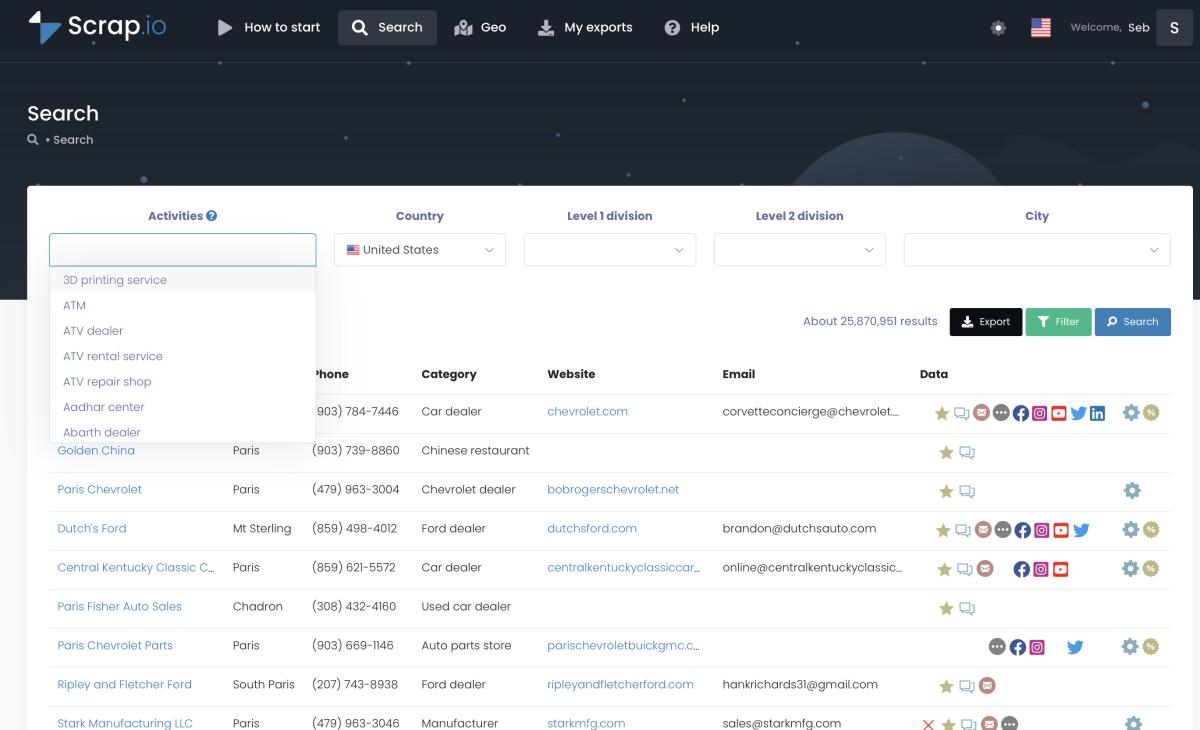
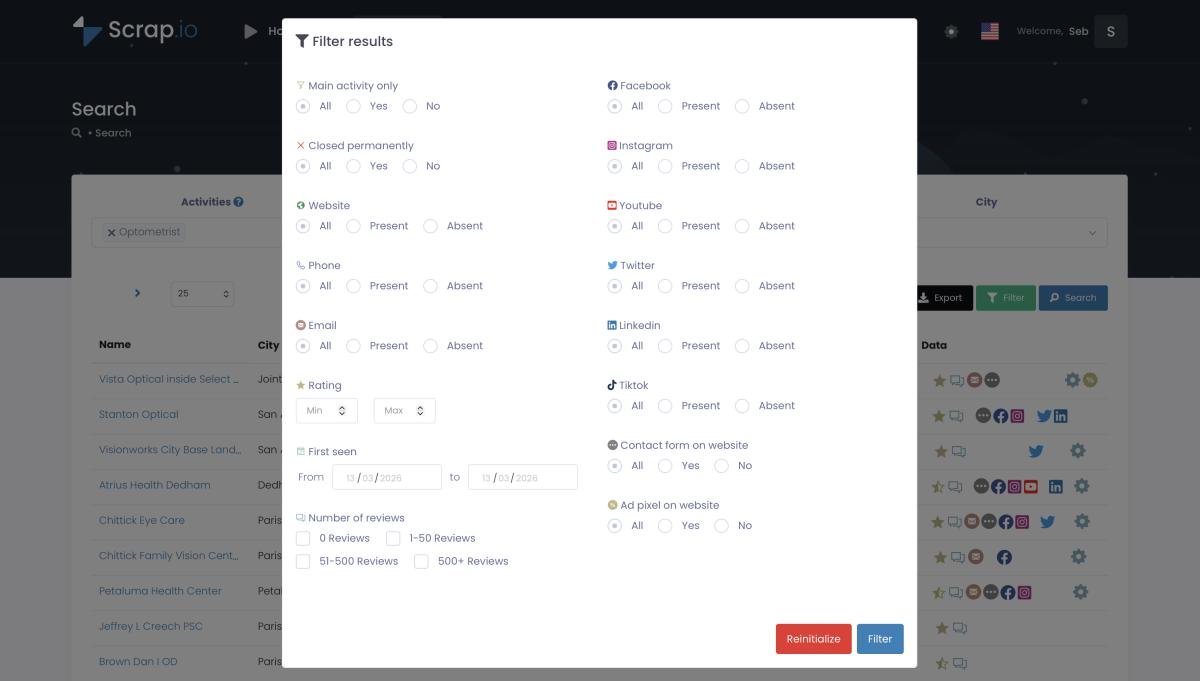
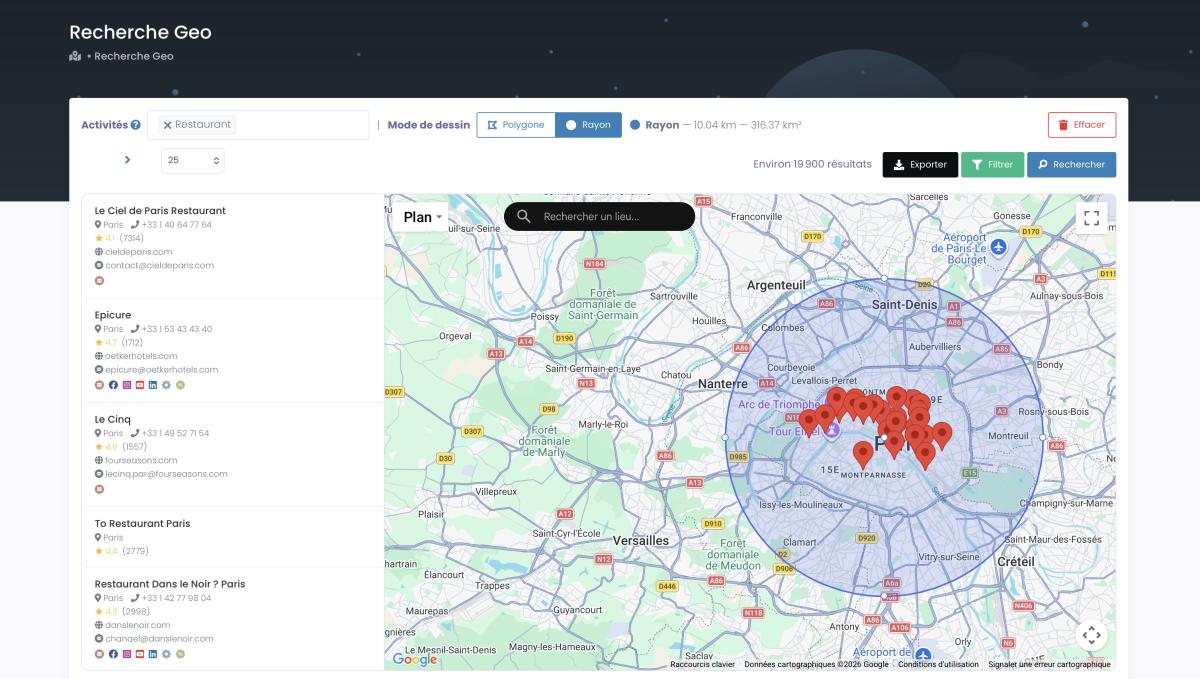
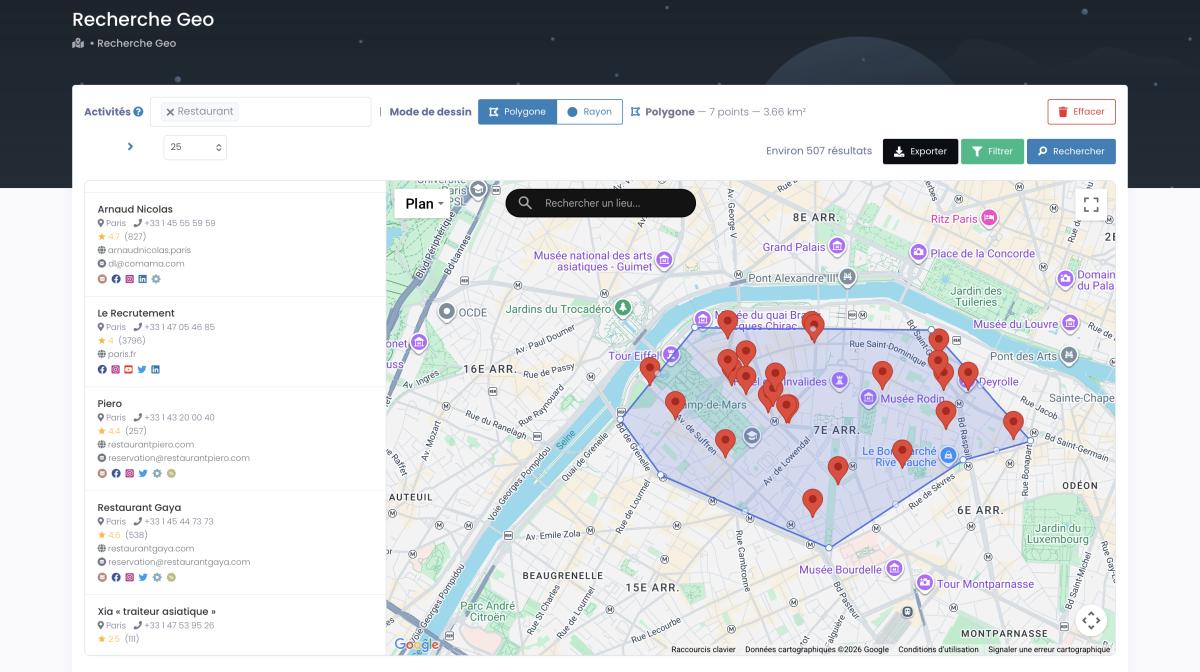
Real-time data, every export. No stale database from six months ago. Each extraction pulls live data from the listing and crawls the associated website on the spot, so emails, social profiles, and website tech are current. If your target doesn't fit a clean administrative boundary, GeoSearch lets you draw a radius (up to 500 km) or a custom polygon on the map, and every filter still applies inside it.
Prefer to stay in code? Fair. There's a REST API (300 requests per minute) plus native Make, n8n, and Zapier connectors, so you automate without the fragile scraping layer. It's the control of a script without the babysitting. And if you want the pure no-code walkthrough, here's the full guide to scrape Google Maps without Python.
225M+ businesses. 195 countries. Emails included. One client pulled 11,734 companies in 45 minutes, no code, no proxies. Try it free for 7 days, 100 leads on us. Start your free trial →
Is it legal to scrape Google Maps in 2026?
"Is this going to get me sued?" Fair question. Here's the honest 2026 answer.
Scraping publicly available business data from Google Maps is generally legal under US law. No login is needed to see a listing, no password gets bypassed, so the Computer Fraud and Abuse Act doesn't apply. The hiQ v. LinkedIn ruling (Ninth Circuit, reaffirmed 2022) established that scraping public data isn't a CFAA violation, the Supreme Court's Van Buren decision narrowed the law further, and Meta v. Bright Data (2024) confirmed that if you're not logged in, you never agreed to any Terms of Service.
Google's ToS do prohibit scraping. But a ToS violation is a contract breach, not a crime. Break it and the realistic worst case is a temporary IP block, not a courtroom. Those are wildly different consequences, and confusing them is where most of the fear comes from.
Then there's privacy law. GDPR allows B2B prospecting on public business data under legitimate interest, and CCPA carves out publicly available business information entirely. The rule of thumb: stick to public business data, include an opt-out in your outreach, and log out before you scrape. Scrap.io only extracts publicly available business data, is GDPR and CCPA compliant, and keeps every data point traceable to its source. For the full case-law breakdown, see whether it's legal to scrape Google Maps.
From a Python script to actual leads
Google Maps leads cost $2 to $15 each. LinkedIn-sourced B2B leads cost $50 to $150. That spread is the entire reason this matters.
Because scraping is never the goal. Leads are. And the numbers make the case: the median B2B cost per lead sat around $198 in 2026 (industry benchmarks), while a self-extracted map lead costs a fraction of that. Same buyer intent, a sliver of the price. No surprise the B2B lead-gen market is projected to grow from $3.33 billion in 2026 to $8.2 billion by 2035, an 11.9% CAGR (Business Research Insights, 2026). Everyone's fighting for these contacts.
So what does the pipeline look like once the data's out? A web agency filters for businesses with no website and pitches them a build. A reputation firm targets 2.9-star listings with six reviews. An SMS team filters to scrape phone numbers from Google Maps for mobile-only campaigns. Each one is really just a different way to scrape leads from Google Maps and point them at the right offer. The lever is always relevance, and relevance comes straight from the filters. "Near me" searches are up more than 400% since 2020, with 82% of mobile users running them, so the local buyer pool has never been bigger.
And when your target ignores city lines (a specific neighborhood, a delivery zone, a sales territory), you draw it. GeoSearch lets you sketch a custom polygon on the map and pull every business inside it. Try doing that with a Python script.
Here's the honest caveat, because I'd rather you succeed than torch your domain: verify emails before you send, keep bounce rates under 2%, and always include an unsubscribe link. Fresh data helps enormously, but a validation pass is non-negotiable. Want the full playbook? We wrote up how to generate Google Maps leads at scale, and if reviews are your angle, here's how to scrape Google reviews with Python specifically.
Skip the terminal. Start your free 7-day trial, 100 export credits included. Filter by email, mobile, rating, and 14 other criteria before you spend a credit, across 225M+ businesses in 195 countries. Try Scrap.io free →
Frequently Asked Questions
Can I scrape Google Maps with Python?
Yes. You can use browser automation (Selenium or Playwright) or third-party APIs. A basic script is under 20 lines. The hard part isn't writing it, it's keeping it running at scale: CAPTCHAs, layout changes, IP bans, and Google's ~120-result-per-search cap all fight you the moment you go past a single city.
Is it legal to scrape Google Maps in 2026?
Scraping public business data generally isn't a CFAA violation in the US (hiQ v. LinkedIn; Meta v. Bright Data, 2024). Google's ToS prohibit it, but a ToS breach is a contract issue, not a crime. Privacy laws like GDPR and CCPA still apply to what you do with the data, so stick to public business data, log out first, and use a compliant tool.
Can I use the official Google Maps API with Python?
Yes, via the googlemaps library and the Places API. It's reliable and ToS-safe, but priced per request (about $32 per 1,000 for Nearby Search), so large lead lists get expensive fast. It also returns no contact emails and caps results at ~120 per query.
What's the best free Google Maps scraper for Python?
Open-source repos like zohaibbashir/Google-Maps-Scrapper (Playwright) or the google-map-scraper PyPI package are fine for small jobs. Both need proxies and ongoing maintenance at volume, and neither extracts emails reliably. Great for learning, limited for real lead generation.
How do I scrape Google Maps without writing Python code?
Use a no-code tool like Scrap.io: search a category and area, apply filters (email present, rating, mobile number) before extracting, then export to CSV or Excel, up to a whole country, in two clicks. No proxies, no CAPTCHAs, emails included.
The honest takeaway
Python gives you control. It also gives you proxy bills, broken selectors at midnight, and a 120-result ceiling that makes country-level extraction a genuine engineering project. If you're a developer with time to burn and a small, specific target, code it. Learn how it works. There's real value in that.
But if what you actually need is clean, filtered, current business data with the emails attached, the best scraper isn't the one with the most elegant code. It's the one that delivers the data when you need it. Pick a category, pick a location, export, prospect. That's the whole workflow.
Whether you code it or not, the data won't scrape itself. Start free, 7 days, 100 leads on us. Real-time public data from 225M+ listings across 195 countries, emails included, no code and no proxy headaches. Start your free trial →
Generate a list of restaurant with Scrap.io