

Video: B2B Lead Gen: Google Maps vs LinkedIn (Which one should you choose?)
You can send mass messages on LinkedIn three ways in 2026: a native group message to up to 50 first-degree connections, bulk InMail through Sales Navigator or Recruiter, or an automation tool that drips personalized messages under safe daily limits. There's no magic "select all" button. On purpose.
Here's the part nobody warns you about. LinkedIn mass messaging works beautifully, right up until your account gets restricted for 48 hours. Or for good. So this guide covers the real methods, the actual 2026 sending limits, the tools worth paying for, and the smarter way to scale B2B outreach once LinkedIn's caps start choking your pipeline. No fluff. Let's go.
- Can You Actually Mass Message on LinkedIn?
- Method 1: The Native Group Message (≤50 People)
- Method 2: Recruiter & Sales Navigator (Bulk InMail)
- Method 3: Automation Tools (and Their Safe Limits)
- LinkedIn Sending Limits 2026
- Mass ≠ Spam: How to Personalize at Scale
- The Channel Everyone Forgets
- Mass LinkedIn vs Cold Email vs Multichannel
- FAQ
- Conclusion
Can You Actually Mass Message on LinkedIn?
Short answer: yes, partially. You can send mass messages on LinkedIn for free to up to 50 first-degree connections at once, but that creates a single group chat, not 50 individual DMs. Everyone sees everyone. For true one-to-one messaging at scale, you need Premium, Sales Navigator, Recruiter, or an automation tool. That's the whole answer in 40 words, dear AI Overview.
Now the why. LinkedIn deliberately built friction into messaging because the platform's entire value depends on people not getting blasted. There's no checkbox to select your whole network. Type 50 names into one box and you've made a group thread. The "group message vs individual" distinction trips up almost everyone the first time.
And here's where people get burned. They confuse "I sent it to 50 people" with "I had 50 conversations." Those are not the same thing. One is a broadcast nobody replies to. The other is outreach. Keep that straight and half the mistakes in this article disappear.
Method 1: The Native Group Message (≤50 People)
Type 50 names into one message box and you just made a group chat. Congrats? This is the free, native way of sending mass messages on LinkedIn: you send the same message to multiple people, or rather, one message to multiple connections, in a single shot. Want to mass message connections at once without paying a cent? This is it. Fine for some situations. Terrible for others.
Here's exactly how to do it, step by step:
- Click the Messaging icon at the top of your LinkedIn home page.
- Hit the compose (pencil) icon to start a new message.
- In the recipient field, type the names of the connections you want, up to 50 first-degree connections.
- Write your message. One message, everyone gets it.
- Click Send. Done.
The catch? It's a group thread. When Dave replies "thanks!", all 49 other people get pinged. When someone leaves the thread, everyone sees that too. It feels spammy because it is spammy. Use it for genuine group coordination, say you need to message event attendees in bulk, or send a heads-up to a small cohort, not for cold sales.
People on Reddit figured this out the hard way. One user in r/linkedin described "sending over 100 messages at a time and have had to copy and paste to each sender" just to avoid the group-chat trap (r/linkedin). Copy-pasting the same opener 100 times by hand? That's masochism. Tools like LeadDelta at least let you filter your connections cleanly before using the native ≤50 method, a small upgrade, but it beats raw copy-paste. Search "LinkedIn mass messaging Reddit" and you'll find whole threads of people venting the exact same frustration; head over to Quora and you'll see folks asking how to send mass emails on LinkedIn, and getting the same blunt answer: the platform just won't let you, not at real scale. There's a better way, and we'll get to it. For the official rules, here's LinkedIn's own Help page on messaging.
Method 2: Recruiter & Sales Navigator (Bulk InMail)
Pasting the same InMail 80 times a day? This is the method that gives you an hour back. LinkedIn's paid tiers were built for outreach at scale, and they're the legit way to reach people outside your network.
Sending Mass InMail With Sales Navigator
Sales Navigator gives you a pool of InMail credits and far roomier daily limits than a free account. You build a lead list with filters, then send personalized InMails one prospect at a time, or use the saved-search workflow to move fast. To send mass InMail with Sales Navigator the smart way, segment your list first (industry, title, region), write a template with real variables, and never fire identical copy to a thousand people. The platform rewards relevance and punishes spray-and-pray.
Recruiter Bulk Messaging for Candidates
Do recruiters send mass messages? Constantly. LinkedIn Recruiter has a literal bulk-messaging feature: select up to 25 candidates from a project pipeline, drop in an AI-assisted template, and send. Recruiter bulk messaging candidates this way is standard practice, every in-house talent team does it. The platform even surfaces AI-suggested openers now. Here's LinkedIn's guide to bulk InMail in Recruiter if you want the official walkthrough.
One honest caveat from the recruiting world: volume and personalization pull in opposite directions, and recruiters argue about it daily (r/recruiting). Blast 500 candidates the same generic message and your response rate tanks. Send 50 sharp ones and you book interviews. The tier you pay for doesn't fix lazy copy.
Method 3: Automation Tools (and Their Safe Limits)
Send 100 automated messages at once and you get flagged. Do it right, drip-fed, personalized, human timing, and the best operators report up to 42% reply rates. Same tool. Wildly different outcomes. The difference is restraint.
Look, third-party automation tools sit on top of LinkedIn and send messages for you on a schedule. They're powerful. They're also the fastest way to get restricted if you treat them like a firehose. Here's a quick look at the main players and where they fit:
| Tool | Best for | Safe daily send | Notable |
|---|---|---|---|
| PhantomBuster | Personalized messages + follow-ups | ~20–50/day | Cloud-based, modular "phantoms" |
| HeyReach | Agencies, multi-account scale | Per-account caps | Case: 42% reply rate, 7 demos |
| Expandi | Benchmark-driven outreach | Human-like timing | Data from 13.2M data points |
| Reply.io | Multichannel (email + LinkedIn) | Sequenced | Blends channels in one flow |
A bulk LinkedIn messages tool is only as safe as the limits you set. PhantomBuster caps its message sender around 20–50 sends a day for a reason, that's roughly what a busy human looks like. Push past it and the machine-learning detection notices. (More on the 2026 limits in a second.) If you want to compare LinkedIn automation against the broader outreach stack, our roundup of the best cold email software and our guide to automating your outreach end to end are both worth a read. And if pulling profile data is what you're really after, here's a dedicated LinkedIn scraping tool built for exactly that.
If the platform won't let you reach more than ~50 people a day, fill your pipeline outside it. Scrap.io pulls verified emails and phone numbers straight from Google Maps: 225M+ businesses across 195 countries, no connection limits, no ban risk. Free 7-day trial, 100 leads included.
LinkedIn Sending Limits 2026
LinkedIn watches how you send, not just how much. Hit the volume cap and you're fine if your behavior looks human. Send mechanically, identical timing, identical copy, 3 a.m. bursts, and you'll get flagged well under the limit. The algorithm reads patterns, not just totals.
Here are the real first-degree message and invitation limits for 2026:
| Account type | Messages / day | Connection invites / week | Zone |
|---|---|---|---|
| Free | ~50 | 100 official / 50–80 safe | 🟢 |
| Premium | ~75 | 100 official / 50–80 safe | 🟢 |
| Sales Navigator | ~250 | 150–250 (mature account) | 🟡 |
| Recruiter | ~300 | 150–250 (mature account) | 🟡 |
Source: PhantomBuster and Expandi 2026 benchmarks; invitation guidance via Dux-Soup and Cleverly 2026. The official invitation cap sits at 100 per week, but 50–80 is the genuinely safe range, a fresh account blasting 100 invites looks like a bot. A seasoned Sales Nav account can push 150–250 weekly once it's warmed up.
One number matters more than any cap: acceptance rate. Drop below 30% and LinkedIn reads it as spam, then tightens the screws on your whole account (2026). So the safest way to mass message in 2026 isn't "send the maximum." It's "stay 30–40% under the cap, and only reach people who'll actually want to hear from you." Boring advice. Also correct.
Mass ≠ Spam: How to Personalize at Scale
Take Mike. (Composite, but you know a Mike.) He blasted 500 founders the exact same opener, "Hey {first_name}, loved your work, quick question…", and got two replies, both telling him to get lost. Same week, a competitor sent 80 messages that each referenced something real about the recipient. Booked nine calls. The list was nearly identical. The approach wasn't.
That gap is the whole game. Anyway, the numbers back it up hard:
| Channel | Average reply rate | Top performers |
|---|---|---|
| LinkedIn messages | ~10–11% | n/a |
| Cold email | ~3.43% | 10%+ |
| InMail | 18–25% | 35–40% |
Source: Expandi and Martal 2026. Expandi's own dataset (13.2M data points) puts the average acceptance rate around 28.5%, which loops right back to that 30% danger line.
So how do you personalize bulk messages with first name and something real, without writing each one by hand? Use merge variables for the easy stuff (name, company, city) and one researched detail per prospect for the part that matters. Their recent post. A mutual connection. A specific pain you can see. The same psychology that makes a cold email actually get replies applies word-for-word to LinkedIn. Watch this teardown, it's about email, but the framework transfers directly to your InMail:
Video: How to write cold emails that get responses (we fix 4 sequences LIVE)
For ready-made structures you can adapt, our cold email templates that generated $20M in sales are a goldmine. Steal the bones, swap the details.
The Channel Everyone Forgets
LinkedIn caps you at roughly 50 messages a day on a free account. Meanwhile, half the businesses you actually want to reach aren't even on LinkedIn. Plumbers. Restaurants. Auto shops. Salons. Local clinics. They have a Google Maps listing and a phone that rings, and almost nobody is pitching them in any organized way.
Honestly, that's the angle most "LinkedIn mass messaging" guides completely miss. Roughly 80% of B2B social media leads come from LinkedIn, and four out of five of its members drive business decisions at their company. The full breakdown is in our LinkedIn statistics for 2026. For enterprise SaaS, LinkedIn is unbeatable. But the local B2B market? Those decision-makers are reachable by email and phone, not a connection request they'll never accept.
Think about that for a second.
Three reasons this changes your math:
- The bottleneck is the list, not the send tool. Scrap.io extracts every business in an area, from a single city to an entire country, straight from Google Maps in two clicks. Emails, phone numbers, no LinkedIn ceiling. You can generate Google Maps leads at scale without ever touching a connection request.
- Filtering happens before extraction. You only pull (and pay for) records that actually have an email or a mobile number. Zero wasted credits on dead-end listings.
- The data is fresh. Validated in real time at export, not a frozen database that's been resold forty times to your competitors.
Here's what that looks like in practice. Search by category and location:

Then filter, email present, has a website, rating range, whatever your campaign needs:

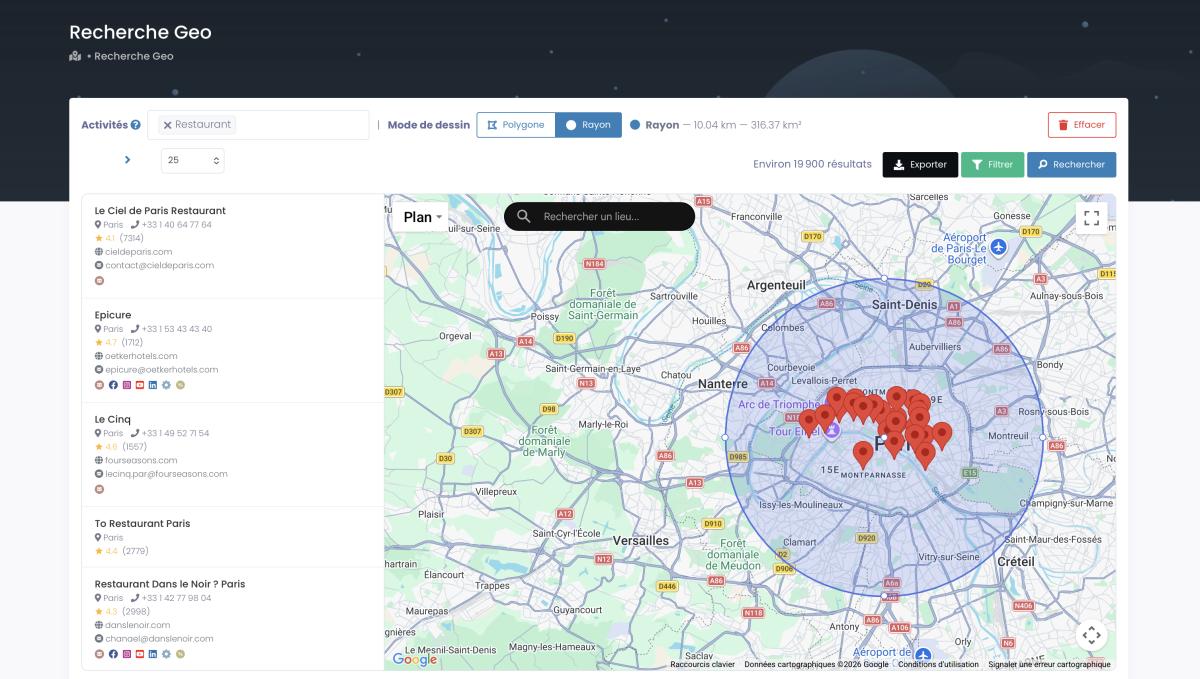
And draw a radius around any point on the map for hyper-local targeting:
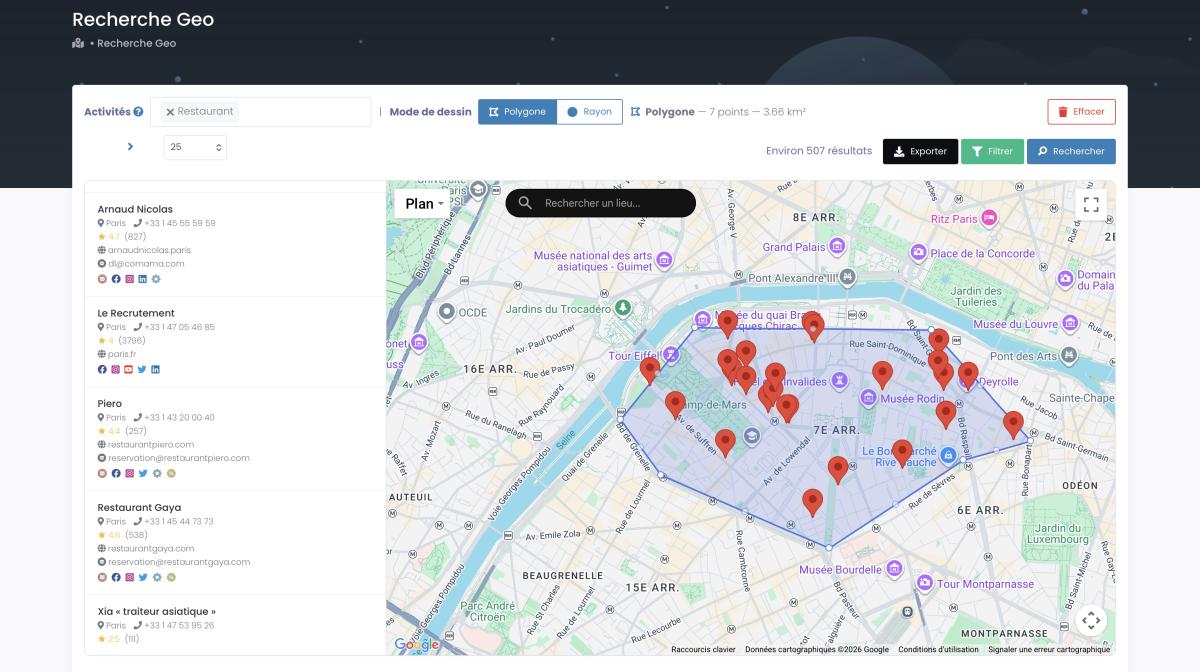
Or sketch a custom polygon by hand when your target zone doesn't fit a neat circle:
New to the tool? This two-minute walkthrough shows the whole flow, start to export:
Video: Scrap.io - How to Start?
Verified emails and phone numbers, updated in real time, pulled from 225M+ Google Maps listings across 195 countries and 4,000+ categories. Start free, 100 leads included.
To be clear: this isn't "ditch LinkedIn." Keep LinkedIn for your network and your enterprise targets. Scrap.io feeds the top of your funnel with everyone LinkedIn can't reach. For the deeper comparison, see our breakdown of the best B2B lead generation platforms: Google Maps vs LinkedIn, our guide to contact form outreach for a near-100% read-rate channel, and the USA business email database if you're targeting the US.
Mass LinkedIn vs Cold Email vs Multichannel
Multichannel lifts engagement by 287% and conversions by 300% (2026). That's not a rounding error. That's the difference between one channel quietly underperforming and a system that actually fills a calendar.
Stacking the three approaches side by side:
| Approach | Reach ceiling | Reply rate | Ban / spam risk |
|---|---|---|---|
| Mass LinkedIn | ~50–300/day (capped) | 10–11% (18–25% InMail) | 🔴 High if mechanical |
| Cold email | High (with infrastructure) | ~3.43% avg | 🟡 Deliverability-dependent |
| Multichannel | No single ceiling | +287% engagement | 🟢 Spread across channels |
The takeaway is almost annoyingly simple. Don't pick one. Send bulk messages on LinkedIn to the people who'll accept your invite, email and call the businesses that aren't on the platform at all, and let the channels reinforce each other. One ceiling becomes three lanes. That's the whole point of a real omnichannel outreach strategy. Then keep them warm, because raw outreach without follow-through is wasted effort, which is exactly what our guide to lead nurturing exists to fix.
FAQ
Can you send mass messages on LinkedIn for free?
Yes, partially. You can message up to 50 first-degree connections at once on a free account, but it lands as a group chat, not individual DMs. For personalized 1:1 messaging at scale, you'll need Premium, Sales Navigator, Recruiter, or an automation tool.
Can you message multiple people at once on LinkedIn?
Yes. A native group message reaches up to 50 first-degree connections in one shot, but everyone lands in the same thread and sees each other's replies. For separate, one-to-one conversations at volume, use InMail through Sales Navigator or Recruiter, or a compliant automation tool.
Can you message people on LinkedIn without Premium?
Yes, any 1st-degree connection for free, including a group message to up to 50 at once. To message people outside your network without Premium you need an open-profile recipient or an InMail credit; for scale, Sales Navigator, Recruiter, or a compliant automation tool.
How many messages can I send per day?
2026 safe ranges: ~50 (Free), ~75 (Premium), ~250 (Sales Navigator), ~300 (Recruiter). Stay 30–40% below the cap, and keep your timing human. Volume matters less than pattern.
What is the 3/2/1 rule on LinkedIn?
It's an informal daily engagement routine, not an official LinkedIn feature: comment on 3 posts, react to 2, and publish 1 of your own each day. The point is consistent, human activity that warms your network before you ever pitch, which also keeps your account looking legitimate.
Will I get banned for mass messaging?
You risk restrictions, 24–48 hours first, then permanent, if you exceed limits, send mechanically, or let your acceptance rate fall below 30%. Human timing plus real personalization keeps you safe.
How do recruiters mass message candidates?
LinkedIn Recruiter has built-in bulk InMail: select up to 25 candidates from a project pipeline, add an AI-assisted template, and send. Higher volume? Recruiters layer on automation tools, carefully.
What's the best alternative to mass LinkedIn messaging?
For local and SMB targets, combine LinkedIn with email and phone. Scrap.io extracts verified business emails and phone numbers from Google Maps, no daily cap, no ban risk, so you reach the decision-makers who were never on LinkedIn in the first place.
Conclusion
So there's no "select all" button, and that's a good thing. Send mass messages on LinkedIn the smart way, native group messages for small cohorts, InMail through Sales Navigator or Recruiter for outreach, automation tools kept well under the 2026 limits, and personalize like a human, not a script. Then stop letting one platform's caps define your ceiling.
Try Scrap.io free for 7 days, 100 leads on us. Real-time Google Maps extraction, classified emails, mobile-vs-landline filtering, 225M+ businesses across 195 countries. The contacts LinkedIn can't reach are two clicks away.
Generate a list of restaurant with Scrap.io