

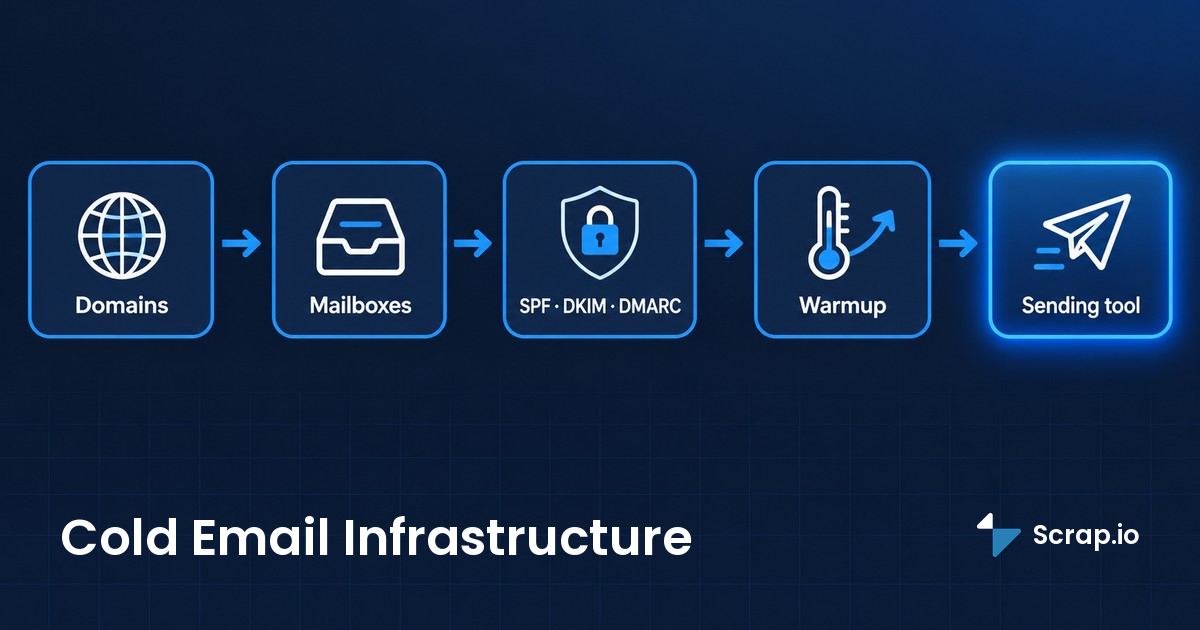
Roughly one legitimate email in six never reaches an inbox. Not spam. Not the promotions tab. Just gone. Validity's 2025 benchmark puts average inbox placement at 83.5%, with 6.7% landing in spam and another 9.8% vanishing into the void entirely. So before you write a single subject line, understand this: your cold email infrastructure is the thing that decides whether your message arrives at all. And most people set it up backwards.
Take Marcus. He blasted 500 cold emails from [email protected] because it was the address he already had. Two weeks later his own team's meeting invites were landing in spam. His domain reputation was toast, and the domain wasn't some throwaway. It was the one his whole business runs on.
This guide fixes that. Domains, mailboxes, DNS, warmup, the sending tool, and the one piece almost nobody connects to deliverability: your data quality. Let's go.
Video: New 2024 email guidelines for Gmail and Yahoo
What's in this guide
- What is cold email infrastructure?
- Why you can't cold email from your main domain
- The 5 building blocks
- Step 1: Sending domains (how many)
- Step 2: Mailboxes (Google vs Microsoft)
- Step 3: DNS, SPF, DKIM, DMARC
- Step 4: Warmup (14 to 30 days)
- Step 5: The sending stack
- The missing piece: your data quality
- Best infrastructure providers (2026)
- DIY vs done-for-you
- Staying compliant (GDPR / CAN-SPAM)
- FAQ
What is cold email infrastructure?
Cold email infrastructure is the technical foundation that lets you send outbound email at scale without burning your main brand domain: secondary sending domains, dedicated mailboxes, and DNS authentication (SPF, DKIM, DMARC), plus warmup and a sending tool on top. Think of it as the plumbing behind every cold campaign. Boring, invisible, and the reason your email either lands or dies.
Here's the part that trips people up. Infrastructure is not your sequencing tool. It's not Instantly or Smartlead. Those are the last mile. The infrastructure is everything underneath: the domains you send from, the inboxes attached to them, and the records that prove to Gmail you are who you say you are. Get the foundation wrong and the fanciest sequencer on earth won't save you.
Interest in getting this right is climbing fast. Searches for the term are up around 200% over the past year, which tracks with what changed in 2024: Gmail, Yahoo, and Microsoft rewrote the rules for anyone sending at volume. More on that in a minute.
Why you can't cold email from your main domain
Remember Marcus? His mistake is the single most common one in cold outreach. Sending cold from your primary domain is domain suicide.
Here's the mechanism. Cold email, by definition, goes to people who never asked for it. Some will ignore it. Some will mark it as spam. Every one of those complaints attaches to the sending domain's reputation. Do that on yourcompany.com and you're not just risking your cold campaign, you're risking every invoice, every password reset, every meeting invite your company sends. Your cold email deliverability setup and your normal business email should never share a domain. Ever.
And the stakes went up. Since February 2024, Google and Yahoo require SPF, DKIM, and DMARC for anyone sending more than 5,000 emails a day, plus a one-click unsubscribe (the RFC 8058 standard) and a spam complaint rate under 0.3% (they recommend staying below 0.1%). Microsoft joined in 2025 with outright rejections. This is why email deliverability stopped being a nice-to-have and became the whole game. If your email authentication requirements aren't met, your emails don't go to spam. They get rejected.
So you build a separate stack. A parallel set of domains that exist only to send cold email, kept completely walled off from the domain your brand depends on. That's the whole point of infrastructure.
The 5 building blocks
A cold email infrastructure has just five moving parts. Miss one and the whole thing leaks.
| # | Block | Job |
|---|---|---|
| 1 | Sending domains | Absorb the reputation risk, protect your main brand |
| 2 | Mailboxes | The actual inboxes that send, a few per domain |
| 3 | DNS authentication | SPF, DKIM, DMARC prove you're a legit sender |
| 4 | Warmup | Build reputation before you send anything real |
| 5 | Sending tool | Sequences, rotation, tracking, the last mile |
Notice what's not on that list: your prospect data. Which is a problem, because the data is the fuel every one of these five blocks runs on. Hold that thought, we'll come back to it hard.
Before you buy another domain, look at what you're feeding it. See how Scrap.io pulls fresh, verified business emails straight from Google Maps in real time, filtered so you only export contacts that actually have an email before you spend a credit. Start free for 7 days, 100 export credits included.
Step 1: Sending domains (how many)
How many domains do you actually need? Fewer than the gurus sell you, more than one.
The 2026 consensus lands here: 5 to 10 secondary sending domains for a serious operation. Not your main domain. Separate ones, ideally close variations of your brand so they still look legitimate (think get-yourcompany.com or yourcompany-hq.com). Each secondary sending domain spreads your volume thinner, which keeps any single domain from looking like a firehose. If one gets flagged, the others keep running and your real domain never enters the equation.
This isn't just theory. Over on r/SaaS, one operator summed up the working setup bluntly: "A robust cold email infrastructure requires 5-10 domains, each with 3-5 email accounts" (r/SaaS). That's not a vendor pitch. That's someone who does this for a living.
Buy them, point them at your mailbox provider, and resist the urge to over-buy. Twenty domains you can't warm properly is worse than five you can. Quality of setup beats quantity of domains, every time.
Step 2: Mailboxes (Google vs Microsoft)
More mailboxes doesn't mean more replies. It means more capacity, spread across more sending identities, which is a different thing entirely.
The math most people settle on: 3 to 5 cold email mailboxes per domain, each capped at 40 to 50 sends per day once warmed. Run the numbers. Eight domains, four mailboxes each, 45 emails a day per mailbox. That's about 1,440 emails a day without any single inbox looking suspicious. Want more volume? Add domains and mailboxes, not sends per inbox.
Google Workspace vs Microsoft 365 for cold email
So which provider? Both work. They behave differently.
| Factor | Google Workspace | Microsoft 365 |
|---|---|---|
| Inbox placement (2026) | Higher (Gmail 87.2%) | Lower (Outlook 75.6%) |
| Stability at volume | Good | Very stable, per community reports |
| Cost per mailbox | Higher | Often cheaper at scale |
That placement gap is real and it matters: Validity's 2026 benchmark clocks Gmail at 87.2% inbox placement versus Outlook's 75.6%. The same campaign can sail into Gmail and quietly drown in Outlook. On the Microsoft side, a sender on r/Coldemailing put the case plainly: "Microsoft 365 mailboxes, if you have the budget. More stable... up to around 30 emails per inbox per day" (r/Coldemailing). My take? If you're just starting, Google is more forgiving. At scale, Microsoft's cost and stability start to win people over. There's no universally correct answer, only the one that fits your volume and budget.
And whatever you pick, respect the daily sending limits. This video breaks down how the numbers actually work inside Gmail.
Video: How to send 1,500 emails in Gmail per day (sending limits)
Step 3: DNS, SPF, DKIM, DMARC
Three acronyms that sound boring and quietly decide about 80% of your deliverability. Skip them and nothing else you do matters.
Quick version of what each one does. SPF is a DNS TXT record listing which servers are allowed to send as your domain. DKIM adds a cryptographic signature so receiving servers can confirm nobody tampered with the message. DMARC ties the two together and tells the receiving server what to do when a check fails. You need all three. This is the core of any cold email DNS setup, and it's non-negotiable in 2026.
Here's roughly what the records look like on Google Workspace:
v=spf1 include:_spf.google.com ~all
v=DMARC1; p=none; rua=mailto:[email protected]; pct=100
Start your DMARC policy at p=none (monitoring only), watch the reports for a couple of weeks, then tighten to p=quarantine and eventually p=reject. Rush straight to reject and you'll block your own legitimate mail. One trap to know about: SPF has a hard limit of 10 DNS lookups. Go over and the whole record fails silently. Check it before you publish.
I'm keeping this deliberately short, because the full spf dkim dmarc setup deserves its own walkthrough with copy-paste records for every provider. We wrote that: the complete SPF, DKIM & DMARC setup guide covers all five steps and the compliance timeline. Read it before you touch a warmup tool. Seriously.
Step 4: Warmup (14 to 30 days)
A warmed domain hits around 87% inbox placement and a 4.1% reply rate. A cold, brand-new domain with no warmup? About 12% inbox. Same emails. Wildly different outcomes. That gap is what email warmup for cold email exists to close.
The logic is simple. A domain you registered last Tuesday has zero reputation. Gmail has never seen it. So the second you fire 200 cold emails from it, you look exactly like a spammer spinning up a burner. Warmup fixes that by starting slow, 5 to 10 emails a day, and ramping over two to four weeks while automated tools generate opens and replies to build a track record.
One honest caveat, because the warmup industry won't tell you this part. Warmup manages your cold email domain reputation. It does nothing for your list quality. A perfectly warmed domain fired at a list of dead addresses still bounces its way to a blacklist. Warmup and clean data are two separate problems, and you need both. If you want the tool comparison, here's our breakdown of the best email warmup tools and whether they even still work in 2026 (spoiler: it's complicated).
Step 5: The sending stack
Your sequencer is the last mile, and honestly the least important part of the chain. It matters, but it's the piece people obsess over while ignoring the four blocks that actually decide whether their email arrives.
A good cold email service/software handles the stuff you don't want to do by hand: mailbox rotation across your domains, sequence timing, follow-ups, reply detection, and basic tracking. That rotation piece is what lets you spread 1,400 daily sends across dozens of inboxes without any one of them tripping a limit. It's plumbing, not magic.
The reply rate reality check keeps everyone humble here. Across 53 million-plus emails, Instantly's 2026 benchmark puts the average cold email reply rate at just 3.43%. The tool won't move that number much. Your data and your targeting will. For the platform comparison, we tested twelve of them in our roundup of the best cold email tools for 2026, ranked by deliverability and price.
Video: Best cold email platforms for 2026 (the sending stack)
The missing piece: your data quality
You can build perfect infrastructure and still bounce your way to a blacklist. It's your list.
This is the angle nobody else connects to infrastructure, so pay attention. Every one of the five blocks above protects your domain. None of them controls your bounce rate. Your bounce rate is decided by the addresses you send to, full stop. And the target is brutal in 2026: keep bounces under 2%, ideally under 1%. Cross 5% and your domain gets flagged. Cross it a couple of times and it gets burned (Amplemarket and Leadhaste benchmarks, 2026).
So where do the bounces come from? Purchased and stale lists. A bought list is dead the day it's sold, stuffed with addresses that changed months ago and, worse, spam traps. And a single spam trap can trigger a Spamhaus DBL listing that torches your whole sending operation. This is exactly why understanding the difference between a soft bounce vs hard bounce matters, and why you verify before you send, not after.
The flip side is just as concrete. Verified lists pull roughly double the reply rate of unverified ones, and five to six times the reply rate of purchased lists (data quality benchmarks, 2026). The fix for how to avoid cold emails going to spam starts before the email is even written: it starts with fresh, real addresses. Here's the full playbook on avoiding the spam folder in prospecting and a deeper guide on building a cold email list that actually lands.
This is where fresh data changes the equation. A Google Maps listing updates constantly because businesses want to be reached, and that's the gap Scrap.io fills. It pulls real business emails straight from Google Maps, verified at the moment of export, with a filter that only keeps listings that actually have an email before you spend a credit. It even classifies what you're getting: the main address, contact@, sales@, or a named individual with first and last name attached. Cleaner list in, fewer bounces out. And if you want to double-check anything, here's how to verify an email list for 95%+ deliverability.
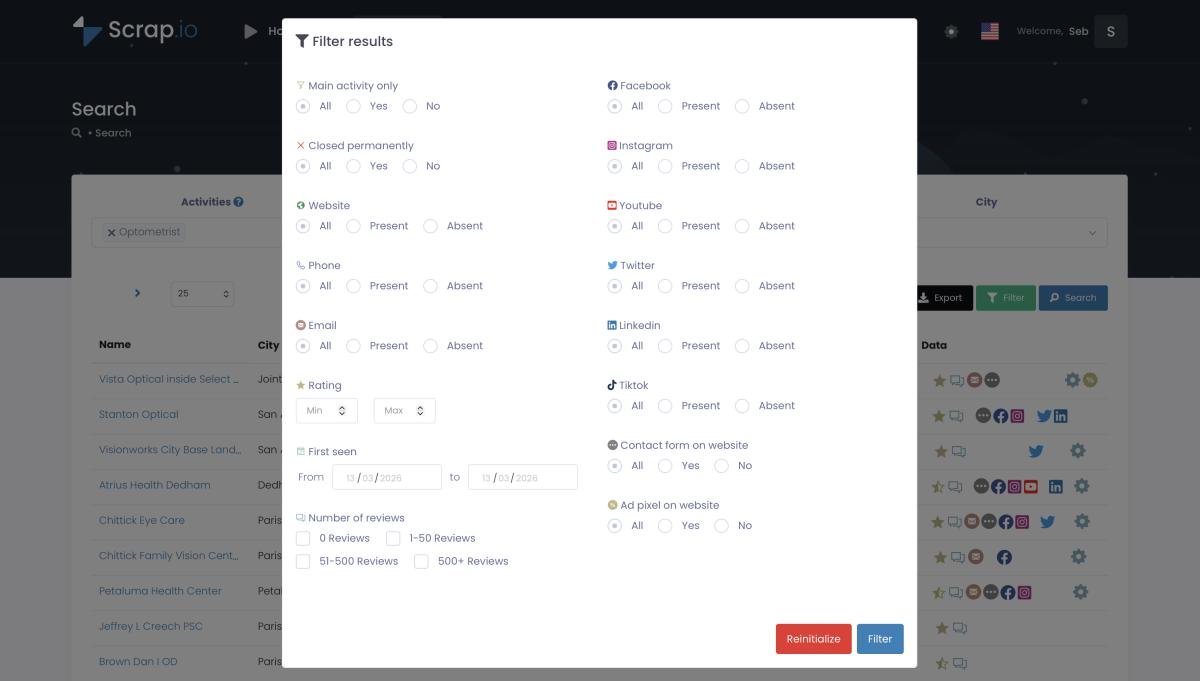
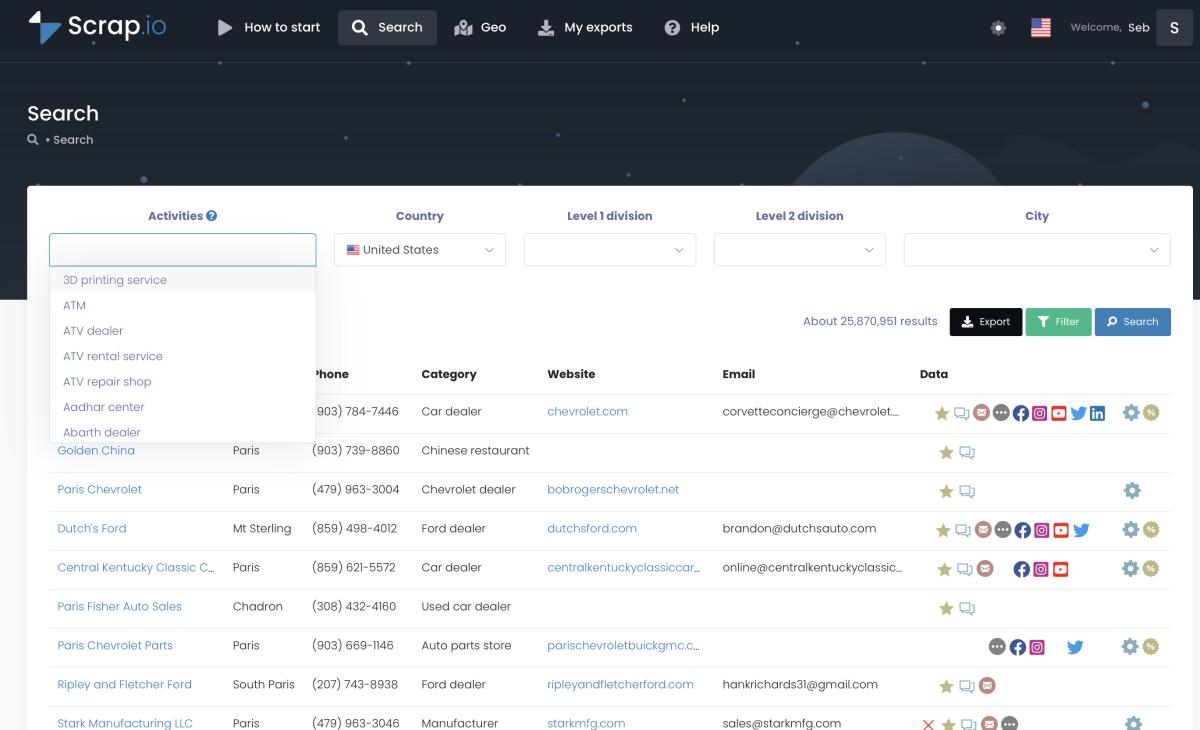
50,000+ professionals use Scrap.io to build fresh, GDPR-compliant prospecting lists, updated at export. 225,676,406 businesses indexed across 195 countries, extracted in real time so your infrastructure never fires at a dead address. Try it free, 100 export credits included.
Best infrastructure providers (2026)
Buy the pieces yourself or rent the whole thing? A wave of providers now sells cold email infrastructure as a managed product: domains, mailboxes, and DNS pre-configured, so you skip the fiddly setup. Here are the real ones worth knowing, so you can judge the market yourself.
| Provider | What it is | Rough pricing |
|---|---|---|
| Instantly | Sending platform + infrastructure, source of the 53M+ benchmark | Plan-based |
| Mailforge | Distributed infrastructure, top organic result | ~$2 to $3 / mailbox / month |
| Maildoso | SMTP + infrastructure, rated "best overall" by GMass | ~$100 / month for 32 mailboxes |
| Smartlead | Sequencer + mailbox rotation | from ~$3.90 / mailbox |
| Inframail / Primeforge | Dedicated Microsoft 365 / Workspace inboxes | Plan-based |
I'll be honest with you: I'm not going to crown a winner here, because the right pick depends on your volume, your provider preference, and how much setup you want to own. Mailforge is cheap and popular. Maildoso gets strong third-party marks. Instantly and Smartlead bundle sending with the infrastructure. Inframail and Primeforge lean into dedicated inboxes. Any of them can work. None of them fixes bad data.
Which is the whole reason for the section you just read. The best cold email infrastructure providers 2026 rent you clean plumbing. They don't rent you clean water. That part is on you.
DIY vs done-for-you
So, build it yourself or pay someone? Here's the honest tradeoff.
| Approach | Best for | Trade-off |
|---|---|---|
| DIY | Founders, tight budgets, control freaks | Cheapest, but you own every DNS headache |
| Done-for-you | Agencies, teams that value time over money | Faster, pricier, less control |
A LinkedIn post from Alexan Zartarian captures the DIY frustration perfectly: "STOP overengineering cold email infrastructure. Buying domains, setting DNS records, creating inboxes one by one..." (LinkedIn). He's got a point. The manual route is tedious. If your time is worth more than the setup fee, done-for-you is a reasonable call. The cheapest cold email infrastructure is always DIY, but cheap and free are not the same thing once you count your hours.
Staying compliant (GDPR / CAN-SPAM)
"Is cold emailing illegal?" No. Doing it without SPF, DKIM, DMARC and an unsubscribe link? That's the fast lane to spam.
The rules are actually manageable. Under CAN-SPAM in the US, cold email is legal as long as you identify yourself honestly, include a real physical address, and offer a working opt-out. No prior consent required for B2B. Under GDPR in the EU, most B2B senders rely on "legitimate interest," which works provided you offer easy opt-out and can explain how you got the address. Target business contacts, stay honest, honor unsubscribes fast.
One quiet advantage of sourcing from public business data: it's easier to document. Scrap.io pulls only publicly available business information, is GDPR and CCPA compliant, and keeps every record traceable to its source. That doesn't exempt you from honoring opt-outs, but it puts your legitimate-interest basis on solid ground.
Conclusion
Cold email infrastructure isn't complicated once you see the shape of it. Five blocks: domains to absorb the risk, mailboxes to send, DNS to prove you're legit, warmup to build reputation, and a tool to run the sequences. Build them in that order and you've got a machine that lands in the inbox instead of the void.
But here's the thing to actually remember. All five protect your domain. None of them fixes your list. And your list is what decides your bounce rate, your reputation, and whether any of this was worth the effort. Your infrastructure is only as good as the data you point it at.
Your infrastructure is only as good as your data. Try Scrap.io free for 7 days: 50 searches and 100 export credits, real-time business emails from Google Maps, filtered so you only export contacts that actually have an email. Start your free trial now.
FAQ
What is cold email infrastructure?
The technical foundation, secondary sending domains, dedicated mailboxes, and DNS authentication (SPF, DKIM, DMARC), that lets you send outbound at scale without burning your main brand domain. Add warmup and a sending tool for a full stack.
How many domains and mailboxes do I need?
The 2026 consensus is 5 to 10 secondary domains, 3 to 5 mailboxes each, capped at 40 to 50 emails per mailbox per day after warmup. That gives you real volume without any single inbox looking suspicious.
What is the 30/30/50 rule for cold emails?
It's a way of framing where results come from: roughly 30% subject line (do they open?), 30% deliverability (did it even arrive?), and 50% follow-ups (the persistence tax). Applied to warmup, the same instinct holds: ramp gradually, watch your bounce and spam rates, and never blast a fresh mailbox.
Is cold emailing illegal?
No. It's legal under CAN-SPAM (US) and GDPR (EU, legitimate interest) as long as you identify yourself, offer an opt-out, and target business contacts. Authentication and an unsubscribe link are table stakes, not optional extras.
Is cold email still effective in 2026?
Yes. The average reply rate is 3.43% across 53 million-plus emails (Instantly, 2026), and warmed setups reach around 87% inbox placement. Effectiveness comes down to infrastructure and data quality far more than raw volume.
Generate a list of restaurant with Scrap.io