

Video: How to Scrape Google Maps at the Country Level
- Why Google Maps Scraping Matters in 2026
- The DIY Approach: Building Your Own Google Maps Scraper
- Professional Google Maps Scraper: The Scrap.io Approach
- Data Quality Comparison: DIY vs Professional (2026 Test Results)
- Cost Analysis: The Real Price of DIY vs Professional
- Who's Actually Using Google Maps Scraping? Real B2B Examples
- Legal and Compliance Considerations in 2026
- Which Google Maps Scraper Is Right for You?
- Frequently Asked Questions
- Conclusion
Last year, I watched a client spend three weeks building a Google Maps scraper from scratch. Python scripts, proxy rotations, Octoparse templates, the whole circus. He got 70,000 restaurant listings for the entire US and felt pretty good about it.
Then we ran the same extraction through Scrap.io. Same category, same country.
665,000+ results. With 70+ data columns instead of 42. Three weeks of work, beaten in about ten minutes. That one stung.
But it taught him what most people figure out the hard way: there's a canyon between scraping a few hundred Google Maps listings and pulling data at country level. And that canyon is where DIY projects go to die. This guide breaks down exactly what happened when we tested both approaches with a Google Maps scraper: the real costs, the actual data quality, and who should pick which path. Whether you're wondering how to scrape Google Maps at country level or trying to price out the cost of building a Google Maps scraper from scratch, the numbers are all here.
Why Google Maps Scraping Matters in 2026
The $27.9 Billion Location Intelligence Opportunity
Here's a number that stopped me mid-scroll. The location intelligence market hit roughly $27.9 billion in 2026, and it's projected to reach about $76.4 billion by 2033, a CAGR near 15.5% (Grand View Research). Google Maps sits right at the center of it.
93% of consumers use Google Maps to find local businesses. Local businesses pull an average of 1,260 views per month through Google Maps. 80% of local Google Maps searches end in a store visit. So yeah, the data sitting inside Google Maps is worth serious money.
The web scraping market itself is around $1.17 billion in 2026, heading toward $2.28 billion by 2030 at an 18.2% CAGR (Mordor Intelligence). B2B lead generation? Business Research Insights values that services market at $3.33 billion in 2026, climbing toward $8.2 billion by 2035 at an 11.91% CAGR (Business Research Insights).
Every Google Maps scraper on the market exists because of these numbers. The question isn't whether to extract the data. It's how.
What Data Can You Extract from Google Maps?
The basics are obvious: business name, address, phone number, website, hours, reviews. Most scrapers, free or paid, get you those.
But the interesting stuff lives deeper. Multiple email addresses. Social media profiles (Facebook, Instagram, LinkedIn, YouTube, X/Twitter). Website technologies (WordPress? Shopify? WooCommerce?). Ad pixels. Contact forms. SEO metadata. Price ranges. Photo counts. Whether the business has claimed its Google listing.
A 12-person roofing company in Nashville doesn't care about 90% of that. A lead generation agency running campaigns across six countries? They need every field they can get.
The DIY Approach: Building Your Own Google Maps Scraper
Setting Up the Technical Infrastructure
Let me walk you through what building your own Google Maps scraper actually looks like, because it's not "pip install scraper" and done. People ask about Google Maps scraper Python vs no-code solutions constantly, so here's the full Python route first.
The challenge: scrape all restaurants in the United States. Not one city. Not one state. The whole country.
Problem number one. You can't just search "restaurants USA" on Google Maps. You need a loop: restaurants near New York City, then Los Angeles, then Chicago, for every single city in every state. So first you need a list of all US cities by state. (Springfield shows up in 34 states, by the way. Miss the state identifier and your data is garbage.) I used a scraper to grab the city list, wrote custom XPath selectors for city names and their parent states, and exported everything to CSV.
Time spent so far? About 4 hours. Haven't scraped a single restaurant yet.
Data Processing with Python (Pandas + Jupyter)
Next step: combine those city-state pairs into search keywords. Excel could handle it, but pandas is faster when you're juggling thousands of rows. Import pandas, build a dataframe, concatenate city + state + "restaurants" + "United States" into a keyword column, export to a fresh Excel file, feed those keywords into the Google Maps template.
Page size maxes out at 100 results per search. Remember that. We'll come back to it.
The 120-Result Limit Problem
This is where DIY Google Maps scraping smacks into a wall that most tutorials skip.
Google Maps caps search results at roughly 120 per query. Search "restaurants near Portland, Oregon" and you'll get 120 listings max, no matter how many actually exist. Portland has thousands of restaurants. You're getting 120.
To work around it, you'd subdivide searches by neighborhood, by zip code, by radius, and even then you'll miss listings. Chrome extensions for Google Maps scraping? Same limit. Open-source GitHub scrapers like gosom/google-maps-scraper? Same limit. We dug into every one of them in our open-source Google Maps scrapers on GitHub guide.
This is the single biggest reason a DIY Google Maps scraper fails at country-level data extraction. It's not a skill problem. It's a platform limitation that demands infrastructure most people don't have. You literally cannot scrape all businesses from Google Maps with a simple script. The platform won't let you. For a closer look at what free Google Maps scraper Chrome extensions can and can't do, we tested the top three.
Real DIY Results: What We Actually Got
After running the full extraction, all US cities, all states, max page sizes, we ended up with about 70,000 restaurant listings across four CSV files (the tool caps at 20,000 rows per export). Merged them with pd.concat. 42 columns of data.
Some columns were useful. Name, address, phone, reviews, rating, website: solid. But the opening hours column? Fused with random attributes like "woman-owned" in the same cell. Popular times data? No documentation on whether it's day-specific or scrape-date-specific. Several columns came back empty or inconsistent.
And 70,000 restaurants for the entire United States, where there are over a million? Our Google Maps scraper captured maybe 7% of the total. Not great when the whole point is to scrape Google Maps at scale. We ran the same test in France and got 52,000 restaurants with DIY. More on what Scrap.io found in a minute.
Video: How to Scrape Google Maps without Python?
Professional Google Maps Scraper: The Scrap.io Approach
No-Code Setup in Minutes
I'll be honest. After watching three weeks burn on the DIY method, opening this professional Google Maps scraper felt almost unfair.
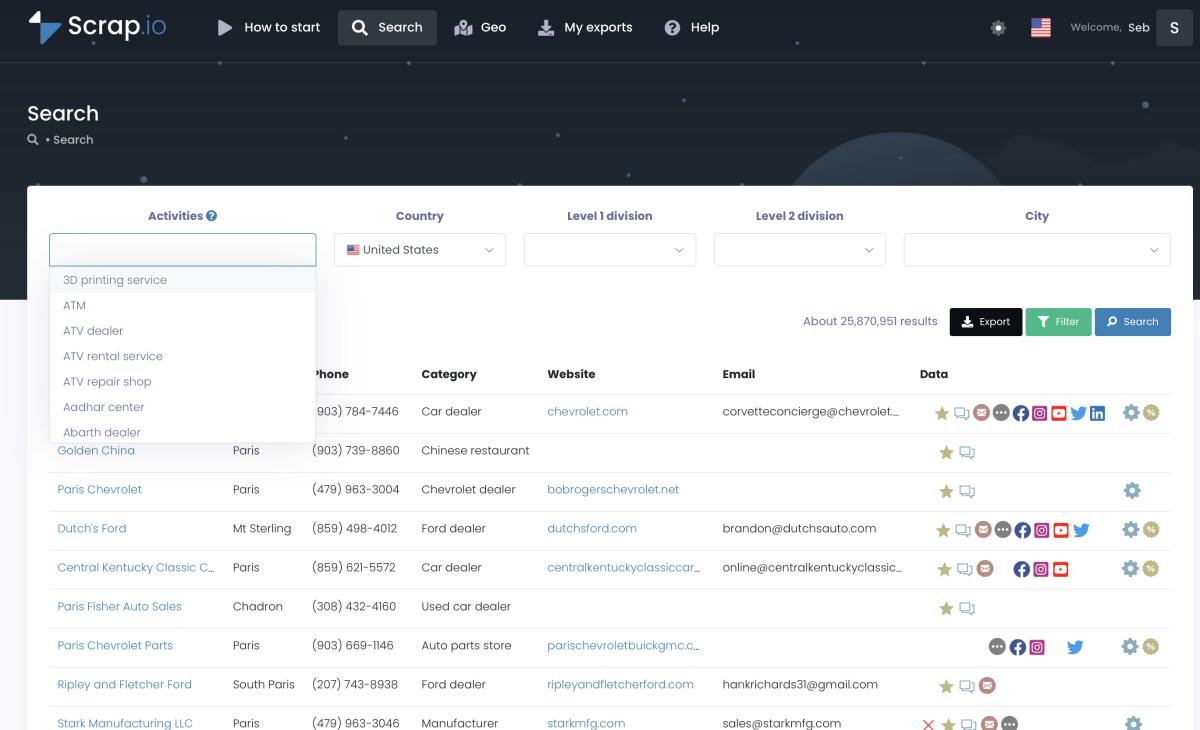
Type a category. Type a location. Click search. That's it. No Python. No proxies. No XPath selectors. No templates. No city lists to scrape first. Want restaurants in the United States? Type "restaurant," select "United States," hit search. Scrap.io tells you there are 665,000+ results ready for export. Not 70,000. Not "approximately." 665,000+.
If you want to scrape Google Maps without Python, this is what the best professional Google Maps scraper in 2026 looks like in practice.
70+ Data Fields vs 42 with DIY
The column count isn't a vanity metric. The extra fields carry the stuff that matters for real business use: multiple emails (up to 5 per listing), social media links (all of them, not just Facebook), website technologies, meta descriptions and SEO data, contact form URLs, ad pixel detection (Meta Pixel, Google Ads, and so on), and whether the business claimed its Google listing.
That last one is gold for agencies. An unclaimed listing usually means a weak digital presence, which means the business is more likely to need your services. Our complete guide to Google Maps scraping breaks down every single field you can pull.
Advanced Filtering That Changes Everything
Here's where Scrap.io earns its keep. Filters.
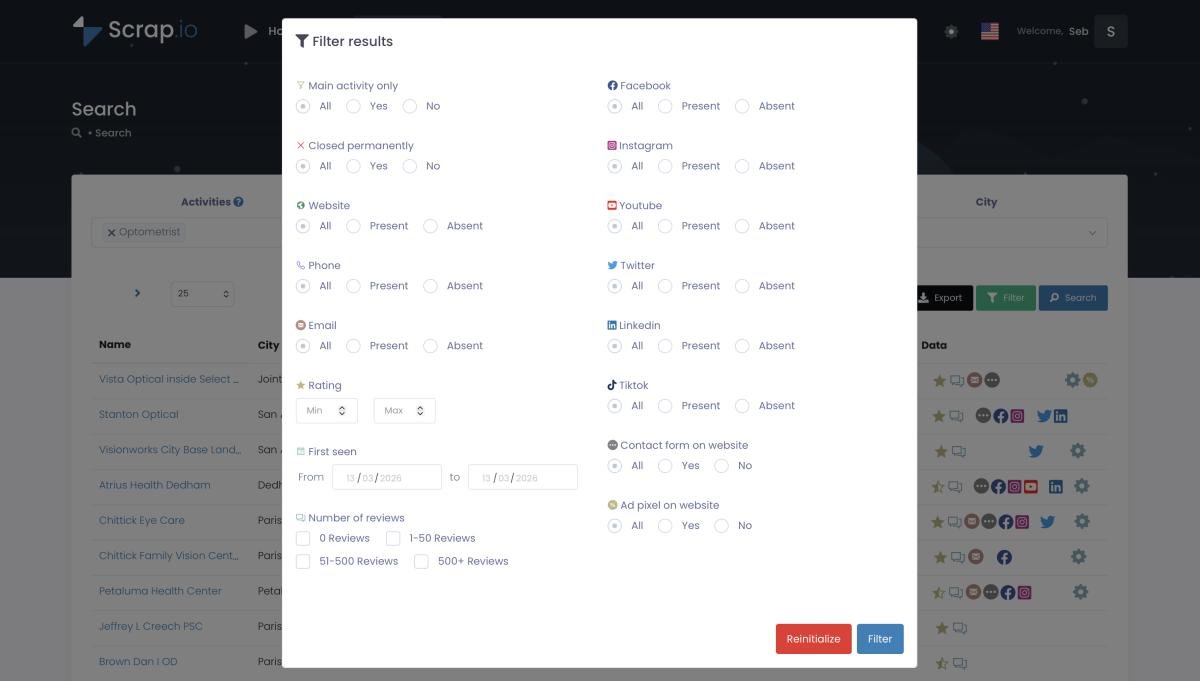
Want only restaurants with a website but no Facebook page? Done. Only businesses with 4+ stars and 50+ reviews? Three clicks. Places with a contact form but no ad pixel? (Those are businesses spending on their website but not on paid ads. Perfect cold outreach targets.) Filter by price range, by permanently-closed status, by photo count, by claimed vs unclaimed. Stack them together.
And here's the part your wallet cares about: on Scrap.io the filters run before extraction, so a credit is only spent on a contact you actually keep. For anyone doing Google Maps lead scraping at volume, this is the difference between downloading 665,000 raw rows and figuring out who to contact, versus exporting 12,000 pre-qualified leads that match your exact ICP. Check the advanced filtering guide for the full breakdown.

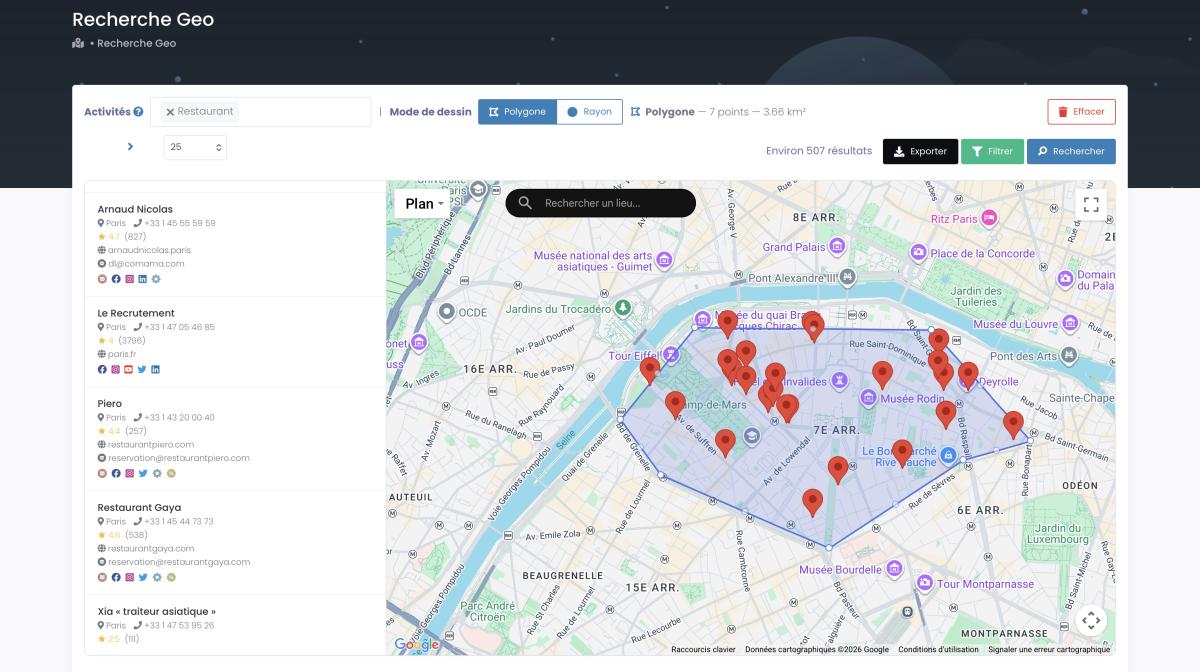
Scrap.io lets you extract business data from Google Maps across entire countries (195 of them, 4,000+ categories, 225M+ listings indexed), no coding required. Start with a free trial and 100 free leads and test the difference on your own niche.
Data Quality Comparison: DIY vs Professional (2026 Test Results)
France Test: 52K vs 222K Restaurants
We ran a controlled test. Same category (restaurants). Same country (France). Same timeframe.
DIY method (scraper + Python + city loop): 52,000 results.
Scrap.io: 222,000 results.
That's a 327% gap, more than four times the data. Country-level Google Maps data extraction isn't even a contest between the two. Not because the DIY method failed (it worked fine), but because the 120-result cap per search structurally blocks you from capturing every listing in dense urban areas. Paris alone has thousands of restaurants. At 120 per search, you'd need hundreds of micro-targeted queries for one city. And you'd still miss some. This is the exact cap that trips up tools built on the official API too, as we showed in our Clay Google Maps scraper fix.
Data Completeness and Accuracy
Beyond row count, data quality split sharply:
| Metric | DIY Method | Scrap.io |
|---|---|---|
| Total results (France) | 52,000 | 222,000 |
| Data columns | 42 | 70+ |
| Email coverage (restaurants) | ~15% | ~28% (62,856 of 221,965) |
| Social media links | None | Facebook, Instagram, LinkedIn, YouTube, X/Twitter |
| Website tech detection | None | Full stack detection |
| Data consistency | Mixed (merged fields, empty columns) | Clean, structured columns |
| Duplicate rate | ~8-12% | <1% (built-in deduplication) |
Note the honest bit: only about 28% of French restaurants (62,856 of 221,965) had an email found on their website. That's not a Scrap.io weakness, it's the reality of the market. A huge share of small restaurants simply don't publish an email anywhere. A tool that promised you "90% email coverage" would be lying to you.
The DIY dataset had issues I'd call "annoying at small scale, deal-breaking at large scale." Opening hours merged with business attributes. Empty popular_times columns. Inconsistent formatting across four export files. Nothing pandas can't fix. But at 70,000 rows, cleaning eats hours.
Want to see the difference between 42 and 70+ data fields for yourself? Try Scrap.io free for 7 days and get 100 verified business leads to inspect column by column.
Cost Analysis: The Real Price of DIY vs Professional
DIY Hidden Costs (Development + Maintenance + Failures)
The "free" Google Maps scraper illusion breaks down fast once you do the math.
Initial development: 28 to 47 hours. At $50/hour (conservative for a developer who knows Python, proxies, and web scraping), that's $1,400 to $2,350 before you extract a single lead.
Monthly maintenance: servers, proxy services, debugging when Google changes its HTML structure (which it does). $280 to $600 per month.
Hidden costs nobody budgets for: IP bans (happened to us twice). Failed extractions you only spot after processing. Data-quality cleanup by hand. Zero support when something breaks at 2 AM. Over 12 months, a DIY Google Maps scraper runs roughly $4,760 to $9,550. For a dataset that captures maybe a third of what's actually out there.
For a detailed cost comparison against other paid tools, see our analysis of the real cost of Google Maps scraping (execution-time vs lead-based pricing).
Professional Solution Pricing (ROI Breakdown)
Scrap.io pricing is straightforward:
| Plan | Price/Month | Credits/Month | Annual Cost |
|---|---|---|---|
| Basic | $49 | 10,000 | $588 |
| Professional | $99 | 20,000 | $1,188 |
| Agency | $199 | 40,000 | $2,388 |
| Company | $499 | 100,000 | $5,988 |
Even the Company plan ($5,988/year) costs less than mid-range DIY ($9,550/year) while delivering three to four times more data, 70+ fields, zero maintenance, and actual customer support. And the Basic plan at $588/year isn't even in the same conversation as DIY costs, all filters and all export columns included.
One more thing. If you're weighing the official route, compare Google Maps API costs vs scraping first. Spoiler: the API gets expensive fast at scale.
Who's Actually Using Google Maps Scraping? Real B2B Examples
Enterprise-Scale Data Projects
GroupBWT documented a project scraping business data across six countries, France, Italy, Spain, Germany, the UK, and Australia. Millions of points of interest, a hybrid keyword-plus-full-map approach, post-processing for validation, deduplication, and enrichment. That's the kind of infrastructure that takes months to build in-house.
A French data researcher used Apify's scraper to extract every bakery in Paris, then mapped their opening hours by arrondissement with kepler.gl. Cool project. But even Apify's platform hit country-level limits that forced creative workarounds. LeadStal, separately, reported dropping cost per lead from $1 to 5 dollars down to $0.003, with a 350% annual ROI and a 65% sales increase for clients using Google Maps lead generation data.
Lead Generation Agencies & Sales Teams
PhantomBuster published extraction results showing 100% phone coverage and 75% email coverage for plumbers in Paris, plus 91% contact coverage for bookstores. Solid numbers, though their execution-time pricing gets pricey fast next to lead-based pricing.
Outscraper has a testimonial I keep coming back to: "The first automated scraper search produced more usable data in 20 minutes than 15 months of manual work." That ratio, 20 minutes vs 15 months, tells you everything about why an automated Google Maps scraper became standard for agencies trying to extract business emails from Google Maps at scale. If Outscraper's on your shortlist, here's why teams pick the best Outscraper alternative instead.
What Reddit Says About Google Maps Scrapers
Over on r/Entrepreneur, a founder put it bluntly in a long thread comparing scraping tools: he'd built his own scraper off the Google Maps API and found it "really expensive to run." The consensus in that thread? Free tools work for small jobs. Paid tools pay for themselves at volume.
The same story echoes across r/CRM, where the discussion keeps circling one point: the Google Maps scraping tool matters less than the data quality and the time you save. One developer shared results from a custom scraper that pulled 100,000+ validated business emails, and still recommended paid solutions for anyone who isn't a full-time developer. How much does Google Maps scraping cost in practice? Less than you'd spend building and maintaining your own. If you'd rather compare the field first, we ranked the best Google Maps scrapers of 2026 with real prices and limits.
Skip the three-week build. Try Scrap.io free for 7 days and get 100 verified business leads instantly, real-time data across 225M+ businesses.
Legal and Compliance Considerations in 2026
CAN-SPAM, GDPR, and Data Privacy
Let's get the uncomfortable stuff out of the way. Is it legal to scrape Google Maps?
Short answer: extracting publicly available business information (names, addresses, phone numbers, reviews) is generally legal. This data is public. Google shows it to anyone who searches. But "generally legal" carries caveats. GDPR applies if you're handling data on EU businesses or contacting EU individuals. CAN-SPAM governs how you use scraped emails in the US. Rate limiting matters too: hammering Google's servers with thousands of requests a minute gets you blocked and can create legal exposure. Different countries have different rules on automated collection, so what's fine in the US might need tweaks for the EU or Asia-Pacific.
How Professional Tools Handle Compliance
This is one area where paying for a professional Google Maps scraping tool removes risk instead of just saving time.
Scrap.io handles rate limiting automatically. Its infrastructure distributes requests in line with best practices. Export formats are structured for easy GDPR handling (deletion requests, data mapping). It works only with publicly available business data, it's GDPR and CCPA compliant, and every data point is traceable to its source. With a DIY Google Maps scraper, compliance is your problem. You're the data controller, the infrastructure operator, and the legal department, all rolled into one.
Which Google Maps Scraper Is Right for You?
Choose DIY If...
You're a developer who genuinely enjoys the technical challenge. You need extremely custom data processing no existing tool supports. You're scraping small volumes, a few hundred listings from one city, now and then. And you have unlimited time plus a budget of exactly zero dollars (though, as we've shown, the "zero cost" thing is a myth).
Choose Professional If...
You need data from more than one city. Time matters to you. You want 70+ fields instead of 42. You need to extract all businesses from a city or country without missing two-thirds of them. And you'd rather spend your hours on outreach, sales, or building your actual business than babysitting proxies.
Still torn? Try to build a full-country list by hand, tonight, with a Python script and a proxy pool. I'll wait. When you're done (or when you've given up around city number forty), you'll know which camp you're in.
Frequently Asked Questions
What's the best free Google Maps scraper in 2026?
Free Google Maps scraper options exist: GitHub repos like gosom/google-maps-scraper, a Google Maps scraper Chrome extension free download, basic API wrappers. They all hit the same wall: 120 to 200 results per search, no email enrichment, frequent IP bans. The free Google Maps scraper limitations are real. And the "free" DIY route actually runs $1,400 to $2,350 in development time alone. Professional tools like Scrap.io offer a free trial with 100 leads so you can test before spending anything.
Is it legal to scrape Google Maps data in 2026?
Scraping publicly available business data from Google Maps is generally legal. Business names, addresses, phones, reviews: that's public information. Respect rate limits, follow GDPR and CAN-SPAM when you use the data, and don't overload Google's servers. Professional scrapers handle compliance automatically with built-in rate limiting.
Is scraping Google Maps allowed in 2026?
Yes, for public business data used in B2B prospecting. Collecting business names, addresses, phones and public emails is broadly allowed, and case law on public-data scraping supports it. Google's Terms of Service still prohibit automated access, so that's a contract matter (you risk an IP block, not a criminal case). Keep an opt-out on every outreach email and target professional contacts.
How many businesses can you scrape from Google Maps at country level?
DIY methods typically capture 30 to 50% of available listings because of the 120-result cap. Our France test: 52,000 restaurants with DIY vs 222,000 with Scrap.io, a 327% gap. For the US, Scrap.io accesses 665,000+ restaurants versus roughly 70,000 with manual scraping.
How much does it cost to build vs buy a Google Maps scraper?
DIY costs: $1,400 to $2,350 in initial development (28 to 47 hours at $50/hr) plus $280 to $600 a month for servers, proxies, and maintenance. That's $4,760 to $9,550 a year. Professional solutions run $49 to $499 a month, all-inclusive. Even the top-tier plan saves money once you factor in developer time.
What data fields can a professional Google Maps scraper extract?
Scrap.io extracts 70+ fields: business name, address, phone, email(s) classified by type, website, social media links (Facebook, Instagram, LinkedIn, YouTube, X/Twitter, TikTok), Google reviews (count, rating, per-score breakdown), photos, opening hours, price range, website technologies, meta descriptions, contact forms, ad pixels, and SEO data. DIY methods typically get 40 to 45 fields with lower consistency.
Conclusion: Stop Building Scrapers, Start Building Your Business
Three weeks of Python scripting. 70,000 results. 42 columns of messy data.
Or ten minutes in Scrap.io. 665,000+ results. 70+ clean columns. Filters that let you target exactly who you need, before you spend a credit.
The math isn't close. For most people reading this (agencies, sales teams, marketers, entrepreneurs who need Google Maps data extraction at scale) the answer is obvious. Your time is worth more spent on what you do with the leads than on how you get them. The DIY Google Maps scraper vs paid tool debate really comes down to one question: do you want to build infrastructure, or build your business?
Stop spending weeks building scrapers that capture half the data. Try Scrap.io free for 7 days, get 100 verified leads, and see why professionals choose the smarter path.
Generate a list of restaurant with Scrap.io