

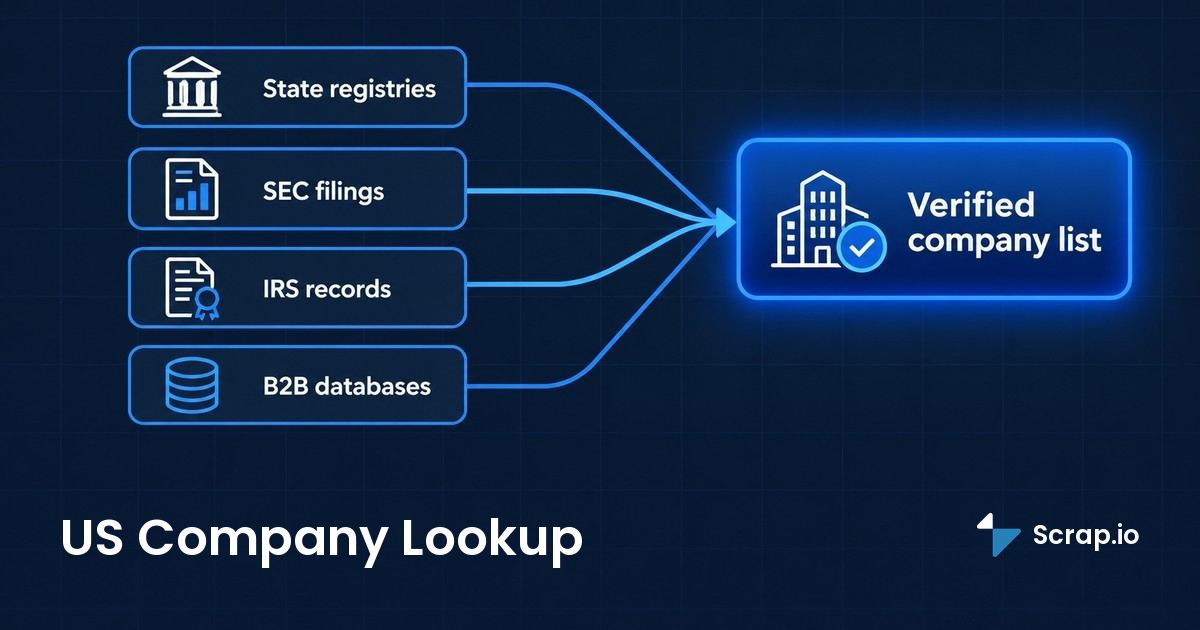
- Why there's no single "US company lookup" button
- What a US company lookup can (and can't) tell you
- How to look up a US company for free (official sources)
- How to verify a US company is legitimate
- Paid databases and B2B data providers
- From one lookup to a full list: company data at scale
- Turning company data into prospecting results
- FAQ
Google "US company lookup" and your brain expects one tidy search box. Type a name, hit enter, get the company. Like the UK's Companies House, but American.
It doesn't exist.
There is no national registry of US businesses. None. What exists instead is a patchwork of 50 state databases, one federal filing system that only covers public companies, a tax agency that guards its records, and a pile of private tools that fill the gaps for a fee. So a US company lookup isn't one action. It's knowing which of those doors to open for the answer you actually need.
Here's the promise for the next 2,500 words. You'll learn how to run a free US company search through official registries (an American company search, a company lookup USA, call it what you want), how to verify a business is legitimate before you wire it a dollar, and (the part nobody else connects) how to go from looking up one company to pulling every company in an industry or a state at once. That last jump is where the real money hides.
Why there's no single "US company lookup" button
Most people assume a country this size must keep one master list somewhere. A federal "US company registry" with a search bar. It's a reasonable guess. It's also wrong.
In the US, companies register at the state level, not the national one. A business incorporates with the Secretary of State (or an equivalent office) in whatever state it chooses, and that state holds the record. Fifty states, plus Washington DC and the territories, each running its own separate database with its own search tool, its own fields, and its own quirks. The National Association of Secretaries of State keeps a reference to these offices, but even NASS doesn't merge them into one searchable pool. Nobody does.
So when someone asks for the "US equivalent of Companies House," the honest answer is that there isn't one. The closest federal source is SEC EDGAR, and it only lists public companies, a tiny sliver of the total. Everything else lives state by state.
And the scale of "everything else" is staggering. There are roughly 36.2 million small businesses in the United States, about 99.9% of all US firms, and 28.4 million of them have no employees at all (SBA data via SellersCommerce, 2026). Together they employ close to 46% of the private workforce, somewhere around 62 million people. Now picture trying to cram 36 million one-person landscapers, consultants, and corner shops into a single clean database that updates in real time. No government built that. The map, as we'll see later, kind of did.
The takeaway for now: a US company lookup usa-wide means picking the right registry for the right company. There's no shortcut button, and anyone selling you "one search for every US business" is selling you a database that's partly made up.
What a US company lookup can (and can't) tell you
You found the company in a state registry. Great. But can you see who actually owns it, or what it's worth? Usually not. This is the expectation-setting part, and skipping it is how people end up frustrated.
Here's the blunt split between what a standard US company lookup reveals and what it quietly hides.
| What you usually CAN see (public) | What you often CAN'T see (private) |
|---|---|
| Legal status (Active / Good Standing / dissolved) | The real beneficial owners |
| Formation / registration date | Revenue and profit |
| Registered agent and address | Financial statements (unless public) |
| Entity type (LLC, Corp, etc.) | Exact employee count |
| State filing number | Contact emails and direct phone lines |
Notice the pattern. Registries are built to confirm that a legal entity exists and is in good standing. They were never built to tell you how to reach it or how to sell to it.
Ownership is the big one people get wrong. Many states only list a registered agent, which is often just a law firm or a filing service, not the human who owns the business. Articles of organization and annual reports sometimes name managers or officers. Sometimes. A lot of the time, the owner stays invisible in the public record, and you'd need commercial or beneficial-ownership data to go further.
So set your expectations before you start. A US company registration lookup proves a company is real and legal. It does not hand you a phone number, an email, or a decision-maker's name. Those live somewhere else, and getting them at scale is a different sport entirely.
How to look up a US company for free (official sources)
You can verify almost any US business without paying a cent, if you know which of the 50-plus registries to open. Here's the free toolkit, in the order most people should actually use it.
State Secretary of State business entity search
This is the real starting point. A business entity search on the Secretary of State website in the company's state of registration is the official, authoritative record, and it's free. You type the business name, you get its legal status, formation date, entity type, and registered agent. It's the cleanest way to find details of a US company by name, and some state portals even let you run a US company search by name, by officer, or by address.
The catch is knowing which state. A company registered in Delaware won't show up in California's system, and vice versa. If you don't know the state, you often have to check the likely ones one at a time. Here are three of the busiest:
| State | Official entity search | Cost |
|---|---|---|
| Delaware | Division of Corporations | Free name search |
| California | bizfile Online | Free |
| New York | DOS Corporation Search | Free |
| All 50 states | See our full guide below | Free |
Rather than repeat the whole state-by-state tour here, we've already mapped every one of them. Our guide to the Secretary of State business search across all 50 states has the direct link and quirks for each registry. Bookmark it, because you'll need it more than once.
SEC EDGAR for public companies
If the company is publicly traded, the edgar database is your best friend, and it's the one genuinely federal source. SEC EDGAR holds the filings every public US company must submit: annual reports, quarterly numbers, ownership disclosures, the lot. Real financials. Actual revenue. The stuff state registries never show.
Run a company search on SEC EDGAR and you can read a public company's 10-K line by line. The limit is obvious, though: it only covers public companies. The 36 million small businesses from earlier? Almost none of them file with the SEC. For a private plumbing outfit in Ohio, EDGAR is a dead end. For Apple or a regional bank, it's gold.
IRS tools (EIN and tax-exempt search)
The IRS doesn't run a general company lookup, and that trips people up. There's no public "search any business by EIN" tool, because tax records are confidential. What the IRS does offer is narrower: the EIN pages explain the federal tax ID that most real businesses carry, and the Tax Exempt Organization Search lets you verify nonprofits and charities specifically.
So use the IRS for what it's good at. Checking whether a charity is legit? Perfect. Looking up a random LLC's owner? Wrong tool. Move on.
Free aggregators (OpenCorporates and directories)
Here's the clever middle path. OpenCorporates aggregates official registry data from across US states (and 140-plus jurisdictions worldwide) into one searchable place. It's the largest open database of companies on the planet, and for a first pass it often saves you the guess-the-state game.
Is it a complete free database of every company? No such thing exists, remember. But as a free aggregator that points you back to the authoritative state filing, OpenCorporates is hard to beat. Use it to locate, then confirm on the official state registry.
That's the free stack: state registry first, EDGAR for public firms, IRS for nonprofits, OpenCorporates to tie it together. It'll answer "does this company exist and is it in good standing" every time. It will not, however, build you a list of 4,000 prospects. For that, keep reading.
Need more than one record at a time? Free registries hand you a single company per search. See how a bulk business-database tool turns that same lookup into an entire industry list.
How to verify a US company is legitimate
The invoice looks real. The website looks real. The LLC behind it was registered three weeks ago, in a state neither of you lives in. Sound familiar?
Verifying legitimacy is where the free registries earn their keep. You don't need a paid background check for most cases. You need a short, boring checklist and the discipline to run it before money changes hands. Here's the one I'd use:
- Confirm Active / Good Standing. Pull up the company on its state registry. A dissolved or "not in good standing" status is an instant red flag.
- Match the address and registered agent. Does the registry address line up with the website and the invoice? A mismatch isn't always fraud, but it's always worth a question.
- Check how long it's been registered. A brand-new entity isn't automatically shady. A brand-new entity in an unrelated state, pressuring you to pay fast? That's the pattern scammers love.
- Look for an EIN and a real web footprint. Legitimate businesses tend to have a federal tax ID, a working site, reviews, a history. Ghosts don't.
- Cross-check one more source. Registry plus OpenCorporates plus a quick web search. If all three agree, you're probably fine. If they contradict each other, stop.
Most "how to check if a company is legitimate in the USA" questions come down to those five steps. A us company registration lookup confirms the legal shell exists. The checklist tells you whether there's a real business inside it.
One honest caveat. This process verifies legal existence and standing, not character. A company can be perfectly registered and still be a terrible vendor. Registries catch the obvious fakes. They don't read reviews for you.
Paid databases and B2B data providers
The global sales-intelligence market hit $5.37 billion in 2026, up from $4.85 billion the year before, and it's projected to reach $12.45 billion by 2034 (a 11.1% CAGR, per Fortune Business Insights). That money exists for one reason: free registries tell you a company exists, not how to sell to it.
When free isn't enough
Free sources break down the moment your goal shifts from "verify one company" to "reach many companies." You can't get an email out of a Secretary of State record. You can't pull a thousand businesses out of EDGAR. And checking 500 companies one registry at a time is, frankly, a form of self-punishment.
That's the exact gap paid databases fill. They layer contact data, firmographics, and (sometimes) intent signals on top of the bare legal record. Think Melissa's Business Check lookup, which returns NAICS codes, employee counts and sales estimates; CompanyData.com, which claims some 374 million companies worldwide; or Dun & Bradstreet's D-U-N-S number for a global business identifier. Useful. Also, often, expensive and sold with a "book a demo" button where the price should be.
The NAICS US company lookup tool and industry codes
One specific paid-ish route deserves a mention, because people search for it directly: the NAICS US company lookup tool. NAICS codes classify businesses by industry, and tools built around them let you search or filter companies by what they actually do. Handy when you care about an industry, not a single name.
The honest snag is that NAICS codes are self-assigned and inconsistent, so "give me every company with code X" is shakier than it sounds. We dug into the free and paid routes in a dedicated guide to NAICS code lookup by company name, including why the code is the start of the job and not the end of it.
Free vs paid: what you actually get
Here's the comparison nobody lays out plainly. Not "which is better," but what each one is physically capable of.
| Capability | Free registries | Bulk business-data tools |
|---|---|---|
| Records per search | 1 at a time ❌ | Thousands ✅ |
| Email and phone included | ❌ | ✅ |
| Data freshness | Official but slow to change 🟡 | Real-time on export ✅ |
| Export to CSV / Excel | ❌ | ✅ |
| Filter before you pay | N/A | ✅ (good ones) |
The price spread between providers is wild, and so is the quality. We compared the field honestly in our rundown of the best B2B data providers, enterprise price tags and all. Short version: match the tool to who you sell to, and never pay enterprise rates for data you could pull fresher yourself.
Which is a good moment for a reality check from the people who overpay the most.
Video: Stop Paying $20,000 a Year for ZoomInfo, This Does More for $49 a Month
Teams pay $20,000 a year for static, aging B2B data. Here's the real-time alternative: Scrap.io pulls fresh business records from Google Maps and filters them before you spend a credit. See how it works.
From one lookup to a full list: company data at scale
Looking up one company is easy. Looking up every plumber in Texas with an email and no website, that's where real money gets made. And it's the exact jump every guide on the first page of Google forgets to make.
Think about what you're actually doing when you run a US company lookup. You're pulling one business out of a giant pool to check it. Now flip the question. What if you want the whole pool, filtered down to just the companies that match your target, with contact details attached and ready to export? No registry does that. The map does.
Google Maps is, quietly, the largest and freshest database of real businesses on earth, because owners update their own listings. Scrap.io reads that layer directly. It indexes 225,676,406 establishments across 195 countries and 4,000-plus categories, pulled in real time at the moment you export (Scrap.io, October 2026). You pick a category and a territory (a city, a county, a whole state, or the entire US in two clicks) and you get every matching business with name, address, phone, website, email and ratings.
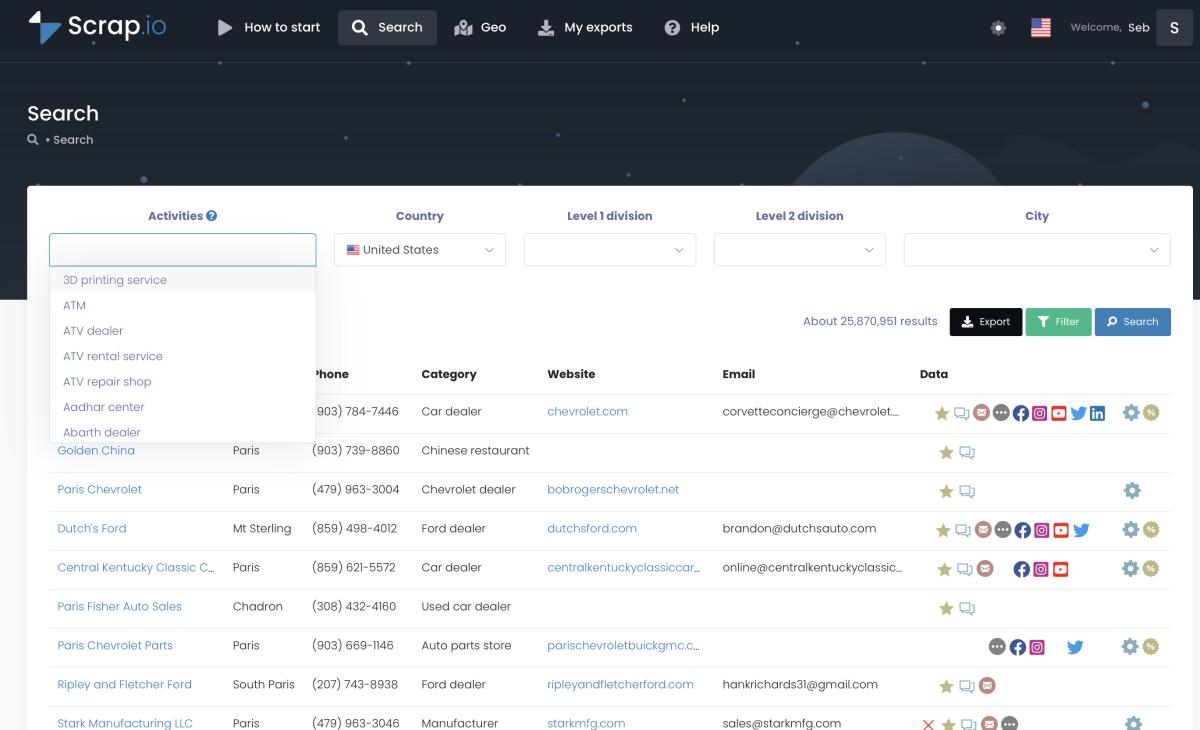
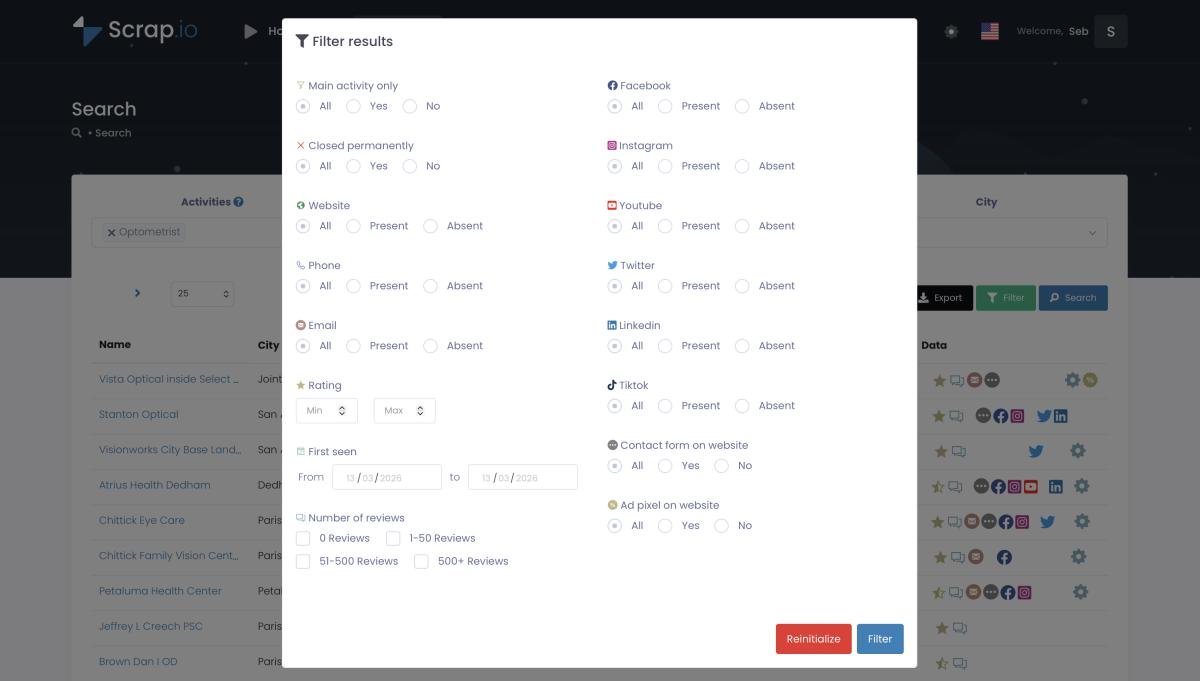
Here's the part that saves real budget: the filters run before extraction, not after. Only want companies that list an email? Toggle it. Only ones with no website (every one a prospect for a web agency)? Toggle that. You spend a credit only on a record that already matches, and counting how many match costs nothing at all. Compare that to a pay-per-record tool where you export everything, then delete half.
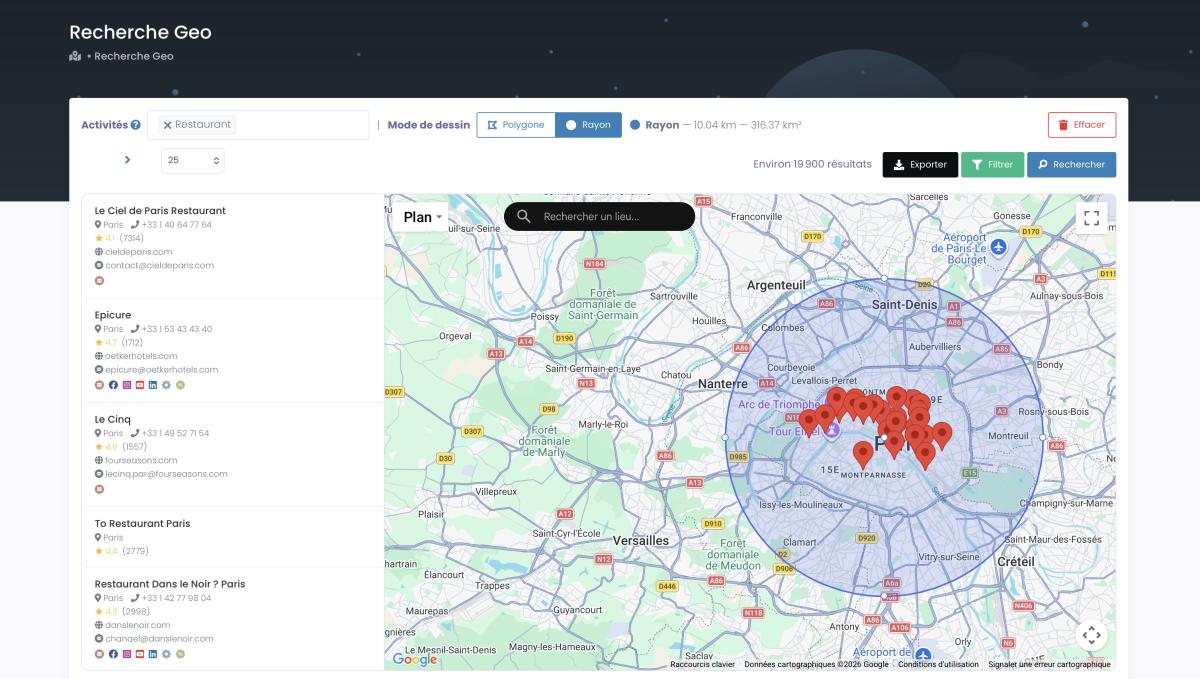
And it's not just administrative zones. GeoSearch lets you draw the exact area you want: a radius around a point, or a polygon hand-drawn around a neighborhood or a corridor that no state line matches.
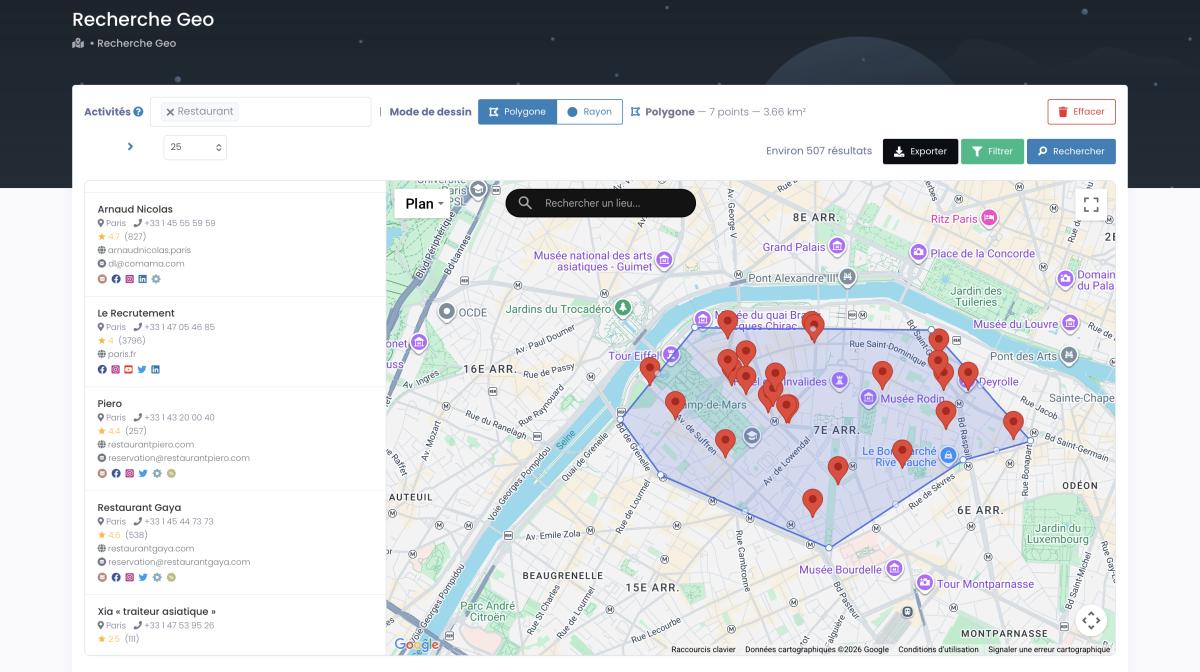
Want to watch it happen on a large scale? This is extraction without picking a single category, across a whole territory:
Video: How to Extract Every Business in 1 Click (No Category)
The output comes out as CSV or Excel, deduplicated, ready for your CRM. If you specifically want the US angle, we built a whole walkthrough on tapping the USA business email database, and the mechanics of the extraction itself live in our Google Maps scraping guide. The data is public business information, traceable to its source, and compliant with GDPR and CCPA.
Build your first US company list in two clicks. Try Scrap.io free for 7 days, 100 leads included. 50,000-plus pros already pull fresh, filtered business data from Google Maps across 195 countries. Start your free trial.
Turning company data into prospecting results
Take Maria, agency owner. She doesn't need one company record. She needs 4,000 of them, filtered, enriched, and ready to email by Friday. A US company lookup gets her the first one. A data-at-scale tool gets her the other 3,999.
Raw company data is just a spreadsheet until you point it at a goal. The goal, for most people pulling this data, is pipeline. And the market agrees it's worth the effort, even if it's bad at it: only about 1.2% of companies reach real B2B sales and marketing data maturity, and only around 8% rate their own data as 91-100% accurate (DiscoverOrg research, cited by Fortune Business Insights). Translation: most teams are prospecting off bad lists. Fresh, filtered data is an edge, not a given.
So what does turning data into results actually look like? A few moves that work:
- Segment before you send. A 4.8-star business with 300 reviews needs a different pitch than a 2-star one with six. Filter by rating, review count, or whether they even have a website, and your message writes itself.
- Use classified emails. A good export separates a generic contact@ address from a named person's email, or a sales@ from a marketing@. Sending the right message to the right inbox beats blasting one template at all of them.
- Match the channel to the data. Mobile numbers for SMS, generic lines for cold calls, emails for sequences. The data tells you which lever to pull.
This is the whole discipline of sales prospecting: get the list right first, then let decent outreach do the rest. Get the list wrong and the best cold email on earth still dies in an empty inbox. If your targets are local businesses specifically (restaurants, contractors, clinics, the economy that never shows up on LinkedIn), our guide to local lead generation walks the whole play end to end.
One thing worth saying plainly, because we're writing this from the Scrap.io side: we've watched clients burn three weeks copy-pasting company names off the web into a spreadsheet by hand, only to find half of it was stale before they finished. That's not diligence. That's the grind a real tool is supposed to kill.
FAQ
Is there a US equivalent of Companies House?
No. There's no single national register of US companies. Businesses register with the Secretary of State of their individual state, which means 50-plus separate databases. The closest federal source is SEC EDGAR, but it only covers publicly traded companies, not the millions of private businesses.
How do I look up a US company for free?
Use the Secretary of State business entity search in the company's state of registration for the official record. For public companies, use SEC EDGAR. To avoid guessing the state, start with an aggregator like OpenCorporates. All three are free and show legal status, formation date, and registered agent.
How can I verify that a US company is legitimate?
Run a short checklist: confirm an Active or Good Standing status in the state registry, match the address and registered agent against the website, check how long it has been registered, and look for an EIN plus a real web presence. A brand-new LLC in an unrelated state pushing for fast payment is a classic red flag.
How do I find out who owns a US business?
State filings such as articles of organization and annual reports sometimes list organizers, officers, or managers. But owner names aren't always public, since many states only publish a registered agent. For true beneficial ownership you may need commercial data or, for some entities, federal beneficial-ownership reporting.
Can I look up many US companies at once?
State registries return one record per search, so no, not through official sources. To build a list by industry or location with phone, email, and website attached, use a tool like Scrap.io, which extracts and filters thousands of Google Maps business listings in real time and exports them to CSV.
Stop looking up companies one by one
So that's the full picture of a US company lookup in 2026. There's no magic national button, and there never was. What you have instead is a free stack that works beautifully for checking one company (state registries, SEC EDGAR, the IRS for nonprofits, OpenCorporates to tie it together) and a verification checklist that catches the fakes before they cost you.
But the free tools stop cold at the edge everyone eventually hits: you don't want one record, you want all of them. One plumber becomes every plumber in the state. One lookup becomes a list. That's the jump from verifying a company to actually building a pipeline, and it's where fresh, filtered, real-time data leaves a pile of registry tabs looking very lonely.
Stop looking up companies one by one. Start your free 7-day Scrap.io trial, 100 leads included, no commitment. Pull every business in a category across a city, a state, or the entire US, filtered before you spend a single credit. Start your free trial.
Generate a list of restaurant with Scrap.io