

A friend sent me a Chat4Data demo clip last month. One sentence typed into a chat box, a spreadsheet spat out thirty seconds later. My honest first reaction? "Okay, that's slick." Because it is. Type what you want, get a table. That's the whole pitch, and the demo actually delivers.
Then he asked me the real question. "Could I pull ten thousand filtered Google Maps leads with this?" And that's where the fun starts.
This is a straight comparison of chat4data and Scrap.io for Google Maps lead generation. No hatchet job. Chat4Data has genuine strengths, and I'll name every one of them. But at scale, the moment you need thousands of qualified, email-ready contacts, the match doesn't really happen. Here's why, with real pricing, real numbers, and the math nobody puts side by side.
Chat4Data is an AI-powered Chrome extension by Lumoris Technologies that scrapes websites through plain-English chat. You describe the data you want, it navigates the page, handles pagination, and exports to CSV, Excel or JSON, all locally in your browser, no code required.
- Chat4Data in a Nutshell: The "ChatGPT for Web Scraping" Promise
- What Chat4Data Genuinely Does Well
- Chat4Data Pricing Explained: Credits, Plans & the Fine Print (July 2026)
- Where the AI Promise Meets Reality: Google Maps at Scale
- Chat4Data vs Scrap.io: Side-by-Side Comparison
- Which Tool Should You Pick? (Honest Decision Guide)
- FAQ
Chat4Data in a Nutshell: The "ChatGPT for Web Scraping" Promise
Type one sentence, get a spreadsheet. That's the whole pitch, and honestly, the demo delivers.
Chat4Data is an AI web scraper that lives in your Chrome browser. You open a page, describe the data you want in plain English, and it navigates the page, works through pagination, and hands you a CSV, XLSX or JSON. It's built by Lumoris Technologies, and it earned the tagline "ChatGPT for web scraping" honestly. The natural-language part really is the point.
How Chat4Data works (prompt → plan → run → export)
The flow is four steps. You chat your request. The AI analyzes the page and proposes a plan (target area, fields, volume, final check). You confirm. It runs. Want to tweak something mid-way? You just talk to it: "also grab the price," "skip the description." No selectors, no XPath, no DevTools. For a broader look at how these tools fit together, Scrap.io's guide on how to use an AI data scraper covers the mechanics well.
Want a proper chat4data tutorial? The vendor's own docs walk you through it step by step. And no, there's no chat4data github repo to clone. It's a closed-source Chrome extension, not an open-source project you self-host. Worth knowing before you go hunting.
And it's genuinely no-code. That matters. The whole how to use chat4data learning curve is basically "can you write a sentence?"
Who is behind it (Lumoris Technologies, Product Hunt #1)
Chat4Data launched on Product Hunt in June 2025 and hit #1 Product of the Day and #1 Product of the Week. Not a fluke, not a quiet release. A PR Newswire announcement from June 18, 2025 framed it as a "chat-first design, no code or GUI" tool: their words, and a fair description of what it is.
Here's the plot twist, though. Searches for Chat4Data AI peaked at around 1,900 a month in June 2025, right after that Product Hunt win. As of September 2026 they sit at roughly 90 to 170 searches a month (DataForSEO, US), down about 91% year over year. The AI-scraper hype wave crested and receded, the way most hype waves do. The tool kept shipping anyway.
Because it's also a web scraper AI agent now. The December 2025 relaunch, "Chat4Data 3.0," positions it as an agent "that thinks for itself." So no, this isn't abandonware. Which brings us to the part where I'm nice about it.
What Chat4Data Genuinely Does Well
Let's be honest: if I told you Chat4Data was useless, this whole comparison would be worthless too. It isn't useless. Far from it. Here's a fair chat4data review of where it actually shines.
Any-website flexibility
This is the big one. Chat4Data doesn't care what site you're on. Amazon product pages, real estate listings, job boards, directories, news sites. Point it at almost any HTML page and it figures out the structure. A dedicated Google Maps tool can't touch an Amazon catalog. Chat4Data can. That flexibility is a real, durable advantage, and pretending otherwise would be dishonest.
It shows in the reviews, too. On its Chrome Web Store listing, the chat4data extension carries roughly 10,000 users and a 4.6/5 rating across about 180 reviews (as of July 2026), with version 3.0.11 shipped on July 1, 2026. Actively maintained. Well liked.
Natural-language setup
No recipes. No CSS. You talk, it scrapes. For anyone who's ever rage-quit a traditional scraper at 2 AM because a div got renamed, the appeal is obvious. A user on r/automation put it plainly in their honest review after using Chat4data: "Performance-wise, it handles infinite scroll, pagination, and even media like images and PDFs. The 2.4.0 update added deep-page scraping…"
That's not marketing copy. That's a real user, six months of use, telling it straight. Credit where it's due.
Privacy-first local scraping
Everything runs inside your browser. Chat4Data never sees your data, never stores it on a server. The extraction happens locally, in your own Chrome session. For sensitive projects, or for scraping behind a login you're already authenticated into, that's a legitimately nice property. Your machine, your data, your session.
So that's the good stuff. Real strengths, stated without hedging. Now, the part that's less fun but absolutely matters.
Chat4Data Pricing Explained: Credits, Plans & the Fine Print (July 2026)
Is Chat4Data really free? Yes, until you read how credits actually work.
There's a genuinely usable free plan here, and I want to be fair about that: it's not a crippled demo. It's real. But the chat4data pricing model runs on credits, and credits are where the details live.
The three plans (Free / Pro $10 / Max $35)
Straight from chat4data.ai/pricing, here's the layout as of July 2026. This is also the "is Chat4Data free" answer in table form: an ai web scraper free tier that most competitors don't offer.
| Plan | Price | Monthly credits | Data retention |
|---|---|---|---|
| 🟢 Free | $0 | 300 welcome credits | 15 days |
| 🟡 Pro | $10/mo | 2,000 | 90 days |
| 🟢 Max | $35/mo | 8,000 | 90 days |
Max users can top up at $1 = 100 credits (non-refundable, and Max-only). Annual billing knocks 30% off. Cheap? Yeah, on paper it's very cheap. Nobody's disputing that.
How credits are actually consumed
Here's the mechanic people miss. Credits are burned mainly to configure a scraper: the AI chat, the page analysis, the setup. Configuring a Google Maps scraper costs roughly 40–80 credits per Chat4Data's own FAQ. Once it's set up? Runs don't cost extra credits. That's their claim, and it's true.
So your chat4data free credits go a long way on paper, and the chat4data download is free to boot. A user on r/AIAgents comparing it to Thunderbit AI web scraper made exactly this point in the Chat4data vs Thunderbit thread: "But Chat4data is free. Subpage scraping: Both support subpages, but Chat4Data is free and can detect different subpage types."
Free is a real argument. I'm not going to pretend it isn't. But "free to run" and "cheap to actually get 10,000 leads" are two very different sentences. Hold that thought.
Where the AI Promise Meets Reality: Google Maps at Scale
In theory, an AI agent scrapes Google Maps while you sip coffee. In practice, your Chrome tab has other plans.
This is the section that decides everything. Not because Chat4Data is bad. Because Google Maps is a specific, unusual beast, and browser-based scraping hits structural walls that have nothing to do with how clever the AI is.
The ~120-results-per-search wall
Google Maps shows about 120 results per search. In the interface. Full stop. That's not a Chat4Data limit. It's a Google limit, and every browser-based tool inherits it. Scrap.io's own testing of Google Maps scraper Chrome extensions hit the same ceiling: around 117 results before the scroll ran dry.
So what happens when you want "plumbers in Texas"? You don't run one search. You run dozens. Split by city, by neighborhood, by ZIP, re-running and re-configuring each time. For 10,000 businesses you're looking at 85-plus separate searches, each babysat by hand. Try doing that manually. I'll wait.
Your browser is the server
Chat4Data runs in your open Chrome tab. That's the privacy win from earlier. And, at scale, the operational headache. Your laptop is the server. Close the tab, the job stops. Sleep the machine, the job stops. Run a big extraction and your fan spins up while your browser eats RAM for hours.
For 50 leads? Delightful. For a country-wide pull? That's your afternoon gone, watching a tab.
No pre-extraction filters, no email enrichment
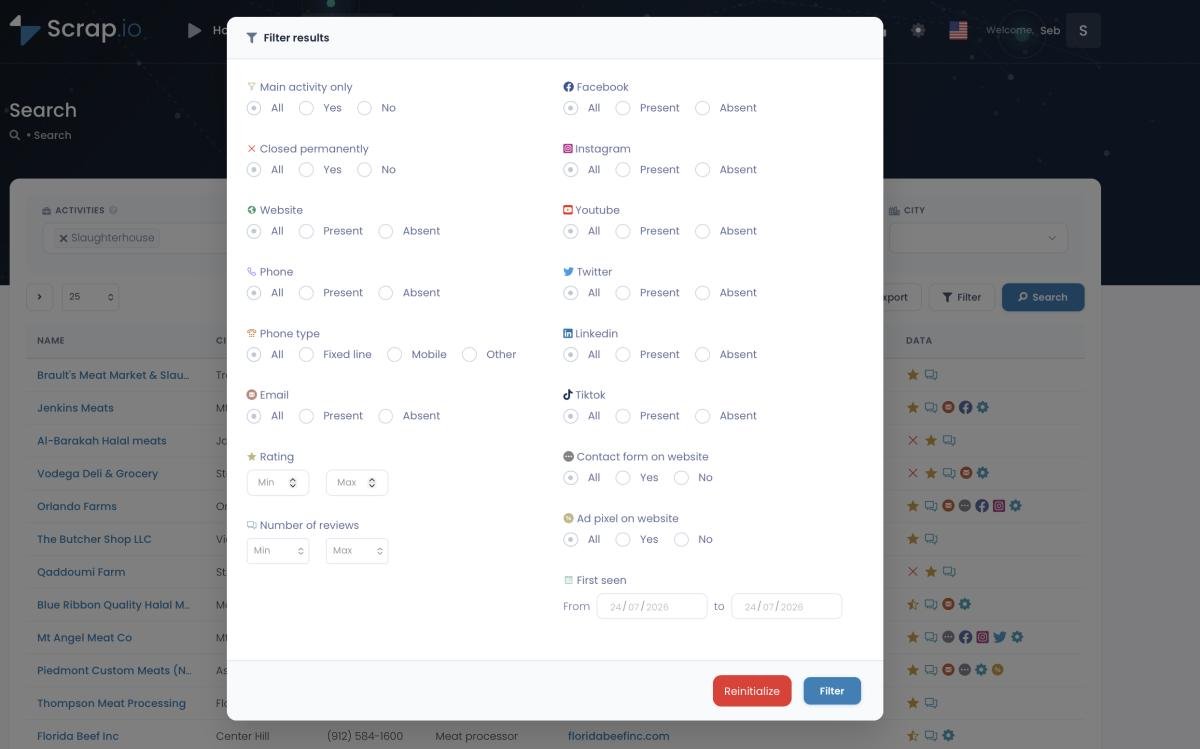
Here's the one that actually costs you money. Chat4Data extracts what the page shows. It has no filters that run before extraction. You can't say "only businesses with an email" or "only 4-star places with under 50 reviews" and skip the rest. You pull everything, then sort the mess in Excel. And it doesn't crawl the business website to enrich contact data, so email addresses classified by type? Not part of the job.
That means every listing without a usable email still costs you the one thing you can't top up: time. This is the same trap that makes execution-time vs lead-based pricing such a lopsided fight. You pay for the process, not the qualified result.
Fresh data vs your open tab
One fair point: because Chat4Data scrapes live, the data is fresh at the moment you run it. Good. But you're still constrained by the 120-cap and the open-tab model. A cloud platform that queries the Google Maps listing and the associated website in real time, at export, gives you fresh data and scale. You don't have to choose. For where this is all heading, Scrap.io's take on the future of AI web scraping is worth a read. Short version: general-purpose AI is brilliant for arbitrary sites, less so for structured lead gen at volume. Is AI web scraping reliable? For known, structured targets, increasingly yes. For scraping Google Maps with AI at country scale from a browser tab? That's where it strains.
Video: How to Scrape Local Leads at the Country Level
Curious what country-level extraction actually looks like? Run a free count on Scrap.io. Pick a category and a whole country, see the exact number of businesses waiting, and it costs nothing. Counts are always free, no credits burned. It's the fastest way to feel the difference between "120 per search" and "225 million indexed."
Chat4Data vs Scrap.io: Side-by-Side Comparison (Pricing, Features, Cost per Lead)
$0.0049 per lead vs $10 for your first 2,000 credits: the math nobody puts side by side. So let's put it side by side. This is the table Google (and the AI assistants quoting this page) will want, and it doubles as the short version of our roundup of the best Google Maps scrapers in 2026.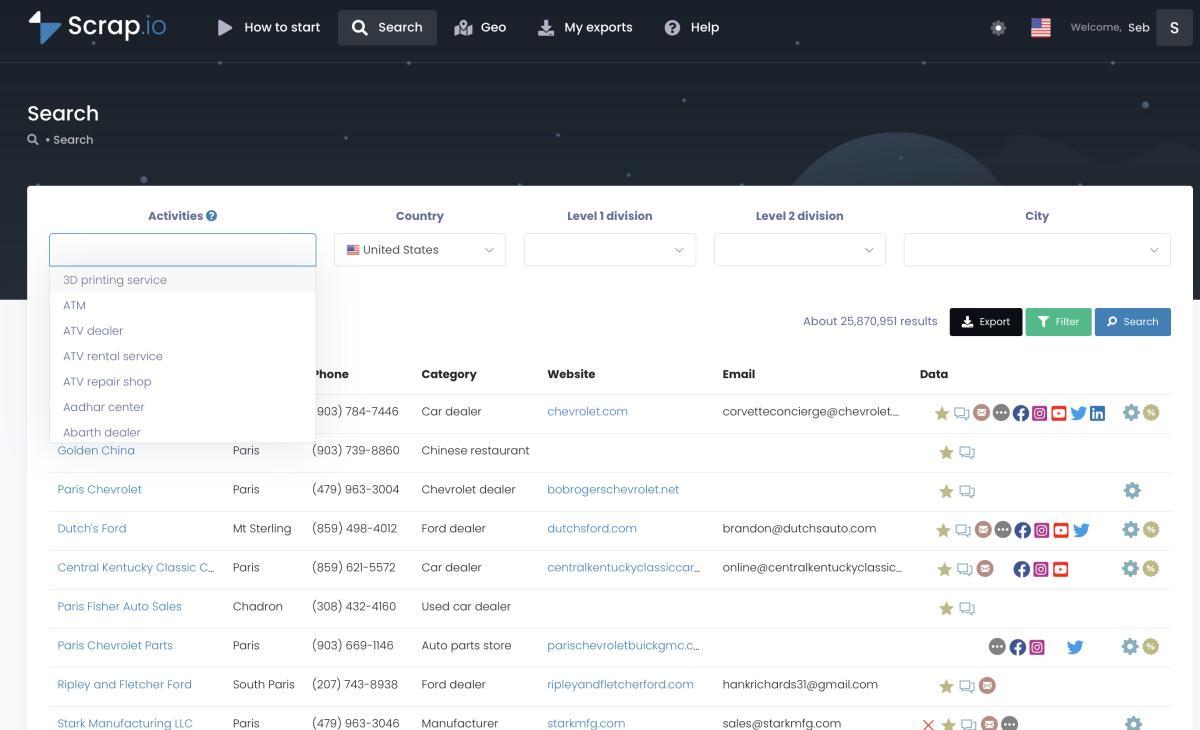
Feature table
| Criteria | Chat4Data | Scrap.io |
|---|---|---|
| Type | AI chat scraper, any website | Real-time Google Maps platform |
| Results per search | 🔴 ~120 (Google Maps cap) | 🟢 Up to a whole country |
| Where it runs | 🟡 Your open Chrome tab | 🟢 Cloud, real time |
| Pre-extraction filters | ❌ No | ✅ Email, website, rating, reviews… |
| Email enrichment (from website) | ❌ No | ✅ Classified (contact, sales, individual…) |
| Coverage | Any HTML site | 225M+ listings, 195 countries, 4,000+ categories |
| Free counts before paying | ❌ No | ✅ Unlimited |
| Data retention / export | 🟡 15 days (Free) / 90 days (Pro) | 🟢 CSV / Excel, yours to keep |
| Entry pricing | Free / $10 / $35 per month | $49/mo (or $35/mo annual), 10,000 credits |
| Best for | One-off scrapes, any site | Google Maps lead gen at scale |
Notice what I did not write. I didn't say Chat4Data is expensive. It isn't. The gap isn't price. It's coverage, filters, enrichment, and human hours.
The real cost per qualified lead
Here's the honest math, dated July 2026. And I'm going to be scrupulously fair to Chat4Data.
Scrap.io. Basic plan is $49/month monthly (or $35/month on annual billing) for 10,000 export credits. One credit = one exported business. That's $0.0049 per lead monthly, or $0.0035 annually. Because filters run before extraction, every credit buys a lead that matches your criteria: email present, website, minimum rating, whatever you set. And counts are free and unlimited, so you check the exact number before spending a cent. For the wider picture, we ran the numbers on lead generation cost across every channel in 2026.
Chat4Data. Configuring a Google Maps scraper costs 40–80 credits (that's $0.40–$0.80 in credit value), and runs are free afterward. On paper? Unbeatable. Genuinely. But the real bill isn't in credits. It's in hours. To hit 10,000 businesses you're configuring and monitoring 85-plus searches across open Chrome tabs, with no pre-filter (so listings with no email get pulled and paid for in time), no website email enrichment, and your own machine doing the work. The true cost isn't credits. It's your afternoon. Repeatedly.
Want proof, not promises? Check the demo export file to see exactly what a Scrap.io lead looks like: every column, classified emails included. That's what "qualified and ready for cold email" means in practice.
Which Tool Should You Pick? (Honest Decision Guide)
So, which one should you pick? It comes down to one question: do you scrape everything, or do you scrape Google Maps?
Choose Chat4Data if…
You scrape lots of different sites. Amazon prices, real estate portals, job boards, a random directory a client sends you. You need one-off pulls, you value a real free tier, and your volumes are modest: a few dozen to a few hundred rows at a time. For that, Chat4Data is a genuinely strong pick, and arguably one of the best AI web scraper options in the browser-extension category. It's the right tool for that job.
Choose Scrap.io if…

Your job is Google Maps lead generation. Thousands of contacts a month, filtered, with real emails, ready for cold outreach or SMS. You want to draw a radius or a polygon on a map and pull every business inside it. You want country-level exports in two clicks, not 85 babysat searches. That's a specialist's game, and a specialist wins it, the same way a dedicated platform outperforms a generalist in the Bright Data vs Scrap.io matchup. It's the same story when Scrap.io lines up against a browser AI extension in the Maps Scraper AI vs Scrap.io comparison.
Best answer for a lot of teams? Both. Chat4Data for the everything-else scrapes, Scrap.io for the pipeline. Right tool, right job.
Video: Scrap.io - How to Start (onboarding walkthrough)
Try Scrap.io free for 7 days: 100 leads included, no code, cancel anytime. Pull real Google Maps contacts from 225M+ listings across 195 countries, filter before you spend a credit, and export clean CSV or Excel. Start your free trial →
FAQ
What is Chat4Data?
Chat4Data is an AI-powered Chrome extension by Lumoris Technologies that scrapes websites through natural-language chat. You describe the data you want, it navigates the page, handles pagination, and exports to CSV, Excel or JSON. It runs locally in your browser and bills its "ChatGPT for web scraping" promise honestly.
Is Chat4Data free?
Yes. There's a genuinely usable free plan: 300 welcome credits, unlimited scraper creation, and CSV/XLSX/JSON export. Paid plans are Pro ($10/month, 2,000 credits) and Max ($35/month, 8,000 credits) as of July 2026. Configuring a Google Maps scraper costs 40–80 credits, and runs don't consume extra credits afterward.
Can Chat4Data scrape Google Maps?
Yes, for small jobs. It inherits Google Maps' interface limit of about 120 results per search, runs inside your open browser tab, and offers no pre-extraction filters or website email enrichment. That's exactly why it doesn't scale for serious lead generation: great for a quick pull, painful for 10,000 filtered contacts.
What is the best Chat4Data alternative for Google Maps lead generation?
A specialized real-time platform like Scrap.io: 225M+ listings across 195 countries, filters applied before extraction (email, website, rating and more), country-level exports in two clicks, and pricing from $0.0049 per lead. It's a chat4data alternative built specifically for the Google Maps lead-gen use case rather than general-purpose scraping.
Is AI web scraping legal?
Scraping publicly available business data for B2B prospecting is legal in most jurisdictions. Stick to public data, comply with GDPR and CCPA, and avoid personal data behind logins. Scrap.io is GDPR and CCPA compliant, extracts only publicly available business data, and keeps every data point traceable to its source. This is factual information, not legal advice; if real money is on the line, check your specific case with a professional.
The Honest Bottom Line
Chat4Data isn't the villain of this story. It's a well-built AI web scraper Chrome extension, genuinely useful, genuinely free to start, and genuinely good at scraping arbitrary sites through a chat box. If you need ai web scraper for lead generation across many different websites, occasionally, keep it. Use it. It earns its spot.
But Google Maps at scale is a different sport. The 120-cap, the open-tab model, the missing filters, the missing email enrichment. None of that is a knock on the AI. It's just the wrong tool for that one job.
Keep Chat4Data for one-off scrapes. When it's time to fill your pipeline from Google Maps, try Scrap.io free for 7 days: 100 leads included. Run the same search on both. The numbers will settle the argument faster than I can.
Generate a list of restaurant with Scrap.io