

By the Scrap.io Team | Last updated: October 2026
Video: How to Extract Every Business From Google Maps in 1 Click
- What a Business Directory Site Is (and Why 2026 Is the Moment)
- The Problem Nobody Talks About: The Empty Directory
- Step 1: Pick a Profitable Niche and Area
- Step 2: Choose Your Platform (WordPress vs No-Code vs Custom)
- Step 3: Structure Your Categories and Listing Fields
- Step 4: Fill Your Directory with Real Google Maps Data
- Step 5: Enrich, Verify and Keep Listings Fresh
- Step 6: Add Schema Markup and Win Local SEO
- Step 7: Monetize Your Directory
- Real Directory Success Stories
- Is It Legal to Use Google Maps Data?
- FAQ
One directory site earned its solo founder roughly $80,000 a year. It started as 70 listings pasted in over a single weekend. That's it. No funding round, no engineering team, no secret growth hack. A guy, a niche, and a weekend of copy-paste that snowballed into a real business (OpenAlternative case study, Dirstarter).
Here's the catch nobody mentions on day two. Those first 70 listings are easy. It's listing 71 through 2,000 that breaks people. You picked a great niche, you installed the plugin, you styled a gorgeous homepage, and then you're staring at an empty database wondering who's going to fill it. Spoiler: not you, not by hand.
This is a guide on how to build a business directory the way it actually works in 2026, with fresh Google Maps data doing the heavy lifting instead of your wrists. Seven steps: niche, platform, structure, data, enrichment, SEO, money. The data part is where most guides go quiet. We won't.
What a Business Directory Site Is (and Why 2026 Is the Moment)
A business directory is just a database with a nice front-end. The database is the hard part. And in 2026, it's finally easy.
A business directory site is a web platform that lists businesses in a specific niche or area, with structured details like name, address, phone, website, hours and reviews, so visitors can search and filter them. Think Yelp, but narrower: dentists in one city, open-source tools, sober-living homes, wedding venues. The narrower, the better.
So why is now the moment? Two shifts collided. First, no-code platforms made the front-end trivial, you can stand up a directory website in an afternoon without writing code. Second, and this is the part that changed everything, the data that used to take months to compile can now be exported in minutes. The vehicle got cheap. The fuel got cheaper.
And the demand is real. Niche directories are quietly one of the better solo-founder business models going, because they compound: every listing is a page, every page is a shot at a long-tail local search, and the whole thing runs while you sleep. A business directory website isn't a 2010 relic. In fact it's having a moment, precisely because the painful part finally got solved.
The Problem Nobody Talks About: The Empty Directory
You picked a niche. You installed the plugin. You styled the homepage until it looked like a real product. Now, who fills the 2,000 empty listings?
This is the cold-start problem, and it's where most directory projects quietly die. An empty directory is worse than no directory. A visitor lands on "Coffee shops in Austin," sees three listings and a lot of white space, and leaves. They're not coming back. Google notices the thin content too, and your rankings never get off the ground.
Here's the advice everyone gets, and it's a trap. Google's own AI Overview, when you ask how to populate a business directory, cheerfully suggests adding "20 to 50 listings manually" to get started. Sure. Twenty to fifty is a fine way to test whether your layout works. It is a catastrophic way to actually fill a directory that needs to look complete on launch day.
Do the math on manual entry. A careful person pastes maybe 30 listings an hour, if the websites cooperate and the phone numbers are easy to find. A directory that needs 2,000 listings is therefore about 67 hours of mind-numbing copy-paste. Nearly two full work weeks. For one city. One niche.
And the payoff for getting past this wall is real. spotcrime.com, a directory of crime data, pulls 1.3 million+ visitors (cited in Google's AI Overview, 2026). That traffic exists because the directory is complete, not because someone hand-typed their way to it.
That's not a launch plan. That's masochism.
The builders who win treat the data as a supply problem, not a data-entry chore. They find a source that hands them every business in the niche at once, filtered down to the ones worth listing, and they import it in a single pass. The weekend that built OpenAlternative's first 70 listings? Imagine it producing 2,000 instead. Same weekend. Different method.
Step 1: Pick a Profitable Niche and Area
"Businesses in my city" is not a niche. "Coffee shops in Austin" is.
The single biggest mistake first-time builders make is going too broad. A general directory competes with Yelp, Google, and a thousand others. A specific one competes with almost nobody. Pick a vertical you understand, pair it with a place, and you've got a defensible little corner of the search results. How to build a niche directory website starts here, with ruthless narrowing.
What makes a niche profitable? Three things, roughly. Enough businesses to make the directory feel complete (a few hundred minimum). Businesses with money to spend on visibility (so you can monetize later). And a search demand that your competitors are serving badly. If people are googling "[niche] in [city]" and landing on garbage, that gap is yours.
Let's make it concrete. Take coffee shops in Austin, Texas. Pulled live from our own index in October 2026, there are 969 coffee shops on Google Maps in Austin, and 472 of them (roughly 49%) have a public email address (Scrap.io, October 2026). That's a directory with nearly a thousand listings and a built-in monetization list sitting right there. One city. One category. You haven't written a line of code yet and you already know your market size to the business.
And here's the part that should make you grin. Sizing a market like that costs nothing. You can check the count for any niche in any city before you commit a cent, because counting results never burns a credit. Pick three candidate niches, count them all, back the winner. How to build a local business directory is a lot less of a gamble when you can see the numbers first.
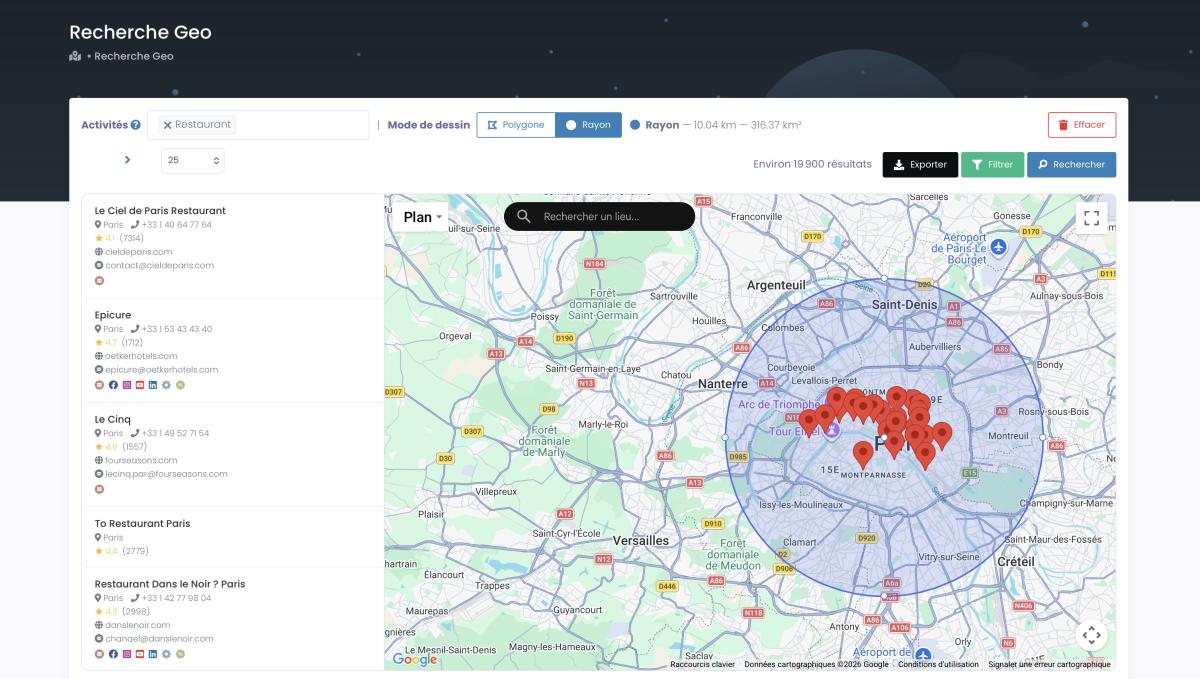
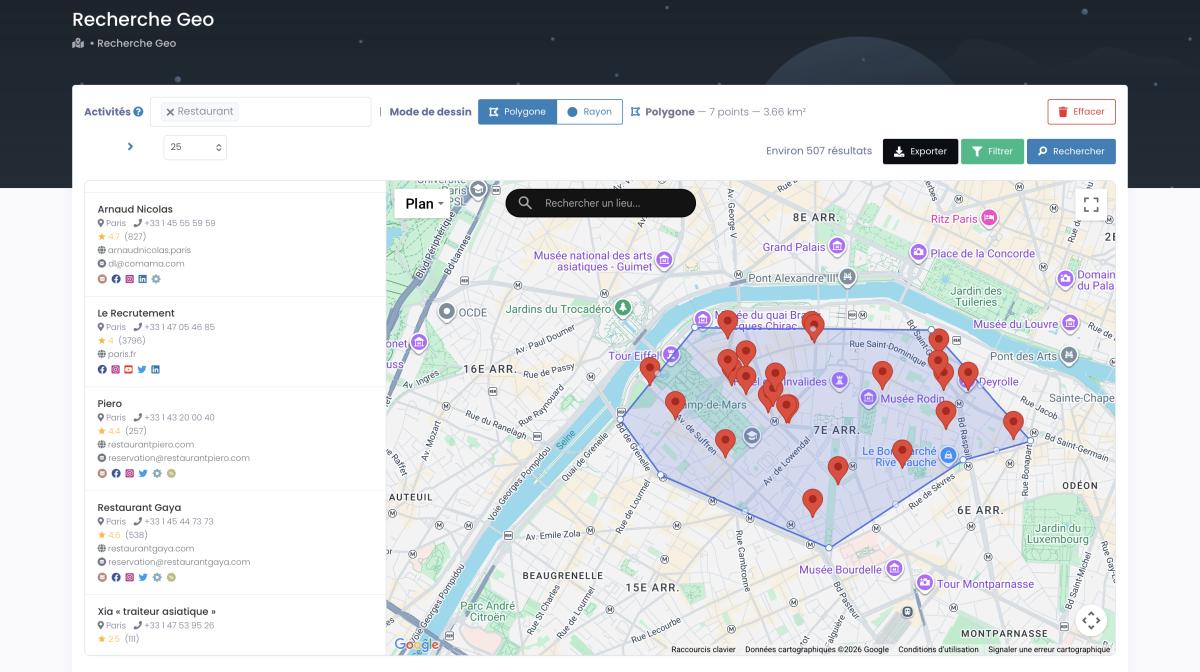
If your service area isn't a tidy city boundary, you draw it yourself. A radius around downtown, or a hand-drawn polygon around the exact neighborhoods you care about, both work the same way and both respect whatever filters you set.
Step 2: Choose Your Platform (WordPress vs No-Code vs Custom)
The platform matters less than you think. It's a vehicle. The data is the fuel. Pick a tank that holds the fuel and move on, because builders waste weeks agonizing over this decision when the real work is elsewhere.
That said, the options genuinely differ, and the right one depends on how much control you want versus how fast you want to launch. Here's the honest comparison for how to make a directory website in 2026.
| Platform | Best for | Control | Speed to launch | Cost |
|---|---|---|---|---|
| WordPress (GeoDirectory, HivePress) | SEO control, ownership | 🟢 Full | 🟡 Medium | Low (hosting + plugin) |
| No-code (Softr + Airtable, Webflow) | Speed, zero maintenance | 🟡 Medium | 🟢 Fast | Medium (monthly SaaS) |
| SaaS (Brilliant Directories) | All-in-one, built-in billing | 🟡 Medium | 🟢 Fast | Medium |
| Custom (Next.js) | Total flexibility, devs | 🟢 Full | 🔴 Slow | High (dev time) |
The WordPress route (directory website wordpress)
If you want ownership and SEO control, this is the classic path. WordPress plus a directory plugin gives you a site you fully own, no monthly platform fee hanging over you. The standout directory website builder here is GeoDirectory, built specifically for location-based listings, with HivePress and the Business Directory Plugin as solid alternatives. There's even a free tier to test with, which makes this a legitimate answer to how to build a business directory for free, at least until you scale. The trade-off? You maintain it. Updates, hosting, the occasional plugin conflict at the worst possible moment.
The no-code route
Want speed over control? No-code is your lane. The combo people rave about is Softr on top of Airtable: your listings live as rows in Airtable, and Softr turns them into a searchable site. One builder on r/nocode put it bluntly: "Softr and Airtable make a directory like just doing data entry." Webflow is the other favorite when SEO matters more. Another r/nocode thread landed on it fast: "Webflow is highly recommended for building powerful business directories that require strong SEO." Pair either with an automation layer and the listings practically manage themselves.
The SaaS and custom routes
All-in-one platforms like Brilliant Directories bundle the site, the member logins, and the billing into one subscription, which is handy if you plan to charge businesses from day one (more on their reasoning here). And at the far end, a custom Next.js build gives you total freedom if you have the developer chops. It's the slowest, priciest option, so only go there if nothing off-the-shelf fits.
My advice? If you're not a developer, start no-code or WordPress. Launch this month, not next quarter. You can always migrate the listings later, because, remember, the listings are the asset, not the platform.
Step 3: Structure Your Categories and Listing Fields
Build your category tree before you add a single listing. Seriously. Retrofitting categories onto 2,000 imported listings is a special kind of pain, and you only learn that lesson once.
Your categories are how visitors navigate and how Google understands your site. Keep them shallow and specific. For a restaurant directory: cuisine type, neighborhood, price range. For a service directory: service type, area served. Mirror the way your audience actually searches, not the way you'd organize a spreadsheet.
Then the fields. Every listing needs the NAP trio at minimum: Name, Address, Phone. That's the backbone of local search, and Google cross-checks it against other sources, so consistency matters. Beyond NAP, the fields that make a directory genuinely useful are website, hours, rating, review count, category, and GPS coordinates. The coordinates are the one people forget, and they're what lets you render a map with pins instead of a boring list. If you're not sure where to get clean lat/long for every listing, there's a full guide on how to pull latitude and longitude for your map.
If you want a thorough walkthrough of the planning side, there's a solid step-by-step guide on how to create a local business directory that pairs well with this one. One more decision hides in here: which categories even exist in your niche. Google Maps itself runs on 4,000+ business categories, and mirroring that taxonomy saves you from inventing your own. The full list of Google Maps categories is a useful reference when you're laying out your tree, because it maps directly onto the data you're about to import. Match your fields to the source and the import is painless. Mismatch them and you'll be reformatting in a spreadsheet at midnight.
Step 4: Fill Your Directory with Real Google Maps Data
There are 672,812 restaurants on Google Maps in the US (Scrap.io, October 2026). You could copy them one by one. Or you could export the ones you need in two clicks. One of those options is a life. The other is Tuesday afternoon, forever.
And that's one category in one country. The underlying index holds 225,676,406 businesses across 195 countries and 4,000+ categories (Scrap.io, 2026), so whatever niche and place you picked back in Step 1, the data is almost certainly sitting there waiting.
This is the step nobody else explains, and it's the whole ballgame. Your directory is a database, and this is where you fill it, not with 20 hand-typed listings, but with every business in your niche and area, pulled fresh and ready to import. Google Maps is the richest public source of local business data there is: name, address, phone, website, hours, rating, review count, category, coordinates. Exactly the fields you set up in Step 3. Funny how that works.
Video: Scrap.io - How to Start?
The workflow is almost insultingly simple. You pick a category and a location, you filter, you export a CSV. Then you import that CSV into WordPress, Softr, Airtable, or Webflow, and your empty directory is suddenly full. No code. The same tool that lets you extract business data from Google Maps at scale is the one doing the pouring, and if you want the no-code mechanics spelled out, here are 5 no-code ways to scrape Google Maps step by step.
Start with the search. Category, location, go.
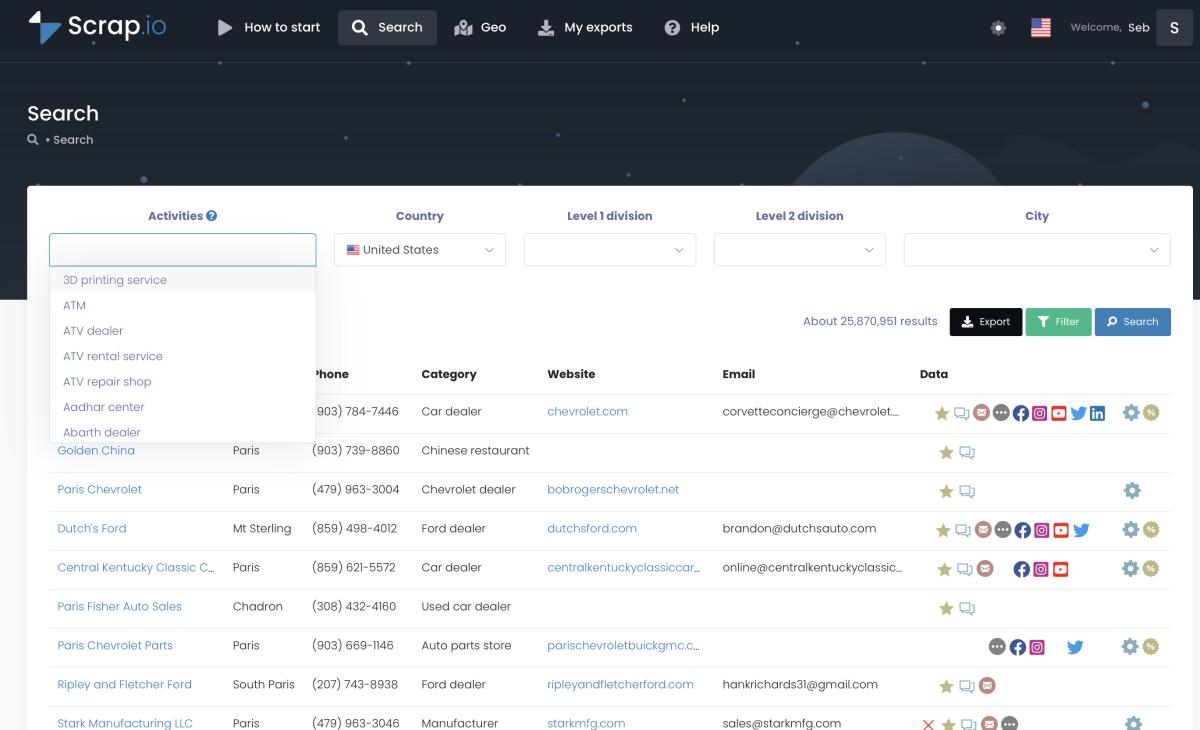
Now the part that saves you real money. You filter before you export, not after. Only want listings that have an email, so your monetization list is built in from day one? Toggle it. Only businesses with a website? A minimum rating? Done, and done. The filters run at the source, so you only spend a credit on listings worth keeping. Most tools make you export everything and sort the garbage out in Excel afterward, which is exactly backwards. There's a dedicated guide on how to filter before you extract if you want to get surgical about it.
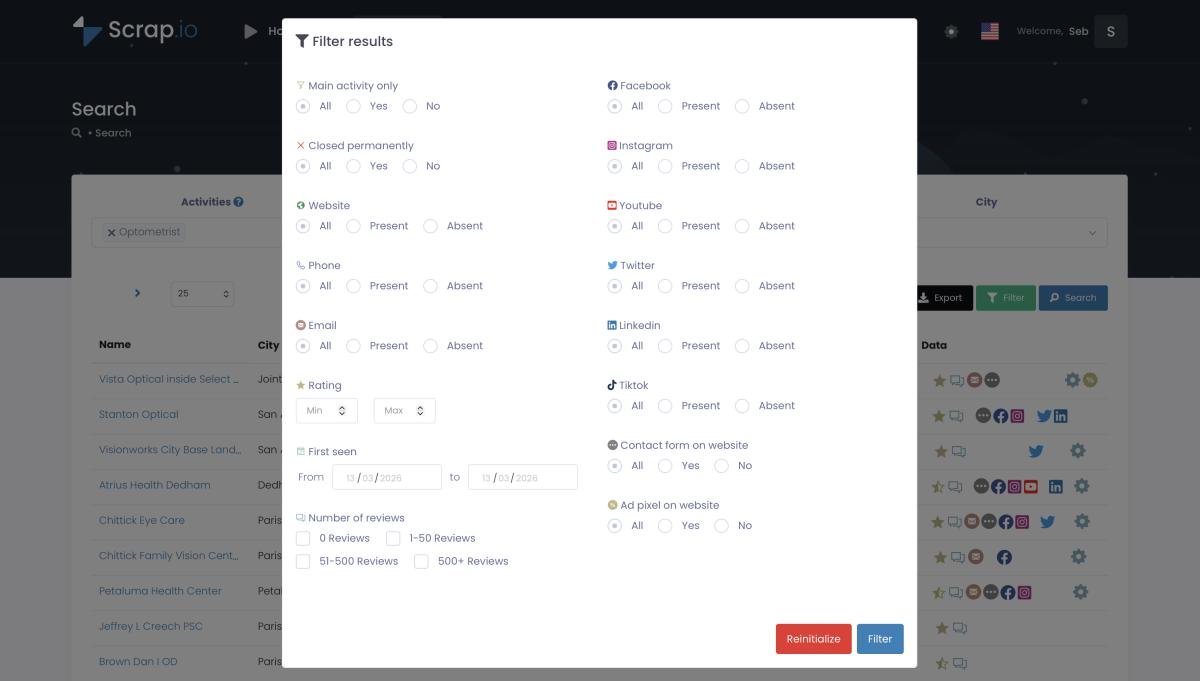
And here's the move that separates a city directory from a national one: scope. The same two clicks that pull every coffee shop in Austin will pull every restaurant in the entire US, all 672,812 of them. You don't change your method, you change a dropdown. Want everything in an area regardless of category, a whole chamber-of-commerce-style directory? You can extract every business in a category, or none at all, across a city, a county, a state, or a country.
Prefer to talk to your data instead of clicking menus? You can drive the whole thing from an AI assistant. Point Claude, ChatGPT or Gemini at the Scrap.io MCP and say "find every wedding venue in Napa County with an email," and it builds the search, applies the filter, and hands you the list. Wild that this is normal now.
Step 5: Enrich, Verify and Keep Listings Fresh
A directory full of dead phone numbers and closed businesses is worse than none. So how do you keep 5,000 listings alive?
Freshness is the quiet killer of directory sites. Businesses move, rebrand, change their hours, or shut down entirely, and they almost never tell you. A listing that was perfect at launch is quietly rotting six months later. The fix isn't to re-type everything. It's to pull from a source that's live, so every refresh gives you the current state of the business, not a snapshot from last spring.
Enrichment is the other half. The raw listing gets you name and phone. What makes your directory genuinely valuable, and monetizable, is the richer layer underneath: classified emails, social profiles, website tech, contact forms. Emails especially. Instead of one generic address, a good source classifies them: the owner's individual email (with first and last name pulled out), the contact@ inbox, the sales@ address, marketing, finance. You know who you're reaching before you reach them. If email is your priority, here's the deep dive on how to find emails on Google Maps.
Three habits keep a directory healthy. One, re-export on a schedule so closed businesses drop off and new ones appear. Two, use the duplicate-exclusion feature so a monthly refresh never floods you with listings you already have. Three, verify contact data before you lean on it for outreach or sell it as a feature. Dead data embarrasses you in front of the very businesses you want to charge.
Doing this by hand every month would be its own full-time job. It isn't one, because you can automate it. Wire the export into a scheduled workflow and the whole refresh runs itself: there's a full tutorial on how to automate the data pipeline with Make.com, and a Google Maps scraper API if you'd rather bake the refresh straight into your own stack. Set it, forget it, and your directory stays current while you sleep.
Step 6: Add Schema Markup and Win Local SEO
Your directory can rank for thousands of long-tail local queries. If Google can read it.
That "if" is where schema markup earns its keep. Schema is structured data you add to each page that tells Google exactly what it's looking at: this is a business, here's its name, rating, address, phone. Get it right and your listings become eligible for rich results, those star ratings and detail snippets that pull the click. Skip it and you're just another wall of text Google has to guess at.
For a directory, three schema types matter. LocalBusiness on every listing page. FAQPage on any page with a Q&A block (like the one at the bottom of this guide). And Breadcrumbs so Google understands your category hierarchy. Here's roughly what a LocalBusiness block looks like on a single listing, the thing you'll want firing on every business page you generate:
{

  "@context": "https://schema.org",

  "@type": "LocalBusiness",

  "name": "Radio Coffee & Beer",

  "address": {

    "@type": "PostalAddress",

    "streetAddress": "4204 Menchaca Rd",

    "addressLocality": "Austin",

    "addressRegion": "TX"

  },

  "telephone": "+1-512-394-7844",

  "aggregateRating": {

    "@type": "AggregateRating",

    "ratingValue": "4.7",

    "reviewCount": "2100"

  }

}
The beauty of importing structured Google Maps data is that you already have every value that schema wants: name, address, phone, rating, review count, coordinates. You're not hunting for this stuff, it came in the CSV. Most directory plugins and no-code tools will generate the markup automatically once the fields are mapped. The reason local SEO and clean data pull in the same direction is no accident, and there's a whole piece on how local SEO and data scraping work together if you want the strategy behind it. Internal linking helps too: link related listings and categories to each other so Google crawls the whole tree.
Step 7: Monetize Your Directory
Small niche directories typically make $500 to $5,000 a month in year one. The best ones clear $80,000 to $400,000+ a year (per Dirstarter, 2026). The gap between those two numbers is mostly time, traffic, and how many ways you've set up to get paid.
A quick reality check before you spend the money in your head: most directories take 3 to 6 months to generate their first revenue (Dirstarter, 2026). This is a compounding asset, not a lottery ticket. Build, fill, rank, then monetize. In that order.
There are five proven ways to turn listings into income, and the smart play is to stack several rather than betting on one.
| Model | How it works | Typical range |
|---|---|---|
| ★ Featured listings | Businesses pay to sit at the top | $50 to $200/mo each |
| Ads / banners | Sell space or run display ads | $50 to $1,500/week |
| Memberships | Recurring fee to be listed | Recurring MRR |
| Lead generation | Route inquiries to businesses | Per-lead fees |
| Affiliate | Commission on referred sales | % of each sale |
Featured listings are usually the first dollar in. You've already got the email of every business in your niche (you filtered for that back in Step 4, remember), so you have a ready-made list of prospects who'd pay for the top slot. OpenAlternative charges $197 a month for a featured spot, and that single model does a lot of its roughly $6,500 monthly revenue. Ads layer on once you have traffic. Memberships give you predictable recurring revenue. Lead-gen and affiliate deals are the advanced moves, worth it once the audience is real.
Here's the honest bit most monetization posts skip: ranges like "$80k to $400k a year" are self-reported by the founders who hit them, and they're the exceptions, not the median. Treat them as proof the ceiling is high, not as a promise. Your job is to build something people actually use. The money follows the usage, never the other way around.
Real Directory Success Stories
Five directories, five niches, one pattern. In every case: a narrow niche, a block of starting data, and monetization that leaned on featured placements. Here's the receipts (figures according to the founders and the sources below).
| Directory | Niche | Reported revenue | Model |
|---|---|---|---|
| OpenAlternative | Open-source software alternatives | ~$80,000/yr | Featured listings ($197/mo) |
| Nomad List | Cities for digital nomads | ~$33,000/mo | Paid memberships |
| SaaSHub | Software comparison | $10,000+/mo MRR | ~100 featured listings |
| Sober Nation | Rehab / treatment centers | $250,000+/yr | Premium placement + lead routing |
| BetaList | Early-stage startups | ~$1M lifetime | Ad slots ($50 to $1,500/wk) |
Two of these matter most for the local, business-directory angle this guide is about. Sober Nation is the closest cousin to a local business directory: it lists treatment centers, routes leads to them, and clears a quarter-million a year doing it (Dirstarter). And Nomad List proves the geographic model, it's literally a directory of places, monetized by membership (figures via an Indie Hackers interview cited by Dirstarter). SaaSHub's founder has been open about the numbers too, pegging it at over $10,000 a month across his directory sites.
Notice what every one of these had on day one: data. OpenAlternative's weekend of 70 listings. A city list. A software database. The directories that made it past the cold-start are the ones that solved the data problem first and worried about everything else second.
Want to see what a finished dataset looks like at scale before you build your own? We publish live regional directories as reference points, like the Texas business directory (2.1M+ live listings) and the NYC business directory (293,700+ businesses, refreshed in real time). That's the kind of completeness your niche directory is aiming for, just narrower.
Is It Legal to Use Google Maps Data?
Is it legal to use Google Maps data in a directory? Short answer: public business data, used to build a legitimate directory, is fair game. The longer answer is worth two minutes, because "generally yes" has edges.
The key distinction is public business information versus private personal data. A restaurant's name, address, phone, hours, rating, and the contact email it publishes on its own website, all public, all fine. That's the same information any human could see by clicking the listing. US case law has backed this repeatedly for publicly available data, and a well-built directory sits comfortably inside it. What you want to avoid is republishing genuinely personal data (think individual reviewers' names lifted out of their reviews) or copyrighted content.
On the privacy side, the frameworks line up the same way. GDPR in Europe treats business contact data differently from personal data, and B2B listings generally fall under legitimate interest. CCPA in California explicitly carves out publicly available business information. A reputable data source helps here, because it should be GDPR and CCPA compliant and keep every data point traceable to its source, which is exactly what you'd want to point to if anyone ever asks where your listings came from. That traceability is not a nice-to-have. It's your paper trail.
So: build on public business data, keep it sourced, don't scrape personal details you don't need, and give businesses a way to update or remove their listing. Do that and a directory stands on solid ground.
FAQ
How do I build a business directory for free?
Start free with WordPress plus a free plugin (the Business Directory Plugin or HivePress) or a no-code free tier like Softr. The site itself costs almost nothing to stand up. The real cost is the data, and you can pull your first listings with a free trial, so your launch directory is populated without spending a cent upfront.
Where does directory listing data come from?
Three sources: manual research, user submissions, and bulk data extraction. For a local directory, the fastest reliable source is Google Maps data (name, address, phone, website, hours, reviews), exported with a tool rather than copied by hand. Manual works for your first 20 listings. It falls apart at 2,000.
Is it legal to use Google Maps data in a directory?
Yes, when you use publicly available business information for a legitimate purpose. Tools like Scrap.io are GDPR and CCPA compliant and keep each data point traceable to its source. Avoid republishing personal data or copyrighted content, and give businesses a way to update their listing.
How much does a directory website make?
It varies. Small niche directories typically earn $500 to $5,000 a month in year one, while established ones reach $80,000 to $400,000+ a year through featured listings, ads, memberships, and lead generation (per Dirstarter, 2026). Most take 3 to 6 months to see their first dollar.
What's the best platform to build a directory website?
There's no single best. WordPress (GeoDirectory, HivePress) for control and SEO, Softr with Airtable or Webflow for speed and no-code, Brilliant Directories for an all-in-one SaaS. Pick the vehicle you'll actually launch with. The data is what makes it win, not the platform.
Generate a list of restaurant with Scrap.io