

Here's a stat that reorganizes the whole 2026 media plan: LinkedIn now commands roughly 41% of all B2B ad budgets — up about two points year over year (MarketingProfs / eMarketer, 2026). Nearly half of every B2B dollar. On one platform.
And yet most advertisers quietly torch their budget in the first month.
I've watched it happen more times than I can count. A team turns on Sponsored Content, targets "everyone in marketing," bids on autopilot, and three weeks later stares at a $90 cost-per-lead wondering where the money went. This LinkedIn Ads guide is the antidote — real 2026 costs, the formats that actually convert, targeting that reaches the buying group instead of the whole internet, and one chapter nobody else writes: how to build your ad audiences from local business data most competitors never touch. Real numbers. Named case studies. No fluff.
- Why LinkedIn Ads in 2026 (and when they're NOT worth it)
- LinkedIn Ads costs in 2026: CPC, CPM & CPL benchmarks
- Setting up LinkedIn Campaign Manager (step by step)
- LinkedIn ad formats & specs (which for which goal)
- LinkedIn Ads targeting: reaching the real buying group
- The data problem: where do your audiences come from?
- 4 real B2B case studies (with numbers)
- Best practices & mistakes to avoid in 2026
- Is it legal? Compliance & data quality (GDPR/CCPA)
- FAQ
Why LinkedIn Ads in 2026 (and when they're NOT worth it)
Let's start with the money, because it explains everything else. LinkedIn's advertising revenue is projected to hit $9.7 billion in 2026 — up from $8.2 billion in 2025, an 18.5% jump, with forecasts pointing to $11.3 billion by 2027 (Statista / Business of Apps / MediaPost, 2026). Translation: more advertisers, more competition for the same feed, rising costs. The cheap days are behind us.
So why do B2B teams keep paying premium prices? Because of who's on the other end. LinkedIn reports that four out of five members drive business decisions at their company, and 72% of marketers say the platform delivers higher-quality leads than other paid channels, with B2B ROAS landing anywhere from 4.1× to 8.3× when campaigns are run properly (2026 benchmarks). A $5 click to a VP of Ops can beat a $0.50 click to nobody in particular. You're paying for the person, not the pixel.
Here's the honest part, though. LinkedIn Ads for B2B are not a fit for everyone. If your customer is a 6-person roofing crew, a family restaurant, or a local dental clinic, they're probably not scrolling LinkedIn on a Tuesday — most small businesses aren't even active there. Selling a $40/month tool with a two-week sales cycle? The math rarely works at a $90 CPL. My advice? Use LinkedIn when your deal size can absorb the cost and your buyer actually lives on the platform. For the rest of the market, there's a better door — and we'll get to it. (This overlaps heavily with the Google Maps vs LinkedIn for B2B lead gen debate, and the LinkedIn statistics for 2026 back up exactly where the line sits.)
Bon. Now the practical stuff.
LinkedIn Ads costs in 2026: CPC, CPM & CPL benchmarks
What do LinkedIn Ads actually cost in 2026? More than Google. Less than you'll fear once you see the conversion side. Here are the benchmarks worth planning around — and yes, re-check them before you commit, because they move.
| Metric | 2026 Benchmark | Notes |
|---|---|---|
| CPC (cost per click) | $5.50–$8.50 (avg ~$5.74) | Varies by audience competition |
| CPM (cost per 1,000 impressions) | $30–$50 (broad B2B $55–$85) | Tighter targeting = higher CPM |
| CPL (cost per lead) | $60–$120 | Lowest with Lead Gen Forms |
| CTR (click-through rate) | 0.44%–0.65% | Sponsored Content average |
| Lead Gen Form CVR | 6.1% (US) | vs Google Search 3.75%, Display 0.77% |
Read that last row twice. A 6.1% conversion rate on Lead Gen Forms — versus 3.75% for Google Search and a rounding-error 0.77% for display — is the entire reason the "expensive" channel keeps getting funded. The upfront CPC stings. The back-end math forgives it, provided your targeting and offer are tight.
One thing that quietly wrecks these numbers before you ever launch: a bad audience list. You can nail the creative and still bleed budget if you're paying to reach the wrong companies. So before you touch a bid, know what a clean, filtered target list actually costs to assemble.
Before you spend a cent on ads, see how much a clean target list actually costs. Scrap.io counts matching businesses across 195 countries and 4,000+ categories for free — no credits burned to see the size of your market. Count your audience on Scrap.io →
Setting up LinkedIn Campaign Manager (step by step)
LinkedIn Campaign Manager is where every campaign lives, and the setup order matters more than people think. Do it wrong and you'll spend the first week fixing billing and objectives instead of optimizing. Here's the sequence that keeps a LinkedIn Ads campaign clean from day one.
- Create your ad account. Inside LinkedIn Ads Manager, link it to your Company Page (you need one — personal profiles can't run Sponsored Content) and set your currency and time zone. You can't change these later, so get them right.
- Add billing. A payment method is required before anything serves. Set a realistic account-level budget cap while you learn.
- Pick your objective. Awareness, consideration (traffic, engagement, video views), or conversions (lead gen, website conversions). Your objective changes which formats and bid options you'll even be shown, so choose based on the stage you're actually funding.
- Choose Accelerate or Classic. Accelerate is LinkedIn's newer AI-assisted campaign type — it builds and optimizes much of the setup for you. Classic gives you manual control over every audience, placement, and bid. Beginners often start on Accelerate; performance teams usually want Classic. Test both if you can.
- Build the audience, set the bid, launch. Define targeting (next section), pick your bid strategy (start with maximum delivery to gather data, then move to cost cap once you know your numbers), load creative, and go.
That's how to run LinkedIn Ads without tripping over yourself in week one. The interface changes cosmetically every year, but that order holds.
LinkedIn ad formats & specs (which for which goal)
More formats won't save a weak offer. But the wrong format for your goal will absolutely sink a good one. Here's the map — LinkedIn ad formats for 2026, matched to the job each one actually does.
| Format | Best for | Quick spec note |
|---|---|---|
| Single Image | Reach, traffic | 1200×627 px, intro text ~150 char |
| Video | Awareness, thought leadership | Keep it under 30s, caption it |
| Document Ads | Lead gen (gated PDF) | PDF/DOC/PPT, high save rate |
| Carousel | Storytelling, multiple proof points | 2–10 cards, 1080×1080 px |
| Thought Leader Ads | Trust, engagement | Promote a person's post |
| Lead Gen Forms | Direct lead capture | 6.1% CVR, pre-filled fields |
| Conversation / Message | 1:1 offers, events | Interactive, choose-your-path |
| Text & Spotlight | Cheap desktop reach | Right-rail, low CTR |
Why Thought Leader Ads are the sleeper format of 2026
If I had to bet on one format, it'd be this one. LinkedIn Thought Leader Ads — sponsoring a real person's post rather than a branded ad — have exploded, with search interest up roughly 83% year over year. Personal profiles out-reach company pages by around 8× organically, and paid amplification of that same authentic voice inherits the trust. People scroll past "Brand X presents." They stop for a face and a hot take. It's the closest thing to buying credibility that isn't sleazy.
On specs, one practical note: Document Ads (linkedin document ads specs allow PDF, DOC, and PPT) quietly punch above their weight for lead gen because people save them for later — which keeps working after the budget stops. Want the full technical rundown? LinkedIn's own official Ads guide keeps the linkedin ad specs current, and the LinkedIn Ads Library lets you spy on what competitors are actually running. Steal shamelessly.
LinkedIn Ads targeting: reaching the real buying group
Meet Marcus. He runs demand gen at a logistics SaaS company, and his product needs sign-off from an ops lead, a finance controller, and a VP who's never heard of him. That's the trap of LinkedIn Ads targeting — you're rarely selling to one person. You're selling to a committee that doesn't know it's a committee yet.
So the targeting options that matter aren't "job title = VP." They're the layered ones. Company size, industry, and seniority stacked together. Job function plus skills, so you catch the ops lead who doesn't have "VP" in their title. And — this is the one people skip — exclusions. Exclude current customers, exclude junior titles that'll never sign, exclude industries you can't serve. Every dollar spent reaching someone who can't buy is a dollar gone.
Then there are Matched Audiences: company lists, contact lists, and website retargeting you upload yourself. This is where account-based marketing lives on LinkedIn — instead of hoping LinkedIn's attributes match your ideal accounts, you hand it the exact list. Retarget site visitors. Upload a list of 500 dream accounts and only show ads to them. It's precision over spray-and-pray, and it's dramatically cheaper per qualified lead. (Our guide on building an ICP from local data pairs perfectly with this.)
But here's the question nobody in the Top 10 guides answers honestly: where does that company list actually come from?
Video: How to Scrape Local Leads at the Country Level
The data problem: where do your audiences come from?
This is the chapter every other LinkedIn Ads guide skips. And it's the one that actually decides whether your Matched Audiences work.
A Matched Audience is only as good as the list you feed it. Garbage in, expensive garbage out. Most teams build that list by exporting a stale CRM, buying a broker file that five competitors already bought, or manually copy-pasting company names into a spreadsheet at 11pm. All three are slow, dirty, or both. There's a better source hiding in plain sight: Google Maps. Almost every business on Earth has a listing there — name, category, website, whether they run a specific ad pixel — whether or not they ever touch LinkedIn.
Here's the workflow. You pick a category and a zone (say, marketing agencies across the US), filter before you extract for the exact signals you want — has a website, has a LinkedIn page, has an email — export a clean company list, and upload it straight into LinkedIn Campaign Manager as a Matched Audience. That's it. Fresh, filtered, and yours alone.
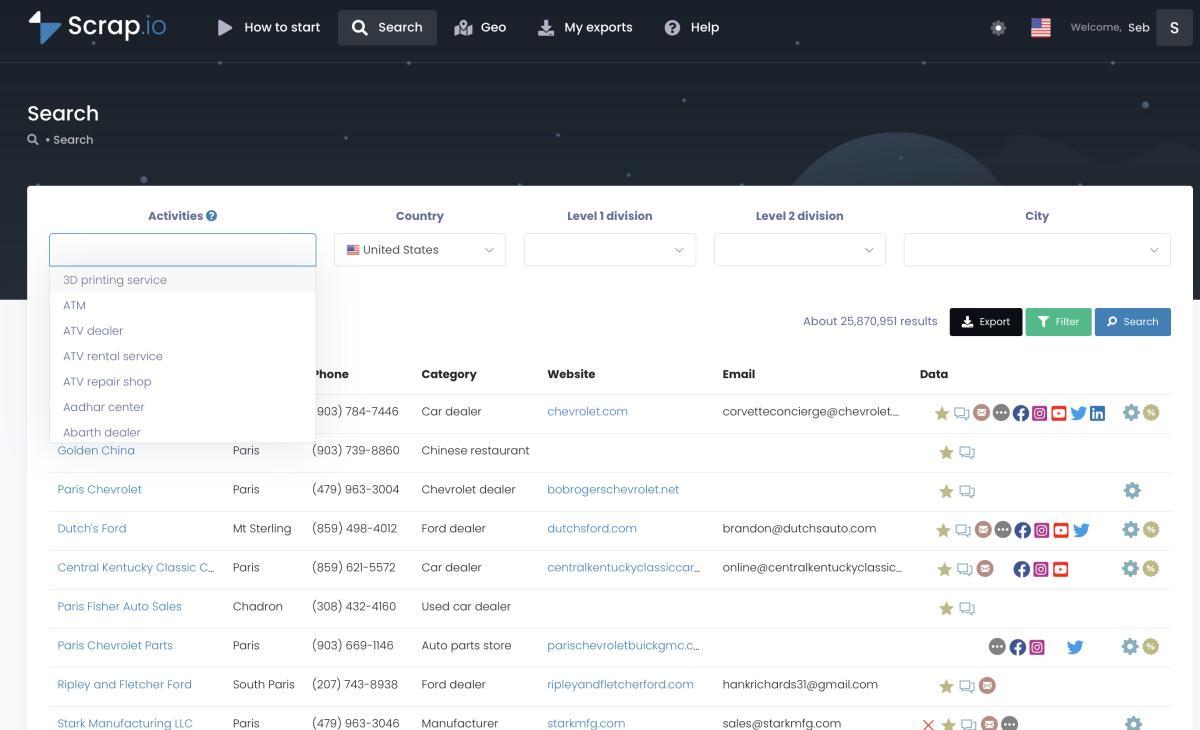
Why filter first? Money. Scrap.io applies every filter before a credit is spent, so you never pay for a business you can't use. Want only agencies that already have a LinkedIn presence, for a lookalike-style Matched Audience? Toggle it on, and those are the only records you extract.
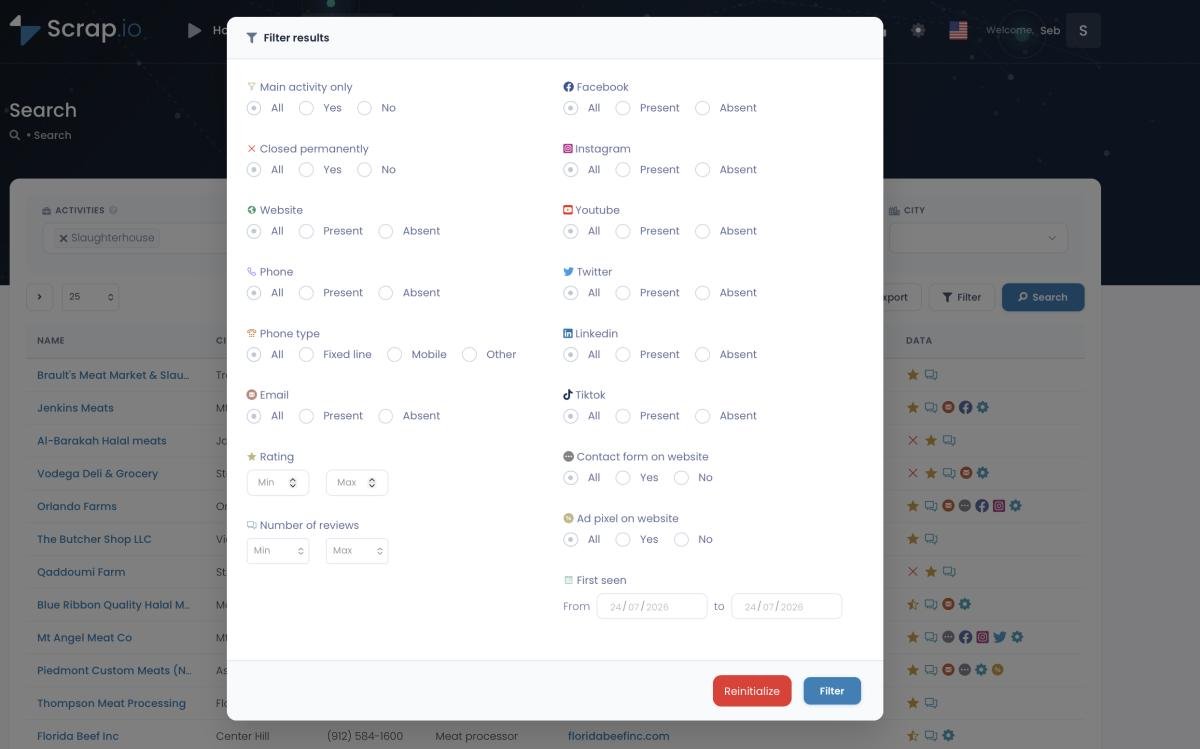
The scale is the part that surprises people. As of August 1, 2026, Scrap.io's live database counts 88,305 marketing agencies in the US — and 28,928 of them (~33%) have a LinkedIn page. Think about what that means for account-based marketing. You can build a national company list of thousands of qualified accounts, filtered by the exact signals that matter to your offer, in the time it takes to make coffee. Try assembling that by hand. I'll wait.

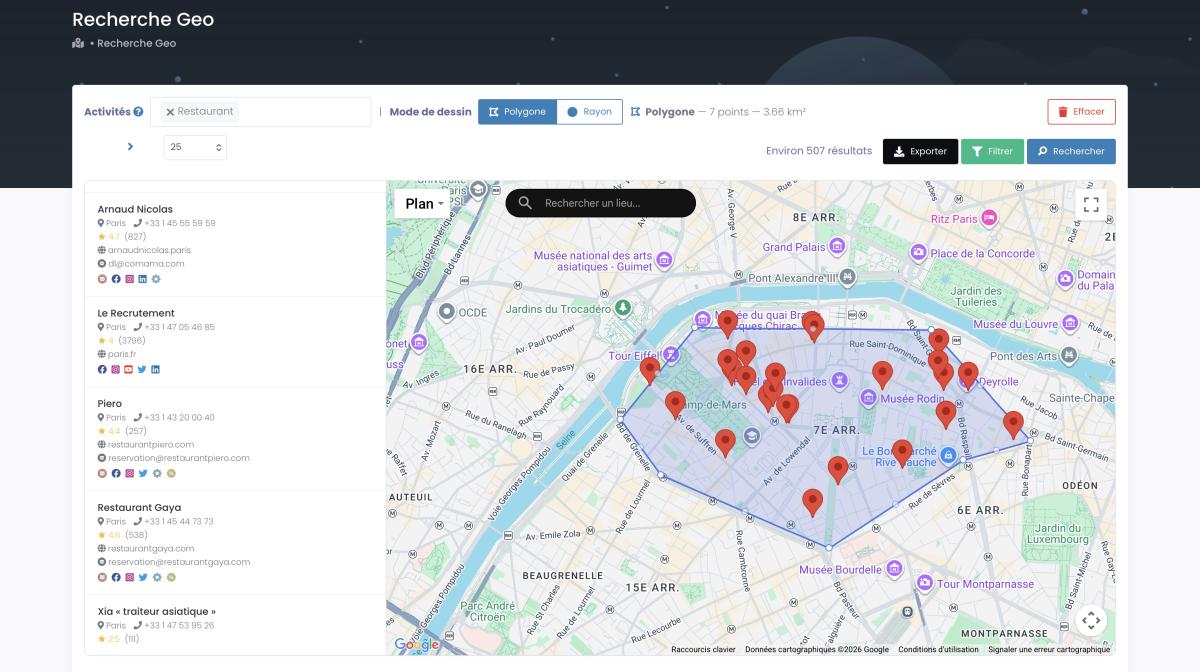
And because the data is geographic, you're not stuck with clumsy administrative borders. GeoSearch lets you draw a radius around a city or sketch a custom polygon by hand — every agency in downtown Chicago but not the suburbs, every SaaS shop within 25 miles of a tech hub. That's targeting precision LinkedIn's native tools simply can't give you, because LinkedIn doesn't know where the office actually sits on a map.
Not into dropdowns? You can drive the whole thing from an AI agent. Scrap.io exposes an official MCP connector for Claude, ChatGPT, and Gemini — you describe the list you want in plain language and it builds the search and filters for you. Wild that this is normal now.
Video: Scrap.io - How to Start
Video: How to Scrape Local Leads with Claude & Vibe Prospecting
This is also the honest bridge for the market LinkedIn Ads can't reach. Selling to local businesses that aren't on LinkedIn? Skip the ads, generate Google Maps leads at scale and go direct. Selling to companies that are on LinkedIn? Use the map to build a sharper audience than LinkedIn's own attributes allow. Either way, the data comes from the same place. (This is the whole logic behind ABM with Google Maps data.)
Build your first LinkedIn Matched Audience from local data. Start Scrap.io free for 7 days — 50 searches and 100 export credits, real-time data across 225M+ businesses in 195 countries, filtered before you spend a credit. Free trial, 100 leads included. Start free on Scrap.io →
4 real B2B case studies (with numbers)
Enough theory. Here's what LinkedIn Ads actually produce when the audience and the funnel are right — four documented B2B campaigns, numbers and sources attached. No made-up wins.
- Rivery — 3.29× ROAS, faster deals. The data-pipeline SaaS ran a full-funnel LinkedIn Ads campaign on a ~$30K/month budget. Over seven months: a 3.29× return on ad spend, 36.8% shorter deal cycles, and 36.6% higher win rates on deals exposed to LinkedIn — with over $1.1M in influenced revenue. LinkedIn liked it enough to write their own case study about it (LinkedSelling).
- An HR-tech company — $10K to $100K/month. With strategic segmentation and an ABM structure (60% cold demand gen, 40% retargeting), the agency scaled the client's spend from $10K/month to $100K/month in six months — wider reach, better-qualified leads, higher ROI (TripleDart).
- Pimly — 5× ROI in two months. The PIM SaaS paired Google and LinkedIn Ads and hit a reported 5× return within two months of launch (InterTeam Marketing).
- TripMaster — 650% ROI, six-figure ARR. The SaaS reportedly drove a 650% return, a 20% conversion rate, and $504,758 in Net New ARR from optimized LinkedIn advertising (SaaSHero).
Notice the through-line? Full-funnel, tight targeting, and a clean audience. These are some of the best LinkedIn Ads examples for lead generation precisely because none of them sprayed a broad list and hoped. They fed their campaigns qualified, targeted accounts. And the community sentiment tracks with the data — practitioners on Factors.ai describe LinkedIn leads as expensive but genuinely qualified, Neal Schaffer makes the case that the channel is worth it the moment one closed contract covers months of clicks, and ResonateHQ lays out the pros, cons, and ROI honestly. Chatter on r/PPC circles the same two truths: pricey clicks, quality intent.
The teams above fed their campaigns clean, targeted lists. Build yours the same way — extract a filtered company list on Scrap.io and upload it as a Matched Audience. Free trial, 100 leads included.
Best practices & mistakes to avoid in 2026
Most LinkedIn Ads don't fail because the platform is broken. They fail on execution. Here's what separates the campaigns that scale from the ones that quietly die.
Sequence, don't spray. Awareness first (Video, Thought Leader Ads), then consideration (Single Image, Carousel, Document), then conversion (Lead Gen Forms). Hitting a cold audience with a "book a demo" ad is like proposing on a first date. It reads as desperate, and it converts like it.
Design for mobile. The overwhelming majority of LinkedIn happens on a phone. If your Document Ad needs pinch-zoom to read, it's dead. Big text, short video, captions always.
Bid on cost cap once you have data, not before. Autopilot from day one just donates money to the auction.
Measure pipeline, not clicks. This is the big one. A cheap CTR means nothing if none of those clicks become revenue. Wire up LinkedIn's Revenue Attribution report, tag your UTMs, and track lead-to-meeting and meeting-to-deal — not vanity metrics. And compare it honestly against LinkedIn Ads vs Google Ads on closed revenue, not cost-per-click, because the channel that looks expensive up top is often the cheaper one at the bottom.
One more, and it's about the whole engine, not just LinkedIn: don't treat paid social as your only channel. The best B2B teams stack it — LinkedIn Ads to warm the account, then email and phone to close the loop. That's the entire logic behind an omnichannel outreach strategy, and it's where a lot of "LinkedIn didn't work" stories quietly turn into "LinkedIn worked, we just needed the follow-up."
Is it legal? Compliance & data quality (GDPR/CCPA)
Quick but important. Uploading a company list to LinkedIn — is that above board? For publicly available business data, done right: yes.
Business names, addresses, categories, and websites pulled from Google Maps are public information that companies voluntarily publish. Extracting them for legitimate B2B prospecting is on solid legal ground. The nuance lives in how you use the data: under GDPR (EU), B2B outreach typically leans on legitimate interest with an easy opt-out; under CCPA (California), publicly available business information is largely carved out of scope. Either way, honor removal requests, and keep your outreach relevant.
The part that matters most for compliance is traceability — can you answer "where did this contact come from?" Scrap.io only extracts publicly available business data, is GDPR- and CCPA-compliant, and every record traces back to its source. That doesn't exempt you from honoring opt-outs. It just means you can actually answer the question when someone asks. (Building a targeted marketing agency email list from public data works the same way.) For the LinkedIn side specifically, a LinkedIn scraping tool raises separate ToS questions — building your audience from public map data sidesteps that entirely.
Your campaigns deserve a better list. Not a broker file five competitors already own. Not a CRM export that went stale in March. A fresh, filtered, traceable one you built yourself.
Give your LinkedIn campaigns a better list — try Scrap.io free today. 7-day trial, 50 searches and 100 export credits, 225M+ businesses across 195 countries, filtered before you spend a credit. Free trial, 100 leads included. Start free on Scrap.io →
FAQ
How much do LinkedIn Ads cost in 2026?
Expect roughly $5.50–$8.50 per click, $30–$50 CPM, and $60–$120 per lead (lowest with Lead Gen Forms, which convert at 6.1%). LinkedIn is a premium, quality-over-volume channel — the clicks cost more than Google, but the leads are better qualified. Benchmarks move, so re-check before you budget.
What is the minimum budget for LinkedIn Ads?
LinkedIn enforces a minimum of about $10 per day per campaign. Realistically, to gather enough data to optimize, plan for $1,500–$5,000 per month. Below that, you're learning too slowly to beat the auction.
Which format is best for B2B lead generation?
Document Ads and Thought Leader Ads for engagement and trust, paired with Lead Gen Forms for capture — the forms convert at 6.1% because they pre-fill the prospect's details, killing the friction of a landing page.
What are LinkedIn Matched Audiences?
Custom audiences you build yourself and upload to Campaign Manager: company lists, contact lists, and website retargeting. They're the backbone of account-based marketing on LinkedIn — instead of relying on LinkedIn's attributes, you feed it the exact accounts you want to reach.
Can I build LinkedIn ad audiences from Google Maps data?
Yes. Tools like Scrap.io extract publicly available business data — filtered by category, zone, and signals like "has a LinkedIn page" or "has a website" — before you spend a credit. Export a clean company list and upload it to LinkedIn as a Matched Audience. It's how you build a national, filtered account list in minutes instead of weeks.
Generate a list of restaurant with Scrap.io