

Last updated: November 2026 · Written by Sébastien
Video: Google Maps API versus Scraping: What's the best approach?
In February 2026, security researchers went digging through public code and found more than 2,800 live Google API keys just sitting there. The same kind of key you're about to create. And some of them could suddenly talk to Gemini.
That's the thing nobody warned developers about. For years Google said Maps keys weren't really secrets. Then 2026 happened.
So before you paste a google maps api key into your site, two questions actually matter: how do you create it the right way in the new console, and what will it cost you once real traffic hits? Google rebuilt both the setup flow and the pricing in the last 18 months. Most guides you'll find are still describing the 2023 version.
Here's what this one covers, with the 2026 details: how to get your key step by step in the current console, where to actually put it on a website, the real per-SKU prices (dollar amounts, not "contact sales"), the brand-new subscription plans, how to lock the key down after the Gemini mess, and the moment the API simply stops being the right tool. That last part is where most people overpay.
- What Is a Google Maps API Key?
- How to Get a Google Maps API Key (Step-by-Step)
- Using Your Google Maps API Key on a Website
- Google Maps API Key Pricing in 2026
- Is the Google Maps API Key Free?
- How to Secure Your Google Maps API Key
- Google Maps API Types: Which APIs to Enable
- Common API Key Issues (And How to Fix Them)
- When the Google Maps API Isn't Enough
- Integrating in Popular Frameworks
- Frequently Asked Questions
What Is a Google Maps API Key (And Why Do You Need One)?
Think of it as a password that doubles as your billing address. It's a string of characters that tells Google three things: who you are, what project you're running, and where to send the invoice.
You need one for four reasons, and none of them are optional.
Authentication. Google won't serve a single map tile without a valid key. Load the Maps JavaScript API without one and you get a grey box with an error overlay. That's it. No key, no maps.
Billing. Your google maps platform api key ties directly to a payment method. Every call gets logged against it. Even on the free tier, Google tracks everything.
Quotas. There are 225,676,406 business listings on Google Maps (Scrap.io, November 2026). Google uses your key to make sure no single project hogs the system. Hit your quota and requests start failing.
Security. You can restrict which websites, IP addresses, and APIs your key works with. Skip that and anyone who finds your key can spend your money. More on why that matters more than it used to in a minute.
If your website or app touches locations in any way, you need a key. No shortcut around it.
How to Get a Google Maps API Key in 2026 (Step-by-Step)
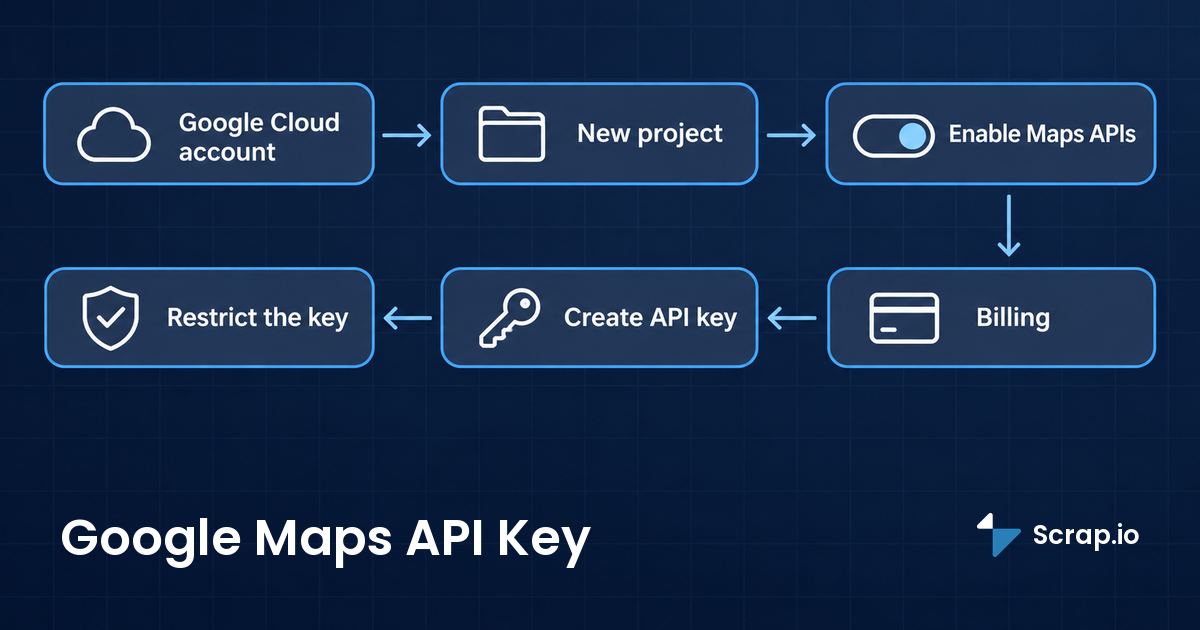
The whole thing takes about 10 minutes. Closer to 7 if you've done it before. Here's the short version, the six steps to a working key, before we go deep on each one:
- Create a Google Cloud account at console.cloud.google.com
- Create a new project from the console dropdown
- Enable the specific Maps APIs you actually need
- Set up billing (a credit card is required, even for the free tier)
- Go to Google Maps Platform > Keys & Credentials and create the key
- Restrict it on the spot (the console now forces at least one API restriction)
Now the detail.
Step 1: Create a Google Cloud Account
Go to console.cloud.google.com and sign in with a regular Google account. New to Google Cloud? You get a $300 trial credit, confirmed on the Google Maps Platform pricing page. It works across all Google Cloud services, Maps included, so it stacks on top of the per-SKU Maps free tiers.
Quick step. Moving on.
Step 2: Create a New Project
Top of the console, there's a project dropdown. Click it, pick "New Project," and give it a name you'll recognize in six months. (I've watched people name theirs "test" and then spend an afternoon figuring out which "test" holds their production key.)
One project can hold several keys, and most setups only need one project. Keep it simple.
Step 3: Enable the Maps APIs You Need
Left sidebar: APIs & Services > Library. Search "Maps" and you'll hit a wall of options. Resist the urge to enable all of them. Every active API is a billing line waiting to happen.
Here's what's on the menu and what each one does:
| API | What It Does | Typical Use Case |
|---|---|---|
| Maps JavaScript API | Interactive, zoomable maps in browsers | Store locators, real estate sites |
| Static Maps API | Flat map images via URL | Email footers, printed receipts |
| Maps Embed API | Simple iframe embeds | Contact pages (completely free) |
| Geocoding API | Convert addresses to lat/lng and back | Data enrichment, address verification |
| Routes API | Routing and travel times, traffic-aware | Delivery apps, fleet management |
| Places API (New) | Search businesses, get details | Lead gen, local business search |
| Street View Static API | 360 degree imagery | Real estate, virtual tours |
Click "Enable" on the ones you need. You can add or remove APIs later, so don't agonize over it. One heads-up, and it's a 2026 one: the old Directions API, Distance Matrix API, and the legacy Places API went Legacy on March 1, 2025, and they're no longer available in new Cloud projects (Google, Legacy products). If you're starting fresh, you'll reach for Routes API and Places API (New), like it or not.
Step 4: Set Up Billing
Billing in the console menu. Link an account or create one. Credit card required.
This is the part that trips people up. Google used to hand every Maps account a flat $200 monthly credit. Universal. Simple. Since March 2025, gone. Replaced by per-SKU free tiers I'll break down in the pricing section. The non-negotiable bit: billing must be enabled or your key won't work, even if you never plan to exceed the free tier. Google wants a card on file regardless.
(Yeah. A bit of a trust fall.)
Step 5: Create Your API Key in Keys & Credentials
Here's where the 2026 console differs from every outdated screenshot you'll find. The path is now Google Maps Platform > Keys & Credentials > Create credentials > API key, per Google's own get-an-API-key documentation. If a tutorial still sends you to "APIs & Services > Credentials," it's describing the old layout.
Click Create credentials, pick API key, and your google maps api key appears on screen. Copy it. Drop it in a password manager or an environment variable. Do NOT commit it to a public GitHub repo. Seriously. The whole first section of this article is about what happens when you do.
Prefer the command line? One call does it:
gcloud services api-keys create --display-name="maps-key" --api-target=service=maps-backend.googleapis.com
Step 6: Restrict the Key (The Console Now Makes You)
Don't close that tab. And honestly, in 2026 you can't skip this even if you wanted to.
The Create API key panel now forces you to choose at least one API restriction before you finish. Open the "Select APIs" list, clear everything the key doesn't need, and leave only the APIs you enabled in Step 3 (for a map on a site, that's Maps JavaScript API, maybe Geocoding). That's the answer to how to restrict google maps api key access, and Google no longer treats it as optional.
Then add an application restriction. For a website, choose "HTTP referrers" and enter your domain as *.yourdomain.com/*. Server-side? Use IP restrictions instead. Mobile? Android package name or iOS bundle ID. Save.
An unrestricted key living in client-side JavaScript is basically an open credit card. Google's own API key security best practices say never ship a key without restrictions. And the horror stories are real. Developers have posted about keys scraped from public repos running up $2,000+ in charges over a single weekend before anyone noticed.
Don't learn that one the hard way.
Using Your Google Maps API Key on a Website
Got your key. Now where does it actually go?
For a plain HTML site, the google maps javascript api key drops straight into a script tag:
<script src="https://maps.googleapis.com/maps/api/js?key=YOUR_API_KEY&callback=initMap" async defer></script>
Swap YOUR_API_KEY for your real key, point a <div id="map"> at an initMap function with your center and zoom, and you've got a live map. On WordPress, you paste the key into a plugin's settings instead (WP Store Locator, Maps Widget, and friends). The WP Store Locator docs call this the "browser key," the one that loads the map, runs autocomplete, and draws routes in the visitor's browser.
One rule that saves headaches: the referrer restriction from Step 6 is what keeps this client-side key safe. Set it to your real domain. If you ever see RefererNotAllowedMapError in the console, that's the referrer restriction rejecting the page the map is loading from. The fix is matching the restriction to your actual URL, not deleting the restriction. (People do delete it. People also get surprise bills.)
Google Maps API Key Pricing in 2026: What You'll Actually Pay
Everyone scrolls here first. I get it.
The Per-SKU Free Tier (Post-March 2025)
The old $200 monthly credit is dead. In its place, Google gives each individual SKU its own free monthly allowance, based on three tiers:
| Tier | Free Calls/Month per SKU | Example SKUs |
|---|---|---|
| Essentials | 10,000 | Geocoding, Static Maps, Dynamic Maps |
| Pro | 5,000 | Place Details (Pro), Compute Routes (Pro) |
| Enterprise | 1,000 | Address Validation (Enterprise), Place Details (Enterprise) |
New customers also get that one-time $300 trial credit on top. Nice for a weekend of testing. Then you're on the per-SKU buckets, and the expensive bucket empties first.
Pricing by API (Corrected for 2026)
Once you cross a free tier, here's the real damage. These rates come straight from Google's core services pricing list (updated October 2026):
| API / SKU | Cost per 1,000 Requests | Free Tier / Month |
|---|---|---|
| Dynamic Maps | $7.00 | 10,000 (Essentials) |
| Static Maps | $2.00 | 10,000 (Essentials) |
| Geocoding | $5.00 | 10,000 (Essentials) |
| Static Street View | $7.00 | 10,000 (Essentials) |
| Dynamic Street View | $14.00 | 5,000 (Pro) |
| Compute Routes | $5.00 (Essentials) / $10.00 (Pro) | 10,000 / 5,000 |
| Directions / Distance Matrix (Legacy) | $5.00 | 10,000 |
| Autocomplete | $2.83 | 10,000 (Essentials) |
| Places Text Search | $32.00 (Pro) / $35.00 (Enterprise) | 5,000 / 1,000 (IDs-only: free) |
| Place Details | $5 (Essentials) / $17 (Pro) / $20 (Enterprise) | 10,000 / 5,000 / 1,000 |
| Address Validation | $17 (Pro) / $25 (Enterprise) | 5,000 / 1,000 |
| 2D Map Tiles | $0.60 | 100,000 |
Read that Places row twice. The business-data SKUs are the pricey ones, and they're billed per request, not per result. Text Search runs $32 to $35 per 1,000 requests before you've made a single Place Details call for the phone number and website. More on why that math stings in the alternatives section.
Map Tiles aside, the Maps Embed API and mobile SDKs are still completely free with no cap. Want to model your own bill? Google has an official pricing calculator, and we ran the deeper scenarios in our Google Maps API pricing calculator breakdown. If you want the exact volume where Google Maps API cost versus scraping flips, we did that math too.
Subscription Plans vs Pay-as-you-go
For the first time, you can pay Google Maps a flat monthly fee. Whether you should is another story.
Alongside pay-as-you-go, Google now sells three subscription plans for its most popular products (Maps Platform pricing). A rival, Woosmap, lays out the same grid in its 2026 breakdown, so this isn't a secret menu.
| Option | Price | Included Calls | Best For |
|---|---|---|---|
| 🟢 Pay-as-you-go | $0 base + per-SKU rates | Per-SKU free tiers only | Small, spiky, or unpredictable usage |
| 🟡 Starter | $100/mo | 50,000 | Steady small apps wanting a flat bill |
| 🟡 Essentials | $275/mo | 100,000 | Mid-traffic sites and dashboards |
| 🔴 Pro | $1,200/mo | 250,000 | High-volume products |
Here's the honest read. A subscription makes your bill predictable, which is genuinely nice when a traffic spike could otherwise quadruple it. But past the included quota you're back to paying per call, and the plan changes nothing about the two limits that actually hurt business-data users: the 60-result cap on Places and the complete absence of email addresses. It smooths the invoice. It doesn't change what the API can do.
Which brings up a quieter question. Are you reaching for Maps to draw something, or to get business data? If it's the second, pulling business listings rather than drawing maps, there's a cheaper road. More on that below.
Real Cost Scenarios
Small site, under 10K map loads/month. Free. The Essentials tier covers it and you won't pay a cent.
Medium traffic, around 100K loads/month. Budget $500 to $700/month after the free tier, more if you lean on Geocoding or Routes. Or take the $275 Essentials subscription and call it done.
Enterprise, 1M+ requests/month. $5,000+/month, easily, and that's before Place Details calls at $17 to $20 per thousand. The expensive SKUs are always the business-data ones.
Is the Google Maps API Key Free?
Yes and no. Mostly yes, if you're small.
The key itself costs nothing to create. Billing has to be enabled (card on file), but Google won't charge you until you pass a free tier. For Essentials SKUs that's 10,000 calls a month. A basic website with a map on the contact page could run for years without paying a dime, especially using the Maps Embed API, which has no cap at all. So "is google maps api key free" has a real answer: yes for light use, with a card on file.
Where free gets slippery: the Places API for business data, or thousands of geocoding calls for an app, burn through the allowance fast. And google maps api free only stretches so far once you're mixing SKUs, because each one drains on its own meter now.
If you still see tutorials promising a google maps api key free without billing, those are out of date. A payment method has been required since 2018. Old Stack Overflow answers from back then suggested enabling Maps through the Cloud SDK without billing. That advice no longer works. And the google maps api key free github rabbit hole? That's mostly other people's leaked credentials. Using them is broken and a bad idea. For testing there's no separate "test mode" either, your google maps api key for testing is the same key, you just stay under the limits.
Maps Demo Key: Free Key for Testing, No Credit Card
There's one real exception worth knowing. In 2025 Google quietly launched a Maps Demo Key, a free demo api key you can generate with no credit card, meant for prototyping. Paste a snippet, a map renders, done. It's not built for production (Google says it's for testing and prototyping only), but if you just want to try the Maps JavaScript API or vibe-code an idea before committing a billing account, it's the fastest path there is. For anything real, you're back to the six steps above.
How to Secure Your Google Maps API Key (Best Practices)
Leaked keys cost real money. And in 2026 they can leak something worse than money.
The 2026 Gemini Problem: Why an Old Maps Key Can Now Leak AI Data
For years, Google told developers Maps keys weren't secrets. In 2026, that stopped being true.
In February, researchers at Truffle Security scanned public code and found more than 2,800 live Google API keys exposed in the open (BleepingComputer, 26 February 2026). The twist: a Maps key created without an API restriction, in a project where the Gemini API (Generative Language API) also happened to be enabled, could be used to call Gemini. A map key. Talking to an AI model. On your bill.
Google classified the issue on 13 January 2026 and says it now blocks known leaked keys from reaching the Gemini API, with new AI Studio keys defaulting to Gemini-only scope. Good. But the real fix is yours, and it's three moves:
- Check whether the Gemini API is enabled on the same project as your Maps key. If it is and you don't use it, disable it.
- Restrict every key to only the Maps APIs it needs (the Step 6 restriction the console now forces). An unrestricted key is the whole problem.
- Audit your public code for exposed keys. The open-source TruffleHog scanner finds credentials sitting in repos, the exact mess those researchers uncovered.
So, is my google maps api key exposed to gemini? Only if it's unrestricted and shares a project with Gemini. Restrict it and the door closes.
Rotate a Leaked Key
Found a key in public code? Don't just delete it and pray. Rotate it. The clean sequence, which is also the answer to how to rotate google maps api key credentials: create a new restricted key, deploy it everywhere the old one lives, confirm traffic has moved, then delete the old key. Deleting first breaks your map. Creating first keeps you live while you swap.
Application and API Restrictions
Web apps: HTTP referrer restrictions so only your domain can use the key. Server-side apps: IP restrictions. Mobile: Android package name or iOS bundle identifier. And only allow the APIs you actually enabled. If your project uses Maps JavaScript API and Geocoding, don't leave Places, Routes, and a dozen others open on the same key. Every extra API is another door.
Environment Variables and Monitoring
Hardcoding a key into client-side JavaScript that ships to every browser is how keys get stolen. Store server keys in an environment variable:
export GOOGLE_MAPS_API_KEY="your-key-here"
For the Maps JavaScript API, which genuinely needs a client-side key, the referrer restriction is your safety net. Then set billing alerts in the Cloud Console. Pick a threshold that makes sense ($10, $50, $100) and check the API dashboard weekly for traffic you don't recognize. Catching abuse early is the difference between a $20 mistake and a $2,000 one.
Google Maps API Types: Which APIs Should You Enable?
Google Maps Platform isn't one API. It's an ecosystem, and picking the wrong combo wastes money. Here's a video tour of what's in it before the table:
Video: All about the Google Maps API and its Features
| API | Description | Use Case | Status / Tier | Free Quota/mo |
|---|---|---|---|---|
| Maps JavaScript API | Interactive browser maps | Store locators, real estate | Essentials | 10,000 |
| Static Maps API | Map images via URL | Emails, reports | Essentials | 10,000 |
| Maps Embed API | Simple iframe embed | Contact pages | Free | Unlimited |
| Geocoding API | Address and coordinates | Data validation, enrichment | Essentials | 10,000 |
| Routes API | Directions, ETAs, route matrix | Logistics, fleet mgmt | Essentials/Pro | 10,000/5,000 |
| Places API (New) | Business info search | Lead gen, local discovery | Essentials/Pro/Enterprise | Varies by SKU |
| Street View Static API | 360 degree imagery | Real estate, virtual tours | Essentials | 10,000 |
| Dynamic Street View | Interactive 360 panoramas | Immersive property tours | Pro | 5,000 |
| Directions / Distance Matrix | Routes and travel-time grids | Legacy apps only | Legacy (since Mar 2025) | 10,000 |
The big 2026 shift is that Directions, Distance Matrix, and the legacy Places API are frozen Legacy services and can't be switched on in a new project anymore (Google, Legacy products). New builds go to Routes API and Places API (New). If routing is your actual job, our Google Routes API pricing guide breaks down the per-element math that quietly inflates logistics bills. And for the full ecosystem tour, there's our complete Google Maps API guide. Working with address conversion? The geocoding API guide and reverse geocoding guide are worth a bookmark, and since Places, Geocoding, and Routes all speak in Place IDs that can quietly expire, our Place ID, Google ID and CID guide explains which identifier to store.
Common Google Maps API Key Issues (And How to Fix Them)
Stuff breaks. When your google maps api key not working search lands you here, it's usually one of these:
| Problem | Likely Cause | Fix |
|---|---|---|
| Key not working at all | Required API not enabled | APIs & Services > Library > enable the specific API |
| "This API project is not authorized" | Key restrictions too tight or wrong referrer | Double-check referrer URLs and IP restrictions |
| RefererNotAllowedMapError | HTTP referrer restriction doesn't match the page URL | Add your exact domain as *.yourdomain.com/* |
| Can't finish creating the key | No API restriction selected | An API restriction is now required at creation: pick at least one |
| Map shows "For development purposes only" | Billing not linked | Add a billing account to your project |
| Quota exceeded errors | Too many requests this month | Check quotas in Console, request an increase if needed |
| Grey tiles, nothing loads | Wrong key or JS API disabled | Verify the key and that Maps JavaScript API is enabled |
| Bill higher than expected | Unrestricted key used by others | Add application + API restrictions immediately |
Ninety percent of issues come down to two things: the right API isn't enabled, or the restrictions are misconfigured. Check those before you touch your code.
Quick one for Android devs: your google maps api key android setup lives in AndroidManifest.xml as a <meta-data> tag, and forgetting it is a classic stumble. Reddit's r/androiddev has long threads about this exact line.
When the Google Maps API Isn't Enough: Alternatives for Business Data
The API is fantastic for displaying maps, calculating routes, and turning addresses into coordinates. For that, nothing really beats it.
But the moment you try to use it for large-scale business data, pulling company info, building lead lists, competitive research, you hit walls.
| Feature | Google Places API | Scrap.io |
|---|---|---|
| Results per query | 20 per page, 60 max | Unlimited (country-scale) |
| Email addresses | Not available | Included (classified by type) |
| Phone numbers | Available | Included (fixed/mobile outside US/CA) |
| Social media profiles | Not available | FB, IG, LinkedIn, TikTok, etc. |
| Cost | $32+ per 1,000 Text Search requests | Flat plans, free counting |
| Coding required | Yes (API integration) | No |
| Website tech detection | Not available | Included |
Twenty results per page. Sixty per query, across three pages. That's a hard cap, no matter how wide your radius. No emails whatsoever. And $32 to $35 per thousand requests through the Places API, before the Place Details calls that fetch the phone and website. If your job is to list every plumber in a city, the API is the wrong tool. Too slow, too limited, too expensive.
Numbers make it concrete. Right now, Scrap.io counts 345 plumbers on Google Maps in Phoenix, 165 of them with an email on their website (47.8%). Zoom out to the whole country and it's 78,235 plumbers in the United States, 29,253 with an email (37.4%), counted on 1 November 2026. The Places API returns those listings 60 at a time, and none of the emails.
And that counting step is free, which is the whole point: count any category in any country for free in Scrap.io before spending a single credit, then decide.
Scrap.io pulls from the same 225,676,406 Google Maps listings the API sees, but hands over emails, phones, social profiles, and the website tech behind each pin. No API key, no code. Prefer to stay in code? There's a Google Maps Scraper API that returns 30+ fields per business over a single REST call, and it's the reason Scrap.io works as a full Google Maps API alternative.
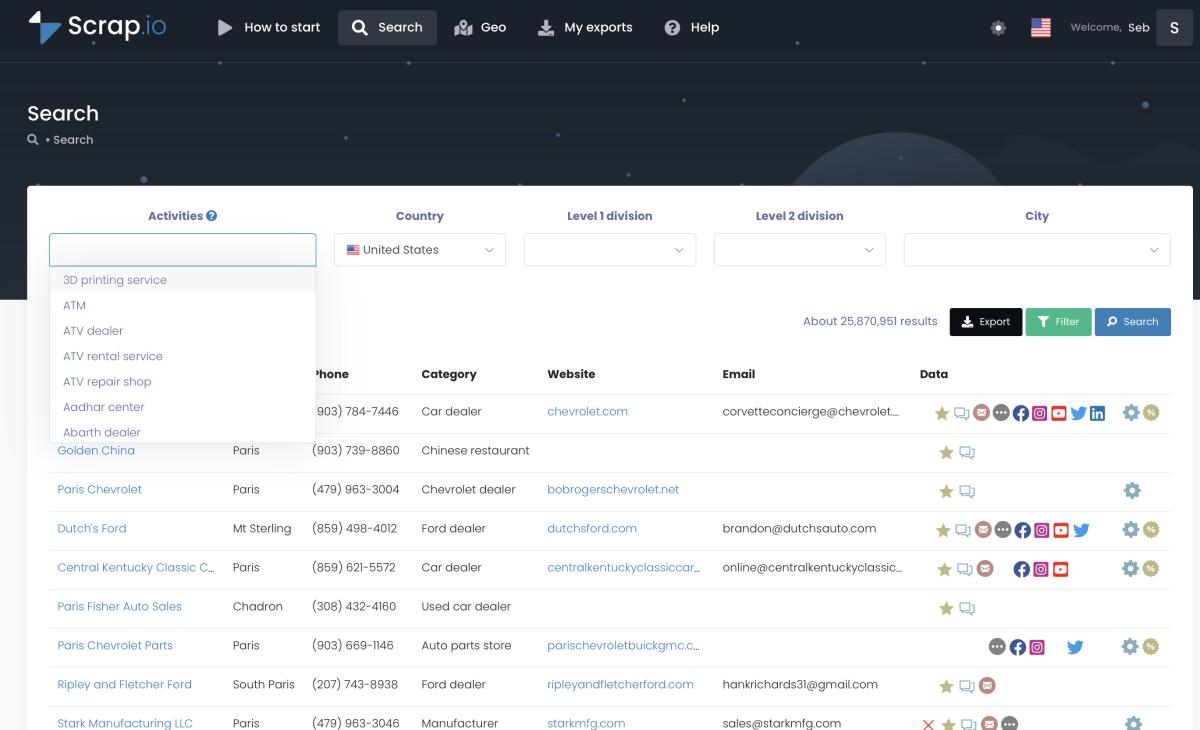
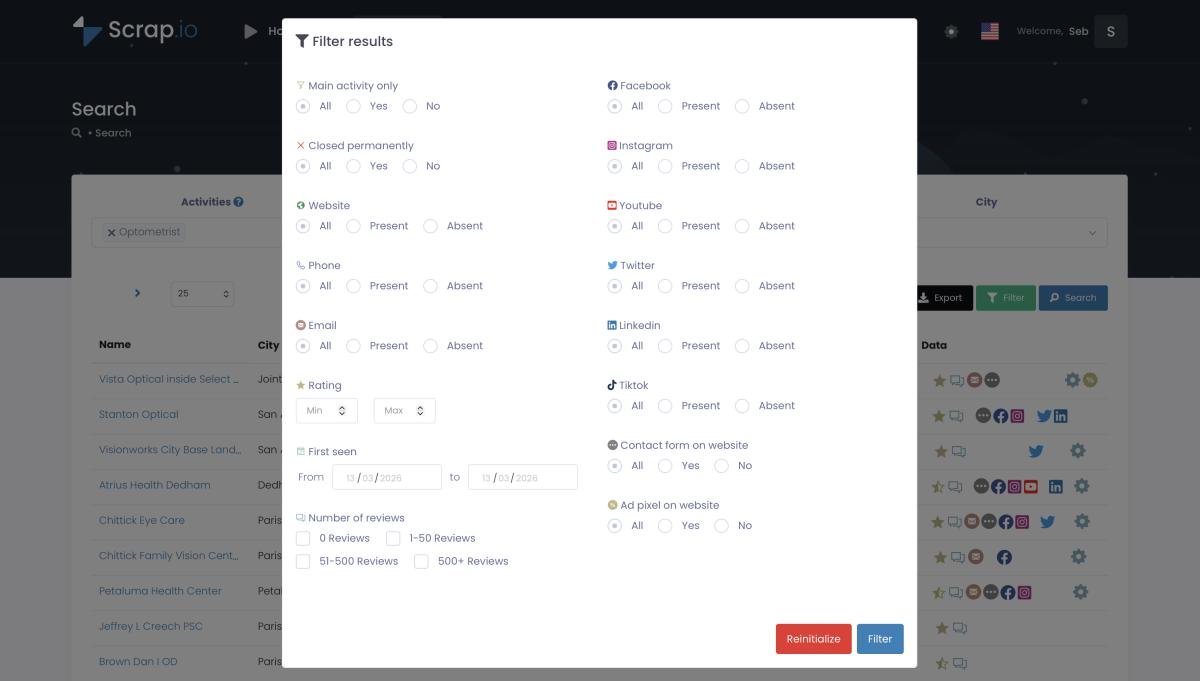
The filtering is where it gets interesting. Target businesses by rating, review count, price range, whether they list an email, which social platforms they're on, even what tech their website runs. And because filters run before extraction, you only spend credits on contacts you'd actually use.
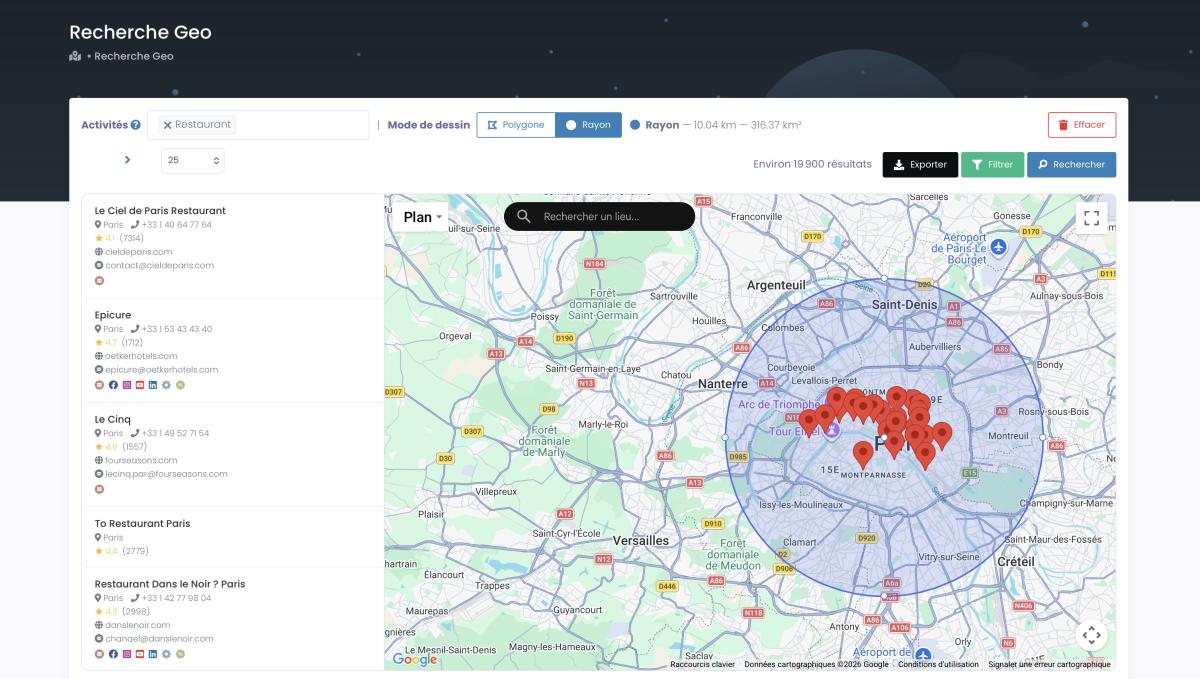
For geo-targeting, Scrap.io does both radius selection and custom polygon drawing. Way more precise than typing a city name.
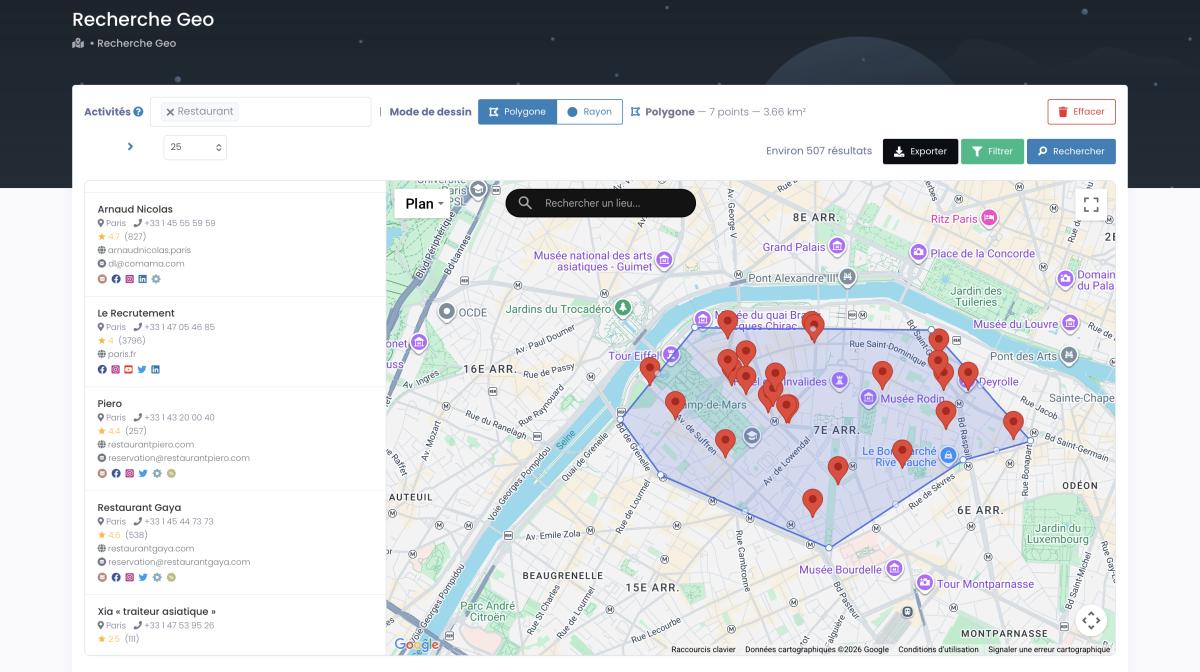
Not sure where to start? This walkthrough covers the whole flow, from first search to first export:
Video: Scrap.io - How to Start?
Prefer working from your browser? The free Scrap.io Chrome extension surfaces emails and social profiles right on Google Maps, handy for one-off research. More on the full platform in our guide to finding email addresses from Google Maps, and the browser tools are covered in Google Maps scraper Chrome extensions.
What Google's Terms Let You Do With API Data
The API hands you the data. The terms decide what you can keep.
Here's the part most guides skip. Google Maps Platform's terms restrict how long you can cache or store Places content. As a rule, you don't get to build a permanent local copy of Google's business data, and the one identifier you're generally allowed to store long-term is the Place ID (which is why keeping the right ID matters, see our guide to finding a Google Place ID). Displaying Maps data also comes with attribution requirements. Before you archive a single row from the API, read the exact language on cloud.google.com/maps-platform/terms, because the limits are stricter than people assume.
Public business data you export yourself sits in a different lane. Scrap.io only works with publicly available business data, stays GDPR and CCPA compliant, and keeps each record traceable to its source. We went deep on whether scraping Google Maps is legal if you want the court rulings and the fine print.
Integrating Google Maps API in Popular Frameworks
JavaScript / HTML
The classic. The script tag from the website section drops into any HTML page, you initialise a map inside a <div id="map"> with your center and zoom, and every load counts against your Dynamic Maps quota. For the advanced stuff, geocoding, Places search, routing, our guide on extracting data from Google Maps with the JavaScript API goes much further.
Python
Great for server-side geocoding and batch calls. A few lines with the requests library hitting the Geocoding endpoint returns latitude and longitude for any address. For coordinates at scale, the Google Maps coordinates guide walks through the automated approaches.
Flutter / Android
Add google_maps_flutter to your pubspec.yaml, then set your google maps api key for flutter in the Android manifest (<meta-data> tag) and the iOS AppDelegate. The package docs on pub.dev cover the platform-specific setup. Don't forget the manifest entry on Android, it's the single most common stumbling block.
WordPress
Several plugins handle this with zero code: WP Store Locator, Maps Widget for Google Maps, and a few others. Paste your key into the plugin settings and you're done. Fastest path to a store locator page, honestly.
Frequently Asked Questions
How do I get a Google Maps API key?
Go to console.cloud.google.com. Create a project, enable the Maps APIs you need, link a billing account, then open Google Maps Platform > Keys & Credentials and click "Create credentials > API key." Under 10 minutes. The console now makes you pick at least one API restriction before you finish, so restrict it right there.
Where do I find my existing Google Maps API key?
Open the Google Cloud console, go to Google Maps Platform > Keys & Credentials, select your project, and click "Show key" next to the one you want. See several keys? Check each one's API restrictions to figure out which app uses it. (Your google maps api key login is just your regular Google account.)
Is Google Maps API free?
Partly. Every SKU has a monthly free tier: 10,000 calls for Essentials, 5,000 for Pro, 1,000 for Enterprise. The Maps Embed API and mobile SDKs are entirely free with no limit. You do need billing enabled, but you won't be charged while you stay inside the free thresholds.
How much does it cost to get a Google Maps API key?
Creating the key costs nothing. You pay for usage above the free tier. Dynamic Maps run $7 per 1,000 loads, Geocoding $5 per 1,000, and Places SKUs $5 to $35 per 1,000 depending on the data. If you'd rather a flat bill, subscription plans start at $100/month for 50,000 calls. Google's pricing calculator estimates your specific case.
Can a Google Maps API key access Gemini?
It can, if the Gemini API is enabled in the same project and the key isn't restricted to Maps APIs. Since early 2026 Google blocks known leaked keys from Gemini, but the fix is yours: restrict every key to the APIs it needs, and rotate any key that's been exposed in public code.
Should the Google Maps API key be public?
Not without restrictions. The Maps JavaScript API does need a key in client-side code, that's unavoidable. But always set HTTP referrer restrictions and limit the key to the APIs you use. An unrestricted public key is an open invitation, and the bill lands on you.
How to use Google Maps API key for free?
Keep usage below the free tier per SKU. For most small sites, the Maps Embed API (unlimited, free) or the 10,000 monthly Dynamic Maps loads under Essentials is plenty. Just want to prototype without a card? Grab a Maps Demo Key. Watch your usage in the Cloud Console dashboard to avoid surprises.
What is the free alternative to Google Maps API?
For maps, OpenStreetMap with Leaflet.js is free, and for geocoding there are generous free tiers worth comparing, see our free geocoding API comparison. None match Google on global coverage, but they work for budget projects. For business data specifically, Scrap.io delivers Google Maps data with emails and phones the API never returns.
Is it legal to scrape Google Maps data?
Scraping public business data is generally legal. US courts have held that accessing publicly available data doesn't violate federal computer-fraud law. Google's Terms of Service do prohibit it, but a ToS violation is a contractual matter, not a crime. Full breakdown in our guide on Google Maps scraping legality.
What is Google Maps API used for?
Everything from a map on a contact page to a full ride-hailing backend: store locators, delivery routing, address validation, geocoding, real estate listings, fleet tracking, competitive research, lead generation. Millions of apps and sites rely on it, and most of them are small businesses that stay comfortably inside the free tier.
Is there a cheaper way to get Google Maps business data than the API?
Yes. The Places API caps at 60 results per query, costs $32+ per 1,000 Text Search requests, and returns no emails. Scrap.io pulls the same 225M+ listings, emails, phones, and social profiles included, with no API key and no code. There's a 7-day free trial with up to 50 searches and 100 export credits, so you can compare the data against your API bill before spending anything.
Wrapping Up
Getting a Google Maps API key is still a 10-minute job. Doing it right in 2026 takes a little more care: the new Keys & Credentials path, the API restriction the console now forces, and a quick check that your key can't wander off and talk to Gemini.
Short version: create a Cloud project, enable only what you need, set up billing, create the key in Keys & Credentials, restrict it on the spot. The per-SKU free tier covers most small sites, and a subscription smooths the bill for bigger ones. But for business data at scale, the 60-result cap and the missing emails make the API the wrong tool, and that's exactly the gap purpose-built tools fill.
Pulling leads instead of drawing maps? Try Scrap.io free for 7 days: up to 50 searches and 100 export credits, with the email addresses the API can't provide. 225,676,406 establishments, 195 countries, no code, no API key. Counting is always free, so you can size any market before you spend a credit.
Last updated: November 2026 · Written by Sébastien
Generate a list of restaurant with Scrap.io