

It's 10 AM. You ran your one search for the day. LeadSwift returned 340 plumbers in Austin, all with phone numbers, half with emails. Nice haul.
Now you're locked out until tomorrow. And you've got four more cities to cover this week.
That's the thing about LeadSwift that no review page mentions in the first paragraph, and it's the single detail that decides whether this tool fits your workflow or quietly wastes your money. Most comparison articles bury it in a feature table. We're putting it in the headline, because after reading 148 G2 reviews and 93 on Capterra, it's the pattern that shows up over and over — in the praise and in the complaints. This LeadSwift review covers the real 2026 pricing, what the daily cap actually does to an agency workflow, what the tool genuinely does better than anyone, and where the ceiling becomes structural rather than fixable.
Table of Contents
- What Is LeadSwift, Exactly?
- LeadSwift Pricing in 2026: The Real Numbers
- The Searches-Per-Day Cap: The Limit Nobody Explains
- What LeadSwift Does Genuinely Well
- Where LeadSwift Falls Short (According to Its Own Users)
- LeadSwift vs the Alternatives: Which One Fits Your Volume?
- The Scrap.io Alternative: No Daily Cap, No City Ceiling
- Is Scraping Local Business Data Legal in 2026?
- Verdict: Should You Buy LeadSwift in 2026?
- FAQ
What Is LeadSwift, Exactly?
LeadSwift isn't a database. That's the single most important thing to understand before you compare it to anything else.
LeadSwift is a local B2B lead generation platform that runs a live keyword-plus-location search across public business listings, then crawls each business's website to pull contact details and qualification signals — and includes an email outreach layer on top. You type "plumbers in Dallas," it goes and finds them, right now. Nothing is served from a frozen snapshot someone scraped last spring.
Different products, different failure modes. A database sells you records collected at some point in the past; this goes and looks.
Where the data comes from
LeadSwift pulls from Google Maps, Yelp, Facebook, and YellowPages, then enriches each result by visiting the business's own website. That website crawl is where the interesting stuff lives — emails, contact forms, tech stack, ad pixels. (Those four sources are the ones LeadSwift documents itself. Third-party blogs list others; we've stuck to what's on the vendor's own pages.)
Who it's built for
Small teams. Overwhelmingly so. Of the 145 reviewers with company size listed on G2, 139 work at companies with 50 employees or fewer. Marketing agencies, solo consultants, web shops hunting local clients. If you're an enterprise RevOps team, this was never built for you and the reviews reflect that.
LeadSwift Pricing in 2026: The Real Numbers
$24.99 a month sounds like a steal. Until you read the fine print: that's one search. Per day.
Here's the current pricing, pulled directly from leadswift.com/pricing and verified on 20 July 2026 — not lifted from another blog's table.
| Plan | Monthly | Annual (per month) | Searches / day | Cost per search (annual) |
|---|---|---|---|---|
| Starter | $24.99 | $19.99 | 1 | ~$19.99 |
| Professional 🔥 | $49.99 | $39.99 | 5 | ~$8.00 |
| Agency | $99.99 | $79.99 | 20 | ~$4.00 |
| Custom | On request | On request | 20+ | — |
Notice the last column. That's the number that should drive the decision, and nobody publishes it. On Starter, each search costs you twenty dollars. On Agency, four. Same product, five times the efficiency.
What counts as "one search"?
LeadSwift is refreshingly direct here. In their own words:
"The number of searches is the only way our packages differ. There are no other restrictions. All packages include unlimited contacts, unlimited data points, and unlimited features (including unlimited outreach)."
A search is one keyword paired with one location. "Restaurants in Toronto." "Plumbers in Dallas." Everything that comes back — and it can be thousands of businesses — is yours at no extra cost. No per-lead billing, no credit meter, no surprise invoice. Credit where it's due: that's cleaner than most of this industry manages, especially next to pay-per-result tools that hand you a price range instead of a number. If you're working out what lead generation actually costs across channels, that predictability counts.
The 7-day free trial (no credit card)
Seven days, no card required. That's a genuine advantage and we're not going to pretend otherwise — plenty of tools in this category, including ours, ask for a card to activate a trial. LeadSwift doesn't. If you want to answer "is LeadSwift worth it in 2026" for your own niche, the LeadSwift free trial no credit card route makes that cheap to test.
The catch is the same one that shapes everything else: your trial runs at the search allowance of whatever tier you're testing. Seven days of one-search-a-day is seven searches. Plan your test cities before you start.
About that "50% off" banner
The pricing page has carried a "🔥 50% OFF — Lock In Now, early adopter pricing ends soon" banner for a long time. We're flagging it as an observation, not an accusation — permanent urgency displays are common in this market and LeadSwift's underlying numbers are stable and honestly presented. Just don't rush a purchase because a banner told you to.
Video: Stop Paying $20,000 a Year for ZoomInfo — This Does More for $49 a Month
The Searches-Per-Day Cap: The Limit Nobody Explains
Here's the part that's genuinely clever, and genuinely frustrating: the cap isn't monthly. It's daily.
Every review site mentions "1 search per day" as a bullet point. Almost nobody works out what it means on a Tuesday afternoon when a client asks you to cover three new metros by Friday.
Why per-day beats per-month for the vendor
A monthly pool of 30 searches lets you burn all 30 in an afternoon when a big project lands. A daily allowance of one forces that same volume across 30 separate days — and makes the tool's peak load completely predictable. Smart engineering. Also a hard ceiling on how fast you can move.
One important caveat, because we're not going to overclaim: LeadSwift doesn't publish a rollover policy anywhere we could find. The only documented flexibility is the ability to pause annual plans for up to three months at a time, which preserves your unused days at the subscription level. Whether an unused daily search survives to tomorrow is not something they state, and we're not going to assert it either way.
The "daily login" tax
If your allowance resets every 24 hours, you have to show up every 24 hours to use it. Miss Saturday and Sunday? Two searches you'll never get back.
It shows up in the reviews. G2's aggregated "what users dislike" module counts four separate reviews citing time management problems tied to "requiring daily logins and manual filtering." That's not a complaint about the data. It's a complaint about the calendar.
And one user put the cost side plainly:
"it's expensive, charged monthly and it's about 50 bucks per month with only 5 search, that is way not enough for a company"
— Alice A., Project Assistant, Construction — Capterra, 23 June 2026 (rated 4/5)
When the cap doesn't matter
Now the fair part, because this is where a lot of comparison articles get lazy and pretend the limitation is universal. It isn't.
"At first I was put off by the 'one search per day' limit on the base plan but honestly any more than a search per day and I'd have trouble keeping up with the amount of data."
— Jason C., Owner/Director — G2, 6 November 2025 (4.5/5)
He's right. A single search can return thousands of businesses. If you're a solo consultant working one vertical in one metro, one search a day is genuinely more pipeline than you can process. The cap only bites when your work is wide rather than deep — multiple cities, multiple verticals, or a client who wants a whole state.
For reference: tools that meter by exported records rather than by searches don't have this problem at all. On Scrap.io, counting is free — interface, API and MCP alike — so you can see exactly how many businesses sit in a whole country before spending anything. Useful context when you're sizing whether a daily cap will hurt you.
What LeadSwift Does Genuinely Well
Let's be fair for a second, because this tool earns its 4.8 on G2 for real reasons.
Real-time data. Every search goes and looks, right now. No stale database, no businesses that closed in 2023 still sitting in your CSV. Biggest quality differentiator in the category, and LeadSwift gets it right.
The HTML and keyword filter inside the prospect's website. Nobody talks about this and it's the best thing in the product. You filter results by what's actually in the target's page source — a keyword, a piece of markup. Selling Shopify migrations? Filter for businesses running something else. That's not lead generation, that's qualification.
Integrated email outreach. Sender rotation, A/B testing, a unified inbox. For a one-person shop that wants one tool instead of a stack, that's a real gap in most competing products.
Qualification data. SEO scores, detected tech stack, ad pixels — enough signal to segment before you write a single email.
And one reviewer made the strategic case better than any marketing page could:
"Apollo is great for a number of reasons, specifically if you're targeting a particular audience, such as C-suite executive type of folks; but if you're trying to target people like general contractors or small restaurants, those type of companies are not going to be on Linked-in."
— Tucie K., Owner, Telecommunications — Capterra, 10 February 2025
That's the whole thesis for this category in three lines. The 8-person HVAC company isn't on LinkedIn. It's on a map.
Where LeadSwift Falls Short (According to Its Own Users)
Across 148 G2 reviews and 93 on Capterra, there isn't a single review below four stars. Dig into the four-star ones and a very consistent pattern shows up.
Here's something no other LeadSwift review publishes: the actual occurrence counts from G2's aggregated dislike module.
| Complaint | Number of reviews |
|---|---|
| 🔴 Poor UI / lack of polish | 12 |
| 🔴 Limited features (notably 1 search/day on the base plan) | 9 |
| 🟡 Email limitations (daily searches + no warm-up) | 5 |
| 🟡 Time management (limited searches → mandatory daily logins) | 4 |
| 🟡 Accuracy issues (lead quality, filtering) | 3 |
| 🟡 Limited CRM integration | 3 |
| 🟡 No free plan | 3 |
| 🟡 Slow performance (exports, long queries) | 3 |
The integrations score backs this up: 3.9/5 on third-party integrations per GetApp — comfortably the lowest sub-score on the profile, and corroborated on Software Advice, which carries the same 4.9/5 aggregate across the shared Gartner review pool as Capterra. (Same pool. Don't add the two totals together — plenty of blogs do, and it inflates the review count by roughly double.)
No country-level or state-level extraction
This is the most consequential gap, and it comes straight from a user:
"It would be nice if there were a way to generate leads by state and/or country. Additionally, the UI isn't quite as nice as other tools I've tested."
— Bryan P., Owner, Marketing & Advertising — Capterra, 14 April 2026
LeadSwift confirms it themselves. Their own guidance: "For best results, run city-level searches (then scale across cities)" — straight from leadswift.com. So can LeadSwift scrape a whole country? No. Not as one operation. You do it city by city, one search at a time, capped daily.
Do the arithmetic on that for a national campaign. On Starter, covering fifty metros takes fifty days.
Video: How to Scrape Local Leads at the Country Level
Email verification is a separate step
Does LeadSwift verify emails? Not inside the search flow.
"Leadswift doesn't currently verify the leads you find, so you'll need another tool to complete that before you can reach out to the leads."
— Liz D., Digital Marketing Consultant — G2, 31 October 2024
There's a companion tool, VerifySwift, but reviewers describe it as a separate CSV workflow rather than something baked into extraction. Budget a verification step before any cold campaign. Related complaint, and a bigger one for outreach quality:
"When you compile the xsls or cvs files, they only take the generic emails for e.g. info@ or enquiries@ email addresses, so you do still need to do a thorough check to find the contacts that you want to target"
— Natalie T., Founder & CEO, Broadcast Media — Capterra, 17 December 2024
Generic inboxes convert worse than named ones. That's not controversial, it's just deliverability. If that's your bottleneck, the mechanics of how to find emails on Google Maps and classify them properly is worth a read.
Export friction
"The export process needs work. You can't export a full campaign in one go, you have to manually go into each lead file which gets tiring if you're working with a lot of data."
— Verified User in Design — G2, 25 May 2025
LeadSwift export problems are real, and they compound with volume. Same with speed:
"it could take awhile to scrape and generate your lead lists since it can be a lot from each search (sometimes 100K+) besides the wait times, everything about Lead Swift is great."
— Andrew K., CEO/Co-Founder — G2, 22 April 2025
No email warm-up, limited CRM integration
Five reviews flag the missing warm-up. If you're using the built-in outreach on a fresh domain without warming it first, your deliverability will be exactly as bad as you'd expect. Three more flag thin CRM connectivity. Neither is fatal — both mean the "all-in-one" promise has edges.
One last observation, offered as fact rather than accusation: the review currently ranked "most helpful" on LeadSwift's Capterra page describes a completely different product — a cleaning service called SteadyStateAI in Naperville. We have no idea how it got there. We're noting it because a careful buyer reading that page deserves to know.
That state-and-country request from Bryan P.? That's not a feature gap you can patch — it's an architecture choice. Here's what the other architecture looks like: 74,854 plumbers across the United States, one search. See the count on Scrap.io — counting costs nothing.
LeadSwift vs the Alternatives: Which One Fits Your Volume?
The real question isn't "is LeadSwift good?" It's: at what volume does it stop being the right tool?
| Criterion | LeadSwift | Scrap.io | Outscraper | Apollo |
|---|---|---|---|---|
| Pricing model | Subscription / searches per day | Subscription / credits per business | Pay-as-you-go, $3 per 1,000 (then $1 per 1,000 above 100k) | Per seat + credits |
| Daily cap | 🔴 Yes (1/5/20 per day) | 🟢 None | 🟢 None | 🟢 None |
| Whole-country extraction | 🔴 No (city by city) | 🟢 Yes (Company plan) | 🟡 Per task | 🔴 N/A |
| Hand-drawn zone (polygon) | 🔴 No | 🟢 Yes (Company plan) | 🔴 No | 🔴 No |
| Filters BEFORE credits are spent | 🟡 Filters at export | 🟢 Yes, before extraction | 🔴 No | 🟡 Partial |
| Real-time data | 🟢 Yes | 🟢 Yes | 🟢 Yes | 🔴 Static database |
| Local SMB coverage | 🟢 Excellent | 🟢 Excellent | 🟢 Good | 🔴 Weak |
| Built-in email outreach | 🟢 Yes | 🔴 No (export to your tool) | 🔴 No | 🟢 Yes |
| Native email verification | 🔴 No (VerifySwift = separate CSV) | 🔴 No | 🔴 No (paid add-on) | 🟢 Yes |
| API | 🟢 Yes | 🟢 Yes (300 req/min, all plans) | 🟢 Yes | 🟢 Yes |
| MCP connector (AI agents) | 🔴 No | 🟢 Yes (scrap.io/mcp) | 🔴 No | 🔴 No |
| Free trial | 🟢 7 days, no card | 🟢 7 days (card required) | 🟢 500 free records | 🟢 Freemium |
Outscraper's figures come from their own pricing page, verified 20 July 2026 — the first 500 businesses are free, then $3 per 1,000 up to 100,000, then $1 per 1,000. Apollo's plan prices aren't listed here because we couldn't verify them at source on the day of writing, and we're not going to copy numbers off a competitor's blog post. Check apollo.io directly.
If you run one broad search a day → LeadSwift
Genuinely. One vertical, one metro, steady drip of prospects, and you want outreach in the same tab. LeadSwift Starter at $19.99 annual is a reasonable buy and the no-card trial means testing it costs you nothing but attention. Our wider round-up of the best Google Maps scrapers of 2026 puts that in context against the whole field.
If you need a whole region or country → the ceiling is structural
This is where the answer changes, and not because of a missing button. LeadSwift's entire query model is keyword + city. Adding "state" isn't a settings toggle, it's a different product. If your work spans geography, look at architectures built for it — the Outscraper alternative breakdown and the D7 Lead Finder comparison both cover the same city-versus-country tension with different players. LeadSwift vs Outscraper comes down to subscription-versus-metered; LeadSwift vs Apollo for local businesses is barely a contest, because Apollo's strength is LinkedIn-shaped org data and local trades aren't there.
The Scrap.io Alternative: No Daily Cap, No City Ceiling
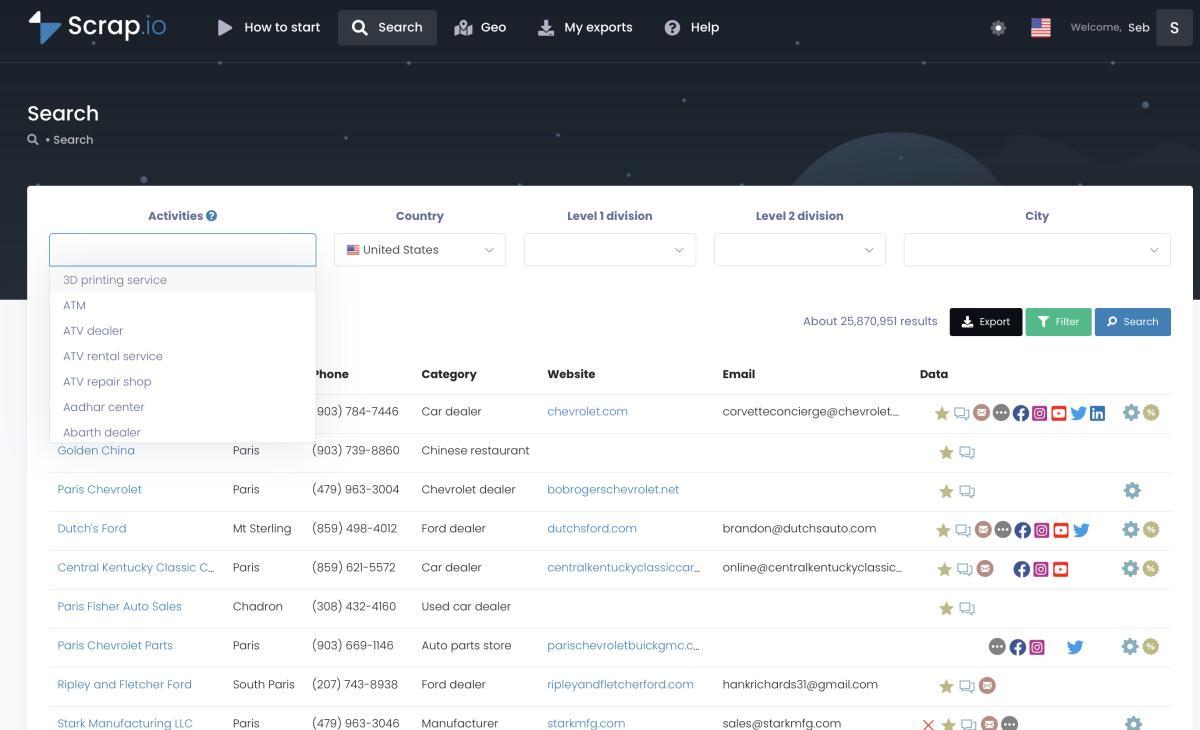
There are 74,854 plumbers listed in the United States. LeadSwift will get you there one city at a time. Scrap.io does it as one search.
Full disclosure: we build Scrap.io. So here's the honest framing — this is about a structural difference in how the two tools are metered, not a claim that one wins everywhere.
Scrap.io doesn't count searches at all. It counts exported businesses. One credit, one business. "All plumbers in the United States" and "plumbers in Austin" are the same operation to the system — only export volume differs. The index sits at 225,676,406 establishments across 195 countries and 4,000+ categories. Best LeadSwift alternative for agencies? That's the mechanical reason it usually is: no ceiling on how often you look.
Filtering before extraction
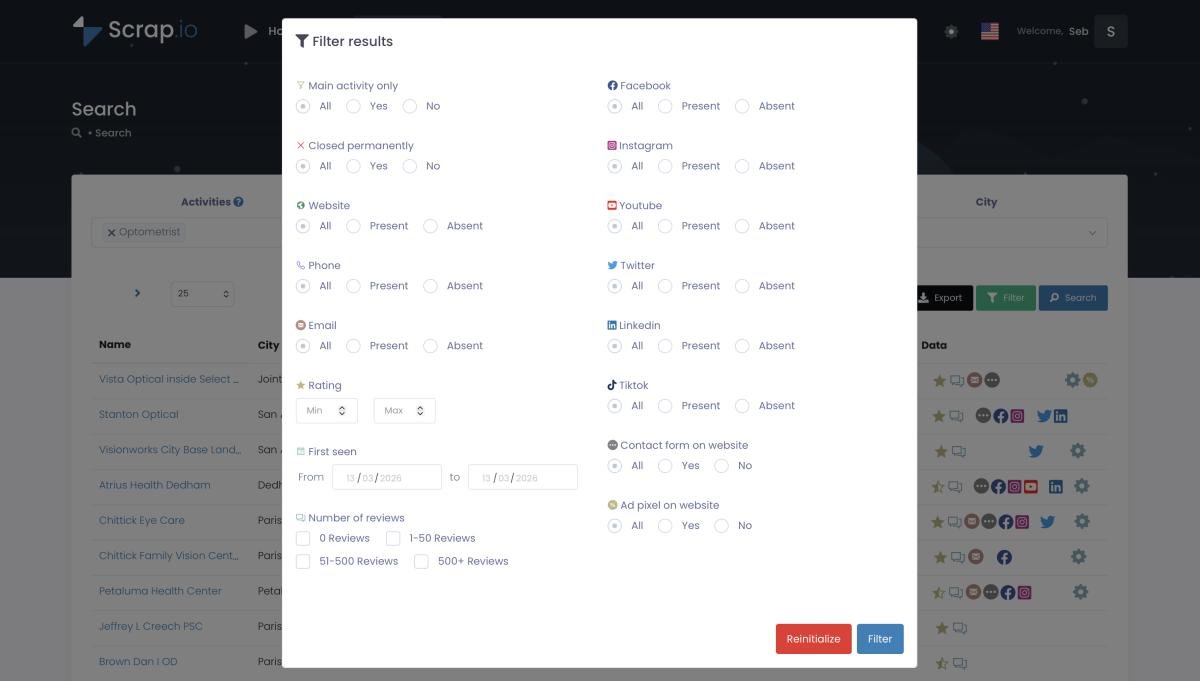
This is the part that actually saves money, and it's a bigger deal than it sounds.
Of those 74,854 US plumbers, 27,369 — 36.6% — have an email address detectable on their own website (Scrap.io data, extracted 20 July 2026). If you only want contactable prospects, you pay for 27,369. Not 74,854. The filters run before credits are consumed: email present, website present, mobile versus landline, minimum rating, review count, contact form, ad pixel, first-detection date, exclude-already-exported.
Paying for 47,000 records you're going to delete is masochism. Don't do it.
Country-level, region-level, or draw-your-own-polygon

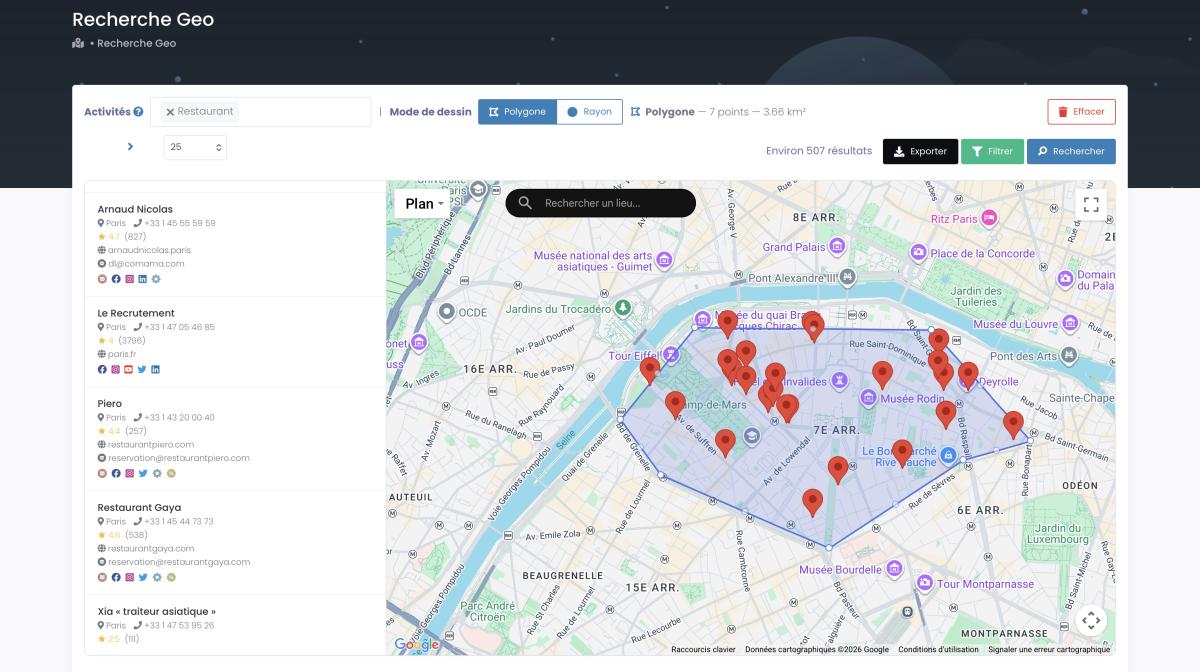
Four administrative levels — city, county, state, country — plus GeoSearch: a radius around any point, or an irregular polygon drawn by hand on the map. You can also pull every business in a zone without specifying a category, which is economic mapping rather than prospecting, and structurally impossible with a keyword+city query.
Now the honest pricing bit, because glossing over it would make everything above worthless. Whole-country search is on the Company plan at $350/month. City-level works on every plan including Basic at $35. County-level needs Professional or above; state-level needs Agency or above. If someone told you a $35 plan scrapes a country, they were wrong.
Real-time data — the point of agreement
Both tools agree on the thing that matters most: no frozen database. Both go and look at extraction time. That's why both beat static-list vendors on data quality. Credit where it's due.
The divergence is in automation — Scrap.io ships a REST API on all plans at 300 requests/minute (docs.scrap.io) plus an MCP connector, so Claude, ChatGPT or Gemini can build the queries in plain language. For the nationwide method step by step, see how to extract every business in a country.
Video: Scrap.io - How to Start?
Run the count yourself before you spend a cent — counts are free on Scrap.io, in the interface, the API and the MCP connector alike. Then, if the volume is there, the 7-day trial gives you 50 searches and 100 export credits across 225M+ businesses in 195 countries.
Is Scraping Local Business Data Legal in 2026?
Before you build a list of 40,000 businesses, one boring but non-negotiable question.
Short version: extracting publicly available business data is broadly legal in the US, and US courts have been consistent about it — the hiQ v. LinkedIn line of rulings established that scraping public data doesn't violate the Computer Fraud and Abuse Act. Business listings need no login, which puts them on firmer ground still.
The nuance is in what you do afterwards, not in the collection. A company's generic phone number, address and info@ inbox generally aren't personal data under GDPR. A named individual's email is a different animal. B2B prospecting in the EU typically leans on legitimate interest, and every outreach message needs a working opt-out. CCPA carves out publicly available business information explicitly.
Scrap.io extracts only publicly available business data, is GDPR and CCPA compliant, and every data point traces back to its source. The full breakdown lives in our guide on whether is it legal to scrape Google Maps. (Factual information, not legal advice — if serious money is riding on it, ask an actual lawyer.)
Verdict: Should You Buy LeadSwift in 2026?
If you've read this far, you're probably deciding between "good enough and cheap" and "no ceiling."
Is LeadSwift worth it in 2026? For a solo operator or small agency working one or two local verticals in a handful of cities, yes — it's a well-priced real-time tool with genuinely useful website-level filtering and outreach built in, and the seven-day no-card trial makes the decision nearly risk-free. The daily search cap is the entire question, and for that user it's a non-issue.
Buy it if…
- You work one or two metros and one or two verticals
- You want extraction and cold email in a single tool
- The website-content filter (keyword, HTML, tech stack) is central to how you qualify
- You process leads slowly enough that a search a day is plenty
Skip it if…
- Your work spans states, regions or countries — the ceiling is architectural, not a setting
- You need to cover multiple cities in the same week
- Export volume is high and you don't want per-file manual downloads
- You need native email verification inside the workflow
Bottom line? LeadSwift is a good tool that will feel excellent for about a year, then feel like a bottleneck the moment your client list grows sideways instead of deeper. Know which of those two you're building.
If LeadSwift's daily cap is the only thing standing between you and your pipeline, try Scrap.io free for 7 days — 50 searches, 100 export credits, filters applied before a single credit is spent, 225M+ businesses across 195 countries. No commitment.
FAQ
How much does LeadSwift cost in 2026?
LeadSwift has three plans: Starter at $24.99/month (1 search per day), Professional at $49.99/month (5 searches per day), and Agency at $99.99/month (20 searches per day). Annual billing drops these to $19.99, $39.99, and $79.99. All plans include unlimited leads, contacts, and exports — the only difference between tiers is the daily search allowance.
How many searches per day does LeadSwift allow?
One search per day on Starter, five on Professional, and twenty on Agency. The cap is daily, not monthly, which means the LeadSwift searches per day limit resets every 24 hours rather than accumulating into a monthly pool. Custom plans above 20 searches per day are available on request.
Can LeadSwift scrape an entire country or state?
No. LeadSwift is built around keyword-plus-location searches at city level. Its own documentation recommends running city-level searches and scaling across cities. Multiple reviewers have requested state and country-level extraction as a missing feature. It does work outside the US — coverage follows the underlying map platforms — but always one city per search.
Does LeadSwift verify email addresses?
Not natively within the search flow. LeadSwift offers a companion tool called VerifySwift, but reviewers report you either upload a CSV separately or the verification only applies to emails sent from within LeadSwift. Plan for a separate verification step before any cold campaign.
What is the best LeadSwift alternative for large-scale extraction?
For agencies that hit the daily search cap or need coverage beyond a single city, Scrap.io is the closest alternative built for scale: it meters by exported businesses rather than by searches, supports city, county, region and country-level extraction, and applies filters before credits are consumed. Counts are free, so you can size the opportunity before paying.
Generate a list of restaurant with Scrap.io