

A purchased lead list is a graveyard. You pay $200, you get a spreadsheet, and half those contacts bounced, retired, or closed shop back in 2023. Been there. Bought the terrible list. Regretted it for a month.
Meanwhile Scrap.io indexes 225,676,406 businesses across 195 countries, most of them sitting on Google Maps with an address, a phone number, reviews, and very often no website and no idea you exist. Your next 500 clients are already on the map. Finding them was never the hard part. Getting them into your pipeline before your competitor does, that's the hard part.
This guide walks through exactly how to generate google maps leads at scale in 2026: what they're worth, the five ways to extract them, why filtering before you extract beats cleaning afterward, how to go from one city to a whole country, and where the legal lines actually sit. Call it google maps lead generation, call it local prospecting. Same playbook. Real numbers, pulled fresh. Named examples. No fluff.
Table of Contents
Video: Scrap.io - How to Start?
What Are Google Maps Leads?
A Google Maps lead is a real, operating local business you pulled from the map, with its name, address, phone, rating, hours, and often the email hiding on its website, captured as a contact you can actually reach out to. That's it. No mystery.
Now compare that to the two things most people use instead. A purchased list? Sold to five of your competitors, scraped who-knows-when, stuffed with dead addresses. A LinkedIn lead? Great if you're selling enterprise SaaS to a VP. Useless if your customer is a 6-person roofing crew that doesn't even have a company page there. The plumber, the dentist, the family restaurant that opened in 1994, none of them are on LinkedIn. All of them are on Maps.
And here's the part that changes everything: Maps data is alive. Business owners update their own Google Business Profile listings because Google rewards them for it. So when you pull a google maps lead, you're getting information the business itself maintained, not a CSV someone sold you for $500 that's been rotting since the last election. That freshness is the whole reason google maps lead generation beats a static database.
Google Maps lead vs LinkedIn lead vs purchased list
| Source | Freshness | Local coverage | Exclusivity |
|---|---|---|---|
| Google Maps lead | Real-time | Excellent (SMBs) | 100% yours |
| LinkedIn lead | Decent | Weak for local SMBs | Shared |
| Purchased list | Stale | Random | Sold 3 to 5 times |
Google Maps covers 195 countries and 4,000+ business categories. That's not a niche database. That's most of the local economy, mapped. If you want the strategic overview first, our guide on local business lead generation strategies lays out where Maps fits into a full pipeline.
What a Google Maps Lead Is Actually Worth
The median B2B cost per lead hit $213 in early 2026, up from $198 the year before (HubSpot State of Marketing 2026, via Digital Applied). Two hundred and thirteen dollars. For one contact. And that's the median, so plenty of channels charge far more.
A Google Maps lead you extract yourself costs a fraction of a cent.
Read that gap again, because it's not a rounding error. It's the whole argument. Even the cheap end of paid acquisition, SEO and organic content, lands around $98 per lead (same Digital Applied report, 2026). A self-extracted map lead sits an order of magnitude below even that. Same buyer intent. A tiny sliver of the price. On the Basic plan ($49 a month for 10,000 export credits), the math works out to roughly half a cent per lead. Do that division yourself and the $213 figure starts to look faintly ridiculous.
Why is the map worth so much? Volume and freshness, stacked. Scrap.io first detected 610,739 new US business listings on the map in the 30 days to October 28, 2026 (Scrap.io data). Six hundred thousand fresh targets in a month, in one country, that no static list has caught up with yet. Nobody's charging you $213 for those. Honestly though, nobody's charging you anything for them, because they're sitting on the map in plain sight.
💡 Want to know how many leads your niche has on Google Maps? Counting is free on Scrap.io, no credits used. Size any market, any country, across 225M+ businesses updated in real time at every export, before you spend a thing.
5 Ways to Get Leads From Google Maps
So how do you actually get leads from Google Maps? There are five ways. Only one or two of them scale without making you want to quit your job. Maybe you're chasing your first client. Maybe you're refining how to generate leads from google maps at volume. Either way, here they are, worst to best.
1. Manual copy-paste
Open Maps. Click a listing. Copy the name. Copy the phone. Paste into a spreadsheet. Repeat. A hundred times. Tomorrow, again.
Does it work? Technically, yes. Is it a good use of a human being's finite hours on earth? No. You'll cap out around 50 listings an hour, and Google only shows you about 120 results per search anyway. This method mostly exists so you understand why the other four were invented.
2. Chrome extensions
Instant Data Scraper, G Maps Extractor, and friends. Free, installed in ten seconds, genuinely fine for grabbing 40 listings for a quick research project. Scrap.io ships one of its own too: the free, unlimited Emails and Social Networks for Google Maps extension shows emails and socials right on the Maps interface. Handy. But extensions scrape through your own browser and your own IP, they stop at Google's ~120-result wall, and most of the others pull zero emails. A tool, not a system.
3. A dedicated Google Maps lead scraper
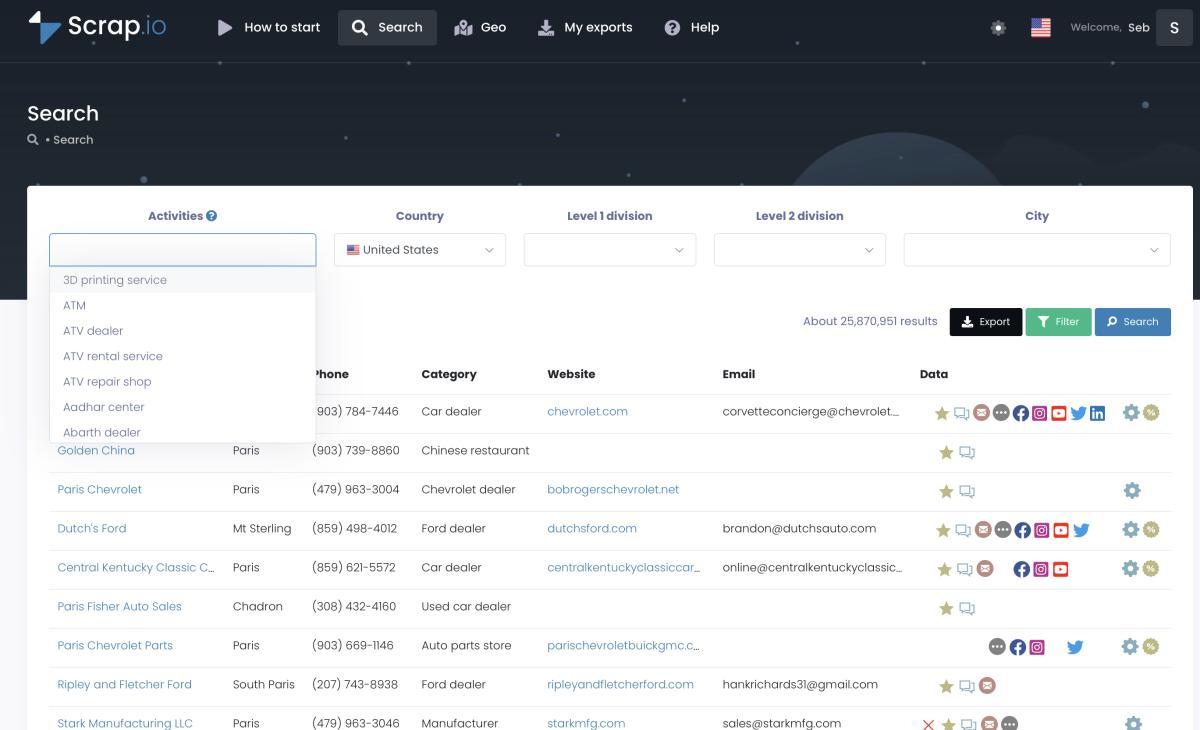
This is where it gets serious. A proper google maps lead scraper doesn't crawl the search interface at all. It taps the underlying data layer, so the 120-result cap simply doesn't exist. You pick a category from the 4,000+ that mirror Google Maps, pick a location, and it hands back a clean CSV with emails, phone types, social profiles, the works. One real Scrap.io user pulled 11,734 businesses in 45 minutes. Try that by hand. I'll wait.
This is also where a google maps leads extractor earns its name: it visits each listing's linked website and pulls the contact data the listing itself never shows, which is how you end up with a google maps lead scraper with emails rather than a phone book. Our full breakdown of how to scrape Google Maps (5 methods) goes deep on this, and the 4,000+ Google Maps categories reference shows exactly what you can target.
4. The Places API
Google's official route. Structured, reliable, zero blocking risk. Also capped at 60 results per Text Search query (three pages of 20, confirmed in the Places API Text Search docs), no emails, no social data. And it gets expensive: Text Search Pro runs $32 per 1,000 calls (Enterprise $35, Enterprise plus Atmosphere $40) after 5,000 free Pro calls a month, because Google replaced the old $200 monthly credit with per-SKU free tiers in March 2025 (Woosmap, 2026). Fine for a developer wiring 50 lookups a week into an app. Wrong tool for a sales team that needs 50,000 leads with contact info. We ran the full math in our Google Maps API cost vs scraping breakdown.
5. AI + MCP
The 2026 addition, and honestly the one I'm most excited about. Instead of clicking through an interface, you tell an AI agent what you want in plain language, "find me every roofer in Texas without a website", and it builds the search, the filters, even the geographic zones for you. Scrap.io exposes an official MCP connector that plugs into Claude, ChatGPT, or Gemini. This is how to scrape leads from google maps without touching a single dropdown. Wild that this is normal now.
Notice the pattern? Methods 1 and 2 top out fast. Method 4 is for coders with narrow needs. Methods 3 and 5 are the only ones that go from "a few leads" to "an entire market" without breaking. Choose accordingly.
Filter Before You Extract (Not After)
Here's the thing almost every tool gets backwards. They make you extract everything first, then clean the mess afterward: deleting the closed businesses, the ones with no email, the duplicates you already contacted last month. You pay for all of it. Then you throw most of it away.
That's insane.
You're buying garbage just to bin it. In short, you pay full price to create your own cleanup job.
Filter first. Before a single credit is spent, narrow to exactly what you can use: email present, mobile or landline only (outside the US and Canada, where carrier data isn't available), no website, minimum rating, claimed or unclaimed, runs an ad pixel or doesn't. A google maps leads generator worth its salt applies those filters at the source, so you only ever pay for contacts you'll actually email. Zero waste. And because you can exclude contacts you've already exported, those duplicates from last month's campaign never cost you a second credit.
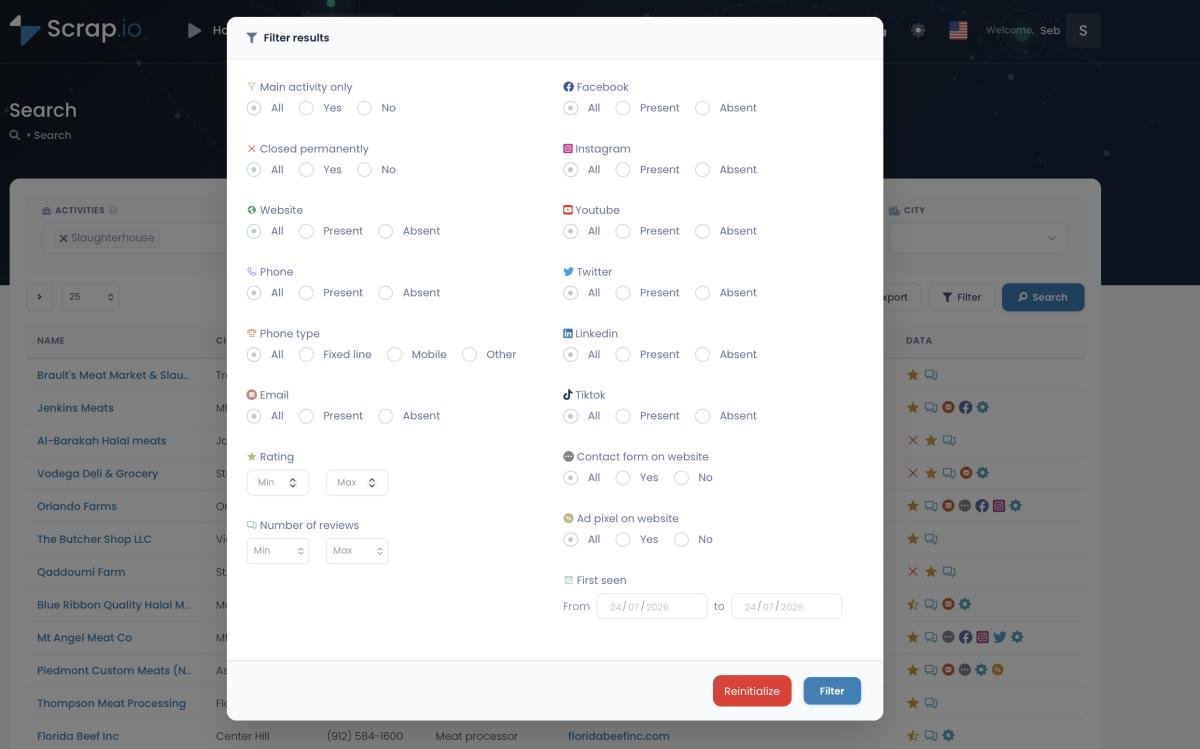
Quick example of why this matters. Say you sell Facebook Ads management. In the US, 15,227,870 businesses have a website, and 9,435,051 of them (62%) run no ad pixel at all (Scrap.io data, October 2026). Filter for exactly that group, a site but no pixel, and that's not a lead list. That's a list of companies who literally need what you sell and aren't buying it yet. That level of targeting, before you even open the file, is almost unfair.
And here's the duplicate problem solved for good: switch on Exclusion Lists and every contact you've already pulled gets stripped out automatically, so a campaign spread across three months never double-charges you for the same business.
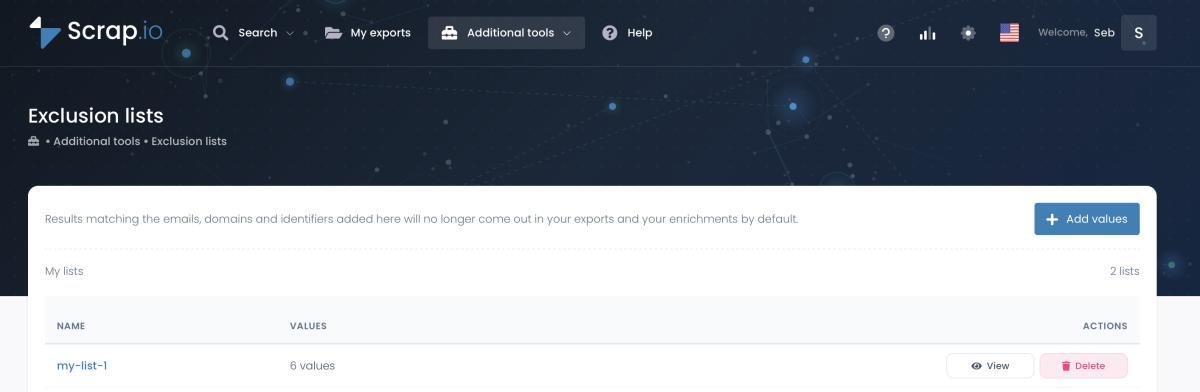
That's what 50,000+ professionals do on Scrap.io (4.8 on Capterra, 4.9 on G2): they filter before they extract, and pay only for usable leads.
Video: Finding Clients Through Google Maps Filters
From One City to an Entire Country
A web agency in Austin didn't want Austin. They wanted every roofer in Texas without a website. Not a city. Not a county. The whole state, one industry, one missing feature. Two clicks, one export, done before lunch.
And the numbers back the ambition. There are 10,801 roofing contractors in Texas on the map right now, 2,978 of them (27.6%) with no website at all, and 5,754 (53.3%) with an email already found (fresh Scrap.io data, October 28, 2026). Zoom out to the whole country and that's 95,822 roofers across the US. One search gets you any slice of that you want.
That's the angle almost nobody talks about. Most scrapers choke past a few hundred results, so people mentally cap their ambition at "one city." But the real money is in coverage. Every dentist in the UK. Every restaurant in France. Every plumber in the entire United States. When you can extract leads from google maps for a whole country in a single search, your total addressable market stops being a neighborhood and starts being a nation. Need google maps leads for restaurants across three states, or every gym in a region? Same two clicks.
Two features make this practical. First, administrative zones: city, county, region, or full country, pick your granularity from a dropdown. Second, GeoSearch, for when your target doesn't fit neat borders. Draw a radius around a point (up to 500 km) or sketch a custom polygon on the map by hand for a specific neighborhood or catchment area. Try doing that with the Places API.
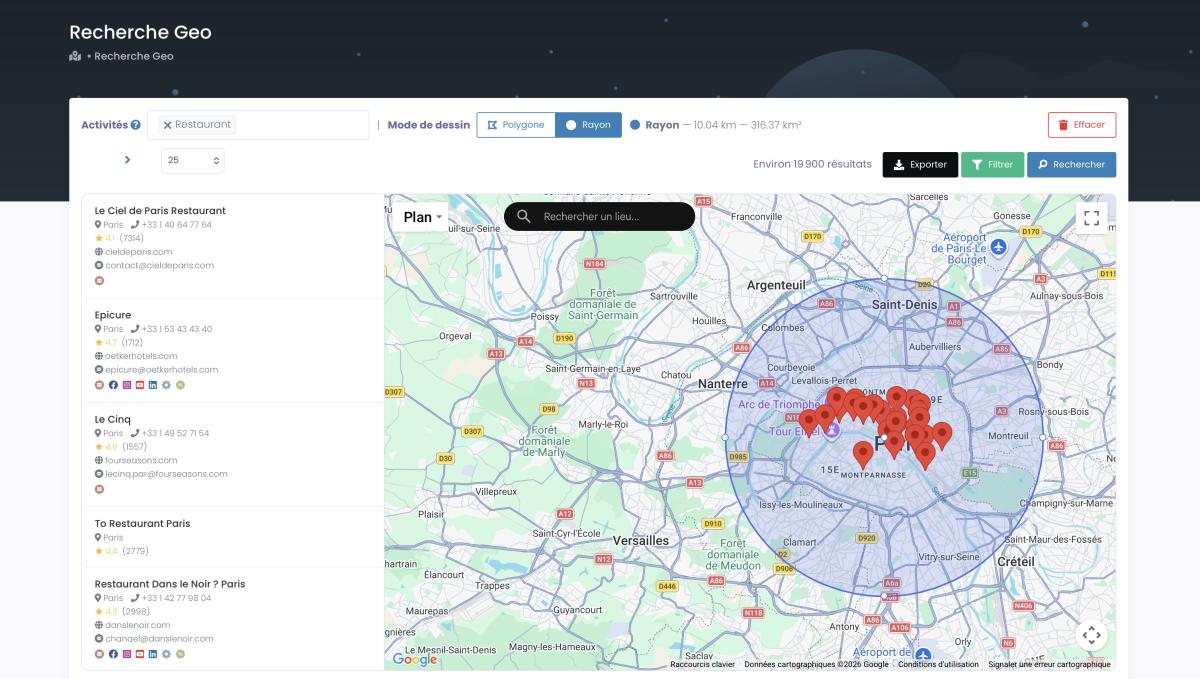
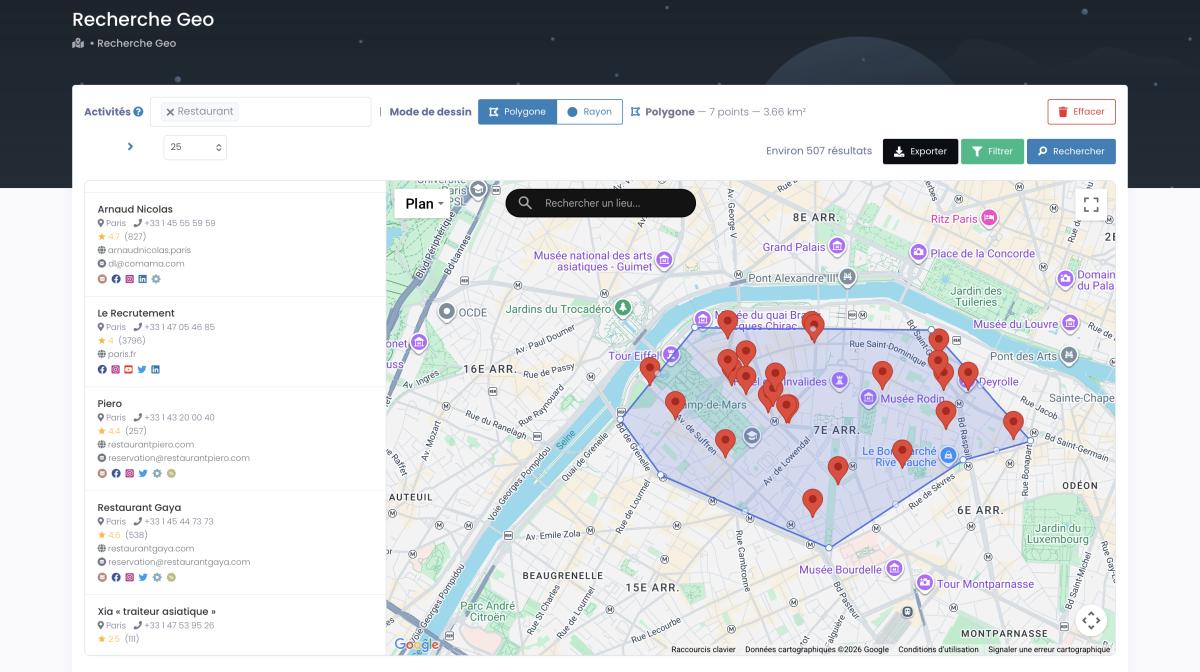
There's also a trick most people miss: you can extract a whole catchment area with no category at all, every business in a zone, full stop. That's a genuine economic map of a territory, not just a filtered slice of it. Want the deep dive? Here's how to extract every business in a country.
Video: How to Extract Every Business in 1 Click (No Category)
Outreach That Actually Converts
A list is not a client.
What happens after the export decides everything, and this is where most people fumble a perfectly good pipeline.
Start with the angle that quietly prints money for agencies: no-website businesses. Around 27% of small businesses still have no website at all (LeadsAgent, 2026), and that number echoes almost exactly in our own data (27.6% of Texas roofers). Filter for exactly that group and you've got a list of companies with a visible, measurable problem you can solve on day one. One web agency playbook built precisely on this, targeting local businesses with no site, reports weekly outreach sessions worth $2,000 to $4,000, with personalized outreach converting roughly three times better than the generic version (LeadsAgent, 2026). If no-website is your whole angle, we wrote the full playbook on how to find businesses without websites.
Personalization is the whole game, and the data is blunt about it. Personalized cold emails see about +26% open rate and +21% reply rate versus generic blasts, with average reply rates hovering around 3.1–3.4% (Snov.io, 2026). Targeted campaigns climb higher. The lever isn't volume. It's relevance.
And relevance comes straight from the map data. You're not writing "Dear Business Owner." You're writing "Hey Mike, saw your Nashville BBQ spot has 62 five-star reviews but no booking link on the site." That second email gets a reply. Because it proves you looked. Pull the email with find emails on Google Maps, then borrow the structure from our cold email templates that generated eight figures in sales. Agencies run this exact play, Maps data plus a tight cold-email sequence, into deals worth $30,000 from a single campaign (Clickback). Once the replies land, you'll want somewhere for them to go: here's how to build a sales pipeline from Google Maps leads.
One honest caveat, because I'd rather you succeed than blast your domain into a spam folder: verify the emails before you send, keep bounce rates under 2%, and always include an unsubscribe link. Fresh data helps enormously here, real-time extraction means fewer dead addresses, but a validation pass is still non-negotiable. Scrap.io pulls fresh, not verified-for-deliverability, so run that check yourself.
📌 Ready to move? Export a filtered list and start today: 7-day free trial, 100 leads offered. Filter by email, phone, rating, no-website, ad pixel, and a dozen more criteria before you spend a credit.
Is It Legal? GDPR & CCPA in Plain English
Short answer: yes, for publicly available business data, done right. You don't need a login to see a Google Maps listing, no password gets bypassed, and US courts, from hiQ v. LinkedIn onward, have consistently ruled that scraping public data doesn't violate the Computer Fraud and Abuse Act. Business names, addresses, phones, and websites are public information, and collecting them for legitimate B2B prospecting is on solid legal ground.
The nuance lives in the details, so let's be specific. Under GDPR, a company's generic address or an info@ email generally isn't "personal data." B2B prospecting typically leans on the "legitimate interest" basis, though a named individual's personal email does trigger stricter rules. Under CCPA in California, publicly available business information is carved out of scope entirely. In both cases, every outreach email needs a working opt-out, and you honor removal requests immediately. No exceptions.
Two things to keep straight. Google's Terms of Service do prohibit scraping, but a ToS is a private contract, not a criminal statute. Break it and the worst realistic outcome is a temporary IP block, not handcuffs. And there's a world of difference between extracting business contacts for lead gen and scraping user reviews to train an AI model; the scary headlines are almost always about the latter. Scrap.io only extracts publicly available business data, is GDPR and CCPA compliant, and keeps every data point traceable to its source. For the full legal rundown, see is it legal to scrape Google Maps.
Best Google Maps Lead Tools in 2026
Not every tool is built for lead gen. Some cap at 60 results. Some bill you by execution time whether the run succeeds or not. Some are free but leave you debugging proxies at 2am. Here's the honest breakdown, and yes, we make one of these, which is exactly why the numbers are laid bare instead of dressed up.
Most of them are fine, by the way. Right up until you need scale.
| Tool | Type | Emails | Filter before pay | Max scale | Best for |
|---|---|---|---|---|---|
| Scrap.io | No-code cloud | ✅ up to 5/listing | ✅ | Whole country | Scale + fresh data |
| Clay | AI enrichment | ⚠️ via waterfall | ❌ | Caps ~60 results | Enrichment top-up |
| LeadStal | Chrome extension | ⚠️ limited | ❌ | Page-by-page | Free small jobs |
| Places API | Official API | ❌ | ❌ | 60/query | Developers |
| Chrome extensions | Browser | ❌ | ❌ | ~120 results | Quick peeks |
Let's be fair to the alternatives. Clay is a legitimately clever enrichment platform. You can scrape Maps by business type and layer a waterfall of data providers on top for niches like roofers, solar installers, or appliance repair. The catch is a hard cap around 60 results per search and a real technical learning curve (we documented exactly where that cap lives in our Clay Google Maps fix). LeadStal markets itself as a "Google Maps Leads Generator," a free extension, genuinely handy for a handful of prospects, but it extracts page by page, so scale is off the table (full head-to-head in our LeadStal comparison). Competitor guides like BluTec Scout's cover single tools well but skip country-level scale and the compliance conversation entirely.
The community says the quiet part out loud. On r/LeadGeneration, one builder wrote: "I've created a Google Maps Scraper API that can extract data for up to 500 businesses per search query…" The ambition is always scale. And over on r/CRM, the perennial question is "Best Google Maps scraping tools for local business leads?" Both threads circle back to the same two pain points: filtering and freshness. Which, conveniently, is exactly the gap a proper platform was built to close.
Call it a leads extractor for google maps, a google maps leads generator tool, or just a scraper, same job, different label. The honest answer to "what's the best leads finder for google maps" or the best google maps leads extractor is boring: it depends on your volume and whether you need emails. But if you're after the best way to find local business leads from google maps at scale, a no-code platform with pre-extraction filtering wins on cost per usable lead every time. Want the full ten-tool shootout with prices and honest verdicts? We ranked them in best Google Maps scrapers 2026.
FAQ
How do I get leads from Google Maps?
Search a business category plus a location, city, region, or entire country, then apply filters like email present, no website, or minimum rating, and export a fresh CSV or Excel file. With a no-code tool like Scrap.io it's two clicks, no code, and the data is pulled in real time at export. Manual copy-paste and Chrome extensions also work for tiny volumes, but they cap out fast at Google's ~120-result wall.
Is there a free Google Maps leads generator?
Searches for "google maps leads generator free" and "how to scrape leads from google maps for free" turn up plenty of Chrome extensions. They'll show basic listing data, but they cap results and rarely pull emails. There are also DIY routes like an n8n google maps leads workflow if you're technical. For real scale plus pre-extraction filtering, Scrap.io offers a 7-day free trial with 100 export credits and 50 searches included (a credit card is required to start it), so you can test data quality on your own niche before committing.
Is it legal to scrape leads from Google Maps?
Yes, for publicly available business data used for legitimate B2B prospecting. Multiple US court rulings (starting with hiQ v. LinkedIn) confirm that scraping public data doesn't violate the CFAA. Scrap.io is GDPR and CCPA compliant, with every data point traceable to its source. Always include an opt-out on outreach emails and honor removal requests.
How many businesses are on Google Maps?
Scrap.io indexes 225,676,406 businesses across 195 countries and 4,000+ categories, and the map keeps growing: 610,739 new US listings were first detected in the 30 days to October 28, 2026. That's most of the local economy, which is why Google Maps is the richest source of local leads there is.
What's the best Google Maps scraper for leads?
It depends on scale. For a few leads, a Chrome extension is fine. For developers wiring lookups into an app, the Places API works, though it caps at 60 results per query and returns no emails. For country-level extraction with pre-export filtering and emails pulled from the listing's website, a full platform like Scrap.io is the fit. It's the only option here that goes from one city to a whole nation without choking.
Your competitors are already exporting these leads. Every day you wait, they're emailing the businesses you haven't found yet. Try Scrap.io free for 7 days: 100 leads included, filtered before you pay, from one city to a whole country. 225M+ businesses, 195 countries, cancel anytime.
Generate a list of restaurant with Scrap.io